Video formats and their characteristics


Free Download Mp4Gain
picture

Video formats and their characteristics

Video formats

Even if you’ve never processed a video, you must have heard out of the corner of your ear that there are some video formats. That by the name (extension) of the file, you can easily identify this format. And you’ve probably heard that if necessary, you can convert one video format to another. Want to know more?

video formats

Before talking about video formats, let’s say a few words about what video standards are.

NTSC. Developed in the United States in 1953. The screen resolution is 720×480 pixels, the frame rate is 30 FPS.
COMRADE. This standard was developed in Germany in 1967. The screen resolution is 720×576 pixels, the frame rate is 25 FPS.
SECAM. A standard developed in France in 1956. It is true that it only concerns television broadcasts, so we will not focus on its characteristics.
Video recording formats
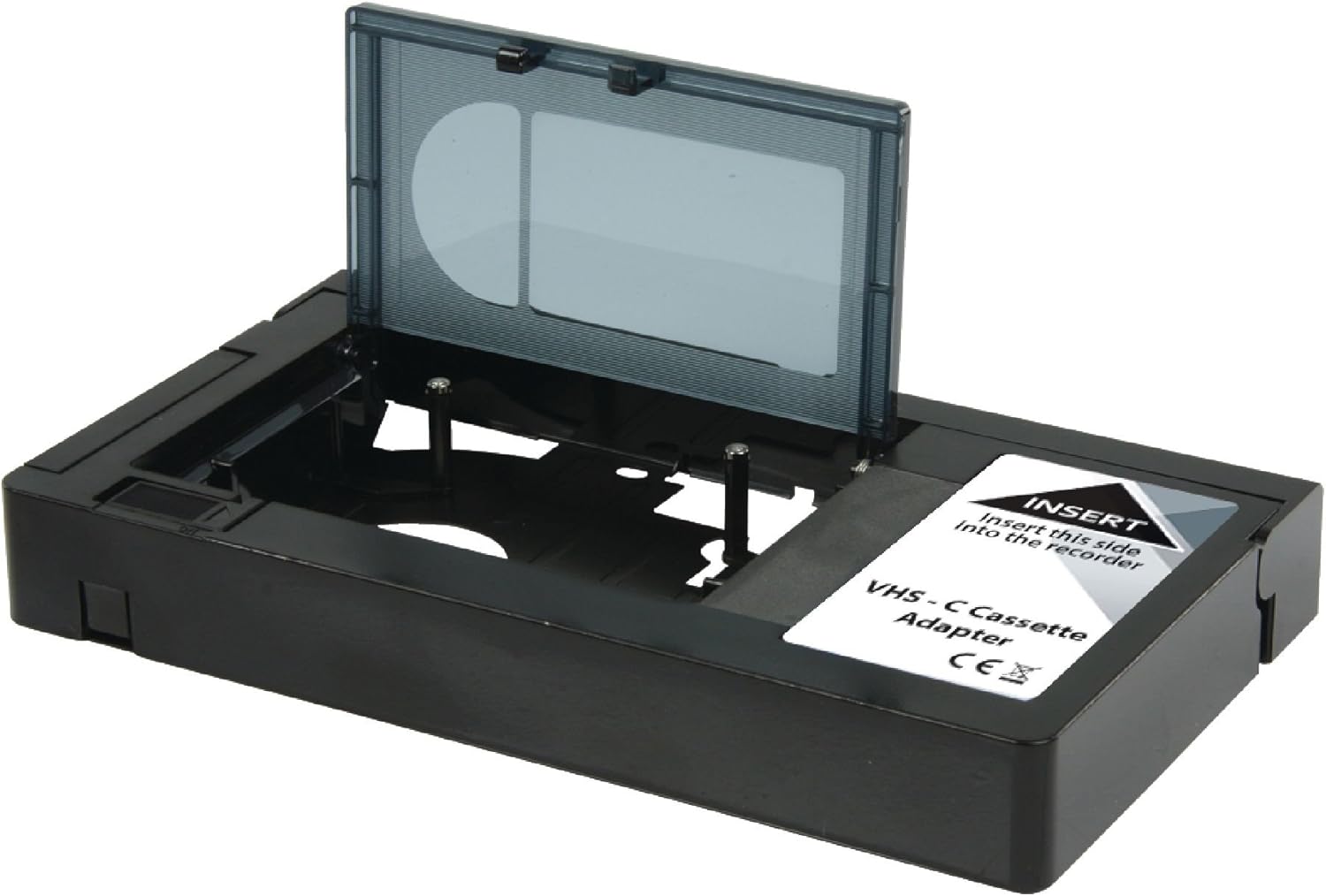
There are several video recording formats, which are divided into analog and digital. To begin with, let’s talk about analog formats, among which the most popular is VHS (more precisely, it was, especially in the 80s-90s). It has a whole family of varieties: VHS-C, S-VHS, Video8, etc. Since 2008 it is no longer used, because it could not withstand the competition, and it is hopelessly out of date.

Video tape (VHS)

But digital video formats are still alive and well:

MiniDV. The recording is done on magnetic tape, 1 hour of video “weighs” 13 GB, the recording speed is ~ 25 Mbit / sec.
HDV. Again, the recording is done on magnetic tape, but the recording quality is much better compared to the previous format – the resolution is 1440 x 1080 with a 16: 9 aspect ratio (interestingly).
AVCHD. High Definition Video Format, whose name stands for Advanced High Definition Video Coding. It is used to record videos in high definition 720p (HD ready), 1080i and 1080p (Full HD) modes on hard drives or memory cards (SD, microSD and Memory Stick PRO). When recording to discs, these are typically 8cm rewritable AVCHD or Blu-Ray discs.
Compression standards and codecs
If you often have to record videos and upload them to the Internet, you should familiarize yourself with the compression standards and codecs that allow you to reduce the file size and as a result, speed up the download of the video to a file hosting or hosting service. videos. So right now there are the following compression standards:

MPEG is one of the main file compression standards. It stands for Moving Pictures Expert Group (the name of the organization that developed it). It has four varieties:
MPEG-1: a file compression format for CDs with mediocre video quality (352×240), currently practically not used;
MPEG-2 is used for digital television and DVD.
MPEG-3 (not to be confused with MP3 audio compression technology): not currently used.
MPEG-4 format can be obtained using codecs like XviD, DivX, etc. Even though it compresses video more strongly than MPEG-2, the image quality is quite decent, especially when using the H.264 codec.
H.264 is a standard that is characterized by a high compression ratio of video data while maintaining decent image quality. Excellent for videos uploaded to the web.
XviD and DivX are highly compressed codecs (based on the MPEG-4 standard).


Free Download Mp4Gain
picture


Mp4Gain Main Window
picture


Mp4Gain Features
picture


Free Download Mp4Gain
picture

Video codecs, video formats – what does this all mean?

Video codecs, video formats – what does this all mean?

Video Codec

If you are puzzled by the endless list of export options in your video editing software, this article is for you. Let’s first look at the definition of a codec.

Video Codecs and Containers

Then we will look at the concept of video format, and then we will look at some of the most common codecs and their uses.

If you are recording or editing video, you will almost immediately come across the term “codec”. Since there are so many and it’s hard to tell them apart, I’ve made a quick overview to help you get started. Once you understand certain terms, you can better decide which one suits your needs. Let’s start with a simple definition.

The video codec is.
A codec is actually a combination of two words: an encoder and a decoder (co / dec). What are they doing? Simply put, because video files are so large, you need a way to make them smaller. The codec encodes, compresses data to store or send it, and then decompresses it for playback or editing.

A codec is a computer code that performs its function each time the software calls a file. Codecs can also be used on physical equipment, such as a camera, to digitize incoming video and audio.

This happens in real time, either at the point of capture or at the point of playback. However, if you are not a broadcast engineer, you will have to rely on your computer or device to select the codec. Hardware compresses your video and audio data for viewing, streaming, or storage.

The video format is.
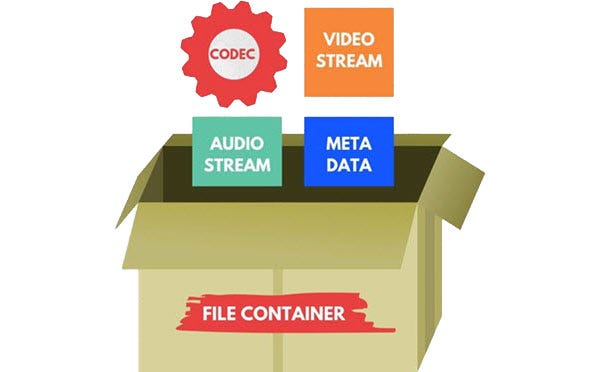
The file format is similar to a container. The container contains data that has been compressed by a specific codec. And sometimes they have the same name.

For example, a file format such as Windows Media Audio contains data compressed with the Windows Media Audio codec. However, a file format such as Audio Video Interleaved (AVI) can contain data compressed with any of several different codecs, including MPEG-2, DivX, or XviD codecs.

AVI files can also contain data that is not compressed by any codec. Therefore, depending on the codecs installed on your system, some AVI files will play fine, while other AVI files, despite having the same file extension, will not play.

It also affects the audio. There is often a situation where when playing a video, the sound plays, but the video does not. This means that the appropriate video codec is installed on your device.

Video formats for mobile devices

Video formats for mobile devices

Video for mobile devices

For a long time, the mobile phone has ceased to be just a means of communication. At the moment, it is most often used as a camera, mp3 player, and video player.

Video Mobile Devices

If most users have no problem with the first and second, it is sometimes impossible to watch the video due to lack of compatibility with the required file format. Today, many pocket players are also equipped with support for video files, which are actually mpeg4 players, although they are often called mp3 out of habit.

The format problem is thought to be solved by special programs that allow you to change the video format, that is, convert it.

There are many programs for converting video files and the user has a fairly free choice. At your discretion, you can choose a program with the widest possible set of settings, or vice versa, some simple program that doesn’t even require installation. There is a choice and it is nice.

Popular video formats for mobile devices
So, here are some examples of the most popular video formats for mobile devices:

3gp (3GP);
AMR-NB or AAC-LC;
AVI;
MOV;
MP4, also known as MPEG-4;
Now it is worth discussing each of the formats in more detail.

3gp (3GP) is a video format developed specifically for third-generation phones, but it turned out to be so successful that it soon became the main format for mobile devices. 3gp saves the video as MPEG-4 or H.263. Audio is saved in formats

AMR-NB or AAC-LC. Video clips finished in 3gp format are small compared to other video formats, but unfortunately this greatly affects the quality (it is very low). If you suddenly see the 3gpp format, don’t be alarmed, this is the same 3gp.

AVI – Audio Video Interleave, literally translated is the interlacing of audio and video. This format was originally used on desktop computers, but with the development of processing power in phones and players, it migrated to mobile devices.

MOV – Better known as QuickTime, Apple Computer’s proprietary technology for playing digital video, sound, text, animation, music, and panoramic images in a variety of formats. This format is most common in Apple brand products such as iPod, iPhone, and others.

MP4, also known as MPEG-4, was conceived as a way to transfer streaming media data, primarily video, over low-bandwidth channels. Unexpectedly, it gained popularity among users, because it allowed to place feature films of an hour and a half to two in good quality on a single CD and exchange video files on the Internet.

What video size is right for your device? – everything is very simple, most devices play videos in full screen mode, which means it is better to create files similar to the screen resolution of your device.

As for me, I prefer the MP4 format. A good volume / quality ratio, reproduced on all devices of the class that I buy, it is easy to find on the Internet without the need for transcoding (I do not want to use a computer to download a movie to my smartphone, because a smartphone is for that and a smartphone to perform various operations and not involve other devices in action).

Disadvantages, advantages and more
Whether it is convenient to watch a video on the road can be debated indefinitely. However, every day more and more people appear on the train, plane and even in the minibus who like to spend time, not reading books or listening to music, but in front of a “blue” mobile screen. Want to join the ranks of mobile moviegoers, but don’t know how to make your communicator, PDA or smartphone “spin the movie”?

Let’s try to describe the benefits that a person who masters the art of pocket video gets. The first is mobility. To see a new blockbuster, for example, in the compartment of a train, it is not necessary to lug around a bulky laptop or, in general, a television. All you have to do is sit on your shelf and put on your headphones.

Since portable devices often have a slightly lower appetite for battery power than laptops, such a mobile “theater” can provide several hours of video viewing. The long road will no longer be boring.

There are also downsides to a mobile theater. For example, it is a relatively small screen that cannot be compared, for example, with the screen of a television or widescreen monitor. However, if you own a VGA device like the HTC Advantage X7500 (formerly known as HTC Athena), you won’t have to complain about the small

The Truth About High Bitrate Lossy Compression

The Truth About High Bitrate Lossy Compression

Lossy compression

In the understanding of most people, the word music lover is most often associated with a person who not only loves and collects music, but also appreciates high-quality music, and not only in artistic and aesthetic terms. but also the quality of the recording. of the phonogram itself. Just think, a few years ago, an audio CD was considered the standard for music quality, whereas a computer, even in dreams, could not compete with the quality of a CD. However, time is a great joker and he often likes to turn things upside down. It would seem that quite a long time passed, one or two years and … that’s it, the CD on the PC went into the background. Don’t ask “why?” You know the answer to this question yourself. Everything is to blame for the revolution in the world of sound on a computer: audio compression (hereinafter referred to as audiolo compression which means lossy compression to reduce the size of the audio file), which made it possible to store music on the hard drive, lots of music! In addition, it was possible to exchange it over the Internet. New sound cards have been released, capable of squeezing almost studio quality out of a piece of hardware that seems useless in terms of music. Nowadays, even having a computer that is not very smart in performance, having bought a Creative SoundBlaster Live! and remembering that since Soviet times there is a good amplifier and good acoustics, you will get nothing but a high-quality music center, the sound of which is inferior only to very expensive audio equipment (average or even the highest hifi category ). Add to this the general availability of music files and you understand that you have the power at your fingertips. And then there is a revolution, and you understand that a compact disc is no longer so convenient, you are fascinated by something completely different: the magic signs of the “MP3”. You cannot eat or sleep; At first glance, the “chicken and egg” question is insoluble: how to “squeeze” and, most importantly, how to “squeeze” …

This is where I will help you. This article is the beginning of my new series of informational materials on music on the computer. For over a year developing OrlSoft MPeg eXtension and maintaining an extensive database of MP3 files, I have accumulated a great deal of research on audio compression. It is these studies that I will try to share with you. Several respected authors have written many articles on audio compression, so I will try not to write what I can easily find in other sources of information. I would like to express my position on the subject under discussion simply and clearly. We will not consider audio compression to be as compact a tool as possible put audio information on your hard drive (so that you can record so many hours of music there). Yes, compression allows you to record music more compactly, but my goal is to minimize quality loss by converting “pure” audio to compressed audio. This is why only high bit rates and qualitatively compressing encoders are considered in these modes. So it is much more convenient to work with compressed audio – instant access to any track from any album, convenient software for playback. And, of course, the financial issue has not been forgotten either.

Of the audio compression formats that exist today, three deserve attention, in my opinion: MP3 (or MPEG-1 Audio Layer III), LQT (as representative of the MPEG-2 AAC / MPEG-4 family) and the completely new OGG format (Ogg Vorbis) developed by a group of enthusiasts:

MP3 is by far the most widely used of these (mainly because it is free). Let me remind you that it was thanks to the MP3 format that the victorious procession of compressed audio took place. However, as is often the case with pioneers, little by little it is losing ground and giving way to new and better formats.
The second format, LQT, is a representative of a new direction of audio coding algorithms, a representative of the AAC family. This is a fairly high quality, but commercial and highly classified format.
OGG became widely known to the public this summer and is currently developing rapidly, soon (with the release of the Encoder and Decoder) it should beat MP3 with better sound quality with smaller file size.
I will not give a detailed description of technologies and formats here, you can easily find them yourself. There will only be facts, conclusions and recommendations. I plan to present my research separately for each format in separate articles.

What is an audio or video data container Part 2

What is an audio or video data container Part 2

digital containers

First the proprietary DivX codec, then its open counterpart Xvid, helped burn a DVD to a CD. The quality was, of course, much worse than that of the DVD.
But an hour and a half of film took up 700 MB and in the 2000s the boom in film piracy was linked precisely to these codecs. If there were movies on the computer, they were movies of this format, with rare exceptions.
And since 2003 modernity begins. The Joint Video Team, under the auspices of the ubiquitous Moving Picture Experts Group, introduced the H.264 codec, which encodes video at the bottom of the post.

Well, almost after all, since then it was finalized, and YouTube generally outperformed my video in VP9 =) For example, in 2007, a plugin for H.264 was released – SVC (Scalable Video Coding), which not only complicated decoding and so on is not an easy codec for computers, it also made it possible to store video at various resolutions in such a format that the highest were dependent on the lowest. Most likely, you have seen pictures on the Internet in a progressive jeep, when they are not loaded from top to bottom, but first in squares, and then everything works out better until they are fully loaded. Here’s a similar story. With the advantage that devices that need to output video in a lower resolution than video, they may not waste resources decoding unnecessary layers.
And the codec consumes a lot of resources. It contains a lot of advanced technologies that I am unfortunately not strong at. However, today, even phones successfully cope with FullHD video in this format, and high-end ones also use 4K.

At the same time, the bit rate of such a 1080p video fluctuates around 2 Mbps, and even less without sound. And the fact of how much it is possible to reduce the amount of data by intelligently increasing the volume and complexity of the calculations still amazes me.

In 2006, Blurey records appeared.

In two years they have supplanted their competitor HD-DVD. They are still alive. The databases were developed by an entire consortium of large companies. Disks come in one layer and two layers, with capacities of 25 and 50 GB, respectively. The video for them is encoded in MPEG-2, MPEG-4, H.264 and the new Microsoft VC-1 codec at the time.
For HD-DVD, the capacities were a bit more modest (15 and 30 GB), but they could also be double-sided. The codec set is the same.

At the same time, the future is slowly approaching. Many would like to meet you in the person of the free VP9 codec, but it is most likely the corporate smile of H.265, which is also called HEVC. What can I say with the coming =)

Seriously, both codecs will find their place. Already today you can find video embeds on sites that are implemented in the open WebM format, which uses VP9 or 8. And since Google is only forcing the use of VP9, ​​YouTube will also support both new codecs.
Both codecs are not revolutionary, but this is another round of video technology. Videos in H.264, VP8, H.265 and VP9 look great. Only the last two are smaller and have a higher usage ceiling. Another question is how much faster or slower will video be encoded in new formats, so that modest content producers like Slaylama are comfortable too. Yes, and these codecs have no special competitors, because today it is important again whether devices can decode video hardware to hardware – your smartphone can handle any open source Theora without any problem, but it will download much faster. So we have good and bad again, Coca-Cola and Pepsi, Android and iPhone, VP9 and H.265.

What is an audio or video data container

What is an audio or video data container

Digital Container

A container is a file format or data stream that encodes data in one way or another.

Codecs and Containers

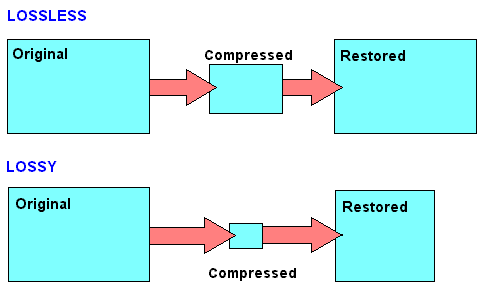
A codec is an encoder and decoder. Something that transforms the data. In the case of media, codecs are designed to compress the data stream and are often lossy.

Within the DV formats, the container can be AVI, Quicktime or the lesser known MXF. The codecs within these containers and formats may be different.

If we are talking about video compression, then there is a general rule of thumb: the more advanced the media we encode, the smaller the data stream or the file size, but more resources will be required for playback with subjectively equal recording quality.

Codec development took place in parallel with the growth of computer performance.

In 1988 the H.261 codec appeared. Few have heard of it, although it was in it that the concepts of keyframes, block vector transforms, and other technologies appeared, which are now used in all popular codecs.
That is, the video is not stored as a sequence of frames, as in a movie. The video is analyzed by the encoder, which finds an abrupt change in the image, for example the beginning of a new scene, and saves that frame, which is called the reference frame. And until the next keyframe, describe only the changes in this frame over time, dividing the image into blocks.

A group of MPEG-1 compression standards has been developed in the 93rd Moving Images Expert Group (MPEG), formed by the International Organization for Standardization (ISO).

With respect to H.261, it was possible to construct changes not only from the previous frame of reference, but also from the next one; and also to encode some section isolated from the rest.

In 1996 MPEG-2 appeared. It is for them that DVDs will be encoded later, you can imagine the scale of distribution. Interlaced scanning is back in the game, so there is nothing radically new.
It is necessary to dwell on the DVD video in detail. These discs appeared in the distant 96, and by 2003 they had become the leading consumer video format.
Movies were recorded at 720 × 576 pixels, which is the same as the D1 format. At the same time, compression made it possible to reduce the bit rate, that is, the data stream, to 9.8 Mbps, which made it possible to write movies on 4.7 GB discs. Coding format: 4: 2: 0, with decreased resolution of the chrominance channels; This trick allows you to reduce the size of the files without significantly affecting the quality of the image, because the luminance channel remains at the original resolution.
The third MPEG does not exist separately, all its chips were absorbed by the second. It also has nothing to do with mp3. They started developing it roughly on par with the second, aiming for higher bit rates, but then they solved all their tasks within the MPEG2 framework.

The video in its beginnings. Part 2

The video in its beginnings. Part 2

VHS

They were replaced by S-VHS and Hi-8. Video quality has improved, signal recording principles have changed, film coverage has improved, tapes are no longer rusted and turned to metal powder.

VHS vs Beta

S-VHS moved away from a composite signal to a two-component signal – the luminance and chrominance channels were written separately. The resolution has been increased to 400 lines. The format began either with pride or with doubts to be called semi-professional, devices for professional publishing and dissemination based on it appeared. The cassette tapes looked like normal VHS and the tape recorders were backward compatible.

Hi-8 is the highest quality consumer analog format. The resolution is 420 lines. The cassette looks like Video-8.

This is where the story of the development of analog formats ends, but the story of video tapes does not end. It’s just that now they write a digital signal on cassettes.

But first, let’s talk about records. Which also stored analog video at the beginning.

The first attempts to record video to disk were made in the late 19th century.
The first patent for such a system, capable of storing just over a minute of video, was filed in 1907.
The eight-inch Ted in the early seventies was stored for five to ten minutes.
At 78, 12-inch (30cm) vinyl VISC kept one hour on each side, but didn’t even allow the video to stop.

The potentially successful CED was planned in ’64 and came out in ’81, immediately outdated and disastrous.

The locally famous 78 30cm Laserdisc stayed up to an hour on the side on 440 lines. Besides the states and Japan, it was not successful anywhere.

The ’83 25cm HDV stood aside for an hour, but was unsuccessful and died three years later.

Digital discs begin with CDs. The first suitable format was Video CD from 1993, which gave VHS quality, but not the cheaper MPEG1 codec, on which a little later, he limited the duration of such a recording to an hour and a quarter. Well, three years later a DVD came out and nobody could compete with it for a long time.

Now let’s get back to the cassettes, which went digital.

Before that, there were digital modules in tape recorders and tape recorders. For example, manipulations with recording a component signal require digital calculations, which means a processor (at least in the recorder system), but the signal was recorded on the analog cassettes themselves.

Now instead of brightness and chromaticity channels, digital data streams were recorded on cassettes, otherwise everything was similar.

And if for the viewer this meant just a pleasant improvement in quality, then for video production professionals the advent of digital recording technologies has made life incredibly simple.

An analog cassette cannot be overclocked especially, but a digital one can be overclocked fifty or even a hundred times, without losing the ability to read the register. This greatly simplifies editing and dramatically reduces the time from footage to ready-to-stream recording.

And finally: a digital signal can be copied and rewritten (almost) as many times as you like, no degradation occurs: a digit is a digit.

First digital format: Sony D1. Where D means Digital and 1 means the first. It appeared in the 86th.

The video in its beginnings.

The video in its beginnings.

VHS

The first industrial cassette format was Sony’s U-matic. The 1971 pros were happy: the cassettes lasted longer than film reels, had 400-line resolution and excellent quality thanks to a nearly two-centimeter (¾ “) wide tape and high scroll speed, and two-inch sound. channels.

vhs

The format was not suitable for home use: the cassettes were huge, with a limit of 90 minutes. The recorders were even bigger. So, despite further improvements, the Sonievskys ¾ did not conquer the world.
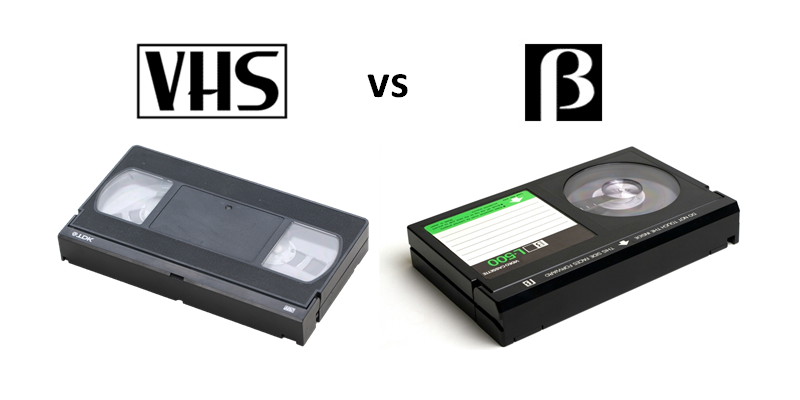
But it was conquered by JVC, having released the 76th Video Home System cassette format. Or simply VHS, which in 1984 had become the main consumer video format.
Cassettes with 12.5 mm (½ inch) tape can store up to six hours of 240-line video, although more often they can store up to three hours. The cassettes were not copy-protected, which was already a good argument against the use of the proprietary Betamax, a competitor format from Sony, the heir to U-matic.

VHS players were cheaper. Furthermore, Sonya miscalculated by banning the sale of pornography on her cassettes.

But even though Betamax lost the war for the user market, its Betacam version was actively used in the professional niche. In television broadcasts, for example. Because VHS was not suitable for professional use: with each re-recording of the cassette, the quality decreased and the distortion increased. This is a consequence of composite recording, which accumulates what is known as crosstalk. A component signal was recorded on Betacam – the video was divided into luminance and chrominance channels, reducing wear and tear during re-recording.

For professionals, it was equally important that Betacam cameras write directly to their cassette, and there was no need to run cables to a separate recorder. And this is extra comfort and mobility.
Betacam was developed in parallel with other formats, but it was always a professional solution.

Rumor has it that Betakam cassette recordings are still being played in some places.

VHS coexisted well with us until the massive arrival of “home theaters” and cheap DVDs, and in the West at that time new formats appeared.

Eight years after the release of VHS, Sony launched a competitor: Video-8.

The format was compact – eight is just the width of the film. The format gave slightly better quality than VHS with a resolution of 250 lines. Not to be confused with ’65 Super 8 – a popular home format that used film. But the G8 didn’t capture the consumer video market, although it did gain some popularity – these convenient little cassettes found their niche, becoming the standard for Handycam camcorders. Your parents probably have a cassette of their wedding somewhere on their table.

Description of the main audio formats

Description of the main audio formats

audio fomats

In the world of music there are a large number of musical formats of its modifications and versions, created by the giants of the music industry and small companies that have received public recognition in the electronic world.

AUDIO FORMATS

Various physical methods have been developed to store audio data for this purpose, such as vinyl records, magnetic tape, CD, DAT, MD (minidisc), DVD, or converting music scores to music (MIDI), in the same way. Many different computing methods have emerged. Audio data storage – digital: OGG, Mp3, Flac, Wav formats.

It is impossible to consider and discuss all audio formats, codecs, their advantages and disadvantages, so in my article I will try to talk about the most popular audio file extensions that you find.

Why can’t we use any universal audio file encoding format? Because for the implementation of various functions, a different format is required. For example: to play CDs in a CD drive, to record music or sound effects in video games, to record a movie track or video clip, to play on mobile phones or transfer files via the Internet, in addition, there are a number of The world’s most widely used operating systems … These include: Amiga, Macintosh, NEXT, and Windows personal computers.

Also, the job of a dj, sound engineer, cj, video engineer, or a simple music lover is quite different in nature. This may require your audio data to be saved in his way. For example, the audio on a CD must be saved using 16 bits and a sample rate of 44.1 kHz. However, to download sound over the internet, we’d better use a different bit depth and sample rate, as each minute of 16-bit, 44-kilohertz audio takes up about 10MB, that is, an average track of 5 minutes will be 50 meters, which is too much information for the average user. This article provides an overview of the most popular music formats.

AA (Audible Audio Book File) is a proprietary format developed by Audible. It is used to record audiobooks that are sold through the Audible and iTunes services. It is possible to reduce or accelerate the speed of listening to files: digital tone, the ability to leave bookmarks when listening to audiobooks, file protection, when delivering sound recordings over the Internet.

AAC (Advanced Audio Coding) is an audio file format with less loss of quality when encoding than MP3 in the same sizes. Lossless music encoding of original quality using the ALAC profile. AAC is a family of MPEG4 audio coding algorithms. Unlike the hybrid mp3 filter bank, AAC uses MDST (Modified Cosine Transform) technology, which means that the listener gets better sound quality than MP3 encoding with the same or lower bit rate. Possible AAC file extensions: [.m4a], [.m4b], [.m4p].

Additionally, AAC is a wideband audio coding algorithm that uses two basic coding principles to greatly reduce the amount of data required to transmit high-quality digital audio. This format is one of the highest quality, uses lossy compression, compatible with most modern equipment, including notebooks.

As of 2009, it is much less widespread than MP3 and other workarounds. AAC (Advanced Audio Coding) was originally created as a successor to MP3 with improved encoding quality. The AAC format, officially known as ISO / IEC 13818-7, was released in 1997 as the new seventh part of the MPEG-2 family. There is also the AAC format known as MPEG-4 Part 3.

Benefits of AAC over MP3:

– up to 48 audio channels;

– high coding efficiency with constant and variable bit rate;

– sampling frequencies from 8 Hz to 96 kHz (MP3: 8 Hz – 48 kHz);

– More flexible set stereo mode.

ADX is a proprietary ADICM-based lossy compression and storage format developed by CRI Middleware specifically for use in video games. The most characteristic feature is the ability to loop the sound recording, which makes the use of the format convenient to use as background music in various games that support this media container. It is compatible with many SEGA Dreamcast games, some PlayStation 2 and GameCube games.

Unlike MP3, it does not use the psychoacoustic model of reducing the volume of sound data (reducing its complexity). Instead, the ADPCM model uses a prediction function relative error data log to store the samples, which means greater conservation of the signal.

The evolution of headphones

The evolution of headphones

Headphones

Headphones have become one of the most popular gadgets that accompany a modern person at home, at work, while playing sports or walking.

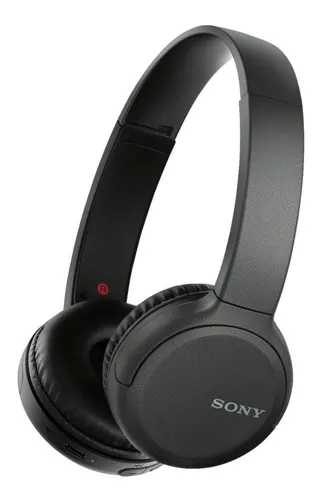
Sony Walkman headphones

Today we can see these devices everywhere: in subway cars, on passersby, in professional studios, on radio and television. The market offers thousands of models in a wide variety of modifications: wired and wireless, open and closed, dynamic and electrostatic. By design, the headphones are plug-in, on-ear, on-ear, and full-size. How did the evolution of headphones come about, in what year was the first prototype designed, who created the first model for listening to music, and what technologies are used in modern devices? You will find the answers to these questions in our article.

Early samples
The device for individual listening to sound was first patented in 1891. The device, then called a “bi-telephone”, looked like two interconnected receivers. Ezra Gilliland, an employee of Bella, proposed to fix a 3 kilogram structure on the head in the form of parts of a telephone and a metal rod (to facilitate the work of telephone operators). It was this decision that became the prototype for modern headphones. In the same 1891, the Frenchman Ernest Mercadier proposed his version of the headphones, which were much smaller and had rubber earplugs used for noise cancellation. Thomas Edison also did not stay away from the new trend: his version of the device was called the “kinetophone.” At the heart of this device was a medical stethoscope,

The beginning of mass use
Nathaniel Baldwin presented in 1910 the drawings of the first headphones with an upper arch instead of underneath. The device, which was intended to be used in the military, was twice as sensitive as existing analogs at the time and could be adjusted in height. In the 1920s, the CW-834 headphones were popular in the United States and were sold with a Western Electric radio. In the 30s, the device was actively used to listen to radio broadcasts. At the same time, by adapting well to speech, the device transmitted music in a very distorted form. Also, the design of headphones from those years remained poor, being too massive and uncomfortable for long-term use.

The appearance of models to listen to music
The first headphones suitable for listening to high-quality music were introduced to the market by the Swedish inventor Eugen Bayer. While still very young, he started a company that produced microphones, and in 1937 he proposed a largely revolutionary model of the Beyerdynamic DT 48 headphones. The product gained great popularity only in the mid-1950s: music lovers turned their attention to the device when its stereo version appeared … It is interesting that you can buy DT 48 in the original design and with the original technical characteristics even today.

John Koss Headphones
John Koss, who started his business with the rental of televisions, in the 60s of the last century, together with his partner Martin Lange, began to develop a portable vinyl player. In the context of the mass interest in music production, this project looked quite promising at the time. In order for the product to be radically different from the models offered by the competition, it was decided to equip it with headphones. It was possible to improve the sound of these devices with the help of spare parts for old televisions. The opportunity to hear the sound individually was received with optimism in the market. Headphones were no longer seen as an element of a communication system, but as a musical attribute. The first production model of the Koss & Lange company, the Koss SP-3, operated on the same principle as modern channel devices. The sound was sent to the ear canal, and not to the pinna. Thanks to this, a “presence effect” was created for the listener.

First open headphones
In 1968, Sennheiser came up with another revolutionary idea. A wide range of users were introduced to the world’s first model of Sennheiser HD 414 open-top headphones. Such a device allowed them to follow what was happening while listening to music. At the same time, the discs being played were partially audible to others. The technology, patented by the company, continues to generate revenue in the form of payments from manufacturers that produce open headphones. Subsequently, the Sennheiser brand has repeatedly offered innovative solutions in this area. So in 1977, the company released the world’s first Unipolar 2000 electret hearing aids, distinguished by their fast response and high detail