MP3 bitrate types


Free Download Mp4Gain
picture

MP3 bitrate types

Mp3 Bitrate

Bit rate

bitrate

CBR stands for constant bit rate, that is, a constant bit rate that is set by the user and does not change when the part is encoded. Therefore, every second of the part corresponds to the same number of bits of encoded data (even when encoding silence).

VBR stands for variable bit rate, that is, a variable bit rate or variable bit rate that the encoder program dynamically changes during encoding based on the saturation of the audio material being encoded and the encoding quality set by the user (for example, silence is encoded with the minimum bit rate). The downside to this encoding method is that VBR considers the quietest snippets to be “negligible” audio information, so it turns out that if you listen too loud, these snippets will be of poor quality, while CBR makes quiet and loud snippets with the same bit rate …

ABR stands for Average Bit Rate, that is, Average Bit Rate, which is a hybrid of VBR and CBR: the user sets the bit rate in kbit / s and the program varies it, constantly adjusting it to the specified bit. Velocity. Therefore, the codec will be careful to use the maximum and minimum possible bitrate values, as it runs the risk of not conforming to the bitrate specified by the user. This is a clear disadvantage of this method, as it affects the quality of the output file, which will be slightly better than using CBR, but worse than using VBR (with the same file size).

MP3 codecs

The type of programs required to convert file formats. The most common MP3 codecs are:

mp3PRO-codec (uses SBR frequency transform).
LAME codec
fraunhofer-codec


Free Download Mp4Gain
picture


Mp4Gain Main Window
picture


Mp4Gain Features
picture


Free Download Mp4Gain
picture

The concepts of pixel, video pixel, point.

The concepts of pixel, video pixel, point.

Pixel

In computer graphics, the term “pixel”, broadly speaking, can mean different concepts: the smallest element of the image on a computer screen; a separate bitmap element; dot of the image printed on the printer.

pixel

Therefore, to avoid confusion, use the following terminology: in ideopixel: the smallest element of the image on the screen; pixel – a separate element of the raster image; dot is the smallest item produced by the printer.

The display screen is divided into a fixed number of video pixels, which form a graphical grid (raster) of a fixed number of rows and columns. The size of the graphics grid is generally expressed in the form NxM, where N is the horizontal number of video pixels and M is the vertical number. On modern displays, graphical grids are used: 640 x 480, 800 x 600, 1024 x 768, 1240 x 1024, etc. The image on the display screen is created by selectively illuminating certain video pixels on the screen with an electron beam. For an image to be perceived by the eye, it must be made up of hundreds or thousands of video pixels, each of which must be illuminated. ”

Raster graphics are photo quality images. If the pixel sizes are small enough (close to the size of video pixels), then the raster image looks no worse than a photograph. Raster graphics effectively represent photo-quality images.

A large amount of memory is required to store bitmaps.

The bitmap file stores the color information for each video pixel as a combination of bits. Simple bitmap images take up a small amount of memory (several tens or hundreds of kilobytes). Photo-quality images typically require several megabytes. Therefore, a large amount of memory is required to store bitmaps.

Bitmap becomes distorted when scaling.

The bitmap may lose its appeal after scaling or rotating it. For example, areas of solid color can take on an odd pattern (“moire”); curves and straight lines that seemed smooth can suddenly become sawtooth. If you reduce and then enlarge the bitmap to its previous size, it will become blurry and uneven, and the filled areas may be distorted. Bitmaps have very limited options for scaling, rotating, and other transformations

Tasks for which raster programs are used.

Raster graphics allow you to create photo-quality images. After all, what are raster graphics? It is an image that consists of pixels, small squares, each of which is assigned a specific color. On any screen, the information is displayed exactly in raster form.

What do the concepts of pixel, video pixel, point mean?

In computer graphics, the term “pixel”, in general terms, can mean different concepts:

· The smallest element of the image on the computer screen;

· A separate element of the bitmap image;

· Dot of the image printed on the printer.

Therefore, to avoid confusion, we will use the following terminology:

· Video pixel: the smallest picture element on the screen;

· Pixel: a separate element from the raster image;

· Dot: the smallest element produced by the printer.

In this case, for the one-pixel image on the computer screen, one or more video pixels can be used.

WHAT ARE VIDEO RESOLUTIONS? Part 2

WHAT ARE VIDEO RESOLUTIONS? Part 2

Video Resolution

Choosing HD CCTV Camera

Video Quality

Besides image resolution, what else should you consider when choosing HD network cameras? Here we will share information on how to choose the right HD cameras from the installer’s point of view.

Poor light
As you know, a CCTV camera works differently from a home camera – a CCTV camera cannot use a flash when capturing an image / video. If the camera performs poorly in low light, its use is limited. When working in low light conditions, said camera “ fades ”, despite its very high resolution.

High resolution is a double-edged sword: the sensor manufacturer does not have the ability to infinitely increase the area of ​​the matrix, therefore the increase in resolution is associated with a decrease in the size of the pixel itself with the Same size of the sensor array (usually 1/3 ”), so there is less light for each pixel, leading to decreased sensitivity with increasing resolution (megapixels).

Currently, the optimal value for most areas of video surveillance is the resolution of 2MP (1080p / FullHD), it is for this resolution that most of the sensors of the Low Illumination series exist.

Time delay
All network (IP) CCTV cameras have some latency compared to real time, and the cost or quality of the camera is not a determining factor in this latency. For example, for the same 720p image, the video delay time for some cameras is 0.1 s, and for some other network cameras this time can be 0.4 s, or even more than 0.7 s. Why is the video delay time different? Unlike an analog camera, a network camera compresses video (a process called encoding) and user devices decode the video for display, resulting in video lag. Generally, the lower the latency, the better the image processor’s capabilities. This means choosing the network camera with the lowest video latency.

Heat dissipation
When the CCTV camera is in operation, it generates heat, especially when the infrared light is turned on at night. This rule is valid for any CCTV camera. Excessive heat generation increases the likelihood of overheating and consequently damage to the camera. When choosing megapixel cameras, pay attention to:

Choose a camera with lower power consumption. Low power consumption means that the camera saves energy and generates less heat. The downside: in winter, a camera with low heat emission can freeze (it is usually about the infrared filter), and also low consumption means that weak infrared illumination is installed, this must also be taken into account.

Consider using a camera with improved performance in low light conditions (no infrared or other artificial lighting). Such a camera in low light conditions can capture images even in the dark (> 0.009 – 0.001 lux).

Choose a camera with good heat dissipation. A metal box is preferable to a plastic one. To ensure reliable performance, the Elite series network cameras use a finned heat sink in the housing to maximize heat dissipation, greatly helping the camera to ensure reliable performance.

Price
“High price = high quality” – In most cases, this rule is true. Based on research reports, it can be said that the consumer often believes that a higher price of a product indicates a higher level of quality. But price is not the only indicator of good quality, especially when buying Made in China products. I have been in the video surveillance industry for more than five years and I can affirm that end users, integrators and installers can get high quality products from Chinese suppliers / manufacturers at a very competitive price. High-end cameras can have unique body designs, offering special features not found in other products.

Technical support
In conclusion, I would like to say that network cameras should also have good technical support. Although IP cameras are becoming easier to set up and operate, end users may encounter technical problems that require third party assistance. Faced with such problem, you will receive our technical support within 1-2 days, this is quite acceptable. This is why I personally do not recommend buying CCTV cameras on Aliexpress, as in the future you are unlikely to receive technical support from online sellers.

WHAT ARE VIDEO RESOLUTIONS?

WHAT ARE VIDEO RESOLUTIONS?

video resolution

1. What is a high definition CCTV camera?

Video Resolution

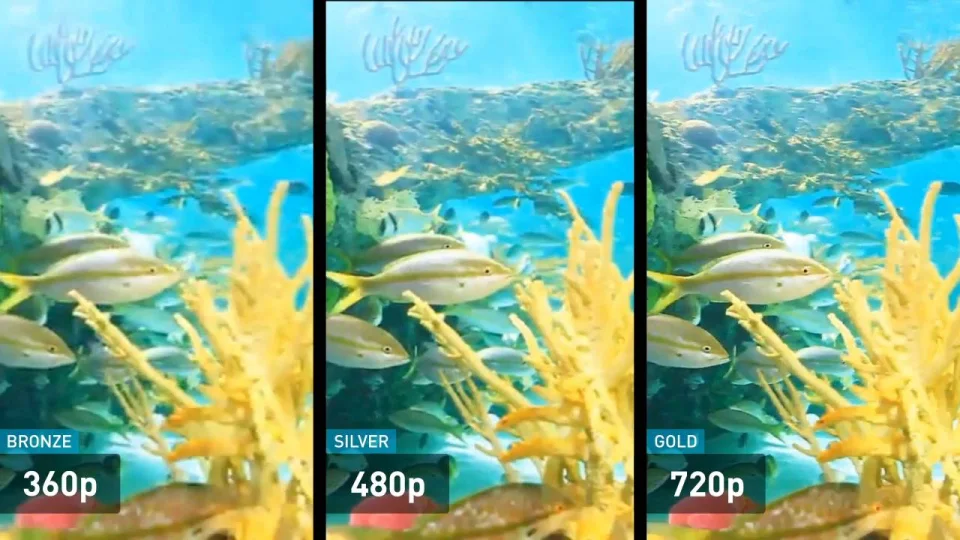
All image formats with a resolution of 1280×720 are considered high definition (HD) format. In the modern world of video surveillance, there are two areas: analog and digital. Consequently, there are analog and network (IP) HD cameras. 960H (NTSC: 960×480) resolution is not HD. Current HD resolution formats include: 1.0 megapixels (720p), 1.3 megapixels (960p), 2 megapixels (1080p), 3 megapixels, 5 megapixels, 8 megapixels (4K UHD), 12 megapixels, 33 megapixels (8K UHD) .. .
Typically, HD network cameras provide slightly better image quality than analog HD cameras of the same resolution (eg 720p).
Recently one of our customers reported that they installed a video surveillance system on 720p AHD cameras (the manufacturer said 1000TVL) and was not satisfied – the image quality of these 720p AHD cameras was even worse than that of the old 960H cameras. Why this happened, we will tell in the fourth part of the article.

2. Advantages of high definition
Compared to standard definition, HD technology has increased image detail. Image quality is further enhanced by various enhancement technologies such as progressive scan, 2D / 3D dynamic noise reduction, wide dynamic range (WDR), etc. In short, HD offers excellent image quality. A typical 960H analog camera offers a resolution of 960H / WD1, which is 960×480 pixels (for NTSC) or 960×576 pixels (for PAL). Once the signal is digitized in the DVR or HVR, the image will be a maximum of 552960 pixels (0.5 megapixels).
A high definition camera can cover a much larger area than a conventional camera. Take, for example, a 12MP fisheye lens panoramic camera with a 360-degree field of view. With an integrated 12 megapixel image sensor and ePTZ (virtual pan / tilt / zoom) and split image capabilities, it can replace multiple conventional CCTV cameras, significantly reducing installation costs and subsequent maintenance fees.
Excellent compatibility is another advantage of HD. Whether you shop online or go to your local electronics store, you will notice that all televisions, camcorders, and digital cameras support HD 1080p (FullHD). Consequently, if you want this equipment to work with your CCTV system, you should choose a CCTV system that supports 1080p. We also understand that 4K is the current trend, it is logical to expect 4K UHD video surveillance system to become popular in the future.

5MP resolution

3. Various HD resolution formats
High definition IP cameras are at the forefront of video surveillance systems. They can provide higher quality video with greater image detail and wider coverage than standard definition cameras. You can select the desired format of network (IP) cameras according to your requirements. For example, for license plate or facial recognition applications, choose megapixel network cameras with a resolution of 1080p or higher. For the resolution of a particular HD format, see the following table:

Format Resolution (pixels) Aspect Ratio Scan
1MP / 720P 1280 x 720 16: 9 Progressive
SXGA / 960P 1280 x 960 4: 3 Progressive
1.3 MP 1280×1024 5: 4 Progressive
2MP / 1080P 1920 x 1080 16: 9 Progressive
2.3 megapixels 1920×1200 16:10 Progressive
3MP 2048×1536 4: 3 Progressive
4MP 2592×1520 16: 9 Progressive
5MP 2560×1960 4: 3 Progressive
6MP 3072×2048 3: 2 Progressive
4K Ultra HD 3840×2160 16: 9 Progressive
8K Ultra HD 7680×4320 16: 9 Progressive

Video quality evaluation. Subjective evaluation of video quality Part 2

Video quality evaluation. Subjective evaluation of video quality Part 2

Video Quality

Although subjective testing was carried out many times by various organizations, until recently there were no stable testing programs designed to work with personal computers in the public domain.

video quality

This was the reason for the development of MSU’s perceptual video quality tool, which implements various methods for subjective comparison and analysis of results.

The subjective test method is a combination of methods to demonstrate sequences, gather expert opinions, and process the results.
Let us consider, using an example of video codec comparison, the test procedure by the SAMVIQ method, recently developed at the EBU (European Broadcasting Union), the implementation of the MSU Perceptual Video Quality tool. This method was used in the subjective comparison of modern video codecs.

SAMVIQ method diagram
Test stages:

1. Expert enters her name (any unique sequence of characters).

2. Color perception test (standard Ishihara charts are used).

3. For each test sequence:

The reference video (original) is shown.
Whenever there are unseen compressed versions of this video, the expert selects the next version of the video, watches it, and rates it. The movie rating belongs to the 0-100 segment, the higher the better. The evaluation of the sequence variants already reviewed can be changed at any time, it is also possible to review any of the variants.
If all variants of the video have been viewed, the expert can proceed to the next test sequence.
Different variants of the compressed sequence are hidden behind the letter designations, so the expert does not know which codec he is evaluating at the moment. The reference video is explicitly available, it is also hidden under one of the letter designations and is rated on a par with the compressed video streams.

Why are such complications necessary? There are several problems that subjective testing techniques should solve. The first of these is to create a common rating scale for all experts, that is, so that the “good” rating means roughly the same for different experts. This is achieved through a technique called “anchoring”: during the test, both the video with the highest quality (“high anchor”, must be associated by all the experts with the maximum score), and with the lowest (“low anchor “, should be associated with a minimum score).

Another task is to minimize the memory effect, the influence of the sequence in which the video is shown on the expert evaluations. In some test methods, this problem is solved by displaying the reference video (original) together with each processed video sequence. In the SAMVIQ method, which we used in the comparison, the first problem is solved using a hidden and explicitly available reference video, and the second, using a more flexible evaluation procedure than in other methods (an expert can review the video and change your evaluations).

With any test method, subjective test results can be influenced by many external factors. It is essential that all testers are instructed on how to pass the test, that there is adequate lighting in the room, and that the tests should not tire the experts. Anything from the gender of the experts to their professions to the timing of testing can make a difference in results. Interestingly, compared to all other factors, monitor characteristics (resolution, LCD / CRT, etc.) do not significantly affect results (see M. Pinson, S. Wolf, “The impact of monitor type and resolution in the subjective video Quality tests “NTIA TM-04-412). Processing of results

The main results are obtained after a simple average of the evaluations by experts. The resulting score is called the MOS (Mean Opinion Score). In addition, to evaluate the dissemination of opinions, a confidence interval is usually given (the interval in which the real mean opinion is located with a certain probability). There are techniques to exclude experts that give results that are unstable and very different from the average.

At the end of 2005, our laboratory carried out subjective tests of video codecs. The test tasks were the subjective comparison of new versions of popular codecs, the comparison of results with objective metric data, and the development of subjective test technology. This article contains only a part of the results obtained.

Video quality evaluation. Subjective evaluation of video quality

Video quality evaluation. Subjective evaluation of video quality

Video Quality

What is quality?

video quality

Dahl’s dictionary contains the following definition: “quality is a property or belonging, everything that constitutes the essence of a person or thing”. What if we need to evaluate the visual quality, for example, of a video compressed with a codec? You can understand the quality of a video as an average rating of the opinions of the people who watch that video. It is this indicator that the creators of video processing systems ultimately want to improve, so I would like to be able to estimate it numerically. There are two approaches to solving this problem: subjective and objective evaluation of video quality. In the first part of this article, we will talk about these approaches, and in the second, we will present the results of our subjective comparison of modern video codecs.

Objective test
You can evaluate video quality using a formula or algorithm such as PSNR, VQM, or SSIM (see Comparing Video Codecs to PSNR Metrics). The main advantage of this approach is the ability to automate the testing process, allowing you to measure the rendering quality of a video system with a large number of different settings and test videos, or measure the quality in real time. The measurements also provide accurate and reproducible data. The downside to this approach is that automated metrics can misrepresent the subjectively perceived quality. This can lead, for example, to an erroneous conclusion about the superiority of one codec over another.

An alternative way to get an estimate of the video quality is to perform subjective tests. The idea behind this method is to get the quality score directly from the viewers who are evaluating the video. A similar approach has long been used to evaluate sound quality. For example, the hydrogenaudio.org forum regularly hosts subjective tests of audio codecs. What is needed to perform subjective tests?

Select video footage to test. Typically, a video of about 8-10 seconds is used to prevent experts from dispersing attention and shortening the overall time of the experiment.
Select the settings for the video processing systems you want to compare.
Choose a test method.
Invite a sufficient number of experts (at least 15 recommended).
Based on your opinion, get final grades.
In 1974 the first version of ITU-R BT.500 “Methodology for the subjective assessment of the quality of television pictures” was published. These guidelines provide a complete description of how all of the above issues should be addressed. Since then, many subjective tests have been carried out, the most recent of which is the Subjective Quality Assessment of the Emerging AVC / H.264 Coding Standard, Subjective Quality of Internet Video Codecs. Volumetric subjective tests are performed by VQEG (Video Quality Experts Group).

What is the video and audio bit rate?

What is the video and audio bit rate?

Bit Rate

Do you like video production or do you value high quality in movies? You’ve probably come across something like bitrate. It always accompanies the technical characteristics of video recordings and its value determines the quality of the image in the file. When working with converters, you will come across this feature more than once, so it is advisable to fully understand what it is responsible for and how it affects the final product: a video or an audio file.

bitrate

To find out what bit rate is, it is worth understanding how video information transmission works. Any video is a rotating sequence of images. In order not to have a “slideshow feel”, the image change speed must be at least 24 frames / sec. Each box has parameters: width and height. The higher they are, the more pixels are placed in an image, the higher the quality.

Each “point” that makes up a frame has a weight and is equal to 1 byte. Let’s take a Full HD picture and calculate its weight – about two megabytes will be released (1920 x 1080 = 2073 600). So one second of video, containing 24 frames, would weigh 48MB. This is where the concept of bitrate comes in: it is the power to compress a video.

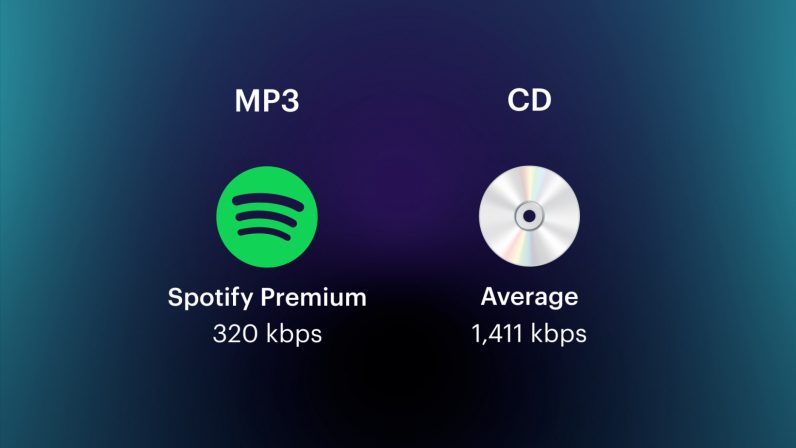
Those. the required file, being encoded, loses weight. But due to strong compression, it may also lose quality. Of course, in reality, not everything is so simple; Much depends on the codec used for encoding. This is the name of the direct compression method. So videos in different formats, but with the same bitrate, can produce images of different quality. The concept of “audio bit rate”, denoting the strength of compression, is also applicable, but for an audio stream.

Bit rate types
Delving into the topic, it is worth noting that the bitrate is not always the same. And now we are not talking about a quantitative indicator, but about a division into types. To work competently with media conversion, read about three types of bitrate: constant, variable, and average, which is a hybrid of the first two.

Constant Bit Rate (CBR)
As the name implies, this type of bit rate does not change during file playback. This compression method allows you to fairly accurately determine the size of the output file and ensure consistent quality throughout your listening or viewing session. But in the entertainment industry, constant bitrate is rarely used due to the impossibility of adjusting it. for dynamic playback, because the files get bigger than they could be.

Variable Bit Rate (VBR)
This type of bit rate is flexible and resistant to change, as a result of which it can be adjusted to the playback object and produce an optimal size / quality indicator. For example, for pictures or musical pieces with a reduced information density, the bit rate will decrease, thus reducing the weight of the object.

Average bit rate
This view is a compromise between the previous ones. The problem with variable bitrate is that changes are automated, and sometimes overcompression can occur. Average bitrate allows the user to set the range in which compression variation will occur. True, the technique of its use is not so simple and is mainly used in professional studios when working on serious projects. An additional advantage of the average bitrate is that it allows you to more accurately calculate the file weight even when the compression force changes.