Audio Format: Comparison and Implementation of MP3 and WAV Part 2


Free Download Mp4Gain
picture

Audio Format: Comparison and Implementation of MP3 and WAV Part 2
MP3 vs WAV

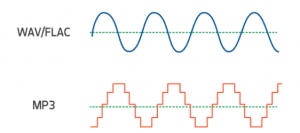
Sound is a mechanical wave, produced by the vibration of an object, and requires a medium to propagate. So, in essence, a sound is a waveform on an axis over time.

MP3 VS WAV

Sound has three elements: pitch, volume, and timbre:

Pitch is determined by the frequency of the sound wave, the higher the frequency, the higher the pitch.
The volume is determined by the amplitude of the sound wave, the larger the amplitude, the louder the sound.
The timbre is determined by the “shape” of the waveform (sounds like square, triangle, and sawtooth are called impulse waves and sound individual).
An audio file is a file obtained by converting an analog signal to a digital signal. In general, there are five important parameters: encoding method, number of channels, sampling rate, bit depth, and bit rate.

Encoding: how this format organizes binary data and how it is compressed.
Number of channels: mono, dual or 5.1 channels, etc.
Sampling rate: The number of samples per second.
Bit Depth: The number of binary bits used to store the y value of the sample point.
Bitrate – The desired number of bits per second for the file.
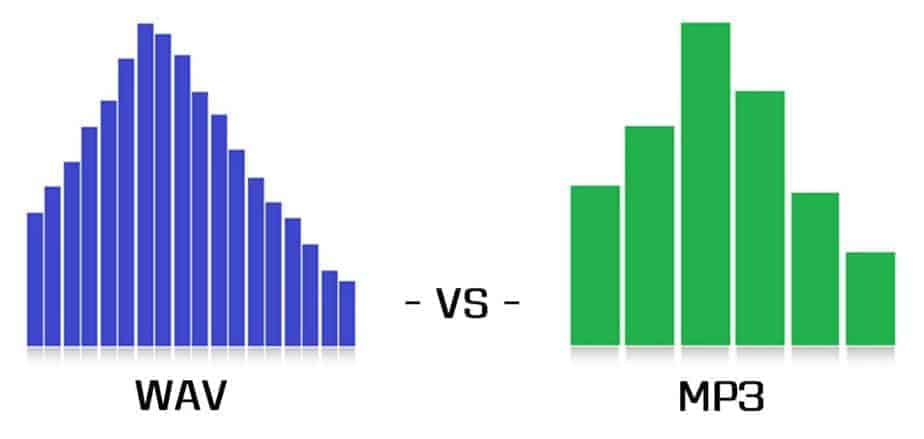
We know that there is no compression in the WAV format, so its encoding method is to directly write all the sampled points to the file in order.

WAV file size (B) = number of channels * sample rate (Hz) * bit depth (bit) / 8 + file header size (B, it’s 44B)

Implementation

When you open an mp3 or wav file with a text editor, you see numbers like this:
4944 3303 0000 0000 3D48 5459 4552 0000
0006 0000 0032 3031 3800 5444 4154 0000
0006 0000 0000 0000 0000 5449 0000 0000 0000 0000 0000 0000 58330 366
5052 4956 0000
368 50 0000 584d 5000 3c3f 7870 6163 6B65
7420 6266 6769 6E3D 22EP BBBF 2220 6964 3D22 5735 6964
3D22 5735 4D30 4D70 4365 6869 487A 7265
537A 4E54 637A 6B63 3964 223F 3E0A 3C78
3A78 6D70 6D65 7461 2078 6D6C 6E73 3A78
3D22 6164 2F6 62 1654
5249 4646 2E3D 0e05 5741 5645 666d 7420
1200 0000 0300 0200 44ac 0000 2062 0500
0800 2000 0000 6461 7461 A026 0e05 8089
00bc 00E8 f0bb c09e 8dbc 00C2 87bc 80F1
d3bc 8063 CCBC C030 FCBC 8012 f4bc 20BB
13bd E051 0fbd c0b0 2dbd 6079 28bd 4012
46bd 6032 40bd c0e3 5dbd 6040 57bd c015
7cbd e035 74bd b058 8dbd 50e2 88bd f0a7 9dbd e0dd 98bd 70d3 acbd e0a9 a7bd
d043 b8bd b0da b2bd
00e3 c4bd 605c bfbd

This one above is the mp3/wav format of the same song. What is the difference between them?


Free Download Mp4Gain
picture


Mp4Gain Main Window
picture


Mp4Gain Features
picture


Free Download Mp4Gain
picture

Audio format: comparison and implementation of MP3 and WAV

Audio format: comparison and implementation of MP3 and WAV

WAV vs MP3

An mp3 is 320kbps, 44100hz, what does this mean?

mp3 vs wav

44100Hz represents the sample rate of the signal. The so-called sampling consists of obtaining the value y of the sound wave at the current moment every unit of time. Sampling is the process of discretizing continuous data (converting an analog signal to a digital signal).
image source

The sampling method mentioned above is called PCM (Pulse Code Modulation). According to the Nyquist-Shannon sampling law, the sampling rate must be at least twice the highest target frequency. The hearing range of the human ear is about 20Hz-20,000Hz (if you’re curious how loud you can hear, you can click here to test your ears), although recording software often has a 48,000 option Hz, but we can safely conclude: 44100Hz can meet almost all our needs, higher is just a waste of your memory and CPU. More than 48,000 samples are meaningless to the human ear, which is similar to 24 frames per second on a movie. 44100Hz happens to be the standard sample rate for almost all music released. In fact, for vocals and many instruments, high-frequency sounds are noise, so high sample rates can sometimes worsen sound quality (which is why we need to adjust the equalizer).

320 kbps represents your bitrate/bitrate, which is shorthand for kilobits per second, which represents the size of the data used to describe sound. In CD (uncompressed audio file), the bit rate is 1411.2kbps, and the mp3 sound quality to achieve CD quality should be higher than 128kbps/44100Hz (128kbps can be said to be the most common bit rate). Generally, a higher number means better quality. The quality depends on many factors (such as the encoding algorithm). Many times we don’t need too high bitrate: our device can play mp3 and CD without difference (sound/sound card is normal).

A wav is 44100 Hz 16-bit stereo or 22050 Hz 8-bit mono, what does this mean? stereo/mono refers to dual/mono. For monophonic sound files, the sample data is an eight-bit short integer (short int 00H-FFH); for two-channel stereo sound files, each sample data is a 16-bit integer (int) and the upper eight bits (left channel) and lower eight bits (right channel) represent the two channels, respectively.

Mp3 format and the differences between VBR and CBR, WHICH IS BETTER?

Mp3 format and the differences between VBR and CBR, WHICH IS BETTER?

CBR & VBR

There is another disadvantage of VBR technology. When playing an audio file, there will inevitably be an operation to jump to the position of the specified time to play (ie, the so-called seek operation).

CBR vs VBR

At this time, it is necessary to convert the time position of the target to the position of the file. Then jump to this file position offset to read and decode. If it is a download and play network playback mode, you must first calculate the position of the file during the search operation. Jump to this position and download a paragraph before continuing to play. . For CBR encoding, the conversion to file position offset is also very simple, using the following formula:

file position (byte) = target time position ( s ) * bit rate (kbps) * 1000/8 + id3v2 field size (if any)
But for VBR encoding, it is obviously impossible to use this formula to convert file position. The reason is also very simple: the bit rate of each frame is not fixed and the length of data per second is not average. Therefore, just like calculating duration, other data fields are needed.

The method to calculate the duration of the audio and implement the seek operation using VBR encoding
To solve the above two problems, VBR encoding adds some data fields. At present, there are mainly two types of VBR encoding technologies, one is the Xing specification proposed by the Xing Company, and the other is the VBRI specification of the Fraunhofer encoder. This article only presents how the Xing specification solves the audio duration computation and the implementation of the seek operation.

The main content of the Xing specification is the Xing header, which means that the first audio frame at the beginning of the VBR-encoded mp3 is not used to store specific audio data, but to store additional audio information. This information is marked with the four characters of “Xing” as the beginning of the field (some files also use the four characters of “Info” as the beginning of the Xing header).

The position of the Xing header in the first audio frame is after the standard 4-byte mp3 audio frame header Between the frame header and the Xing header, there will be a blank part where the data content is all 0. This blank The length of the section is specified. After the decoder parses the frame header of the first audio frame, it skips the blank part of the specified length, and then judges whether the next content is the four characters of ‘Xing’ or ‘Info’ to judge the audio If the VBR encoding.

Mp3, differences between CBR and VBR

Mp3, differences between CBR and VBR

CBR vs VBR

Differences in data content between CBR and VBR mp3 files. It can be seen that the bit rate of the VBR encoded mp3 is not necessarily the same due to the difference in data content between frames. Generally, VBR technology will compress and encode in the range of 8~320kbps, so the bit rate of the whole file is higher than that of the whole file. Constant CBR encoding, VBR encoding has a bit rate variable bit rate throughout the file, hence the name VBR (variable bit rate).

CBR & VBR

In addition to the two encodings CBR and VBR, there is also an ABR (Average Bit Rate, Average Bit Rate) type encoding, which is basically the same as CBR, most audio frames are encoded at the bit rate specified, but they will be The content is encoded with a higher bitrate than specified, but usually this content is short, so there is not much difference in file size compared to CBR, so this type is not common.

Disadvantages of VBR technology compared to CBR technology
Using VBR technology to encode and compress mp3 files can certainly optimize file size, but at the same time, it also brings some new problems in acquiring audio information and monitoring playback progress.

The first is the calculation of the duration of the audio. If it is CBR encoding, since the bitrate is constant, the data size of all audio frames is fixed, so the data size needed to decode for each second of playback is the same, so it is very simple to calculate the audio time length. Just use the following formula:

timelength ( s ) = (total file length (Byte) – total id3 field size (if present)) * 8 / (bitrate (kbps) * 1000 )
In the formula, the id3 field refers to the basic information field that is placed at the beginning or end of the mp3 file, and is generally used to record the audio file name, singer name, and album name. The id3 is divided into two versions, v1 and v2, and only v1 records. The above three types of information, and the size is fixed, are usually placed at the end of the file; v2 is more flexible than v1, the type of the recorded information is not limited to the above three, and the size is not fixed, it is usually placed at the beginning of the file. The id3 field is an optional field, and the mp3 file doesn’t necessarily have it, so to calculate the audio time of the mp3, you must first read it to see if the id3 exists.

For VBR encoded mp3 files, since the bit rate of each frame is not fixed, the data size of each frame is arbitrary. Obviously, the size of the data reproduced per second is different. In this way, the duration of all the audio cannot be calculated with the above formula and other data fields are needed, which is one of the shortcomings of VBR technology: it is relatively difficult and complicated to calculate the duration of the audio.

Basic differences between VBR and CBR in mp3 files

Basic differences between VBR and CBR in mp3 files

CBR vs VBR

From the perspective of bitrate encoding, one of the most common audio file formats, MP3, can be divided into two types: one is constant bitrate CBR (constant bitrate).

CBR & VBR

The bit rate of a frame is constant and unique. ; the other is Variable Bit-Rate VBR, which is the opposite of CBR. The bit rate of each frame is not fixed. The bitrate may or may not be the same. Due to the existence of these two types, some jobs that need to be done when playing mp3 files, such as getting audio information and controlling playback progress, need to be handled separately.

Introduction to some basic concepts.
To clearly understand the specific differences between CBR and VBR, you need to understand an important attribute of audio files: bit rate, also known as bitrate or bit rate, refers to the number of bits transmitted per second. The unit is bps (bits per second). The higher the bit rate, the higher the data transmission speed. Bitrate in audio refers to the amount of binary data per unit of time after converting an analog sound signal to a digital sound signal, which is an indirect measure of audio quality.

The bitrate unit of audio files is generally kbps, 1 kbps = 1000 bps. The default bitrate of mp3 is 128kbps, but the mp3 downloaded from the net is more common at 192kbps, and if you want to get high definition mp3 with better sound quality, the bitrate usually reaches 320kbps. The higher the bitrate, the better the sound quality, but the more disk space it will take up.

In general, the higher the pitch of the sound clip, the more space it needs to store and the higher the bitrate. The traditional mp3 file is encoded with CBR, that is, the bit rate of each frame is the same, which brings a problem: if the bit rate of each frame is the same, then the data size of each frame it’s the same way, no matter the pitch of this frame is high or low, the storage space of the audio frame with the highest pitch in all audio is used to store this frame, but for the audio frame with low pitch, not much storage space is needed. This will result in a loss of storage space and will virtually increase the size of the mp3 file.

The appearance of VBR encoding technology is to solve the problem of this waste of space. VBR technology selects the most suitable bit rate for each audio frame. For audio frames with a lower pitch, the bit rate will be lower and the data size will be smaller. If the pitch is higher, the bit rate will be higher. The size is bigger. In this way, the storage space of the audio data can be saved and the size of the mp3 file can be further compressed without losing the audio quality.

Do you know what bit rate is? Let’s understand the mp3 format

Do you know what bit rate is? Let’s understand the mp3 format

MP3

3, WMA (Windows Media Audio, Windows Media Audio)

Mp3

WMA is Microsoft’s media compression method. It is a technology that only compresses audio data in Microsoft Windows media technology, and the sound quality is similar to MP3. From the perspective of compression rate, under the condition of encoding rate less than 192kbps, WMA can get lower volume than MP3 file in the same sound quality condition, even half (but when the encoding rate encoding is higher than 192 kbps, the general thinking is that MP3 has better sound quality than WMA). According to Microsoft’s official announcement, the WMA format is highly protectable and can even limit the playback machine, playback time and number of playback, and has considerable copyright protection capabilities.

4. WAV (sound resource file)

WAV is a kind of waveform file, which directly records sound waveform without compression. The audio track captured from CD is wav file, which is large in size.

5. AMICD

ADPCM is short for Adaptive Differential Pulse Code Modulation, the full name is Adaptive Differential Pulse Code, and it is also a lossy compressed digital audio format. This format is commonly used in MP3 Walkman recordings. It can provide a very high compression ratio. Generally, a 128MB MP3 Walkman can record up to 16 hours of recording, but the pursuit of long recording time comes at the expense of sound quality.

6. AAC (Advanced Audio Coding, Advanced Audio Coding)

AAC is a lossy compressed audio format jointly developed by the Fraunhofer Institute (creator of the MP3 format), Dolby Laboratory (DOLBY), and AT&T (American Telephone and Telegraph Company), and is part of the MPEG-2 specification. Compared with MP3, AAC adds features that MP3 audio formats do not have, such as perfect stereo sound playback, streaming effect sound scanning, multimedia control, and noise reduction optimization, and also supports more sampling rates and bit rates, and multiple languages. compatibility and higher decoding efficiency. In conclusion, AAC can provide better sound quality with 30% smaller file size than MP3 files.

However, in the current MP3 Walkman, only a few have applied this format.

7. ASF (Advanced Streaming Format, Advanced Streaming Format)

ASF is a new generation of online streaming digital audio compression technology developed by Microsoft for Real. This compression technology is characterized by taking into account both the fidelity and the transmission requirements of the network, so it has a certain advanced character. Also due to the influence of Microsoft, this audio format is gaining more and more support.

8. OGG Vorbis format

OGG is the project name of a large multimedia development program, which involves the development of video and audio encoding. OGG Vorbis is a high-quality audio coding scheme, which is more advanced than MP3 as it supports multi-channel coding. Official data shows that OGG Vorbis can achieve better sound quality than MP3 at relatively low data rates. However, due to the limitation of using headphones to play the Walkman, even multi-channel (more than two channels) encoded OGG Vorbis format audio files cannot be listened to with headphones because headphones only provide two-channel output.

MP3 audio format. What is the bit rate?

MP3 audio format. What is the bit rate?

Mp3

2. MP3 (CBR, VBR, ABR)

Mp3

MP3 is currently the most widely used and widely used lossy compressed digital audio format. It has been explained above and will not be repeated here.

CBR (constant bit rate)

CBR is the oldest and simplest MP3 encoding (compression) method. When this method is used for encoding, the bit rate of the entire file is the same, in other words, the bit rate used by the MP3 file per second is the same. Although the music file has sections of varying complexity, the encoder always keeps the bit rate constant, unless you use the highest sound quality, otherwise the sound quality of the different sections of the MP3 file will vary. The more complex the passage, the worse the sound quality. Its biggest advantage is that the file size is fixed, which is convenient for calculating storage space.

VBR (Variable Bit Rate, Variable Bit Rate)

VBR is a variable encoding rate MP3 compression method. Its principle is to encode the complex part of a song with a high bit rate and the simple part with a low bit rate. Through this dynamic adjustment of the encoding rate, the sound quality can be improved. additionally obtained and the size of the file. Its main advantage is that the entire song can approximately meet our sound quality requirements, but the disadvantage is that the size of the compressed file cannot be estimated during encoding.

Most MP3 players released now support VBR, but although some machines can play songs in VBR format, they can’t display the playing time correctly. Nowadays, a lot of high-quality MP3 music is encoded in VBR.

ABR (average bit rate, average bit rate)

ABR is an interpolation parameter of VBR. It is an encoding method developed on the basis of VBR. This encoding mode is created for the large file size of CBR and the variable size of files generated by VBR. ABR is within the specified file size, with every 50 frames (about 1 second for 30 frames) as a segment, low-frequency and insensitive frequencies use relatively low traffic, high-frequency and large dynamic performance use high traffic , which can be used as VBR and CBR A compromise.

What is bit rate? Knowledge of the MP3 audio format.

What is bit rate? Knowledge of the MP3 audio format.

mp3

Digital audio formats are audio signals that are recorded, processed, and reproduced in digital form.

MP3

The emergence of digital audio formats is to meet the needs of high-fidelity playback, storage and transmission. Simply put, early analog audio formats had issues with playback distortion and glitches due to media wear. Since the advent of the CD, digital format audio files have become popular, but another problem has arisen: the limitation of the storage volume, and the CD still has the phenomenon of wear. Saving to hard drive (relatively longer storage time) is not a good solution when storage media (mainly hard drives) are still expensive at the time. The rise of the Internet has created a requirement for long-distance file transmission. Under the restriction of bandwidth, the demand to reduce file size has become more intense. All this has led to the generation of lossy compressed digital audio formats from external factors!

In terms of internal factors, with the improvement of computer operation and coding capabilities, the progress of various acoustic psychological models has promoted the emergence of various lossy compressed digital audio formats. Some of the most commonly used audio formats in MP3 players are briefly introduced below: MP3 (CBR, VBR, ABR), WMA, WAV, ADPCM, and the emerging audio formats AAC, ASF, and OGG.

Before introducing various digital audio formats, let’s clarify one concept: bitrate.

In the field of computing, all information is digitized. Bit is the smallest unit of data in a computer, it refers to a number of 0 or 1, which is a mathematical binary number, a “0” or “1” , is a bit. For example, when we say a 2-digit number, it means that it is a two-digit binary number, and there are 4 combinations of “00”, “01”, “10” and “11”, which represent 0, “11” in decimal respectively. 1, 2 and 3 are four numbers.

Bitrate is a benchmark indicator of the efficiency of digital music compression. The bit rate represents the number of bits bps (bit per second, bits per second) transmitted per unit of time (1 second). We usually use kbps (in simple terms, it is per second) clock 1000 bits) as the unit. The bit rate of digital music on CD is 1411.2 kbps (ie recording 1 second of CD music requires 1411.2 × 1024 bits of data). The higher the bit rate of the music file, the more data (Bit) must be processed in a unit of time (1 second), and the better the sound quality of the music file. However, when the bit rate is high, the file size increases, which will occupy a large amount of storage capacity. 8 to 320 kbps.

1. WMA (Windows Media Audio, Windows Media Audio)

As a Microsoft media compression method, it is a part of the technology that compresses only audio data in Windows Media Technologies. The sound quality is similar to MP3 and can be compressed with half the technology of MP3. It has the copyrighted Windows Media Rights Manager and can be played by installing it in WMP (Windows Media Player, Windows Media Player). Due to the strong influence of Microsoft and Windows, as well as major copyright reasons, the major American record companies EMI and BMG have officially confirmed that they use the WMA method developed and produced by Microsoft. It is believed that this advanced method will become even more popular in the future.

What you need to know about MP3

What you need to know about MP3

Mp3

What is MP3?

Mp3

MP3 is short for MPEG Layer3. It is one of the transmission formats for storing and transmitting audio in digital form, developed by Fraunhofer IIS and THOMSON, and later approved as part of the MPEG1 and MPEG2 compressed video and audio standards. This scheme is the most complex scheme in the MPEG Layer 1/2/3 family. It requires the most amount of machine time to encode compared to the other two and provides higher encoding quality. It is mainly used for audio CD encoding.

The high degree of compactness of MP3 compared to other formats such as PCM (i.e. normal WAV- file) and similar formats while maintaining similar sound quality (considered 16-bit stereo at 44.1 kHz) is achieved using additional quantization according to a certain scheme, which minimizes the loss of quality. This is achieved by taking into account the peculiarities of human hearing, including the masking effect of a weak signal from one frequency range with a stronger signal from an adjacent range, when it occurs, or a strong signal from the previous frame, which causes a temporary decrease in the ear’s sensitivity to the current frame signal (simply, background sounds are eliminated, which are not heard by the human ear due to the presence at a given / previous moment of another – louder). It also takes into account the inability of most people to distinguish between signals that are below a certain power level,

This is called adaptive coding, and it allows you to save on the less perceptually significant sound details. The compression ratio (and therefore quality) is not determined by the format, but by the width of the data stream when encoded in MP3. The bit rate when encoding a signal similar to an audio CD (44.1 kHz 16 bit stereo) varies from the largest, 320 kbs (320 kilobits per second, also kbs, kbps or kb / s), up to 96 kbs and less.

Why MP3?

MP3 has two huge advantages over other formats available today. It is true that MicroSoft is trying to squeeze MP3 with its new WMA format, and there are also alternative VQF and AAC formats, but they have not yet received proper distribution and the quality is often a little worse. However, WMA is still, in fact, closed for free use, so you have problems with various encoding / listening / maintenance programs (although, who doubts MicroSoft’s mobilization capabilities :-).

The first advantage of MP3 is that none of the existing similar formats can yet be said to fully guarantee the stable preservation of sound quality at sufficiently high bit rates, except MP3, which has stood the test of time with dignity.
The second, no less important advantage: over the next few years, and perhaps the entire decade, MP3 has become the de facto standard, as the parties that use it (eg me 😉 have made a lot of investments in him, including digital radio stations. There are also many easy-to-use software programs written for MP3. Now the production of hardware MP3 players has been launched, both pocket and car. Thus, MP3 became the first massively recognized audio storage format after Audio CD (although it is often illegal).

The most famous encoders

Today there are 3 main sources that have created programs to encode MP3 music. These are Fraunhofer-IIS, Xing Technologies, and ISO itself, which adhere to the ISO MPEG standard developed by it.
Most of the encoders created to date use modified code from one of these organizations. Fraunhofer-IIS based encoders are not very fast, but very high quality, quality optimized for low bit rates.

128 kbps (11: 1)
The most popular bit rate today. The 11: 1 compression ratio is of course an argument, especially for the internet, where every kilobyte counts. However, the high frequencies are not very well preserved and there is some distortion in the sound. At the same time, I can safely say that on an ordinary computer, for example, using an ordinary sound card, computer speakers, albeit of good quality, or output through a simple recorder to your speakers (using the input for a External CD, like me), the difference will not be noticeable unless you are a sound expert.
However, in normal speakers (at least large and expensive), the lack of high frequencies is quite noticeable.

Advantages and disadvantages of MP3 technology

Advantages and disadvantages of MP3 technology

In the Internet age, MP3 became a de facto standard for digital audio files. With the popular Napster peer-to-peer application, music lovers can exchange MP3 files so they can get songs without paying for them. This article has been written to highlight the advantages and disadvantages of MP3, as well as to help you decide if you want to convert your existing music files in some other format to MP3 or not.

Advantages of MP3

The advantage of MP3 is its high fidelity. The quality of an MP3 file is determined by its bit rate. The bit rate is measured in kilobits per second. The bit rate of an MP3 file can range from 8 kbps to 320 kbps. You should save your songs at 160kbps if they don’t like it very much and don’t put them at the top of the list of MP3 players. Keep your songs at 192kbps if you like them a little. Use 256kbps for the songs you like. And using 320kbps for your all-time favorite songs. Anyway, even a 320kbps MP3 doesn’t sound as good as the song’s WAV file version. But a 320kbps MP3 takes up four times less space than a WAV file. To use an analogy, an MP3 file is a WAV file, which is a JPEG image to a BMP image.

The second advantage is that it can be played by many types of devices, such as CD players and Apple’s iPod. You can also play MP3 files with multimedia players like Winamp, Windows Media Player or QuickTime. The third advantage of MP3 ID3 tags. The ID3 tag of an MP3 file stores the artist name, song title, year, and genre. You can also create your own playlists.

Another benefit of MP3 is that encoding is easy. It’s easy to rip audio CDs, and as easy as burning custom MP3 CD-R files. The encoding speed is also very fast, it also depends on the speed of the CD drive. It takes very little time to produce MP3 files. You can use lossless audio compression if you have a lot of free disk space and lossy audio compression if you have little free disk space. MP3 LAME encoders, as they are free and open source, so that everyone can contribute to their development.

Another point in favor of MP3 is that the distribution is simple. MP3 files can be downloaded through HTTP or FTP sites. You can also distribute MP3 files through portable storage devices, such as USB flash drives. You can also buy MP3s from online music stores like iTunes and eMusic.

You can also use a server to transmit these files. The MP3 stream uses a playlist format, such as M3U (meaning MP3 URL) or PLS. MP3 Streaming is also used by Internet radio stations. You can embed MP3 streams with the help of a Flash player. You can have different rates of dial-up and broadband connections. MP3 audio is not saved on the hard disk.

Problems with MP3

A downside to MP3 is that it takes up quite a lot of storage space. Since an MP3 file usually takes up to 5 megabytes (MB) of disk space, the number of files that can be stored is limited. Also, the relatively large size of an MP3 file makes downloading the file slow if you have a slow Internet connection.

Another problem is that the song may skip in random places. This occurs especially if you have a slow computer and simultaneously with several programs that are hogging the processor. It is not technically free. You will also need an MP3 decoder if you want to convert audio from MP3 format to WAV format. The MP3 format has very little security available. For example, people using the Morpheus file sharing service had their computers accessible by hackers.

Another limitation is that this file is not the highest format fidelity for audio files. Other audio formats, such as Ogg Vorbis and Advanced Audio Coding (AAC), are superior to MP3 in terms of quality. AAC is the format used in Apple iTunes player. However, MP3 is still the most popular audio format in the world.

The advantages and disadvantages of MP3, which I have listed, will help you make an appropriate decision before going for music download next time.