Mp4 Normalize – Mp4 Loudness Normalization


Free Download Mp4Gain
picture

Mp4 Normalize – Mp4 Loudness Normalization

Mp4Gain can normalize the volume and loudness of the most popular video formats.

Initially when trying to do a volume leveler or volume enhancer (volume louder), it was only possible to do it for an mp3.

It was not possible to normalize mp3 for other audio formats. Moreover, initially there were no formats such as Ogg, FLAC, etc.

For some time now, we have not only made Mp4Gain able to normalize the loudness of the most important audio formats, but we have also achieved something incredible: normalizing mp4 files.

In fact, we have managed to normalize videos of the main formats. We have also got Mp4Gain to be used as an audio and video converter.

You can take a video and convert it from one format to another and convert an audio file from one format to another. It can also extract the audio from a video file and convert it to an audio format, getting audio in any of its main formats.

Mp4Gain’s volume normalization is so advanced that not only does it make everyone sound at the same level of audio gain, but each video (or each song in the case of audio files) has volume consistency, preventing there are parts that sound louder and other parts that sound barely audible.

We recommend you download and try Mp4Gain on your windows computer so that you can enjoy the results, without a doubt it is the best and most powerful normalizer with the possibility of normalizing audio and video files.


Free Download Mp4Gain
picture


Mp4Gain Main Window
picture


Mp4Gain Features
picture


Free Download Mp4Gain
picture

Mp3 – Subjective perception of sound: timbre
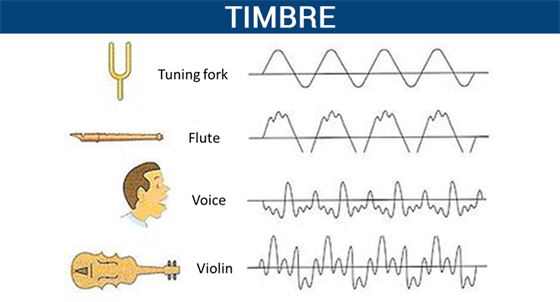
Mp3 – Subjective perception of sound: timbre

Audio Timbre mp3

Tone is a concept that we often come into contact with in our daily lives, and it can even be said that it is an essential concept.

Mp3 timbre

In high school physics textbooks, timbre, along with pitch and volume, are considered the three basic attributes of sound. Although we often deal with the word doorbell, and doorbell has more mature applications in many respects, doorbell is actually a very vague concept. What physical phenomenon determines the timbre? Why can we only use vague words like light and shadow, thickness and warmth to describe timbre?

Pitch and volume are well understood and correspond to physical phenomena: pitch corresponds to the vibrational frequency of an object, and volume corresponds to the object’s vibrational amplitude. However, we were unable to find a physical phenomenon that corresponds to the timbre. There are also no precise words to describe the timbre in our language.

We can create great music by precisely controlling the combination of pitch, duration, and volume. So can we control timbre like we control pitch and duration?

What exactly is pitch? What physical processes are involved in the timbre?

This is something that many people have been exploring and researching for the last few hundred years. But to this day, there is still no perfect answer.

In this article, I have classified some of the research results of my predecessors and presented some of my own thoughts. I hope that it can give everyone a systematic understanding of timbre, and I hope to inspire those who are interested in studying timbre in the future.

This article will start with the definition of timbre, discuss what timbre is, the subjective perception of timbre, the main factors that affect timbre, the description of timbre in language, the application of timbre in music, and personal perspectives for timbre. doorbell investigation. This article also proposes a sound classifier model for the timbre. At the same time, there are some conjectures that I have not been able to study in the article. I will check them out in the future.

The definition of sound
There are many definitions of timbre.

The word timbre comes from the French   . In old French it referred to the sounds produced by different musical instruments.

In his music textbook “Fundamentals of Music Theory,” Li Chongguang noted that “timbres are different due to the nature, shape, and number of harmonics of the sounding body.”

The American Standards Association (ASA) defines ringing from the opposite perspective. It does not define what timbre is, but what timbre it is not: “timbre is any other difference between sounds of the same loudness, pitch, and duration.”

All the above definitions tell us what tone it is. But none of these definitions is as clearly linked to the corresponding physical laws as other physical properties.

Like pitch and frequency of vibration, like speed and time and displacement, like color and wavelength.

Why can’t the word timbre clearly correspond to a certain physical phenomenon? I think this is due to the complexity of the timbre.

How does the normalization of an mp3 work?

How does the normalization of an mp3 work?

mp3 volume normalizer

The normalization of the loudness of an mp3 is based on perception.

How MP3 Compression Works

The human ear has its peculiarities and the study of these have allowed the development of the normalization algorithm for mp3 files.

Initially what was needed was simply to reduce the space an audio file took up, while maintaining high quality.

We must remember that in the early years of the internet, it was very slow and hard drives had very little capacity. What made it impossible to download a wav file (this option is still not used today), which is the one with the “original” quality because the wav takes up a lot of space.

So the normalization algorithm of an mp3 was based on being able to understand how the human ear works to be able to discard information without sacrificing quality, based on the way we perceive music and thus, the mp3 file, which occupies much less space ( a tenth of the original) sounds almost the same as the original.

But… what information can be discarded without the human ear noticing? How is it achieved that even discarding information, an mp3 sounds almost the same as the original?

The first thing is to discard all the sounds that are not perceived by the human ear, but are nevertheless present in the original music wav file. Because the human ear can only perceive sounds in a range of frequencies, any lower frequency will not be heard and any higher frequency will not be heard either. So it’s safe to rule out silences, and also to rule out low and high frequencies that are beyond our ability to perceive.

But there are other phenomena in human hatred, such as the so-called masking. It happens that if we listen to a frequency at high volume and immediately after (or even at the same time) we listen to another instrument or sound with a similar frequency, our ear will not perceive this second sound… Then it is also possible to discard these sounds that are masked by first. Almost all frequency redundancy can be discarded without the human ear being able to perceive it.

So if we take a wav file and remove all the frequencies that are outside of our hearing range and also the masking, we will have been able to reduce the new audio considerably. If we also add a compression (like the one used for a .zip file), we will have a reduction so great that the new file will weigh one tenth of the original.

This allows the new file to be much more manageable than the original and to take up much less space on the hard drive, which was of crucial importance in those years.

This method that we are explaining in general was the one that was used two decades ago or more. Today Mp4Gain uses much more modern and complex methods, which provide more surprising results.

In addition, Mp4Gain is capable of normalizing not only mp3 files, but all popular audio formats and it can also normalize videos. And this is based on more modern, efficient and state-of-the-art algorithms, which provides a much better result.

Generally speaking, we have provided a non-technical explanation of how audio files were compressed to make an mp3.

We advise you to download Mp4Gain and check its quality for yourself. You guys are going to love it.

Loudness Normalization – Mp4Gain

Loudness Normalization – Mp4Gain

Loudness Normalization

Mp4Gain is the most advanced normalizer and practically the only loudness normalizer that is still current and updated according to new technology and new formats.

Loudness Normalization

In fact, it is the only one that handles the most popular audio and video formats. You can even extract the audio from any cvideo and save it as an audio format (mp3, acc, m4a, flac, ogg, etc).

These are the formats that Mp4Gain handles:

Video formats:

mp4, flv, avi
mpg, 3gp, wmv

Audio formats:

mp3, mp2, flac
ogg, m4a, acc
wav ac3

And very soon we will add more formats…

In fact, Mp4Gain offers other features, such as the ability to alter the pitch of a song without changing its speed and vice versa.

In fact, normalization offers a whole series of parameters that will allow you to achieve exactly what you are looking for. You can add the option to include Replay Gain, for example…

It also offers the option that, within the same song or video, all its parts have a similar sound. Avoiding, in this way, the existence in the audio or video file, parts that are very loud and others that have a very low volume.

Of course you can equalize as you like, to improve the quality of the audio.

For all these reasons, we believe that it is best that you download a copy of Mp4Gain and try it for free on your computer.

The program is very simple to use, you could practically say that it is intuitive. In other words, it is possible to use Mp4Gain without needing to read any manual, since it usually only loads the songs or videos and clicks the normalize button and that’s it.

Never again will you suffer from the situation that your different audio or video files have a very different loudness, forcing you to manipulate the volume knob to manually compensate for the difference in volume levels.

Download it today and give it a try.

Audio normalization for beginners

What’s more annoying when listening to music is that you have to manipulate the volume control for every song that plays. If you have a computer, a tool allows you to uniformize the atmosphere from track to track while the songs are playing. This is called normalization. Three main means are used to achieve this result more or less effectively.

Audio normalization

Normalization through detection of maximum volume

The player or audio processing software analyzes the sound of the track and detects the highest amplitude. If it is less than the maximum gain value that is imposed, the signal is automatically boosted by the number of decibels required to reach and reach this value in all samples on the track. If the highest amplitude is equal to or greater than the maximum gain value, nothing is done.

Normalization

This method has only one advantage: the avoidance of saturation. However, the drawbacks are many.

This form of normalization cannot be applied in real time, as it is assumed that the maximum signal value is known in advance, which is hardly the case with live audio sources (playback or recording). Also, this type of normalization turns out to be totally ineffective when the overall sound of the song is low, but interrupted by small ridges that can be parasitic. When these peaks reach or exceed the maximum gain value, nothing happens and the overall sound is always reduced, especially if these peaks last only a few fractions of a second.

Normalization in detecting maximum volume is almost never used by reading software. Many audio processing software or even audio CD burning offers this option, such as Audacity and Nero.

Normalization by medium volume detection

Here, the player or audio processing software analyzes the sound of the track and does not detect the highest amplitude, but the average amplitude of the signal. Thus, the volume of the song will automatically increase or decrease by the number of decibels required to reach the imposed value, as appropriate.

Also known as RMS, this method has the advantage that the sound is fairly accurately balanced from one song to another, even if there are sharp peaks in the volume.

However, normal normalization of volume detection, like the previous method, cannot be applied in real time and is ipso facto unsuitable for live audio sources. In addition, saturation can occur if the imposed value to be achieved is not sufficient. It is recommended to use normalization values ​​small enough to avoid this problem as much as possible.

Many reading software programs use this normalization mode, but they all work better or worse than the others. .

Sound compression / modern normalization

The mp4gain audio processing  software performs the audio signal analysis, analysis that will lead to increase or decrease the volume of certain areas of the signal according to a complete set of fairly complex parameters inherent in the signal itself. Ultimately, the loud sounds will be attenuated, the weak sounds will improve when multiple presets are reached.

This is the best normalization method if the sound processing values ​​are well established, in which case the sound volume becomes very constant and without saturation, regardless of the source and signal type, in real time or No

However, this type of normalization requires some processing power from the processor. Although the results achieved are much more professional and the only ones that really achieve what the 2020 ear is looking for. Mp4Gain has the most efficient response to normalize audio, either from audio files of the most popular formats or from video files, including the most commonly used formats.

Audio Normalization, understand what it is about

Audio Normalization, understand what it is about

Difference between Peak level and RMS in Audio

Something that is mentioned a lot, for example when audio recordings are produced, is about the so-called Peak Level and RMS, Peak and RMS (Root Mean Square), which are detected by meters (software, or hardware) But… What are they exactly these values?

Tube Compressor-Limiter

It is important that someone who does not record audio but simply listens to understands these differences.
This will make you a true expert, even if you are just someone who has a good collection of music, but knows how to distinguish who is normalizing and understands the subject.

DIFFERENCES

The Peak value will inform us of all those maximum values ​​that occur in our music in real time. To understand us … If we have, for example, a recorded song where a drummer emphasizes playing the tarola or a cymbal, we will see that our peak meter will show a higher value for a moment, because it is the one that is sounding louder in that instant. This meter will work with fast attack times, to be able to immediately measure these peaks and maybe use a limiter to avoid them.

What is RMS?

The RMS value, however, will mark the average value of the loudness or volume of our music … how does that do it? , for this it will use attack times, much longer longer. To be clearer … This value will give a reference of the energy level or volume (how high or low is the volume that is playing) but will not be affected by the peaks.

When we say that it has a slower attack value, this means that it does not measure variations so quickly, but rather that it is “slow” to react and therefore shows us something that could be an “average” volume level.

In any case, the suitable normalizer must be a mixture of limiter (that device that prevents the music from distorting because it has exceeded the maximum possible level) and a compressor, which is the one that prevents the peaks from exceeding a level and also prevents them from Volume drops drop more than a preset value.

In this way the music always remains within a medium range, without exceeding a limit neither up nor down.

Professionally recorded or broadcast music is always limited and compressed to keep it playing its best within a suitable range.

The only software that does exactly this is the Mp4Gain. That is why it has been accepted not only by amateurs, but by professionals.

Digital audio normalization

Digital audio normalization

In the last decade the term digital audio normalization has become popular. You could say that most people have a vague idea of ​​what they mean. However, it is important to understand some concepts that relate very closely to the issue of the volume gain of an audio file.

One of these issues is audio quality, so we think it is very important to start by explaining what kilobytes per second means.

It is not difficult to understand this concept, however very few people understand it and much less people manage to understand

So let’s try to understand what the subject of kilobytes per second means and how it impacts the quality of an audio file of any format.

This will allow us to have a greater vision to understand the issue of volume, digital audio normalization and loudness given that all this is closely related to audio quality.

So let’s begin to understand why at higher kilobytes per second we will usually have better audio quality.

For this it is necessary to use some examples. But first we need to understand that the greater amount of kilo bytes per second means a greater amount of information per second.

Many will ask And why more information per second synonymous with better audio or video quality?

For that it is important to keep in mind that audio or video files are capturing information and this information is usually very rich in data. For example, the amount of data per second in the performance of a musical group with five or six instruments is quite a lot. Or say the information per second in an image What is very many. So if we lower the number of bytes per second we are reducing the amount of information which impoverish our audio or video file.

The war of volume

For some years now, music recording companies have detected that people listen as a synonym for quality if there is a greater volume And then they have opted for the strategy of increasing the volume of the music they record a little more and produce.

If we had a graphic that will show us the volume and loudness that music used to have in the 70s and we were comparing by decade we could see that the loudness and volume level and volume gain have been increasing decade after decade.

This as I mentioned produces a deceptive effect of perception in the human being that confuses an increase in volume with an increase in audio quality.

And this has been called the war of volume because as we mentioned they have gradually increased the volume level of musical productions to make it appear that they have a higher sound quality.

And how does this compare to bytes per second? As it happens that the amount of information per second does really determine a higher quality and does not need an artificial increase in volume to appear to have a higher quality of digital audio.

So a modern digital audio normalization like the one offered by mp4gain is not misleading, but tries to ensure that each musical passage and each instrument have their optimum volume so that the loudness is constant and so that the quality is the best possible.
