How does the normalization of an mp3 work?


Free Download Mp4Gain
picture

How does the normalization of an mp3 work?

mp3 volume normalizer

The normalization of the loudness of an mp3 is based on perception.

How MP3 Compression Works

The human ear has its peculiarities and the study of these have allowed the development of the normalization algorithm for mp3 files.

Initially what was needed was simply to reduce the space an audio file took up, while maintaining high quality.

We must remember that in the early years of the internet, it was very slow and hard drives had very little capacity. What made it impossible to download a wav file (this option is still not used today), which is the one with the “original” quality because the wav takes up a lot of space.

So the normalization algorithm of an mp3 was based on being able to understand how the human ear works to be able to discard information without sacrificing quality, based on the way we perceive music and thus, the mp3 file, which occupies much less space ( a tenth of the original) sounds almost the same as the original.

But… what information can be discarded without the human ear noticing? How is it achieved that even discarding information, an mp3 sounds almost the same as the original?

The first thing is to discard all the sounds that are not perceived by the human ear, but are nevertheless present in the original music wav file. Because the human ear can only perceive sounds in a range of frequencies, any lower frequency will not be heard and any higher frequency will not be heard either. So it’s safe to rule out silences, and also to rule out low and high frequencies that are beyond our ability to perceive.

But there are other phenomena in human hatred, such as the so-called masking. It happens that if we listen to a frequency at high volume and immediately after (or even at the same time) we listen to another instrument or sound with a similar frequency, our ear will not perceive this second sound… Then it is also possible to discard these sounds that are masked by first. Almost all frequency redundancy can be discarded without the human ear being able to perceive it.

So if we take a wav file and remove all the frequencies that are outside of our hearing range and also the masking, we will have been able to reduce the new audio considerably. If we also add a compression (like the one used for a .zip file), we will have a reduction so great that the new file will weigh one tenth of the original.

This allows the new file to be much more manageable than the original and to take up much less space on the hard drive, which was of crucial importance in those years.

This method that we are explaining in general was the one that was used two decades ago or more. Today Mp4Gain uses much more modern and complex methods, which provide more surprising results.

In addition, Mp4Gain is capable of normalizing not only mp3 files, but all popular audio formats and it can also normalize videos. And this is based on more modern, efficient and state-of-the-art algorithms, which provides a much better result.

Generally speaking, we have provided a non-technical explanation of how audio files were compressed to make an mp3.

We advise you to download Mp4Gain and check its quality for yourself. You guys are going to love it.



Free Download Mp4Gain
picture


Mp4Gain Main Window
picture


Mp4Gain Features
picture


Free Download Mp4Gain
picture

Loudness Normalization – Mp4Gain

Loudness Normalization – Mp4Gain

Loudness Normalization

Mp4Gain is the most advanced normalizer and practically the only loudness normalizer that is still current and updated according to new technology and new formats.

Loudness Normalization

In fact, it is the only one that handles the most popular audio and video formats. You can even extract the audio from any cvideo and save it as an audio format (mp3, acc, m4a, flac, ogg, etc).

These are the formats that Mp4Gain handles:

Video formats:

mp4, flv, avi
mpg, 3gp, wmv

Audio formats:

mp3, mp2, flac
ogg, m4a, acc
wav ac3

And very soon we will add more formats…

In fact, Mp4Gain offers other features, such as the ability to alter the pitch of a song without changing its speed and vice versa.

In fact, normalization offers a whole series of parameters that will allow you to achieve exactly what you are looking for. You can add the option to include Replay Gain, for example…

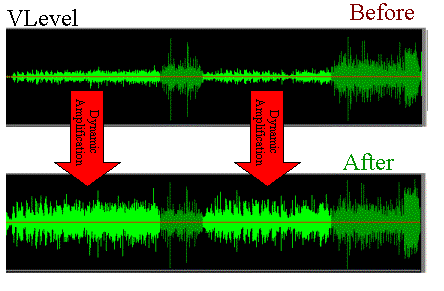
It also offers the option that, within the same song or video, all its parts have a similar sound. Avoiding, in this way, the existence in the audio or video file, parts that are very loud and others that have a very low volume.

Of course you can equalize as you like, to improve the quality of the audio.

For all these reasons, we believe that it is best that you download a copy of Mp4Gain and try it for free on your computer.

The program is very simple to use, you could practically say that it is intuitive. In other words, it is possible to use Mp4Gain without needing to read any manual, since it usually only loads the songs or videos and clicks the normalize button and that’s it.

Never again will you suffer from the situation that your different audio or video files have a very different loudness, forcing you to manipulate the volume knob to manually compensate for the difference in volume levels.

Download it today and give it a try.

MP3 files at the same volume and with the same audio quality.

Now, on all people’s computers, one thing that is not lacking is music in the form of mp3 files.
These mp3 files come from very different sources, some may be derived from “ripping” some CDs, others are downloaded from the Internet or from P2P programs, or have been received by some friends.

Normalize Audio

Over time, everyone has their music collection made of mp3 files that are certainly different from each other in quality and volume.
By playing a random playlist with the media player, you can listen to music at lower volume levels than others and with different audio quality.

We are certainly talking about subtleties, these differences in quality and volume, in most cases, even if perceived, it does not bother.
However, this problem can be easily corrected by setting all mp3 files to the same volume and sound quality.

Volume Normalizer

Normalizing the audio of two tracks or two songs becomes useful even if you need to combine them into a single mp3 file or if you want to create a video presentation with a soundtrack.

MP4Gain normalizes the volume of multiple audio and multiple music tracks by analyzing mp3 files and other formats to determine how much each volume should be corrected.

The operation is really simple and within everyone’s reach, also because Mp4Gain can also be downloaded easily.
First of all, after installing it, add the complete files or folders inside it by pressing the respective buttons.
The next step is to analyze the traces that, after a brief process, will result in an optimal volume level for combining songs and mp3 files.
The default value recommended by MP4Gain is 89.0 dB; Other programs choose 92.0 dB, but since the software works differently, it is always advisable to use the default values, especially if you are not experienced in sound techniques (in that case, more professional software will probably be used).
Analysis of the audio tracks highlights deviations from that value of 89.0 which is detected as the “normal” target volume.

Once the analysis process is complete, you can click the Normalize button and apply the suggested changes to the volume levels for each individual track. Thus,
MP4Gain should be used easily and without complications, managing to improve the problem of the different music volume levels of a collection of MP3 files, without compromising their quality.