Sample rate and bit rate


Free Download Mp4Gain
picture

Sample rate and bit rate

Sample Rate

Recently, sample rates and bit rates have become even more common on music distribution sites and music players. Are there many people who don’t know what it’s like, even though they hear it often?

sample rate

So this time, I will explain sample rate and bit rate in an easy to understand way!

Please note: to explain it in an easy to understand way, there are some parts that are strictly different. note that.

1. Reasons sample rate and bit rate exist in the first place
Sample rate and bit rate are terms that come up when digitizing and digitizing audio. Audio devices such as headphones and speakers typically transmit analog audio signals. Sampling rate and bit rate are terms that appear only in the digital case, so they have almost no relation to analog audio signals.

The reason that sample rates and bit rates appear in the digital world is that there are problems converting analog signals to digital. Analog signals are constantly changing and it is not possible to accurately record the changes.

That’s where sample rate and bit rate come into play. Records the value of a constantly changing analog signal at regular intervals. An audio file is a collection of records as a piece of data. By making this digital audio file, it can be handled on a computer or smartphone and exchanged as data.

By the way, the log is the analog audio data log. However, in the case of vinyl, the original sound cannot be accurately recorded and there will be some differences. The slight difference shows up as the discs own sound quality.

2. What is the sampling rate?
I wrote that by digitizing in 1., I will record how much the value is at regular intervals. If you explain the sample rate in one word, it means “how often you are recording”.

Sampling rate is often expressed in the base unit of “kHz (kilohertz)”. As you know, “kilometer” is the same as “kilometre” and “km”, which means 1000 times. On the other hand, “Hz” indicates how many times it vibrates per second. In the case of sampling frequency, there is no problem in understanding how many times a second is recorded.

That is, in the case of 48kHz, it is recorded 48,000 times per second.

Basically, the more you record during 1 second, the closer it is to an analog signal, so the sound quality will be higher. However, the amount of data will increase proportionally, so it needs to be balanced.

The “Nyquist frequency” is an index that determines the balance. To briefly explain what it looks like, half the sample rate is the loudest pitch that can be produced at that sample rate.

In other words, in the case of a sound source with a sampling frequency of 48kHz, it is possible to record sounds up to 24kHz, which is half, and it is not possible to record sounds higher than that.

Since humans can basically only recognize sounds up to 20 kHz, it doesn’t make much sense to increase the sample rate too much. However, recent research says that “I think I actually feel it in the part that is not my ear.” However, it is a difficult part because there is a limit to the high-pitched sound that audio equipment can produce.

2. What is a bit rate?
When it comes to how often the sample rate is recorded, the bit rate is an indication of how much value there is at the time. Bit rate is basically expressed as “bit”. Since it is a drive that appears on a personal computer, it can be an unpleasant drive for those who are not good with personal computers.

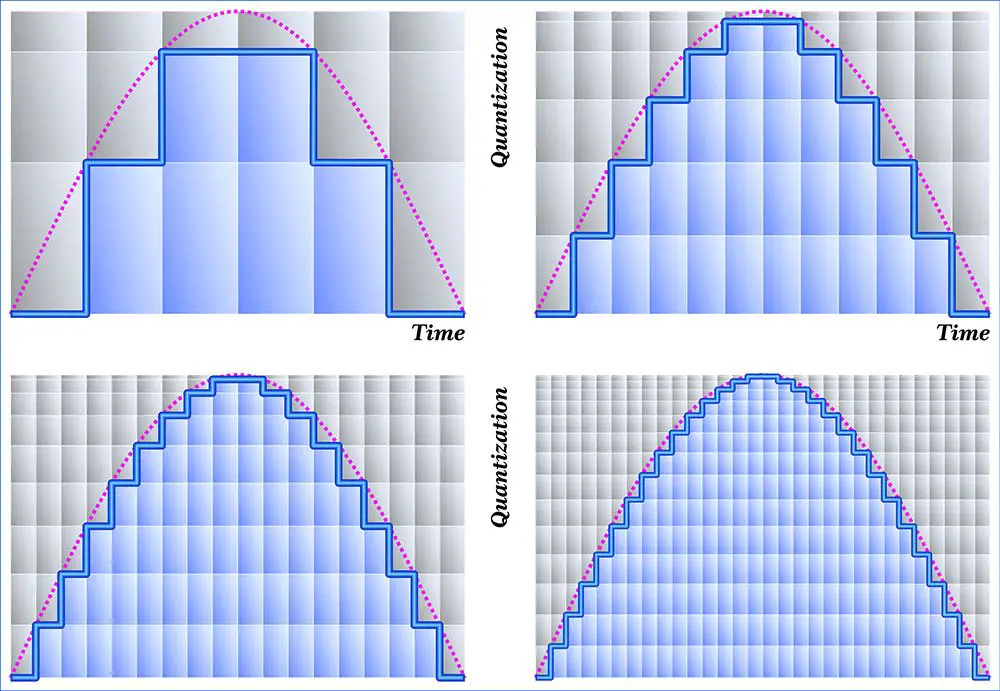
However, the bitrate is easy. Imagine the horizontal line on the graph. The bit rate is the precision with which this horizontal line is prepared. It means that 1000 pieces are prepared in 1 bit. I think this makes it easier to understand.

The value of how much represents the bit rate indicates the volume. In other words, the higher the bitrate, the higher the volume, and subtle changes in volume can be recorded. It’s okay if you remember a lot about bitrate.



Free Download Mp4Gain
picture


Mp4Gain Main Window
picture


Mp4Gain Features
picture


Free Download Mp4Gain
picture

Understanding Sample Rate Part 2

Understanding Sample Rate Part 2

sample rate

When the number of samples is reduced in this way, the original smooth curve disappears and a choppy waveform is created.

Sample Rate

Well, when it’s actually played back, it’s not the reason the signal is so choppy, it’s that in post-processing by the computer, “From the position of this point, the original waveform would have looked like this.” it is possible to reproduce a certain curve, but…

However, it is easy to imagine that the smaller this point is, the more difficult it will be to reproduce the original correct waveform, right?

In other words, you can understand that the higher the sample rate, the higher the reproducibility of the original sound.

Let’s hear the difference in sound quality depending on the sample rate

Let’s see in this video how the sound quality actually changes when the sample rate is different.

In this video you can check the sound quality of each of the four stages, “8kHz, 16kHz, 32kHz, 48kHz”.

There is a clear difference, right?

At 8kHz, the treble is cut off so much that it doesn’t seem to be the same song, and the overall muffled sound makes it impossible to hear the drum hi-hat.

The higher the sample rate, the better?
As you can see in the video above, sample rate is an important part of sound quality.

At this point, it’s easy to think, “If you set the sample rate to 96kHz or 192kHz, you should get really good sound!”, but actually the change in sound is quite hard to understand after 44, 1kHz

So why is it difficult to understand the change in sound after 44.1 kHz?

The reason why the change in sound quality is difficult to understand above 44.1 kHz
First, the frequency band that humans can hear is determined to be “20 Hz to 20 kHz”.

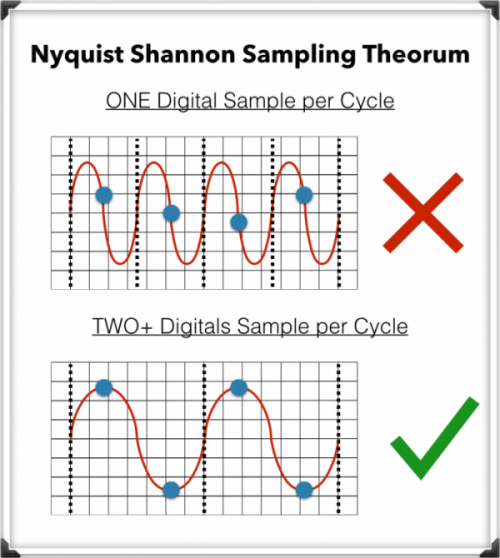
And as the basis of audio, there is a rule that the sample rate “needs twice the frequency of the frequency band you want to reproduce”. (For more information, see “Nyquist Frequency”)

Simply put, if you want to play down to 20kHz, which is the human audible range, you need a sample rate of at least 40kHz.

Since the sound quality of the CD is 44.1 kHz, the CD can completely cover the limit of human hearing, 20 kHz.

In the video above, the sound source with a sampling rate of 8 kHz is actually 4 kHz or later, and the sound source with a sampling rate of 16 kHz is actually 8 kHz or later, and the high-pitched sound disappears.

daughter
That’s why I couldn’t hear the high-frequency hi-hat sound at first.

At this level, the difference is easy to understand because it is within the human audible range, but since the CD sound quality has already been reproduced beyond the human audible range of 20 kHz, the playable frequency becomes 48 kHz or 96kHz So in most cases, the general public either don’t have enough speakers or headphones to reproduce it, or they can’t hear frequencies above 20kHz in the first place.

However, there are some interesting research results that humans hear components above 20kHz, so you can’t say there’s no point in playing after 20kHz, but unless you’re listening in a very good environment. There’s no doubt that most people can’t tell the difference.

Reference: Effect of components above 20kHz on the perception of instrument sounds

Three reasons why a 44.1 kHz sample rate is enough

So far, you know that as the sample rate increases, the difference in sound quality becomes negligible.

So what value should be set for the project sampling rate?

It’s “44.1kHz”!

Let’s look at why 44.1 kHz is the recommended sample rate, along with three reasons why.

The higher the sample rate, the higher the CPU load.
This is the biggest disadvantage of increasing the sampling rate.

If you increase the sample rate of the project, the load on the CPU will increase and the computer will not work properly.

Therefore, the higher the sampling rate, the greater the amount of information, but it is not a good option to demand too much sound quality with the specifications of a general personal computer.

After all, the standard sample rate in the music industry is 44.1 kHz.
Although high-resolution audio sources are gradually appearing recently, the music industry standard is 44.1 kHz of CD sound quality.

Furthermore, although subscription models are becoming more and more common in the music industry today, the sample rates of Spotify, Amazon M

Understand sample rate

Understand sample rate

Sample Rate

This “sample rate” is always involved when creating a new project or when exporting audio.

sample rate

The sampling rate seems to be difficult… Which one should I choose after all?

Of the various options, which sampling rate should be selected as the “correct answer”?

If you make a mistake when choosing the sample rate first, the song you made may be ruined, so today I will learn the basics about this sample rate and use it for everyday music production.

After reading this article, you will find that:

Knowledge of sampling rate required for DTM
Which sample rate to choose
Differences in sound quality depending on the sample rate and advantages/disadvantages
How to check the sample rate
Aside from difficult stories like “aliasing” and “Nyquist frequency”, I have summarized only the knowledge that is absolutely necessary to do DTM, so even those who say “It’s a pain to talk about numbers…” should definitely use this . knowledge Let’s remember!

Now, let’s start with the basics of sample rate.

Table of Contents
What is the sampling rate?
Let’s hear the difference in sound quality depending on the sample rate
The higher the sample rate, the better?
The reason why the change in sound quality is difficult to understand above 44.1 kHz
Three reasons why a 44.1 kHz sample rate is enough
The higher the sample rate, the higher the CPU load.
After all, the standard sample rate in the music industry is 44.1 kHz.
You can also request mastering if you have a minimum of 44.1kHz.
Two ways to check the sample rate
For audio files, right click to check
How to check from your DAW preferences
resume
What is the sampling rate?

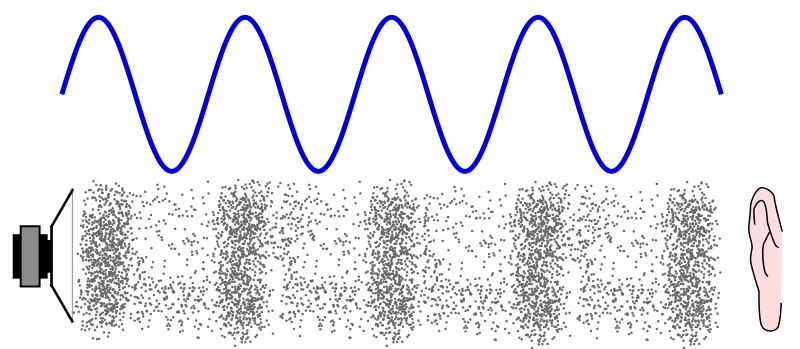
Sound is represented by such a waveform.

You can see a similar waveform even if you zoom in on the audio file in your DAW, but first let’s make this the waveform of the sound in the real world (analog world).

We take this to a computer and listen to it on a speaker and edit it, so we have to bring the sound as data into the digital world. (Convert DA)

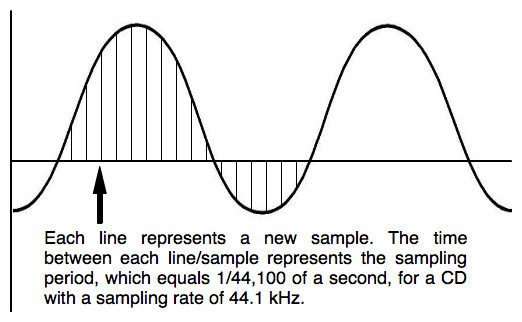
At that point, a process called “sampling” is required, but this is not a particularly difficult story, and it is necessary to cut a cross section of sound tens of thousands of times per second and digitize analog data. .

And this “how many times per second do you sample?” it is expressed by the number “sampling rate”.

Old man
If the sample rate is 1 Hz, it means sample once per second.

So at 44.1kHz (44,100hz) CD sound quality, you’re sampling 44,100 times per second.

Next, let’s take a look at the waveform of sound reproduced in the digital world.

This part is the sampled part, and the more points there are, the more accurately the original sound can be reproduced.

In the figure above, the points are connected by a straight line, but a relatively smooth curve is still maintained at this point.

So what happens to the waveform if this point (sample rate) is low?

What is sample rate/sample frequency?

What is sample rate/sample frequency?

sample rate

Sampling rate Sampling rate is the number of sampling processes performed per second in an AD converter that converts an analog signal to a digital signal.

SAMPLERATE

The unit is “Hz”, and the higher the value, the faster the analog input signal can be converted to a digital value, resulting in higher sound quality. However, the amount of data grows proportionally, so choose the right frequency for media and devices with limited storage capacity.

It is said that in order to accurately record and reproduce a certain sound, it is necessary to sample at a frequency that is approximately twice the frequency of that sound. The sample rate used on music CDs is 44.1 kHz. In this case, the voice waveform is shredded 44,100 times per second, and the voice information at each time is converted into digital information.

Human beings generally have 20 Hz for individual differences, but they can perceive sounds from around 15 kHz to 20 kHz as sound, and this frequency band is called the audible range.

Difference Between Sample Rate and Bit Rate
Sample rate and bit rate are used to describe the sound quality before and after the compression of the audio data.

The sampling rate is a value that represents “the number of sampling processes performed per second”.
For example, at the standard sample rate of 44.1 kHz, that means sampling 44,100 times per second.
The higher this number, the smoother the sound and the better the sound quality. In other words, the numerical value of the sample rate represents the quality of the sound.

On the other hand, the bitrate is a value that indicates “at how many levels the volume is rendered”.
For example, in the case of 16 bits, which is the standard bit rate, the amount of information is divided by 2 to the 16th power (= 65536 steps). If the number of bits is low, the sound quality will be uneven, and as with the sample rate, the higher the bit rate value, the more information can be reproduced and the sound quality will be better.

What is the sample rate / sample rate?

What is the sample rate / sample rate?

Sample Rate

Sampling rate Sampling frequency is the number of sampling processes performed per second in an AD converter that converts an analog signal into a digital signal.

Sample Rate

The unit is “Hz”, and the higher the value, the faster the analog input signal can be converted to a digital value, resulting in higher sound quality. However, the amount of data grows proportionally, so you must choose the appropriate frequency for media and devices with limited storage capacity.

It is said that to accurately record and reproduce a certain sound, it is necessary to sample at a frequency that is approximately twice the frequency of that sound. The sampling frequency used for music CDs is 44.1 kHz. In this case, the voice waveform is shredded 44,100 times per second and the voice information at each moment is converted into digital information.

Humans generally have 20 Hz for individual differences, but they can perceive sounds around 15 kHz to 20 kHz as sound, and this frequency band is called the audible range.

Difference between sample rate and bit rate
Sample rate and bit rate are used to describe the sound quality before and after compression of the audio data.

The sampling rate is a value that represents “the number of sampling processes performed per second”.
For example, at the standard sample rate of 44.1 kHz, it means to sample 44100 times per second.
The higher this number, the softer the sound and the better the sound quality. In other words, the numerical value of the sample rate represents the quality of the sound.

On the other hand, the bit rate is a value that indicates “at how many levels the volume is represented”.
For example, in the case of 16 bits, which is the standard bit rate, the amount of information is divided by 2 to the 16th power (= 65536 steps). If the number of bits is low, the sound quality will be granular and, as with the sample rate, the higher the value of the bit rate, the more information that can be reproduced and the sound quality will be better.

Sampling rate bit rate
Divide the time axis A
44.1 kHz, divide 44100 per second Divide the amount of information vertically Into
In the 16-bit case, divide the amount of information by 2 to the 16th power.
LiveOn compatible sample rate
In LiveOn, when creating a conference room, you can select from 5 patterns of “8kHz, 11kHz, 16kHz, 22kHz, 32kHz”. LiveOn supports up to 32 kHz, so you can have a meeting with clear sound quality.

It is very easy to listen to because you can communicate with a voice close to the voice on the floor and you can use it comfortably without stress even in long meetings.

The sample rate set when creating the conference room can be changed from the change screen.

Main sampling frequencies
Live: 8kHz to 32kHz
Telephone (ISDN, etc.): 8kHz
YouTube video (standard): 22.05 kHz
FM stereo transmission relay: 32kHz
CD-DA: 44.1 kHz
DAT / miniDV video: 32kHz to 48kHz

What is 16-bit MQA?

What is 16-bit MQA?

Sample Rate

Explain how MQA “origami” folds recorded audio into a more efficient format, we often take high sample rates, such as 192 kHz, as an example.

Sample Rate

But the strengths of the comprehensive MQA system are just as important, even when the sample rate is low.

Music catalogs are important because many masters were originally recorded at 44.1 kHz and most of them were recorded only at 44.1 kHz 16b (“Red Book”).

For the 1977-2010 era catalogs, MQA is much closer to the original studio sound, to the actual sound, than most remastered releases (adding effects rather than reducing bugs). Allows you to “go back”. In many cases, the clear sound provided by MQA is deep.

In the early days of digital audio, recording and production equipment was much less sophisticated than it is today. On some level, this can be an advantage. It keeps it clean because you don’t have to mess with the sound between production and release in the studio. But early digital technology also introduced systematic flaws that we were able to perceive and correct. (A part of this is described in the author’s AES treatise [1])

What is MQA 16b?

There are three ways to create a 16-bit MQA file:
1) 16b 44.1 (or 48) kHz master encoding.
2) Derivatives for 24b MQA encoding.
3) Custom MQA-CD encoding.
In all three cases, MQA files can provide audible dynamic range greater than 16b.

For each type

1. When MQA encodes a 16b 44.1 kHz master, the entire encoded MQA file is also 44.1 kHz / 16b. Despite being 16b, this file contains all the decoding and playback information. This MQA encoding also includes all the information that can be accessed while playing the original master, and in some cases even more.
2. If the original source is 44.1 kHz / 24b or the sampling frequency is 88.2, 176.4, 352, 8 kHz or DSD, the standard MQA file will be 44.1 kHz / 24b. This file contains decoding, “display” and rendering information. If this 24b MQA file encounters a “16-bit bottleneck” during delivery (for example, in a wireless or automotive environment), the 16-bit information in the header will be clipped to maximize downstream sound quality. Organized as such, display and reproduction are still possible. See [2].
So encoding a high-speed master and truncating the 24-bit to 16-bit MQA will give you the best possible sound quality (with or without a decoder). This MQA file can be sent to a streaming service via any 16-bit distribution system, for example as an alternative to Redbook and, interestingly, on a CD. Importantly, this 16-bit version of the MQA replay can be heard as a certified and studio approved replay.
For this reason, some record companies no longer create Redbook files and choose the high quality and certification that MQA 16b files provide.
3. In 2) above, the 16-bit MQA file was created by first optimizing the encoding to 24-bit and then removing the lower 8 bits. However, if the file is for MQA-CD, the encoder uses a different approach to further optimize the data on the CD.

What about the sound quality of music distribution subscriptions?

What about the sound quality of music distribution subscriptions?

Sample Rate

Times have gone further and as of 2020, listening to music on music distribution subscription services (abbreviation: subscription) is not uncommon.

Sample Rate

Since subscription to music distribution is a service that always connects to the Internet or downloads and listens to music, some people may be concerned about the sound quality.

In this article, we will introduce how to enjoy music with the sound quality of music distribution subscriptions and good sound quality.

There is a high-quality music distribution subscription.
There is a setting to improve the sound quality.
If you want to listen to music distribution subscriptions with good sound quality, consider using good quality headphones.
About the sound quality of the subscription
Table of Contents

About the sound quality of the subscription
About the Bitrate and Audio Codec of Top Subscriptions
How to enjoy the subscription with better sound quality
abstract
About the sound quality of the subscription
How is the sound quality of a music distribution subscription determined?

Sound quality depends on bit rate and type of audio codec.

I will explain the bit rate and the audio codec.

What is a bit rate?
It is a value (unit: bps) that expresses the amount of data per second after compressing music data.

For music files with the same compression format, files with higher bitrate values ​​are said to have better sound quality.

What is an audio codec?
A function that compresses or decompresses music files.

There are two types of compression methods for music file codecs: lossy and lossless.

Lossy codec
Data compression in which the data before compression and the data after decompression do not match.

The advantage is that the size of the music file can be reduced, but the disadvantage is that the sound quality deteriorates.

The types of lossy codecs are listed below as an example.

■ Lossy codec types
・ MP3
・ AAC
・ WMA
・ Vorbis

Lossless codec
Data compression in which the data before compression and the data after decompression are the same.

The compression ratio of the music file size is small, but the advantage is that there is no deterioration in sound quality compared to before compression.

Lossless codec types are listed below as an example.

■ Lossless codec types
· A THE C
・ FLAC
・ TAK
・ Lossless WMA
・ Monkey’s Audio

What do the audio sample rates and sample sizes mean?

What do the audio sample rates and sample sizes mean?

Sample Rate

You can see that MP3 audio files have audio in the number of bits (in seconds) that the player uses, that is, the bit rate that indicates the quality of the audio.

sample rate

But I am confused with the terms sample rate and sample size. Are they not dependent on bit rate or sound quality? Or can it be explained in understandable terms?

Audio
Bit rate

This is a great article on the three terms you are asking. In summary, here are three definitions.

Bit rate: the amount of data per second. This can be different in the file (variable bit rate) and can have static values.
Sample Rate – The rate at which audio is measured per second. It is usually measured in kilohertz (kHz). The usual number you can see is 44.1 kHz. This is directly related to the bit depth or the number of bits measured in each cycle.
So at this point you need to do some math and you can see that the bitrate is in bits per second (usually measured in megabits per second). Therefore, bit rate = sample rate x bit depth. As far as I know, your sample size is just one of these 1-second chunks of data.

If you run pure math, you will find that these files are very large, but there are some compression algorithms that have been adopted to keep the files low without a significant loss of quality.

Receive your personal cloud storage with 2 Gb of free space
The sample size or bit depth is included, which is a measure of the number of bits in the sample, which is a direct quality measure. However, this only applies to PCM sampling. For irreversible formats like mp3, the sample size doesn’t really define the quality.

See Audio Bit Depth for more information.

Sample rate = No sample rate. Of audio samples transported per second

Sample size = The sample size determines the maximum dynamic range of a digitized sound. Dynamic range is the ratio of the maximum amplitude to the minimum non-zero amplitude of a signal, generally expressed in decibels (dB).

The sampling frequency affects the quality of the recorded sound. Therefore, a higher sample rate will improve the quality as the number of bits increases, but will require more data and result in larger files. The bit rate used to store the samples used to store the sampled data also affects the quality of the recording. Bit rate is the amount of space that can be used to store sampled data per second. The higher the bitrate, the better the sound, but more space is required to store the file.

The difference between 44,100 Hz (music industry) and 48,000 Hz (video industry)

The difference between 44,100 Hz (music industry) and 48,000 Hz (video industry)

44100 vs 48000 sample rate

In video production, record the frame rate for shooting and the sample rate for recording. Remember this is one of the basics for shooting and recording.

SAMPLE RATE

First, about the difference in sampling frequency. Generally speaking

44,100Hz (44.1kHz) is the standard in the music industry

48,000Hz (48kHz) is the sound standard in the video industry

The difference between the two sample rates is just that. I talked about the sample rate as
the frame rate in video in another article, “Sound Principles Required for Video Production,” Sample Rate and Bit Depth. ”
In other words, the higher the sample rate in Hz, the softer the sound will be.

There are several theories about the historical background of 44,100Hz.
I would like to introduce you to one of the most logical.

First, when sampling sound, you need a sample rate that is at least twice the highest frequency you are recording. This is the sample rate necessary to obtain a minimum of the waveform. This is because it is not possible to record a sound that has the character of a wave if there is only one place to take a sample. Most people say that the audible range is 50 Hz to 16,000 Hz. Double is 32 kHz, but it seems that the harmonic components that make up the tone need to be recorded in order to record the voice correctly. Only when this is taken into account does it appear that up to 44,100Hz is required. Click here for more details.

Sound Processing “I want to hear my voice clearly” (link outside of Vook’s site)

What happens when the sample rate is low?
When digitizing analog information, if the sampling rate is not high, the high-frequency information will be hidden in the low-frequency information.
Then the high-frequency sound will be recorded as low-frequency sound.

In any case, by definition, 48,000 Hz has better sound quality than 44,100 Hz. The video industry has introduced 48,000 Hz.

One problem that sometimes occurs is that “I was recording 48 kHz video and the separately recorded microphone was set to 44.1 kHz.” At first I thought that different sample rates would be a big deal, but it doesn’t really seem to be the case.

Sound recorded at a small sample rate just has a small number of samples per second, but since there is almost no difference between 44.1 kHz and 48 kHz, I think you can barely tell the difference when you listen to the sound normally. At 96 kHz, the sound quality is even higher, but the number of samples is so large that ordinary people cannot hear it at all.

In some cases, the sample rate is really important.

1) By writing the audio actually recorded with a different sample number as a video file. This is because the sample rate must be converted to a video sample rate that is different from the conventional 44.1 kHz and 96 kHz sample rates, that is, 48 ​​kHz. Software that specializes in video editing seems to have sound distortion at this point.

2) When recording a 48 kHz music video to match the music played at 44.1 kHz on the site. In this case, it can be very difficult to match performance lips to post-production due to the different sample rates of the sound being played. It’s called sink drift.

3) Another point It seems that this is a problem that occurs at the time of recording, but there is a problem that the sound changes gradually when the sound recorded separately using a cheap recorder is synchronized with the sound recorded in the reference of the video. it seems that there are moments. In this case, it seems that you need to manually fast-forward the video a little and match it to the audio file, or extract a few frames at the important points in the audio and sync it up. It seems that this has nothing to do with the sample rate, so I will describe it so as not to cause misunderstandings.

What is the sample rate (sample rate)?

What is the sample rate (sample rate)?

Sample Rate

Differences in sound quality and how to check it! It also explains the settings to consider!

sample rate

Adjusting the sample rate Sound quality

The sample rate is mentioned in the DAW and audio interface settings. How should I set it?
I googled “sample rate”, but I don’t understand all the difficult words …
The higher the sample rate, the better the sound quality?

show-frequency-what-is
For those people, here we explain in a way that is easy to understand even for beginners, from the meaning of the sample rate that always appears when starting DTM, the relationship with the sound quality, the confirmation method to the setting method. I would like it in a way.

Please refer to that.

1. What is the sampling frequency?
Adjusting the sample rate Sound quality
Sample rate is a frequency that indicates how accurately sound is captured. .

Sample rate, sample rate Also sometimes called sample rate in English.

The higher the number, the better it will be caught. .

Of course, if you want to import sound to your computer, you have to convert it to data. Capturing sound data is called sampling.

* Currently, sampling mainly refers to capturing existing sounds. (Using existing music, recording material, etc.)

Rate means rate or commission in Japanese.

In other words, sampling = sound data capture. Fee = fee, commission

Literally translated, “sample rate = sound data capture rate. It will be a commission.

In other words, the sample rate indicates how well the sound is captured.

For example, if the sampling frequency is 48 kHz, the data will be taken by dividing it into 48000 times per second.

The higher this value, the finer the sound will be sampled.

It may be easier to understand if you think of the version in which each pixel art block is a sound.

2. Does the sound quality change depending on the sampling frequency?
Sample rate loading sound quality
A common question is whether the sound quality changes based on frequency.

Naturally it changes.

However, beginners and those who do not have expensive equipment will not notice much even if it changes.

So I will show you how to check it!