Basics of digital sound theory Part 4


Free Download Mp4Gain
picture

Basics of digital sound theory Part 4
Sample Rate

The MP3 algorithm allows you to compress the sound 20 to 30 times while maintaining good quality.

Sample Rate

The full quality of the CD is believed to be preserved at a bit rate of approximately 160 Kbps (the concepts of “sample rate” and “sample bit depth” do not apply to MP3 files). However, in most cases, much more compressed audio is quite acceptable. Therefore, in Flash animations, MP3 compression is usually used, which gives a bit rate of the order of 16-32 Kbps. The Flash player supports a range of bit rates ranging from 16 to 160 Kbps. You must select the most suitable based on film size and sound quality requirements. It is often worth leaving the MP3 file at the same quality as imported (therefore, the Use imported mp3 quality setting is on by default). If the quality changes, then the change should be in the direction of decreasing quality, but not increasing.

If the sound is processed in an external editor, you can take into account the fact that the Flash player supports not only the MP3 algorithm, which is part of the MPEG1 Layer 3 standard, but also newer algorithms (MPEG2 and MPEG2.5), that provide better sound quality when bit depth is low. In addition, the player supports MP3 encoding with both constant and variable bit depth (in the latter case, the best compression ratio is achieved).

The MP3 format is optimal for rash projects. Therefore, in practice, it is practically only used. Furthermore, MP3 files can be loaded dynamically, and they also have very useful ID3 tags with information about this sound.

• Nellymoser. A relatively new compression algorithm developed by Nellymoser Inc. Designed to compress human speech. His main idea is that a human voice can include vibrations with frequencies in a fairly narrow range. The upper and lower components can be discarded. Very low amplitude harmonics are also eliminated. The result is compression comparable to MP3 compression, but the sound quality is higher. More details about the Nellymoser algorithm can be found on the developer’s website http://www.nellymoser.com/.

The Nellymoser algorithm codec is included in the player only in Flash MX.

In the Flash IDE, Nellymoser compression is called Speech. You can adjust the quality / size ratio when using Nellymoser compression by changing the sample rate.

You can also include uncompressed audio in your SWF movie. In the development environment, this mode is called Raw. In this case, you can change the bit depth and sample rate. In theory, you can use uncompressed audio if sound quality is significantly more important than movie size (or, even less likely, if you need to save computing resources). In practice, however, it is better to use MP3 compression with a high bit rate (more than 120 Kbps).

Storage formats
There are quite a few audio formats. By default, Flash only allows you to import two of them.

• WAV. The main format for storing uncompressed audio on the Windows platform. Supports mono and stereo audio, various samples, and bit depths. Usually it is WAV where the analog signal is digitized, and only then is one of the compression algorithms applied. WAV files are extremely large, which is why this format has been significantly replaced by MP3. However, WAV is still the main format for professional sound editors like SoundForge.

• MP3. Audio format using the compression algorithm described above. The main format in the case of Flash, as it perfectly combines good sound quality and a small file size. Also, sound files in this format, unlike WAV files, can be dynamically loaded into a movie using the loadSound () method of the Sound class.

If you have QuickTime 4 or higher installed, you can import files in AIFF, QuickTime, Sun AU formats additionally.


Free Download Mp4Gain
picture


Mp4Gain Main Window
picture


Mp4Gain Features
picture


Free Download Mp4Gain
picture

Basics of digital sound theory Part 3

Basics of digital sound theory Part 3

Sample Rate

Compression algorithms

Sample Rate

Let’s try to calculate how much disk space an average CD-quality digitized music composition will occupy. Obviously, for this it is necessary to use the formula t KBF size ⋅ ⋅ ⋅ = where F is the sampling frequency, B is the sample capacity, K is the number of strings, t is the time.

Assuming 44.1 kHz herbal, B = 2 bytes, K = 2 channels, and t = 300 seconds, we get that the digitized song will occupy approximately 50MB.

This means that only about 10 uncompressed songs can be burned to CD. Since every second of digitized CD quality sound takes up almost 200 Kb, this sound will be very problematic to use on telephony, radio or the Internet. Even if you digitize the sound as a single channel with a sample rate of 11.05 kHz and a bit depth of 8 bits, each second will occupy 11 KB.

For ordinary telephone networks, this is too much for sound to be transmitted in a continuous stream. A problem arises: somehow it is necessary to reduce the size of the sound files.

It is solved quite effectively by using various compression algorithms.
Flash Player supports the following types of compression.

• ADPCM (Adaptive Differential Pulse Code Modulation – Adaptive Difference Pulse Code Modulation). This type of compression is based on two ideas. First, it was found that in the vast majority of sounds we perceive, slowly changing low-frequency components prevail. From this fact it follows that the difference between adjacent samples is often small (or rather, significantly less than the absolute value of the samples themselves).

This means that the digitized audio signal can be represented not by the samples themselves, but by the differences between them, which are smaller in magnitude and therefore require fewer bits for description. Second, the coding of the difference between adjacent samples is done taking into account the magnitude of the amplitude and frequency composition, since the human ear has sensitivity limits (the so-called adaptation).

The ADPCM algorithm is actively used in IP telephony. It is poorly suited for streaming music due to the significant distortions it introduces into sound (distortions, of course, get into speech, but are hardly noticeable in speech). The compression ratio for ADPCM is typically low, ranging from 8: 1 to 3: 1. The ADPCM Flash Player codec allows 2, 3.4, or 5 bits to represent the difference between samples. Actually, you can achieve acceptable sound quality with a bit rate (bit rate, that is, the “weight” of a second of sound) of 16 Kbit.

The ADPCM algorithm is significantly inferior to MP3, so it is not worth using such compression in principle. MP3 compression will provide an order of magnitude better quality with the same bit depth. The presence of the corresponding codec is explained by the principles of backward compatibility: the MP3 codec is built into the player only in Flash 4. Before that, only the ADPCM codec was used, which is probably due to the free distribution of this algorithm. The reason ADPCM is still used in IP telephony is that it does not require as extensive math calculations as MP3, so compression can be done on the fly.

• MP3. One of the first and most common compression algorithms based on the so-called psychoacoustic compression. It uses the following characteristics of the human ear:

or if a soft sound follows a very strong one, then we don’t hear it. Therefore, it can be discarded;

or a sound component with a large amplitude masks components close to it in frequency, but with smaller amplitudes. Therefore, they can be slaughtered without noticeable loss of quality;

or the ear’s sensitivity to frequency distortion is low, therefore, if the components are close, they can be considered the same;

o We misperceive very low and very loud sounds, so fewer bits can be allocated for their encoding than for sounds with an average frequency.

Technically, the MP3 algorithm is implemented as follows. The sound is divided into chunks of a certain length called frames, and a forward Fourier transform is applied to each set of samples. Its result is the decomposition of a sound wave into elementary sinusoids of different frequencies: harmonics. The harmonic coefficient determines its contribution to the resulting wave. Harmonic coefficients are compared and the least significant are discarded.

Basics of Digital Sound Theory Part 2

Basics of Digital Sound Theory Part 2

Sample rate

A sample rate of 44.1 kHz is not always ideal.

Samplerate

When transmitting data over a low-bandwidth network, the quality of the sound must be sacrificed in favor of its size, in practice sampling frequencies two, four and eight times lower than 44.1 kHz are usually used:

• 22.05 kHz: the so-called radio quality. Used when encoding the sound of FM radio stations. In the case of Flash, it is good for creating background music and event sounds. For the transmission of a human voice, it is even somewhat redundant;

• 11.025 kHz – telephone quality. A sample rate more suitable for the human voice. Used in 1P telephony;

• 5.5 kHz: sound about to lose the information component. This sample rate can be used to transmit low sounds as well as speech (albeit with mediocre quality).

Flash Player supports sample rates 44.1: 22.05; 11,025; 5.5 kHz. The choice of frequency should be determined by the type of sound, as well as the importance of maintaining the size of the SWF file. However, it should be remembered that there is no point in increasing the sample rate of the audio fragment compared to the initial one. This will not increase the quality, but will only unnecessarily increase the size of the movie.

Bit depth of samples
Bit depth determines how many different amplitude values ​​can be captured during digitizing. If the bit width is 4 bits, then the range of the amplitude value from zero to the maximum will be divided into only 16 bins. Naturally, the error when rebuilding the analog signal will be very high. This bit depth is suitable for representing very simple sounds as well as speech (its quality will be low).

The 8-bit width allows 256 amplitude values ​​to be represented. This is the bit depth used by FM radio stations. It is enough to present any sound in satisfactory quality. 16-bit encoding is optimal. At the same time, it can work with 65,536 amplitude options, which is enough to cover the entire audible range.

The 16-bit format is used for CD recording. Higher quality quantization is only justified in the case of studio sound processing.

Flash Player supports 8-bit and 16-bit quantization for uncompressed formats (for example, WAV) and only 16-bit for compressed formats (MP3 belongs to them). Keep this in mind when importing a sound file into a movie.

Number of channels The
Stereo sound is designed to give the playback sound a natural dimension. This is achieved due to the fact that a different component of sound is reproduced from each speaker. In general, the sound of each channel is a separate sound file, so the size of the stereo sound is proportional to the number of channels supported.

Conventional non-professional sound cards work with two-channel audio. The Flash player also supports the same number of channels. With ActionScript, you can mix the sound of the channels by playing the left channel on the right speaker and the right channel on the left. How this is done, we will talk a bit below.

If the sound is encoded in MP3 format, you can choose one of three stereo formats.

• Dual channel. Each channel receives half of the stream and is separately encoded as mono. It is mainly recommended in cases where different channels contain a fundamentally different signal, for example text in different languages.

• Stereo. The channels are scrambled separately, but the scrambler program can give one channel more space than the other if necessary. Most standard format.

• Joint stereo. The stereo signal is divided into two new channels. One is the average of the original channels and the other is the difference between the channels. In this mode, the sound quality is obtained more frequently than in others.

Unfortunately, in the Flash development environment, you cannot specify which stereo format is used. Therefore, if sound quality is of paramount importance, then the creation of MP3 files with the required parameters should be done using one of the specialized programs.

Basic concepts of digital sound theory

Basic concepts of digital sound theory

Sample Rate

Sound is, in general, the vibrations of an elastic medium.

sample rate

The sound is caused by mechanical vibrations of some object (this can be a string, vocal cords, etc.) in contact with the environment. The frequency of vibration (measured in Hertz) determines the pitch. The higher the frequency, the louder the sound. The human ear can perceive sound vibrations from the air with a frequency of 20 Hz to 20 kHz. The ear perceives the amplitude of the vibration as volume. The higher the amplitude, the louder the sound.

Electromagnetic waves are a direct analog of sound waves. The latter are less susceptible to dispersal by the environment, the information they carry is easier to store and process. Electromagnetic waves are the most important secondary carrier of sound. The transformation of acoustic waves into electromagnetic waves (as well as the reverse operation) is carried out due to the usual induction effect, which consists in the appearance of a current in a conductor when it is placed in an alternating magnetic field.

Simply put, the oscillation of the loudspeaker membrane magnet near the coil induces an alternating current in it. If this current is applied to another speaker, then the magnet on its membrane will move, creating a corresponding sound.

This is how the telephone and the radio work.

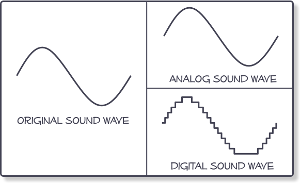
Sound converted to electromagnetic waves can be easily stored. For this, some parameter of the carrier must be compared (the depth of the plate track or the degree of magnetization of the film) with the amplitude of the oscillations (that is, the strength of the induced current in the speaker coil) . Sound converted directly to electromagnetic waves is called analog sound. Its main characteristic is the direct correspondence of the electromagnetic waves transmitted or recorded with the acoustic ones.

Digital sound is relatively new. Its main difference from analog is discretion. When digitizing, a special device, an analog-to-digital converter (ADC), measures at regular intervals (approximately 0.001-0.0001 seconds) the magnitude of the amplitude of an electromagnetic wave corresponding to an analog sound form and writes its value to a file with a specified precision. This value is generally called sample, or in jargon, sample (of the sample in English, sample). The same digitization is often called sampling or sampling.

By converting sound from digital to analog (this is done by a device called a digital-to-analog converter (DAC)).

The interpolation (approximation) of the intermediate values ​​of the amplitude is carried out according to the known ones. Since the sampling frequency is usually high, this operation allows you to fairly accurately reconstruct the original analog signal.

The digital form of sound is characterized by five parameters.

1. The sampling rate;
2. Bit size of the samples.
3. The number of channels or tracks.
4. Compression / decompression algorithm (codec).
5. Storage format.

Since each of these parameters is quite specific, we will consider them separately.

Sampling rate
The sample rate determines how many samples per second will be taken when digitizing. If we compare digital sound with digital images, then the sample rate will correspond to the resolution (a more “realistic” analogy is the frame rate in cinema). The higher the sampling frequency, the better it is possible to reconstruct the analog signal based on the digital form of the sound (more precisely, the higher the sampling frequency, the broader the spectrum of frequencies that can be recorded during digitization).
The famous Nyquist-Kotelnikov theorem states that for the correct reconstruction of an analog signal from its digital recording, it is necessary that the sampling frequency be at least twice the maximum sound frequency.

Since the upper listening limit is 20 kHz, ideally the sample rate should be at least 40 kHz. This is why the standard sampling frequency used for recording CDs is 44.1 kHz (so-called CD quality). However, the sample rate can be higher, but this sound quality is only used by recording studios and especially demanding music lovers.

What is the sample rate and bit rate?

What is the sample rate?

Sample Rate

Frequency is defined as the number of cycles of periodic motion per unit of time. The SI unit of frequency is called hertz (Hz, after its inventor Heinrich Hertz). One hertz corresponds to one cycle (or complete oscillation) per second.

Sample Rate

Example. Sound waves have a frequency in the range of approximately 20 to 20,000 Hz. This means that at any point along the path of the sound wave, the pressure will fluctuate from high to low, 20 to 20,000 times per second.

In digital audio, the maximum frequency that can be successfully recreated is half the sample rate. Therefore, with a sample rate of 44.1 kHz, frequencies up to 22.05 kHz can be recreated. Wave frequency refers to how many times per second a wave moves from its highest point to its lowest point and vice versa. It is usually measured in hertz (Hz) or cycles per second. The frequency of the wave determines its height. High-frequency waves have a high pitch, while lower frequencies have a lower pitch. The average person can hear frequencies from 15 or 20 Hz to about 20,000 Hz (20 kHz).

Analog wave The wave amplitude refers to half the distance between the highest point of the wave and the lowest point. The greater the amplitude of the wave, the greater its volume, which is generally measured in decibels (dB). The decibel range for human hearing is complex and depends on the frequency of the sound in question, the age of the person and the listening environment, but varies from approximately 0 to 120 dB, with each 10 dB change corresponding to a doubling of the perceived volume.

Absolute Threshold: ATH is the volume level at which a certain sound can be detected 50% of the time.

What is the bit rate?

Bit rate refers to the data transfer rate (that is, how many bits are transmitted in a given time), generally expressed in bits per second. Common units of bit rate are kilobits per second (Kbps) and megabits per second (Mbps). The term is also commonly used when talking about digital sampling and sample rates. For example, the MP3 audio compression algorithm is often configured to output files at a bit rate of 128 kbps. This means that the file contains an average of 128 kilobits for every second of audio (960 KB per minute). This is in contrast to CD audio, which is encoded as 44,100 16-bit stereo samples per second: 1411.2 kbps (16-bit x 44100 Hz x 2ch).

Often times, bytes are written in uppercase and are multipliers (for example, “KB” for kilobytes) and lowercase factors are bits (for example, “kb” for kilobytes). All modern computers use 8-bit bytes.

MP3 bit rate
The MP3 bit rate can be misleading. For example, an MP3 “constant bit rate” (CBR) of 128 kbps will use approximately 128 kilobits for every second of encoded audio (so the file size in bits divided by the length of the audio is approximately 128,000), and Your frame headers will appear at regular intervals, but internally, frame-by-frame, you can encode audio at bit rates higher or lower than 128 kbps by using a bit pool (the ability of a frame to use spare bits from a previous block). However, the size of this bucket, and thus the amount of variability, is limited, so 128 kbps will be very close to the effective bit rate throughout the file.

See also: 8D surround sound and how to do it
As another example, “128 kbps VBR MP3” is often incorrect, as the purpose of VBR is to allow each of the internal MP3 sectors to have its own bit rate. When people refer to the VBR MP3 bit rate, they are generally referring to the actual average bit rate of their frames. If the length of the encoded audio is known, then the “bit rate” can be the data size of the file divided by its duration, which will be fairly close to the same number. However, the length of an MP3 VBR cannot be accurately determined without scanning all the frames.

Digital Sound and Sample Rate

Digital Sound and Sample Rate

Sample Rate

Given the wide availability of inexpensive digital audio equipment, we invite you to take a closer look at digital audio.

Sample Rate

Acoustic sound is a continuous process in time and in amplitude, that is, the air pressure changes smoothly with time and does not jump from one value to another. Acoustic sound can be converted into an electrical signal using a microphone that, depending on the change in air pressure, changes the electrical voltage it generates at the output. After the conversion of an acoustic sound into an electrical signal, continuity is maintained in time and in amplitude: the signal voltage changes in the same way that the air pressure changes, which is why this sound is called analog. We can record an electrical signal on magnetic tape and convert it back to sound using a loudspeaker that functions as a “reverse microphone”: it moves air in response to changes in voltage. Respectively,

Despite the fact that the analog electrical signal has regularly served humanity for decades, over time some of its representatives (of humanity) became clear that the analog signal and magnetic recording are not the best ways to transmit and store audio information, since both during transmission and during storage occur. unavoidable losses, i.e. sound degradation. At the same time, the transmission and storage of data on computers that operate exclusively on digital data can be done without any loss. The only question is how to convert analog audio to digital and vice versa.

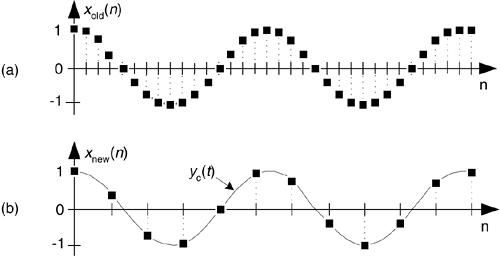
To solve the first problem, there are special devices known as analog-to-digital converters (ADCs). These devices are capable of converting a continuous analog signal into a sequence of separate numbers, that is, making it discrete (English discrete – separate, consisting of separate parts). The conversion takes place as follows: the device measures the amplitude of the analog signal many times per second and outputs the measurement results in the form of numbers.

Analog signal
Sampling
Sampled signal
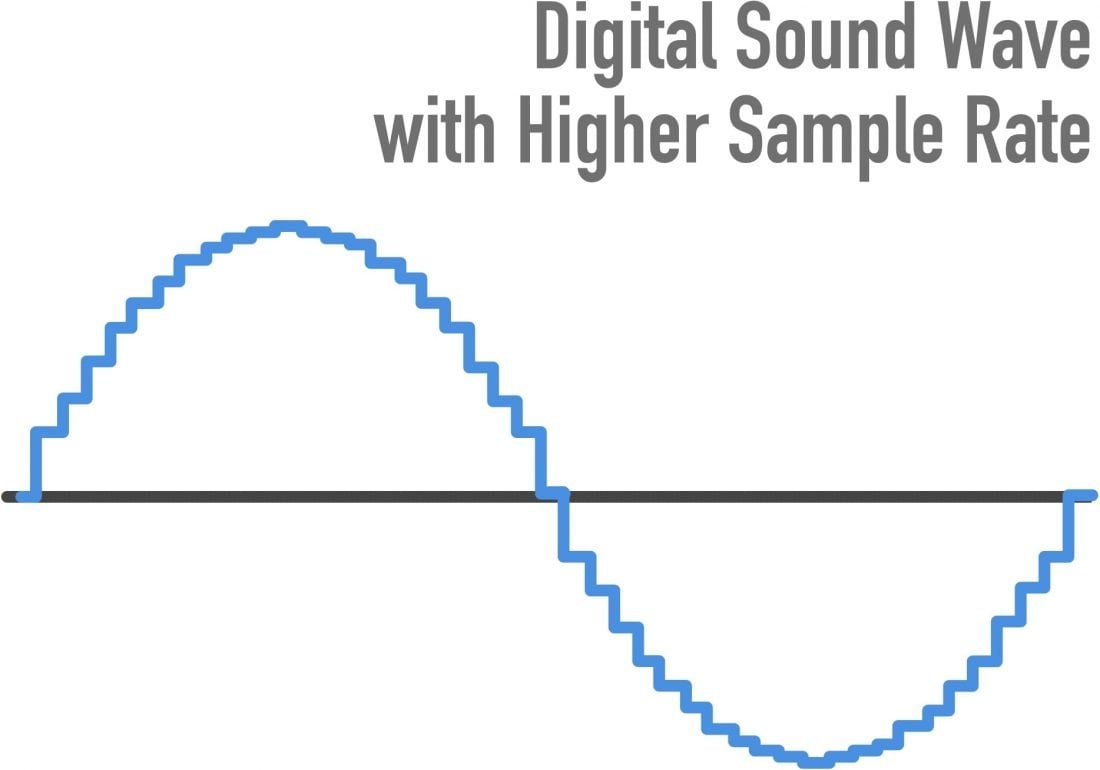
As seen in the figure, the measurement result is not an exact analog of a continuous electrical signal. How much does digital sound compare to analog? Obviously, this correspondence will be more complete the more often the measurements are made and the more accurate they are. The frequency at which measurements are taken is called the sample rate. And the precision of amplitude measurements is indicated by the number of bits used to represent the measurement result. This parameter is called the bit depth.

Sampling rate
So, the conversion of an analog signal to digital consists of two stages: sampling in time and quantization in amplitude. Time sampling means that the signal is represented by a number of its samples (samples) taken at regular intervals. For example, when we say that the sample rate is 44.1 kHz, it means that the signal is measured 44,100 times per second (in MO, the more intelligible term “sample rate” is usually used, however, “sample rate “is more correct.).

The main issue in the first stage of converting an analog to digital signal (digitizing) is to choose the sampling frequency of the analog signal. As already mentioned, the higher the frequency, the closer the digital signal is to the analog. However, in proportion to the increase in frequency, the following increases: a) the intensity of the digital data stream and the bandwidth capabilities of the interfaces are not unlimited, especially if several channels are recorded / played simultaneously; b) the computational load of digital effects processors and their computational capabilities are also limited; c) the amount of memory required to store the digital signal. Obviously a compromise is needed.

The choice of the sampling frequency affects the frequency range of the received digital sound or the maximum frequency of an analog signal, correctly represented in digital. The range of frequencies a person hears is believed to be 20 to 20,000 Hz. According to the well-known Nyquist theorem, in order for an analog (continuous in time) signal to be accurately reconstructed from its samples, the sampling frequency it must be at least twice the maximum audio frequency. An audio frequency equal to half the sampling frequency is called the Nyquist frequency and is the maximum frequency that a given digital system can store and reproduce correctly. Thus, if the real analog signal that we are going to digitize contains frequency components from 0 Hz to 20 kHz.

The sample rate: looking for the best sound

When it comes to digital music and sound effects, the sample rate plays an important role. This applies to both CDs and file formats like MP3 and network players. The values ​​specified for the height or frequency of the removal rate differ significantly from each other. An important reference value is 44.1 kHz. We explain why this is so.

Sample rate

What is sampling frequency about

For a guitar voice or riff to be stored on a CD or hard drive, the sound must be digitized. To do this, samples of the analog signal are taken at constant time intervals (discrete time). These are used to convert the recorded information into a code.

Raumfeld connector
Raumfeld connector

If the signal is digital, such as MP3, it can also be converted back to an analog signal, such as fluctuating current intensity, to make the membrane of a speaker sound. The frequency of these samples or samples is indicated by the sampling frequency. In general, the more samples there are, the more detailed the sound can be digitally reproduced.

A CD accepts signals that have been digitized with a sampling frequency of 44,100 Hz or 44.1 kHz. That corresponds to 44,100 samples per second. Of course, this frequency was not determined by chance. Such a resolution takes into account the maximum audible audio frequency of about 20 kHz and an important rule of data processing: the Nyquist-Shannon theorem. From this it can be deduced that the sampling frequency must be at least twice as high as the highest frequency of the signal to be digitized. So if the highest tones we can hear vibrate at 20 kHz, according to this theorem, the sample rate must be at least 40 kHz in order to digitize and decode all the tones correctly. Otherwise, the digitized signal can only be incorrectly converted to analog.

44.1 kHz is not the end of the story

The sampling frequency development did not stop at 44.1 kHz. Modern data carriers and transmission methods now make it possible to process significantly larger amounts of data. Lossless formats like FLAC or high resolution multi-channel standards exceed this value many times over.

Dolby TrueHD, for example, supports very high sample rates. Thus, significantly finer digitized signals can be processed. Additionally, audio masters can use better reconstruction and anti-aliasing filters.

Sample rate isn’t the only measure – bit depth

While the sample rate describes the frequency of the samples, the bit depth indicates how many bits are used per sample. In other words, the bit depth tells you how accurate or how high the resolution is for each individual sample. The amplitude or dynamic range of the analog signal at the time of the sample is determined. So the area between the weakest and strongest sound pressure level. On a CD, each sample is 16-bit deep, although this value is also exceeded by modern digital standards. Dolby TrueHD reaches 24 bits.

The Raumfeld connector brings out what is digitally possible
The raumfeld connector supports a sampling rate of 192 kHz.

▶ Hardly anyone makes bits sound as good as the Raumfeld plug. Because it plays high-resolution formats up to 96 kHz and 24-bit. An integrated high-end converter from Cirrus Logic converts digital data into analog. The Raumfeld connector has a powerful WLAN module for wireless data transmission. Thanks to Google Cast, multi-room speakers can also be conveniently controlled via the connector. If you connect the network player to a conventional system via Cinch or Toslink, it will be integrated into the local network.

Conclusion: sample rate as a bargaining chip for digital sound formats
The sampling rate indicates how often signals are sampled from an analog signal for digitization.
The Nyquist-Shannon theorem states that for the digitization to be true to the original, the sample rate must be at least twice the highest analog frequency.
CDs support sample rates up to 44.1 kHz. Modern formats, on the other hand, can reproduce 96 kHz and more.
Bit depth indicates how individual samples are resolved and influences the digitized dynamic range.
While CD samples have a 16-bit resolution, Dolby TrueHD, for example, reaches 24-bit.

Sample rate (Hz and kHz), resolution (bits), and bit rate (kBit / s) for music and audio

Because it always leads to misunderstandings, today there is a short explanation of the most important key figures for music and audio files. These basically apply to all uncompressed formats (WAV and AIFF). I’ll also go into the bitrate of compressed formats like MP3, WMV, and OGG below.

Sample Rates

Basic knowledge: An audio file stores a number at very short intervals that represents the level of the audio signal. During playback, the contour is calculated from this sequence of numbers.

Audio Sample Rate

An audio file can have multiple channels. Mono (one channel), stereo (2 channels), and 5.1 and 7.1 (Surround) are common. Each channel provides the information from one of the speakers and is a separate audio signal. That means we can split a stereo file and save it into two mono files.

The sample rate (Hertz) indicates how often the audio level is recorded and saved in one second. A specification of 44,100 Hz (44.1 kHz) means that 44,100 values ​​are stored for one second of music. Typical sample rates are 44.1 kHz (music CD), 48.0 kHz (film), and 96 kHz (recording studio).

The resolution (bit) indicates how much memory is used for that sample value. For example, 16 bits (2 to the power of 16) allow a scale of 65,536 values ​​for each individual sample value. If we have a lot of memory for a value, we can process the signal more precisely. Typical settings are 16-bit (music CD) or 24-bit or 32-bit in the studio.

Bit rate (kBit / s) is often confused with resolution. Represents the “bandwidth” of the audio file, that is, the amount of data that is processed in one second. For uncompressed formats like WAV and AIFF, you can easily calculate the bit rate by multiplying the above three values:

Bit rate = channels x sample rate x resolution

Example:

A WAV file in CD quality has the following bit rate:
2 channels x 16 bits x 44.1 kHz = 1411.2 kBit / s

The bit rate for compressed formats (MP3, OGG, WMV, AAC, etc.)
Unfortunately, this formula does not work with MP3 and other compressed formats because the signal is packaged to save space. The encoder reduces the bandwidth of the data to a desired bit rate and tries to obtain the best possible quality within this frame. The bit rate can be constant (CBR mode) or variable (VBR mode). A variable bit rate often makes sense if the audio signal is highly varied (for example, a movie or radio playback).

Sample rate, a clear explanation about what the sample rate is

Let’s proceed in order and start from the sampling frequency, defined as the number of times per second in which our AD converter will measure the electrical signal placed at its input: it is measured in Herz (Hz).

Obviously, the greater the number of “photographs” that we take of our electrical signal in one second, the greater its fidelity to the “original” sound wave. At the same time, obviously, our converter will be obliged to spend a greater amount of “energy” (faster information processing speed, greater storage space, etc.) which therefore translates into a different quality of components and obviously at a higher cost.

La tasa de muestreo

Sampling rate

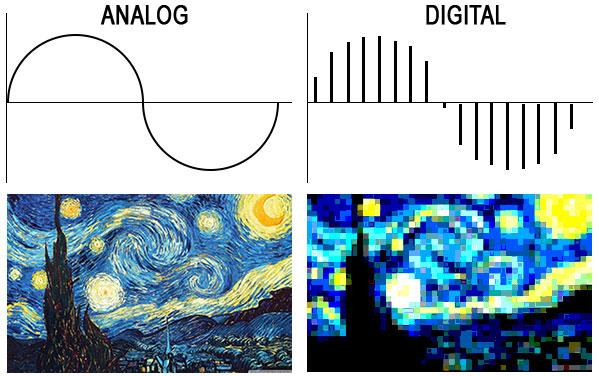
On the left an analog wave (a sine wave) in the time / amplitude domain and an image of Vincent Van Gogh’s “Starry Night” which, for our teaching purposes, we intend to be very high resolution. On the right, a quick reconstruction of the same sampled analog waveform and the same photograph reproduced with a much smaller number of pixels.

Well, if it were that simple, there wouldn’t be a bit of fun. Let’s go back to the diagram of the AD converter at the end of the previous article. Surely you have noticed that the first block through which our signal passes is the so-called “Anti-aliasing filter”, nothing less than a low pass filter.

Coooooooooooosaaaaaaaaaaaaaaaaaa !? Do we want to faithfully reproduce our signal in the digital domain and the first thing we do is pass it through a filter to change its frequency component (remove all components above a certain frequency)?

Yes my dear … you need to share a minimum (but I swear, a minimum) of signal theory to tell you a bit about the “Nyquist-Shannon Sampling Theorem” (for the “fetishists” – no offense, for course …. I am also part of it: of the mathematical treatment, take a look at the related Wikipedia page where you can find a good perspective), based on which, to sample an analog signal without loss of information (that is, to be able to re-enter it – then convert it DA – into the analog domain without “noticeable” differences compared to the original signal) it is necessary that the number of samples taken per second (the sampling frequency) is at least twice the maximum present frequency into the signal to be sampled, Therefore, it is worth introducing frequencies in the digital signal that do not exist in the original analog signal (the calls, and hence the filter name, alias frequencies).
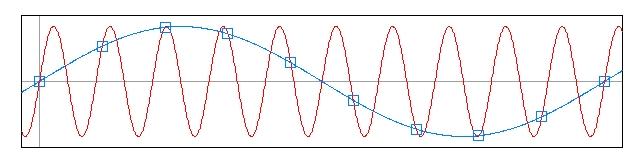
The aliasing phenomenon occurs because we do not have enough samples to describe the trend of the higher frequencies, which are therefore translated into the digital signal as lower frequencies, although nonexistent in the original signal. See this beautiful image always taken from the omniscient Wikipedia. In red the sinusoid sampled at intervals not sufficient to reconstruct it, and in blue the frequency alias (lower) that originates from the points we have taken.

La tasa de muestreo

Sampling rate

As we already know, the human ear is sensitive, at most (at an early age and in good hearing health), to frequencies around 20 KHz; In theory, our anti-aliasing filter should be set at 40,000 Hz and that should be our sample rate, but since it is practically impossible to build a filter with such a steep slope in analog, we opted for a filter with less steep slope and so both leaves the signal to sample frequencies slightly higher than 20,000 Hz (which we don’t hear, but there are), sampling at a slightly higher frequency. Therefore, the minimum sample rate used is equal to 44,100 samples per second.

Obviously, technological development and, nevertheless, the opinion and experience of many professionals (which I personally share very modestly) have in any case led to the awareness that, having set the minimum limit of 44,100 Hz (we will see later, it is the sampling frequency of the files that make up an audio CD), sampling at higher frequencies certainly leads to better results both from the point of view of signal manipulation (passing through a plug-in, the sum of two or more signals within a DAW, etc.) and from a listening point of view.

Later we will return to the topic, we will develop it further and we will begin to understand the logic with which the converter assigns a value in “machine language” to the different samples taken during the sampling phase.