Converting MP3 to WAV: A Technical Overview

Converting MP3 to WAV: A Technical Overview

MP3 to WAV
Mp3 to Wav

If you’re an audio geek, you might want to convert your MP3 files to WAV format to get a higher quality sound. Converting MP3 to WAV is a simple process, but it’s important to understand the technical differences between the two formats.

Mp3 to Wav
Mp3 to Wav

MP3 vs. WAV: What’s the Difference?

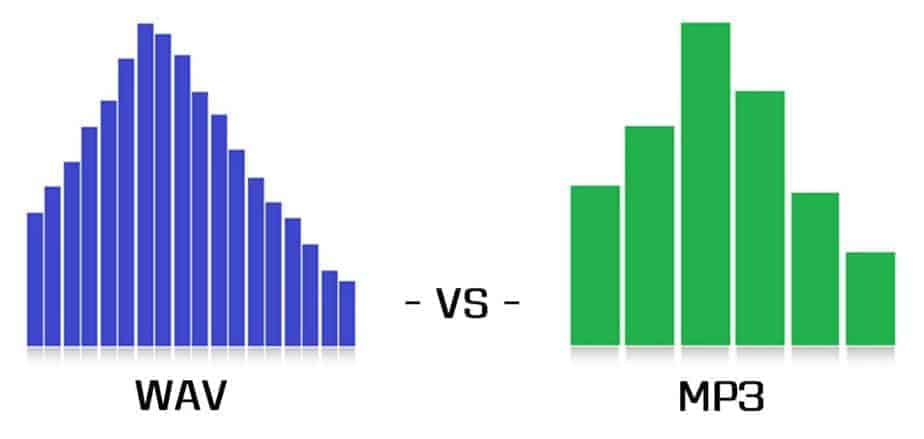
MP3 and WAV are both audio file formats, but they use different methods to compress and store audio data.

  • MP3: MP3 is a lossy audio compression format. This means that some audio data is lost during the compression process. MP3 files are smaller in size than WAV files, but they also have lower audio quality. MP3 files are popular for streaming and portable audio players because of their small file size.
  • WAV: WAV is a lossless audio format. This means that all audio data is preserved during the compression process. WAV files are larger in size than MP3 files, but they offer higher audio quality. WAV files are commonly used for professional audio editing and production.

Converting MP3 to WAV: The Technical Process

Converting MP3 to WAV involves decoding the MP3 data and re-encoding it in WAV format. Here’s a technical overview of the process:

  1. MP3 decoding: The MP3 data is read and decoded to raw audio data.
  2. Audio processing: The raw audio data is processed, including any required resampling, normalization, or filtering.
  3. WAV encoding: The processed audio data is encoded in WAV format.

Factors to Consider When Converting MP3 to WAV

When converting MP3 to WAV, there are several technical factors to consider:

  • Audio quality: The resulting WAV file will have higher audio quality than the original MP3, but the quality can still be affected by the initial MP3 compression and any subsequent processing.
  • File size: The resulting WAV file will be larger in size than the original MP3, which can affect storage and transfer.
  • Bit depth and sample rate: The bit depth and sample rate of the WAV file can affect its compatibility with different audio devices and software.

Conclusion

Converting MP3 to WAV can improve the audio quality of your files, but it’s important to understand the technical differences between the two formats. By considering factors like audio quality, file size, bit depth, and sample rate, you can ensure that your WAV files are optimized for your needs.

The History of WAV: From Cassette Tapes to Digital Audio

The WAV (Waveform Audio File Format) is a popular file format for storing and playing digital audio. But where did it come from, and how did it become so widely used?

The Early Days of Digital Audio

The history of the WAV file format goes back to the early days of digital audio. In the 1970s, digital recording technology was still in its infancy. Early digital audio systems used magnetic tape to store the digital audio data. This allowed the audio to be captured in a digital format, but the resulting files were quite large and difficult to work with.

In the 1980s, a new digital audio recording format was developed. Called the Digital Audio Tape (DAT), this new format used a rotating head to record and play back digital audio. DAT tapes were much smaller and more convenient than earlier magnetic tape formats, and they could store up to two hours of digital audio.

The Emergence of the WAV File Format

In the 1990s, personal computers became more powerful and began to include sound cards as standard equipment. This made it possible to record and play back digital audio on a computer. However, there were many different file formats for digital audio, and there was no standard format that could be used on all computers.

In response to this problem, Microsoft developed the WAV file format in 1991. The WAV format was designed to be a standard format for storing and playing digital audio on a computer. It was based on the Resource Interchange File Format (RIFF), a file format used for multimedia files.

The Advantages of the WAV File Format

One of the main advantages of the WAV file format is that it is an uncompressed format. This means that the audio data is stored in its original form, without any loss of quality. It is also a simple format, with a header that contains basic information about the audio file, such as its sample rate and bit depth.

The WAV format is also widely supported by audio software and hardware. This makes it a popular choice for professional audio production and editing. In addition, WAV files can be easily converted to other audio formats, such as MP3 or FLAC, without any loss of quality.

The Future of the WAV File Format

Today, the WAV file format is still widely used for digital audio recording and playback. However, new file formats, such as FLAC and ALAC, have emerged as alternatives to the WAV format. These formats offer better compression, which means that audio files can be stored in a smaller size without sacrificing quality.

Despite the competition from newer formats, the WAV format remains a popular choice for many professional audio producers and engineers. Its simplicity, uncompressed nature, and widespread support make it a reliable and flexible format for digital audio.

So there you have it, the history of the WAV file format. From its early days as a solution to the problems of early digital audio recording, to its current status as a popular choice for professional audio production, the WAV format has come a long way.

Comparison and implementation of MP3, WAV

Comparison and implementation of MP3, WAV

WAV vs MP3
WAV vs MP3

Sound has three elements: pitch, volume, and timbre:

WAV vs MP3
WAV vs MP3

Pitch is determined by the frequency of the sound wave, the higher the frequency, the higher the pitch.
The volume is determined by the amplitude of the sound wave, the larger the amplitude, the louder the sound.
The timbre is determined by the “shape” of the waveform (sounds like square, triangle, and sawtooth are called impulse waves and sound individual).
An audio file is a file obtained by converting an analog signal to a digital signal. In general, there are 5 important parameters: encoding method, number of channels, sampling rate, bit depth, and bit rate.

Encoding: how this format organizes binary data and how it is compressed.
Number of channels: mono, dual or 5.1 channels, etc.
Sampling rate: The number of samples per second.
Bit Depth: The number of binary bits used to store the y value of the sample point.
Bitrate – The desired number of bits per second for the file.
We know that there is no compression in the WAV format, so its encoding method is to directly write all the sampled points to the file in order.

WAV file size (B) = number of channels * sample rate (Hz) * bit depth (bit) / 8 + the file header size (B, it’s 44B)

Implementation
When you open an mp3 or wav file with a text editor, you see numbers like this:
4944 3303 0000 0000 3d48 5459 4552 0000
0006 0000 0032 3031 3800 5444 4154 0000
0006 0000 0032 3230 3300 5449 4d45 0000
0006 0000 0031 3430 3600 5052 4956 0000
168e 0000 584d 5000 3c3f 7870 6163 6b65
7420 6265 6769 6e3d 22ef bbbf 2220 6964
3d22 5735 4D30 4D70 4365 6869 487A 7265
537A 4E54 637A 6B63 3964 223F 3E0A 3A78
6D70 6D65 7461 2078 6D6C 6E78 3D22
6F62 653A 6574 612F
5249 4646 2e3d 0e05 5741 5645 666d 7420
1200 0000 0300 0200 44ac 0000 2062 0500
0800 2000 0000 6461 7461 a026 0e05 8089
00bc 00e8 f0bb c09e 8dbc 00c2 87bc 80f1
d3bc 8063 ccbc c030 fcbc 8012 f4bc 20bb
13bd e051 0fbd c0b0 2dbd 6079 28bd 4012
46bd 6032 40bd c0e3 5dbd 6040 57bd c015
7cbd e035 74bd b058 8dbd 50e2 88bd f0a7 9dbd e0dd 98bd 70d3 acbd e0a9 a7bd
d043 b8bd b0da b2bd
00e3 c4bd 605c bfbd
This one above is the mp3/wav format of the same song. What is the difference between them?

WAV
structure
file header
The WAV format follows the RIFF Resource Interchange File Format, so the WAV format is actually a three-layer relationship, which is simplified here. Its file header format is as follows:

Address Carving type content
00H-03H 4 character * 4 RIFF resource file exchange flag
04H-07H 4 unsigned int The number of bytes from the next address to the end of the file.
08H-0BH 4 character * 4 WAV file WAVE logo
0CH-0FH 4 character * 4 fmt wave file flag, the last digit is 0x20 space
10H-13H 4 unsigned int The size of the subchunk file header. For the WAV subfragment, the value is 0x10.
14H-15H 2 short unsigned Format type, when the value is 1, it means the data is linear PCM encoding
16H-17H 2 short unsigned number of channels
18H-1BH 4 int unsigned Sampling rate
1CH-1FH 4 int unsigned Wave file bytes per second = sample rate Bit depth PCM / 8 channels
20H-21H 2 short unsigned DATA data block unit length = number of channels * PCM bit depth / 8
22H-23H 2 short unsigned Bit depth PCM
24H-27H 4 character * 4 data stamp data
28H-2BH 4 unsigned int Total length of data part (bytes)
struct WAVHeader
{ char RIFF[ 4 ]; ///Resource file exchange flag RIFF unsigned LEN; ///Number of bytes from the next address to the end of the file char WAV[ 4 ]; ///WAV file flag WAVE char FMT [ 4 ]; ///Wave fmt file pointer, last digit is 0x20 space unsigned SubchunkSize; ///The size of the sub-chunk file header, for WAV this sub-chunk, the value is 0x10 DATATYPE short unsigned; / //Format type, when the value is 1, it means the data is unsigned linear PCM encoding short CH ; ///Number of unsigned channels F; ///Unsigned sample rate BYTERATE; ///Number of bytes per second of wave file = sample rate*PCM bit depth/8*Number of unsigned channels

short DATAUNITLEN; ///DATA block unit length=channel number*PCM bit depth/unsigned 8 short BITDEPTH; ///PCM bit depth character DATA[ 4 ]; ///Unsigned data mark data DATALEN ; ///Total data section length (bytes) };

Comparison and implementation of MP3, WAV

Comparison and implementation of MP3, WAV

WAV vs. MP3
WAV vs. MP3

An mp3 is 320kbps, 44100hz, what does this mean?

WAV vs. MP3
WAV vs. MP3

44100Hz represents the sample rate of the signal. The so-called sampling consists of obtaining the value y of the sound wave at the current moment every unit of time. Sampling is the process of discretizing continuous data (converting an analog signal to a digital signal).
image source

The sampling method mentioned above is called PCM (Pulse Code Modulation). According to the Nyquist-Shannon sampling law, the sampling rate must be at least twice the highest target frequency. The hearing range of the human ear is about 20Hz-20,000Hz (if you’re curious how loud you can hear, you can click here to test your ears), although recording software often has a 48,000 option Hz, but we can safely conclude: 44100Hz can meet almost all our needs, higher is just a waste of your memory and CPU. More than 48,000 samples are meaningless to the human ear, which is similar to 24 frames per second on a movie. 44100Hz happens to be the standard sample rate for almost all music released. In fact, for vocals and many instruments, high-frequency sounds are noise, so high sample rates can sometimes worsen sound quality (which is why we need to adjust the equalizer).

320kbps represents your bit rate/bit rate, which is short for kilobits per second, which represents the size of the data used to describe sound. In CD (uncompressed audio file), the bit rate is 1411.2 kbps, and the mp3 sound quality to achieve CD quality should be higher than 128 kbps / 44100 Hz (128 kbps can be said to be the most common bit rate). Generally, a higher number means better quality. The quality depends on many factors (such as the encoding algorithm). Many times we don’t need too high bitrate: our device can play mp3 and CD without difference (sound/sound card is normal).

A wav is 44100 Hz 16-bit stereo or 22050 Hz 8-bit mono, what does this mean? stereo/mono refers to dual/mono. For monophonic sound files, the sample data is an eight-bit short integer (short int 00H-FFH); for two-channel stereo sound files, each sample data is a 16-bit integer (int) and the upper eight bits (left channel) and lower eight bits (right channel) represent the two channels, respectively.

Sound is a mechanical wave, produced by the vibration of an object, and requires a medium to propagate. So, in essence, a sound is a waveform on an axis over time.

Mp3 Converter – mp3 to wav -mp3 to mp4

Mp3 Converter – mp3 to wav -mp3 to mp4

MP3 Converter
MP3 Converter

In addition to Mp4Gain’s well-known function of normalizing the volume of mp3s, another option is to convert any of the most popular formats into another. Even from video to audio and vice versa.

MP3 Converter
MP3 Converter

For many reasons we may want to have a file and want to convert it to another, in this case we refer to audio and video.

Perhaps the most common case, but not the only one, is that we can easily get the mp4 of almost any song from any era and from there we want to convert it into an mp3, flac, ogg, etc.

Mp4Gain is the ideal program for this purpose, converting audio and video files is something that is achieved very easily and with great quality.

Today that everything is multimedia and being able to manipulate these multimedia files by converting them, normalizing them, equalizing them, etc. It is an indispensable option in our time.

And of course, at the same time as the conversion from one format to another, we can do it and normalize the volume of the audio simultaneously, with which we will obtain a new format with quality, with the appropriate volume and in the format that we were wanting to have it.

Audio quality: Bitrate in MP3 files

In many cases, the term Bitrate is used, which is the bit rate per second that a multimedia file (Audio or Video) has. Currently the MP3 music format is one of the most widespread (Although there are currently other more current formats such as OGG Vorbis, AAC, Flac, Monkey Audio, …) however the audio quality is variable, this is due to the characteristics with which the MP3 in question has been compressed, including:

Mode: It can be of two types mainly:

Mono: With a single channel (The right and left channel go together, not separated which gives worse audio quality).

Stereo: Two channels (Right and Left, improve audio quality).
Sampling frequency: Audio CDs use 44,100 Hz (22,050 Hz per channel), although there are higher frequencies such as 48,000 Hz used in DVDs and lower, the higher the frequency, the higher the quality.

Bits: Audio CDs have 16 Bits (Although MP3 can be compressed at a lower quality such as 8 Bits).

Bitrate (Bit Rate per second): Audio CDs have about 1,400 Kbps (44100 Hz * 16 Bits * 2 channels), meaning that an Audio CD would have a bitrate of 1,400 Kbps (In MP3 format the maximum Bitrate is 320 Kbps, however, it is assumed that an MP3 with a 128 Kbps Bitrate has a quality similar to CD, although in many cases to achieve a quality similar to CD it is necessary to use a Bitrate of 192 Kbps, and to obtain CD quality it is necessary use 256 Kbps or 320 Kbps). Some of the most common Bitrates are:
8 Kbps Mono: Telephone Sound.
16 Kbps Mono: Better quality than shortwave.
32 Kbps Mono: Better quality than AM.
64 Kbps Stereo: Better quality than FM.
112 – 128 Kbps: Quality close to CD.
160 Kbps: Quality closer to CD.
192 Kbps: Virtually CD quality.
256 Kbps: Quality CD practically undisputed from an original CD.
320 Kbps: CD quality.

Coding method: It can be of two types:

VBR (Variable Bit Rate, Bit Rate Variable): Encodes the file in MP3 with a variable Bitrate.

CBR (Constant Bit Rate, Constant Bit Rate): Encodes the MP3 file with a fixed Bitrate.
In addition, another factor that influences the encoding of the MP3 file is the CODEC (Encoder-Decoder) used, one of the most common and the best result is LAME (Lame Ain’t an MP3 Encoder) which is also free.
One point to keep in mind is that if we recompress an MP3 file that originally has a 128 Kbps bitrate and convert them to 192 Kbps for example, audio quality is not really gained because the MP3 format has some quality loss (MP3 is a loss algorithm, also called lossy). which has occurred when converting the original file (Ex: CD Audio or a 320 Kbps MP3 to a 128 Kbps MP3) so this recompression does not make much sense since we will not gain in audio quality (As they say where there is no one can not get) and the only thing we will achieve in any case is to increase the initial size of the file.
The opposite case (Recompress a 320 Kbps MP3 file for example at 192 Kbps) if it makes some sense because in this case although we lose some audio quality we reduce the weight (Kilobytes or Megabytes) of each MP3 file somewhat.
In conclusion, it can be said that if we need to encode / compress an MP3 file with good quality, the “ideal” would be to do so:
To be able to start from an Audio CD, although an MP3 at 320 or 256 Kbps could also be valid for a recompression of the file.
In stereo mode (With two channels, right and left).
With at least 44100 Khz sampling rate and 16 Bits.
With a minimum bitrate of 192 Kbps or at most 256 Kbps (Using 320 Kbps would give higher quality but also increase the file size considerably).

Mp3 Patent: goodbye

The MP3 format that revolutionized the music industry is already free as the wind: goodbye to patents

When you download video on the internet sometimes you use AVI or MKV but do you know the differences between them? When you download video on the internet you sometimes use AVI or MKV but do you know the differences between them?


This was the first industry guy to realize that the MP3 they had rejected was killing them. This was the first industry guy to realize that the MP3 they had rejected was killing them.
Services like Spotify already have more customers than digital music buying Services like Spotify already have more customers than digital music buying

The MP3 format revolutionized the world of music. For better or worse, this audio coding format made it possible to listen to (and share) music through the Internet so that the entire industry ended up adopting this or other solutions to end up making the leap to a model in which the physical format gave prominence to downloads and streaming.

The technology, however, was subject to patents that were defended by Technicolor, but those patents – still valid for encoders, for example – expired on April 16, 2017 completely. The MP3 is now freer than ever.

Until never, MP3 patents

Those responsible for Fraunhofer IIS explained a few days ago how “on April 23, 2017, the Technicolor mp3 licensing program for certain Technicolor and Fraunhofer IIS patents and software related to the mp3 has expired.”

Fraun

In that message, all those who have licensed the technology were thanked for their support of a format that became the “defacto audio codec worldwide over the past two decades,” and highlighted that even with more efficient audio codecs, mp3 is still “very popular with consumers”. The success of MP3 was parallel to that of the legendary Winamp, the player that became that symbol of a change of air in the audio industry.

These patents have been very beneficial for their owners: it is estimated that thanks to them the Fraunhofer Society achieved revenues that reached 100 million euros in 2005. Those amounts of money made many others try to take a piece of that juicy cake, and the lawsuits and lawsuits surrounding who owned what in the MP3 segment have been frequent.

Linux distros, among the big winners

These alternatives still fail to undermine the popularity of the MP3 format, which for the purpose of patent validity can be used without restrictions in all types of scenarios.

Fedora
One of the best known cases was that of Linux distributions, in which we often found ourselves without native reproduction of MP3 content by those patents. In the Fedora documentation, for example, it was indicated how since October 11, 2016 this distribution could already include MP3 players since the patents for music reproduction had expired.

The encoding of MP3 files – creating them from a CD in Fedora, for example – was not “permissible because it requires proprietary technologies and the patent owner has not provided licenses compatible with Fedora requirements.” Neither Technicolor wanted to assign, nor Fedora (or any other distribution) to pay for those licenses.

It was possible to install a posteriori players that provided this option, but the developers of the distributions preferred to be cured in health in this section: now any “distro” may finally include native support for reproduction, but now also for coding.

The alternatives exist, but MP3 does not seem to lose strength

The MP3 format (MPEG-1 Layer 3) has undoubtedly been the “lost” audio format — we lose data in encoding — the most popular in history, but it is certainly not technically the best. The rise of the format and its deficiencies made in fact that many others tried to develop alternatives with which to conquer the market.

Mp31

Among these codecs is the AAC family of formats, which does not require the payment of licenses to stream or distribute content in that format. Of course, there are patents for the development of AAC codecs, which forces those who implement Open Source software that takes advantage of this format to distribute it only with the code, as in the case of the famous FFMpeg.