Audio (audio) compression comparison [mp3, wma, ogg, atrac]


Free Download Mp4Gain
picture

Audio (audio) compression comparison [mp3, wma, ogg, atrac]
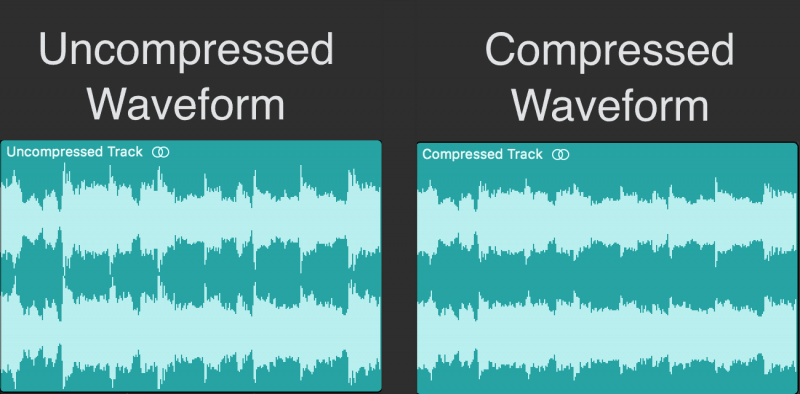
Compressed Audio

MP3-typed audio, etc., for storing music that was recorded on cassette tapes, music borrowed from CD rental shops or purchased music CDs, or for easy enjoyment with a portable player or car.
compressed audio

More and more people are recording with compression technology. However, there are many standards such as WMA recommended by Microsoft as well as MP3 when it comes to audio compression. Also, since the sound quality and compression rate of each standard change depending on the bit rate setting and the like, there is a wide variety of compression methods depending on the combination of the standard and the setting.

So, I wanted to check what the sound quality and file size would be when recording with which standard and with which settings, and select the standard that suits my purpose, so I took this survey. However, due to the investigation of the ideas of fans, the software and equipment used were covered by those that are freely obtainable in hand or on the net, so the result may be different from the original performance. , but it is only one. Take it as an example.
Since this test focuses on sound quality, it does not test at a low bit rate, which deteriorates sound quality.

Finally, in conducting this survey, I referenced many documents on the Internet. We would like to express our gratitude to each person (individual/corporation) for facilitating us to review materials that have been researched and created with considerable effort from their respective points of view. The sites I mainly referred to will be featured at the bottom of this page, so I recommend that those who are viewing this also take a look.

[Survey outline]
1. 1. Destination standards
As mentioned above, there are many audio compression standards, but here we have limited them to MP3, WMA, OGG, and ATRAC. The standards and reasons for the survey are shown below.

・MP3 ( Moving Picture Experts Group 1 Audio Layer – 3 )
I chose it because it is probably the best known and most popular standard and there are many compatible players for the same reason.

・WMA ( Windows Media Audio ) _ _
It is widely known alongside MP3. Recently, it has become compatible with car audio and DVD players. Also, according to a theory, the same bitrate is rumored to have higher sound quality and compression than MP3, so I chose it.

・OGG (Ogg Vorbis)
It may not be familiar to you yet, but although MP3 requires a license, the number of compatible players is gradually increasing due to the fact that it is unlicensed but offers high sound quality and high compression. Since it is (apparently) high-performance and license-free, it is easy to develop encoders and playback software, so we chose it with the expectation that it will spread in the future.

・ATRAC ( Advanced TR Transform Acoustic Coding ) _ _
This name may not be familiar to you, but you can understand the standard adopted by MD. Many people think that MD has the same high sound quality as CD, and since it is widely used as a storage medium for music, it was used as a reference for comparison.

・ Reason for not targeting other standards
There are many compression standards in addition to the above, but there are few compatible software and players, and considering the interaction with others (although I cannot say publicly), I judged that the comparison with the three types above is adequate. In addition, there is a standard called OpenMG (ATRAC3) recommended by SONY, etc., and there is no need to adopt other than SONY in mobile players, etc., but there are still few (limited) supported players, and recording is done. except for VAIO users, since it is difficult to do so, it was excluded from the target.

2. 2. Survey method
The three types of sounds selected for the survey were converted to various bit rates of each standard, visually compared to the original sounds, and listened to and evaluated. Also, I heard rumors that although the standard is the same, there are differences depending on the conversion software, so I used various types of software (encoder). the detail is just below.


Free Download Mp4Gain
picture


Mp4Gain Main Window
picture


Mp4Gain Features
picture


Free Download Mp4Gain
picture

What do the audio sample rates and sample sizes mean?

What do the audio sample rates and sample sizes mean?

The human hearing range

You can see that MP3 audio files have audio in the number of bits (in seconds) that the player uses, that is, the bit rate that indicates the quality of the audio.

human hearing range

But I am confused with the terms sample rate and sample size. Are they dependent on bit rate and sound quality? Or can it be explained in understandable terms?

This is a great article on the three terms you are asking. In summary, here are three definitions.

Bit rate: the amount of data per second. This can vary within the file (variable bit rate) and can have static values.
Sample Rate – The rate at which audio is measured per second. It is usually measured in kilohertz (kHz). The usual number you can see is 44.1 kHz. This is directly related to the bit depth or the number of bits measured in each cycle.
So at this point you need to do some math and you can see that the bitrate is in bits per second (usually measured in megabits per second). Therefore, bit rate = sample rate x bit depth. As far as I know, your sample size is just one of these 1-second chunks of data.

If you run pure math, you will find that these files are very large, but there are some compression algorithms that have been adopted to keep the files low without a significant loss of quality.

The sample size or bit depth is included, which is a measure of the number of bits in the sample, which is a direct quality measure. However, this only applies to PCM sampling. For irreversible formats like mp3, the sample size doesn’t really define the quality.

See Audio Bit Depth for more information.

1
2012/02/10Florist
Sample rate = There is no sample rate. Of audio samples transported per second

Sample size = The sample size determines the maximum dynamic range of a digitized sound. Dynamic range is the ratio of the maximum amplitude to the minimum non-zero amplitude of a signal, generally expressed in decibels (dB).

The sampling frequency affects the quality of the recorded sound. Therefore, a higher sample rate will improve the quality as the number of bits increases, but will require more data and result in larger files. The bit rate used to store the samples used to store the sampled data also affects the quality of the recording. Bit rate is the amount of space that can be used to store sampled data per second. The higher the bit rate, the better the sound, but more space is required to store the file.

Relationship between human audible range and sample rate

Relationship between human audible range and sample rate

Audio Sample Rate

The two main factors that indicate the performance of an audio interface are the number of sample bits and the sample rate.

sample rate

Of these, the number of sample bits is expressed as a numeric value, such as 16 bits or 24 bits, and last time I introduced that the dynamic range differs based on the difference in the number of sample bits. In other words, we have also used graphs to show that the difference in the number of bits is the precision with which very quiet sound can be expressed.
So what about the other sample rate? The sampling frequency is also called the sampling frequency, but the unit is usually kHz. The most commonly used are 32 kHz, 44.1 kHz, 48 kHz, and 96 kHz.
The Roland audio interfaces introduced last time, such as the UA-1X and UA-3FX, as well as the UA-1D and UA-20, are models that support 44.1 kHz and 48 kHz.

UA-1X dal_4007_s.jpg dal_4002_s.jpg UA-20
UX-1X UA-1D UA-3FX UA-20
As many of you will know, CDs, which can be said to be representative of digital audio, are compatible with 44.1 kHz and with 44.1 kHz, that clear sound can be expressed. But why is it 44.1 kHz? Here is a clear medical basis. It is the relationship with the human audible range, that is, the audible frequency band.
Generally, the highest pitch that can be expressed is said to be half the sample rate. In other words, 44.1 kHz is up to 22.05 kHz and 48 kHz is up to 24 kHz. On the other hand, the range that humans can hear is said to be 20 Hz to 20 kHz for healthy people. Therefore, according to the theory, recording of 20 kHz or more does not make sense because humans cannot perceive it. However, considering a small margin, it is the CD standard that can be expressed up to 22.05kHz. However, the reason it became a medium number like 44.1kHz is that when CD was standardized, the VTR was used for digital recording, and the TV’s horizontal and vertical sync signal was 44.1kHz., It is said which was by using it.

■ Can humans really detect sounds above 20 kHz?

However, if you can’t really hear more than 20 kHz, there is no point in picking up frequencies above that. But is that true?
The answer is clear from the appearance of DVD-Audio, which has a sound quality superior to that of CDs. Yes, it is certainly difficult to recognize 20 kHz or more as a single signal, but when signals of various frequencies, such as music, are expressed in an overlapping way, the atmosphere of the sound that can be heard depends on whether 20 kHz or more is being output. o No. It makes a difference. When I listen to a CD and an analog record, sometimes I feel that the sound of the record is better, but it can also be said that this is the result of not setting an upper limit on the frequency in the case of analogs.
Here, let’s experiment a bit to see if it is true that “the highest pitch that can be expressed is half the sample rate.”

48 kHz 96 kHz 48 kHz 96 kHz
White noise expressed at a sampling frequency of 48 kHz (left) and a sampling frequency of 96 kHz (right). In the case of 48 kHz, the sound is output only up to about 24 kHz, but in the case of 96 kHz, all the sound is output flat. In the two graphs above, the horizontal axis was only up to 48kHz, so it looked completely flat at 96kHz, but when the horizontal axis is up to 96kHz and expressed in exponential notation, it is 48k, which is almost the same as the theoretical . value. You can see exactly what comes out.
The graph shown here shows the extent to which frequency is expressed by creating white noise that mixes evenly from low to loud sounds at 48 kHz and 96 kHz. If you look at this, you can see that the 48 kHz sample rate is up to about 24 kHz and the 96 kHz sample rate is up to 48 kHz. However, the two charts on the right side have an index on the horizontal axis, so it might not seem like much of a difference, but it does have a double number range.
You can say that this is the difference between 48kHz and 96kHz.

■ If you want to make a CD last, do you need 24-bit / 96 kHz specifications?

By the way, some people may have some doubts about the story so far? Yes, I would like to digitally record analog recordings and tapes and eventually convert them to a CD, but if the CD itself is 16-bit / 44.1 kHz, the specs, such as 24-bit / 96 kHz, are above spec. Is it unnecessary?
It certainly may not be necessary if you burn the recording as is to CD without any processing.

What is Sample Rate and Bit Rate Depth?

What is Sample Rate and Bit Rate Depth?

Audio Compression

Both image and video data have some numerical values ​​related to image quality, such as the number of pixels, the number of colors that can be expressed, and the number of frames per second in the case of video.

Audio Compression

Similarly, audio data also has two numerical values ​​related to sound quality, which are the sample rate and the bit rate. I do not understand the difficulty in either case, but I am sure I am not mistaken, so I will write about these two today.

Sampling rate
Let’s start with the sample rate.

Simply put, the sample rate is a numerical value that indicates “how loud the sound is recorded.” For some reason, when the sampling frequency is 44.1 kHz, it is not possible to record up to 44.1 kHz and it seems that it is possible to record up to about 22 kHz. Remember that you register up to half the frequency. If you’re wondering why that happens, google it (laughs).

It seems to have an effect on the sound of musical instruments that produce a crisp sound like cymbals, but I have never bothered to change the sample rate under the same conditions and compare them, so the amount of sound depends on the frequency of sampling. It is unknown if it will change. In professional environments, it is often recorded at 48 kHz. On rare occasions, the sample rate changes the sound quality, and some teachers boast that they can tell the difference. You seem to understand something. I would love to take a blind test, but I don’t have free time to go out with me.

Bit rate depth
This is a numerical representation of “how low a sound can be picked up (small change in volume)”. This can be a bit difficult to imagine.

The higher the bit rate, the smoother the waveform lines will be as the sound rises and falls, and the lower the depth of the bit rate, the rougher it becomes.

There are two options, 16-bit or 24-bit. There are also 32 bits at the moment.

Bitrate is likely to make a difference when recording percussion instruments such as drums (instruments with extremely loud volume). Some engineers record in 16-bit from scratch because the sound impression changes when 24-bit drum sound is converted to 16-bit for burning to CD. Unlike the sample rate, this is quite different.

Personal feeling about sample rate and bit rate.
First of all, the sound quality of commonly sold CDs is 16-bit at 44.1 kHz. And, in the professional field, it is often recorded at 24 bits and 48 kHz (which is called Neyonyonpachi). And the human audible range is said to be up to 20 kHz.

With that in mind, it is honestly ridiculous to see and hear something like “This audio interface supports up to XXkHz, so the sound is good …”. Just record at 2448. And there should hardly be any current audio interface model that doesn’t support 2448.

There are audio interfaces that support 192 kHz, but I honestly doubt the idea that the higher the sample rate, the better the sound quality. The basis of recording is to record the desired sound as loud as possible. To record sounds that are far from the human audible range, reducing the proportion of sounds that we really want (of course, sounds that can be heard by the human ear) is what we call high-quality sound. First of all, I think that high frequency sound is nothing more than noise like white noise. If you think that those high frequency sounds are generated by playing musical instruments, it means that the same or louder sounds are generated from fluorescent lamps and all machines, and those sounds are also recorded.

Data lost due to compression is irreversible Part 2

Data lost due to compression is irreversible Part 2


audio compression

[Quantization bit number (bit depth)]

Audio Compression

◉ Unit: bit
◉ Audio: Resolution related to volume. The higher the value, the more faithfully the quiet sound can be reproduced and the wider the theoretical dynamic range (ratio of the maximum and minimum volume values). 16-bit, 24-bit, and 32-bit floats are used primarily in production.
◉ If you compare it with the video …: Conceptually, it corresponds to the number of gradation bits. In terms of feel, it is almost the same as the dynamic range of the video. The wider the range, the greater the gradation possible without overexposure and underexposure.
◉ Remarks: There is no concept of the amount of quantization bits in compression formats such as MP3.
◉ Image of the number of quantization bits

When a square is cut on the vertical (volume) axis, the volume change less than one step cannot be reproduced, resulting in noise. In other words, the finer the squares, the more accurately the low volume can be reproduced. The actual number of steps in the number of bits in common use is as follows.

・ 16 bits → 65,536 steps

・ 24 bit → 16,777,216 steps

It can be seen that the 24-bit, which is said to be high-resolution, can reproduce the volume change much more accurately than the CD-quality 16-bit. In other words, 24-bit has a “wider dynamic range” than 16-bit.

[Sampling frequency]
◉ Unit: Hz
◉ Audio: Temporal resolution. Involved in the reproducible frequency range. If the frequency is low, the treble range will not be reproduced correctly. As the frequency increases, it is possible to reproduce frequencies above the audible range. Those used primarily in production are 44.1 kHz, 48 kHz, 96 kHz, and 192 kHz.
◉ If you compare it to video …: In terms of temporal resolution, it is equivalent to frame rate. The higher the speed, the smoother the video will be (in the case of sound, it is perceived as treble reproducibility rather than smoothness).
◉ Remarks: The upper limit of the frequency that can actually be reproduced is half the frequency. For example, if the speed is 96 kHz, it can be played up to
48 kHz ◉ Explanatory sampling frequency diagram

If you compare it to a video, you may understand it in some way. As of 2018, I think the lowest line quality that can be used regularly is the “16 bit / 44.1 kHz” used by CDs. If each value gets lower than this, it will collapse more and more so that it can be heard. If the number of bits is small, small sounds are converted to noise, and if the sampling frequency is small, the aliasing noise (noise that is inevitably generated by digitization. Moiré sound phenomenon) falls into the audible range and is comes back jarring. And note that half the value of the sample rate is the upper limit of the actual recorded / played rate. In other words, in the case of “44.1 kHz”, the actual recording / playback is up to about 22 kHz. The human audible range is said to be 20Hz to 20kHz, so that’s a sufficient value in terms of specs. By setting the sample rate to twice the upper limit of this audible range, overlapping noise is removed from the audible range, and by cutting it with a digital filter, jarring noise, which is CD quality, is removed. From this, you can see that “16 bit / 44.1 kHz” is the lowest line.

The master file
must be of high quality

That said, it’s hard to understand how sound quality changes at low bits and low sample rates without actually experiencing it.

Data lost due to compression is irreversible

Data lost due to compression is irreversible

Audio Compression

In this series, we will focus on the basic knowledge about “sound” that is necessary for video production, and we will make it easy to understand by omitting small and difficult things as much as possible, such as a little general knowledge and sound, including music. . I look forward to delivering it, so I look forward to working with you!

Audio Compression

Now, let’s talk about the first memorable event under the name [Digital Audio Basics]. There are several types of digital audio. Among them, I have summarized the main ones.

[Format types and functions]
◉ Uncompressed format: linear PCM (WAV, BWF, AIFF)
→ The most basic format for digital audio. BWF is a commercial WAV that can contain metadata.

◉ Lossy compression format: P3, AAC (MP4), MQA, etc.
→ Format used mainly for general purposes. In many cases, the information in the uncompressed data is shrunk and compressed. The data capacity is reduced, but the sound quality also deteriorates accordingly. MQA is a new format that is irreversible in terms of data, but reversible in terms of sound quality.

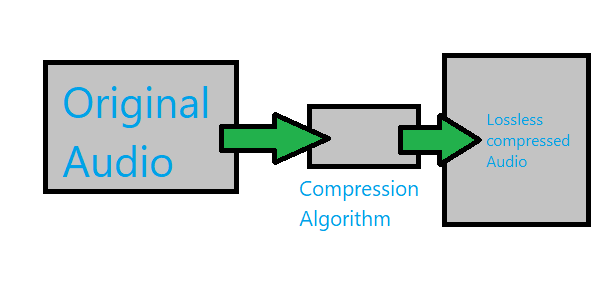
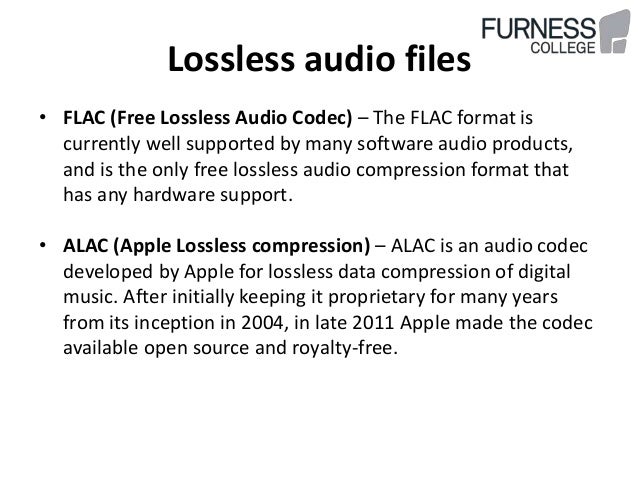
◉ Lossless compression format: FLAC, ALAC, etc.
→ Format mainly used for high-quality listening. It has the reversibility of being able to reproduce exactly the same sound quality as before compression, but the data capacity is not that small.

◉ Others: DSD (DSF, DSDIFF, etc.)
→ It is also called 1-bit audio, but since the concept is fundamentally different from multi-bit audio like linear PCM, it can be compared to “24bit” WAV, etc. in the same line I have not. Currently, it is one of the highest quality formats, but it has the weakness of not being editable.

How is it? I think there are several things, from the familiar ones to the ones you see for the first time, but among them, the one that is most suitable for today’s video production is “Linear PCM”! The reason is as follows.

1. Since it is an uncompressed format, it has excellent sound quality.

2. You can edit like cut and paste.

3. The digital voice tracker is the most popular Ma ‘around the world because the bet, any device, can be managed by software.

Since MP3 and AAC (MP4) are compressed formats, there is a considerable loss in sound quality. Depending on the compression ratio, it may not be obvious at first glance, but it is not suitable as processing-based material such as video production and music production. FLAC and ALAC are lossless compression formats that do not deteriorate sound quality, but do not significantly reduce capacity, and there is no software that can be edited natively (without conversion to other formats), so it is still unsuitable for the production. . DSD was adopted from SACD which appeared in 1999, and is said to be the most analog digital audio today, and it has a smooth texture that is different from linear PCM in terms of sound quality. This format has finally attracted attention in recent years, but due to its mechanism, it has the weakness that it cannot be edited as is, so on the production site, mainly one-shot music recording (recording without editing) and mixing (long-playing recording without editing) and mixing (often used as a master recorder when combining multiple sounds into one stereo or surround sound (also called track down). “Almost Ichi 択 linear PCM” video production, I think I could understand that you can refer to. Of course, if the compressed format does not make you uncomfortable, you can use it, but consider it as an emergency. If you still want quality, you must use linear PCM. The data lost by compression is irreversible. The file that will be the master of the work must be of the highest possible quality. By the way, whether you use WAV or AIFF, the sound quality is almost the same. However, co Considering compatibility, even Mac users can be relieved to use WAV for data transfer.

“16 bit / 44.1 kHz” is
the lowest line of CD quality

Now let’s dive a little deeper into linear PCM. There are “number of quantization bits” (bit depth) and “sample rate” (sample rate) that represent linear PCM specifications. Have you ever seen the notation “16 bit / 44.1 kHz”? This means that the original (analog) audio is sampled (digitized) 44,100 times per second at the 16-bit volume stage (2 raised to 16 = 65,536)! Still, I think it’s “what is this?”, So I tried to sum up the points by comparing it to the video!

Audio and video analogic & digital

Audio and video analogic & digital

Lossless and Lossy audio compression

The appearance of multimedia systems, of course, brought about revolutionary changes in areas such as education, computer training, in many areas of professional activity, science, art, computer games, etc. But, you must agree, it is impossible to imagine the modern. multimedia systems without sound or video. In this work, I would like to dwell on the consideration of the fundamental differences in the representation of digital signals from analog, the characteristics of digital audio and video information, their compression algorithms (compression).

Lossy, and Lossless compression

2. Differences between the digital representation of analog signals.

The traditional analog representation of signals is based on the similarity (similarity) of electrical signals (current and voltage changes) with the original signals represented by them (sound pressure, temperature, speed, etc.), as well as on the similarity of electrical signals. signal forms at various points in the transmission or amplification path. The shape of the electrical curve that describes (also called transfer) the original signal is as close as possible to the shape of the curve of this signal.

Such a representation is the most accurate, however, the slightest distortion of the shape of the electrical carrier signal will inevitably involve the same distortion of the shape and signal of the carrier. In terms of information theory, the amount of information in the carrier signal is exactly equal to the amount of information in the original signal, and the electrical representation does not contain redundancy that could protect the carried signal from distortion during storage, transmission. and amplification.

The digital representation of electrical signals is designed to add redundancy to avoid unwanted interference. For this, serious restrictions are imposed on the carrier electrical signal: its amplitude can take only two limit values: 0 and 1.

In this case, the entire zone of possible amplitudes is divided into three zones: the lower one represents zero values, the upper one, individual, and the middle one is prohibited, only interferences can enter. Therefore, any interference, the amplitude of which is less than half the amplitude of the carrier signal, does not affect the correct transmission of the values ​​0 and 1. Interference with a higher amplitude also does not affect whether the duration of the interference pulse is significantly shorter than the duration of the information pulse, and a filter is installed at the pulse noise input of the receiver.

The digital signal formed in this way can carry any useful information that is encoded in the form of a sequence of bits: zeros and ones; Electrical and sound signals are a special case of such information. Here, the amount of information in the digital carrier signal is much greater than in the original encoded signal, so that the carrier signal has some redundancy with respect to the original, and any distortion in the waveform of the carrier signal, which it still retains the ability of the receiver to correctly distinguish between zeros and ones, it does not affect the reliability of the signal transmitted by this information signal. However, in the case of significant interference, the shape of the signal can become so distorted that the precise transmission of the information being carried becomes impossible: errors appear in it, which, with a simple coding method, the receiver does not you can only correct, but also detect. To further increase the resistance of a digital signal to interference and distortion, two types of redundant digital coding are used: verification codes (EDC – Error Detection Code) and correction (ECC – Error Correction Code) . Digital encoding is simply adding extra bits to the original information and / or converting the original bit string into a longer string and other structure. EDC allows you to simply detect the fact of an error: a distortion or loss of a useful one or the appearance of a false digit, but the information transferred in this case is also distorted; ECC allows you to immediately correct detected errors, keeping the information that is transferred unchanged.

Each type of EDC / ECC has its own capacity limit to detect and correct errors, after which undetected errors and distortions of the information being transferred start anew. An increase in the amount of EDC / ECC relative to the amount of initial information generally increases the detection and correction capabilities of these codes.

Like EDC, the popular cyclic redundancy code CRC (Cyclic Redundancy Check), whose essence is the complex mixture of the initial information in the block and the formation of short binary words, whose bits have u

Audio compression algorithms for streaming purposes

Audio compression algorithms for streaming purposes.

Lossy, and Lossless compression

The problem of transmitting the necessary number of audio channels through a network of limited capacity forces us to resort to audio compression.

Lossy and Lossless ata compresion in digital audio

Despite the use of modern digital technologies, compression negatively affects sound quality and causes additional delay in signal transmission.

Currently, there are two fundamentally different approaches to compressing audio signals. This article will provide a general comparison between these two different compression principles. Also presented are graphs of the frequency response (amplitude frequency characteristic) of the sound sample in its original uncompressed form and after one cycle of encoding and decoding using MPEG Layer II and Enhanced apt-X.

Algorithms like MPEG and AAC use encoding using a psychoacoustic model of sound perception. Another approach is time encoding using Adaptive Differential PCM (ADPCM) in algorithms like Enhanced apt-X.

Linear PCM audio
Before compression, the audio is generally digitized in linear PCM format at 32 kHz, 44.1 or 48 kHz with a resolution of 16 or 24 bits.

The analog signal will be digitized in uncompressed digital PCM. The digital inputs of the codecs use oversampling to ensure conversion without timing issues. The uncompressed PCM signal is our benchmark for comparing compressed audio files.

MPEG Layer ll compression
MPEG 1 Layer ll is a widely used format. This is a typical example of a psychoacoustic perception coding algorithm that analyzes the incoming signal and compares it to a theoretical model to determine what frequency and what time domain information can be lost. The need to analyze the audio signal results in a mandatory delay, typically greater than 30 ms.

In theory, high compression ratios can be achieved, but even with relatively low compression, MPEG can seriously degrade audio quality. In Fig. 2 shows the frequency response after one pass of MPEG encoding of the source file.

Be aware of frequencies that are lost or distorted compared to original PCM audio.

Compression Enhanced Apt-X
Enhanced apt-X uses ADPCM audio processing technology. The signal is divided into four frequency bands that can be processed at a quarter of the original sample rate using a variable bit rate and variable quantization step. Since all processing is based on the time domain method, there is no delay other than the actual processing time required.

As a result, a 4: 1 compression ratio preserves the entire frequency content of the original signal with a coding delay of less than 3 ms. Frequency response graph in Fig. 3 shows the result of one pass encoding / decoding using Enhanced apt-X at 256 kbps and illustrates the high fidelity of Enhanced apt-X compared to the original uncompressed signal.

How Enhanced apt-X Works
The improved apt-X encoding algorithm passes the original PCM data through a specially designed two-stage Q-mirror filter to divide the signal into four subbands and reduce the clock frequency to 1/4 of the original clock frequency. The quantization procedure consists of processing four sub-signals to reduce each signal from 16 bits to 7 bits in subband 1, 4 bits in subband 2, 3 bits in subband 3 and 2 in subband 4.

The inverse quantizer and prediction scheme uses the above values ​​to predict the size of the next signal. This value is compared to the actual signal and the “difference” is measured. The encoder transmits this measured “difference” signal to the decoder. Each subband is processed in parallel and the output of the string quantizer and predictor is encoded with a predetermined resolution. The processing output of the four subbands is multiplexed into a single 16- or 24-bit enhanced apt-X signal. Then additional data and sync data is added to it for streaming.

What is digital audio data compression?

What is digital audio data compression?

lossless and lossy compression

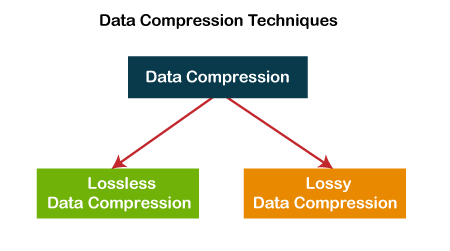
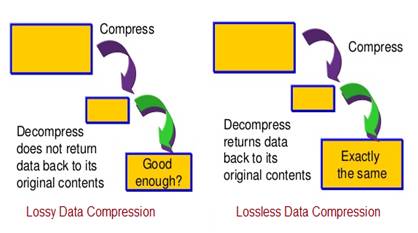
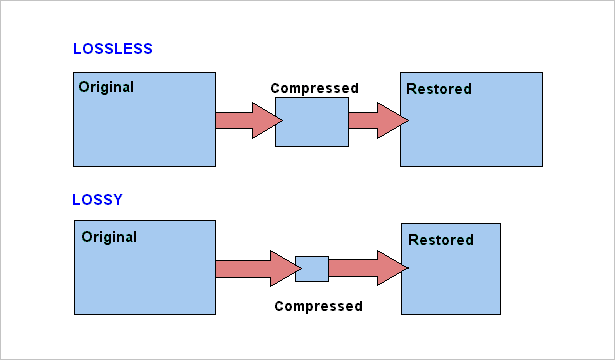
It could be said that there are two methods with which it is possible to compress the data in the case of digital audio.

lossless lossy compression

On the one hand, the method known as lossy compression is intended to reduce psychoacoustic redundancy and the other method is to reduce statistical redundancy. And this is known as lossless compression.

Lossless compression

Many people wonder how lossless compression can be achieved.
The Huffman code takes into account the probability that levels of different magnitudes will appear, for example, the most probable values ​​to appear frequently are assigned shorter codes and, on the other hand, the values ​​whose probability of appearance is small are assigned they use longer code words.

If we think about it, we will realize that by replacing the signal values ​​that will appear very frequently with shorter words, this will save us space but it does not imply any loss of quality because no information is being discarded.

If we put an example perhaps very simplified to be able to explain this method, we could imagine that we are going to compress a text. Now suppose this text contains some words that may be repeated very frequently.
For this explanation suppose that our text contains the word “statistically” many times and suppose that we substitute 3 characters for it: xx ÷.
So in each place where the word “statistically” should appear, we will replace it with the characters “xx ÷” And if this word appears enough times we will reduce the size of the text.
If we do this with each of the words that will appear several times, we will be able to make a significant reduction of the text without having to discard any information.

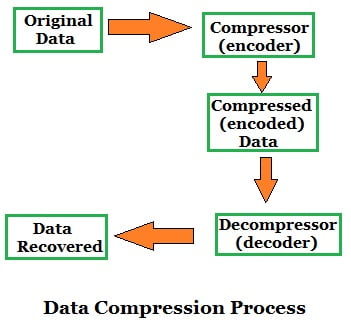
Therefore, when we rebuild or decompress our file, we will obtain a file exactly the same as the initial one, without any loss.

The other method where if there is a loss what is sought is to discard what is audio information the ear cannot distinguish, for example in the masking effect.
This masking what happens in our ears due to the imperfection of the human ear, supposes that two sounds do occur at approximately the same moment And these sounds have a close frequency But one of them has a much higher volume, the ear will only perceive the one who has higher volume and the one with the lowest volume will not perceive. Therefore, it can be discarded and the human ear will not perceive the difference.

This type of compression does use the technique of discarding information, which is why the resulting file has some information loss.

In general terms, today those systems that act without loss of information are being highly valued.

Lossless Audio Compression Part 3

Lossless Audio Compression Part 3

Lossless Audio compression

An overview of the most common audio codecs.

lossless audio

DVD Audio adopts the MLP lossless data compression algorithm developed by Meridian. And SACD is used, unlike other formats. Three ways to encode audio. Macromedia Flash Professional 8. We study both formats with lossless compression and lossy compression of mp3 and the like, based on human quirks. AllFrets audio file formats. Inverse Fourier transform for real sounds without loss of quality of psychoacoustics used in lossy audio compression algorithms. Lossy Audio – Lossy Format – What You Need To Know. Lossless compression from a perceptual point of view. Facts Well, in terms of sound, nothing better than the old and well-known MP3 has been invented. Then. Methods of compression of images, audio signals and educational video. The lossless compression algorithm for integer data, the Salomon D values, is considered.

Lossless Audio Compression Knowledge Map.
Lossless Audio Converter converts from one lossless audio compression format to another. FLAC, ALAC, WMA Lossless, WAV, APE are supported. Lossless audio codec TTA Compression theory Tau projects. The most common lossless compression formats are: Free Lossless Audio Codec FLAC, Apple Lossless, MPEG 4 ALS ,. Multimedia technologies in CAD. Part II: Tutorial. Powerful lossless compression algorithm. A rare branch of this type of algorithm. Lossless audio encoding zi p. A brief description is given. Understand lossless audio conversion and decompression. There are two main types of compression: lossless compression and lossy compression. The most famous compression format is c.

Recommendations for using the mp3 compression standard.
Examples of lossy and lossless compression algorithms and data formats are given for transferring text, audio and video information. Text. Audio compression format MP3 Helpix.Org. Remember that along with digital sound there is analog sound or graphic files, the audio signal cannot be compressed without loss of compression based on removing unnecessary sounds from the music file.

Lossless audio compression.
A set of transformations that efficiently compress the audio data with the possibility of full recovery.  The block statistics for each data block are calculated separately and added to the most compressed block. Lossless audio compression C. Lossless data compression eng. Lossless data compression is a class of data compression algorithms for video, audio, graphics, and documents presented in.

Useful Information Lossless formats for Cinetec kettles.
Free Lossless Audio Codec Free Lossless Audio Codec is a popular free codec for audio compression. Unlike lossy codecs. Sound compression life prog. This method is the opposite of lossless audio compression used for formats like FLAC, ALAC, and others.

Files with Hi Fi sound.
What are the ways to store lossless audio? Which lossy compression format is better to use: mp3, LQT, WMA, MP, ogg vorbis…. Lossless information compression. First part Habr Habr. Lossless: FLAC, ALAC, WAV Lossy: MP3, AAC, OGG, WMA. Compressed audio storage formats: MP3, AAC, OGG and others. Lossless format what is it? High quality music c. Lossless Audio Compression A set of transforms that allow you to compress efficiently. Visit the site for more information. Is there a difference between MP3, AAC, FLAC and. Lossless audio files are usually larger, the definition of the concept is derived from the name – uncompressed raw data.

Digital Audio Compression Methods from the Academy of Digital Music.
FLAC is possibly the most popular lossless audio compression format. FLAC. FLAC format. Free lossless audio codec. LossyWAV. Audio compression: 6.4. Well established methods. Lossy compression is mainly used for JPEG graphics, MP3 audio, MPEG video, that is, where, due to the huge file sizes, the degree.