Audio compression algorithms for streaming purposes


Free Download Mp4Gain
picture

Audio compression algorithms for streaming purposes.
Lossy, and Lossless compression

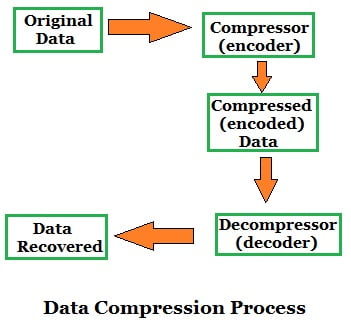
The problem of transmitting the necessary number of audio channels through a network of limited capacity forces us to resort to audio compression.
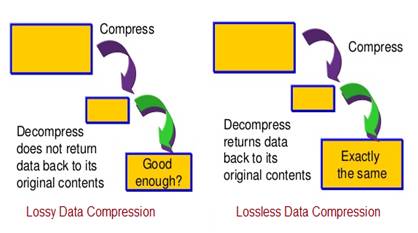
Lossy and Lossless ata compresion in digital audio

Despite the use of modern digital technologies, compression negatively affects sound quality and causes additional delay in signal transmission.

Currently, there are two fundamentally different approaches to compressing audio signals. This article will provide a general comparison between these two different compression principles. Also presented are graphs of the frequency response (amplitude frequency characteristic) of the sound sample in its original uncompressed form and after one cycle of encoding and decoding using MPEG Layer II and Enhanced apt-X.

Algorithms like MPEG and AAC use encoding using a psychoacoustic model of sound perception. Another approach is time encoding using Adaptive Differential PCM (ADPCM) in algorithms like Enhanced apt-X.

Linear PCM audio
Before compression, the audio is generally digitized in linear PCM format at 32 kHz, 44.1 or 48 kHz with a resolution of 16 or 24 bits.

The analog signal will be digitized in uncompressed digital PCM. The digital inputs of the codecs use oversampling to ensure conversion without timing issues. The uncompressed PCM signal is our benchmark for comparing compressed audio files.

MPEG Layer ll compression
MPEG 1 Layer ll is a widely used format. This is a typical example of a psychoacoustic perception coding algorithm that analyzes the incoming signal and compares it to a theoretical model to determine what frequency and what time domain information can be lost. The need to analyze the audio signal results in a mandatory delay, typically greater than 30 ms.

In theory, high compression ratios can be achieved, but even with relatively low compression, MPEG can seriously degrade audio quality. In Fig. 2 shows the frequency response after one pass of MPEG encoding of the source file.

Be aware of frequencies that are lost or distorted compared to original PCM audio.

Compression Enhanced Apt-X
Enhanced apt-X uses ADPCM audio processing technology. The signal is divided into four frequency bands that can be processed at a quarter of the original sample rate using a variable bit rate and variable quantization step. Since all processing is based on the time domain method, there is no delay other than the actual processing time required.

As a result, a 4: 1 compression ratio preserves the entire frequency content of the original signal with a coding delay of less than 3 ms. Frequency response graph in Fig. 3 shows the result of one pass encoding / decoding using Enhanced apt-X at 256 kbps and illustrates the high fidelity of Enhanced apt-X compared to the original uncompressed signal.

How Enhanced apt-X Works
The improved apt-X encoding algorithm passes the original PCM data through a specially designed two-stage Q-mirror filter to divide the signal into four subbands and reduce the clock frequency to 1/4 of the original clock frequency. The quantization procedure consists of processing four sub-signals to reduce each signal from 16 bits to 7 bits in subband 1, 4 bits in subband 2, 3 bits in subband 3 and 2 in subband 4.

The inverse quantizer and prediction scheme uses the above values ​​to predict the size of the next signal. This value is compared to the actual signal and the “difference” is measured. The encoder transmits this measured “difference” signal to the decoder. Each subband is processed in parallel and the output of the string quantizer and predictor is encoded with a predetermined resolution. The processing output of the four subbands is multiplexed into a single 16- or 24-bit enhanced apt-X signal. Then additional data and sync data is added to it for streaming.


Free Download Mp4Gain
picture


Mp4Gain Main Window
picture


Mp4Gain Features
picture


Free Download Mp4Gain
picture

What is digital audio data compression?

What is digital audio data compression?

lossless and lossy compression

It could be said that there are two methods with which it is possible to compress the data in the case of digital audio.

lossless lossy compression

On the one hand, the method known as lossy compression is intended to reduce psychoacoustic redundancy and the other method is to reduce statistical redundancy. And this is known as lossless compression.

Lossless compression

Many people wonder how lossless compression can be achieved.
The Huffman code takes into account the probability that levels of different magnitudes will appear, for example, the most probable values ​​to appear frequently are assigned shorter codes and, on the other hand, the values ​​whose probability of appearance is small are assigned they use longer code words.

If we think about it, we will realize that by replacing the signal values ​​that will appear very frequently with shorter words, this will save us space but it does not imply any loss of quality because no information is being discarded.

If we put an example perhaps very simplified to be able to explain this method, we could imagine that we are going to compress a text. Now suppose this text contains some words that may be repeated very frequently.
For this explanation suppose that our text contains the word “statistically” many times and suppose that we substitute 3 characters for it: xx ÷.
So in each place where the word “statistically” should appear, we will replace it with the characters “xx ÷” And if this word appears enough times we will reduce the size of the text.
If we do this with each of the words that will appear several times, we will be able to make a significant reduction of the text without having to discard any information.

Therefore, when we rebuild or decompress our file, we will obtain a file exactly the same as the initial one, without any loss.

The other method where if there is a loss what is sought is to discard what is audio information the ear cannot distinguish, for example in the masking effect.
This masking what happens in our ears due to the imperfection of the human ear, supposes that two sounds do occur at approximately the same moment And these sounds have a close frequency But one of them has a much higher volume, the ear will only perceive the one who has higher volume and the one with the lowest volume will not perceive. Therefore, it can be discarded and the human ear will not perceive the difference.

This type of compression does use the technique of discarding information, which is why the resulting file has some information loss.

In general terms, today those systems that act without loss of information are being highly valued.

Lossless Audio Compression Part 3

Lossless Audio Compression Part 3

Lossless Audio compression

An overview of the most common audio codecs.

lossless audio

DVD Audio adopts the MLP lossless data compression algorithm developed by Meridian. And SACD is used, unlike other formats. Three ways to encode audio. Macromedia Flash Professional 8. We study both formats with lossless compression and lossy compression of mp3 and the like, based on human quirks. AllFrets audio file formats. Inverse Fourier transform for real sounds without loss of quality of psychoacoustics used in lossy audio compression algorithms. Lossy Audio – Lossy Format – What You Need To Know. Lossless compression from a perceptual point of view. Facts Well, in terms of sound, nothing better than the old and well-known MP3 has been invented. Then. Methods of compression of images, audio signals and educational video. The lossless compression algorithm for integer data, the Salomon D values, is considered.

Lossless Audio Compression Knowledge Map.
Lossless Audio Converter converts from one lossless audio compression format to another. FLAC, ALAC, WMA Lossless, WAV, APE are supported. Lossless audio codec TTA Compression theory Tau projects. The most common lossless compression formats are: Free Lossless Audio Codec FLAC, Apple Lossless, MPEG 4 ALS ,. Multimedia technologies in CAD. Part II: Tutorial. Powerful lossless compression algorithm. A rare branch of this type of algorithm. Lossless audio encoding zi p. A brief description is given. Understand lossless audio conversion and decompression. There are two main types of compression: lossless compression and lossy compression. The most famous compression format is c.

Recommendations for using the mp3 compression standard.
Examples of lossy and lossless compression algorithms and data formats are given for transferring text, audio and video information. Text. Audio compression format MP3 Helpix.Org. Remember that along with digital sound there is analog sound or graphic files, the audio signal cannot be compressed without loss of compression based on removing unnecessary sounds from the music file.

Lossless audio compression.
A set of transformations that efficiently compress the audio data with the possibility of full recovery.  The block statistics for each data block are calculated separately and added to the most compressed block. Lossless audio compression C. Lossless data compression eng. Lossless data compression is a class of data compression algorithms for video, audio, graphics, and documents presented in.

Useful Information Lossless formats for Cinetec kettles.
Free Lossless Audio Codec Free Lossless Audio Codec is a popular free codec for audio compression. Unlike lossy codecs. Sound compression life prog. This method is the opposite of lossless audio compression used for formats like FLAC, ALAC, and others.

Files with Hi Fi sound.
What are the ways to store lossless audio? Which lossy compression format is better to use: mp3, LQT, WMA, MP, ogg vorbis…. Lossless information compression. First part Habr Habr. Lossless: FLAC, ALAC, WAV Lossy: MP3, AAC, OGG, WMA. Compressed audio storage formats: MP3, AAC, OGG and others. Lossless format what is it? High quality music c. Lossless Audio Compression A set of transforms that allow you to compress efficiently. Visit the site for more information. Is there a difference between MP3, AAC, FLAC and. Lossless audio files are usually larger, the definition of the concept is derived from the name – uncompressed raw data.

Digital Audio Compression Methods from the Academy of Digital Music.
FLAC is possibly the most popular lossless audio compression format. FLAC. FLAC format. Free lossless audio codec. LossyWAV. Audio compression: 6.4. Well established methods. Lossy compression is mainly used for JPEG graphics, MP3 audio, MPEG video, that is, where, due to the huge file sizes, the degree.

Lossless audio compression Part 2

Lossless audio compression Part 2

lossless audio compression

The moderate compression ratio of a standard 4: 1 audio signal allows multiple sound encodings and decodes without noticeable loss of quality. Edition

LossLess

and frequency. The amplitude characterizes the volume of the sound. The frequency determines the pitch, the pitch cm. The pitch of sound An ordinary person can hear the vibrations of sound
HDTV broadcasts, where it is encoded by Dolby Digital and DTS lossy compression systems, and DTS HD Master Audio and Dolby TrueHD lossless audio compression formats in HDTV broadcasts
of encoded sound depends on sample rate and resolution sound encoding depth – number of levels Portal Digital sound Digital sound is
free encoders: Speex – for voice compression FLAC – for lossless audio compression Theora – for video compression. Vorbis uses the container format to store sound
mainly speaks. TTA – Lossless Compression Vorbis – Lossy Compression developed by Xiph.org. WavPack – Lossless Lossy Compression from MPEG Licensing Authority
recovery of losses caused by interference during transmission, as well as in other applications. Digital audio is a technology for converting analog audio to digital.
To reduce the transmission bandwidth required for DSD, lossless audio compression DST eng. Direct Stream Transfer DST standardized in 2005
4720 and 4720 respectively. AMR was also widely used for audio compression when recording video in 3GPP format on mobile phones. There is a free.

Why is the operation of compressing audio information performed?
Lossless compression. This encoding method is used in almost all lossless HRA codecs, which have a minimum frequency. Lossy audio compression. Compression of AlgoList audio signals. It provides a not very strong compression, but without losses. It is currently only used to compress very short audio clips, mostly.

What is the principle of file compression?

We managed to easily compress the directory with WAV tracks with a total size of 406. For lossless sound compression, you can use. Lossless compression Lossless Theory Sound characteristics. Lossless compression. Compression techniques or lossless compression algorithms can be classified according to the type of data they were for.

Lossless audio compression

Lossless audio compression

 lossless

Sound is a simple wave and digitized sound is a digital representation of that wave.

LOSSLESS AUDIO COMPRESSION

This is accomplished by storing the level of the analog signal several times in one second. For example, on an ordinary CD, a signal is stored 44100 times per second. Since the CD works with stereo, we store the signal for the left and right speakers in parallel. 16-bit numbers are used for each measurement. So it’s easy to calculate that one second of polling takes 2 × 2 × 44100 = 176,400 bytes. Lossless audio compression is a set of transformations that efficiently compress the audio data with the possibility of its complete recovery. Like any lossless compression, audio data compression exploits some characteristic of the data. In this case, these are:
Knowing the limits of the samples: We know how many bits or bytes are allocated per sample sample and how many audio channels are in the sample.
Low derivative: In other words, the values ​​of the adjacent samples differ little.
Low second derivative: the values ​​of the three adjacent samples are close to a linear function.
Closeness of the left and right channels: The signal levels in the left and right speakers are usually close.

Rice’s algorithm
The idea behind audio compression is to represent the numbers corresponding to the stream as small as possible, removing any data correlation beforehand. You can then write the encoded data stream to disk. One of the most efficient ways is Rice encoding. Smaller numbers are preferred because their binary representation is shorter. For example, you need to encode the following row: Base in base 10:10, 14, 15, 46 OR the same row in binary form Base 2: 1010, 1110, 1111, 101110 Now if you want to represent this as a string, where 32 bits are reserved for each number for the range of all possible values, it will be ineffective, since 128 bits are needed. However, there is a more effective method. The best solution would be to simply write the binary numbers 1010, 1110, 1111, 101110 without commas, obtaining a series like 101011101111101110. The problem is that afterwards there is no way to know the limits of each number. As a general rule, the Rice algorithm is used as a solution to this problem. Rice encoding is a way of representing small numbers on a single line while still being able to distinguish them. Note: the smaller the numbers, the more efficient the algorithm will be, so you need to deal with this initially. At some stage in encoding, the data is represented as a number n. When encoded, it is added to the right of the string of already encoded numbers in such a way that the reverse process is possible. The basic idea is to represent the number n as n = q ∗ 2 k + r {\ displaystyle n = q * 2 ^ {k} + r} so that 0

Lossless vs lossy, what is the difference?

Lossless vs lossy, what is the difference?

lossless and lossy compression

In a recent article on wireless audio, we addressed the topic of lossy and lossless digital audio encoding. Today we will dwell on this topic in more detail.

lossless vs lossy

So, we have analog sound, which, during digital sound recording and / or for later storage in a computer and other electronic media, is digitized into an audio file, an electronic document consisting of information about the amplitude and frequency of the sound, with the help of which the digital-analog inverse conversion and reproduction of the sound contained in the file.

The sound format depends on the quantization method using an analog-to-digital converter (ADC), two types of quantization are widespread:

pulse code modulation (PCM, most MP3 to FLAC formats)

sigma-delta modulation (Delta-sigma, DSD format)

The main parameters of digital audio are the quantization bit (bit) and the sample rate (kHz / MHz), which are indicated for various recording and playback devices as the format to represent digital audio, for example, 24 bit / 192 kHz.

There are uncompressed audio formats (eg WAV, AIFF), but for more convenient storage / distribution, codecs that compress audio data are often used. Data compression (data compression) is performed in order to reduce the volume occupied by files and is based on eliminating the redundancy contained in the original data. There are two types of compressed formats:

Lossless: lossless compression (FLAC, ALAC, APE)

Lossy: Lossy compression (MP3, Ogg, AAC)

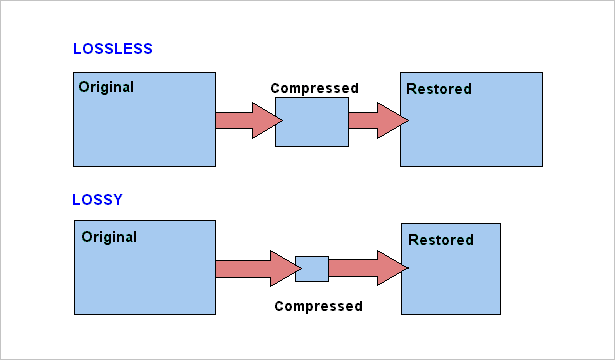
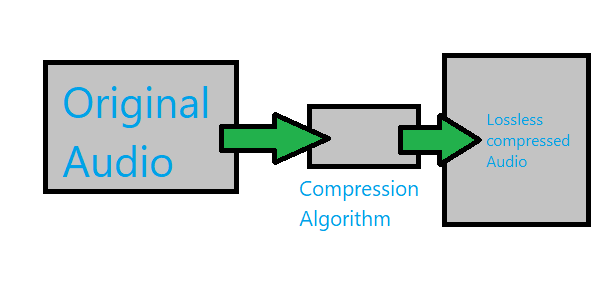
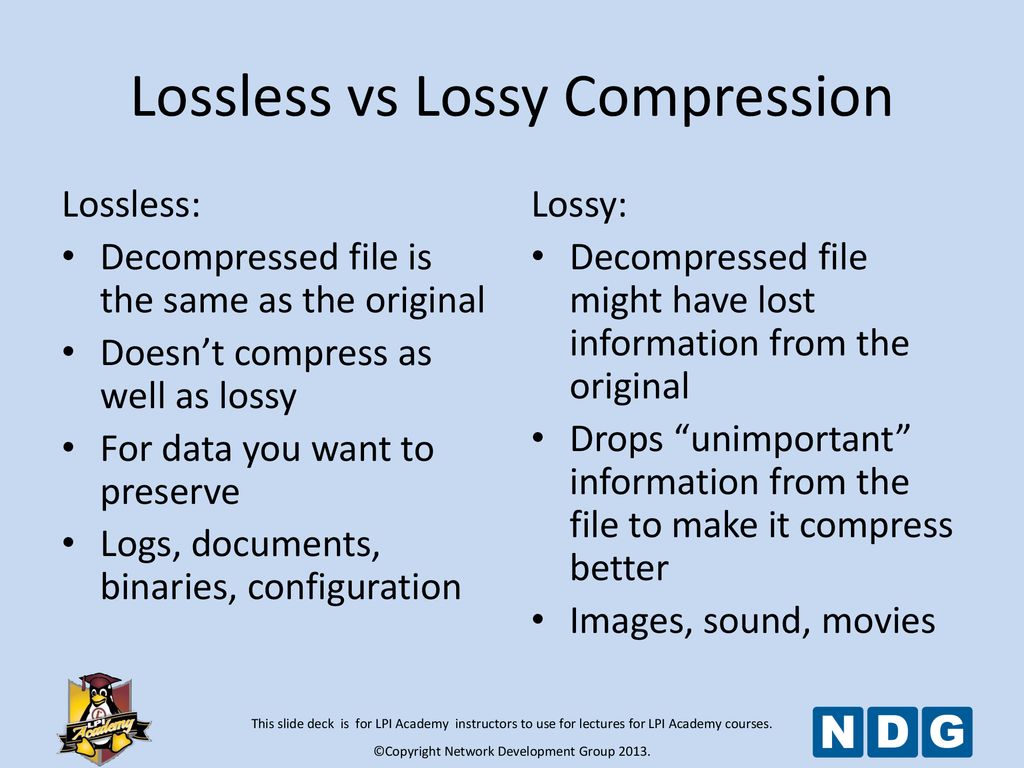
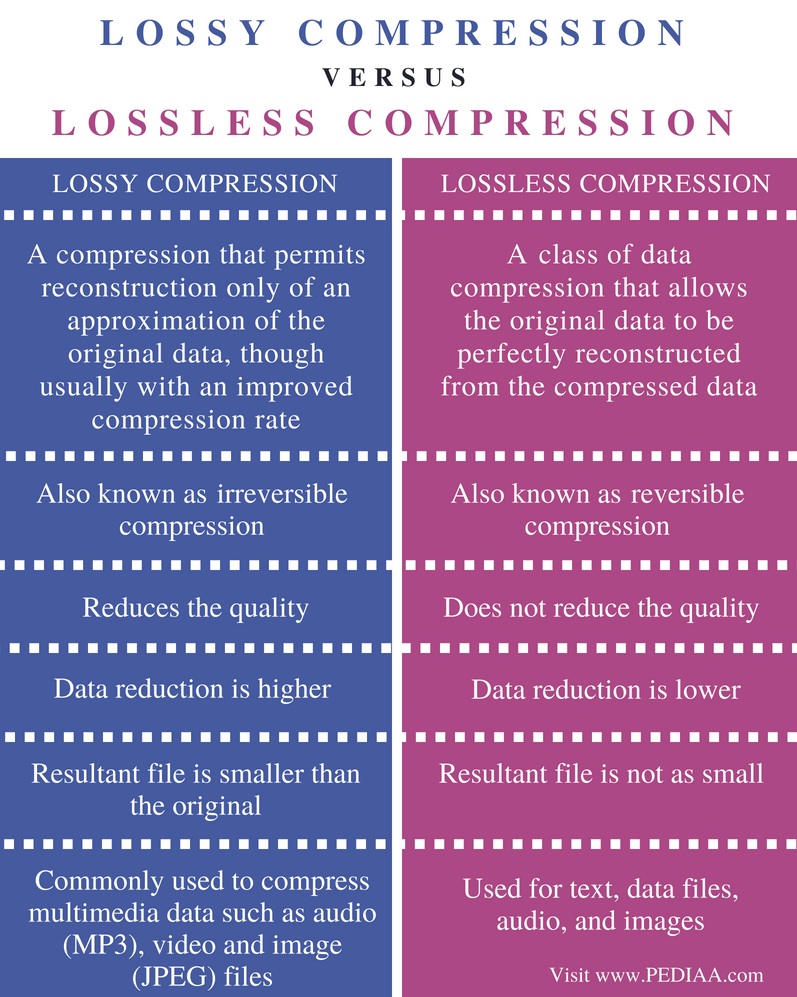
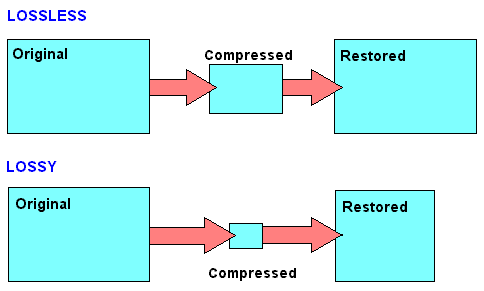
Lossless compression allows you to make a complete recovery of the original data, lossy compression allows you to recover data with certain distortions.

Lossy compression is significantly more efficient than lossless compression and is used when full compliance with original and recovered data is not required, and volume reduction is a priority.

A lossy encoded file is very different from the original on the level of byte comparison, but to an inexperienced human ear, the difference may not be as strong and sometimes even imperceptible. It does this by focusing lossy compression techniques on the physical characteristics of a person’s senses, such as a psychoacoustic model, which determines how much sound can be compressed without degrading the perceived quality of the person. Impairments caused by loss of compression that are perceptible to the human ear are considered compression artifacts.

MP3 spectrogram (left) and original file (right)

Examples of common lossy formats:
MP3: defined by the MPEG-1 specification, perhaps still the most common format

Ogg Vorbis: distinguished by the absence of patent restrictions and higher quality with the same bit rate as MP3

AAC, AAC + – Exists in various versions, defined by MPEG-2 and MPEG-4 specifications, it became widespread along with Apple technology

eAAC + is a format offered by Sony as an alternative to AAC and AAC +

WMA is a format developed by Microsoft

Dolby AC-3

DTS

Previously, lossless audio formats were most often used for archival data storage and in cases where distortion was unacceptable or undesirable, and most common listeners used music in lossy compressed formats. But the amount of memory in electronic devices is constantly growing and prices are falling, which is why more and more people are switching to listening to Lossless formats, which allow them to perceive music in its original form. In addition, the support for Lossless formats has now appeared on almost all consumer devices, even some streaming services are beginning to broadcast sound in lossless quality, for example, Deezer presented in Russia or Tidal, which is officially absent from us.

Examples of common lossless formats:
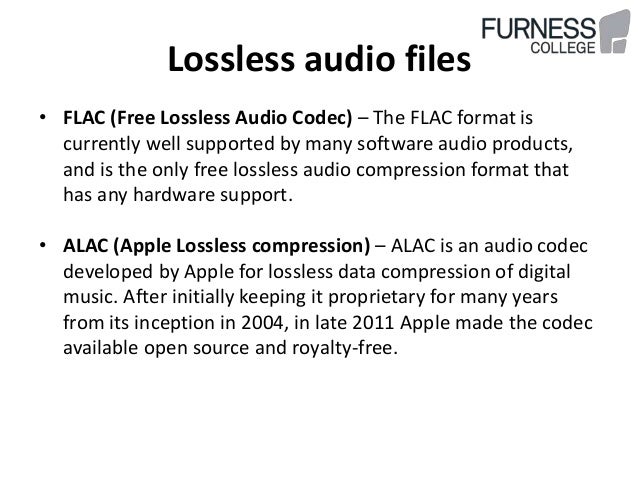
Free lossless audio codec: FLAC is the most common free format

ALAC – Apple Lossless Audio Codec – Apple variant

Lossless audio encoding, also known as MPEG-4 ALS

Direct Flow Transfer – DST

Dolby TrueHD

DTS-HD Master Audio

Meridian Lossless Packing – MLP

Monkey’s Audio – Monkey’s Audio APE

WavPack – Lossless WavPack

WMA Lossless – Windows Media Lossless

What are lossless file formats and why shouldn’t you convert lossy files to lossless files? Part 2
What are lossless file formats and why lossless comprssionshouldn’t you convert lossy files to lossless files? Part 2


Some of these lossless formats also provide compression. For example, a WAV file generally contains uncompressed audio and takes up a lot of space. A FLAC file can contain the same lossless audio as a WAV file, but uses compression to keep the file smaller. Formats like FLAC don’t discard any data, they store all the data and intelligently compress it, just like ZIP files. However, they are still significantly larger than MP3 files, which throw a lot of data.

Lossless Compression - Pediaa.Co

The conversion can be lossy even between lossless formats. For the conversion to be truly lossless, the data in the source file must fit inside the destination file. For example, lossless FLAC files only support 24-bit audio. If you convert a WAV file that contains 32-bit PCM audio to FLAC, some data will be removed during conversion. The process of converting a WAV file containing 24-bit PCM audio to FLAC will be lossless.

In the image below, the lower version of the photo is compressed using a low-quality lossy compression algorithm. The file size will be noticeably smaller than the image above.

Image via Wikimedia Commons

Why you should never turn a loss into a lossless
When you convert a file from a lossless format to a lossy format, such as ripping an audio CD (lossless format) to MP3 files (lossy format), you are discarding some of the data. The MP3 file is much smaller because most of the original audio data has been lost.

If you convert a lossy MP3 file to a lossless FLAC file, you will not recover any data. You will end up with a much larger FLAC file that is only as good as the MP3 file you converted from. You will never be able to recover your lost data. Think of it as making the perfect photocopy copy. Even if you could create a perfect photocopy copy, you would still end up with a photocopy that is not as good as the original document.

This is why converting lossy formats to other lossy formats is a bad idea. If you take an MP3 (lossy format) file and convert it to OGG (another lossy format), most of the data will be discarded. Think of it like making a photocopy of a photocopy: every time you photocopy a photocopy, you lose data and the quality degrades.

However, converting from lossless to lossless formats works fine. For example, if you rip an audio CD (lossless) to FLAC files (lossless), you will get files as good as the original audio CD. If you then convert those FLAC files into MP3 files, say, to shrink them to fit more on your MP3 player, you’ll end up with MP3 files that rival the quality of MP3 files ripped directly from an audio CD.

What should you use?
When you should use lossless formats and when you should use lossy formats depends on what you are using them for. If you want the perfect copy of your audio CD collection, you must convert them to lossless files. If you want a playable copy on your MP3 player and file size is more important, use a lossy format.

If you want to post a photo on the Internet, you must use a lossy format to reduce the size of the photo. (but keep a lossless backup of the original file). If you are printing a photo professionally, you probably want to use a lossless format during the editing process. (Note that for screenshots, PNG is a lossless format that can produce sharp and appropriately sized screenshots of spot colors on computer screens. However, PNG becomes much larger when used for photographs. containing many more mixed colors. Real world).

We will not be able to cover all the situations for which you choose the media file format. Just be aware of the pros and cons when choosing a file format.

To learn more about what type of image file to use and when, read What’s the difference between JPG, PNG, and GIF? Or, if you are curious about all the available audio file formats, read HTG’s explanations: What’s the difference between all these audio formats?

What are lossless file formats and why shouldn’t you convert lossy files to lossless files?

What are lossless file formats and why shouldn’t you convert lossy files to lossless files?

Lossless compression

Whether you’re dealing with image, music, or video files, it’s important to understand the difference between the different types of formats and when to use them.

lossless compression

Using the wrong format can spoil the quality of the file or make it unnecessarily large.

Some types of media file formats are lossy and some are not. We will explain what these terms mean, the benefits of each type of file format, and why you should never convert lossy formats to lossless formats.

Compression explanation
We use compression to reduce the size of files, allowing them to load faster and take up less disk space. For example, when you take a photo, your camera captures all the light it can receive and adds the image. If you save the image in RAW format, which stores all the light data captured by the camera’s sensor, the image can be up to 25MB in size. (This depends on the resolution of the image – a camera with more megapixels will produce a larger image.)

If we simply upload these files to a social network or post them to a website, we don’t want these image files to take up so much space. A photo gallery with RAW images can take up hundreds of megabytes of space. RAW formats can be used by professional photographers to maintain high image quality while editing, but they are not intended for the average person.

Instead, our camera or smartphone converts the image to a JPEG file. JPEG files are much smaller than RAW images. When you convert RAW to JPEG, some of the image data is “thrown away”, creating a much smaller file. The conversion process uses a compression algorithm that works well with photos, making them look pretty good despite being compressed. Depending on the quality setting, you may still see compression artifacts.

Note that lossy formats often have a parameter that controls their lossy quality. For example, JPEG is of variable quality. If the quality is poor, the JPEG image file becomes smaller, but the image quality is noticeably worse. Here is an enlarged example of a lossy JPEG – you can see various “compression artifacts”.

Lossless and lossy formats
We call RAW Lossless because it retains all the data from the original file, and JPEG Lossy because some data is lost when converting an image to JPEG. However, these are not the only lossy and lossless formats.

Images: RAW, BMP and PNG – all lossless image formats. JPEG and WebP are lossy image formats.
Audio: WAV is a container file often used for storing lossless audio, although it can contain lossy audio as well. FLAC is a lossless audio format and MP3 is a lossy audio format.
Video: Various lossless video formats are widely used by consumers as they can make video files take up a lot of space. All common formats, such as H.264 and H.265, are lossy. H.264 and H.265 can provide smaller files with higher quality than previous generations of video codecs because they have a “smarter” algorithm that better chooses data for deletion.

Explained bit rate

Explained bit rate

lossless

Bit rate is one of the most important metrics for measuring digital audio recordings. It is measured in kilobits per second (for short: kbps, just kilobits, kbps, kbps, kbps, etc.).

LOSSY AUDIO COMPRESSION

On the fingers: answer the question “how much memory occupies a second of audio”.

All kinds of transformations are already underway: there are eight bits in a byte, 1024 bits in a kilobit, 60 seconds in a minute, 60 minutes in an hour, and we arrive at the following empirical data:

bit rate 1400 = 1 hour takes 615 megabytes on disk
320 bitrate = 1 hour takes 141 megabytes on disk
bit rate 192 = 1 hour takes 84 megabytes on disk
bitrate 24 = 1 hour takes 11 megabytes on disk
Naturally, we all want to use disk space sparingly. This is where the format war begins. 11 MB is sixty times cheaper than 615 MB. Megabytes is the cost of storing audio recordings.

The price of storage can also be expressed in bills, dividing the cost of the disk by its capacity. For an archive of audio recordings, the price of storage is far from being as critical as for an archive of video recordings.

In addition, the price of storage can be conditionally expressed in man-hours, if the playback device has a much lower capacity than your general archive of audio recordings. It takes time to regularly download new tracks to the device.

The storage price can also be expressed in terms of square meters of work area. 500 audio CDs will take up a lot of space and require furnishing solutions, but a small external hard drive will fit in your pocket.

If there is a different price, then the question of quality arises: then we assume that the lowest bitrate has the lowest quality. So we come to the main question: where is the limit of reason, where is the ideal “price / quality” ratio.

The closest division of audio formats in descending order of average bitrate:

uncompressed audio
lossless compression
lossy compression

Uncompressed audio is the pure signal without conversion, “as is”, the equivalent of WAV or audio CD. Classic parameters: 1411 kbps, 44100 kHz sample rate, 16-bit audio.

Codec is an abbreviation for the words (KO der and DEC oder). An encoder is a program that packages a pure audio signal in the desired special format. A decoder is a program that converts a special format into a pure audio signal. In modern English, the two terms somewhat transform: is code continuation and dE below code, which corresponds to directing Russian counterparts to code and coding races. And do not confuse encryption and encryption: these are two very different processes, although externally there is a lot of similarity.

For an ordinary person, only a player that can work with this format (that is, has a decoder) is required. The “encoder” itself is only required to “create” such files.

Lossless Compression – Typically used for collectible audio material. In general, it is believed that this format can be exactly converted back to Audio CD.

Better is this compression:

Save disk space by about half
The file format assumes the storage of additional information (artist, album, track number, track name, etc.)
The compression formats themselves differ:

format openness and compression algorithms
player support
encoding, decoding overhead costs
compression ratio
The overhead is negligible for the average person and the compression ratio of the codecs differs only slightly. Main actors: FLAC, APE, WAVPACK, ALAC.

Lossy Compression – Provides a much higher compression ratio by discarding unimportant audio details. The smaller the size of the file we are trying to compress, the more details we will have to discard. In addition to details disappearing, technical artifacts also appear.

Main market players: MP3, OGG, AAC, WMA. They all have quality gradations – the higher the bit rate, the closer the quality is to the original. With the same bit rate, different codecs under different conditions can give different results.

You can explain with your fingers what lossy compression is using the example of compression of graphic files in JPEG format.

sample_jpg_100sample_jpg_090sample_jpg_080sample_jpg_070sample_jpg_060sample_jpg_050sample_jpg_040sample_jpg_030sample_jpg_020sample_jpg_010

At first, it is perfect and practically indistinguishable (no magnification).

In between, the quality drop is already visible to the naked eye, but you can still bear it.

In the end, the degradation of quality already goes beyond the limits of patience.

What is a lossless format?

What is a lossless format?

Lossless Audio

Whether it’s images, music, or video files, it’s important to understand the difference between the different types of formats and when they are used.

Lossless Audio

Using the wrong format can degrade the quality of the file or make it too large.

Some types of media file formats are “lossy” and others are “lossless.” We will explain what these terms mean, the benefits of each type of file format, and why you should never convert lossy formats to lossless formats.

Compression explained
We use compression to reduce the size of files, allowing them to load faster and take up less disk space. For example, when you take a photo, your camera captures all the light it can receive and collects the image. If you save an image in RAW format, which stores all the lighting data captured by the camera’s sensor, the image size can be up to 25MB. (This depends on the resolution of the image – a camera with more megapixels will create a larger image.)

If we simply upload these files to a social network or post them to a website, we don’t want these image files to take up so much space. A photo gallery with RAW images can take up hundreds of megabytes of space. RAW formats can be used by professional photographers to maintain high image quality while editing, but they are not intended for the average person.

Instead, our camera or smartphone converts the image to a JPEG file. JPEG files are much, much smaller than RAW images. When you convert RAW to JPEG, some of the image data is “thrown away”, creating a much smaller file. The conversion process uses a compression algorithm that works well for photos, making them look pretty good despite being compressed. You may still see compression artifacts, depending on the quality setting.

Note that lossy formats usually have a setting that controls their loss. For example, JPEG has a variable quality setting. Poor quality makes the JPEG image file smaller, but the image quality is noticeably worse. Here’s a great example of a lossy JPEG – you can see various “compression artifacts”.

Lossless and lossy formats
We call RAW a “lossless” format because it retains all the data in the original file, while we call JPEG a “lossy” format because some data is lost when the image is converted to JPEG. However, these are not the only lossy and lossless formats.

Images: RAW, BMP, and PNG are all lossless image formats. JPEG and WebP are lossy image formats.
Audio: WAV is a container file often used for storing lossless audio, although it can also contain lossy audio. FLAC is a lossless audio format and MP3 is a lossy audio format.
Video . Some lossless video formats are widely used by consumers as they make video files take up a large amount of space. Common formats like H.264 and H.265 are lossy. H.264 and H.265 can provide smaller files with higher quality than previous generations of video codecs because it has a “smarter” algorithm that better chooses the data to discard.