Mp3 Normalizer – Masking Effects Part 2


Free Download Mp4Gain
picture

Mp3 Normalizer – Masking Effects Part 2
Mp3 Normalizer

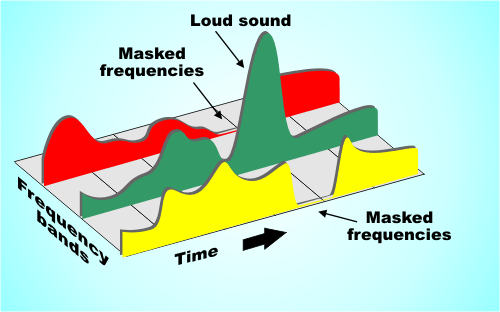
They are related to the frequency and relative loudness of sounds of different frequencies, whereas temporal masking is only related to time.

MP3 Normalizer: Psychoacoustic Model

If two sounds are particularly close in time, humans may also have trouble telling them apart. For example, if a loud sound is followed by a very weak sound, the last sound will be difficult to hear. But if you play the second sound some time after the first sound stops, the last sound can be heard. How long should the interval be? For pure tones it is generally 5 ms. Of course, if the reverse effect is the same over time, if a lower sound appears before a higher sound, and the interval is too short, you won’t hear the lower sound.

Enter Bitrates, Stage Left La

JPEG compression can explicitly control the rate at which compression is discarded, but Mp3 users cannot. However, mp3 users can specify how many bits are used to store each second of music. The end effect is the same.

During encoding, the “garbage components” of the signal are compared to mathematical models of human psychoacoustics, as well as the bit rate used for compression, to decide which data to discard. The current bitrate used for mp3 compression is generally 128 kbps. The encoder will take this number into account when generating each data frame. If the bitrate is relatively low, the definition of “irrelevant” and “redundant” data will be relaxed, resulting in a large amount of data being considered useless data. Compressed audio will lose a lot of detail, resulting in a loss of sound quality. Conversely, if a higher bit rate encoding is used, the “irrelevance” and “redundancy” criteria are more precisely defined, details are preserved, but the file size is larger.

Please note that the bitrate of an mp3 file refers to the total bitrate of all encoded channels. That is, a 128 kbps stereo mp3 file is the same size as two 64 kbps mono mp3 files at the same time. But one 128kbps stereo file does sound better than two separate 64kbps mono files. Because in a stereo mp3 file, all the bits can be allocated (unevenly) to two channels as needed, for example, at a given time, one channel uses 60% of the bits and the other uses the remaining 40% , but the total number of bits will not exceed the bitrate parameter specified before encoding.

Fixed bit rate and variable bit rate

We assume that the mp3 encoding discussed here uses a fixed bitrate encoding method, which means that the output bitrate of the encoded file at any time period is whatever value you specify. The disadvantage of fixed bit rate encoding is that the amount of information in most sound files is not constant. In audio clips that use more musical instruments or have many people talking at the same time, the amount of information is large and vice versa, there are many factors that affect the amount of information in audio files. Variable bit rate encoding was developed to accommodate this characteristic of audio files. Variable bitrate encoding, which adjusts the bitrate used for encoding at any one time according to the dynamic characteristics of the audio data.

In most cases, variable bitrate encoding can achieve essentially the same sound quality as fixed bitrate encoding with a smaller file size. But variable bit rate encoding has its own drawbacks. First of all, some older players just don’t support decoding variable bitrate mp3 files and can’t play such files. Second, when the decoder plays a variable bitrate mp3, it cannot determine the current decode (play) position, and the “current play time” displayed on the player is inaccurate.

The information in the header of each frame is the same for a compressed fixed bitrate mp3 file, but not for the variable bitrate mp3 encoding. But when decoding, variable bitrate encoding does not require more computing power than a fixed bitrate file, because the mp3 decoder reads the full frame header even when playing a fixed bitrate mp3 file .


Free Download Mp4Gain
picture


Mp4Gain Main Window
picture


Mp4Gain Features
picture


Free Download Mp4Gain
picture

Mp3 Normalizer – Masking Effects

Mp3 Normalizer – Masking Effects

Mp3 Normalizer - Psychoacoustic Model

mp3 encoding: “masking effects” and bitrate

mp3 normalizer masking effects

masking effects

The process of information filtering by human consciousness includes a process called “masking”. People who study psychoacoustics are very concerned with the study of this process, which studies the relationship between hearing, consciousness and sound. Mutual relationship. There are two masking effects that affect the Mp3 encoding process: one is acoustic masking and the other is temporal masking.

Sync masking (also called acoustic masking)

To describe the sync masking effect, it’s best to use an analogy. Imagine a bird flying in front of the sun. You see the bird fly from the left between you and the sun, and then the bird disappears because the sun’s rays are too bright. When the bird leaves the area of ​​the sun, you can see it again. Just like in a quiet environment, the sound of a guitarist’s fingers sliding across the strings can be heard, but if the same sound is played in an environment where rock music is being played, the average person cannot hear it.

The Mp3 codec only cares about the interrelationship between frequencies and loudness. Sync masking is described in terms that the mp3 codec can handle as follows: you have a sound signal, it’s a 1000hz sine wave (one), then we have a 1100hz sine wave (two), the wave sine two is weaker, -10db. Most people do not notice the presence of sine wave two in this situation. But sine wave two is not easy to perceive, not only because it is weaker, but also because its frequency is very close to that of sine wave one. To illustrate this phenomenon, we gradually increase the frequency of the second sine wave, but keep its volume constant until we can hear it. Assuming its frequency increases to 4000 Hz, we can hear this sound. When the frequency difference between the two sine waves gradually increases, the second sine wave can be heard gradually, until its frequency increases to a certain point, most people can hear two different tones, one is louder and the other is softer. lower.

This process is what psychoacousticists call the “synchronization masking” phenomenon. Two sounds with similar frequencies but very different volumes are difficult for humans to perceive as two different sounds. Taking this phenomenon into account, mp3 tries to discard those sounds that cannot be perceived during the encoding process, or assign as few bits as possible to these sounds.

Temporary masking Temporary masking Masking effects
synchronous

Mp3 Normalizer

Mp3 Normalizer

Mp3 Normalizer

Why do we need to normalize an mp3?

Mp3 Normalizer

We need an mp3 normalizer because any user who has a lot of mp4 files or even other audio formats like flac, ogg, m4a etc. (Because Mp4Gain can normalize the main audio and video formats), but why?

For the simple reason that coming from different websites, from different sources, we not only find significant differences in volume level, but also in bitrate, etc.

This means that when playing them on our computer or on other devices, we find that these significant differences in the volume level force us to correct it manually using the volume knob.
Which is neither comfortable nor ideal.

Mp4Gain, as we mentioned, not only do mp3 normalizer, to modify the loudness. But it does the same with the most used audio and video formats, it can even extract the audio from any video and normalize it at the same time.

Mp3 Normalizer 2022

In general, the need to normalize the volume of audio and video files remains in 2022.

Search for mp4 normalizer, avi normalizer, etc. has been added lately. That is, the video normalizer has become a necessity.

Mp4 Normalizer

As we pointed out, Mp4Gain is perfectly capable of normalizing the volume level of videos in the main formats and is both an audio and video converter.

Download it, try it and discover how it improves your audio and video files.

What format is flac? Can you play mp3 in flac format?

What format is flac? Can you play mp3 in flac format?

flac file

How to play flac format?

FLAC

FLAC is short for Free Lossless Audio Codec, which can be interpreted as lossless audio compression coding in Chinese. FLAC is a well-known free audio compression codec, which is characterized by lossless compression. Unlike other lossy compression codes such as MP3 and AAC, it does not destroy any original audio data, so it can restore the sound quality of music discs. It is now compatible with many software and hardware audio products. To play flac format in MP3, you need to convert the format. The specific operation method is as follows: 1. Download the format factory class format conversion software, install it and open it. 2. Click the FLAC format on the open interface, and open the FLAC format file to convert on this page. It is equivalent to inputting the file in this format into the software. 3. On the opened page, browse and select the MP3 format to be output, and then select the sound quality effect to be output, and then click Start or OK. 4. After the conversion is complete, connect the MP3 player to the computer. 5. Copy the converted files to MP3 storage. 6. Safely eject the device, remove the MP3 player and start playing the music.

FLAC stands for Free Lossless Audio Codec – Free lossless audio compression. In short, FLAC is similar to MP3, but it has lossless compression, which means that the audio is compressed in FLAC without losing any information. This compression is similar to Zip, but FLAC will give you a higher compression ratio, because FLAC is a compression method specially designed for the characteristics of audio, and you can use the player to play FLAC compressed files like you normally play MP3 files (there are already there are many FLAC-compatible car players and home audio equipment, and you can find links to these equipment manufacturers on the FLAC website). General hi-fi players can be used, and normal MP3 generally supports MP3 and WAV formats. Common lossless formats are: FLAC, APE, TTA, TAK, ALAC APE is the most popular lossless audio, APE is featured on major resource stations and even in many people’s minds, only APE is lossless. This is thanks to the promotion of the APE encoder by Monkey’s Audio. In fact, the compression rate of APE is very good and the encoding speed is fast enough.

Normalize FLAC – FLAC loudness normalizer

Normalize FLAC – FLAC loudness normalizer

FLAC

Normalize the volume of a FLAC file

flac

Mp4Gain is capable of normalizing the loudness of FLAC, Ogg, etc. files. And also videos.

You can normalize the volume level (volume leveler, volume enhancer) of your FLAC files.

All this with the push of a button.

What is a FLAC?

FLAC can be interpreted as lossless audio compression coding. FLAC is a well-known free audio compression codec, which is characterized by lossless compression. Unlike other lossy compression codes, such as MP3 and AAC, it does not destroy any original audio information, so it can restore the sound quality of music discs [1] . It has been compatible with many software and hardware audio products (such as CDs, etc.) since 2012.

FLAC is different from MP3 .MP3 is a lossy audio compression encoding, but FLAC is a lossless compression, which means no information will be lost after the audio is compressed with the FLAC encoding. After the file is restored FLAC to a WAV file, the contents of the WAV file before compression itself. This compression is similar to ZIP, but FLAC has a higher compression rate than ZIP and RAR because FLAC is a compression method specially designed for the characteristics of PCM audio. And you can use the player to play FLAC compressed files directly, just like MP3 files (there are many car players and home audio equipment that support FLAC, you can find links to these equipment manufacturers on the FLAC website) .

FLAC is free and is supported by most operating systems, including Windows.

Now major websites have FLAC music downloads, and publishers usually take the .cda audio track directly into .flac after buying the CD to ensure the original lossless quality of the CD.
Lossless formats work very well with good headphones.

Mp4 Normalize – Mp4 Loudness Normalization

Mp4 Normalize – Mp4 Loudness Normalization

Mp4Gain can normalize the volume and loudness of the most popular video formats.

Initially when trying to do a volume leveler or volume enhancer (volume louder), it was only possible to do it for an mp3.

It was not possible to normalize mp3 for other audio formats. Moreover, initially there were no formats such as Ogg, FLAC, etc.

For some time now, we have not only made Mp4Gain able to normalize the loudness of the most important audio formats, but we have also achieved something incredible: normalizing mp4 files.

In fact, we have managed to normalize videos of the main formats. We have also got Mp4Gain to be used as an audio and video converter.

You can take a video and convert it from one format to another and convert an audio file from one format to another. It can also extract the audio from a video file and convert it to an audio format, getting audio in any of its main formats.

Mp4Gain’s volume normalization is so advanced that not only does it make everyone sound at the same level of audio gain, but each video (or each song in the case of audio files) has volume consistency, preventing there are parts that sound louder and other parts that sound barely audible.

We recommend you download and try Mp4Gain on your windows computer so that you can enjoy the results, without a doubt it is the best and most powerful normalizer with the possibility of normalizing audio and video files.

Mp3 – Subjective perception of sound: timbre

Mp3 – Subjective perception of sound: timbre

Audio Timbre mp3

Tone is a concept that we often come into contact with in our daily lives, and it can even be said that it is an essential concept.

Mp3 timbre

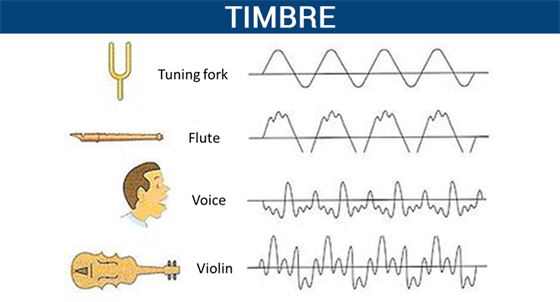
In high school physics textbooks, timbre, along with pitch and volume, are considered the three basic attributes of sound. Although we often deal with the word doorbell, and doorbell has more mature applications in many respects, doorbell is actually a very vague concept. What physical phenomenon determines the timbre? Why can we only use vague words like light and shadow, thickness and warmth to describe timbre?

Pitch and volume are well understood and correspond to physical phenomena: pitch corresponds to the vibrational frequency of an object, and volume corresponds to the object’s vibrational amplitude. However, we were unable to find a physical phenomenon that corresponds to the timbre. There are also no precise words to describe the timbre in our language.

We can create great music by precisely controlling the combination of pitch, duration, and volume. So can we control timbre like we control pitch and duration?

What exactly is pitch? What physical processes are involved in the timbre?

This is something that many people have been exploring and researching for the last few hundred years. But to this day, there is still no perfect answer.

In this article, I have classified some of the research results of my predecessors and presented some of my own thoughts. I hope that it can give everyone a systematic understanding of timbre, and I hope to inspire those who are interested in studying timbre in the future.

This article will start with the definition of timbre, discuss what timbre is, the subjective perception of timbre, the main factors that affect timbre, the description of timbre in language, the application of timbre in music, and personal perspectives for timbre. doorbell investigation. This article also proposes a sound classifier model for the timbre. At the same time, there are some conjectures that I have not been able to study in the article. I will check them out in the future.

The definition of sound
There are many definitions of timbre.

The word timbre comes from the French   . In old French it referred to the sounds produced by different musical instruments.

In his music textbook “Fundamentals of Music Theory,” Li Chongguang noted that “timbres are different due to the nature, shape, and number of harmonics of the sounding body.”

The American Standards Association (ASA) defines ringing from the opposite perspective. It does not define what timbre is, but what timbre it is not: “timbre is any other difference between sounds of the same loudness, pitch, and duration.”

All the above definitions tell us what tone it is. But none of these definitions is as clearly linked to the corresponding physical laws as other physical properties.

Like pitch and frequency of vibration, like speed and time and displacement, like color and wavelength.

Why can’t the word timbre clearly correspond to a certain physical phenomenon? I think this is due to the complexity of the timbre.

How does the normalization of an mp3 work?

How does the normalization of an mp3 work?

mp3 volume normalizer

The normalization of the loudness of an mp3 is based on perception.

How MP3 Compression Works

The human ear has its peculiarities and the study of these have allowed the development of the normalization algorithm for mp3 files.

Initially what was needed was simply to reduce the space an audio file took up, while maintaining high quality.

We must remember that in the early years of the internet, it was very slow and hard drives had very little capacity. What made it impossible to download a wav file (this option is still not used today), which is the one with the “original” quality because the wav takes up a lot of space.

So the normalization algorithm of an mp3 was based on being able to understand how the human ear works to be able to discard information without sacrificing quality, based on the way we perceive music and thus, the mp3 file, which occupies much less space ( a tenth of the original) sounds almost the same as the original.

But… what information can be discarded without the human ear noticing? How is it achieved that even discarding information, an mp3 sounds almost the same as the original?

The first thing is to discard all the sounds that are not perceived by the human ear, but are nevertheless present in the original music wav file. Because the human ear can only perceive sounds in a range of frequencies, any lower frequency will not be heard and any higher frequency will not be heard either. So it’s safe to rule out silences, and also to rule out low and high frequencies that are beyond our ability to perceive.

But there are other phenomena in human hatred, such as the so-called masking. It happens that if we listen to a frequency at high volume and immediately after (or even at the same time) we listen to another instrument or sound with a similar frequency, our ear will not perceive this second sound… Then it is also possible to discard these sounds that are masked by first. Almost all frequency redundancy can be discarded without the human ear being able to perceive it.

So if we take a wav file and remove all the frequencies that are outside of our hearing range and also the masking, we will have been able to reduce the new audio considerably. If we also add a compression (like the one used for a .zip file), we will have a reduction so great that the new file will weigh one tenth of the original.

This allows the new file to be much more manageable than the original and to take up much less space on the hard drive, which was of crucial importance in those years.

This method that we are explaining in general was the one that was used two decades ago or more. Today Mp4Gain uses much more modern and complex methods, which provide more surprising results.

In addition, Mp4Gain is capable of normalizing not only mp3 files, but all popular audio formats and it can also normalize videos. And this is based on more modern, efficient and state-of-the-art algorithms, which provides a much better result.

Generally speaking, we have provided a non-technical explanation of how audio files were compressed to make an mp3.

We advise you to download Mp4Gain and check its quality for yourself. You guys are going to love it.

Loudness Normalization – Mp4Gain

Loudness Normalization – Mp4Gain

Loudness Normalization

Mp4Gain is the most advanced normalizer and practically the only loudness normalizer that is still current and updated according to new technology and new formats.

Loudness Normalization

In fact, it is the only one that handles the most popular audio and video formats. You can even extract the audio from any cvideo and save it as an audio format (mp3, acc, m4a, flac, ogg, etc).

These are the formats that Mp4Gain handles:

Video formats:

mp4, flv, avi
mpg, 3gp, wmv

Audio formats:

mp3, mp2, flac
ogg, m4a, acc
wav ac3

And very soon we will add more formats…

In fact, Mp4Gain offers other features, such as the ability to alter the pitch of a song without changing its speed and vice versa.

In fact, normalization offers a whole series of parameters that will allow you to achieve exactly what you are looking for. You can add the option to include Replay Gain, for example…

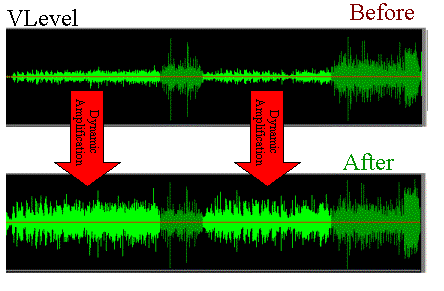
It also offers the option that, within the same song or video, all its parts have a similar sound. Avoiding, in this way, the existence in the audio or video file, parts that are very loud and others that have a very low volume.

Of course you can equalize as you like, to improve the quality of the audio.

For all these reasons, we believe that it is best that you download a copy of Mp4Gain and try it for free on your computer.

The program is very simple to use, you could practically say that it is intuitive. In other words, it is possible to use Mp4Gain without needing to read any manual, since it usually only loads the songs or videos and clicks the normalize button and that’s it.

Never again will you suffer from the situation that your different audio or video files have a very different loudness, forcing you to manipulate the volume knob to manually compensate for the difference in volume levels.

Download it today and give it a try.

Normalize audio and video to improve loudness, tips to achieve better normalization.

Normalize audio and video to improve loudness, tips to achieve better normalization.

Normalize Audio


Many years ago when the motion picture and recorded audio industry started, there were no problems with the volume of individual songs or individual video or movie broadcasts in theaters.

Audio Normalization


One of the main reasons is that each time one of these multimedia contents was produced they ended with a mastering which, among other things, took care of the volume level and in general the dynamics of the sound.

For some years now, the technical processes to encode the audio and also the image are not made by professionals but by people who download a program and start encoding audios and videos without having the equipment or training to do so.

On the other hand, especially in the area of ​​video, there has been a boom in independent video production, many times carried out on cell phones that are not prepared and designed to record my video or high-quality audio.

In fact, even good quality microphones are not always used, but the phone’s own microphone is often used and sometimes at a considerable distance from the person who is speaking.

Later this video is edited more by intuition than by knowledge and this is how it is distributed on the net.

The same happens with music that is encoded, edited and recorded with more desire than knowledge.

All this has generated that when a person has several videos or several audio recordings, they immediately perceive that there is a great difference in the loudness of these videos or these songs.

Initially we talked about how before music was heard by people through radio broadcasters, for example, which had expensive hardware equipment, such as exciters and compressors, which were used to maintain a constant volume with a loudness dynamics that allowed it to be audible to a constant volume level.

The same thing happened with television and movie theaters.

The music that came out of the recording studios of the big record companies had careful mastering is where, among other things, they made sure that the output db was always in the correct range, the same can be said of television or film production companies that in addition to the equipment to compress the audio They also had professionals who took care of all this.

Today with the freedom for everyone to produce and share audio and video something that has been neglected You could say what is the standard of quality and loudness levels of video and audio volume.

That is why after many years of improvements the Mp4Gain has reached totally professional levels where music and video are treated and improved and optimized to reach the professional level in terms of quality and loudness of the audio volume.

Mp4Gain is also used to process audio files or video files to standardize the loudness of the volume, which is popularly known as normalizing the volume of the audio and normalizing the volume of the videos.

There is no other program that fulfills these functions at a professional level and at such a reasonable cost that anyone can have in their home.

It is no longer necessary to spend thousands of dollars to have professional compressors and exciters, but with a few tens of dollars anyone who distributes audio or video can determine that the sound of it is professional, standardized and perfectly audible.