How digital compression works.


Free Download Mp4Gain
picture

How digital compression works.

Digital Compression

Have you ever wondered how sound is reproduced on digital devices?
Digital Compression

How is a sound signal formed from a combination of ones and zeros? I’m sure I was thinking, since I started reading! But often, even professionals only have a general idea of ​​the modern sound route. In this article, you will learn how the different formats appeared, what a digital-to-analog converter is, what types of DACs exist, and what determines the quality of sound reproduction.

PCM
As you know, in digital audio, almost any format, with rare exceptions, is recorded using a pulse code stream or a PCM stream – pulse code modulation. FLAC, MP3, WAV, Audio CD, DVD-Audio and other formats are just ways to package, “preserve” a PCM stream.

How it all began
The theoretical foundations of digital sound transmission were developed at the dawn of the 20th century, when scientists tried to transmit an audio signal over a long distance, but not by telephone, but in a rather strange way for that time.

By dividing the sound wave into small parts, it could be sent to the receiver in some kind of mathematical representation. The recipient, in turn, could restore the original waveform and listen to the recording. In addition, scientists were faced with the task of increasing the bandwidth of the “ether”.

In 1933, the theorem of V.A. Kotelnikov. In Western sources, it is called the Nyquist-Shannon theorem. Yes, Harry Nyquist was the first to raise this issue: in 1927 he calculated the minimum sampling frequency to transmit a waveform, which later got his name “Nyquist frequency”, but Kotelnikov’s theorem was published 16 years ago before.

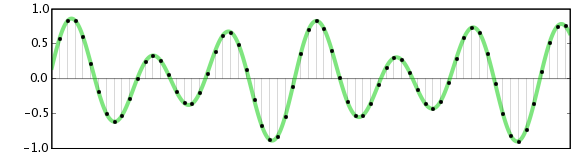
The essence of the theorem is simple: a continuous signal can be represented as an interpolation series consisting of discrete reports, from which the signal can be reconstructed. In order to roughly restore the original state of the signal, the sampling frequency must be at least twice the upper cutoff frequency of this signal.

For many years, the theorem was not in demand, until the advent of the digital age. It was then that it found a use. In particular, the theorem was useful when developing the CDDA (Compact Disc Digital Audio) format, in common people it is called Audio CD or Red Book. The format was released by engineers at Philips and Sony in 1980 and became the standard for audio CDs.

Format characteristics:

sampling frequency – 44.1 kHz;
quantization capacity – 16 bits.

INFO
The sampling rate is the number of signal samples taken during your sampling. Measured in Hertz.
Quantization bit: the number of binary bits that express the amplitude of the signal. Measured in bits.
The 44.1 kHz sampling frequency was calculated from Kotelnikov’s theorem. It is believed that the hearing of the average person cannot pick up sound beyond 19-22 kHz. The frequency was probably 22 kHz and was chosen as the upper limit.

22,000 × 2 = 44,000 + 100 = 44,100 Hertz

Where does 100 Hertz come from? There is a version that this is a small margin in case of errors or oversampling. In fact, Sony chose this frequency for its compatibility with the PAL transmission standard.

The bit depth of the CDDA format is 16 bits, or 65,536 samples, which equates to a dynamic range of approximately 96 dB. Such a large number of samples were not chosen by chance. Firstly, due to the strong influence of quantization noise, and secondly, to provide a formal dynamic range superior to that of the main competitors at the time – cassette records and vinyl records. I’ll cover this in more detail in the section on digital to analog converters.

The development of PCM continued on the principle of multiplying by two. Other sample rates appeared: first, the 48 kHz sample rate was added, and then the frequencies based on it were 96, 192, and 384 kHz. The 44.1 kHz frequency was also doubled to 88.2, 176.4, and 352.8 kHz. Bit depth increased from 16 to 24 and then to 32 bits.


Free Download Mp4Gain
picture


Mp4Gain Main Window
picture


Mp4Gain Features
picture


Free Download Mp4Gain
picture

Audio encoding: secrets revealed

Audio encoding: secrets revealed

Digital Audio

Audio settings for video capture and transmission.

Digital Audio

As people directly related to the AV sphere, we constantly talk about audio coding and audio codecs, but what is it? An audio codec is essentially a device or algorithm that can encode and decode a digital audio signal.

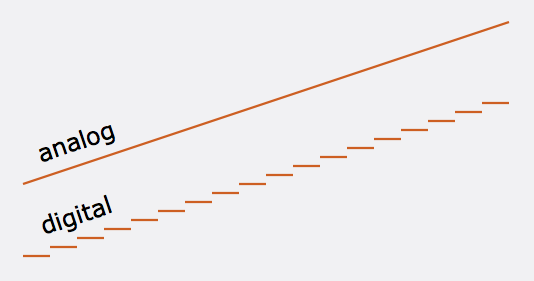
In practice, the audio waves that travel through the air are continuous analog signals. The signals are converted to digital form by a device called an analog-to-digital converter (ADC), and the reverse converter is called a digital-to-analog converter (DAC). The codec lies between these two functions and it is he who allows you to adjust some important parameters for the successful capture, recording and transmission of an audio signal: the codec algorithm, the sampling frequency, the bit width and the speed of the audio signal. data.

The three most popular audio codecs are Pulse-Code Modulation (PCM), MP3, and Advanced Audio Coding (AAC). The choice of codec determines the compression rate and the recording quality. PCM is a codec used by computers, CDs, digital phones, and sometimes SACD. The PCM signal source is sampled at regular intervals, and each sample is the digital amplitude of the analog signal. PCM is the simplest option for digitizing an analog signal.

With the correct parameters, this digitized signal can be fully converted to analog without any loss. But this codec, which provides almost complete identity with the original audio, is unfortunately not very cheap, which results in large files, and these files are not suitable for streaming. We recommend using PCM to record digital images for your sources or when doing audio post-processing.

Fortunately, we always have the option of choosing a different codec that can compress digital data (versus PCM) based on some helpful observations on the behavior of sound waves. But in this case, you have to make a compromise: all alternative algorithms are associated with “losses”, since it is impossible to completely restore the original signal, but nevertheless the result is still so good that most users will not be able to to catch the difference.

MP3 is an audio encoding format that uses a digital data compression algorithm that allows you to save the audio signal in smaller files. The MP3 codec is the most used by users to record and store music files. We recommend using MP3 to stream audio content as it requires less network bandwidth.

AAC is a newer audio encoding algorithm that is the successor to MP3. AAC has become the standard for MPEG-2 and MPEG-4 formats. In fact, this is also a digital data compression codec, but with less quality loss than MP3 when encoded with the same bit rate. We recommend using this codec for online streaming.

Sampling frequency (kHz, kHz)
Sample rate (or sample rate): the frequency with which the signal is digitized, stored, processed or converted from analog to digital. Time sampling means that the signal is represented by several of its samples (samples) taken at regular intervals.

Measured in hertz (Hz, Hz) or kilohertz (kHz, kHz,) 1 kHz equals 1000 Hz. For example, 44,100 samples per second can be labeled 44,100 Hz or 44.1 kHz. The selected sample rate will determine the maximum playback frequency and, as follows from Kotelnikov’s theorem, to fully restore the original signal, the sample rate must be twice the highest frequency in the signal spectrum.

As you know, the human ear is capable of picking up frequencies between 20 Hz and 20 kHz. Given these parameters and the values ​​shown in the following table, you can understand why 44.1 kHz was chosen as the sampling frequency for CD and is still considered a very good frequency for recording.

What are the problems with digital audio?

What are the problems with digital audio?

digital audio

As with many areas of technology, there is no single standard for digital audio.

DIGITAL AUDIO

It can be presented in various standards: AES / EBU 110 Ohm, AES-ID3 75 Ohm, S / PDIF 75 Ohm, Optical Toslink, among others. The sampling frequency can be from 32 kHz to 192 kHz with different bit depths. To work with all the variety of standards in a serious studio, you need to have an interface unit, better a digital audio converter or a sample rate converter.

What are the problems with digital video?
Digital video (SDI) is similar in some respects to analog video. In it, the quality of the cables and connectors is also important for normal operation, the loss of high frequencies of the signal in them also affects the quality of the signal. Due to many factors that affect the analog signal, fluctuations can appear in digital systems, at a certain level of which there is a complete blockage of the image (clipping effect *). A little lost in digital video can have far more serious consequences than a pixel lost in analog. When working with digital video, restoration of signal quality (equalization of the frequency spectrum and restoration of clock frequency) is often required. The format (“language”) of a digital signal is very important for its correct transmission, since the transmission protocols are very specific.
Level incompatibility is a rare problem in analog technology. Digital signals, however, can have different and incompatible levels: TTL, ECL or others. Another problem with digital signals is the adaptation of the load capacity of the digital inputs and outputs, which must also be addressed.

What is the easiest way to input a digital video signal into a computer?
The easiest and cheapest way is to use a DV video source and a Firewire® card on your computer (or the built-in interface on many modern computers). The entry procedure is simple and fast. For analog video, you can use an analog video capture card or an external analog video to DV converter connected to the Firewire® card.

Why do I sometimes have difficulties with the DV format?
The digital video format that uses a DV or mini-DV cassette and Firewire® technology has a very high bit rate, which limits the length of the connecting cable. Attempting to use long cables will cause many bit stream problems, such as clipping effect * when the image is completely lost. Another problem is a consequence of two-way communication between devices connected via Firewire® and manifests itself when trying to randomly connect multiple DV devices.

What is a device for embedding (extracting) digital audio into an SDI signal?
The total digital stream of digital serial video can include multiple channels of digital audio. An SDI embedder is used to insert digital audio into an SDI signal, and an SDI embedder is used to extract digital audio from a mixed stream.

How sound is stored on a computer

How sound is stored on a computer

Digital Audio

Today there are about three dozen common digital audio formats. Why you need to create so many types of sound files to store one type of content and how to manage all this, you will learn from this material.

digital audio

Introduction
Surely many users prefer to use their home computer not only as a workhorse, but also as a multimedia center, where they can watch movies or family photos, as well as listen to their favorite music. Although compact digital players or mobile phones are certainly more suitable for listening to musical compositions, but unlike them, a computer can not only play music.

No matter how big the built-in memory of your music player is, it will most likely be difficult to store your entire music library on it. Additionally, using a PC, you can create, edit, organize, and search for music. Also, don’t forget that there are around three dozen common digital audio formats today, and most players are far from omnivorous and can only play a few of them.

So why do you need to create so many music formats to store one type of content? The point is that in the vast majority of cases the sound is stored in a “compressed” form, since one minute of uncompressed composition occupies about 10 MB on the hard disk. On the one hand, this seems not to be much, but on the other, if you are a music lover and your collection consists of several hundred or even thousands of songs, then it is clear that the sound must be compressed to reduce the space it occupies in electronic media.

Various special algorithms are used to compress music files, which subsequently determine the structure and presentation of the audio data, or so-called digital audio file formats. All audio formats can be divided into three groups: uncompressed audio formats, lossless compression, and lossy compression.

No compression
One of the most widespread formats related to this type is the well-known WAV. The sound of files with this extension is stored without compression or changes. It is true that much more space is required to store uncompressed files and therefore WAV is more widely used only in professional audio and video applications, where the sound should not have a loss of quality before processing. Storing ordinary musical compositions in this form is an unwarranted waste.

To play WAV files, you do not need any special software, as all media players understand this format, including the standard Windows Media audio player built into the Windows system.

Another format used to store uncompressed audio that is worth mentioning is Apple’s development called AIFF (Audio Interchange File Format). As you may have guessed, it is most commonly used on Macintosh computers running Mac OS X.

Lossless compression (lossless)
Lossless compression algorithms for audio files work on the principle of conventional file cabinets. They do not provide the highest level of compression (40 to 60%), while they have virtually no effect on sound quality. It is also worth noting that in this case, the encrypted data can be fully restored to its original form. Therefore, the use of lossless compression is most often used in cases where it is important to preserve the identity of the compressed data with respect to the original.

The most popular audio formats in this group are FLAC (Free Lossless Audio Codec), APE (Monkey’s Audio), WMA (Windows Media Lossless), and ALAC (Apple Lossless Audio Codec). Each has its own pros and cons. For example, the APE codec offers slightly better compression gains, while FLAC is more common. In general, all true music lovers store their music collections in lossless formats, since they do not remove any data from the audio stream and files created with these codecs can be listened to even on high-quality stereos.

To play lossless compressed formats, as a rule, third-party players (except WMA) are used, such as MPlayer, foobar, AIMP, Winamp, VLC and others, since all the necessary codecs are already built into them. Another option is to separately install an additional codec pack (for example, K-Lite), after which you can listen to files in lossless format from almost any audio player.

Lossy compression
This is the most popular group of algorithms that provides the maximum audio compression ratio (up to 10 times or more). However, the audio file loses quality.

What are the pros and cons of digital audio?

What are the pros and cons of digital audio?

Pros and Cons of  Digital Audio

The digital representation of sound is valuable, first of all, for the possibility of endless storage and reproduction without loss of quality, but the conversion from analog to digital form and vice versa inevitably leads to its partial loss.

Gaming Headsets: Everything you need to know - Gaming Lifestyle Secrets

The most unpleasant distortions introduced in the digitizing stage are the granular noise that occurs when the signal is quantized by level due to rounding of the amplitude to the nearest discrete value. Unlike simple broadband noise introduced by quantization errors, granular noise is the harmonic distortion of the signal, most noticeable in the upper part of the spectrum.

The power of the granular noise is inversely proportional to the number of quantization steps; However, due to the logarithmic characteristic of hearing with linear quantization (constant step value), quiet sounds have fewer quantization steps than loud sounds, and as a result, the main density of non-linear distortions falls in the region of sounds. silent. This leads to a limitation of the dynamic range, which ideally (without taking into account harmonic distortion) would be equal to the signal-to-noise ratio, but the need to limit this distortion reduces the dynamic range for 16-bit encoding to 50-60 dB. The situation could have been saved by logarithmic quantification, but its implementation in real time is very difficult and expensive.

The distortion introduced by granular noise can be reduced by adding normal white noise (random or pseudo-random signal) to the signal, with an amplitude of half the least significant bit; such an operation is called dithering. This leads to a slight increase in the noise level, but weakens the correlation of quantization errors with the components of the high-frequency signal and improves subjective perception. Anti-aliasing is also applied before rounding the samples by decreasing their bit depth. Essentially, dithering and noise shaping are special cases of the same technology, with the difference that, in the first case, white noise with a flat spectrum is used and, in the second, noise with a spectrum with a “shape “special.

When restoring audio from digital to analog, there is the problem of smoothing the stepped waveform and suppressing the harmonics introduced by the sample rate. Due to the imperfection of the frequency response of the filters, insufficient suppression of this interference or excessive attenuation of useful high-frequency components may occur. Poorly suppressed sample rate harmonics distort the shape of the analog signal (especially in the high frequency region), resulting in a “rough” and “dirty” sound.

What methods are used to effectively compress digital audio?

Currently, the most famous are Audio MPEG, PASC and ATRAC. They all use the so-called “perception coding” (perceptual coding), in which information barely perceptible to the ear is removed from the sound signal. As a result, despite the change in the shape and spectrum of the signal, your hearing perception is practically unchanged and the compression ratio justifies a slight decrease in quality. Such encoding refers to lossy compression methods, when it is no longer possible to accurately restore the original waveform from the compressed signal.

Techniques to remove some of the information are based on a characteristic of human hearing, called masking: if there are pronounced peaks (dominant harmonics) in the sound spectrum, the weakest frequency components in the immediate vicinity of them are practically not perceived (masked) by ear. During encoding, the entire audio stream is divided into small frames, each of which is converted into a spectral representation and divided into several frequency bands. Within bands, masked sounds are detected and removed, after which each frame undergoes adaptive coding directly in spectral form. All these operations make it possible to significantly reduce (several times) the amount of data while maintaining the quality acceptable to most listeners.

Each of the described encoding methods is characterized by the bit rate at which the compressed information must enter the decoder when the audio signal is recovered. The decoder converts a series of compressed instantaneous signal spectra into a conventional digital waveform.

Audio MPEG is a group of audio compression techniques standardized by MPEG (Moving Pictures Experts Group).

Misconceptions about digital audio

Misconceptions about digital audio

Digital Audio

The higher the bitrate, the better the track

This is not always the case. For starters, let me remind you what bitrate t (bitrate, instead of bitraid). In fact, this is the data rate in kilobits per second during playback. That is, if we take the size of the track in kilobits and divide it by its duration in seconds, we get its bit rate, the call. File-based bitrate (FBR), usually not too different from the bitrate of the audio stream (the reason for the differences is the presence of metadata on the track: tags, “embedded” images, etc.) .

Digital audio

Now let’s take an example: the uncompressed PCM audio bit rate recorded on a normal audio CD is calculated as follows: 2 (channels) × 16 (bits per sample) × 44100 (samples per second) = 1411200 (bps ) = 1411.2 kbps … Now let’s grab and compress the track with any lossless codec (“lossless” – “lossless”, that is, one that does not lead to data loss), for example, the FLAC codec. As a result, we will get a lower bit rate than the original, but the quality will remain unchanged; here is your first rebuttal.

Something else is worth adding here. The lossless compression output bitrate can be very different (but is generally lower than uncompressed audio); It depends on the complexity of the compressed signal, or rather on data redundancy. So simpler signals will compress better (ie we have smaller file size for the same duration => lower bitrate), and more complex signals will be worse. That’s why lossless classical music has a lower bitrate than, say, rock. But it must be emphasized that the bit rate here is in no way an indicator of the quality of the sound material.

Now let’s talk about lossy compression. First of all, you need to understand that there are many different encoders and formats, and even within the same format, the encoding quality for different encoders can differ (for example, QuickTime AAC encodes much better than outdated FAAC), not to mention the superiority of modern formats (OGG Vorbis, AAC, Opus) in MP3. Simply put, from two identical tracks encoded by different encoders with the same bit rate, some will sound better and some will sound worse.

Also, there is upconversion. That is, you can take a track in MP3 format with 96 kbps bit rate and convert it to 320 kbps MP3. Not only will the quality not improve (after all, data lost during the previous 96 kbit / s encoding cannot be returned), it will even get worse. It’s worth noting that at each lossy encoding stage (at any bit rate and any encoder), a certain amount of distortion is introduced into the audio.

And even more. There is one more nuance. If, say, the bitrate of an audio stream is 320 kbps, this does not mean that the 320 kbps was spent encoding that very second. This is typical for constant bit rate encoding and for those cases where a person, hoping to get the highest quality, forces a constant bit rate too high (for example, setting CBR to 512 kbps for Nero AAC ). As you know, the number of bits assigned to a particular frame is regulated by the psychoacoustic model. But in case the allocated amount is much lower than the set bitrate, even the bit deposit is not saved (for terms see the article “What is CBR, ABR, VBR?”) – as a result, we get useless “zero bits” that simply “wrap up” the frame size to the desired one (that is, increase the size of the stream to the specified size). By the way, this is easy to check: compress the resulting file with a filing cabinet (preferably 7z) and look at the compression ratio – the more, the more zero bits (as they lead to redundancy), the more space wasted.

Lossy codecs (MP3 and others) can cope with modern electronic music, but cannot efficiently encode classical (academic), live and instrumental music.
The “irony of fate” here is that, in fact, everything is the exact opposite. As you know, academic music in the vast majority of cases follows melodic and harmonic principles, as well as instrumental composition. From a mathematical point of view, this leads to a relatively simple harmonic composition of the music.

Choose the correct audio format

Digital music: audio formats and their basic differences

Digital audio

The formats used to be clearly specified by the player. Those who had a VHS player bought VHS cassettes and those who had a Betamax payer, well, they were unlucky. It was similar a few decades later with Blu-ray and HD-DVD. If you could bet on the wrong horse with the respective playback devices, at least the purchase decision regarding the individual media was clearly defined. In the age of digital music, one has the advantage of a nearly universal player in the form of a computer and huge media libraries, but even more difficult because choosing the most sensible format in which to buy or convert your music is more versatile.

Digital Audio

What points determine the choice of the correct audio format?

First of all, of course, it should be noted that not all programs can play all formats. But especially DJ programs like Traktor or Virtual DJ deal with a variety of formats, which doesn’t make the decision for you at first and requires knowledge of other factors. The question of the correct format is particularly important for DJs, because individual formats differ significantly in terms of handling and quality! So now we want to explain to you where the differences lie between individual audio files so that later you can decide which format is the most suitable for you! We limit ourselves to the six common formats MP3, AAC, WAV, AIFF, FLAC and ALAC.

“To compress an MP3 file, what humans cannot hear is simply cut off.”

A distinction must first be made between simple files and cabinet files. Individual files contain little information beyond the song. Cabinet files are individual file packages that together form a meaningful whole. Here, for example, song texts or album covers, including the actual audio file, can be put together in one package. Additionally, there are different audio tracks that can be contained as individual files within the container, allowing for more accurate use of the audio material.

To individual audio formats: outdated variants

Everyone knows: MPEG1 Audio Layer III or just for short: MP3. The format developed by Moving Experts Group uses psychoacoustic findings to compress the original file. In other words: what the person doesn’t hear is simply cut off. Unfortunately, since this is only what humans with primitive audio technology cannot hear, the format not only requires little hard disk space, but also offers little acoustic enjoyment – loss of important audio information is characteristic of MP3.

In addition to the advantage of the small file size, the outdated format has the main disadvantage of clipped sound quality. What cannot be heard on small, private systems is quickly noticeable at clubs or festivals. The “thump” is missing because the dynamics of some frequencies are cut off, which means that the energy of the track does not reach the listener. If you still want to use MP3, you should definitely opt for encoding with 320 kBit / s, the maximum data rate supported by the MP3 format.

Another lossy format is AAC (Advanced Audio Coding) and it also comes from the ranks of the Moving Picture Experts Group. Similar to MP3, but with the help of a different technology, the audio signal is compressed simply by filtering out what the human ear presumably cannot perceive. AAC also saves a lot of storage space. However, thanks to the improved technology, it is possible to produce a significantly better sound experience than that reserved for MP3 even at lower data rates.

The most accurate error correction and the most efficient encoding algorithms create this superiority over an MP3 file with a comparable data rate. The efficiency of the algorithms is not only noticeable in the sound: with the same audio quality, AAC files are about a quarter smaller than their counterparts in MP3 format.

Why does digital music need to be normalized?

Why does digital music need to be normalized?

For younger consumers, the focus is often on the computer, which plays MP3s through the PC’s speakers. “They’re made to rumble a lot during games,” says “c’t” expert Zota. This can be useful when reproducing the explosions in a shooting game. However, when listening to music, such boxes disappoint.

Digital Music

Other consumers use their iPod with clip-on speakers, and mini systems like Bose’s “Wave Music System” are enjoying best-sellers. Of course, they cannot match the tonal volume of a full floor standing speaker.
monitor

Digital music

Those who decide to buy a high-quality music system generally turn to home theater systems. These are multi-channel systems with up to eight speakers and multiple power amplifiers. Their specialty is DVD playback, where they evoke powerful bass thanks to the subwoofers.

The viewer also physically experiences an earthquake in the movie because the shelves begin to shake. Solo: Compared to pure stereo systems, some home theater systems are disappointing. Some subwoofers are too inaccurate to play music. Above all, the quality is significantly more expensive compared to stereo systems. “The budget has to be divided into many more individual parts than with a stereo system,” says Besic, specialist in “Stereoplay”. For 1000 euros there is a decent stereo, but only a lousy home theater system. According to GfK, Germans spend an average of just over 400 euros on complete home theater systems, and 800 euros if these consist of the individual components of an amplifier, CD player and speaker cabinets.

Music producers flatten recordings

But it’s not just bad speakers that degrade sound quality. Music producers also contribute. They have been making their songs louder and louder since the mid-1990s. In pop, hip hop, rock, and electronic dance music, there are practically no quiet passages. At the same time, musical recordings have lost their dynamism. The mids are emphasized, but very high and fine sounds, as well as very deep bass, are often missing. The idea behind it: the songs should appear and assert themselves against loud advertising on the radio or background noise in the pub.

Additionally, sound engineers increasingly manipulate the sound of rock bands and pop singers with just a few clicks. Engineers use computer programs to smooth the edges and eliminate the smallest errors. For example, the pitch of the song is fine-tuned later; and hand-played drums sound accurate after computer processing, but like a machine and somehow always the same. Not much remains of the musicians’ own sound.

“In addition, the generally short time due to lower budgets also plays a role. In the past, you had much more production time, which of course was reflected in the end result in better quality and creativity, ”says Gerhard Wölfle, director of Dorian Gray Studios in Eichenau, near Munich. Wölfle has recorded CDs with the bands Guano Apes, Reamonn and The Donots. In the past, around six weeks of production time was the guideline for such albums. Today, studio professionals are satisfied when the music industry and artists spend half their time on them. Gerhard Wölfle says: “The excessive volume due to the massive use of compressors and limiters definitely gives many productions to the rest”.

An excellent example of an extremely loud album is the album “What People Say I Am, That’s What I’m Not” by English band Arctic Monkeys from 2006. The fully adjusted mix quickly rose to the top of audience favor. . The single “I bet you look good on the dance floor” (see the band’s MySpace profile) became a number one hit.

All this has generated a problem in matters such as the loudness of the music, which almost necessarily must be normalized to get them to sound at a similar volume.

Mp4Gain is the perfect choice to get a boost to the loudness of a song or to make all instruments sound clearly and audible.

Mp4Gain offers the latest technology and algorithms to make your music sound great today.