Video Compression: Relationship to Resolution


Free Download Mp4Gain
picture

Video Compression: Relationship to Resolution

Video Bitrate

Higher resolution videos require higher bit rates. (Because it increases the amount of information per frame / second)

Video Bitrate

For example

Video “1280 x 720”
Video “1920 x 1080”
If you have two videos, the latter requires more bitrate. “1280 x 720” may be sufficient bit rate, but “1920 x 1080” is not sufficient.

For “Recommended bit rate” for “Resolution”, see Youtube recommended bit rate.

Recommended encoding settings for uploaded videos (details) – YouTube Help
→ https://support.google.com/youtube/answer/1722171?hl=ja

Relationship to frame rate
If the frame rate doubles, the bit rate will inevitably double.

This is because “the number of frames per second” is doubled.

For example

30 fps (2 Mbps)
60 fps (2 Mbps)
If there are two videos,

For 60 fps, “60 sheets at 2 Mbps” should be displayed, while

For 30fps, you only need to display “30 sheets at 2Mbps”, so the bitrate is actually half.

Reference: What is the frame rate? Difference between VFR (variable) and CFR (fixed)

It is not good to increase the bitrate too much
Bit rate = it is useless to rise above a certain level
It does not mean that you need to increase the bit rate.

For example, even if you encode a video with an original image quality of 100 at an ultra-high bit rate, the image quality will not exceed 100. (If possible, 99, etc.)

It is often the case that the image quality is 95 at a 5 Mbps bit rate, but the image quality is only 96 even if a 10 Mbps bit rate is assigned.

In such cases, it is useless to assign a bit rate of 10 Mbps.

The bit rate is to maintain the image and sound quality of the original video. It is not intended to raise the bottom.

High bit rate = high playback load
The higher the bitrate, the more playback load will be placed on the PC.

If you use a unnecessarily high bit rate, you will end up with the worst video, “Although the image quality is normal, the playback load is extremely high and the file size is a huge waste.”

So if you want to encode it for your own storage,

Video resolution
Video content
Let’s think about the bitrate to be assigned.

Related: How to Calculate Video Bitrate [Ratio to File Size]

However, if you want to post to Youtube, it will be encoded on the Youtube side and set to a suitable bitrate, so it’s okay if you encode at an ultra-high bitrate for now.

Related: Enco conditions and methods for videos published on Youtube

Resume
In short, it looks like the following.

If you want to make a video that emphasizes the quality of the image
→ Increase the video bit rate

If you want to make a video that emphasizes the sound quality
→ Increase the audio bit rate (increase the sample rate and bit depth)

When you want to make a video that emphasizes movement (smoothness)
→ Increase the frame rate of the video (simply doubling the frame rate requires doubling the bit rate)

Reference: What is the frame rate? Difference between VFR (variable) and CFR (fixed)
Reference: How to Change the Frame Rate (fps) of a Video

By the way, it is a bit rate encoding method.

CBR
Vbr
APR
The “image quality” and the “sound quality” also depend on this, so be careful with this as well.

Reference: Difference between CBR (fixed), VBR (variable) and ABR (average) [bit rate]


Free Download Mp4Gain
picture


Mp4Gain Main Window
picture


Mp4Gain Features
picture


Free Download Mp4Gain
picture

Video compression: Relationship to codec

Video compression: Relationship to codec

Video Bitrate

I mentioned earlier that “the higher the bit rate, the better the image quality and sound quality”, but the image quality and sound quality are closely related to the “codec”.

A “codec” is something like a “compression algorithm” for compressing “video” and “audio”.

Reference: What is video format? Codec difference

For example, the video codec “H.264” It is a very famous codec that is also used on Youtube and Nico Nico Douga,

(Addendum: Not used now …)

There is a codec called “H.265” that improves the “image quality per file size” of “H.264”.

“H.265” is “H.264 at about half the bit rate of”, “H.264 will get the equivalent of image quality and”. (The compression rate is double)

For example

Using “2Mbps” video bit rate with “H.264 codec”
Video with a bit rate of “2 Mbps” with the codec “H.265”
If there are two videos, the image quality of “H.265” is twice as beautiful even though the bit rate (file size) is the same.

s-25-11-2015_14h09_08
▲ Image comparing H.264 and H.265
(the character part etc. is quite different)
In addition, there is an almost four times difference in picture quality between videos using the “MPEG-2” codec used in DVDs and videos using “H.265”.

Also, the image quality is almost eight times different from that of “MPEG-1”, which is the predecessor of “MPEG-2”.

In other words, if you want to achieve the same image quality as “H.265” video with “MPEG-1”, you need 8 times the bit rate of “H.265”.

By the way, the video in unzipped state without using the codec
Uncompressed video
Uncompressed video
Is named. (Also called “raw video”)

The intro has gotten long, but what I mean after all is

“If you use a codec with a good compression rate, you can maintain reasonable picture and sound quality even at low bit rates.”

That’s why

In other words, the picture and sound quality are good.

Image quality (sound quality) = high bit rate x codec type
It is decided by the formula.

Reference: Different from the type of video codec (H.264, VP9, ​​MPEG, Xvid, DivX, WMV, etc.)

Reference: Different from the type of voice codec (MP3, AAC, WMA, WAV, Vorbis, FLAC, etc.)

Reference: Difference Between Lossy Compression and Lossless Compression [codec]

What is a bit rate?

What is a bit rate?

Video Bitrate

The bit rate in a video is “how much information is packed in one second”.

What if the bit rate is high?
Basically, the higher the bit rate, the better the picture and sound quality.

* Although it is closely related to the “codec” described later, it will basically improve.

There are two types of bit rates
Bit rates are assigned separately for “video” and “audio”.

The higher the bitrate assigned to “video”, the better the “image quality”.
The higher the bit rate assigned to “voice”, the better the “sound quality”.
Also, the sum of the two bit rates is called the “oval bit rate (total bit rate)”. (This oval bit rate is called “video bit rate”)

screenshot_2952
▲ If you open the video file properties and open the “Details” tab, you can see “What is the bit rate?”

(However, this Windows function is unreliable, so it is better to use video analysis software like MediaInfo)

In other words

Oval bit rate = video bit rate + audio bit rate
It becomes the calculation formula.

So even if it says “bit rate is high!”, It may mean “bit rate of video is high” and “bit rate of audio is not high”.

In other words, in such a case, the video will be “Image quality is good, but sound quality is not good …”.

Basically, the file size of “audio” is much smaller than that of “video”, so even if you increase the bit rate of “audio” significantly, the overall size of the file will not change as much.

Therefore, “speech” is often encoded uncompressed (linear PCM).

Relationship to image quality
The higher the “video” bit rate, the more accurate the color information that can be assigned to all pixels.

as a result

High bit rates improve image quality and
If the bit rate is low, the image quality will deteriorate.
koubittore-to
teibittore-to-to
▲ High bit rate (12 Mbps, 2.57 MB) ▲ Low bit rate (90 kbps, 20 KB)
* Actually, it is a gif video, so the bit rate is not accurate.

Bit rate difference

Also, in the case of a low bitrate, if you allocate bits evenly to all pixels, you will run out of bits, so in scenes where similar colors are continuous (such as a scene where the blue sky stretches without end), etc. Try to reduce the bits preferably.

As a result, “block noise” ↓ is likely to occur in such scenes.

Block noise
▲ Example of block noise (block noise)

Relationship to sound quality
The audio bit rate is

Sampling rate (Hz) x bit depth (bit) = bit rate (bps)
It can be expressed by the formula.

For example, when recording sound as digital data

How often do you record (= sample rate)
How much data is stored per interval (= bit depth)
Decide and register.

For example

Sampling rate: 44000Hz
Bit depth: 24 bit
If so, the sound is divided and recorded 44,000 times per second, and the sound is recorded using 24 bits for every 44,000 times.

In other words, if you want to improve the sound quality, you can increase the “sample rate” or the “bit depth”.

Increase the sample rate → Soft sound
Increase the bit depth → Increase the expressiveness of the sound, such as finesse and volume
Reference: Meaning and Relationship of Sample Rate, Bit Depth, and Bit Rate

The Truth About High Bitrate Lossy Compression Part 3

The Truth About High Bitrate Lossy Compression Part 3

BITRATE

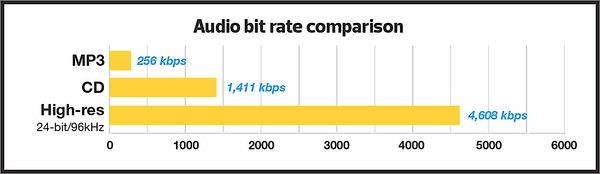
For most users of the MP3 format, the problem of high quality sound is usually phrased as follows: “256 or 320? Or maybe try VBR?”

Bitrate


And this question haunts them day after day. Not all recordings sound good at 256; there is a strong audible and visible (measured) loss in the high frequency range. When using VBR mode (the so-called variable bit rate stream), it often happens that music sounds better by ear than 256, but this should not be taken as a general rule of thumb. Encode low-value or poor-quality records – you can’t go wrong. I have selected the VBR parameters to get the highest quality for VBR.

For the commercial LQT format, there is only one encoder proprietary to the authors: Liquifier Pro. We push them. Note that the LQT format is originally based on VBR encoding, so there are simply multiple modes for it, such as “bad”, “good”, and “excellent”. Naturally, for our tests we took the “excellent” (audiophile) mode, which results in a stream of 192 to 256, most of the time 200-220 kbps. Let me remind you that the LQT format is based on the MPEG-2 AAC family of algorithms. Also, this is the highest quality AAC implementation to date (tested on analogs).

The OGG format is a relative of the MP3 format, but it contains a different psychoacoustic model and some technical innovations that MP3 does not have. For starters, OGG initially only supports VBR mode. The user sets the approximate bit rate and the encoder tries to compress as closely as possible. The range of variation is extremely wide: 8 to 512 kbps, and it is much more discreet than MP3. The top bar is up to 512 kbit / s, whereas nowadays MP3 encoders really only “pull” up to 320. You may ask “is it possible that even 320 is not enough?” Yes, it happens, but rarely.

Roxette samples
Well, we come to the most interesting part. Let’s start with my auditory sensations.

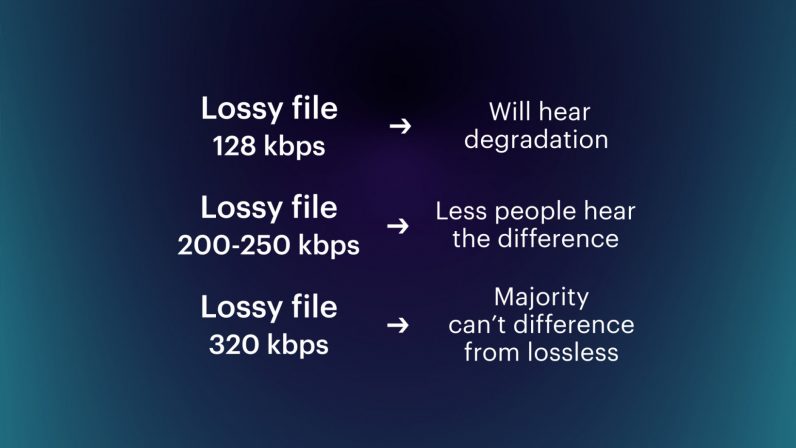
For MP3 in a 256 kbps stream, noise disturbances at high frequencies are clearly audible. Not only is a considerable part of them absent from the sound, but strong distortion, wheezing, clanging and other “charms” are also mixed in. This is a sign that 256 is clearly not enough, therefore you need to test higher. Let’s take a 320 compressed sample. The sound has changed significantly, this is a completely different matter: the upper part is in place, no differences by ear were found. For the purity of the experiment, let’s see what happens in floating flow mode. We obtain an average bit rate of 290 kbit / s, of which the conclusion suggests that 256 for the sample under study will not be enough. In fact, a sample encoded in VBR mode sounds a little better than 256, but it clearly falls short of 320. In the case of MP3, for high-quality compression, only encoding in 320 kbps mode is adequate, ie , to the maximum of opportunities.

Let’s take OGG as “modified MP3”. There are five approximate bit rates for the encoder: 128, 160, 192, 256 and 350. Well, let’s try 192 and 256. We will not take 350 bit rates, because we already know that MP3 at 320 kbps clearly transmits excellent quality, it seems that better not necessary. For 192 mode, we get an average stream of 226, and for 256 mode, up to 315 kbps. So far the precision. Such a large deviation from the reference point is a signal for sound material that is very difficult to encode; with a sample with a simpler density, the precision will be higher. To be honest, I tried to evaluate 320 MP3 and 315 OGG for a long time and came to the conclusion that they both sound almost identical to the original sound. But they are based on different psychoacoustic models and their sound coloration is different. Personally, I liked the MP3 a bit more. But, this is really a controversial issue; after all, the OGG encoder is just a beta version. When there is a release, I think it should surpass MP3 in quality. Comparing them separately to the original, I was inclined to believe that the OGG has an even closer sound to the original, but there is something wrong with the high frequencies of this encoder. Because of this, MP3 sounds a bit better. I don’t think it is necessary to say that in 350 mode (average bitrate was 365) OGG “perfectly” repeats the original.

Now we are talking about the little-known but widely advertised format as the “highest quality”: the LQT format. And most importantly, it sounds great overall, however after listening to it, I realized that I didn’t like its sound. It doesn’t distort high frequencies, like MP3 256 kbps, but it smears the sound and smears a lot. Loud sounds fade over time.

The Truth About High Bitrate Lossy Compression Part 2

The Truth About High Bitrate Lossy Compression Part 2

Bitrate

I decided to “drop” the three specified formats to get the highest quality sound with the minimum file size.

audio bitrate

For the test, we selected several samples (here a sample is a small fragment cut from a PCM file) from two types of compositions. The first is a very dense and loud sound with amplitude normalization (compacting the sound “vertically” to fit 16-bit from a 24-bit master) and compression of the dynamic range (so that the sound of all instruments is always strong). As the first type (as in my previous tests), the composition Crush On You from the album Have A Nice Day by Roxette was chosen, three samples of 15-20 seconds each of different parts of the composition were examined. The second sample is clean and transparent (acoustic or light orchestral arrangement).

Why these particular records? Roxette samples have very strong dynamic compression (the amplitude value is very often equal to the maximum (which is bad) and leads to overload of the playback equipment and strong distortions).

Roxette sample
In such samples, the encoders have to work in extreme mode, so any distortion becomes easily audible. encoding distortions add to the existing intrinsic distortions of the original. You ask “why then take a sample as a test?” It is necessary and how. The vast majority of albums released today are recorded this way. Therefore, the encoder must adequately accept clipping sound.

With Klaiderman’s samples, the situation is diametrically opposite. The original analog recording after a very high quality digital remastering was recorded to CD and without dynamic compression.

Clayderman sample
Great sound, very nice and smooth highs. We will pay special attention to them during the analysis, we will try to preserve them. But it is these frequencies that will be the most difficult for encoders to transmit.

the truth about high bitrate lossy compression

the truth about high bitrate lossy compression

bitrate lossy

Preface

bitrate lossy

In the understanding of most people, the word music lover is most often associated with a person who not only loves and collects music, but also appreciates high-quality music, and not only in artistic and aesthetic terms. but also the quality of the recording. of the phonogram itself. Think, a few years ago, an audio CD was considered the standard of music quality, but a computer, even in dreams, could not compete with the quality of a CD. However, time is a great joker and he often likes to turn things upside down. It would seem that quite a long time passed, one or two years and … that’s it, the CD on the PC went into the background. Don’t ask “why?”, You know the answer to this question yourself. Everything is to blame for the revolution in the world of sound on a computer: audio compression (hereinafter referred to as audiolo compression which means lossy compression to reduce the size of the audio file), which made it possible to store music on the hard drive, lots of music! In addition, it was possible to exchange it over the Internet. New sound cards have been released, capable of squeezing almost studio quality out of a piece of hardware that seems useless in terms of music. Today, even having a computer that is not very smart in performance, having bought a Creative SoundBlaster Live! And remembering that since the Soviet times there is a good amplifier and good acoustics, you will get nothing but a high-quality music center, the sound of which is inferior only to very expensive audio equipment (mid-range or even high-fidelity hi-fi). ). Add to this the general availability of music files and you know you have the power at your fingertips. And then there is a revolution, and you understand that a compact disc is no longer so convenient, you are fascinated by something completely different: the magic signs of the “MP3”. He cannot eat or sleep; faces the seemingly insoluble question of the “chicken and egg”: how to “squeeze” and, more importantly, how to “squeeze” …

This is where I will help you. This article is the beginning of my new series of informational materials on music on the computer. For over a year maintaining an extensive database of MP3 files, I have accumulated a great deal of research on audio compression. It is these studies that I will try to share with you. Several respected authors have written many articles on audio compression, so I will try not to write what I can easily find in other sources of information. I would like to express my position on the subject under discussion simply and clearly. We will not consider audio compression to be as compact a tool as possible put audio information on your hard drive (so that you can record so many hours of music there). Yes, compression allows you to record music more compactly, but my goal is to minimize quality loss by converting “pure” audio to compressed. That is why only high bitrates and encoders that compress qualitatively are considered in these modes. So it is much more convenient to work with compressed audio – instant access to any track from any album, convenient software for playback. And, of course, the financial issue has not been forgotten either.

Of the audio compression formats that exist today, three deserve attention, in my opinion: MP3 (or MPEG-1 Audio Layer III), LQT (as representative of the MPEG-2 AAC / MPEG-4 family) and the completely new OGG format (Ogg Vorbis) developed by a group of enthusiasts:

MP3 is by far the most widely used of these (mainly because it is free). Let me remind you that it was thanks to the MP3 format that the victorious procession of compressed audio took place. However, as is often the case with pioneers, little by little it is losing ground and giving way to new and better formats.
The second format, LQT, is a representative of a new direction of audio coding algorithms, a representative of the AAC family. This is a fairly high quality, but commercial and highly classified format.
OGG became widely known to the public this summer and is currently developing rapidly, soon (with the release of the Encoder and Decoder) it should beat MP3 with better sound quality with smaller file size.
I will not give a detailed description of technologies and formats here, you can easily find them yourself. There will only be facts, conclusions and recommendations. I plan to present my research separately for each format in separate articles.

What is the best bit rate for video and sound and what is it?

What is the best bit rate for video and sound and what is it?

Audio bit depth - Wikipedia

Common characteristics of video and audio recordings include the so-called bit rate.

bit rate

Some users do not know how important this figure plays when playing files, along with their size and resolution. What is the bit rate? The bitrate is the number of bits that are used to process and transmit data during a certain period of time. This measurement is used to measure the effective transmission rate on a data stream channel.

In other words, this is the minimum value of the channel capable of passing the flow without delay. The measure of video bit rate is bits per second and its derivatives (kbps, Mbps, etc.). In audio and video transmissions that use degrading compression, this term refers to the degree of compression of the transmission.

Consequently, it indicates the size of the channel within which compression took place. Compression modes In practice, there are three modes of stream compression that cause quality loss: Constant Bit Rate (or CBR). In this encoding option, the initial bit rate is set by the user and then does not change for the entire duration of the audio or video. Its advantage is that it is quite easy to calculate the size of the final file. However, this encoding is not very suitable for audio files that have dynamically changing sound, as it does not provide a good size / quality ratio.

Variable bit rate (or VBR). The bitrate value is selected by the codec, depending on the parameters (the expected quality level). During the encoded fragment, the value of the bit rate may change. When audio is compressed, the required bit rate is set based on the psychoacoustic model. This encoding achieves the best sound quality ratio, but it is difficult to calculate the exact size of an audio or video recording. It can be very different. Average Bit Rate (or ABR).

This is a hybrid of the first two modes. The initial value of the bit rate is set by the user, but then independently changed by the program within certain limits. At the same time, the difference with VBR is that the codec uses the maximum and minimum values ​​within the limits set by the user, and does not exceed them. This encoding allows you to set the processing speed in the most flexible way and allows you to determine the file size with greater precision. Where are the Users and AppData folders and what is stored in them What and how is it measured? When quantifying high data rates, metric or decimal prefixes are used. It looks like this: Speed ​​1000 bps = 1 kbps (one kilobit or one thousand bits per second). Speed ​​1,000,000 bps = 1 Mbps (one megabit or one million bits per second). Speed ​​1,000,000,000 bps = 1 Gbps (one gigabit or one billion bits per second). What bit rate should I choose? When it comes to the common MP3 audio format, it is the audio compression that results in data loss. The higher the bit rate, the better the sound quality. Speaking of the choice of the bit rate for this format, we can say the following: 32 kbps: very low quality sound (valid only for voice recording); 96 – May be applicable for low quality audio transmission or voice recording; 128 and 160: allows you to encode music recordings at an entry level; 192 – music encoding in acceptable quality; 256: high quality music recording; 320 is the highest quality that can be achieved in MP3 format. In video formats, this value is calculated differently. For example, for videos on YouTube, a bit rate of 10-16 Mbps at 720p is sufficient. This will achieve a clear image and a small file size. If better image quality is required, this value can be increased to 18-25 Mbps. The highest image quality will be achieved at 50 Mbps and 1080i resolution. In general, the effect of bit rate on video quality is expressed as follows: Yandex.Direct18 + Start your journey from the station Start on your home planet, explore the universe and find intelligent life in the universe. MORE DETAILS XCRAFT.RU 18+ Read Glukhovsky’s new novel “Post” Exclusively on Booknet, a new post-apocalyptic novel by Dmitry Glukhovsky. MORE DETAILS LITNET.COM 400 kbps: low quality video at 240p; 750 kbps, 1 Mbps: can be used for some YouTube videos at 360p and 480p, respectively; up to 1.15 Mbps – compressed video in VCD format; 2.5 and 3.8 are compressed YouTube videos recorded at 720p; 4.5 and 6.8 are sharper, but still compressed YouTube videos using 1080p; 9.8 – DVD video recordings.

Data compression modes: CBR and VBR

Data compression modes: CBR and VBR

CBR and VBR

Often times an inexperienced (and even sophisticated) DVR owner has a question: “What’s behind the CBR and VBR abbreviations in the recording channel settings?”

CBR and VBR in mp4 H264 video files | Internet with a BrainCBR and VBR

In fact, if everything is clear with the video settings (720p, 1080N, 1080p are already established formats in the world of video surveillance), then with the audio settings not everything is so transparent.

The sound from the microphone connected to the recorder is encoded in MP3 format. Today, the MP3 format is the most popular audio file encoding format of all the existing ones. It is generally accepted that the quality of an audio track depends on its bit rate, therefore the most optimal bit rate for an audio track is 192 kbps. This statement, however, is one-sided, because in addition to the bit rate, the sound quality depends on the codec in which the audio was recorded.

There are three main types of MP3 file encoding: CBR, VBR, and ABR. The ABR type is intermediate between the other two and is not used in video surveillance. Therefore, in this article, we will only consider the CBR and VBR encoding types.

CBR (constant bit rate) stands for constant bit rate, which was set by the user during recording or encoding and does not change in the future. That is, regardless of the data type (even if you are recording silence), the number of bits specified by the user is constantly encoded in 1 second. The consequence of this type of encoding is the cumbersome amount of data received, which is a waste of disk space.

VBR (Variable Bit Rate) translates from English as a variable (variable) bit rate. By encoding in VBR, we get a file, the bit rate of which changes depending on the density of the data stream (that is, for example, the bit rate of silence will be less than the bit rate of any sound). This type of encoding continues to improve, reaching new indicators of the amplitude of changes in the bit rate of the data stream. The main disadvantage is that it is impossible to predict the future size of the encoded file. Despite this, this minus sign does not obscure the overall picture in any way – the file size turns out to be smaller than when encoded as CBR. This is due to the fact that the bit rate of silence (s) is lower. Obviously, this format is more acceptable for video surveillance tasks than CBR.

Estimated Compressed Video Quality Parameters

Estimated Compressed Video Quality Parameters

Bitrate

Estimated compressed video quality parameters.

Bitrate

If you have ever used video stream compression programs, you have probably come across parameters such as the size (size) of the output file or its bit rate among the characteristics of the output file, and wondered: how to choose the correct value?

Sound files
As a general rule, these problems do not arise with audio files, because the quality of the sound is determined almost unambiguously by its bit rate (that is, the reproduction rate of the transmission, usually expressed in kilobits per second). If we see that the bit rate of a compressed audio file (mp3) is 128 kpbs (kilobits per second), then we understand that the sound quality corresponds to a CD disc, if it is 64 or 96 kbps, then this already It is low. sound quality, if 256 kbps is High quality studio sound, etc.

Although within itself the sound quality is also characterized by parameters such as the sampling frequency, but as a general rule this parameter is already included in the bit rate and, therefore, the sound quality is usually determined by the Bit rate. Those. if we see an mp3 file with music with a description that is compressed with a quality of 128 kbps, then we already want to say that it is stereo sound with a sampling frequency of 44 or 48 khz.

Introductory
With video, things get a bit more complicated. The video has parameters such as size and frame rate. Therefore, knowing just one bit rate is not enough; you need to additionally know the frame size and the number of frames per second. Therefore, looking at the video parameters, for example, 640×480 (frame size), 25 fps (frames per second), 1300 kbps (bit rate), it is difficult for a beginner to say anything about its quality, even approximately. Similarly, setting the parameter 1300 kbps when compressing video, it is not clear what we get in the output. And this is essential, since the process of recompressing video movies takes several hours.

The quality of the video stream compression is most unequivocally determined by the “bits / pixel” ratio, which means the average number of bits spent in 1 pixel of the image. Also, I will denote this coefficient with the letter K (because I don’t know how it is normally denoted).
If we take a 24-bit color depth encoded in RGB format (that is, when the red, green and blue channels are encoded at 8 bits per channel), then the uncompressed video stream will have a value of K = 24. The Modern video codecs give a good quality picture at a fairly low K value. For XviD and DivX codecs, good image quality will be at a K-value in the range of 0.25-0.35, for H264 – in the range 0.15-0.2 (that is, the video stream is compressed by file size more than 100 times relative to uncompressed). I don’t know the values ​​of other codecs, but the worse (older) the codec is, the higher the value of K, in which there will be a good image quality.

The coefficient is calculated using the following formula:

The code:
K = (size * 8) / (width * height * fps * time)
Where:

size: size of the video stream in bytes
width, height – frame size (width and height) in pixels
fps: number of frames per second
time – video transmission time in seconds
At the same time, don’t forget that 1 kilobyte equals 1024 bytes (not 1000) and consequently 1 megabyte equals 1024 kilobytes = 1048576 bytes.

It should be understood that the above K values ​​for codecs are taken for “average” video. If the video is a hand-drawn cartoon or a flash cartoon, then the quality will be good even with lower values ​​of the coefficient. If the video contains a lot of movement and constant changes in color and brightness (for example, an anthill), then for good quality the video should be compressed with a higher value of the coefficient. If you do not need a clear image (for example, when you need to shoot some physical exercises, but at the same time the clear contours of the face and surrounding objects are not important to us), then the coefficient can be reduced. Etc.

Typically, compression programs ask you to specify the bit rate (usually in kilobits per second) or the size of the target file (usually in kilobytes). Starting from the fact that the bit rate is the file size in bits divided by the time in seconds, the corresponding parameters are calculated using the formulas

Does it make sense to convert the file to a higher audio bitrate?

Does it make sense to convert the file to a higher audio bitrate?

Bitrate

When a certain file (mp4, flv, etc.) has an audio bitrate of 95kbps, does it make sense to generate a higher bitrate when converting to mp3 or other format (lossy or not)?

Bitrate

Will this result in higher quality audio or just a larger file?

Edits after many answers + comments:

I am not saying that the output is of better quality than the input: obviously this is not possible. (Except to go from a lossless format to the original waveform). I’m talking about whether an output with a higher bit rate than an input will have better quality than otherwise.

Please note that I know that converting between lossy formats is not recommended. Only in some cases the original cd / wave may not be available. The question is just the usefulness of the optional increase in bitrate during conversion.

Perhaps a sub-question is useful: Does the answer depend on the output file type (lossless or lossy)?

the two most popular polls below (this one and this one) seem to speak differently, that is, the bitrates are later said to be not directly comparable, and if the original audio is in a more efficient format, then the audio Output (less efficient) should have a slightly higher bitrate (same idea here and here), but although mp3 is less efficient, I’m not sure which formats are more efficient. (Is it aac?) (- And, in general, the answers seem to fall into one of the two positions represented by the answers with the most votes).

The reality is that if you have a file with a bit rate, it will NOT improve if we increase the bit rate.
If the ORIGINAL encoding has a better bit rate, then it will sound better. But modifying it after encoding it has no effect.