What is the difference between AAC and mp3? Introducing a music file format comparison!


Free Download Mp4Gain
picture

What is the difference between AAC and mp3? Introducing a music file format comparison!
AAC Vs. MP3

One of the music files is “AAC”, but do you know the difference between the two files, the AAC file and the popular mp3 file? This article provides a comparison of the formats and the differences between the two music files, AAC and mp3.

AAC or MP3

What is AAC?
What is the difference between AAC and mp3?

What is AAC?

There are various music file formats, but do you know what kind of file is “AAC”, what is one of the file formats? AAC is an abbreviation for “Advanced Audio Coding” and is one of the irreversible digital audio compression formats. The extensions are “.m4a” and “.m4p”.

This is a standardized file format for higher sound quality and higher compression than MPEG-1 Audio, including mp3. AAC is also used in MPEG-2 and MPEG-4 and is responsible for the audio part of video files in those formats. AAC can have 48 channels of full-bandwidth audio in one stream and can contain 16 channels of low-frequency sound effects, 16 interactive channels, and 16 data streams.

What is the difference between AAC and mp3?

You may be curious to know the difference between AAC files and mp3 files. As mentioned above, AAC files are a standard intended for higher sound quality and higher compression than mp3 files, which is why they are basically positioned as the successor format to mp3. AAC is the new generation and mp3 is the old generation.

Both are lossy compression, that is, data compression is done using a compression method that produces data that is truncated, even though the data compression rate is high. Therefore, if you rip from a music CD and create these files, the sound quality will inevitably deteriorate compared to the original music CD. (Since the audible range that humans cannot hear is cut off, it is difficult to notice if you are not very particular to

respect). The data compression rate for both AAC and mp3 is about 1/10 of the original data, and AAC is slightly better. It feels like the compression rate is high. AAC is the default file format used by Mac products, such as the iPhone, and mp3 is more common on Android smartphones. Also, there are many music players that support mp3 because it has a long history and AAC tends to be less than mp3.

Regarding sound quality, the maximum bit rate for both is “320 kbps”. Although 320 kbps is well below the 1142 kbps for music CDs, the sound quality is high enough considering the human audible range. And if both AAC and mp3 are encoded at 320 kbps, AAC is said to have better sound quality.


Free Download Mp4Gain
picture


Mp4Gain Main Window
picture


Mp4Gain Features
picture


Free Download Mp4Gain
picture

Difference between lossless compression and lossy compression.

Difference between lossless compression and lossy compression.

Lossless

Basically, the higher the kbps, the higher the sound quality in the sense that it is closer to the original sound.

lossless vs lossy

Therefore, it is easy to think that it is only necessary to collect sound sources with high kbps.

However, since the amount of data will be large, it must actually be compressed.

That’s where two compression technologies come in.

Lossless compression (lossless compression)
Rossy compression (lossy compression)
About the uncompressed sound source
Let’s explain each compression technology.

We will also look at uncompressed sound sources.

Lossless compression (lossless compression)
Lossless compression has the advantage of retaining a large amount of information by compressing the data without damaging it.

In other words, the tendency is for the kbps value to be higher.

Of course, because it is compressed, the file size can be reduced to about half.

However, the capacity is considerably higher than the Rossie compression.

Lossy compression (lossy compression)
Rossy compression is famous for formats like mp3 and AAC.

These audio files cut and compress sounds that are inaudible to the human ear, which can save a lot of space.

However, even in the sense of cutting off the sound, it deviates from the original sound.

However, it is quite difficult to distinguish it from those without loss in the ears of ordinary people and in an environment where you can prepare.

Therefore, it is still used in many software and services, taking advantage of the reduction in size.

About the uncompressed sound source
It is no exaggeration to say that the audio file is the closest to the original sound.

Windows .wav and Mac OS .aiff are famous as uncompressed sound sources.

Uncompressed sound sources are so flexible that they can store data at any sample rate and bit rate.

So it is the best file format to record first.

But it goes without saying that the file size is large because it is not compressed.

Therefore, lossless compression, which can reduce the size and preserve the original data, is now popular.Difference between lossless compression (lossless compression) and lossy compression (lossy compression)
Basically, the higher the kbps, the higher the sound quality in the sense that it is closer to the original sound.

Therefore, it is easy to think that it is only necessary to collect sound sources with high kbps.

However, since the amount of data will be large, it must actually be compressed.

That’s where two compression technologies come in.

Lossless compression (lossless compression)
Rossy compression (lossy compression)
About the uncompressed sound source
Let’s explain each compression technology.

We will also look at uncompressed sound sources.

Lossless compression (lossless compression)
Lossless compression has the advantage of retaining a large amount of information by compressing the data without damaging it.

In other words, the tendency is for the kbps value to be higher.

Of course, because it is compressed, the file size can be reduced to about half.

However, the capacity is considerably higher than the Rossie compression.

Lossy compression (lossy compression)
Rossy compression is famous for formats like mp3 and AAC.

These audio files cut and compress sounds that are inaudible to the human ear, which can save a lot of space.

However, even in the sense of cutting off the sound, it deviates from the original sound.

However, it is quite difficult to distinguish it from those without loss in the ears of ordinary people and in an environment where you can prepare.

Therefore, it is still used in many software and services, taking advantage of the reduction in size.

About the uncompressed sound source
It is no exaggeration to say that the audio file is the closest to the original sound.

Windows .wav and Mac OS .aiff are famous as uncompressed sound sources.

Uncompressed sound sources are so flexible that they can store data at any sample rate and bit rate.

So it is the best file format to record first.

But it goes without saying that the file size is large because it is not compressed.

Therefore, lossless compression, which can reduce the size and preserve the original data, is now popular.

High resolution compatible terminal

High resolution compatible terminal

High-Resolution Audio

In the case of the iPhone, it does not support the output of high-resolution sound sources.

Hi-Res Audio

Therefore, it is necessary to prepare a headphone amplifier equipped with a DAC that supports high resolution.

In the case of Android, there are terminals that support high resolution such as Xperia.

To enjoy high-resolution sound quality, you need to check whether the terminal that plays music is also compatible.

High resolution recommended elements
We will present specific recommended high resolution elements.

ACTIVE “CT10”
Let’s take a look at the appeal of the product.

ACTIVE “CT10”
ACTIVE CT10 [Cool White] High-resolution portable audio player with high sound quality

19,800 yen (as of 08/27 01:10)
Amazon
Rakuten

ACTIVE “CT10” is a digital audio player that allows you to easily enjoy high resolution.

ACTIVE “CT10” has the following characteristics.

Achieves smooth operation despite its compact size
Astell & Kern exclusive sound quality
Up to 400GB expansion with MicroSD card
groovers will end on June 30, 2019
Let’s take a look at each feature.

Achieves smooth operation despite its compact size
Many people support the compactness of the ACTIVE “CT10”.

It’s smaller than most smartphones and fits in the palm of your hand, making it easy to carry.

And despite its small size, it uses a “quad-core CPU” for exceptional stability.

The “Quad Core CPU” has high processing power and offers smooth operation.

The processing power is important because it is high resolution, which usually has a large capacity.

Astell & Kern exclusive sound quality
ACTIVE “CT10” is a collection of Astell & Kern technical capabilities.

Astell & Kern is the original brand of IRIVER Korea and has developed many audio players compatible with Hi-Fi / Hi-Res sound sources.

Due to its high sound quality, it is now one of the standard brands of high-resolution players.

ACTIVE “CT10” boasts of sound quality because it requested development support from the IRIVER group company.

Up to 400GB expansion with MicroSD card
Since the capacity is 16GB, it is a little small to put a high resolution sound source.

However, since it supports MicroSD cards up to 400GB, it can be expanded up to 416GB in total.

It is sold separately, but if you want to put a lot of music on it, buy a MicroSD card.

High resolution has a large capacity.

groovers will end on June 30, 2019
ACTIVE “CT10” was able to buy a high resolution sound source directly from the player body.

However, it cannot be used now because the distribution site “groovers” has ended.

However, ACTIVE “CT10” can easily transfer music from your computer.

Just because “groovers” have finished doesn’t mean you can’t listen in high resolution.

Difference between analog data and digital data
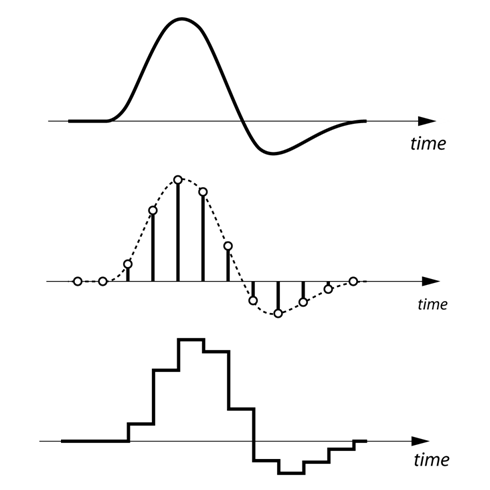
Analog is a line.

Digital is a point.

Digital data can be brought closer to analog (line) by arranging points in succession.

The record is analog because it records continuous sound waves in the groove as is.

A CD divides continuous sound waves at regular intervals (sampling) and applies numerical values ​​to each division (quantization).

Then the flow consists of converting the numerical value into digital data suitable for a computer (encoding).

In this way, digital data is only one point, so in theory it is further from the original sound than analog.

However, since it is indistinguishable to the human ear, it is possible to enjoy the sound digitally without any discomfort.

Over the limits of human hearing! High resolution doesn’t make sense?

Over the limits of human hearing! High resolution doesn’t make sense?

Hi-Res

What is the limit of the ability to discriminate human sounds?

Hi-Res Audio

Although there are individual differences, the human audible range is said to be 20 Hz to 20 kHz.

The sampling frequency of the CD is 44.1 kHz.

In theory, this value can be reproduced up to 22.05 kHz of the original sound, so it can sufficiently cover the human audible range.

In that case, the question arises that high-resolution sound quality, which has higher specs than CDs, may not be audible to the human ear.

Actually, there are many negative opinions from a scientific point of view, and it remains controversial.

<Reference: High Resolution Audio-Wikipedia>

However, the sound is highly dependent on experience, so if you are interested, you should give it a try.

Necessary environment to enjoy high resolution
Whether it makes sense or not, there are a few things you need to prepare for to enjoy high resolution.

The required environment is as follows.

High resolution sound source
High-resolution compatible headphones / earphones / speakers
High resolution compatible terminal
Let’s explain each environment.

High resolution sound source
There are various media for high resolution audio sources.

The easiest of these is probably the Hi-Res Audio source that is delivered online.

If you are a high resolution distribution site, you can get many sources of sound.

Note that listening with high-resolution headphones will not result in high-resolution audio.

High-resolution compatible headphones / earphones / speakers
In addition to high-resolution audio sources, prepare items such as compatible headphones and earphones.

It is quick to check if there is a high resolution mark on the product package to see if it is compatible.

Please note that most wireless headphones do not support high resolution playback because they compress data during transmission.

In the case of wireless technology, only aptX / aptX HD compatible items or SONY LDAC compatible devices support high resolution.

In any case, the high-resolution branding is a milestone.

High resolution doesn’t make sense?

High resolution doesn’t make sense?

Hi-Res

Sound quality comparison!

What is the difference between bit, khz and kbps? High resolution doesn’t make sense?
It is quick to judge whether the sound quality is good or bad from the data.

However, there are several factors that make up sound quality.

Therefore, in this article, I explained the sound quality in a rather broken way.

If you are a little interested in sound quality, check it out.

High-resolution sound quality and CD comparison
Over the limits of human hearing! High resolution doesn’t make sense?

Necessary environment to enjoy high resolution
High resolution sound source
High-resolution compatible headphones / earphones / speakers
High resolution compatible terminal
High resolution recommended elements
ACTIVE “CT10”
Difference between analog data and digital data
Difference between lossless compression (lossless compression) and lossy compression (lossy compression)
Lossless compression (lossless compression)
Lossy compression (lossy compression)
About the uncompressed sound source
Difference between bit, kHz (kilohertz) and kbps (Kirobuki PS)
The next three units are important for measuring sound quality.

little
kHz (kilohertz)
kbps (Kilobit per second)
Let’s briefly explain each unit.

What is a bit?
bit is the number of quantization bits.

Here, it is easy to understand if you think of it as “the resolution (fineness) of the sound itself”.

The higher the value of this bit, the smaller and finer the sound can be reproduced.

In other words, it is more faithful to the original sound.

However, there is a disadvantage that the amount of data increases when the bit is large.

What is kHz (kilohertz)?
kHz is the sampling frequency.

It’s easy to understand if you think of it as “the number of data used in the expression of sound per second”.

The higher this number, the greater the range that can be recorded.

Also, kHz is one of the numbers often used to express headphone specifications.

If you look at the specification table, you will often see numbers like “20Hz to 20kHz”.

This indicates the range of supported ranges.

The lower the number on the left, the better the bass can be heard, and the higher the number on the right, the greater the playback range.

What is kbps?
kbps is the so-called bit rate.

Also known as “bits per second” or “kilobits per second”.

Unit that expresses how many kilobits of data can be transmitted per second.

Kbps can be calculated using the following formula.

kbps = bit x kHz x number of channels

The number of channels is the number of speakers, for example, in stereo, it is “2”.

In theory, the higher the number of processed bits per second, the higher the sound quality.

High-resolution sound quality and CD comparison
Let’s compare CD and high resolution sound quality from a data point of view.

little kHz kbps
16 bit CD 44.1-48 kHz 1,411.2 kbps
High resolution Exceeds 44.1 kHz / 16 bit
Those that exceed CD specifications are defined as high resolution.

Specific examples are as follows.

44.1 kHz / 16-bit: CD specifications
48 kHz / 16-bit: CD specifications
44.1 kHz / 24-bit: high resolution (the number of quantization bits is greater than the CD specification)
48 kHz / 24 bit: high resolution (the number of quantization bits is greater than the CD specification)
96 kHz / 16 bit: high resolution (sampling frequency is higher than CD specification)
96 kHz / 24-bit: high resolution (both higher than CD specs)
96 kHz / 12 bit: not high resolution (low number of quantization bits)
32 kHz / 24 bit: not high resolution (sample rate is low)

Digital audio: a simple but deep explanation about digital audio. Part 1

Sound is a phenomenon that implies a propagation of waves generally produced by a vibratory movement of a body. The propagation of sound implies a transport of energy without carrying out a transport of matter.

digital audio

As the sound is produced by a wave movement when applying the Fourier transform we can express it by a sum of sinusoidal curves that correspond to pure tones that can be characterized by the magnitudes of any wave such as:

-Period It is the time elapsed between two equivalent points of a wave.
– Wavelength It is the real distance a wave travels from its highest point to the next equivalent point.
-Frequency It is the magnitude that measures the number of repetitions in a space of time.
-Amplitude It is the distance between the furthest point of the wave with the equilibrium point.

These magnitudes give the sound a series of characteristics such as:

-Duration: Determines the length or short of the sound due to the time, measured in seconds, it occupies.
-Intensity: Determines the high or low sound due to what we know in relative terms as volume, which is measured in decibels (it is a logarithmic scale).
-Timbre: Determines the proper nuance of each instrument or sound source due to the different harmonics that compose it.
– Hue: Determines the acute or serious sound due to the frequency it has. The frequency is measured in hertz (Hz).

If we carefully consider it, we will see that the initial concept of Mp3Gain was intensity, which is measured in decibels and represents the loudness we perceive.

digital audio

Digital audio

Digital audio is the digital coding of an electrical signal that represents any sound wave. This electrical signal is picked up for example by a microphone, which takes the sound whose nature is analog and transforms it into electricity that still has the same type of analog nature, then through the necessary hardware and software it can be transformed into binary information, turning Something continuous in discreet. This process involves two tasks: sampling and digital quantification of the electrical signal.

Within the digital audio there are different types of formats to represent the audio:

-PCM: They contain all the information received from the analog to digital converter, without any omission of data. This makes the type of formats that have the best quality in the digital world. WAV is an example of this type of format in question.

-Compressed: It is similar to the previous one, but specific compression techniques are used in which “non-essential” information can be lost to reduce the size of the final file. They usually have good quality in relation to the weight of the file, but as noted above, information is lost, so those with sufficiently developed / trained ears might perceive that there is something strange in a song for example. On the one hand we have formats such as MP3 and OGG that compress with loss, compared to FLAC that compresses without loss. Obviously between one format and the other there is a notable difference in the size of the final file.

-Descriptive: They are used primarily to make music and contain mainly a description of what would be the “score” of the song. With this description, the algorithm, which reproduces the song, can take a sound source with samples of the instruments that the composition needs, to synthesize the final sound based on the indications of the “score”. Examples of this format are MIDI and tracker formats (MOD, XM, IT, etc.). The difference between MIDI and tracker formats is that the latter bring built-in sound sources into the file, so the final file weighs more than using MIDI. However, with MIDI we will need to obtain a sound source on our own or use the one that brings the default sound card (which is not usually too good).