Understanding Sample Rate Part 2


Free Download Mp4Gain
picture

Understanding Sample Rate Part 2

sample rate

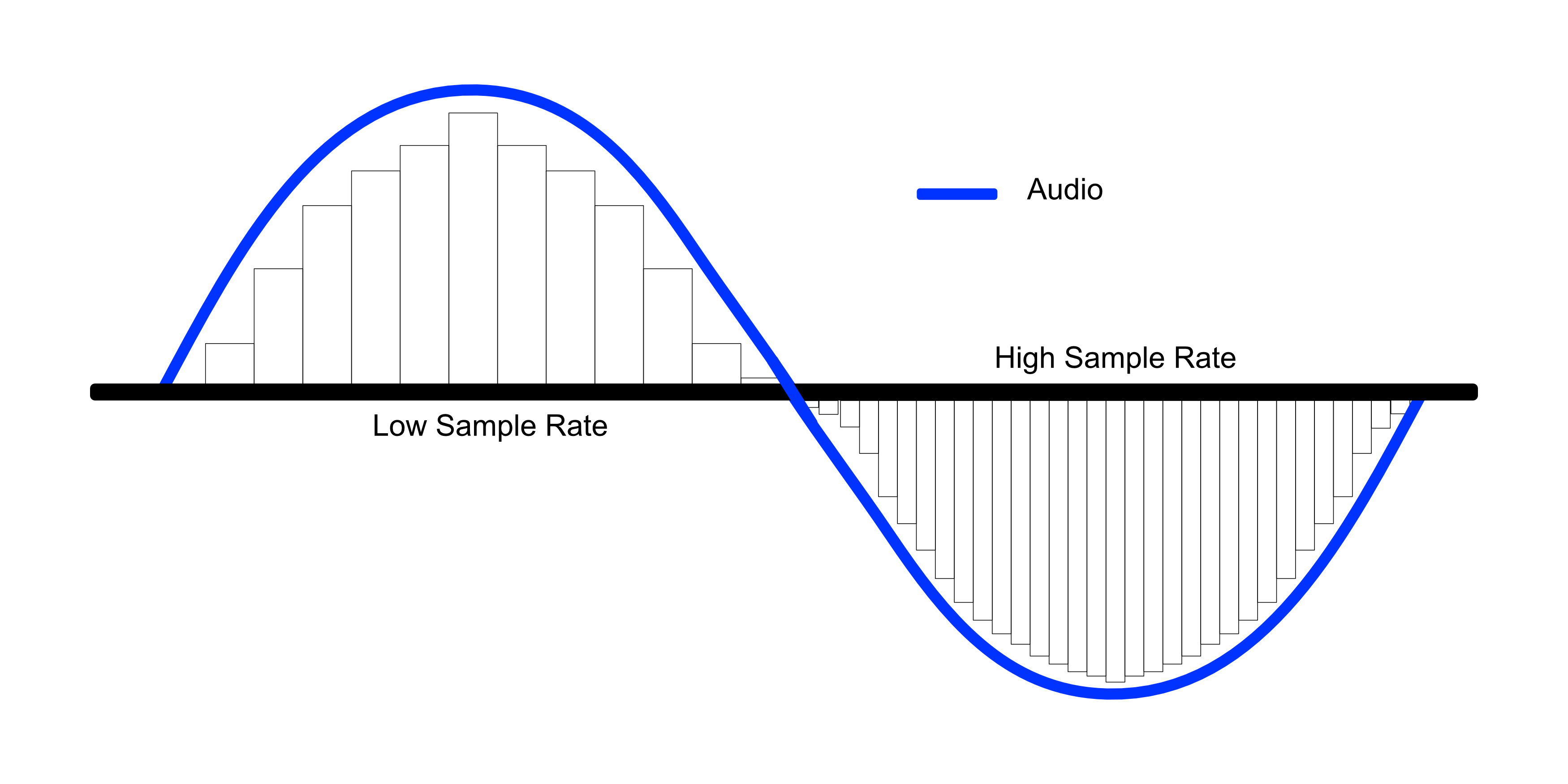
When the number of samples is reduced in this way, the original smooth curve disappears and a choppy waveform is created.

Sample Rate

Well, when it’s actually played back, it’s not the reason the signal is so choppy, it’s that in post-processing by the computer, “From the position of this point, the original waveform would have looked like this.” it is possible to reproduce a certain curve, but…

However, it is easy to imagine that the smaller this point is, the more difficult it will be to reproduce the original correct waveform, right?

In other words, you can understand that the higher the sample rate, the higher the reproducibility of the original sound.

Let’s hear the difference in sound quality depending on the sample rate

Let’s see in this video how the sound quality actually changes when the sample rate is different.

In this video you can check the sound quality of each of the four stages, “8kHz, 16kHz, 32kHz, 48kHz”.

There is a clear difference, right?

At 8kHz, the treble is cut off so much that it doesn’t seem to be the same song, and the overall muffled sound makes it impossible to hear the drum hi-hat.

The higher the sample rate, the better?
As you can see in the video above, sample rate is an important part of sound quality.

At this point, it’s easy to think, “If you set the sample rate to 96kHz or 192kHz, you should get really good sound!”, but actually the change in sound is quite hard to understand after 44, 1kHz

So why is it difficult to understand the change in sound after 44.1 kHz?

The reason why the change in sound quality is difficult to understand above 44.1 kHz
First, the frequency band that humans can hear is determined to be “20 Hz to 20 kHz”.

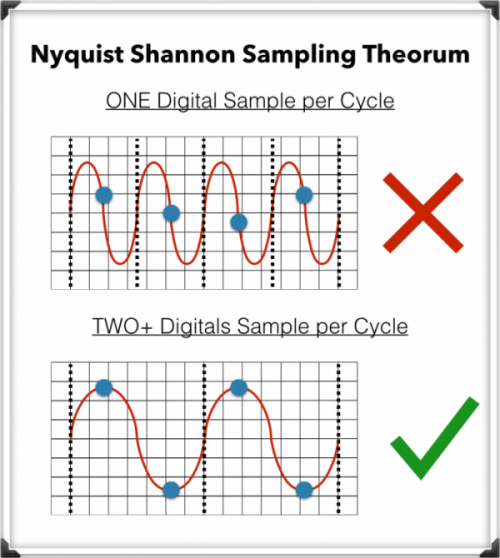
And as the basis of audio, there is a rule that the sample rate “needs twice the frequency of the frequency band you want to reproduce”. (For more information, see “Nyquist Frequency”)

Simply put, if you want to play down to 20kHz, which is the human audible range, you need a sample rate of at least 40kHz.

Since the sound quality of the CD is 44.1 kHz, the CD can completely cover the limit of human hearing, 20 kHz.

In the video above, the sound source with a sampling rate of 8 kHz is actually 4 kHz or later, and the sound source with a sampling rate of 16 kHz is actually 8 kHz or later, and the high-pitched sound disappears.

daughter
That’s why I couldn’t hear the high-frequency hi-hat sound at first.

At this level, the difference is easy to understand because it is within the human audible range, but since the CD sound quality has already been reproduced beyond the human audible range of 20 kHz, the playable frequency becomes 48 kHz or 96kHz So in most cases, the general public either don’t have enough speakers or headphones to reproduce it, or they can’t hear frequencies above 20kHz in the first place.

However, there are some interesting research results that humans hear components above 20kHz, so you can’t say there’s no point in playing after 20kHz, but unless you’re listening in a very good environment. There’s no doubt that most people can’t tell the difference.

Reference: Effect of components above 20kHz on the perception of instrument sounds

Three reasons why a 44.1 kHz sample rate is enough

So far, you know that as the sample rate increases, the difference in sound quality becomes negligible.

So what value should be set for the project sampling rate?

It’s “44.1kHz”!

Let’s look at why 44.1 kHz is the recommended sample rate, along with three reasons why.

The higher the sample rate, the higher the CPU load.
This is the biggest disadvantage of increasing the sampling rate.

If you increase the sample rate of the project, the load on the CPU will increase and the computer will not work properly.

Therefore, the higher the sampling rate, the greater the amount of information, but it is not a good option to demand too much sound quality with the specifications of a general personal computer.

After all, the standard sample rate in the music industry is 44.1 kHz.
Although high-resolution audio sources are gradually appearing recently, the music industry standard is 44.1 kHz of CD sound quality.

Furthermore, although subscription models are becoming more and more common in the music industry today, the sample rates of Spotify, Amazon M


Free Download Mp4Gain
picture


Mp4Gain Main Window
picture


Mp4Gain Features
picture


Free Download Mp4Gain
picture

Understand sample rate

Understand sample rate

Sample Rate

This “sample rate” is always involved when creating a new project or when exporting audio.

sample rate

The sampling rate seems to be difficult… Which one should I choose after all?

Of the various options, which sampling rate should be selected as the “correct answer”?

If you make a mistake when choosing the sample rate first, the song you made may be ruined, so today I will learn the basics about this sample rate and use it for everyday music production.

After reading this article, you will find that:

Knowledge of sampling rate required for DTM
Which sample rate to choose
Differences in sound quality depending on the sample rate and advantages/disadvantages
How to check the sample rate
Aside from difficult stories like “aliasing” and “Nyquist frequency”, I have summarized only the knowledge that is absolutely necessary to do DTM, so even those who say “It’s a pain to talk about numbers…” should definitely use this . knowledge Let’s remember!

Now, let’s start with the basics of sample rate.

Table of Contents
What is the sampling rate?
Let’s hear the difference in sound quality depending on the sample rate
The higher the sample rate, the better?
The reason why the change in sound quality is difficult to understand above 44.1 kHz
Three reasons why a 44.1 kHz sample rate is enough
The higher the sample rate, the higher the CPU load.
After all, the standard sample rate in the music industry is 44.1 kHz.
You can also request mastering if you have a minimum of 44.1kHz.
Two ways to check the sample rate
For audio files, right click to check
How to check from your DAW preferences
resume
What is the sampling rate?

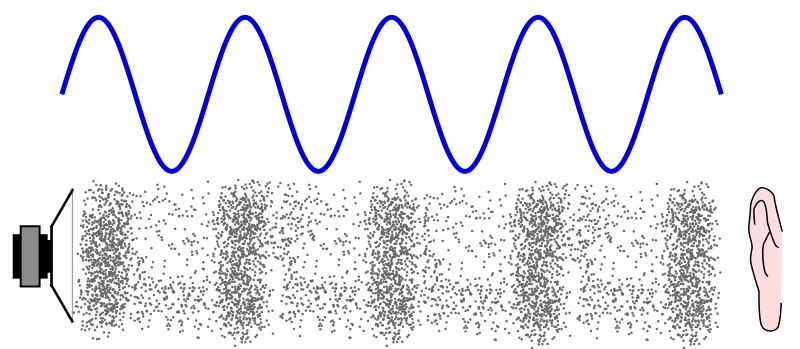
Sound is represented by such a waveform.

You can see a similar waveform even if you zoom in on the audio file in your DAW, but first let’s make this the waveform of the sound in the real world (analog world).

We take this to a computer and listen to it on a speaker and edit it, so we have to bring the sound as data into the digital world. (Convert DA)

At that point, a process called “sampling” is required, but this is not a particularly difficult story, and it is necessary to cut a cross section of sound tens of thousands of times per second and digitize analog data. .

And this “how many times per second do you sample?” it is expressed by the number “sampling rate”.

Old man
If the sample rate is 1 Hz, it means sample once per second.

So at 44.1kHz (44,100hz) CD sound quality, you’re sampling 44,100 times per second.

Next, let’s take a look at the waveform of sound reproduced in the digital world.

This part is the sampled part, and the more points there are, the more accurately the original sound can be reproduced.

In the figure above, the points are connected by a straight line, but a relatively smooth curve is still maintained at this point.

So what happens to the waveform if this point (sample rate) is low?

What is sample rate/sample frequency?

What is sample rate/sample frequency?

sample rate

Sampling rate Sampling rate is the number of sampling processes performed per second in an AD converter that converts an analog signal to a digital signal.

SAMPLERATE

The unit is “Hz”, and the higher the value, the faster the analog input signal can be converted to a digital value, resulting in higher sound quality. However, the amount of data grows proportionally, so choose the right frequency for media and devices with limited storage capacity.

It is said that in order to accurately record and reproduce a certain sound, it is necessary to sample at a frequency that is approximately twice the frequency of that sound. The sample rate used on music CDs is 44.1 kHz. In this case, the voice waveform is shredded 44,100 times per second, and the voice information at each time is converted into digital information.

Human beings generally have 20 Hz for individual differences, but they can perceive sounds from around 15 kHz to 20 kHz as sound, and this frequency band is called the audible range.

Difference Between Sample Rate and Bit Rate
Sample rate and bit rate are used to describe the sound quality before and after the compression of the audio data.

The sampling rate is a value that represents “the number of sampling processes performed per second”.
For example, at the standard sample rate of 44.1 kHz, that means sampling 44,100 times per second.
The higher this number, the smoother the sound and the better the sound quality. In other words, the numerical value of the sample rate represents the quality of the sound.

On the other hand, the bitrate is a value that indicates “at how many levels the volume is rendered”.
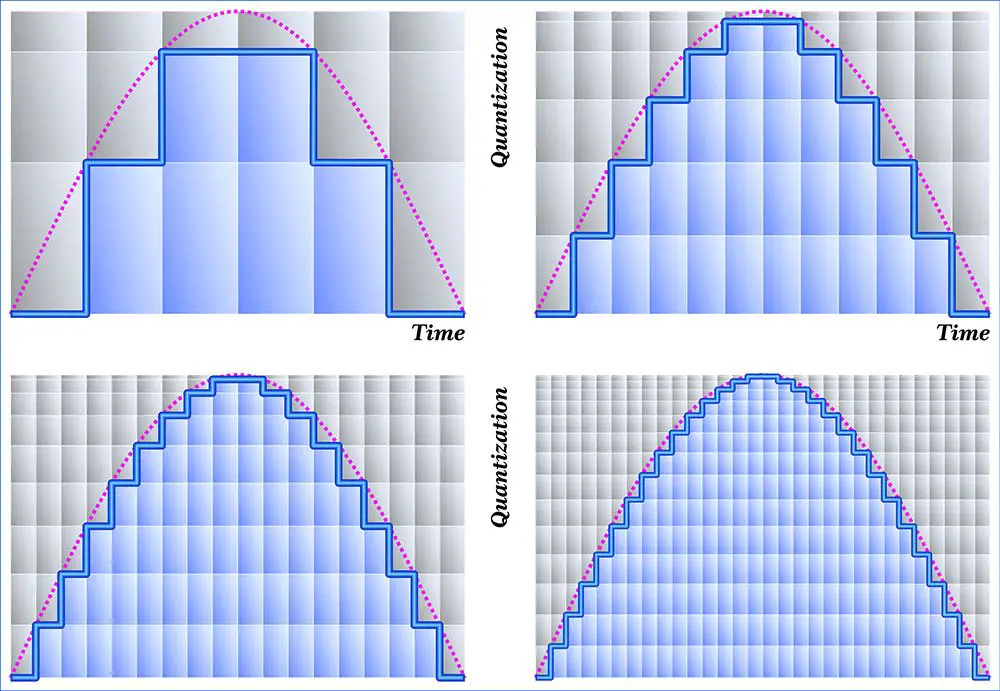
For example, in the case of 16 bits, which is the standard bit rate, the amount of information is divided by 2 to the 16th power (= 65536 steps). If the number of bits is low, the sound quality will be uneven, and as with the sample rate, the higher the bit rate value, the more information can be reproduced and the sound quality will be better.

What is 16-bit MQA?

What is 16-bit MQA?

Sample Rate

Explain how MQA “origami” folds recorded audio into a more efficient format, we often take high sample rates, such as 192 kHz, as an example.

Sample Rate

But the strengths of the comprehensive MQA system are just as important, even when the sample rate is low.

Music catalogs are important because many masters were originally recorded at 44.1 kHz and most of them were recorded only at 44.1 kHz 16b (“Red Book”).

For the 1977-2010 era catalogs, MQA is much closer to the original studio sound, to the actual sound, than most remastered releases (adding effects rather than reducing bugs). Allows you to “go back”. In many cases, the clear sound provided by MQA is deep.

In the early days of digital audio, recording and production equipment was much less sophisticated than it is today. On some level, this can be an advantage. It keeps it clean because you don’t have to mess with the sound between production and release in the studio. But early digital technology also introduced systematic flaws that we were able to perceive and correct. (A part of this is described in the author’s AES treatise [1])

What is MQA 16b?

There are three ways to create a 16-bit MQA file:
1) 16b 44.1 (or 48) kHz master encoding.
2) Derivatives for 24b MQA encoding.
3) Custom MQA-CD encoding.
In all three cases, MQA files can provide audible dynamic range greater than 16b.

For each type

1. When MQA encodes a 16b 44.1 kHz master, the entire encoded MQA file is also 44.1 kHz / 16b. Despite being 16b, this file contains all the decoding and playback information. This MQA encoding also includes all the information that can be accessed while playing the original master, and in some cases even more.
2. If the original source is 44.1 kHz / 24b or the sampling frequency is 88.2, 176.4, 352, 8 kHz or DSD, the standard MQA file will be 44.1 kHz / 24b. This file contains decoding, “display” and rendering information. If this 24b MQA file encounters a “16-bit bottleneck” during delivery (for example, in a wireless or automotive environment), the 16-bit information in the header will be clipped to maximize downstream sound quality. Organized as such, display and reproduction are still possible. See [2].
So encoding a high-speed master and truncating the 24-bit to 16-bit MQA will give you the best possible sound quality (with or without a decoder). This MQA file can be sent to a streaming service via any 16-bit distribution system, for example as an alternative to Redbook and, interestingly, on a CD. Importantly, this 16-bit version of the MQA replay can be heard as a certified and studio approved replay.
For this reason, some record companies no longer create Redbook files and choose the high quality and certification that MQA 16b files provide.
3. In 2) above, the 16-bit MQA file was created by first optimizing the encoding to 24-bit and then removing the lower 8 bits. However, if the file is for MQA-CD, the encoder uses a different approach to further optimize the data on the CD.

What about the sound quality of music distribution subscriptions?

What about the sound quality of music distribution subscriptions?

Sample Rate

Times have gone further and as of 2020, listening to music on music distribution subscription services (abbreviation: subscription) is not uncommon.

Sample Rate

Since subscription to music distribution is a service that always connects to the Internet or downloads and listens to music, some people may be concerned about the sound quality.

In this article, we will introduce how to enjoy music with the sound quality of music distribution subscriptions and good sound quality.

There is a high-quality music distribution subscription.
There is a setting to improve the sound quality.
If you want to listen to music distribution subscriptions with good sound quality, consider using good quality headphones.
About the sound quality of the subscription
Table of Contents

About the sound quality of the subscription
About the Bitrate and Audio Codec of Top Subscriptions
How to enjoy the subscription with better sound quality
abstract
About the sound quality of the subscription
How is the sound quality of a music distribution subscription determined?

Sound quality depends on bit rate and type of audio codec.

I will explain the bit rate and the audio codec.

What is a bit rate?
It is a value (unit: bps) that expresses the amount of data per second after compressing music data.

For music files with the same compression format, files with higher bitrate values ​​are said to have better sound quality.

What is an audio codec?
A function that compresses or decompresses music files.

There are two types of compression methods for music file codecs: lossy and lossless.

Lossy codec
Data compression in which the data before compression and the data after decompression do not match.

The advantage is that the size of the music file can be reduced, but the disadvantage is that the sound quality deteriorates.

The types of lossy codecs are listed below as an example.

■ Lossy codec types
・ MP3
・ AAC
・ WMA
・ Vorbis

Lossless codec
Data compression in which the data before compression and the data after decompression are the same.

The compression ratio of the music file size is small, but the advantage is that there is no deterioration in sound quality compared to before compression.

Lossless codec types are listed below as an example.

■ Lossless codec types
· A THE C
・ FLAC
・ TAK
・ Lossless WMA
・ Monkey’s Audio

What do the audio sample rates and sample sizes mean?

What do the audio sample rates and sample sizes mean?

Sample Rate

You can see that MP3 audio files have audio in the number of bits (in seconds) that the player uses, that is, the bit rate that indicates the quality of the audio.

sample rate

But I am confused with the terms sample rate and sample size. Are they not dependent on bit rate or sound quality? Or can it be explained in understandable terms?

Audio
Bit rate

This is a great article on the three terms you are asking. In summary, here are three definitions.

Bit rate: the amount of data per second. This can be different in the file (variable bit rate) and can have static values.
Sample Rate – The rate at which audio is measured per second. It is usually measured in kilohertz (kHz). The usual number you can see is 44.1 kHz. This is directly related to the bit depth or the number of bits measured in each cycle.
So at this point you need to do some math and you can see that the bitrate is in bits per second (usually measured in megabits per second). Therefore, bit rate = sample rate x bit depth. As far as I know, your sample size is just one of these 1-second chunks of data.

If you run pure math, you will find that these files are very large, but there are some compression algorithms that have been adopted to keep the files low without a significant loss of quality.

Receive your personal cloud storage with 2 Gb of free space
The sample size or bit depth is included, which is a measure of the number of bits in the sample, which is a direct quality measure. However, this only applies to PCM sampling. For irreversible formats like mp3, the sample size doesn’t really define the quality.

See Audio Bit Depth for more information.

Sample rate = No sample rate. Of audio samples transported per second

Sample size = The sample size determines the maximum dynamic range of a digitized sound. Dynamic range is the ratio of the maximum amplitude to the minimum non-zero amplitude of a signal, generally expressed in decibels (dB).

The sampling frequency affects the quality of the recorded sound. Therefore, a higher sample rate will improve the quality as the number of bits increases, but will require more data and result in larger files. The bit rate used to store the samples used to store the sampled data also affects the quality of the recording. Bit rate is the amount of space that can be used to store sampled data per second. The higher the bitrate, the better the sound, but more space is required to store the file.

Audio sample rate and bit depth – in simple, understandable language

Audio sample rate and bit depth – in simple, understandable language

Bit Depth and Sample Rate

What is the sample rate (sample rate)? What is bit depth?

Sample Rate & BitDepth

Even if you are not dealing directly with digital sound recording, you will be interested!

Are you new to the world of digital music? Not sure what all these designations and complex numbers mean?

Hmm, no wonder! After all, every day there is more and more information. And knowing everything is almost impossible.

Yes, this is not necessary! You need to know the essentials.

Sample rate and bit depth are sound engineering concepts that you should know if you decide to make music in a computer environment.

Even if you haven’t had to record music in a virtual environment yet, but have dealt with audio (be it on a portable digital player, a player on a computer, or elsewhere), you may have seen some numbers in the properties of audio: “16 bit, 24 bit, 44100 Hz, 48000 Hz …”

The material is presented briefly and is accessible even to the uninitiated. Just the essentials.

So what are sample rate and bit depth? What is it for?

To begin with, we agreed that in different sources you can find: Sample rate and Sample rate. The abbreviations are equivalent. Call it what you like the most.

And bit and bit depth. It’s the same, the same, it just sounds different.

So.

Sample rate (sample rate) …

All inanimate music (music produced by a computer, music center, etc., that is, not live) has this parameter. This is the number of samples per second. Without going into details, I will say that 44100 Hz is optimal for humans. Since at a higher value, the sounds to be sampled will be practically inaccessible to our ears, we will simply not hear them, because they will be out of earshot.

I’ll explain a bit more in datell about sample rate. Discrete means discontinuous. That is, the sampling process is the processing of each bit of information one by one (that is, discretely and not all at once). In our case, this happens 44100 times per second. By Nyquist’s theorem, the required sampling rate for normal perception should be twice the hearing threshold. Since an average person listens up to 16 KHz (KiloHz or 16000 Hz), and something (normal for a healthy young person) up to 20 KHz, the sampling frequency was determined at 44.1 KHz (44100 Hz), that is, twice the threshold. audibility of the human ear. Why not 40 kHz (40,000 Hz)? Taken with margin (nobody canceled errors and noise on the route and after the CD release).

I hope everything is clear now.

The bitness (Bitness) is a kind of resolution of these same samples. Why am I calling this permission? Just so you prefer to understand by analogy what is what.

Grab your monitor – the higher the resolution, the better the picture, right? At low resolution you will see individual pixels and the eye will no longer be happy as before. I smile

Bitness is dynamic range, that is, the oscillation of your audio up and down (in terms of volume, power, so to speak), the nuances of performance.

The higher the audio bit rate, the more space the audio will occupy on your hard drive (on your computer); keep in mind.

For projects that are important to you, I advise you to use 24 bits and a sample rate of 48000 Hz. THIS IS A STANDARD. Then, for CD output, it will be possible to downgrade the data to 16 bits and 44.1 kHz.

But some people prefer to work on 24/96 (24 Bits – bit depth, 96 KHz – sample rate) or 24 / 88.2. The taste and the color …

For most projects, 16 / 44.1 is adequate (16 bit – bit depth, 44100 Hz is equivalent to 44.1 KHz – sample rate).

The sample rate and bit depth go directly next to each other and never go alone. That is their destiny.

Why is 44,100 used as the high quality sample rate?

Why is 44,100 used as the high quality sample rate?

Sample Rate

Why did we choose 44.1 kHz as the recording sample rate?

Sample Rates

People’s ears hear a sound whose frequency varies between 20 Hz and 20 kHz. By Nyquist’s theorem, the recording speed must be at least 40 kHz. Is this the reason for choosing 44.1 kHz?

Explain in more detail, the sample rate means how many “frames” should be recorded per second to have high quality audio.
According to the famous theorem created by a famous scientist named Nyquist, the sampling frequency must be at least twice the maximum frequency that we will record … then, as the human ear can hear approximately 20 kHz at most, twice that would be 40,000 per which was proposed 44,100 as a standard sampling frequency for high fidelity audio.

It is true that, like any convention, the choice of 44.1 kHz is something of a historical accident. There are several other historical reasons.

Of course, the sample rate must be higher than 40 kHz if you want high-quality audio with a 20 kHz bandwidth.

How to make 48.0 kHz was discussed (this matched well with 24fps and supposedly 30fps movies on North American television), but given the physical size of 120mm, there was a limit to the amount of CD data that could be stored and what an error detection and correction scheme is needed that requires some data redundancy, the amount of logical data that a CD can store (about 700MB) is about half of the physical data. With all of this in mind, at 48 kHz, we were told that it cannot hold all of Beethoven’s 9s, but that it can hold all of 9 on one record at a slightly slower speed. So 48 kHz is not.

However, why 44.1 and not 44.0 or 45.0 kHz or some nice round number?

Then in the late 1970s, there was a product called the Sony F1, designed to record digital audio onto readily available videotape (Betamax, not VHS). It was at 44.1 kHz (or more precisely 44.056 kHz). Thus, it will facilitate the transfer of recordings without oversampling and interpolation from F1 to CD or in the other direction.

My understanding of how this turns out is that the horizontal scan speed of the NTSC TV was 15,750 kHz and 44.1 kHz is exactly 2.8 times. I’m not entirely sure, but I think this means you can have three pairs of stereo samples per horizontal line, and for every 5 lines where you would normally have 15 samples, there are 14 samples plus an extra sample for some checking. for parity or redundancy in F1. 14 samples for 5 lines is the same as 2.8 samples per horizontal line and 15,750 lines per second, which is 44,100 samples per second.

With the transition to digital formats, audio was stored in the form of pseudo-video, which could be viewed as black or white (representing a binary format).

The frequency and field structure used by the television standard is as follows for 60 Hz video: 245 lines per field (excluding the first 35 skipped lines). With three samples per line, that is 60 x 245 x 3 = 44100 = 44.1 kHz.

This convention was later used for the CD format due to hardware compatibility issues (the first computer used to make master CDs used for CD replication was video-based).

Now, with the advent of color television, they’ve had to slow the horizontal line speed a bit to 15,734 lines per second. This setting results in 44,056 samples per second on the Sony F1.

Sampling frequency.

Sampling frequency.

Sample Rate

What is its importance for sound recording?

Sample Rate

Time sampling is a process that is directly related to the conversion of an analog signal to digital. Along with it, the data is quantized in amplitude. Time sampling means measuring a signal at the time of its entire transmission.

A sample is taken as a unit. If in words this is not entirely clear, then in an example it seems more convincing. Let’s say the sample rate is 44100 Hz, the same as that used on audio CDs.

This means that the signal is measured 44100 times in one second.

An analog signal is always higher in saturation than a digital one. And its transformation is an inevitable loss of quality.

The sample rate serves as a kind of benchmark: the higher it is, the closer the digital sound quality is to analog. This is clearly visible in the list below. Shows which sound frequency is best.

As you study it, you will see a direct relationship between sampling and track quality:

1,8000 Hz. This frequency is typical for telephone conversations and voice recording on a dictaphone with a simple set of functions. It is used in audio converted through the Nellymoser codec.
2. 22050 Hz is used in broadcasting.
3.44100Hz. As mentioned above, this frequency is typical for audio CDs, and this figure has long been identified with the highest quality level. And today the format does not lose its positions.
4.48000 Hz. These are the DAT and DVD formats, which have replaced AUDIO.
5.16000 – DVD-Audio MLP-5.1.
6.2822 400HZ is a high-tech Super Audio SACD format.
Also read 3D Builder Windows 10 what it is
The list clearly indicates which sound frequency is the best. In addition, technologies do not stop and new formats appear.

But before making far-reaching plans, a very significant nuance must be taken into account.

Its essence is simple: the higher the sampling frequency, the more difficult it is to achieve it technologically. This requires:

Provide high intensity transmission of digital streams. And this is not possible on all interfaces. And the more channels are involved in the recording (which is typical for musical ensembles), the more complicated the process will be;
be armed with a processor capable of powerful computing operations. But even with the most advanced examples, the possibilities for ultra-high quality sound are limited;
Use it to record computer equipment with a large amount of RAM.
Considering the above information, it is not surprising that the sound frequency equal to 44100 Hz is still the most in demand today.

It has been meeting even the most demanding quality requirements for decades, and at the same time there are all the technical possibilities to achieve it. This last factor is decisive for both normal users and most recording studios.

Even knowing what the best sound frequency is, to achieve this, it is necessary to take care of the technical equipment.

What is the sample rate and how does it help improve the quality of the audio or video?

What is the sample rate and how does it help improve the quality of the audio or video?

It is important to distinguish what is a sample, as opposed to what is analog audio.
When digitizing the music, a digital equipment takes an X amount of “samples”, saves the values ​​of each one of them and thus it will be able to “reconstruct” a sound (a video too).

Sample Rate

As sound and video contain much information, it is necessary to take many samples, in order to obtain as much information as possible to later reconstruct one signal, very similar to the original.

Sample rate

There is a theorem that explains why the number of 44 thousand 100 samples per second was reached, but we will not enter from such a technical point of view.

What is important for you to know is that the minimum for HD quality audio to be considered is 44100 samples per second.

With less it will sound like talking on a landline phone or even talking on a walkie talkie.

With 44100 samples per second, the sinusoidal wave can be reconstructed without the existence of “closing teeth” in the wave, rather it will be possible to obtain a very detailed curvature, without peaks or ridges, without areas with squares.

Some use 48,000 samples per second, already reaching very high levels of audio quality. Of course, the greater the number of samples per second, the greater the use of disk space, whether you use an mp3, aac, flac, etc. But nowadays with large storage disks, that is not a problem, because these formats continue to be small.

If you manage to combine a sample rate of at least 44100 and preferably 48000 and a bitrate of more than 160 kbs, your music will sound very good, really good.

What will be good is that you buy headphones or speakers that are capable of delivering a good quality of audio, as well as the device that will compute this audio. Be it a computer, a player, an ipod, etc.

And obviously, starting from an “original” good. That is, get original audio that has a good quality.

By following these simple steps, without having to go into very technical details, you will have a very good sound quality.

Obviously Mp4Gain is the perfect software to mormalize the volume and even give other touches or tweaks like correcting the equalization, etc.