An equalizer, concealer or equalizer in English, is a tool also used for recording, mixing or reinforcing sound, to increase or decrease the volume of certain frequency bands of a sound.
I – HARMONIC ANALYSIS OF SOUND
On the sound page, we have seen that the audible frequency spectrum, that is, the range of frequencies perceived by the human ear, extended from 16 to 20,000 Hz. Each sound has its own frequency spectrum corresponding to the “signature acoustics”. The 3 voiceprint examples below will allow you to practice frequency analysis.
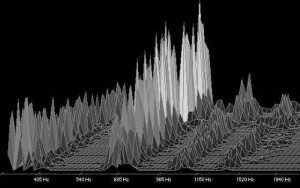
Example 1
This harmonic analysis is carried out from a wav file. There are 4 frequency bands (around 330, 660, 990, and 1600 Hz). We note that the 660 Hz band dominates with its strongest energy: it defines the dominant tone. The other bands are secondary tones. Voices are not the only voices featuring spectrums with particular dominant tones; This is also the case for musical instruments. This is what differentiates them from noises that also have secondary tones that overlap without any relationship between them.
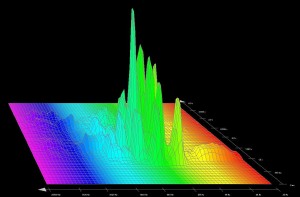
Example 2
Recording of a female voice characterized by a low-mid dominant spectrum. Low frequencies at the beginning of the low-mid range and in the bass register.

Example 3
Recording of a female voice, voiceover on television. The registration is more extensive in the range of low and low mids.
II – RECOGNIZING FREQUENCIES
The equalizer allows you to intervene in the frequency spectrum of a sound by increasing (increasing) or attenuating (cutting) certain bands. In this way, we can eliminate unnecessary or unpleasant frequencies, strengthen a voice, correct the instruments so that they do not overlap too much when playing simultaneously or create a musical style. Such manipulations must be exercised with discernment. Before embarking on frequency corrections, you must learn to recognize the most important frequencies of a sound. This will avoid big mistakes that could kill crucial ranges of the spectrum … A little too low or an exaggeration of the treble and the song will quickly transform into an amalgam of frequencies that will sound more like noise than music! In isolated sounds, identification of different frequency bands is relatively easy. Choose audio files for vocals or instruments instead of composite songs.
III – THE EQUALIZER SETTING
The correct setting of an equalizer is not obvious since there is no miracle recipe. Adjustments are just compromises for a set to keep its balance while making corrections on certain instruments. Musical tastes and sensibilities also influence the stages. Therefore, in this area it is difficult to give absolute rules, but we can reflect on the following points to avoid …
There is no need to cut entire ranges of the spectrum. Pay attention to strong fades in the mid range. You run the risk of getting a confusing set. Preferably make corrections in a very narrow spectrum or specific frequencies.
IV – GAIN OR LIMITATER?
In a composition, most of the corrections correspond to attenuations that allow giving rise to each instrument. In some cases, a positive gain is applied to increase the presence of a voice or to give air to an ensemble. Corrections are generally between -6 dB and +6 dB, but we can also reserve a space for creativity by deviating from these values.


/stickers-abstract-music-volume-equalizer-concept-idea-background.jpg.jpg)