Mp3 Equalizer Software


Free Download Mp4Gain
picture

Mp3 Equalizer Software

Mp3 Equalizer

Since it was possible to transfer files between computers, especially music container files, it was clearly perceived that it was necessary to “tweak” the volume level or loudness so that they all sound with the same intensity in terms of volume.

mp3 equalizer software

Mp3 Equalizer

At the beginning of this circumstance, they were only mp3 files. Currently we have Opus, Flacc, ogg, etc and in all of them this same normalization of the volume level is necessary.

Mp4Gain is, without a doubt, the most advanced software in this area, in fact almost the only one. Because in addition to normalizing the volume of many audio formats it can also normalize the audio volume of many video formats.

When it comes to audio, whether it’s the diversity of algorithms, codec types, or the complexity of the audio codec is much higher than that of video. The video codec is still mainly based on macroblocks as the processing unit, and the hybrid prediction and transformation coding framework, such as H.264 and H.265, is under this framework. Audio is quite complex and different audio codecs should be selected for different scenarios. The following is the main content shared for you this time, I hope that through this sharing, you can have a general understanding of audio encoding and decoding, and have a baseline in practical applications.

Outline of the content of this exchange:

1) General voice/audio coding table;
2) Basic elements of digital voice;
3) Why compression;
4) Factors considered by the encoder;
5) Classic voice coding model;
6)ISO;
7) Coding model;
8) USAC,
9) Coding,
10) Factors to consider in the selection.

Digital sound has three elements:

1) Sampling rate,
2) Number of channels,
3) Number of quantization bits.

▲ The sound digitization process

The sound digitization process is:

1) Sampling: digitizes the signal on the time axis;
2) Quantization: digitizes the signal on the amplitude axis;
3) Coding: records the sampled and quantized digital data in a given format.
6. Why compress
Compress audio, primarily to free up more bandwidth for video while reducing bandwidth load. Two factors, storage and bandwidth, determine the need for voice compression.

Let’s look at the example below.

The duration is 4 minutes, the sample rate is 44100 Hz, the sample depth is 16 bits, and the double voice Wav file size is:

44100Hz*16bits*4minutes*2=(44100/1second)*16bits*(4minutes*(60seconds/1minute)*2=705600bits/second*240seconds=169344000bits=169344000/(8bits/1byte)*2=42336000bytes=42336000/( 1048576/1M)bytes=40.37MB
MP3, 128 kbps compressed file size:

128kbps*4minutes=(128kbits/1second)*(4minutes*(60seconds/1minute))=(128kbits/1second)*240seconds=30720kbits=30720kbits/(8bits/1byte)=3840kbytes=3840k/(1024k/1M)bytes=3.75 MB = 3.75MB
As in the example above, after compressing the sound, the storage size is one tenth of the original size, and the compression rate is very impressive!


Free Download Mp4Gain
picture


Mp4Gain Main Window
picture


Mp4Gain Features
picture


Free Download Mp4Gain
picture

HOW TO CORRECTLY USE AN EQUALIZER

An equalizer, concealer or equalizer in English, is a tool also used for recording, mixing or reinforcing sound, to increase or decrease the volume of certain frequency bands of a sound.

I – HARMONIC ANALYSIS OF SOUND

On the sound page, we have seen that the audible frequency spectrum, that is, the range of frequencies perceived by the human ear, extended from 16 to 20,000 Hz. Each sound has its own frequency spectrum corresponding to the “signature acoustics”. The 3 voiceprint examples below will allow you to practice frequency analysis.

equalizer
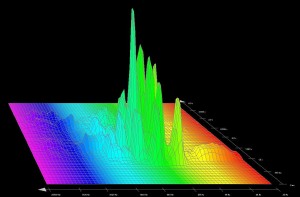
Example 1

This harmonic analysis is carried out from a wav file. There are 4 frequency bands (around 330, 660, 990, and 1600 Hz). We note that the 660 Hz band dominates with its strongest energy: it defines the dominant tone. The other bands are secondary tones. Voices are not the only voices featuring spectrums with particular dominant tones; This is also the case for musical instruments. This is what differentiates them from noises that also have secondary tones that overlap without any relationship between them.

Audio Equalizer

Example 2

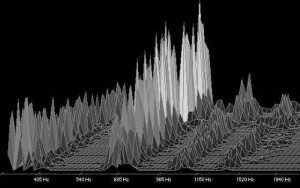
Recording of a female voice characterized by a low-mid dominant spectrum. Low frequencies at the beginning of the low-mid range and in the bass register.

female_vote_equalizing
Example 3

Recording of a female voice, voiceover on television. The registration is more extensive in the range of low and low mids.

II – RECOGNIZING FREQUENCIES

The equalizer allows you to intervene in the frequency spectrum of a sound by increasing (increasing) or attenuating (cutting) certain bands. In this way, we can eliminate unnecessary or unpleasant frequencies, strengthen a voice, correct the instruments so that they do not overlap too much when playing simultaneously or create a musical style. Such manipulations must be exercised with discernment. Before embarking on frequency corrections, you must learn to recognize the most important frequencies of a sound. This will avoid big mistakes that could kill crucial ranges of the spectrum … A little too low or an exaggeration of the treble and the song will quickly transform into an amalgam of frequencies that will sound more like noise than music! In isolated sounds, identification of different frequency bands is relatively easy. Choose audio files for vocals or instruments instead of composite songs.

III – THE EQUALIZER SETTING

The correct setting of an equalizer is not obvious since there is no miracle recipe. Adjustments are just compromises for a set to keep its balance while making corrections on certain instruments. Musical tastes and sensibilities also influence the stages. Therefore, in this area it is difficult to give absolute rules, but we can reflect on the following points to avoid …

There is no need to cut entire ranges of the spectrum. Pay attention to strong fades in the mid range. You run the risk of getting a confusing set. Preferably make corrections in a very narrow spectrum or specific frequencies.

IV – GAIN OR  LIMITATER?

In a composition, most of the corrections correspond to attenuations that allow giving rise to each instrument. In some cases, a positive gain is applied to increase the presence of a voice or to give air to an ensemble. Corrections are generally between -6 dB and +6 dB, but we can also reserve a space for creativity by deviating from these values.