Types of Audio Equalizers


Free Download Mp4Gain
picture

Types of Audio Equalizers

Types of Audio Equalizers

Types of Audio Equalizers: Introduction

As an audio enthusiast, I have always been intrigued by the different types of audio equalizers available in the market. Equalizers allow us to adjust the frequency response of audio signals, thereby enhancing the sound quality of music or any other audio content. In this article, we will explore the various types of audio equalizers that exist.

Graphic Equalizers

Graphic equalizers are one of the most popular types of audio equalizers. They are characterized by their visual representation, which consists of a series of sliders that control different frequency ranges. These sliders allow us to boost or cut specific frequencies to achieve the desired sound. As the name suggests, graphic equalizers display a graph of the frequency response, which makes it easy to visualize the adjustments being made.

According to F. Alton Everest in his book “The Master Handbook of Acoustics”, “graphic equalizers are the most common type of equalizer, and they are very versatile. They are used in many applications, including live sound reinforcement, studio recording, and home audio systems.”

Parametric Equalizers

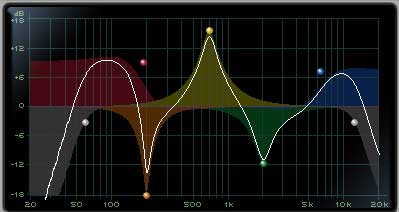
Parametric equalizers are another type of audio equalizer that offer greater control and precision over the sound. They consist of a set of adjustable parameters such as center frequency, bandwidth, and gain. This allows us to precisely adjust the frequency response of the audio signal to achieve the desired sound.

In the words of Bob Katz in his book “Mastering Audio: The Art and the Science”, “parametric equalizers are the Swiss Army knife of equalization. They offer greater control over the sound, and they are commonly used in professional audio applications such as mastering and sound design.”

Shelving Equalizers

Shelving equalizers are a type of equalizer that adjust the frequency response above or below a certain point. They are characterized by a shelf-like shape in their frequency response, which makes them ideal for boosting or cutting high or low frequencies.

According to Craig Anderton in his book “The Musician’s Guide to Home Recording”, “shelving equalizers are particularly useful in adjusting the tonal balance of a track, such as boosting the highs to add sparkle or reducing the lows to make the track less boomy.”

Semi-Parametric Equalizers

Semi-parametric equalizers are a combination of graphic and parametric equalizers. They consist of a set of adjustable parameters such as center frequency and gain, as well as a set of fixed frequency bands that can be boosted or cut using sliders. This offers a balance between the control and precision of parametric equalizers and the simplicity and visual feedback of graphic equalizers.

According to Mike Senior in his book “Mixing Secrets for the Small Studio”, “semi-parametric equalizers are a great choice for home studios and beginner mixers, as they offer a good balance between flexibility and ease of use.”

Conclusion

In conclusion, there are various types of audio equalizers available in the market, each with its own set of features and advantages. Whether you’re a professional audio engineer or a home studio enthusiast, choosing the right type of equalizer can make a significant difference in the quality of your audio output. If you’re looking for a solution that combines normalization, conversion, and equalization, then mp4gain is an excellent option to consider.


Free Download Mp4Gain
picture


Mp4Gain Main Window
picture


Mp4Gain Features
picture


Free Download Mp4Gain
picture

What is a Sound Equalizer?

What is a Sound Equalizer?

What is a Sound Equalizer?

Equalizer in Audio Systems

An equalizer is a device that allows you to adjust the frequency response of an audio system, enabling you to fine-tune the sound to your liking. It can be found in many audio systems, including home theaters, car audio systems, and professional audio equipment. By adjusting the equalizer settings, you can boost or cut specific frequencies, such as bass or treble, to enhance the overall listening experience.

How to Use an Equalizer

Using an equalizer can be a bit tricky, but once you get the hang of it, it can make a big difference in the sound quality of your audio system. To use an equalizer, start by playing some music that you’re familiar with, and then adjust the equalizer settings to your liking. Be careful not to overdo it, as boosting certain frequencies too much can result in distortion. It’s best to make small adjustments and listen to the changes as you go.

Understanding Equalizers

Equalizers work by adjusting the amplitude of specific frequencies in the audio signal. They are made up of several filters, each of which affects a different frequency range. For example, a low-pass filter will affect frequencies below a certain point, while a high-pass filter will affect frequencies above a certain point. Understanding how these filters work and how to adjust them can help you get the most out of your audio system.

As the character Aldous Snow says in the movie Get Him to the Greek: “Music is the only thing that makes sense anymore, man. Play it loud enough, it keeps the demons at bay.” And a good equalizer can make that music sound even better.

Equalizer Settings for Music

Equalizer settings for music can vary depending on personal preference, the type of music being played, and the quality of the audio system. However, there are some general guidelines that can help you get started. For example, boosting the bass frequencies can give music a more powerful and dynamic sound, while cutting the treble frequencies can make it sound warmer and smoother. It’s also important to pay attention to the midrange frequencies, which can affect the clarity and definition of the music.

In conclusion, using an equalizer can be a great way to enhance the sound quality of your audio system. With a little bit of practice and experimentation, you can find the perfect equalizer settings for your music and enjoy a more immersive listening experience.

Understanding Equalizers

Understanding Equalizers: A Guide to Mastering Audio Equalization

Understanding Equalizers

How to Use an Equalizer to Enhance Your Audio

As an audio enthusiast, I’ve always been fascinated by the power of equalizers. These nifty tools can help you fine-tune your audio to perfection, giving you the power to adjust frequencies and eliminate unwanted noise. If you’re new to equalization, this guide will show you how to use an equalizer to enhance your audio experience.

Equalizer Settings Explained: The Basics

Equalizers come with a variety of settings that can be overwhelming at first. However, by understanding the basics, you’ll be able to optimize your audio in no time. In this section, we’ll break down each setting and explain what it does.

Mastering Equalization: Tips and Tricks

Mastering equalization takes time and practice, but with these tips and tricks, you’ll be well on your way to becoming an equalization pro. From understanding your audio equipment to experimenting with different settings, we’ll cover everything you need to know to take your audio to the next level.

Equalizer Dos and Don’ts: Common Mistakes to Avoid

Equalization can be a powerful tool, but it’s easy to make mistakes that can ruin your audio. In this section, we’ll cover some common dos and don’ts to keep in mind when using an equalizer. From avoiding excessive boosting to being mindful of your volume levels, these tips will help you get the most out of your equalizer.

Equalizer Tips and Tricks: Final Words

Using an equalizer can be a game-changer for your audio, but it takes time and practice to master. By understanding the basics, experimenting with different settings, and being mindful of common mistakes, you’ll be able to optimize your audio to perfection. And if you’re looking for a reliable audio equalizer software, consider mp4gain for all your audio needs.

Volume equalizer, mp3 louder.

Volume equalizer, mp3 louder.

Volume equalizer

Anyone who has some mp3 or video files or music files of other formats will soon discover that some have a problem with the volume…they don’t sound at the same volume level as the other files.

Volume equalizer

And this forces him to start looking for a solution.

It is obvious that this solution is Mp4Gain, not only because it has the most modern algorithm to normalize the volume of an mp3, video, etc. But because it can also be a converter, that is, we normalize an mp4 but we want to obtain an mp3, for example.

And it also has certain advanced settings, which should only be used by someone who has very specific knowledge and needs, to get exactly what he is needing. For example, add Replay Gain.

For the rest of the users, Mp4Gain is so simple to use that it is enough to load one or several files (in batch mode) and press the button to normalize, just that and the program does everything without further need to modify or move settings.

Mp4Gain is powerful for those who need it and easy and simple to use for the rest, and offers the best results.

Volume equalizer – mp3 louder

Volume equalizer – mp3 louder

Volume equalizer

Equalize the volume of mp3, mp4 or any other audio or video file, in the main formats.

Volume equalizer

That is something that Mp4Gain offers and that it achieves with the best quality, because it is without a doubt the best audio normalizer in the world.

Anyone who has a fair amount of sound or video files has noticed that there is an unevenness in the volume level. Which is annoying to play them one after the other. Well, the difference between some of them is too noticeable, perhaps it sounds lower in volume or perhaps it sounds very loud.

The reasons why this happens and why we find these differences are many. Perhaps the most obvious is because they have been encoded (converted) by some amateur user, who chose the settings (bit rate, sample rate, etc) without knowing what he was doing… and it also turns out that we have a mixture of different bit rates, for example, in all our mp3.

Mp4Gain can not only standardize the bit rate, for example, but it analyzes the audio frame by frame (more than 40 thousand times per second) and finds the precise levels so that they have the same decibel level, which you can choose or let Mp4Gain does it automatically.

Volume equalizer, how does it work?

Volume equalizer, how does it work?

Volume Equalizer

Many people ask us how an mp3, mp4, etc. They save so much space.

volume equalizer

First of all there is obviously the zip type compression. That is, those algorithms that reduce the space basically seeking to eliminate the redundancy of symbols. That is, if in a row you find: 11111110000000 what you do is put 7-1,7-0 implying that there are 7 times a one and 7 times a zero. You save space by describing what you write when you have repetitive characters.

This is just a very simplified example.

But there is also another compression that is based on knowing how the human ear works. We already know that there are low and high frequencies that the human ear does not perceive, so everything that is outside the hearing range of the human ear can be ruled out.

There is also masking, which implies that if two similar frequencies sound almost simultaneously, one of them at a higher volume, it will mask the second, that is, we will not hear the second, so it can be discarded.

It is obvious that all these processes cause information to be discarded and that can damage the quality, but in general, if it is done correctly, the human ear, even the trained one, cannot perceive the difference.

Thousands of tests have been done making people, including musicians, listen to high bitrate mp3s and listen to a WAV and it has been verified that they cannot tell the difference.