What is audio compression?
I have finally returned to the tutorials, we are going to talk about the compression of audio from the most basic to the most advanced, it is a subject that many as producers have had a hard time learning and understanding.
So what is audio compression and what can you do to help?
Basically, compression reduces the dynamic range of your recording by reducing the level of the loudest parts, which means that the noisy and silent parts are now closer together in volume and the natural volume variations are less obvious. The audio compressor unit can increase the overall level of this compressed signal.
So, the end result is that the quieter parts sound as if they had increased their volume to be closer to the louder parts. Dynamic changes in the volume of a recording are now under more control, and a side effect is that the overall level of the compressed recording can be increased within its mix. The recording will also be located within the entire mix much more easily.
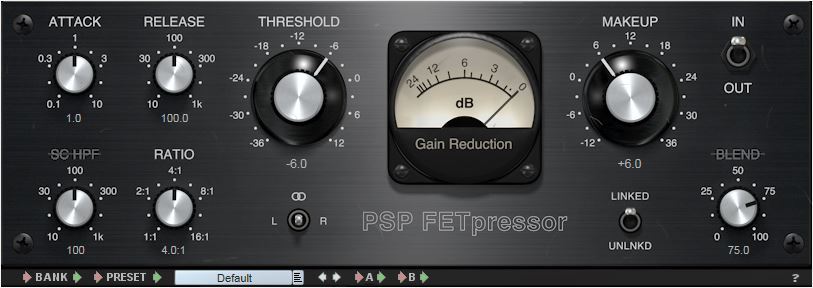
What are the compression controls?
The compression device itself has many different controls that can affect the sound it is processing. We will review the main controls that are commonly found.
Input Gain
This controls the level of the signal entering the audio compressor.
Threshold
Compression reduces the overall level of the loudest parts of your recording. But how does the compressor know what part of the signal is “high” and what part of the signal is compressed? When setting the threshold.
The threshold sets the level at which the compressor starts and begins to change the recording dynamics. So, for example, if you set your threshold to -20 dB, everything below this level will not be affected by the compressor. But everything higher than this level (-20 dB) will be compressed.
Ratio
How much will the signal be compressed once it has exceeded this threshold? This is controlled with the relationship. The higher the ratio, the greater the compression.
The easiest way to show you how reason works is by showing you some numbers, if the ratio is 1: 1, there is no compression at all. On the other hand, if the ratio is set to 2: 1, for every 2 dB of sound that exceeds the threshold, you will get 1 dB of output above the threshold. So, if the signal exceeds the threshold by 10 dB, the compressor reduces this signal, so it is now 5 dB above the threshold.
If the ratio goes up to 8: 1, for every 8 dB of sound above the threshold you would get 1 dB of output above the threshold. Then, if the signal exceeds the threshold by 16 dB, the compressor reduces it, so only 2 dB exceeds the threshold.
Attack
This is the time it takes for the compressor to act on the input, once the sound level has exceeded the threshold. It is usually measured in milliseconds (ms).
Release
This is the time it takes for the compressor to let the signal return to normal once it has fallen below the threshold. Again, usually measured in ms.
Makeup
If the audio signal has been compressed, the overall level of the signal will be reduced. Increasing the output gain increases the level that comes out of the compressor, so the volume can more easily adapt to the levels of the rest of its tracks in its mix.
Knee
The soft compression of the knee is softer in the sound as it passes through the audio compressor: the change of uncompressed sound to compressed is softer. Hard knee compression is a more immediate and obvious effect.
Compressors are a very effective tool for us engineers, in the next post I will talk about the different types of compressors.