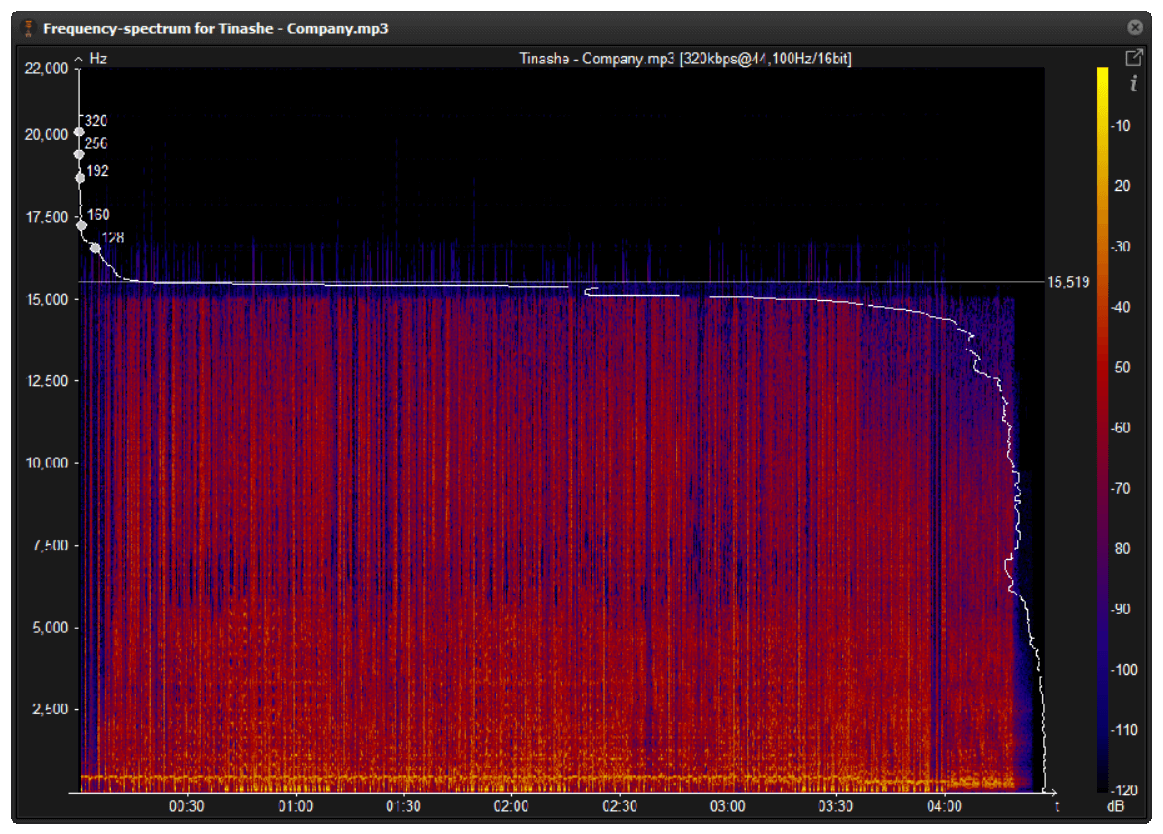
How much does the bit rate affect the sound quality in an mp3?
audio bit rate quality
Is the bit rate very important?
audio bit rate quality
The bit rate strictly measures the amount of information per second that an audio file can carry.
What does this mean?
That the greater the number of bits per second, the greater the “detail” and the greater the number of details, the higher the resolution and therefore the quality.
Let us imagine an example that would illustrate the matter very clearly:
You must describe an object, but you can only use ONE word.
You say:
-Car
That doesn’t say much.
Now you can use 2 words:
1.- car 2.- red
We already have more information.
Now you can use 6 words:
1.- car 2.- new 3.- red 4.- convertible 5.- sports car 6.- luxury
Now you have a much more elaborate image, thanks to the fact that you were able to provide more information. If you could now use 20 words or 100, it would be a more precise idea each time that you could convey.
Exactly the same thing happens with music and the bit rate is the amount of information that can be transmitted per second.
An estimate like the following is generally known:
8 Kbps Mono: Telephone Sound.
16 Kbps Mono: Better quality than shortwave.
32 Kbps Mono: Better quality than AM.
64 Kbps Stereo: Better quality than FM.
112 – 128 Kbps: Quality close to CD.
160 Kbps: Quality closer to CD.
192 Kbps: Practically CD quality.
256 Kbps: CD quality virtually indistinguishable from an original CD.
320 Kbps: CD quality.
Mp4Gain can help you make your entire music collection the same bitrate.
In a following article we will give more information about this interesting topic. Very necessary if you want to really have quality in your audio and more if you use Mp4Gain.
As we have already been explaining, this entire topic is based on and one can only speak of “quality” if one refers specifically to the human ear.
We humans do not consider better quality the ability to record frequencies that we cannot even hear, neither because they are very high frequencies nor very low frequencies.
Nor do we consider a recording of poor quality that has not been able to record these frequencies.
Some animals would possibly have a different opinion.
So, having this point clear, we have to consider high fidelity to a recording that could faithfully record those frequencies that we humans can hear. The rest does not interest us.
So, all this first issue of encoding or compressing is based on that, on ensuring that the frequencies that the human ear can perceive remain with the greatest fidelity.
And we benefit from knowing that there are other inaudible frequencies, but they take up disk space and we can remove them without experiencing a drop in quality.
Mp4Gain is a program that handles these areas very well and manages to make it sound as good as possible and nobody will notice the difference between one format and another, because they all sound of the best possible quality.
Well, in fact, the bit rate should be said to be another dimension, it is a compression of audio files.
Audio compression
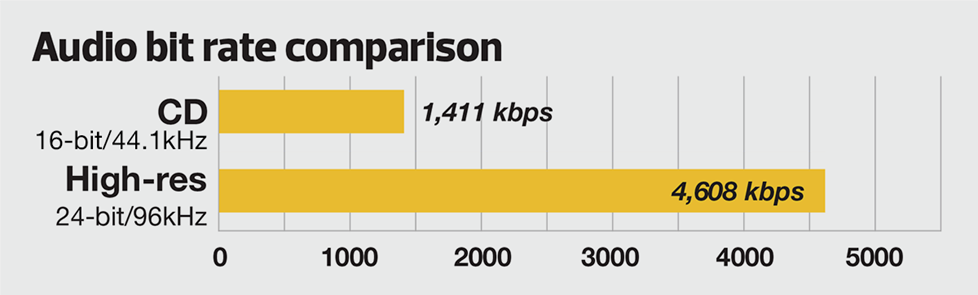
Nowadays, most of the audio formats that we use regularly are based on the original “WAV” file of the audio CD (44.1khz sampling rate, 16bit sampling precision, 2ch). The original recorded sound data is stored in an array, which is in PCM format, while WAV format is an encoding format developed by Microsoft, and its function is to play the PCM format data through encoding.
Since the data in WAV basically completely restores the PCM data, MP3, AAC and other lossless encoding formats are basically recompressed based on the WAV files. Therefore, we can simply think that WAV is the original audio format and other audio formats are compressed formats.
When it comes to compression, storage and transmission are inseparable. The purpose of compression is to improve storage and transmission. Therefore, before we talk about compression, we need to understand the basic units of computers.
We all know that the computer is a binary number system, and the files stored by the computer are made up of two numbers, 0 and 1. Therefore, the computer’s transmission is based on each number, and each number is called 1 ” bit”. For example, for an audio piece, its basic data is “0,1,1,1,0,1, 1 ,0″, and when transmitting, these numbers are transmitted one by one. The sampling precision mentioned above is this unit.
The storage unit of the computer is ” byte (Byte)”. In the computer, 1 byte consists of 8 bits, that is, 8b(bit)=1B(Byte). In computer parlance, data storage is expressed in decimal and data transmission is expressed in binary, so 1KB=1024B=1024×8b. This is also part of the reason why the hard drive capacity we see does not match the actual capacity.
Go back and talk about audio compression, the bitrate of the audio is actually the compression ratio. So the bitrate really just defines the size of the file, but because under normal conditions the larger the file, the less data you lose, so the sound quality is relatively higher. However, the bit rate itself does not directly affect the quality of the file. For example, if we take a 128kb file as the source file, even if it is converted to a 320kb file, the sound quality will not be better than 128kb. .
So what exactly do the numbers and letters in the bitrate mean? First look at the full name of 128k “128kbps”, let’s try to break it down: 128 is a number, k is a thousand symbol, b is a unit, s is a second, and ps is actually “/s”. Thus, 128kbps is 128kb/s. That’s 128kb per second.
Note that the b here is a lowercase b, or bit. Knowing this, we can calculate the approximate storage space that a 128kb file occupies: 128*1000=128000b/s÷8=16000B/s÷1024=15.625KB/s*60=937.5KB/min÷1024=0.9155 MB/ min. So 128Kb audio file size is about 0.92M or 916Kb per minute, so 128Kb mp3 is about 1M in size. You can test and check it locally.
Before talking about lossy and lossless, there are two words to explain to you, that is, we will see CBR and VBR when compressing MP3. And CBR is constant bit rate, constant bit rate; VBR is variable bit rate, dynamic bit rate. In theory, VBR’s way is to automatically correct some bitrates according to the specific frequency of the sound in the source audio file, to achieve a smaller file with the same bitrate effect.
Let’s talk about lossy and lossless. In a nutshell, lossy compression is about achieving compression by removing some less important data from existing data; lossless compression is about achieving compression by optimizing the layout. Since these compression methods involve deeper technical knowledge, we won’t say more, and we can probably look at it this way: lossy compression is like removing some unimportant particles in an article to achieve the purpose, after decompression, it is you deleted the content cannot be recovered; Lossless is achieved through typesetting. After decompression, complete WAV data can be obtained, just like our commonly used winzip and WinRAR.
What is the difference between 128k and 320k music?
Audio Bitrate
【Preface】
Audio Bitrate
Some time ago, a colleague came across a very troubled client. The mess was said to have been caused by the client asking him to provide song files larger than 100MB-200MB in size. And my colleagues don’t know much about audio formats, so they started endlessly fumbling about FLAC, WAV and audio size. In the end, the colleague did not clearly explain to the customer what was going on.
After that, other things happened that made me feel that in the music industry there are too many practitioners around me who have an extremely poor understanding of music and even lack some basic knowledge related to music. I don’t even have the idea to understand, which makes me very sad. It seems that music has only one product attribute, and our practitioners only need to organize the shelves, encode various products, and recommend products to users with the big data of user purchase records, and they don’t need to worry about why the users users like this. Brands, what features these products have, and provide users with various services with cold data.
Therefore, I think it is necessary to write something. I don’t expect practitioners to become people who really love music. I just hope that even if you still think of “her” as a commodity, you can first figure out what you’re selling. and what is..
PS: The contents of the first lesson are multimedia files. Since the relevant content involves a lot of technical issues, it seems a bit boring, but if you read it carefully, you will see that it is actually very easy to understand, but these basic knowledge can be very helpful.Improve your skill well. Also expect more interesting content about records, musical styles, etc. which I will post soon.
Bit Rate, Sample Rate, Lossless, MP3, FLAC, APE, 320kb, 192kb, 128kb, 44.1khz, CBR, VBR. Does this bunch of various names make you both familiar and unknown?
The higher the bitrate, the better the sound quality. Lossless music is the highest sound quality, right? So, let’s start with the sound collection.
【Audio composition】
Nowadays, when we talk about audio, everything is digital audio. Digital audio consists of three parts: sample rate, sample precision, and number of sound channels.
Sample Rate: Both the sample rate, which refers to the number of samples per second when recording the sound, expressed in Hertz (Hz).
Sampling Precision: Refers to the dynamic range of the recorded sound, measured in bits (Bit).
Sound channel: the number of channels (1-8).
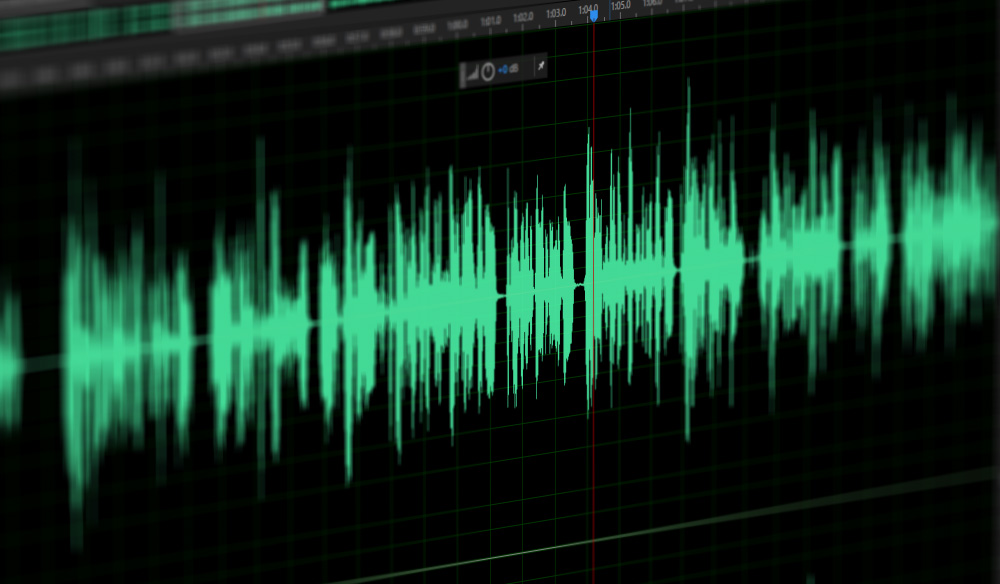
In simple terms, we can think of a sound wave as a curve. We know that the curve is made up of points, and the sampling rate is the number of points in the middle of the length per second (the horizontal axis in the figure above). Sampling precision is the number of points in the dynamic range (upper vertical axis). The finer the positioning of these two dimensions, the greater the true sound restoration and the better the sound quality. Of course, the larger the audio file will be.
Encoding rate (Kbps) * total length of the song (seconds) / 8 = file size (KB), if divided by 1024, it is the size in MB.
mp3 is lossy compression, the smaller the file, the higher the loss. The relationship between bitrate and audio and video compression is simply that the higher the bitrate, the better the audio quality and video, but larger is the encoded file; yes The opposite is true for lower bitrates.
Bitrate refers to the sampling rate at which digital sound is converted from analog to digital format. The higher the sampling rate, the better the quality of the restored sound.
The bitrate value is compared to the actual audio:
16 Kbps = phone sound quality
24 Kbps = increase phone sound quality, short wave transmission, long wave transmission, European standard medium wave transmission
40 Kbps = American standard medium wave transmission 56 Kbps
= voice
64 Kbps = voice boost (best bit for mobile phone ringtones) = tape (best setting for mobile phone stereo MP3 player, best setting for low-end MP3 player
112 Kbps = FM stereo radio FM 128 Kbps ) 160 Kbps = Hi-fi HIFI (best setting for mid-range MP3 player to high-end MP3 players) 192 Kbps=CD (best setting for high-end MP3 player) high-end ) 256 Kbps= Studio Music Studio (for music enthusiasts) In fact, with the advancement of technology, bit rates are also getting higher and higher, MP3 has a maximum bit rate of 320 Kbps, but some formats can achieve higher bit rates and superior sound quality. For example, the emerging APE audio format can provide true audiophile-level lossless sound quality and smaller volume than WAV format, and its bit rate is typically 550kbps.
What is the proper audio bitrate? When recording gameplay videos and putting them on the Internet, the bit rate used to suppress the video depends on the end use. If you are going to share it on an online video site like Youku, the requirements for videos will vary from site to site. Youku’s requirements for video formats are as follows: Generally speaking, when uploading videos to online sites, it is recommended that the video be encoded in H264/X264, and the video bitrate should be 1600Kbps;
What is the proper audio bitrate?
When recording gameplay videos and putting them on the Internet, the bit rate used to suppress the video depends on the end use.
If you are going to share it on an online video site like Youku, the requirements for videos will vary from site to site. Youku’s requirements for video formats are as follows:
Generally speaking, when uploading to online video website, it is recommended that the video be encoded by H264/X264, the video bit rate should be 1600Kbps; audio must be AAC encoded and audio bitrate must be 128 Kbps.
If you plan to put it on the network drive and share it with friends, it is recommended to use a higher bit rate. For example, the video is encoded by H264/X264 and the video bit rate is 2400Kbps; the audio is AAC encoded and the audio bitrate is 128 Kbps.
What does audio bitrate mean?
The code rate is the number of data bits transmitted per unit of time during data transmission. Generally, the unit we use is kbps, that is, kilobits per second.
A common understanding is the sample rate. The higher the sample rate per time unit, the higher the precision, and the processed file will be closer to the original file, but the file size is proportional to the sample rate, so almost all encoding formats pay attention to This is how to use the lowest code rate to achieve the least distortion. The cbr (fixed code rate) and vbr (variable code rate) derived from this core are all items in this regard, but things are not absolute, In terms of audio, the higher the bit rate, the lower the compressed ratio, the smaller the sound quality loss and the closer it is to the sound quality of the audio source.
Basically, the sound quality of the two data 44.1 and 128 in the MP3 song attribute is very good.
What do the bits, bit rate and sample rate of an audio file mean? Part 2
bit rate and sample rate
If it’s in a lossless uncompressed format, the bit rate is strictly equal to the number of bits * sample rate * number of channels. And typically, the MP3 bitrate you can see just represents how much capacity the format needs to describe this one second of audio.
bit rate and sample rate
MP3 is a lossy compression. In the compression process, some information is lost, but the lost information cannot be represented by the number of bits and the sampling rate. In general, the higher the bit rate, the less information will be lost. Mathematically, bitrate and sound quality are proportional. As for whether you can hear it or not, it depends on many factors. The MP3 algorithm is not complicated, of course, to understand it you have to learn what the Fourier transform is.
There is also lossless compression (representing APE, FLAC, etc.), which also has a bitrate, and this bitrate has nothing to do with sound quality. It also describes how much capacity the file uses to describe one second of audio content, but the same audio content can be compressed to different sizes (compression ratios), similar to zip compression ratios. No matter how big you compress it, in the end it can be restored to the same file. So if you see who is chasing lossless bitrate, you can basically conclude that the product is a bad pen.
What do the bits, bit rate and sample rate of an audio file mean?
bits, bit rate and sample rate
For example, the common mp3 format audio source is 16-bit 320 Kbps or Sony Hi-Res 24-bit 192 KHz.
bits, bit rate and sample rate
The stored sound data (for uncompressed PCM format) is equivalent to drawing a curve on graph paper, and its points can only be on the grid.
Then the sampling rate is how dense the grid is in the horizontal direction (how many grids per second); the number of digits is how dense the grid is in the vertical direction (how thin and how much storage each sample is stored), 16 Bit means that the range of values of each sample point is from 2 to the 16th, i.e. , from 0 to 65535. The code rate is the multiplication of the two (how much storage the samples take per second).
First, there are two cases, lossy and lossless. After figuring out lossless and lossless, we need to figure out the sample rate and bit depth. After calculating the sample rate and bit depth, we need to figure out the difference between the ratio of bit rate and bit depth to sample rate and its impact on audio quality.
In order to store a continuous physical signal (well, tell me about Planck’s constant…) in a computer, it must be converted to a digital signal. In acoustics, a digital signal is a digital representation of the amplitude of the sound wave at any moment.
Sound waves are longitudinal waves, which are difficult to draw. The following figure is replaced by transverse waves (the concept of longitudinal waves is the phenomenon that the density of air or other media changes regularly due to energy. The peaks represent high density, the troughs represent low density, and the horizontal line is the average density, i.e. silent state)
Using high school physics, waves contain two dimensions, one is intensity and the other is time. “Number of digits” indicates how many levels the sound wave is divided into from the strongest to the weakest; “Sampling Rate” determines the precision of the time axis or the sampling density, i.e. the length of time represented by each red dot, and the code rate is one second The number of dots on the clock, multiplied by the space that each point occupies.
So the so-called 24 bits consist of dividing the intensity of the sound wave by 2 at power level 24, occupying 3 bytes of space. Obviously, the finer the grade, the more details are restored.
The sample rate is generally 44100 Hz for CD (Hertz = times/second), 48000 Hz for DVD, and 96000 Hz as standard. As with the number of digits, the more points you get in a single second, the more details are restored. Why does CD take this value? Because the hearing range of the human ear is generally believed to be between 20 and 20,000 Hz. It is necessary to represent a peak and a valley, and at least two sampling points are required. So the CD can represent the sound of 22050 Hz at most, but this sound doesn’t have any detail, because if there are only two peak and trough points, the mean waveform is completely lost. Therefore, there will be a higher sampling rate.
About the sample rate. What is the most intuitive effect of sample rate?
Audio bit depth, sample rate, and bit rate
Affects the expressiveness of the sound’s frequency range. The higher the sample rate, the larger the frequency range that can be expressed. 44.1KHz sampling rate can represent the frequency range from 0Hz to 22050Hz; 48KHz sampling rate can represent the frequency range from 0Hz to 24000Hz; 96 KHz sample rate can represent the frequency range from 0 Hz to 48000 Hz. The average frequency range that the human ear can hear is approximately 20 Hz-20,000 Hz. Combining the above two, if you see one parameter: 16Bit 44.1KHz , it means this digital audio can express “96dB dynamic range” and “0 Hz -22050 Hz” frequency range; 24Bit 48KHz , it means this digital audio can Performance ” 144dB Dynamic Range ” and ” 0Hz -24000 ”
Hertz” frequency range. (3) Audio bit rate, also called bit rate, or bit rate. Bit rate refers to the amount of information that can pass through a data stream per second, which can also be understood as: how much is used per second The amount of data in bits to represent In principle, the higher the audio bitrate, the better the quality However, if it is lossy compressed audio , different compression algorithms, even if the bitrate is the same, will lead to completely different sound quality results.Typical representative: 96kbpsThe sound quality of WMA audio format is obviously better than that of MP3 audio format than 96 kbps. Why is this? The difference is due to different compression algorithms and different data utilization rates. Another example, if the MP3 is compressed below 48 kbps, it’s already terrible. And if it’s format AAC audio, to the same 48kbps bit rate, the sound quality is obviously better than MP3. For lossless compressed audio, even if the bitrate is completely different, the final sound quality is the same
. For example, if the same WAV file is compressed in FLAC and APE formats, the bit rate of the output file is not the same, but the sound quality is the same. Even if it is the same format, the compression level is different and the bitrate is completely different, but the end result, the sound quality remains the same (but when encoding and decoding, the CPU usage is different and the encoding time is also different).
And the audio has several important parameters, such as KHZ, BIT, channel, KBPS, etc.
MP3 Quality
And the format is different, the algorithm is also different, so even if the above parameters are the same, the format is different. The sound quality will also be very different. Among them, VBR is a dynamic sampling. For a detailed and complete explanation, please refer to the description below.
After reading it patiently, you will be able to say a thing or two.
Audio sampling explains the digital audio system The original sound is reproduced by converting the waveform of the sound wave into a series of binary data The equipment used in this step is an analog-to-digital (A/D) converter, which samples the sound wave at a rate of tens of thousands of times per second. A sampler records the state of the original analog sound wave at a given time, called a sampler. A series of samples can be connected to describe a sound wave. The number of samples per second is called the sample rate or sample rate, and the unit is HZ.
(hertz). The higher the sample rate, the higher the frequency of the sound wave that can be described. The sample rate determines the frequency range (equivalent to the pitch) of the sound, which can be represented by a digital waveform. The frequency range is often called the bandwidth. To understand properly, audio sampling can be broken down into the number of bits sampled and the frequency of the sample. 1. The number of sampling bits The number of sampling bits can be understood as the resolution of the sound processed by the capture card. The higher the value, the higher the resolution and the more realistic the sound recorded and played back. The first thing we need to know: sound files on the computer are represented by the numbers 0 and 1 . So the essence of recording on the computer is to convert the analog sound signal into a digital signal. On the contrary, during playback, the digital signal is restored to an analog sound signal output. The capture card bit refers to the binary digits of the digital sound signal used by the capture card when capturing and playing sound files. The bits on the capture card objectively reflect the accuracy of the digital sound signal’s description of the input sound signal. 8 bits represent the eighth power of 2–256 and 16 bits represent the sixteenth power of 2–64K . For comparison, for the same music data, a 16-bit sound card can break it down into 64K precision units for processing, while an 8-bit sound card can only handle 256 precision units.
It causes a large signal loss, and the final sampling effect is naturally incomparable. All the major products on the market today are 16-bit capture cards, not 64-bit or even 128-bit as some ignorant marketers advocate, who confuse the concept of polyphony in capture cards with the concept of bits of sampling. Although the EMU10K1 chip used by the most powerful capture card series is claimed to be 32-bit, it is just a Direct Sound acceleration-based multi-audio streaming technology, and its essence is still a 16-bit sound card. . It must be said that the 16-bit sampling precision is more than enough for computer multimedia audio. 2. Audio Sampling Level (Audio Sampling Rate) The digital audio system reproduces the original sound by converting the sound waveform into a series of binary data. The equipment used to accomplish this step is an analog-to-digital (A/D) converter, which takes each sound wave, and each sampler records the state of the original analog sound wave at a given time, which is called sample. A series of samples can be connected to describe a sound wave. The number of samples per second is called the sample rate or sample rate, and the unit is HZ (Hertz). The higher the sample rate, the higher the frequency of the sound wave that can be described.