What audio formats are compatible with iPhone, iPad, iPod?


Free Download Mp4Gain
picture

What audio formats are compatible with iPhone, iPad, iPod?

Iphone

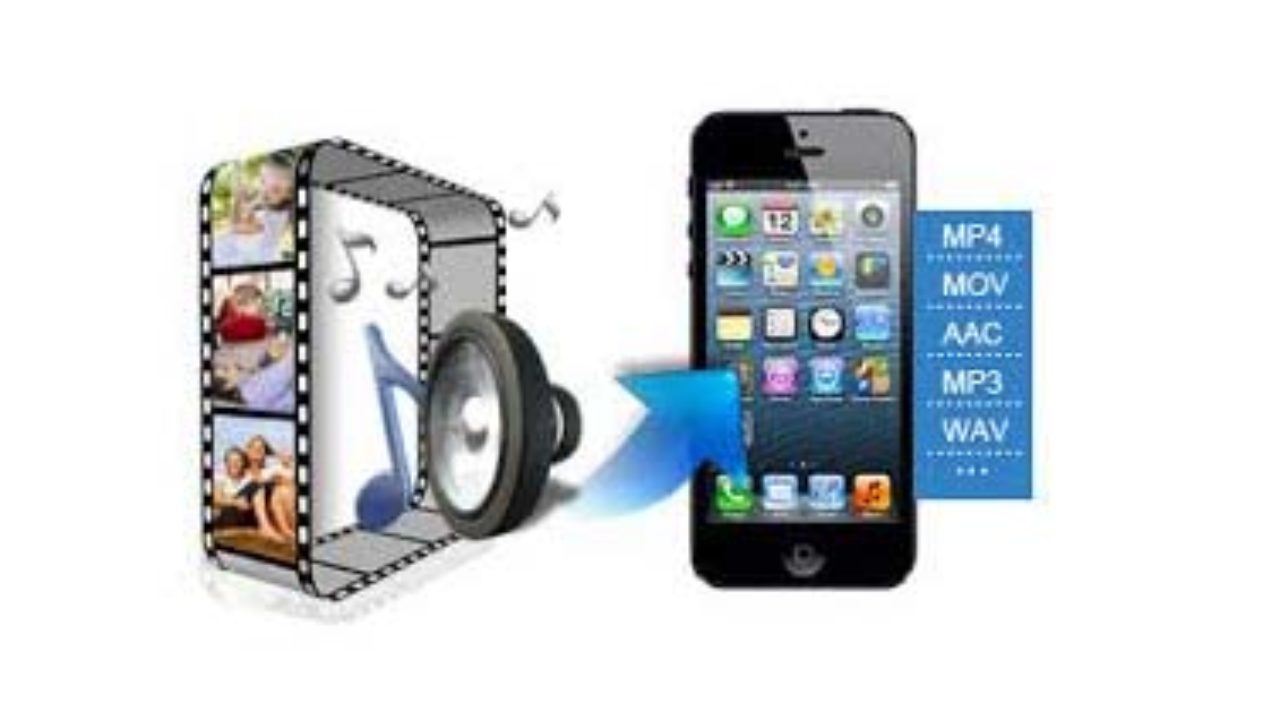
Now there are far fewer such questions on the net, but before in many forums people asked before buying an iPhone: “What audio formats are compatible with iPhone, iPad, iPod?”

Apple Music

iPhone and iPad support the following audio file formats:
AAC (8 to 320 kbps), AAC (from iTunes Store), HE-AAC, MP3 (8 to 320 kbps), MP3 VBR, Audible (formats 2, 3, 4, Audible Enhanced Audio, AAX and AAX +) , AIFF and WAV, Apple Lossless (ALAC).

Most of the time iPhone and iPad users prefer MP3 and ALAC (Apple Lossless) formats, which they download from trackers, so there is practically no problem to copy music to iPhone, iPad.

What is Apple Lossless (ALAC) and how is it different from FLAC?
A few separate words should be said about the rather unusual Apple Lossless (ALAC) – this is an analog of the FLAC audio codec. Apple Lossless was specially designed by Apple to ensure that the user can enjoy the highest quality music while keeping battery consumption within reasonable limits.

Apple Lossless (ALAC) does not require high performance, so you can listen to music without quality loss, even on old iPod Nano. Apple takes great care to ensure that its devices can work for a long time without recharging, which is why we have a FLAC analog in the person of Apple Lossless.


Free Download Mp4Gain
picture


Mp4Gain Main Window
picture


Mp4Gain Features
picture


Free Download Mp4Gain
picture

In what format is it better to listen to music? PART 4

In what format is it better to listen to music? PART 4

Audio File Format

What has changed today

AUDIO FORMATS

A rare sound engineer makes a digital master recording (which is then played back on physical media), using modern technologies to the full. So the chance that a 24-bit track is actually only 16-bit is extremely high.

High-quality analog recording on high-end gear is even harder to find today, if only for fans of this sound. Such is, for example, Jack White, the former leader of the White Stripes. At the same time, some of his recordings reference lo-fi variations, and looking for the scandalous sonic characteristics of the song becomes something of a foodie treat.

If you imagine an ideal source, only the trained ear or listening on high-quality audio equipment will allow you to find a compressed file. And already based on this (and without forgetting perception), it is worth drawing the following conclusion:

AAC is necessary and sufficient for medium-priced equipment, in the absence of which (and in the absence of sources that can be encoded in AAC) – MP3 with a constant 320 kbps bit rate, created with the Lame 3.93 codec (recommended keys for decoding: -cbr -b320 -q0 -k -ms).

The exceptions are recordings originally recorded in high quality, say, recorded on DVD-Audio, SACD, or recordings originally collected in DSD (or similar format) with a high bit rate.

Although without losses it has some characteristics. And we will tell about them next time.

The author does not like Apple. The author greatly appreciates the achievements of the Fraunhofers and was greatly surprised to learn that AAC is his work. 🙂

In what format is it better to listen to music? Part 3

In what format is it better to listen to music? Part 3

audio formats

Due to its advanced age, MP3 has significant limitations: the bit depth can be 16-24 bits, the sample rate is expressed only in discrete values ​​(8, 11,025, 12, 16, 22.05, 24, 32, 44.1, 48), the bit rate is limited to 320 kbps. Also, in the normal version of MP3, the number of channels is limited to two.

audio formats

AAC
The same rake, only in profile. Also developed by the Fraunhofer Society. Later and uses a different, more modern psychoacoustic model. The publicly available information allows us to conclude: yes, they managed to improve their own creation.

Even with the simplest numbers, AAC is a more flexible format. The bit depth of the files obtained with the help of this development varies from 16 to 24, the sampling frequency, if desired, will also allow not to lose the sound image and is in the range of 8-192 kHz. The data stream is generally close to lossless formats (up to 512 kbps), while the maximum number of AAC file channels reaches 48.

Which format is definitely the best?
Considering that AAC is MP3 reinvented after a dozen years, then the choice is in its favor. If you want, it makes sense to only compare MP3 and OGG.

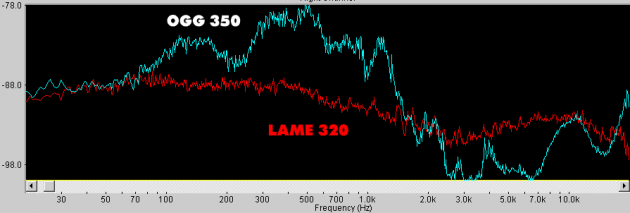
On the graphics – good AudioCD, compressed OGG with 350 kbps variable bit rate and MP3 using Lame. The lower the graph, the closer the sound is to the original. It turns out to be a very interesting image. Although MP3 has clearly cut the high frequencies, unlike OGG, in which you can see a blockage below 2 kHz.

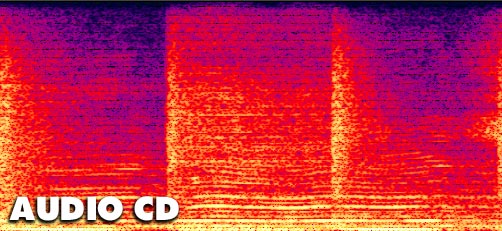
The frequency-time distribution of sound does not speak of less interesting things. At a constant 320kbps bit rate, MP3 is almost identical to the original recording. Everything seems to fit now. But … In fact, everything is even more confusing.

Why use at a loss at all when there is no loss available?
Common sense.

The fact is that most analog recordings do not contain the amount of information that would need to be stored in high-quality formats. Don’t forget that the native sample rate for CD is 44.1 kHz, the quantization is only 16 bits.

The above graphics well demonstrate the high fidelity of MP3 streaming. But for an audio cassette, magnetic tape (unless of course it is a master tape), the characteristics of an audio CD are unattainable. And for mass studio equipment, the ability to record analog sound corresponding to AudioCD has appeared relatively recently. It makes no sense to digitize in FLAC (and even more so in WAV) a concert recording or a disc from the pre-digital era, especially those made with magnetic media. They do not contain those spectra and the amount of information that containers can store without compression.

In what format is it better to listen to music? Part 2

In what format is it better to listen to music? Part 2

Audio Formats

The reference value of the audible range for humans is 16 Hz to 20 kHz, but you cannot hear and be aware of all incoming sounds simultaneously.

audio files

Hearing is discreet and your hearing sensitivity is not linear.

Modern psychoacoustic models accurately assess human hearing and are constantly improving. In fact, despite the guarantees of music lovers, musicians and audiophiles, to the inexperienced middle ear, the initial appearance of MP3 in maximum quality has become extremely noticeable. There are exceptions, they cannot cease to exist. But they are not always easily noticed by blind listening.

Formats using psychoacoustic compression models
There are many of these formats for lossy audio compression. The most common today are the following.

OGG (Vorbis)
In general, a file with the * .ogg extension is a “container”: it can contain multiple sound recordings with their own tags and characteristics. Most of the time, the files stored in it are compressed with the Ogg Vorbis codec, although others can be used, including MP3 or FLAC.

Its main advantages include a wide range of possible parameters during encoding: the audio sampling frequency can reach 192 kHz, the bit depth is 32 bits. By default, OGG uses a variable bit rate (although this is not shown on the properties screen), which can go up to 1000 kbps.

MP3
Unlike the free OGG, MP3 was developed by the Fraunhofer Society, an association of German institutes for applied research, which is very important for modern acoustics. Among audiophiles, by the way, this is an extremely respected office, yet they don’t like to admit it. But its developments are closely watched.

Unlike OGG, it can have variable (VBR) and constant (CBR) bit rate. By the way, it was thanks to MP3 that it was discovered that not all recordings can be encoded with high quality with a variable bit rate (see the above reasons, the encoding algorithms and their results in this case may be different when encoding the same source ).

In what format is it better to listen to music?

In what format is it better to listen to music?

Lossy compression

Understanding digital audio formats is not easy. It is even more difficult to come to an unequivocal conclusion in which format it is better to listen to music.

Lossy Formats

If you look at the audio format comparison table on Wikipedia, your eyes will start to flutter with columns of silent numbers. Let’s try to find out what’s behind this.
In what format is it better to listen to music? Three lost whales
Share this
sixteen
Let’s make a reservation right away that the article talks ONLY about general characteristics and will not include some details. Moving forward, Lifehacker will conduct its own unbiased investigation. And today we will try to generalize the already known experience in one way or another.

There is an analog and a figure.

The analog is good, but short-lived and inconvenient. Therefore, analog media, despite high vinyl sales, will not be making a comeback.

Digital audio can be of three main types:

in a format that does not use compression;
in a format that uses lossless compression;
in a format that uses lossy compression.
At first glance, lossless formats are more promising. This is not always the case, as we will discuss in more detail in one of the following materials. Uncompressed formats make no sense other than storing the master recordings needed to create audio content. They are easier to restore. Storing and listening to home recordings is superfluous.

Of the many parameters of digital audio, the user must first be concerned with sample rate (the accuracy of digitizing an analog signal in time), bit depth (the accuracy of digitizing in amplitude – volume) , the bit rate (the amount of information contained in the file in terms of one second).

Today we will talk about lossy.

For compressed sound, the concept of the psychoacoustic model is very important – the ideas of scientists and engineers about how a person perceives sound. The ear perceives the entire spectrum of acoustic waves entering it. However, the brain processes the signals.

Lossy compression format at a glance

Lossy compression format at a glance

lossy compression

“As you know, the music we listen to consists of a set of signals, each of which has its own characteristics, including loudness.

LOSSY COMPRESSION

The human hearing aid is designed so that we do not distinguish or poorly distinguish a weak (low) signal from the background of a strong (strong) signal. This principle forms the basis of modern means of compression (compression) of audio data.

If we imagine that a signal of a certain length is divided into many parts, and each part is processed in such a way that a weaker signal, which is difficult to distinguish from the background of a strong one, falls under the knife, and one remains a signal louder, then this will be an approximate audio compression model. Consequently, the level of data compression will depend on how many parts (samples) the original file will be divided into and how many weak signals from each individual sample will be removed (what the bit rate will be, the number of bits in a sample). sample of a specified duration). This coding principle is called lossy coding or lossy coding.

Ogg Vorbis is a completely open and patent-free audio format that allows you to store and transmit audio information with high sound quality (44.1-48.0 kHz sample rate, more than 16 bits, polyphony (multi-channel audio) ) and bit rates ranging from 16 to 512 Kbps per channel. In this case, the number of processed channels can reach 255.

MP3 or MPEG-1 Layer 3 audio is by far the most popular format for storing and transmitting compressed data. This format was developed by the Fraunhofer Institut, Germany. “Http://ru.wikibooks.org/wiki/Compression_Audio_data_with_lossy

Comparative tests

Sound Forge 7.0 (Spectral Analysis / Spectrum Analysis function) was used for the analysis of the sound signal.

“Spectral analysis is a signal processing technique that can reveal the frequency content of a signal. Solving the problems of spectral analysis is possible through the use of the fast Fourier transform, which makes it possible to determine the contribution of individual components of the vibration spectrum to the overall vibration picture. “Http: //masters.donntu. edu.ua/2007/fema/belinskaya/library/a4/art4.htm

The following graphs were obtained in the form of an amplitude distribution in the frequency domain, the spectrum of the signal is presented using a Blackman-Harris / Blackman-Harris window and a maximum sampling frequency (FFT size) of 65536, this gives allows you to analyze the smallest details of the signal at frequencies around 20,000 Hz, without smoothing.

The analysis of the spectrum of the compressed signal assumes the presence of a recording of the original quality, for this we use a licensed audio CD made in the USA “Kevin Yost – Bongo Madness”, with standard characteristics 44100 Hz / 16 bit

The rich electronic sound spans the entire frequency spectrum and captures even the inaudible range (20,000 Hz to 22,000 Hz), as can be seen in the graph below. Considering that it is generally possible to notice codec compression at higher frequencies, the 10-20 kHz range will be considered.

High quality audio

High quality audio

High quality audio

Unlike HD video, there is still no universal standard for high definition audio.

high quality audio

Without going into detail, this term generally refers to recordings with a higher sample rate and / or bit depth than CD (i.e. 16-bit / 44.1 kHz). Examples of high-resolution audio are 16-bit / 96 kHz or 24-bit / 192 kHz files.

Due to the additional audio information, high-resolution files sound much better than compressed files that lose this information during the compression process. These formats require more disk space, but their quality is definitely worth the investment.

High-resolution audio includes uncompressed formats like AIFF and WAV, and lossless formats like FLAC and ALAC. DSD (partly a niche format used on Super Audio CDs) also falls under the Hi-Res Audio category, but it is compatible with a much smaller number of devices. When it comes to streaming, services like Tidal Masters use an MQA container to stream high definition files over networks using the lowest possible signal bandwidth.

As for the playback of high-resolution audio formats, today it is already compatible with many devices. The 24-bit files can be played with Denon HEOS wireless speakers, as well as premium portable music players like Cowon Plenue D2 and Astell & Kern A & norma SR15.

Also, most flagship Android smartphones support Hi-Res Audio, for example the highly rated Samsung Galaxy S10 +, but you won’t be able to immediately hear them on a new iPhone. We’ve found ways around this limitation, but keep in mind that Hi-Res Audio files are not yet as compact as their lossy counterparts.

What is the best audio format for you?
The format you choose depends on whether you are more concerned about memory capacity or sound quality, and what type of device you intend to use it with.

The popularity of MP3s came at a time when the cost of disk space was very high. Today’s smartphones, music players, and laptops are equipped with an impressive amount of memory, so it makes sense to pay attention to higher-than-CD quality formats.

If you have decided to archive your audio files, FLAC or another lossless format might be a good option. They represent a good compromise between compression level and sound quality, allowing you to listen to high-quality digital music and save disk space. Just be sure to check the compatibility of the selected format and available devices.

Lossless vs lossy, what is the difference?

Lossless vs lossy, what is the difference?

lossless and lossy compression

In a recent article on wireless audio, we addressed the topic of lossy and lossless digital audio encoding. Today we will dwell on this topic in more detail.
lossless vs lossy

So, we have analog sound, which, during digital sound recording and / or for later storage in a computer and other electronic media, is digitized into an audio file, an electronic document consisting of information about the amplitude and frequency of the sound, with the help of which the digital-analog inverse conversion and reproduction of the sound contained in the file.

The sound format depends on the quantization method using an analog-to-digital converter (ADC), two types of quantization are widespread:

pulse code modulation (PCM, most MP3 to FLAC formats)

sigma-delta modulation (Delta-sigma, DSD format)

The main parameters of digital audio are the quantization bit (bit) and the sample rate (kHz / MHz), which are indicated for various recording and playback devices as the format to represent digital audio, for example, 24 bit / 192 kHz.

There are uncompressed audio formats (eg WAV, AIFF), but for more convenient storage / distribution, codecs that compress audio data are often used. Data compression (data compression) is performed in order to reduce the volume occupied by files and is based on eliminating the redundancy contained in the original data. There are two types of compressed formats:

Lossless: lossless compression (FLAC, ALAC, APE)

Lossy: Lossy compression (MP3, Ogg, AAC)

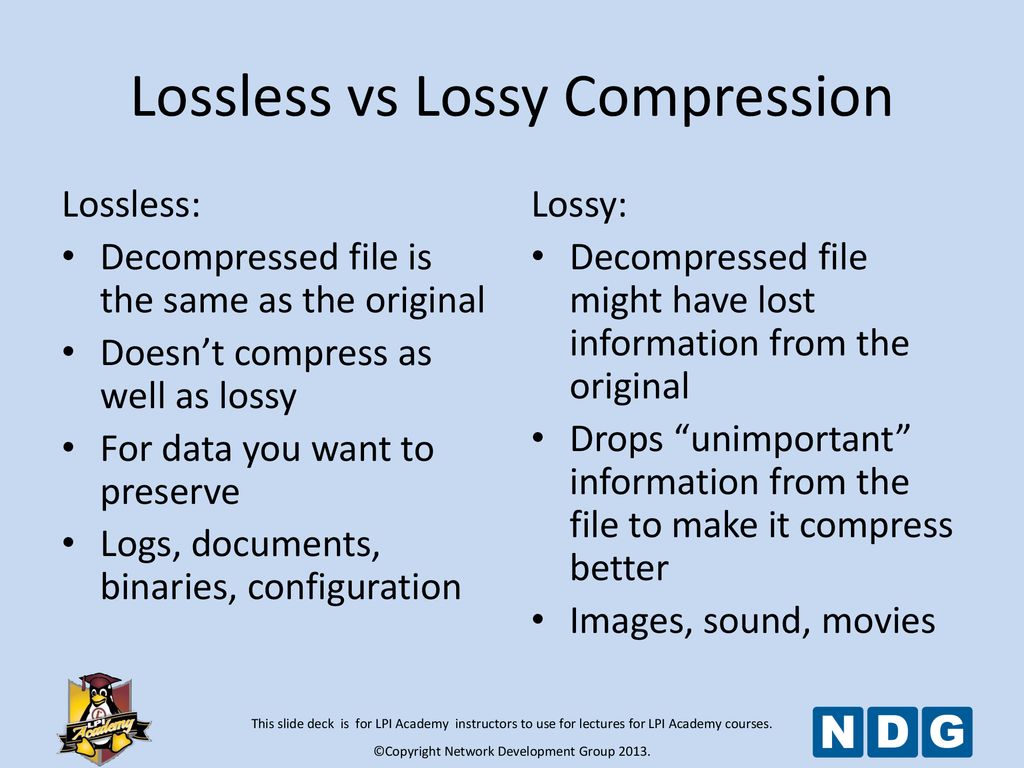
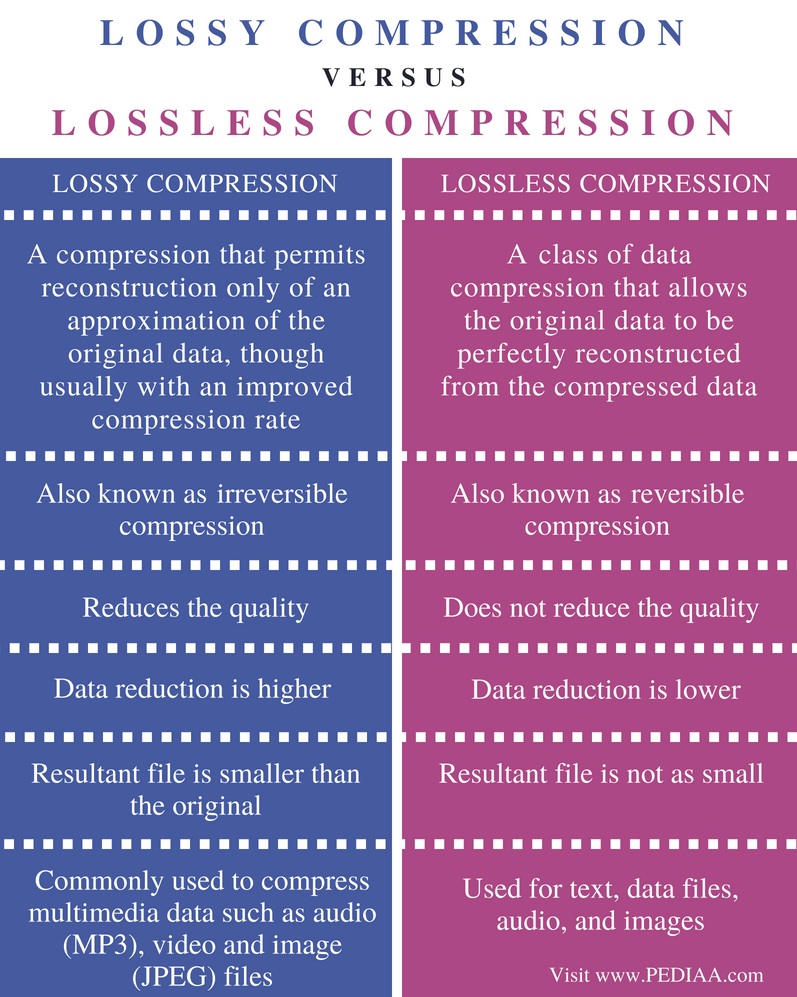
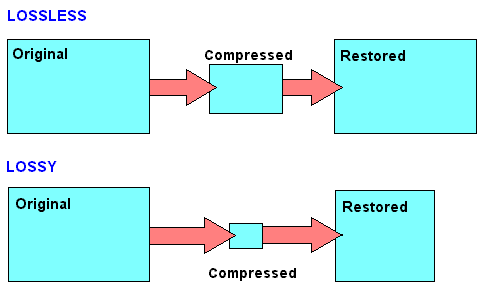
Lossless compression allows you to make a complete recovery of the original data, lossy compression allows you to recover data with certain distortions.

Lossy compression is significantly more efficient than lossless compression and is used when full compliance with original and recovered data is not required, and volume reduction is a priority.

A lossy encoded file is very different from the original on the level of byte comparison, but to an inexperienced human ear, the difference may not be as strong and sometimes even imperceptible. It does this by focusing lossy compression techniques on the physical characteristics of a person’s senses, such as a psychoacoustic model, which determines how much sound can be compressed without degrading the perceived quality of the person. Impairments caused by loss of compression that are perceptible to the human ear are considered compression artifacts.

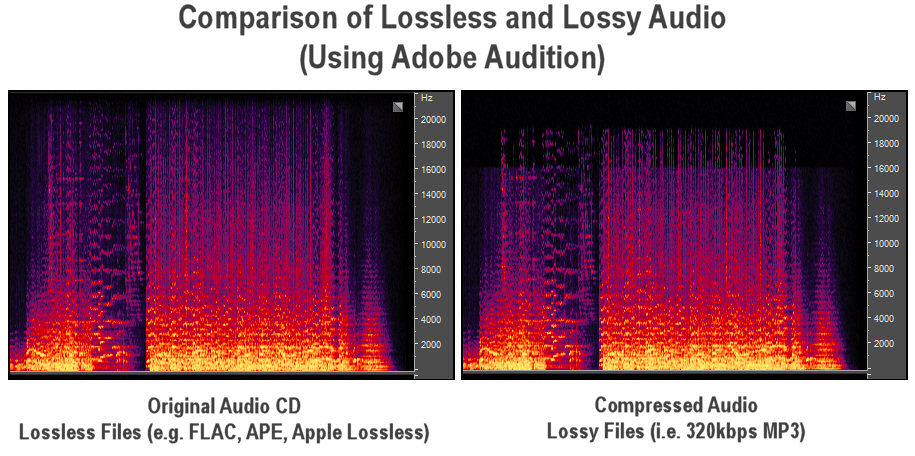
MP3 spectrogram (left) and original file (right)

Examples of common lossy formats:
MP3: defined by the MPEG-1 specification, perhaps still the most common format

Ogg Vorbis: distinguished by the absence of patent restrictions and higher quality with the same bit rate as MP3

AAC, AAC + – Exists in various versions, defined by MPEG-2 and MPEG-4 specifications, it became widespread along with Apple technology

eAAC + is a format offered by Sony as an alternative to AAC and AAC +

WMA is a format developed by Microsoft

Dolby AC-3

DTS

Previously, lossless audio formats were most often used for archival data storage and in cases where distortion was unacceptable or undesirable, and most common listeners used music in lossy compressed formats. But the amount of memory in electronic devices is constantly growing and prices are falling, which is why more and more people are switching to listening to Lossless formats, which allow them to perceive music in its original form. In addition, the support for Lossless formats has now appeared on almost all consumer devices, even some streaming services are beginning to broadcast sound in lossless quality, for example, Deezer presented in Russia or Tidal, which is officially absent from us.

Examples of common lossless formats:
Free lossless audio codec: FLAC is the most common free format

ALAC – Apple Lossless Audio Codec – Apple variant

Lossless audio encoding, also known as MPEG-4 ALS

Direct Flow Transfer – DST

Dolby TrueHD

DTS-HD Master Audio

Meridian Lossless Packing – MLP

Monkey’s Audio – Monkey’s Audio APE

WavPack – Lossless WavPack

WMA Lossless – Windows Media Lossless

What are lossless file formats and why shouldn’t you convert lossy files to lossless files? Part 2
What are lossless file formats and why lossless comprssionshouldn’t you convert lossy files to lossless files? Part 2


Some of these lossless formats also provide compression. For example, a WAV file generally contains uncompressed audio and takes up a lot of space. A FLAC file can contain the same lossless audio as a WAV file, but uses compression to keep the file smaller. Formats like FLAC don’t discard any data, they store all the data and intelligently compress it, just like ZIP files. However, they are still significantly larger than MP3 files, which throw a lot of data.

Lossless Compression - Pediaa.Co

The conversion can be lossy even between lossless formats. For the conversion to be truly lossless, the data in the source file must fit inside the destination file. For example, lossless FLAC files only support 24-bit audio. If you convert a WAV file that contains 32-bit PCM audio to FLAC, some data will be removed during conversion. The process of converting a WAV file containing 24-bit PCM audio to FLAC will be lossless.

In the image below, the lower version of the photo is compressed using a low-quality lossy compression algorithm. The file size will be noticeably smaller than the image above.

Image via Wikimedia Commons

Why you should never turn a loss into a lossless
When you convert a file from a lossless format to a lossy format, such as ripping an audio CD (lossless format) to MP3 files (lossy format), you are discarding some of the data. The MP3 file is much smaller because most of the original audio data has been lost.

If you convert a lossy MP3 file to a lossless FLAC file, you will not recover any data. You will end up with a much larger FLAC file that is only as good as the MP3 file you converted from. You will never be able to recover your lost data. Think of it as making the perfect photocopy copy. Even if you could create a perfect photocopy copy, you would still end up with a photocopy that is not as good as the original document.

This is why converting lossy formats to other lossy formats is a bad idea. If you take an MP3 (lossy format) file and convert it to OGG (another lossy format), most of the data will be discarded. Think of it like making a photocopy of a photocopy: every time you photocopy a photocopy, you lose data and the quality degrades.

However, converting from lossless to lossless formats works fine. For example, if you rip an audio CD (lossless) to FLAC files (lossless), you will get files as good as the original audio CD. If you then convert those FLAC files into MP3 files, say, to shrink them to fit more on your MP3 player, you’ll end up with MP3 files that rival the quality of MP3 files ripped directly from an audio CD.

What should you use?
When you should use lossless formats and when you should use lossy formats depends on what you are using them for. If you want the perfect copy of your audio CD collection, you must convert them to lossless files. If you want a playable copy on your MP3 player and file size is more important, use a lossy format.

If you want to post a photo on the Internet, you must use a lossy format to reduce the size of the photo. (but keep a lossless backup of the original file). If you are printing a photo professionally, you probably want to use a lossless format during the editing process. (Note that for screenshots, PNG is a lossless format that can produce sharp and appropriately sized screenshots of spot colors on computer screens. However, PNG becomes much larger when used for photographs. containing many more mixed colors. Real world).

We will not be able to cover all the situations for which you choose the media file format. Just be aware of the pros and cons when choosing a file format.

To learn more about what type of image file to use and when, read What’s the difference between JPG, PNG, and GIF? Or, if you are curious about all the available audio file formats, read HTG’s explanations: What’s the difference between all these audio formats?

What are lossless file formats and why shouldn’t you convert lossy files to lossless files?

What are lossless file formats and why shouldn’t you convert lossy files to lossless files?

Lossless compression

Whether you’re dealing with image, music, or video files, it’s important to understand the difference between the different types of formats and when to use them.

lossless compression

Using the wrong format can spoil the quality of the file or make it unnecessarily large.

Some types of media file formats are lossy and some are not. We will explain what these terms mean, the benefits of each type of file format, and why you should never convert lossy formats to lossless formats.

Compression explanation
We use compression to reduce the size of files, allowing them to load faster and take up less disk space. For example, when you take a photo, your camera captures all the light it can receive and adds the image. If you save the image in RAW format, which stores all the light data captured by the camera’s sensor, the image can be up to 25MB in size. (This depends on the resolution of the image – a camera with more megapixels will produce a larger image.)

If we simply upload these files to a social network or post them to a website, we don’t want these image files to take up so much space. A photo gallery with RAW images can take up hundreds of megabytes of space. RAW formats can be used by professional photographers to maintain high image quality while editing, but they are not intended for the average person.

Instead, our camera or smartphone converts the image to a JPEG file. JPEG files are much smaller than RAW images. When you convert RAW to JPEG, some of the image data is “thrown away”, creating a much smaller file. The conversion process uses a compression algorithm that works well with photos, making them look pretty good despite being compressed. Depending on the quality setting, you may still see compression artifacts.

Note that lossy formats often have a parameter that controls their lossy quality. For example, JPEG is of variable quality. If the quality is poor, the JPEG image file becomes smaller, but the image quality is noticeably worse. Here is an enlarged example of a lossy JPEG – you can see various “compression artifacts”.

Lossless and lossy formats
We call RAW Lossless because it retains all the data from the original file, and JPEG Lossy because some data is lost when converting an image to JPEG. However, these are not the only lossy and lossless formats.

Images: RAW, BMP and PNG – all lossless image formats. JPEG and WebP are lossy image formats.
Audio: WAV is a container file often used for storing lossless audio, although it can contain lossy audio as well. FLAC is a lossless audio format and MP3 is a lossy audio format.
Video: Various lossless video formats are widely used by consumers as they can make video files take up a lot of space. All common formats, such as H.264 and H.265, are lossy. H.264 and H.265 can provide smaller files with higher quality than previous generations of video codecs because they have a “smarter” algorithm that better chooses data for deletion.