
How does the bit rate affect the quality of the music?
Does the bit rate affect the quality of the music?
There is a lot of talk these days that we have lost real music with the advent of compressed audio formats like MP3, AAC and the like. Is it really so? Will lossless music save music? Can an inexperienced listener tell the difference between MP3 and FLAC music? Let’s take a look at this problem.
What is Bitrate?
You’ve probably heard the term “bitrate” before and you probably have a basic idea of what it means, but it might be a good idea to familiarize yourself with its official definition so you know how it all works.
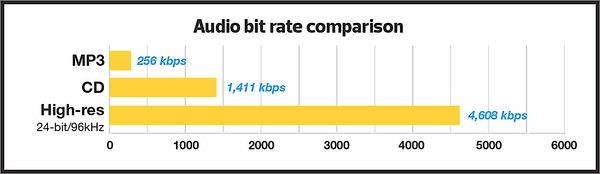
Bit rate is the number of bits or the amount of data that is processed over a period of time. In audio, this generally means kilobits per second. For example, the music you buy from iTunes is 256 kilobytes per second, which means that every second of the song contains 256 kilobytes of data.
The higher the bit rate of the track, the more space it will take up on your computer. Audio CDs typically take up quite a bit of space, so it has become common practice to compress these files so that you can burn more music to your hard drive (or iPod, Dropbox or whatever). This is where the “lossy” and “lossy” formats conflict.
Lossless and Lossy formats: what’s the difference?
When we say lossless, we mean that we haven’t really changed the original file. That is, we copy a track from the CD to our hard drive, but we do not compress it to the point of losing data. Essentially the same as the original CD track.
However, most of the time, you will probably extract your music in Lossy format. That is, you took a CD, copied it to your hard drive, and compressed the tracks so they don’t take up a lot of space. A typical MP3 or AAC album is probably about 100MB. The same album in a lossless format like FLAC or ALAC (aka Apple Lossless) will be around 300MB, so it has become common practice to use lossy formats for faster downloads and more hard drive savings. .
The problem is that when you compress a file to save space, you are removing chunks of data. Just like when you take a high quality image and compress it to JPEG, your computer grabs the raw data and “tricks” certain parts of the image into being basically the same, but with some loss of clarity and quality.
An example of how the JPEG graphics compression algorithm works
Remember that you are saving hard drive space by compressing music in lossy formats, which can make a big difference for an iPhone with 32GB of storage, but is only a trade-off in terms of size / quality.
There are different levels of compression: 128 Kbps, for example, takes up very little space, but it will also have a lower quality of playback than a larger 320 Kbps file, which in turn is of lower quality than the 1,411 reference file Kbps. From. 1,411 kbps is an audio CD level quality, which is more than sufficient in most cases.
The problem is not how much the music is compressed, but what equipment you listen to it on.
Does bit rate really matter?
As memory gets cheaper every year, listening to sound at a higher bit rate, or even lossless formats, is starting to become more and more popular. But is it worth the time, effort, and storage space on your phone or computer?
I don’t like answering questions this way, but sadly the answer is: it depends.
Part of the equation is the hardware you use. If you are using a good quality pair of headphones or speakers, you are used to wide frequency and dynamic range. As such, you are more likely to notice the downsides that come with compressing music into lower bitrate files. You may notice that low-quality MP3 files lack a certain level of detail; Subtle backing tracks may be harder to hear, the highs and lows won’t be as dynamic, or you may hear distortion in the lead vocal. In these cases, you may want a higher bit rate track.
However, if you’re listening to your music with a cheap pair of headphones on your iPod, you probably won’t notice the difference between a 128Kbps file and a 320Kbps file, let alone 1,411Kbps lossless music. Remember when you I showed the image a few paragraphs above and noticed that you probably had to look at it to see the flaws? Your headphones are like a truncated version of the image: they will make these imperfections difficult to perceive, as they are not physically capable of reproducing the music for you the way you want them to.
The other part of the equation is, of course, your own ears. It can be very difficult for some people to distinguish between two different bit rates for the simple reason: they listen to little music. Listening skills, like any other, develop with practice. If you listen to your favorite music often and a lot, your hearing becomes more accurate and begins to pick up small details and midtones. But until then, doesn’t it really matter what bitrate you use?
So what format and bit rate should you choose yourself? Is 320 Kbps enough for you or do you definitely need Lossless format?
The point is that it is difficult to hear the difference between a lossless file and a 320Kbps MP3 file. To hear the difference, you need serious high-quality equipment, good hearing, and some kind of music (for example, classical or jazz). .
For the vast majority of people, 320 Kbps is more than enough to listen to.
What else should you consider?
Music recorded in the Lossless format can be useful. Lossless files are more reliable in the future, in the sense that you can always compress them to Lossy format when you need to, but you can’t do the opposite and restore original CD quality from MP3 file. This, again, is one of the fundamental problems of online music stores: if you have created a huge music library on iTunes and one day you decide that you need more bitrate, you will have to buy it again, but this time only in CD format . …
Whenever I can, I always buy or copy music in Lossless format for backup.
I understand that audiophiles are like a needle under your nails. Like I said, it all depends on you, your audition and the equipment you have.
Compare two tracks recorded in Lossless and Lossy formats. Try a few different audio formats, listen to them for a while and see if it makes a difference for you or not.


