SAMPLING FREQUENCY


Free Download Mp4Gain
picture

SAMPLING FREQUENCY

samplerate

When the distribution begins, you may encounter such a phenomenon that
“the video and audio change gradually, although at first it is not so much.”
samplerate

One of the causes is: -There is also a
error when setting the sample rate of the audio signal
.

If you are experiencing sound drift, you may want to review your settings.

Note:
What I’m talking about in this article is something I don’t understand, and although I mentioned “countermeasures” at the bottom for now, I really don’t understand the cause.
Still, I think the “countermeasure” described here will lead to an improvement for those who have problems with sound deviation, so I’ll post it.
(The author has made a clear improvement on the sound gap.)
Maybe there is an error in the article about the way of thinking, understanding, etc. note that.

What is sample rate and bit depth?

Sample rate is like a unit used when recording and playing back audio digitally,
y represents how much audio is sampled (sampled) per second.
It seems that Hz (hertz) is often used as a unit.

Bit depth is the number of bits by which a sample is represented and is expressed as either 16 bits or 24 bits.
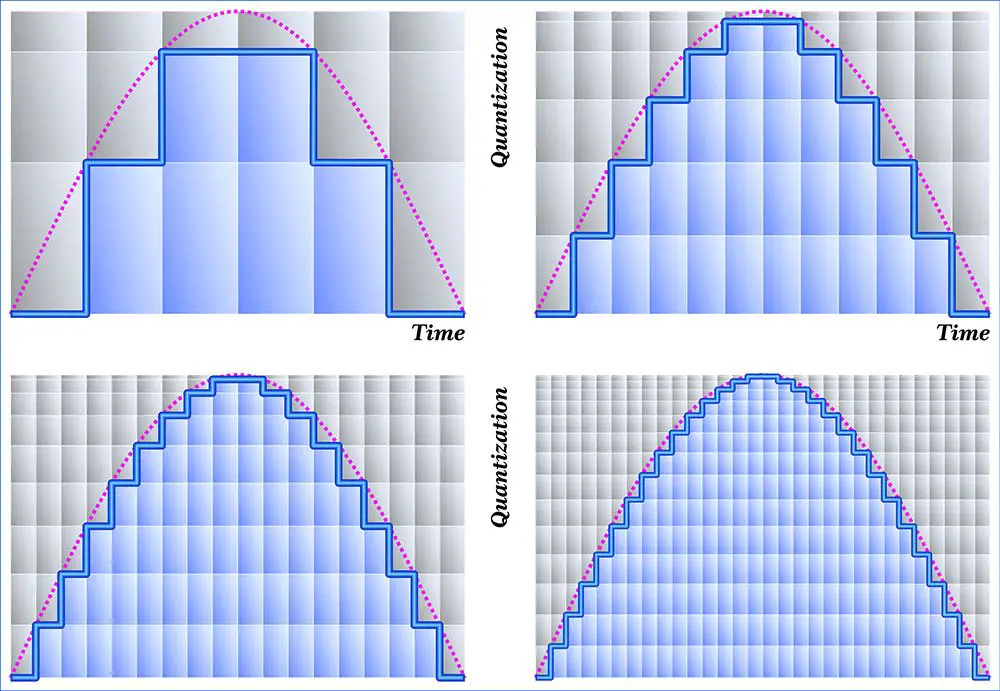
It is used in the form of how many stages the difference in the sound that can be recorded is divided from the silent state to the maximum volume state, and the higher the bit depth, the more delicately the sound can be recorded and reproduced. . .

The minimum unit
of the vertical axis of the sound waveform (the one seen in voice editing software) is
the smallest unit of
horizontal axis of bit depth, which is determined by the sample rate.

When it comes to audio digitally, the two are often written as a set.
For example:
CD: 16bit 44.1kHz
DVD: 24bit 48kHz

A notation like 44100 Hz 16 bits appears even in the audio interface settings.
The values ​​that can be set and the sound quality that can be handled differ for each audio interface.

Why does sound change due to sample rate setting error?
I can’t explain this area well.
When I was afraid of the sound gap, I searched for various information and looked at it,
but I couldn’t find anything like a good explanation.

Even if you look at the site that has information on measures against sound deviation, it says that if there is a hint of one or two lines
and continuous deviation of the sound, you should check if the sample rate is misaligned
. my environment, but…

in my environment
By the way, in my environment, when I rewatch the recording when the distribution sound was out of sync, there was a symptom that the
audio played a bit earlier (recording time axis was a bit shorter)
. .. It was a subtle speed boost that I’d miss until someone told me, but it was certainly fast.

The range of sample rate settings that VirtualAudioCable itself can handle was quite wide (checked in the dedicated settings app), so if I wasn’t careful, before I knew it
(default?), the “default format” was set to 48kHz in windows settings. What I was doing was a blind spot.
The sample rate was fixed on the Windows side.
After fixing this, continuous sound space during distribution was improved.

How to set the sample rate
Sampling Rate Adjustment Concept
The sample rate should be the same as much as possible.
Since distribution software and mixing software handle multiple inputs, they (should) convert such differences, but still the sound quality deteriorates each time the sample rate is converted.
This time, it appears that there is a sound gap involved.

We will try to unify the sample rate settings here as much as possible for those used during distribution.
I think it is better to unify at 44.1 kHz or 48 kHz.


Free Download Mp4Gain
picture


Mp4Gain Main Window
picture


Mp4Gain Features
picture


Free Download Mp4Gain
picture

What are Encoding, Codec, Bitrate, Sample Rate Part 2

What are Encoding, Codec, Bitrate, Sample Rate Part 2

Sample Rate

Bit rate / Sampling rate

SAMPLE RATE

Bit rate :
the amount of data processed per unit of time, which is used to indicate how much information can be processed and sent/received per second, such as
kbps.
Sampling rate (sampling rate/sampling frequency) :
represents the amount of sample data (frequency/frequency of occurrence?) per unit of time when converting a digital signal to an analog signal.
・ 44.1kHz or 48kHz
That’s how it is …

Fountain

Bit per second (bit per second) is a unit of data transfer rate (bit rate in JIS information processing terminology). It is defined as the number of bits that have passed (ie transferred) a virtual or physical point in the data transfer path per second.

▶ ︎ https://ja.wikipedia.org/wiki/ Bits per second
Sampling rate (sample rate) is sampling, which is a process necessary to convert analog waveforms, such as voice, into digital data, and is the sampling rate per unit of time. The commonly used unit is Hz.

Also called sample rate or sample rate.

▶ ︎ https://ja.wikipedia.org/wiki/Sampling rate
❤︎3, what is the standard file format?
This will come in handy when creating your own data, so it’s worth knowing.

*
If it’s a CD, even if you create a larger file with a 44.1 kHz

* iTunes is a
AAC file format with a
256 kbps bit rate
sample rate
5~10MB

It’s standard…

So the sample size (number of bits) is not shown in the compressed file, so there is no comparison by the number of bits, but it seems that Wav files and CD sound sources have a quality sound superior to compressed files.

It is easy to understand when compared to the bitrate on the WAV file side.

* iTunes sound source purchase file example

hello Adele
Hello Adele
Bit rate: 256 kbps Sampling frequency: 44.1
kHz
CCA
9.8MB

Sia-Viva
Sia Alive
Bit rate: 256 kbps Sampling frequency: 44.1
kHz
CCA
8.9MB

Spicy Red Chili Getaway
Red Hot Chili Getaway Rate
bits: 256kbps
Sampling frequency: 44.1 kHz
CCA
8.4MB

Original WAV-min file
By the way, the one I created uncompressed with Protools from the original sound source file is the one shown in
next figure.

adela hello mp3
Bit rate: 2304kbps
Sample size: 24 bits Sampling rate: 48
kHz
WAV
63.7MB

Also, when I encoded Adele Hello to MP3 with iTunes,
bit rate: 256 kbps → 160 kbps Sampling rate: 44.1
kHz
AAC → MP3
9.8MB → 5.9MB
.

So I feel like MP3, 160kbps and 44.1kHz are the breaking lines where the deterioration isn’t as noticeable.

WAV files are a backup instead of a listen

Typically, bit rate: 256 kbps, sample rate: 44.1 kHz, AAC is more than enough.

What are encoding, codec, bit rate, sample rate?

What are encoding, codec, bit rate, sample rate?

Sample Rate VS Bit Rate

Basic DTM knowledge

sample rate

Not limited to DTM people

Encode
encoder
codec
Bit rate
Sampling frequency
I think you hear it often

Do you only know by nuances?

So I hurried up and checked it out.

Table of contents that you can fly with a touch ↗︎
❤︎1, encode/decode/encoder/codec
❤︎2, Bit rate / Sampling rate
❤︎3, what is the standard file format?
Sponsorship

❤︎1, encode/decode/encoder/codec
As for the music files,

Coding :
File format conversion
・ WAV to MP3
Decode :
restore encrypted version
* Encoding can also refer to the compression of the file itself.
In that case, decoding also means returning the compressed data to an “audible” state.

Thank you for your comment <(_ _)>

Encoder/Decoder :
Software and equipment that encodes/decodes (encoder/decoder)
Codec :
how to convert file format
There seems to be a lossy compression method and a lossy compression method… In
other words, it seems that there are some formats that can be decoded and others that cannot be decoded
At the bottom of the codec page of the wiki it is written in detail
・MPEG audio codecs are irreversible compression methods, that is, they cannot be decoded…
・Apple Lossless (Apple Lossless Audio Codec, Apple Lossless): Decoding is possible with the lossless codec compression method installed in iTunes, QuickTime, etc.
・Windows Media Audio (WMA): It appears that you can choose which format the codec should have installed in Windows Media Player.

I checked the source on the wiki etc.

Encryption, also called encryption, is the conversion of digital data into a code according to the purpose according to certain rules. For details on the encoding method, please refer to the encoding method.

On a computer, it can also refer to file compression (also called “high-efficiency encryption”) or encryption. In this case, the function (software or hardware) that encodes is called an “encoder”.

Decode is also called decode and is an antonym for encode. To restore the encrypted information. The function to be decoded is called the “decoder”. Depending on the device that communicates and records information, it may be equipped with both an encoder and a decoder, and such bidirectional conversion function, conversion device, algorithm or the like is called a codec.

In a computer, the interpretation of a given machine language as an internal representation is called decoding, and its logic circuit is called a decoder. The entire mechanism that collects instructions and data and sends information to the arithmetic unit, centered on the decoder, is called the interface.

▶︎
A codec is a device or software that can encode (encode) and decode (decode) data bidirectionally using an encoding method. It is also used as a term to refer to the algorithm for that purpose.

▶︎
Hmmm…

What is the sampling rate (sample frequency)? Part 2

What is the sampling rate (sample frequency)? Part 2

Sample Rate

Differences in sound quality and how to check! It also explains the settings that need to be taken into account!
Sampling frequency setting Sound quality

Audio Sample Rate

How to check the sampling rate?
The most orthodox method is probably the DAW setup screen.

Sample Rate Ableton Live Settings
I think it depends on the DAW, but I think there is a sample rate setting as well as an interface setting.

4. How should I actually set the sampling rate?
Just as the resolution of televisions increases, so do the sample rate settings.

As of March 2019, the sample rate setting in DTM is

48kHz = 48000Hz
96kHz = 96000Hz
It is common.

By the way, the CD has a lower setting of 44.1 kHz = 44100 Hz.

If you want to know the sample rate of sound data on your computer, please right click and see the detail information.

Sampling rate file information
Points to consider
The higher the sample rate setting, the more PC specifications are required.

Also, the supported sample rates differ depending on the audio interface.

Please note that 96kHz is not supported by inexpensive (10,000 yen or less) audio interfaces.

5. Points to consider in addition to the sampling rate
Sampling rate Number of quantization bits Bit rate
Sample rate isn’t the only thing to consider when recording.

Points to note along with the sample rate That is the number of quantization bits (bit rate).

The number of quantization bits is a value indicating the number of steps to express when converting an analog signal to a digital signal.

The sample rate is the horizontal time axis and the number of quantization bits is the vertical depth.

As of March 2019, the setting for the number of quantization bits in the DAW is

24 bit
32 bit float
It is common.

resume
The sample rate is a frequency that indicates how accurately the sound is captured.

Of course, there are differences in sound quality depending on the rhythm, but beginners and those who do not trust the equipment will not notice the difference.

The sample rate will continue to increase, so there is no basic concept of vintage in audio interfaces. It may be better to get a new one as much as possible.

What is the sampling rate (sample frequency)?

What is the sampling rate (sample frequency)?

Sample Rate


Differences in sound quality and how to check! It also explains the settings that need to be taken into account!
Sampling frequency setting Sound quality

Sample Rate

plugin-boutique-2022-free
The sample rate is mentioned in DAW and audio interface settings. How should I set it?
I googled “sampling rate”, but I don’t understand all the difficult words…
The higher the sample rate, the better the sound quality?
I’m curious!

sample-rate-what-is
For those people, I would like to explain in a way that is easy to understand even for beginners, from the meaning of the sample rate that always appears when starting DTM, the relationship with sound quality, the confirmation method to the setting method. .

Please refer to that.

Table of Contents [ Close ]
1. What is the sampling rate?
2. Does the sound quality change depending on the sample rate?
3. How to check the sampling rate?
4. How should I actually set the sampling rate?
5. Points to consider in addition to the sampling rate
resume
1. What is the sampling rate?
Sampling frequency setting Sound quality
The sample rate is a frequency that indicates how accurately the sound is captured.

Sampling Rate, Sampling Frequency Also sometimes called Sampling Rate in English.

The higher the value, the more accurate the captured data will be.

Of course, if you want to import sound to your computer, you have to convert it to data. Capturing sound data is called sampling.

* Currently, sampling refers primarily to capturing existing sounds. (Use of existing music, recording material, etc.)

Rate means fee or commission in Japanese.

In other words, sampling = capturing sound data. Rate = rate, commission

Literally translated, “sampling rate = sound data capture rate. It will be a commission.”

In other words, the sample rate indicates how accurately the sound is captured.

For example, if the sampling rate is 48kHz, the data will be taken by dividing it by 48000 times per second.

The higher this value is, the finer the sound will be sampled.

It may be easier to understand if you think of the version where each block of pixel art is a sound.

splicing accessories-2022
2. Does the sound quality change depending on the sample rate?
Sampling rate loads sound quality
A common question is whether sound quality changes with frequency.

Of course it will change.

However, beginners and those without expensive equipment won’t notice much even if it changes.

Then I’ll show you how to check it!

Sample rate and bit rate

Sample rate and bit rate

Sample Rate

Recently, sample rates and bit rates have become even more common on music distribution sites and music players. Are there many people who don’t know what it’s like, even though they hear it often?

sample rate

So this time, I will explain sample rate and bit rate in an easy to understand way!

Please note: to explain it in an easy to understand way, there are some parts that are strictly different. note that.

1. Reasons sample rate and bit rate exist in the first place
Sample rate and bit rate are terms that come up when digitizing and digitizing audio. Audio devices such as headphones and speakers typically transmit analog audio signals. Sampling rate and bit rate are terms that appear only in the digital case, so they have almost no relation to analog audio signals.

The reason that sample rates and bit rates appear in the digital world is that there are problems converting analog signals to digital. Analog signals are constantly changing and it is not possible to accurately record the changes.

That’s where sample rate and bit rate come into play. Records the value of a constantly changing analog signal at regular intervals. An audio file is a collection of records as a piece of data. By making this digital audio file, it can be handled on a computer or smartphone and exchanged as data.

By the way, the log is the analog audio data log. However, in the case of vinyl, the original sound cannot be accurately recorded and there will be some differences. The slight difference shows up as the discs own sound quality.

2. What is the sampling rate?
I wrote that by digitizing in 1., I will record how much the value is at regular intervals. If you explain the sample rate in one word, it means “how often you are recording”.

Sampling rate is often expressed in the base unit of “kHz (kilohertz)”. As you know, “kilometer” is the same as “kilometre” and “km”, which means 1000 times. On the other hand, “Hz” indicates how many times it vibrates per second. In the case of sampling frequency, there is no problem in understanding how many times a second is recorded.

That is, in the case of 48kHz, it is recorded 48,000 times per second.

Basically, the more you record during 1 second, the closer it is to an analog signal, so the sound quality will be higher. However, the amount of data will increase proportionally, so it needs to be balanced.

The “Nyquist frequency” is an index that determines the balance. To briefly explain what it looks like, half the sample rate is the loudest pitch that can be produced at that sample rate.

In other words, in the case of a sound source with a sampling frequency of 48kHz, it is possible to record sounds up to 24kHz, which is half, and it is not possible to record sounds higher than that.

Since humans can basically only recognize sounds up to 20 kHz, it doesn’t make much sense to increase the sample rate too much. However, recent research says that “I think I actually feel it in the part that is not my ear.” However, it is a difficult part because there is a limit to the high-pitched sound that audio equipment can produce.

2. What is a bit rate?
When it comes to how often the sample rate is recorded, the bit rate is an indication of how much value there is at the time. Bit rate is basically expressed as “bit”. Since it is a drive that appears on a personal computer, it can be an unpleasant drive for those who are not good with personal computers.

However, the bitrate is easy. Imagine the horizontal line on the graph. The bit rate is the precision with which this horizontal line is prepared. It means that 1000 pieces are prepared in 1 bit. I think this makes it easier to understand.

The value of how much represents the bit rate indicates the volume. In other words, the higher the bitrate, the higher the volume, and subtle changes in volume can be recorded. It’s okay if you remember a lot about bitrate.

Understanding Sample Rate Part 2

Understanding Sample Rate Part 2

sample rate

When the number of samples is reduced in this way, the original smooth curve disappears and a choppy waveform is created.

Sample Rate

Well, when it’s actually played back, it’s not the reason the signal is so choppy, it’s that in post-processing by the computer, “From the position of this point, the original waveform would have looked like this.” it is possible to reproduce a certain curve, but…

However, it is easy to imagine that the smaller this point is, the more difficult it will be to reproduce the original correct waveform, right?

In other words, you can understand that the higher the sample rate, the higher the reproducibility of the original sound.

Let’s hear the difference in sound quality depending on the sample rate

Let’s see in this video how the sound quality actually changes when the sample rate is different.

In this video you can check the sound quality of each of the four stages, “8kHz, 16kHz, 32kHz, 48kHz”.

There is a clear difference, right?

At 8kHz, the treble is cut off so much that it doesn’t seem to be the same song, and the overall muffled sound makes it impossible to hear the drum hi-hat.

The higher the sample rate, the better?
As you can see in the video above, sample rate is an important part of sound quality.

At this point, it’s easy to think, “If you set the sample rate to 96kHz or 192kHz, you should get really good sound!”, but actually the change in sound is quite hard to understand after 44, 1kHz

So why is it difficult to understand the change in sound after 44.1 kHz?

The reason why the change in sound quality is difficult to understand above 44.1 kHz
First, the frequency band that humans can hear is determined to be “20 Hz to 20 kHz”.

And as the basis of audio, there is a rule that the sample rate “needs twice the frequency of the frequency band you want to reproduce”. (For more information, see “Nyquist Frequency”)

Simply put, if you want to play down to 20kHz, which is the human audible range, you need a sample rate of at least 40kHz.

Since the sound quality of the CD is 44.1 kHz, the CD can completely cover the limit of human hearing, 20 kHz.

In the video above, the sound source with a sampling rate of 8 kHz is actually 4 kHz or later, and the sound source with a sampling rate of 16 kHz is actually 8 kHz or later, and the high-pitched sound disappears.

daughter
That’s why I couldn’t hear the high-frequency hi-hat sound at first.

At this level, the difference is easy to understand because it is within the human audible range, but since the CD sound quality has already been reproduced beyond the human audible range of 20 kHz, the playable frequency becomes 48 kHz or 96kHz So in most cases, the general public either don’t have enough speakers or headphones to reproduce it, or they can’t hear frequencies above 20kHz in the first place.

However, there are some interesting research results that humans hear components above 20kHz, so you can’t say there’s no point in playing after 20kHz, but unless you’re listening in a very good environment. There’s no doubt that most people can’t tell the difference.

Reference: Effect of components above 20kHz on the perception of instrument sounds

Three reasons why a 44.1 kHz sample rate is enough

So far, you know that as the sample rate increases, the difference in sound quality becomes negligible.

So what value should be set for the project sampling rate?

It’s “44.1kHz”!

Let’s look at why 44.1 kHz is the recommended sample rate, along with three reasons why.

The higher the sample rate, the higher the CPU load.
This is the biggest disadvantage of increasing the sampling rate.

If you increase the sample rate of the project, the load on the CPU will increase and the computer will not work properly.

Therefore, the higher the sampling rate, the greater the amount of information, but it is not a good option to demand too much sound quality with the specifications of a general personal computer.

After all, the standard sample rate in the music industry is 44.1 kHz.
Although high-resolution audio sources are gradually appearing recently, the music industry standard is 44.1 kHz of CD sound quality.

Furthermore, although subscription models are becoming more and more common in the music industry today, the sample rates of Spotify, Amazon M

Understand sample rate

Understand sample rate

Sample Rate

This “sample rate” is always involved when creating a new project or when exporting audio.

sample rate

The sampling rate seems to be difficult… Which one should I choose after all?

Of the various options, which sampling rate should be selected as the “correct answer”?

If you make a mistake when choosing the sample rate first, the song you made may be ruined, so today I will learn the basics about this sample rate and use it for everyday music production.

After reading this article, you will find that:

Knowledge of sampling rate required for DTM
Which sample rate to choose
Differences in sound quality depending on the sample rate and advantages/disadvantages
How to check the sample rate
Aside from difficult stories like “aliasing” and “Nyquist frequency”, I have summarized only the knowledge that is absolutely necessary to do DTM, so even those who say “It’s a pain to talk about numbers…” should definitely use this . knowledge Let’s remember!

Now, let’s start with the basics of sample rate.

Table of Contents
What is the sampling rate?
Let’s hear the difference in sound quality depending on the sample rate
The higher the sample rate, the better?
The reason why the change in sound quality is difficult to understand above 44.1 kHz
Three reasons why a 44.1 kHz sample rate is enough
The higher the sample rate, the higher the CPU load.
After all, the standard sample rate in the music industry is 44.1 kHz.
You can also request mastering if you have a minimum of 44.1kHz.
Two ways to check the sample rate
For audio files, right click to check
How to check from your DAW preferences
resume
What is the sampling rate?

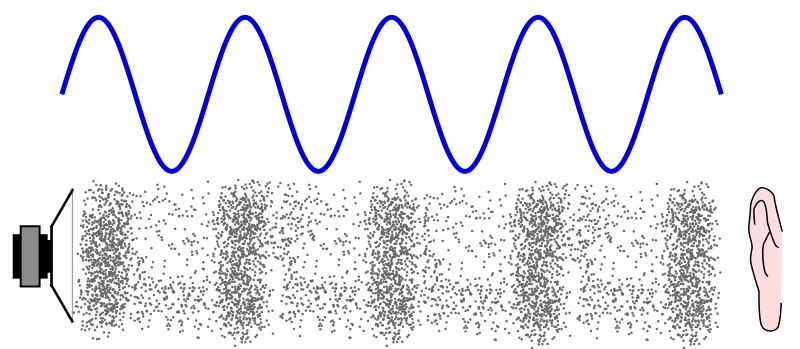
Sound is represented by such a waveform.

You can see a similar waveform even if you zoom in on the audio file in your DAW, but first let’s make this the waveform of the sound in the real world (analog world).

We take this to a computer and listen to it on a speaker and edit it, so we have to bring the sound as data into the digital world. (Convert DA)

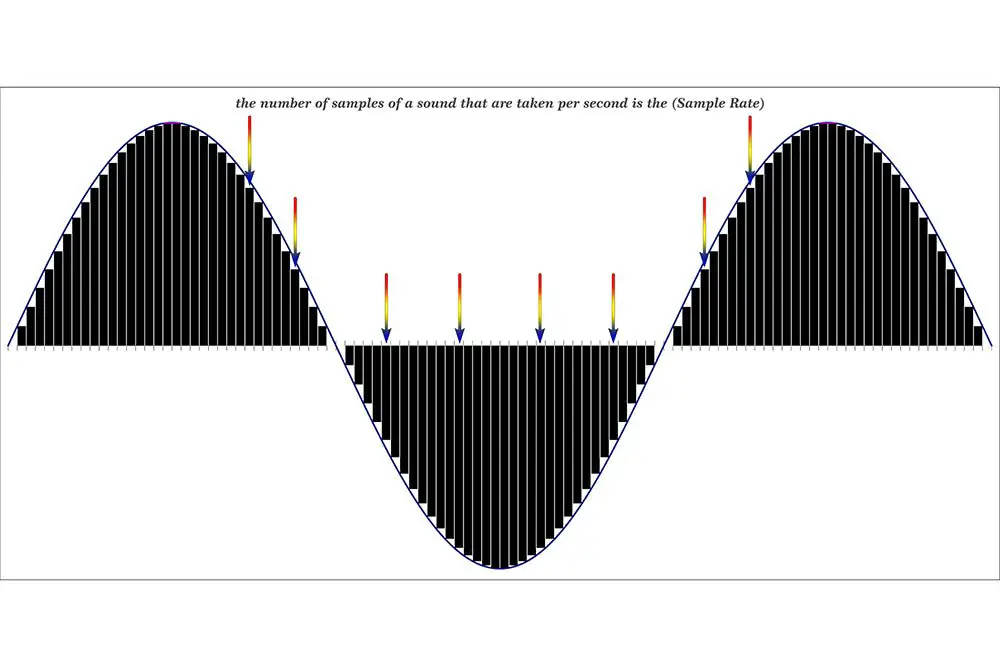
At that point, a process called “sampling” is required, but this is not a particularly difficult story, and it is necessary to cut a cross section of sound tens of thousands of times per second and digitize analog data. .

And this “how many times per second do you sample?” it is expressed by the number “sampling rate”.

Old man
If the sample rate is 1 Hz, it means sample once per second.

So at 44.1kHz (44,100hz) CD sound quality, you’re sampling 44,100 times per second.

Next, let’s take a look at the waveform of sound reproduced in the digital world.

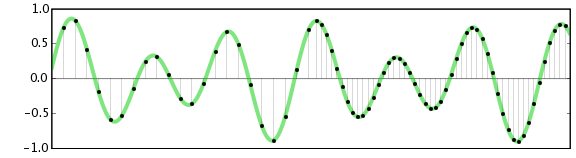
This part is the sampled part, and the more points there are, the more accurately the original sound can be reproduced.

In the figure above, the points are connected by a straight line, but a relatively smooth curve is still maintained at this point.

So what happens to the waveform if this point (sample rate) is low?

What is sample rate/sample frequency?

What is sample rate/sample frequency?

sample rate

Sampling rate Sampling rate is the number of sampling processes performed per second in an AD converter that converts an analog signal to a digital signal.

SAMPLERATE

The unit is “Hz”, and the higher the value, the faster the analog input signal can be converted to a digital value, resulting in higher sound quality. However, the amount of data grows proportionally, so choose the right frequency for media and devices with limited storage capacity.

It is said that in order to accurately record and reproduce a certain sound, it is necessary to sample at a frequency that is approximately twice the frequency of that sound. The sample rate used on music CDs is 44.1 kHz. In this case, the voice waveform is shredded 44,100 times per second, and the voice information at each time is converted into digital information.

Human beings generally have 20 Hz for individual differences, but they can perceive sounds from around 15 kHz to 20 kHz as sound, and this frequency band is called the audible range.

Difference Between Sample Rate and Bit Rate
Sample rate and bit rate are used to describe the sound quality before and after the compression of the audio data.

The sampling rate is a value that represents “the number of sampling processes performed per second”.
For example, at the standard sample rate of 44.1 kHz, that means sampling 44,100 times per second.
The higher this number, the smoother the sound and the better the sound quality. In other words, the numerical value of the sample rate represents the quality of the sound.

On the other hand, the bitrate is a value that indicates “at how many levels the volume is rendered”.
For example, in the case of 16 bits, which is the standard bit rate, the amount of information is divided by 2 to the 16th power (= 65536 steps). If the number of bits is low, the sound quality will be uneven, and as with the sample rate, the higher the bit rate value, the more information can be reproduced and the sound quality will be better.

What is 16-bit MQA?

What is 16-bit MQA?

Sample Rate

Explain how MQA “origami” folds recorded audio into a more efficient format, we often take high sample rates, such as 192 kHz, as an example.

Sample Rate

But the strengths of the comprehensive MQA system are just as important, even when the sample rate is low.

Music catalogs are important because many masters were originally recorded at 44.1 kHz and most of them were recorded only at 44.1 kHz 16b (“Red Book”).

For the 1977-2010 era catalogs, MQA is much closer to the original studio sound, to the actual sound, than most remastered releases (adding effects rather than reducing bugs). Allows you to “go back”. In many cases, the clear sound provided by MQA is deep.

In the early days of digital audio, recording and production equipment was much less sophisticated than it is today. On some level, this can be an advantage. It keeps it clean because you don’t have to mess with the sound between production and release in the studio. But early digital technology also introduced systematic flaws that we were able to perceive and correct. (A part of this is described in the author’s AES treatise [1])

What is MQA 16b?

There are three ways to create a 16-bit MQA file:
1) 16b 44.1 (or 48) kHz master encoding.
2) Derivatives for 24b MQA encoding.
3) Custom MQA-CD encoding.
In all three cases, MQA files can provide audible dynamic range greater than 16b.

For each type

1. When MQA encodes a 16b 44.1 kHz master, the entire encoded MQA file is also 44.1 kHz / 16b. Despite being 16b, this file contains all the decoding and playback information. This MQA encoding also includes all the information that can be accessed while playing the original master, and in some cases even more.
2. If the original source is 44.1 kHz / 24b or the sampling frequency is 88.2, 176.4, 352, 8 kHz or DSD, the standard MQA file will be 44.1 kHz / 24b. This file contains decoding, “display” and rendering information. If this 24b MQA file encounters a “16-bit bottleneck” during delivery (for example, in a wireless or automotive environment), the 16-bit information in the header will be clipped to maximize downstream sound quality. Organized as such, display and reproduction are still possible. See [2].
So encoding a high-speed master and truncating the 24-bit to 16-bit MQA will give you the best possible sound quality (with or without a decoder). This MQA file can be sent to a streaming service via any 16-bit distribution system, for example as an alternative to Redbook and, interestingly, on a CD. Importantly, this 16-bit version of the MQA replay can be heard as a certified and studio approved replay.
For this reason, some record companies no longer create Redbook files and choose the high quality and certification that MQA 16b files provide.
3. In 2) above, the 16-bit MQA file was created by first optimizing the encoding to 24-bit and then removing the lower 8 bits. However, if the file is for MQA-CD, the encoder uses a different approach to further optimize the data on the CD.