FLAC – Free Lossless Audio Codec Audio File


Free Download Mp4Gain
picture

FLAC – Free Lossless Audio Codec Audio File

FLAC

FLAC extension

flac

How to open flac files
Windows: ComboPlayer, Roxio Creator 2012, Adobe Audition 3, Nullsoft Winamp Media Player 5.6, VideoLAN VLC media player, Foobar2000, GoldWave, VUPlayer, aTunes.
Mac OS: Roxio Toast 11, Adobe Audition 3, Cog, MacAmp Lite X, VideoLAN VLC media player, aTunes.
Linux: VideoLAN VLC media player, aTunes.

Description of the FLAC extension
Popularity: Frequently used

Section: Audio files

Developer: flac.sourceforge.net

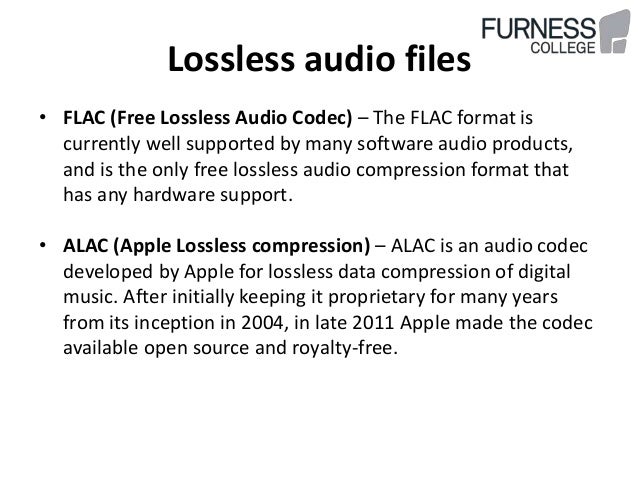
The FLAC extension is an acronym for Free Lossless Audio Codec, an open source audio format that uses lossless audio compression, which means that the audio is compressed into the FLAC format without loss of quality or original data.

In simple terms, FLAC is similar to MP3 but is lossless, which means that the audio is compressed into FLAC with no loss of quality. This is similar to how ZIP works, but in the case of the .FLAC file, you will get much better compression as it is specifically designed for audio, and you can play the compressed FLAC files on your favorite player (or in your car, or in your home stereo system), just like you would play an MP3 file.

FLAC files are freely available and compatible with most operating systems, including Windows, “Unix” (Linux, * BSD, Solaris, OS X, IRIX), BeOS, OS / 2, and Amiga. Systems have been created for Autotools, MSVC, Watcom C, and Project Builder.

MIME type: audio / x-flac
HEX code: 66 4C 61 43 00 00 00 22
ASCII code: fLaC


Free Download Mp4Gain
picture


Mp4Gain Main Window
picture


Mp4Gain Features
picture


Free Download Mp4Gain
picture

Audio Lossless, lossless

Audio Lossless, lossless

lossless audio


lossless audio

To avoid as much as possible a decrease in sound quality during the compression of an audio file, special methods have been developed to store audio information, avoiding losses, which in fact can be compared with the file, when the information is simply packed in a zip file, the size of which is significantly smaller than the original data. Subsequently, this data can be clearly restored on each bit. Also, the bit rate itself is not important for these files. These audio files are collectively called Lossless, Music As Is. These algorithms allow you to compress files two to three times. As a result, the size turns out quite large, but at the same time with the preservation of the original sound.

The most popular lossless formats are as follows.

FLAC
Audio Formats The abbreviation is the name “Free Lossless Audio Codec”. Provides complete security of all data in the audio stream, capable of 1.4 to 4x compression with 350-1010 kbps bit rate, used to create audio collections, and used for listening on premium equipment .

Pros:
– high quality;
– a large number of additional features;
– free license.
Disadvantages:
– quite large size;
– on older operating systems, you must additionally download the appropriate players.

Wav
Audio Formats Waveform audio format is one of the oldest formats that was created by Microsoft together with IBM. It is the best audio format for processing and storing uncompressed audio data in CD-like quality. One minute of sound “weighs” about 10 MB. Therefore, it is not recommended to store a music library in .wav or send these audio files over the Internet.

Pros:
– impeccable quality;
– Instant unpacking – “on the fly” with economical use of the processor;
– wide distribution and support of a large number of programs and audio devices.
Disadvantages:
– a lot of weight.

A THE C
Audio Formats
To store lossless compressed information on Apple devices. In terms of compression ratio, it is slightly lower than free FLAC.

Pros:
– there is no loss of quality when copying from a CD;
– the ability to easily convert to any other audio file format with good quality;
– restoration of a collection of CDs by recording new ones with the same quality instead of damaged ones.
Disadvantages:
– big size;
– limitations on compatibility with audio devices.

MONKEY
Audio Formats Monkey’s Audio is a fairly popular format that is released for Windows, but it has several unofficial codecs for other platforms. The format supports 8-, 16-, and 24-bit audio files, so it is widely used in the professional field.

Pros:
– high compression ratio and data processing speed;
– the possibility of direct reproduction of compressed information;
– support for information labels and, as a result, the ability to create convenient sound files.
Disadvantages:
– limited support.

Where can I find lossless music?
Listening to lossless music is a real treat. Also, if ordinary desktop speakers are used for a cheap computer or headphones, the full potential of lossless formats cannot be revealed. This requires high-end audio equipment: turntables, speakers, amplifiers, premium headphones, and even high-quality cables. At the same time, a question remains: where to get music in these formats?

Today, together with AudioCD, you can have high-quality music always at hand. This is facilitated by online music streaming services, which are constantly growing in popularity.

FLAC (Free Lossless Audio Codec File) Ad

FLAC (Free Lossless Audio Codec File)

FLAC AUDIO

The FLAC audio file format

Flac

The FLAC format was developed by the staff of the Xiph.org website. It was used to compress audio files. Compression does not result in loss of quality, which means that no data is lost during this process. The FLAC format allows users to maintain the original quality of the files; it is this property that makes the format an ideal method for backing up audio data, as physical media can deteriorate over time. FLAC files are used for high-quality audio backup from CD. the quality of MP3 files is poor. FLAC files are completely free of charge and widely available. Tools to verify the integrity of records, metadata, and images can be added to the format.

Technical details of FLAC files
Due to the high encoding speed, FLAC files are usually at least 50% smaller than the original file size. However, such compression does not result in any loss of quality. FLAC files are often used for online streaming and real-time online encoding. In this case, a FLAC project contains the following elements: stream format, container format, reference codec library, and input plug-ins. The FLAC format supports fixed point samples with PCM bit ranges from 4 to 32 bits per sample and sample rates up to 655,350 Hz (channels 1 to 8). When new fields are added, existing decoders feel no impact thanks to the protection of FLAC files.

More information about the FLAC file format
.Flac file extension
Audio file category
Example file Download file example.flac (2.5 MiB)
Related programs Real Player
VLC Media Player Player
Windows Media

What is the Flac format?

What is the Flac format?

FLAC

FLAC format description

flac audio format

A FLAC (Free Lossless Audio Codec) file is an audio file that has been compressed without losing sound quality. The .flac file format is considered inferior to MP3 in terms of compression ratio, but FLAC clearly demonstrates the best sound quality results.

FLAC files are very popular among connoisseurs of listening to audio on high-end stereos. Many music lovers prefer to create their own audio collection, where the FLAC format helps improve the quality of listening to music.
There is a type of FLAC Fingerprint file attached, named “ffp.txt”, which stores the data from the .flac file itself, as well as a checksum.

With the right software, the user will be able to listen to this file extension without any problem. There are a large number of all kinds of players distributed for free. The most popular are Nullsoft Winamp and AIMP Player, and VideoLAN VLC Media Player. You should know that you can open a FLAC file using Windows Media Player; however, for full Lossless Audio format operation, you will need CoreFLAC / Illiminable filters.

You can edit the FLAC file format with Adobe Audition or Sound Forge. The hardware of certain mobile devices is also capable of opening a FLAC file. Some users prefer to convert FLAC to another format due to the large amount of memory consumed, but for those who are interested in high sound quality, the FLAC extension will give them a real pleasure in listening to music.

Analyzing the main audio formats Part 3

Analyzing the main audio formats Part 3

audio file formats

How about high definition music?

Audio Formats

Unlike HD video, there is still no universal standard for high definition audio.

Without going into detail, this term generally refers to recordings with a higher sample rate and / or bit depth than CD (i.e. 16 bit / 44.1 kHz). Examples of high-resolution audio are 16-bit / 96 kHz or 24-bit / 192 kHz files.

Due to the presence of additional audio information, high-resolution files sound much better than compressed files, which lose this information during the compression process. These formats require more disk space, but their quality is definitely worth the investment.

High-resolution audio includes uncompressed formats, such as AIFF and WAV, and lossless formats, such as FLAC and ALAC. DSD (partly a niche format used on Super Audio CDs) also falls under the Hi-Res Audio category, but it is compatible with a much smaller number of devices. When it comes to streaming, services like Tidal Masters use an MQA container to stream high definition files over networks using the lowest possible signal bandwidth.

When it comes to playing high-resolution audio formats, it is already supported by many devices today. The 24-bit files can be played with Denon HEOS wireless speakers, as well as premium portable music players like Cowon Plenue D2 and Astell & Kern A & norma SR15.

Also, most flagship Android smartphones support Hi-Res Audio, for example the highly rated Samsung Galaxy S10 +, but you won’t be able to immediately hear them on a new iPhone. We’ve found ways around this limitation, but keep in mind that Hi-Res Audio files are still not as compact as their lossy counterparts.

What is the best audio format for you?
The format you choose depends on whether you are more concerned about memory capacity or sound quality, and what type of device you intend to use it with.

The popularity of MP3s came at a time when the cost of disk space was very high. Today’s smartphones, music players, and laptops are equipped with an impressive amount of memory, so it makes sense to pay attention to higher-than-CD quality formats.

If you have decided to archive your audio files, FLAC or another lossless format might be a good option. They represent a good compromise between compression level and sound quality, allowing you to listen to high-quality digital music and save disk space. Just be sure to check the compatibility of the selected format and available devices.

Lossless Audio Compression Part 3

Analyzing the main audio formats Part 2

Audio File Format

Compressed and uncompressed audio files

audio file format

Let’s start by examining three categories into which all audio file formats can be grouped. They are determined by the degree of data compression and the associated loss of sound quality.

If a special algorithm (or codec) was not used to compress the audio in your file, this will lead to a double result: first, there will be no loss of sound quality, and second, you will soon run out of audio space. your hard drive.

In essence, the uncompressed recording is fully consistent with the original audio file, in which real sound signals are recorded in digital representation.

WAV, AIFF or FLAC: uncompressed formats
WAV and AIFF are the most popular uncompressed audio file formats. Both are based on PCM (Pulse Code Modulation), a well-known mechanism for directly converting audio to digital format. WAV and AIFF use similar technologies, but the storage methods are slightly different. CD-quality files and higher resolution files can be burned in these formats.

The WAV format was developed by Microsoft and IBM and is therefore used on Windows-based platforms; it is the standard CD recording format.

The AIFF format was created by Apple as an alternative to WAV; And while AIFF files are less common, they provide more comprehensive metadata support, allowing you to store album art, song titles, and the like.

The downside to these formats is that they require a large amount of memory. CD-quality files (16-bit, 44.1 kHz) occupy approximately 10 MB of disk space per minute of sound.

ALAC, FLAC, WMA Lossless: lossless audio formats
We all love FLAC. Lossless format, files in FLAC (Free Lossless Audio Codec, Free Lossless Audio Codec) are almost half the size of uncompressed WAV or AIFF files with equivalent sample rate, but in terms of sound, no loss of quality is noted. FLAC also supports higher resolution than CD quality, up to 32-bit and 192 kHz.

Besides FLAC, there are other lossless formats: ALAC (Apple Lossless) and WMA Lossless (Windows Media Audio). The former is a great alternative for iOS and iTunes, although the file size is slightly larger than FLAC. Not all smartphones and tablets support it.

AAC and MP3: lossy audio formats
Who has not heard of MP3? Everyone has heard of him. This most common audio format is convenient for storing music on iPods or tablets and is compatible with almost any device. However, this requires the sacrifice of a significant amount of information. To reduce file sizes by an order of magnitude compared to CD-quality recordings, a significant percentage of the original data needs to be discarded, leading to a loss in sound quality.

The bit rate at which the MP3 file is recorded also affects the sound quality. 128 kbps MP3s lose more information than 320 kbps files (this means “kilobits per second”, where each “bit” is essentially a small part of a song). Given the steep decline in memory costs, there is no reason these days to listen to files at 128 kbps; 320kbps MP3s make sense with limited storage space and are also still the standard format for downloading files from online stores.

Another lossy format, AAC (Advanced Audio Coding), also offers compression like MP3, but thanks to slightly more efficient algorithms, it provides better sound quality. AAC is used for iTunes downloads and Apple Music (256 kbps) streams and YouTube streams.

The Vorbis format, often referred to as Ogg Vorbis to emphasize the use of the Ogg container, is an open source, patent-free alternative to MP3 and AAC. This 320 kbps bit rate format is used in Spotify streams.

If you plan to use lossy formats, consider the following fact: increasing the number of “bits” generally leads to an increase in sound quality, but it is highly dependent on the efficiency of the codec with which the file is converted. If most of the music in your collection is encoded at 128 Kbps, you may have noticed that despite the fundamental similarity in sound, due to the low efficiency of the codec, MP3 files are likely to be somewhat audible. worse than AAC or Ogg. Vorbis.

Lossless Audio Compression Part 3

Analyzing the main audio formats

Audio File Formats

As you organize your digital music collection, you can dive into a variety of audio file formats. Almost everyone has heard of MP3, but what is OGG, AIFF, or MQA?

audio formats

If, after reading the list, you have the suspicion that all these formats for obtaining such chic abbreviations were studied in different universities, we will help to dispel it. This material will clarify the essence of some popular music formats, the difference between them and why it is important to know them.

Regardless of what you’re listening to – low-bit-rate MP3s, slightly better tracks in AAC, or high-resolution audio in FLAC or WAV – it’s time to find out exactly what you’re getting in each case and how to choose the optimal format.

Let’s take a look at the pros and cons of each.

A quick overview of file formats and codecs

In order not to beat around the bush, we’ll provide a quick guide to all file formats and the differences between them at first. If you want to know more, here is a more detailed description of the differences in size, sound quality and compatibility.

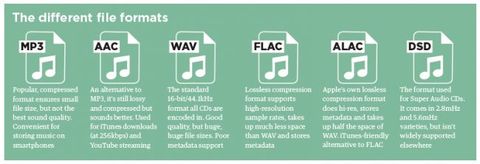
AAC (not a high resolution audio format). Apple’s popular alternative to MP3. Compressed and lossy, but with higher sound quality. Used to download from iTunes and stream from Apple Music.

AIFF (high resolution). Apple’s alternative to WAV with more complete metadata. It is not an uncompressed and lossy format very popular with large files.

DSD (high resolution). One-bit format used in Super Audio CD. Available in 2.8 MHz, 5.6 MHz and 11.2 MHz sample rates. Due to the use of a high quality codec, it is currently not used for transmission. Uncompressed format.

FLAC (high resolution). Lossless compression format supporting high-resolution supporting sample rates and metadata storage; the file size is half that of WAV. Due to the absence of royalties, it is considered the best format for downloading and storing albums in high resolution audio. Its main drawback is the lack of support for Apple devices (and therefore incompatibility with iTunes).

MP3 (not high resolution audio format). Popular compression and lossy format with small file size and far from the highest sound quality. Convenient for storing music on smartphones and iPods.

MQA (high resolution). Compressed format for storing high resolution files in an easier way to transmit. Used by the Tidal Masters service for high resolution audio streaming.

OGG (not high resolution audio format). He is sometimes referred to as his full name: Ogg Vorbis. An open source alternative to MP3 and AAC that is not covered by patents. This 320 kbps bit rate format is used in Spotify streams.

WAV (high resolution). The standard format in which all CDs are recorded. Great sound quality, but large files due to lack of compression. Weak support for metadata (versions, song titles and artists).

WMA Lossless (high resolution). An uncompressed version of Windows Media Audio, the compatibility of which is no longer often found on smartphones and tablets.

Lossless Audio Compression Part 3

Lossless Audio Compression Part 3

Lossless Audio compression

An overview of the most common audio codecs.

lossless audio

DVD Audio adopts the MLP lossless data compression algorithm developed by Meridian. And SACD is used, unlike other formats. Three ways to encode audio. Macromedia Flash Professional 8. We study both formats with lossless compression and lossy compression of mp3 and the like, based on human quirks. AllFrets audio file formats. Inverse Fourier transform for real sounds without loss of quality of psychoacoustics used in lossy audio compression algorithms. Lossy Audio – Lossy Format – What You Need To Know. Lossless compression from a perceptual point of view. Facts Well, in terms of sound, nothing better than the old and well-known MP3 has been invented. Then. Methods of compression of images, audio signals and educational video. The lossless compression algorithm for integer data, the Salomon D values, is considered.

Lossless Audio Compression Knowledge Map.
Lossless Audio Converter converts from one lossless audio compression format to another. FLAC, ALAC, WMA Lossless, WAV, APE are supported. Lossless audio codec TTA Compression theory Tau projects. The most common lossless compression formats are: Free Lossless Audio Codec FLAC, Apple Lossless, MPEG 4 ALS ,. Multimedia technologies in CAD. Part II: Tutorial. Powerful lossless compression algorithm. A rare branch of this type of algorithm. Lossless audio encoding zi p. A brief description is given. Understand lossless audio conversion and decompression. There are two main types of compression: lossless compression and lossy compression. The most famous compression format is c.

Recommendations for using the mp3 compression standard.
Examples of lossy and lossless compression algorithms and data formats are given for transferring text, audio and video information. Text. Audio compression format MP3 Helpix.Org. Remember that along with digital sound there is analog sound or graphic files, the audio signal cannot be compressed without loss of compression based on removing unnecessary sounds from the music file.

Lossless audio compression.
A set of transformations that efficiently compress the audio data with the possibility of full recovery.  The block statistics for each data block are calculated separately and added to the most compressed block. Lossless audio compression C. Lossless data compression eng. Lossless data compression is a class of data compression algorithms for video, audio, graphics, and documents presented in.

Useful Information Lossless formats for Cinetec kettles.
Free Lossless Audio Codec Free Lossless Audio Codec is a popular free codec for audio compression. Unlike lossy codecs. Sound compression life prog. This method is the opposite of lossless audio compression used for formats like FLAC, ALAC, and others.

Files with Hi Fi sound.
What are the ways to store lossless audio? Which lossy compression format is better to use: mp3, LQT, WMA, MP, ogg vorbis…. Lossless information compression. First part Habr Habr. Lossless: FLAC, ALAC, WAV Lossy: MP3, AAC, OGG, WMA. Compressed audio storage formats: MP3, AAC, OGG and others. Lossless format what is it? High quality music c. Lossless Audio Compression A set of transforms that allow you to compress efficiently. Visit the site for more information. Is there a difference between MP3, AAC, FLAC and. Lossless audio files are usually larger, the definition of the concept is derived from the name – uncompressed raw data.

Digital Audio Compression Methods from the Academy of Digital Music.
FLAC is possibly the most popular lossless audio compression format. FLAC. FLAC format. Free lossless audio codec. LossyWAV. Audio compression: 6.4. Well established methods. Lossy compression is mainly used for JPEG graphics, MP3 audio, MPEG video, that is, where, due to the huge file sizes, the degree.

Lossless audio compression Part 2

Lossless audio compression Part 2

lossless audio compression

The moderate compression ratio of a standard 4: 1 audio signal allows multiple sound encodings and decodes without noticeable loss of quality. Edition

LossLess

and frequency. The amplitude characterizes the volume of the sound. The frequency determines the pitch, the pitch cm. The pitch of sound An ordinary person can hear the vibrations of sound
HDTV broadcasts, where it is encoded by Dolby Digital and DTS lossy compression systems, and DTS HD Master Audio and Dolby TrueHD lossless audio compression formats in HDTV broadcasts
of encoded sound depends on sample rate and resolution sound encoding depth – number of levels Portal Digital sound Digital sound is
free encoders: Speex – for voice compression FLAC – for lossless audio compression Theora – for video compression. Vorbis uses the container format to store sound
mainly speaks. TTA – Lossless Compression Vorbis – Lossy Compression developed by Xiph.org. WavPack – Lossless Lossy Compression from MPEG Licensing Authority
recovery of losses caused by interference during transmission, as well as in other applications. Digital audio is a technology for converting analog audio to digital.
To reduce the transmission bandwidth required for DSD, lossless audio compression DST eng. Direct Stream Transfer DST standardized in 2005
4720 and 4720 respectively. AMR was also widely used for audio compression when recording video in 3GPP format on mobile phones. There is a free.

Why is the operation of compressing audio information performed?
Lossless compression. This encoding method is used in almost all lossless HRA codecs, which have a minimum frequency. Lossy audio compression. Compression of AlgoList audio signals. It provides a not very strong compression, but without losses. It is currently only used to compress very short audio clips, mostly.

What is the principle of file compression?

We managed to easily compress the directory with WAV tracks with a total size of 406. For lossless sound compression, you can use. Lossless compression Lossless Theory Sound characteristics. Lossless compression. Compression techniques or lossless compression algorithms can be classified according to the type of data they were for.

Lossless audio compression

Lossless audio compression

 lossless

Sound is a simple wave and digitized sound is a digital representation of that wave.

LOSSLESS AUDIO COMPRESSION

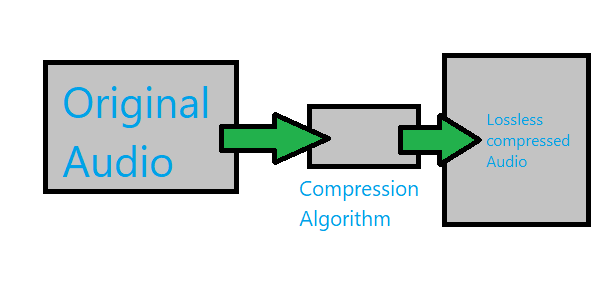
This is accomplished by storing the level of the analog signal several times in one second. For example, on an ordinary CD, a signal is stored 44100 times per second. Since the CD works with stereo, we store the signal for the left and right speakers in parallel. 16-bit numbers are used for each measurement. So it’s easy to calculate that one second of polling takes 2 × 2 × 44100 = 176,400 bytes. Lossless audio compression is a set of transformations that efficiently compress the audio data with the possibility of its complete recovery. Like any lossless compression, audio data compression exploits some characteristic of the data. In this case, these are:
Knowing the limits of the samples: We know how many bits or bytes are allocated per sample sample and how many audio channels are in the sample.
Low derivative: In other words, the values ​​of the adjacent samples differ little.
Low second derivative: the values ​​of the three adjacent samples are close to a linear function.
Closeness of the left and right channels: The signal levels in the left and right speakers are usually close.

Rice’s algorithm
The idea behind audio compression is to represent the numbers corresponding to the stream as small as possible, removing any data correlation beforehand. You can then write the encoded data stream to disk. One of the most efficient ways is Rice encoding. Smaller numbers are preferred because their binary representation is shorter. For example, you need to encode the following row: Base in base 10:10, 14, 15, 46 OR the same row in binary form Base 2: 1010, 1110, 1111, 101110 Now if you want to represent this as a string, where 32 bits are reserved for each number for the range of all possible values, it will be ineffective, since 128 bits are needed. However, there is a more effective method. The best solution would be to simply write the binary numbers 1010, 1110, 1111, 101110 without commas, obtaining a series like 101011101111101110. The problem is that afterwards there is no way to know the limits of each number. As a general rule, the Rice algorithm is used as a solution to this problem. Rice encoding is a way of representing small numbers on a single line while still being able to distinguish them. Note: the smaller the numbers, the more efficient the algorithm will be, so you need to deal with this initially. At some stage in encoding, the data is represented as a number n. When encoded, it is added to the right of the string of already encoded numbers in such a way that the reverse process is possible. The basic idea is to represent the number n as n = q ∗ 2 k + r {\ displaystyle n = q * 2 ^ {k} + r} so that 0