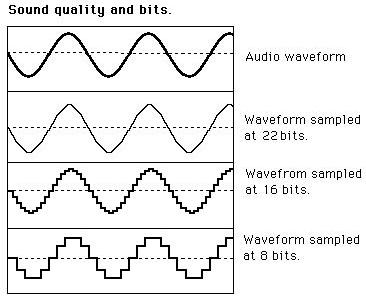
What is the bit rate?

Bitrate, or as they say the width of the sequence

It is the amount of data transmitted or processed in 1 second. The concept mainly applies to multimedia content, for example, video bit rate is nothing more than the amount of video information that is displayed on the screen in one second. To measure the bit rate, the designation “Kbit / s (kbps)” is used, that is, kilobits per second, less frequently Mbit / s, and so on. The more information that is transmitted during a specific period of time, the higher the quality of the image.
When people say “low bit rate video” they are generally referring to low quality video. Blur, opacity, and pixelation are characteristic of such video, while high-bit-rate video has a detailed image with rich colors. Like video, audio also comes with low and high bit rates. Music with a low bit rate loses in the frequency range, words and chords become less distinguishable, and itself takes on an unnatural sound, as if it were an electronic sound.
Bit rate types
When compressing video, you have 3 modes to choose from: constant, variable, and average. Let’s start in order:
Constant Bit Rate (CBR). Sets the desired value and does not change throughout the video. The advantage of this option is that you know in advance what the size of the final file will be. But there is also a downside, especially in relation to sound. It may grow during playback, which may require changing the bit rate. Since you don’t get what you want, quality suffers.
Changes in sound level
Variable (VBR). In this case, you are working in conjunction with a codec. Your task is to set the maximum bitrate and programs must select the required value for each scene. Thus, the “minus” of the previous regime has been eliminated. Also, the file size may be even smaller than expected, but the outcome is impossible to predict.
Average (ABR). From the name it is clear: this is a cross between the first and second mode. Here you set not only the maximum, but also the minimum bitrate, and the codec itself selects it within these limits, based on the dynamics of the video. Its quality is better than that of the variable option, because the bit rate does not fall below the set value.
YI 4K video bit rate increase
Although action cameras have been in our lives for a long time, not everyone understands their true purpose. More than once I have come across the fact that people see them as a compact analog of ordinary consumer camcorders and make corresponding demands on them. First of all, it comes down to the quality of the footage shot. “I just want to take the camera out of my pocket, start recording, and get a picture like on film.”
… This is impossible in principle. And it is doubly impossible in an action camera, since it is a compromise between “action” (a set of characteristics for operation in extreme conditions) and the quality of the shot: improving one thing, the other will deteriorate proportionally.
However, you can do something. For example, replace the lens or increase the video bit rate. What will increase the bit rate? Some improvement in image quality. It should be understood that although the camera shoots at a fairly high bit rate (up to 60 Mbps), the built-in codec uses a fast profile. In other words, video recorded with a 60 Mbps camera will be worse than video recorded on a computer with the same bit rate. First of all, areas of almost uniform color and “jerky” undergo such coding. For example, grass, ripples in the water, or foliage. Increasing the bitrate is not a panacea here, but a tangible step forward. It is true that you need to understand that the developer set a limit of 60 Mbit / s for a reason and that increasing the bit rate is done at your own risk and risk. Also, this increases the requirements for the memory card used and the writing speed on it.
If you use a camera, for example, for video blogs with video uploading to YouTube, you don’t need to change anything, as the video host will recode your video by itself, regardless of the initial parameters. If you’re post-processing the footage, it makes sense to give it a try as there is minimal body movement.
DISCLAIMER OF LIABILITY
In many respects, this article expresses the subjective opinion of the author. Furthermore, the author is not responsible for possible damage to the camera.