
What is a bit rate?

The bit rate in a video is “how much information is packed in one second”.
What if the bit rate is high?
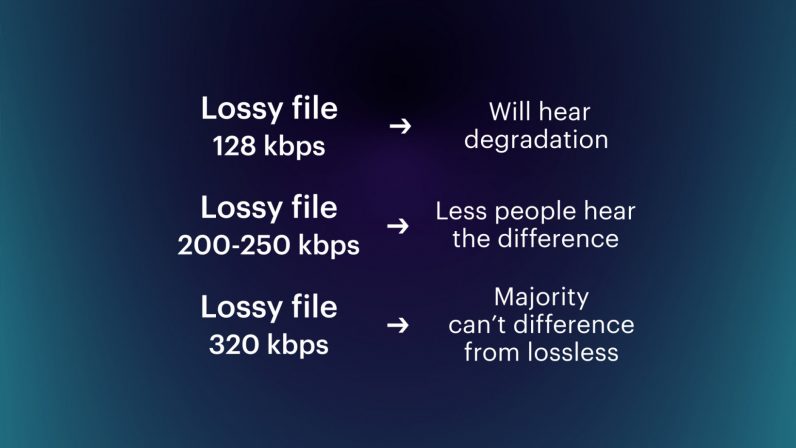
Basically, the higher the bit rate, the better the picture and sound quality.
* Although it is closely related to the “codec” described later, it will basically improve.
There are two types of bit rates
Bit rates are assigned separately for “video” and “audio”.
The higher the bitrate assigned to “video”, the better the “image quality”.
The higher the bit rate assigned to “voice”, the better the “sound quality”.
Also, the sum of the two bit rates is called the “oval bit rate (total bit rate)”. (This oval bit rate is called “video bit rate”)
screenshot_2952
▲ If you open the video file properties and open the “Details” tab, you can see “What is the bit rate?”
(However, this Windows function is unreliable, so it is better to use video analysis software like MediaInfo)
In other words
Oval bit rate = video bit rate + audio bit rate
It becomes the calculation formula.
So even if it says “bit rate is high!”, It may mean “bit rate of video is high” and “bit rate of audio is not high”.
In other words, in such a case, the video will be “Image quality is good, but sound quality is not good …”.
Basically, the file size of “audio” is much smaller than that of “video”, so even if you increase the bit rate of “audio” significantly, the overall size of the file will not change as much.
Therefore, “speech” is often encoded uncompressed (linear PCM).
Relationship to image quality
The higher the “video” bit rate, the more accurate the color information that can be assigned to all pixels.
as a result
High bit rates improve image quality and
If the bit rate is low, the image quality will deteriorate.
koubittore-to
teibittore-to-to
▲ High bit rate (12 Mbps, 2.57 MB) ▲ Low bit rate (90 kbps, 20 KB)
* Actually, it is a gif video, so the bit rate is not accurate.
Bit rate difference
Also, in the case of a low bitrate, if you allocate bits evenly to all pixels, you will run out of bits, so in scenes where similar colors are continuous (such as a scene where the blue sky stretches without end), etc. Try to reduce the bits preferably.
As a result, “block noise” ↓ is likely to occur in such scenes.
Block noise
▲ Example of block noise (block noise)
Relationship to sound quality
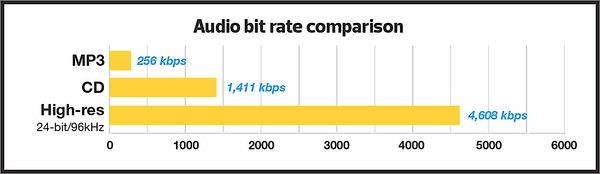
The audio bit rate is
Sampling rate (Hz) x bit depth (bit) = bit rate (bps)
It can be expressed by the formula.
For example, when recording sound as digital data
How often do you record (= sample rate)
How much data is stored per interval (= bit depth)
Decide and register.
For example
Sampling rate: 44000Hz
Bit depth: 24 bit
If so, the sound is divided and recorded 44,000 times per second, and the sound is recorded using 24 bits for every 44,000 times.
In other words, if you want to improve the sound quality, you can increase the “sample rate” or the “bit depth”.
Increase the sample rate → Soft sound
Increase the bit depth → Increase the expressiveness of the sound, such as finesse and volume
Reference: Meaning and Relationship of Sample Rate, Bit Depth, and Bit Rate







/CBR-vs-VBR-069b3b5e6d554d53841e7e525092d25b.jpg)
