Keyframes for moving images


Free Download Mp4Gain
picture

Keyframes for moving images

Bitrate vs Resolution

In a moving image, things move or change significantly in a short time. Therefore, inserting keyframes at short intervals improves the reproducibility of small movements.

Bitrate

There is also the advantage that the search is smoother for images with many keyframes. The reason is that the search is based on keyframes, so the more keyframes you have, the easier it is to stop at the target scene. If the position where the search stops is not a keyframe but a difference information frame, the information is fetched to a nearby keyframe, but that time is short.
However, if you increase the number of keyframes too much, the keyframe bit rate will be taken over and the overall video quality will deteriorate, so be careful.
For moving images, the keyframe is approximately once every 3 seconds.

■ Keyframes for images with little movement

Since there is little difference information in a video with little motion, you won’t notice much difference in change even if there are few keyframes. However, if you insert keyframes for too long, search may not work properly and playback may take a long time to start. This is the opposite of the case where there are many keyframes, and if the rewind position is far from the keyframes, it will take time to read.
For those with little movement, the guideline for keyframes is approximately once every 6 to 8 seconds.

So far, “What is the encoding mechanism? Five points to consider for encoding HD video [Part 1]”, “Understanding the appropriate bit rate for the resolution you want to distribute”, motion oriented or image quality I explained three points how to change the “frame rate” and “how to insert keyframes” depending on whether it is important. In [Part 2], we will explain “the advantages and disadvantages of bitrate setting (CBR / VBR), proper usage” and “correct aspect ratio and interlaced processing”.


Free Download Mp4Gain
picture


Mp4Gain Main Window
picture


Mp4Gain Features
picture


Free Download Mp4Gain
picture

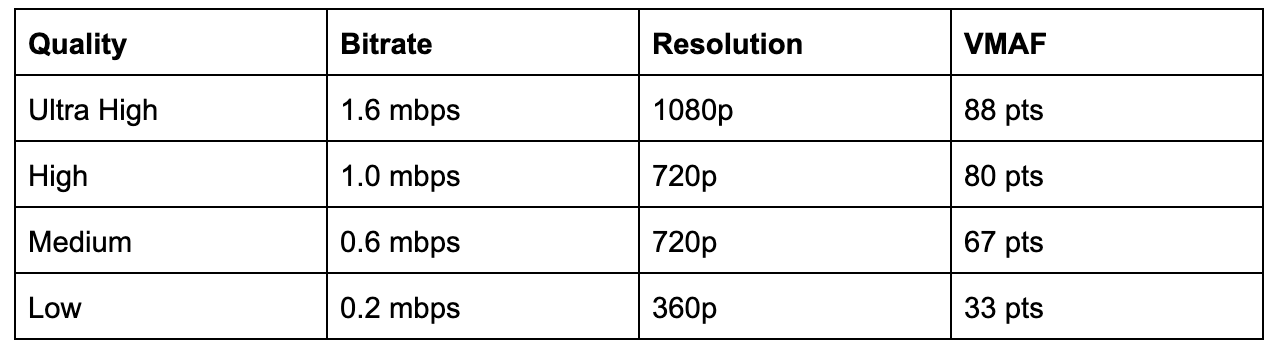
Learn a suitable bit rate guideline for resolution

Learn a suitable bit rate guideline for resolution

video bitrate

This is because the amount of data allocated per pixel is reduced, resulting in poor image quality.

Video Bitrate or Resolution

The same phenomenon can be said of the videos. Bit rate is the amount of data allocated per second and affects the image quality of the video. If you want to display a video on a large screen, such as full screen display on a computer or TV monitor, you need a sufficient bit rate according to the resolution. On the other hand, when displayed at a small resolution, the roughness is not as noticeable even if the bit rate is reduced. On the contrary, even if you encode at a high bit rate, you will not notice the difference in image quality, and in many cases the file size will only increase.

Below is a list of the appropriate resolutions and bit rates commonly used for Internet video distribution.

<< Estimated resolution and suitable bitrate >>
* Figures are based on 30 fps assumption and based on our opinions as of June 2021.
* The appropriate bit rate may vary slightly depending on the video content.

resolution Video with little movement Video with a lot of movement
SD (720 x 480 px) 500 kps-1 Mbps 1 Mbps-2 Mbps
HD (1280 x 720 px) 2.4 Mbps-4.5 Mbps 4.5 Mbps-9 Mbps
Full HD (1920 x 1080px) 4.5 Mbps-9 Mbps 9 Mbps-18 Mbps
4K (4096 x 2160 px) 25 Mbps-35 Mbps 35 Mbps ~ 70 Mbps
However, in the case of moving images, the image quality at the time of encoding will differ depending on whether the video material has a lot of movement or the video material has little movement, even if the bit rate is the same. Therefore, it is necessary to thoroughly judge and encode not only the bit rate, but also the frame rate and keyframe settings, which will be explained later, according to the video material. I hope you understand that “there is a relationship between resolution and proper bit rate” as a determining factor for high definition.

Point 2: Increase the frame rate if motion is important and lower the frame rate if image quality is important.
The frame rate (number of frames) is set at 29.97 fps for televisions and 24 fps for movies, while the frame rate is freely configurable for Internet video encoding. A video is a collection of continuous images (frames) like a flip book. The more frames per second, the smoother the movement.

In video encoding, the bit rate per second is fixed, so if you increase the frame rate, the number of images in the flip book will increase and the movement will be smoother, but the amount of data allocated per frame will decrease, so the image quality will be better to fall.
On the other hand, if you reduce the number of frames, the number of images in the flip book will decrease and the smoothness of the movement will be a little slower, but the image quality will improve because a large amount of data will be allocated to each frame.

If you want to emphasize the smoothness of motion in a video with a lot of motion, increase the frame rate (video demo 1). On the other hand, if the video has little movement, it is not necessary to increase the number of frames as much (depending on the degree), so it is effective to lower the frame rate and give priority to improving the image quality (Video Demo 2 ).

Point 3: insert “keyframes” at short intervals for moving images
A keyframe is a frame that exists as a single still image (an image that is not compressed between frames) and is the starting point for difference information. Depending on the encoder settings, the keyframes are inserted when there is a scene change and the difference information is inserted at regular intervals, such as XX frames and once every XX seconds.

What is the encryption mechanism? 5 Points to Consider for HD Video Encoding [Part 1]

What is the encryption mechanism? 5 Points to Consider for HD Video Encoding [Part 1]

sample rate

Encode

Sample Rate

The image quality of Internet videos is almost proportional to the bit rate. However, if the bit rate increases unnecessarily, the file size will increase. “Keep bit rate low”, “Reduce file size” and “Reduce load time” are linked, and there is nothing to say if you can encode in high definition while keeping the bit rate low.
Also, at the beginning, I wrote that “image quality is almost proportional to bit rate”, but I think some of you may have experienced that “I increased the bit rate and encoded, but I am not satisfied with the quality of the image. “So, this time, I will explain five points that are often used to do high definition video encoding.

” Table of Contents ”

Encoding Mechanism
Point 1: learn a suitable bit rate guideline for resolution
Point 2: Increase the frame rate if motion is important and lower the frame rate if image quality is important.
Point 3: insert “keyframes” at short intervals for moving images
* You can read the second part (Point 4, Point 5) here.

Encoding Mechanism
First, I will briefly explain the encoding mechanism.
An image is a collection of continuous images (frames), and by changing this in a short time like a flip book, it appears that you are visually moving. Japanese television images are 29.97 frames per second (short for 29.97 fps / frame per second) and most movies and animations have a standard of 24 fps. Since a large number of frames are required for video, the amount of data is also huge. Therefore, data compression is indispensable for distributing videos on the Internet.

When coding

“Prediction in frame” that compresses data within a frame
“Prediction between frames” that compresses data into consecutive frames
Information is reduced and data is compressed within the range that does not affect the visual sense.

■ What is in-frame prediction?
There are various methodologies for data compression, so I will skip the details here, but the basic idea of ​​within-frame prediction is to divide a frame into small blocks called cells and the colors adjacent to each other in the block. they are the same or similar, they are compressed together.
For example, if there is information “blue blue blue blue blue blue blue blue blue blue red red yellow yellow yellow” in the divided block, the amount of data can be reduced by combining this with “blue 11, red 2, yellow 3”. It’s an image.

An example of data compression in in-frame prediction (image)

■ What is cross-frame prediction?
However, in the case of video with a time axis, the number of frames is large, so there is a limit to the overall weight reduction based solely on the prediction within the frame. On the other hand, in the prediction between frames, based on the idea that “the contents are similar before and after the consecutive frames”, the cells that do not change from the previous frame reduce the amount of data by reusing information and the cells that change It becomes data as difference information.

Prediction between frames (image)

From here, I’ll explain five specific code points.

What format do you choose when copying? AIFF, ALAC, AAC … Check the sound quality of each one by “appearance” Part 2

What format do you choose when copying? AIFF, ALAC, AAC … Check the sound quality of each one by “appearance” Part 2

Sample Rate

The “lossless compression” method, to which Apple Lossless and FLAC belong, is a method that can completely restore the original audio data during playback, at the cost of a low compression rate.

Sample Rate

The file size is large, but the sound quality is equivalent to that of a CD. The bit rate fluctuates automatically according to the content of the audio data, and the compression rate is not constant accordingly.

AIFF and WAV are “uncompressed” methods. Extract the original audio data and create a file as is. It does not compress, so it has a lot of capacity, but the sound quality is perfect.

Let’s take a closer look at the table.

■ Don’t say it again … Considering the playback environment, the format selection criteria for copying are as follows: As

You can see from the “Compression rate” and “Sound quality” items in the table, both are highly rated. It has around “AAC / 256kbps” and “MP3 / 192kbps”, which is a Rossy format with a higher bit rate. While ensuring good sound quality, the file size can also be reduced. It also has an excellent balance with the capacity of the integrated SSD / HDD of PC, iOS devices, smartphones, etc.

The default setting for iTunes is AAC / 256kbps, and the specifications for music files sold on the iTunes Store are the same. You can tell that the current standard is around here. In terms of playback compatibility, AAC and MP3 are widespread, and no matter which one you choose, you don’t have to worry about the playback environment.

On the other hand, it is the lossless format that Apple Lossless and FLAC belong to that can reduce the file size to some extent while maintaining the best sound quality equivalent to that of a CD. If you want to give the highest priority to sound quality from an audio point of view, I would like to select this. It will be a bit difficult to balance it with the capacity of SSD / HDD, smartphone, etc. from the PC, but if it can be erased, it is convenient to use this format.

For example, if you don’t have that many CDs, creating a library in a lossless format will not put too much pressure on your PC’s SSD / HDD and you will be able to sync all the songs on your iOS device. Alternatively, you can deal with this by coming up with sync settings for iOS devices, etc. (I’ll explain later). If so, it is better to have a lossless format that can maintain the best sound quality, and there are few errors in the long run.

Just keep in mind that Apple Lossless and FLAC are a bit difficult to choose in terms of the playback environment. Until now, iTunes and iOS devices do not support FLAC, and many other devices and software do not support Apple Lossless. As of June 2012, at the time of writing, many network players only support FLAC. However, with Apple Lossless opening font in October 2011, support for the same format is expanding, so I’d like to keep an eye out for this trend as well.

AIFF and WAV are uncompressed formats. Of course, the sound quality remains the same as that of a CD. However, the data capacity is not compressed at all. In other words, the uncompressed format “has the same sound quality as the lossless format and has a larger file size than the lossless format.” In that sense, there is no reason to choose it unless you are particular about it.

Well finally the highlight of this era. Let’s review the “appearance” of “what is the actual deterioration in sound quality for each compression format?”

What format do you choose when copying? AIFF, ALAC, AAC … Check the sound quality of each by “appearance”

What format do you choose when copying? AIFF, ALAC, AAC … Check the sound quality of each by “appearance”

Bit Rate

Music files are the mainstream of Imadoki’s audio playback sources.

bitrate

Except when purchased from an online distribution, the sound quality of the music files used here is largely related to the work of reading audio data from a CD to a PC, the so-called “ripping” setting. This time I would like to review that part in a little more detail.

The first half of this article describes the basics of the extraction format for those who want to know what sound quality to choose when extracting. Perhaps this first half is common information to many file and web readers.

However, the highlights are beyond that. “Really Terrifying Audio Compression” … So, in the second half of the article, “How much does the compressed file actually deteriorate the sound?” And “How much does the sound quality change depending on the bit rate value?” you will check with (→ Visually check the sound quality of AIFF, ALAC, AAC!). I would like you to stay with us until the end.

■ Don’t say it’s time to change … First, let’s review the basics

The scheme of the options for copying is “compression format (file format)” and “bit rate”. These two determine the sound quality and file size, which is another important factor.

“Compressed format (file format)” refers to formats such as AAC, MP3, Apple Lossless, and FLAC. This selection determines the sound quality, file size, and playback environment.

The “bit rate” is the amount of data allocated per second of audio. The higher the value (kbps), the higher the sound quality, but the larger the file size.

In the case of iTunes, call this screen “Load Settings” from the environment settings and configure the extraction.

Please refer to the following table based on that. We have summarized the characteristics of typical compression formats and bit rate settings.

The item “Sample Bitrate Settings” in the table is quoted from the default settings provided in iTunes (* iTunes does not support FLAC)

First of all, pay attention to the second item from the left of the table. Compression formats can be broadly classified into “lossy compression”, “lossless compression” and “uncompressed”.

The “lossy compression” method, to which AAC and MP3 belong, achieves a high compression rate = a significant reduction in file capacity by reducing some of the data when compressing audio data. In contrast, the original audio data cannot be fully restored during playback and deterioration in sound quality is inevitable. The degree of deterioration in sound quality changes depending on the bit rate setting. The lower the value of the bit rate, the greater the deterioration in sound quality and, conversely, the higher the value of the bit rate, the more mitigated.

What do the audio sample rates and sample sizes mean?

What do the audio sample rates and sample sizes mean?

The human hearing range

You can see that MP3 audio files have audio in the number of bits (in seconds) that the player uses, that is, the bit rate that indicates the quality of the audio.

human hearing range

But I am confused with the terms sample rate and sample size. Are they dependent on bit rate and sound quality? Or can it be explained in understandable terms?

This is a great article on the three terms you are asking. In summary, here are three definitions.

Bit rate: the amount of data per second. This can vary within the file (variable bit rate) and can have static values.
Sample Rate – The rate at which audio is measured per second. It is usually measured in kilohertz (kHz). The usual number you can see is 44.1 kHz. This is directly related to the bit depth or the number of bits measured in each cycle.
So at this point you need to do some math and you can see that the bitrate is in bits per second (usually measured in megabits per second). Therefore, bit rate = sample rate x bit depth. As far as I know, your sample size is just one of these 1-second chunks of data.

If you run pure math, you will find that these files are very large, but there are some compression algorithms that have been adopted to keep the files low without a significant loss of quality.

The sample size or bit depth is included, which is a measure of the number of bits in the sample, which is a direct quality measure. However, this only applies to PCM sampling. For irreversible formats like mp3, the sample size doesn’t really define the quality.

See Audio Bit Depth for more information.

1
2012/02/10Florist
Sample rate = There is no sample rate. Of audio samples transported per second

Sample size = The sample size determines the maximum dynamic range of a digitized sound. Dynamic range is the ratio of the maximum amplitude to the minimum non-zero amplitude of a signal, generally expressed in decibels (dB).

The sampling frequency affects the quality of the recorded sound. Therefore, a higher sample rate will improve the quality as the number of bits increases, but will require more data and result in larger files. The bit rate used to store the samples used to store the sampled data also affects the quality of the recording. Bit rate is the amount of space that can be used to store sampled data per second. The higher the bit rate, the better the sound, but more space is required to store the file.

Relationship between human audible range and sample rate

Relationship between human audible range and sample rate

Audio Sample Rate

The two main factors that indicate the performance of an audio interface are the number of sample bits and the sample rate.

sample rate

Of these, the number of sample bits is expressed as a numeric value, such as 16 bits or 24 bits, and last time I introduced that the dynamic range differs based on the difference in the number of sample bits. In other words, we have also used graphs to show that the difference in the number of bits is the precision with which very quiet sound can be expressed.
So what about the other sample rate? The sampling frequency is also called the sampling frequency, but the unit is usually kHz. The most commonly used are 32 kHz, 44.1 kHz, 48 kHz, and 96 kHz.
The Roland audio interfaces introduced last time, such as the UA-1X and UA-3FX, as well as the UA-1D and UA-20, are models that support 44.1 kHz and 48 kHz.

UA-1X dal_4007_s.jpg dal_4002_s.jpg UA-20
UX-1X UA-1D UA-3FX UA-20
As many of you will know, CDs, which can be said to be representative of digital audio, are compatible with 44.1 kHz and with 44.1 kHz, that clear sound can be expressed. But why is it 44.1 kHz? Here is a clear medical basis. It is the relationship with the human audible range, that is, the audible frequency band.
Generally, the highest pitch that can be expressed is said to be half the sample rate. In other words, 44.1 kHz is up to 22.05 kHz and 48 kHz is up to 24 kHz. On the other hand, the range that humans can hear is said to be 20 Hz to 20 kHz for healthy people. Therefore, according to the theory, recording of 20 kHz or more does not make sense because humans cannot perceive it. However, considering a small margin, it is the CD standard that can be expressed up to 22.05kHz. However, the reason it became a medium number like 44.1kHz is that when CD was standardized, the VTR was used for digital recording, and the TV’s horizontal and vertical sync signal was 44.1kHz., It is said which was by using it.

■ Can humans really detect sounds above 20 kHz?

However, if you can’t really hear more than 20 kHz, there is no point in picking up frequencies above that. But is that true?
The answer is clear from the appearance of DVD-Audio, which has a sound quality superior to that of CDs. Yes, it is certainly difficult to recognize 20 kHz or more as a single signal, but when signals of various frequencies, such as music, are expressed in an overlapping way, the atmosphere of the sound that can be heard depends on whether 20 kHz or more is being output. o No. It makes a difference. When I listen to a CD and an analog record, sometimes I feel that the sound of the record is better, but it can also be said that this is the result of not setting an upper limit on the frequency in the case of analogs.
Here, let’s experiment a bit to see if it is true that “the highest pitch that can be expressed is half the sample rate.”

48 kHz 96 kHz 48 kHz 96 kHz
White noise expressed at a sampling frequency of 48 kHz (left) and a sampling frequency of 96 kHz (right). In the case of 48 kHz, the sound is output only up to about 24 kHz, but in the case of 96 kHz, all the sound is output flat. In the two graphs above, the horizontal axis was only up to 48kHz, so it looked completely flat at 96kHz, but when the horizontal axis is up to 96kHz and expressed in exponential notation, it is 48k, which is almost the same as the theoretical . value. You can see exactly what comes out.
The graph shown here shows the extent to which frequency is expressed by creating white noise that mixes evenly from low to loud sounds at 48 kHz and 96 kHz. If you look at this, you can see that the 48 kHz sample rate is up to about 24 kHz and the 96 kHz sample rate is up to 48 kHz. However, the two charts on the right side have an index on the horizontal axis, so it might not seem like much of a difference, but it does have a double number range.
You can say that this is the difference between 48kHz and 96kHz.

■ If you want to make a CD last, do you need 24-bit / 96 kHz specifications?

By the way, some people may have some doubts about the story so far? Yes, I would like to digitally record analog recordings and tapes and eventually convert them to a CD, but if the CD itself is 16-bit / 44.1 kHz, the specs, such as 24-bit / 96 kHz, are above spec. Is it unnecessary?
It certainly may not be necessary if you burn the recording as is to CD without any processing.

What is Sample Rate and Bit Rate Depth?

What is Sample Rate and Bit Rate Depth?

Audio Compression

Both image and video data have some numerical values ​​related to image quality, such as the number of pixels, the number of colors that can be expressed, and the number of frames per second in the case of video.

Audio Compression

Similarly, audio data also has two numerical values ​​related to sound quality, which are the sample rate and the bit rate. I do not understand the difficulty in either case, but I am sure I am not mistaken, so I will write about these two today.

Sampling rate
Let’s start with the sample rate.

Simply put, the sample rate is a numerical value that indicates “how loud the sound is recorded.” For some reason, when the sampling frequency is 44.1 kHz, it is not possible to record up to 44.1 kHz and it seems that it is possible to record up to about 22 kHz. Remember that you register up to half the frequency. If you’re wondering why that happens, google it (laughs).

It seems to have an effect on the sound of musical instruments that produce a crisp sound like cymbals, but I have never bothered to change the sample rate under the same conditions and compare them, so the amount of sound depends on the frequency of sampling. It is unknown if it will change. In professional environments, it is often recorded at 48 kHz. On rare occasions, the sample rate changes the sound quality, and some teachers boast that they can tell the difference. You seem to understand something. I would love to take a blind test, but I don’t have free time to go out with me.

Bit rate depth
This is a numerical representation of “how low a sound can be picked up (small change in volume)”. This can be a bit difficult to imagine.

The higher the bit rate, the smoother the waveform lines will be as the sound rises and falls, and the lower the depth of the bit rate, the rougher it becomes.

There are two options, 16-bit or 24-bit. There are also 32 bits at the moment.

Bitrate is likely to make a difference when recording percussion instruments such as drums (instruments with extremely loud volume). Some engineers record in 16-bit from scratch because the sound impression changes when 24-bit drum sound is converted to 16-bit for burning to CD. Unlike the sample rate, this is quite different.

Personal feeling about sample rate and bit rate.
First of all, the sound quality of commonly sold CDs is 16-bit at 44.1 kHz. And, in the professional field, it is often recorded at 24 bits and 48 kHz (which is called Neyonyonpachi). And the human audible range is said to be up to 20 kHz.

With that in mind, it is honestly ridiculous to see and hear something like “This audio interface supports up to XXkHz, so the sound is good …”. Just record at 2448. And there should hardly be any current audio interface model that doesn’t support 2448.

There are audio interfaces that support 192 kHz, but I honestly doubt the idea that the higher the sample rate, the better the sound quality. The basis of recording is to record the desired sound as loud as possible. To record sounds that are far from the human audible range, reducing the proportion of sounds that we really want (of course, sounds that can be heard by the human ear) is what we call high-quality sound. First of all, I think that high frequency sound is nothing more than noise like white noise. If you think that those high frequency sounds are generated by playing musical instruments, it means that the same or louder sounds are generated from fluorescent lamps and all machines, and those sounds are also recorded.

Data lost due to compression is irreversible Part 2

Data lost due to compression is irreversible Part 2


audio compression

[Quantization bit number (bit depth)]

Audio Compression

◉ Unit: bit
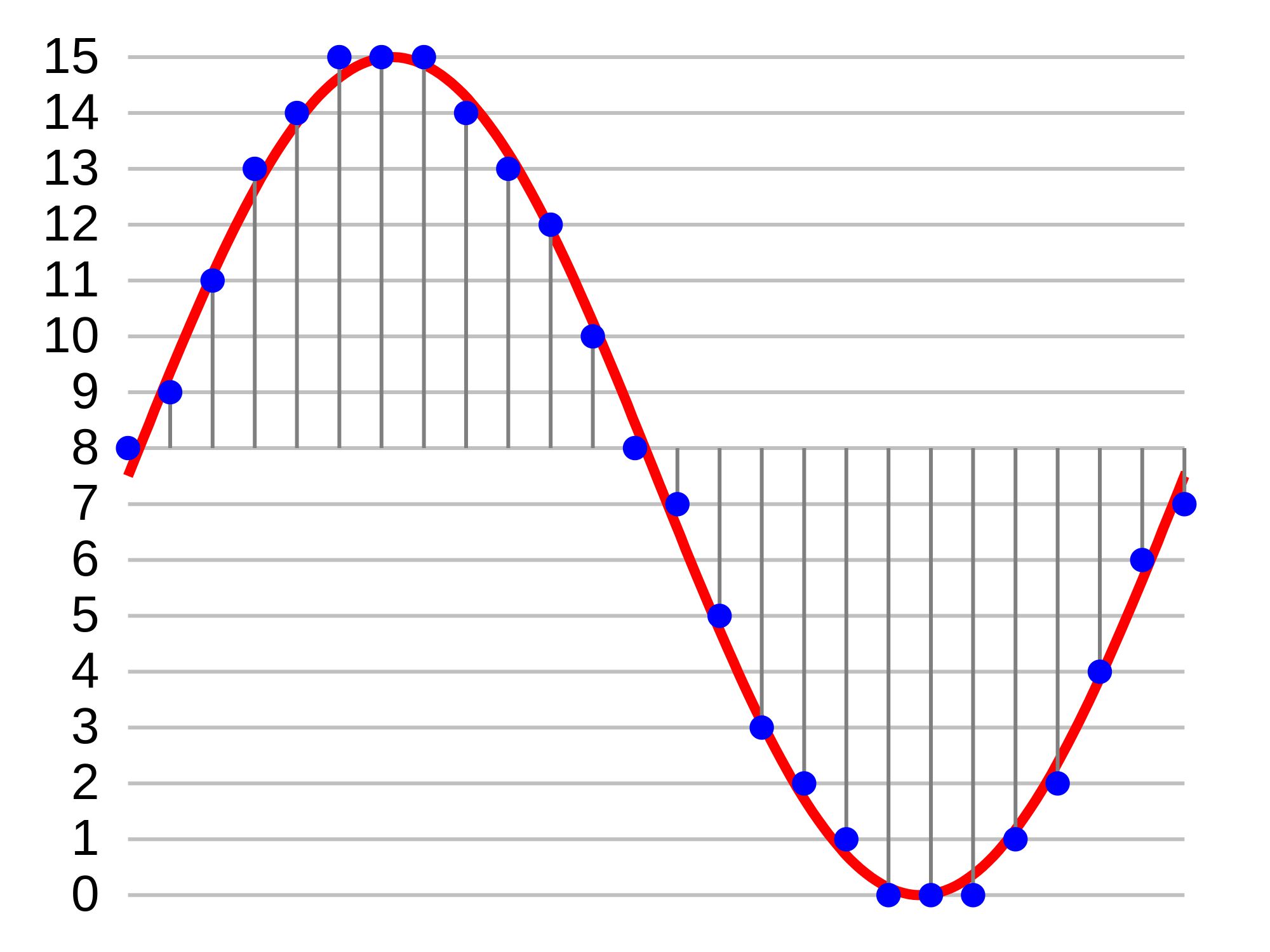
◉ Audio: Resolution related to volume. The higher the value, the more faithfully the quiet sound can be reproduced and the wider the theoretical dynamic range (ratio of the maximum and minimum volume values). 16-bit, 24-bit, and 32-bit floats are used primarily in production.
◉ If you compare it with the video …: Conceptually, it corresponds to the number of gradation bits. In terms of feel, it is almost the same as the dynamic range of the video. The wider the range, the greater the gradation possible without overexposure and underexposure.
◉ Remarks: There is no concept of the amount of quantization bits in compression formats such as MP3.
◉ Image of the number of quantization bits

When a square is cut on the vertical (volume) axis, the volume change less than one step cannot be reproduced, resulting in noise. In other words, the finer the squares, the more accurately the low volume can be reproduced. The actual number of steps in the number of bits in common use is as follows.

・ 16 bits → 65,536 steps

・ 24 bit → 16,777,216 steps

It can be seen that the 24-bit, which is said to be high-resolution, can reproduce the volume change much more accurately than the CD-quality 16-bit. In other words, 24-bit has a “wider dynamic range” than 16-bit.

[Sampling frequency]
◉ Unit: Hz
◉ Audio: Temporal resolution. Involved in the reproducible frequency range. If the frequency is low, the treble range will not be reproduced correctly. As the frequency increases, it is possible to reproduce frequencies above the audible range. Those used primarily in production are 44.1 kHz, 48 kHz, 96 kHz, and 192 kHz.
◉ If you compare it to video …: In terms of temporal resolution, it is equivalent to frame rate. The higher the speed, the smoother the video will be (in the case of sound, it is perceived as treble reproducibility rather than smoothness).
◉ Remarks: The upper limit of the frequency that can actually be reproduced is half the frequency. For example, if the speed is 96 kHz, it can be played up to
48 kHz ◉ Explanatory sampling frequency diagram

If you compare it to a video, you may understand it in some way. As of 2018, I think the lowest line quality that can be used regularly is the “16 bit / 44.1 kHz” used by CDs. If each value gets lower than this, it will collapse more and more so that it can be heard. If the number of bits is small, small sounds are converted to noise, and if the sampling frequency is small, the aliasing noise (noise that is inevitably generated by digitization. Moiré sound phenomenon) falls into the audible range and is comes back jarring. And note that half the value of the sample rate is the upper limit of the actual recorded / played rate. In other words, in the case of “44.1 kHz”, the actual recording / playback is up to about 22 kHz. The human audible range is said to be 20Hz to 20kHz, so that’s a sufficient value in terms of specs. By setting the sample rate to twice the upper limit of this audible range, overlapping noise is removed from the audible range, and by cutting it with a digital filter, jarring noise, which is CD quality, is removed. From this, you can see that “16 bit / 44.1 kHz” is the lowest line.

The master file
must be of high quality

That said, it’s hard to understand how sound quality changes at low bits and low sample rates without actually experiencing it.

Data lost due to compression is irreversible
Data lost due to compression is irreversible

Audio Compression

In this series, we will focus on the basic knowledge about “sound” that is necessary for video production, and we will make it easy to understand by omitting small and difficult things as much as possible, such as a little general knowledge and sound, including music. . I look forward to delivering it, so I look forward to working with you!
Audio Compression

Now, let’s talk about the first memorable event under the name [Digital Audio Basics]. There are several types of digital audio. Among them, I have summarized the main ones.

[Format types and functions]
◉ Uncompressed format: linear PCM (WAV, BWF, AIFF)
→ The most basic format for digital audio. BWF is a commercial WAV that can contain metadata.

◉ Lossy compression format: P3, AAC (MP4), MQA, etc.
→ Format used mainly for general purposes. In many cases, the information in the uncompressed data is shrunk and compressed. The data capacity is reduced, but the sound quality also deteriorates accordingly. MQA is a new format that is irreversible in terms of data, but reversible in terms of sound quality.

◉ Lossless compression format: FLAC, ALAC, etc.
→ Format mainly used for high-quality listening. It has the reversibility of being able to reproduce exactly the same sound quality as before compression, but the data capacity is not that small.

◉ Others: DSD (DSF, DSDIFF, etc.)
→ It is also called 1-bit audio, but since the concept is fundamentally different from multi-bit audio like linear PCM, it can be compared to “24bit” WAV, etc. in the same line I have not. Currently, it is one of the highest quality formats, but it has the weakness of not being editable.

How is it? I think there are several things, from the familiar ones to the ones you see for the first time, but among them, the one that is most suitable for today’s video production is “Linear PCM”! The reason is as follows.

1. Since it is an uncompressed format, it has excellent sound quality.

2. You can edit like cut and paste.

3. The digital voice tracker is the most popular Ma ‘around the world because the bet, any device, can be managed by software.

Since MP3 and AAC (MP4) are compressed formats, there is a considerable loss in sound quality. Depending on the compression ratio, it may not be obvious at first glance, but it is not suitable as processing-based material such as video production and music production. FLAC and ALAC are lossless compression formats that do not deteriorate sound quality, but do not significantly reduce capacity, and there is no software that can be edited natively (without conversion to other formats), so it is still unsuitable for the production. . DSD was adopted from SACD which appeared in 1999, and is said to be the most analog digital audio today, and it has a smooth texture that is different from linear PCM in terms of sound quality. This format has finally attracted attention in recent years, but due to its mechanism, it has the weakness that it cannot be edited as is, so on the production site, mainly one-shot music recording (recording without editing) and mixing (long-playing recording without editing) and mixing (often used as a master recorder when combining multiple sounds into one stereo or surround sound (also called track down). “Almost Ichi 択 linear PCM” video production, I think I could understand that you can refer to. Of course, if the compressed format does not make you uncomfortable, you can use it, but consider it as an emergency. If you still want quality, you must use linear PCM. The data lost by compression is irreversible. The file that will be the master of the work must be of the highest possible quality. By the way, whether you use WAV or AIFF, the sound quality is almost the same. However, co Considering compatibility, even Mac users can be relieved to use WAV for data transfer.

“16 bit / 44.1 kHz” is
the lowest line of CD quality

Now let’s dive a little deeper into linear PCM. There are “number of quantization bits” (bit depth) and “sample rate” (sample rate) that represent linear PCM specifications. Have you ever seen the notation “16 bit / 44.1 kHz”? This means that the original (analog) audio is sampled (digitized) 44,100 times per second at the 16-bit volume stage (2 raised to 16 = 65,536)! Still, I think it’s “what is this?”, So I tried to sum up the points by comparing it to the video!