
Learn a suitable bit rate guideline for resolution
This is because the amount of data allocated per pixel is reduced, resulting in poor image quality.

The same phenomenon can be said of the videos. Bit rate is the amount of data allocated per second and affects the image quality of the video. If you want to display a video on a large screen, such as full screen display on a computer or TV monitor, you need a sufficient bit rate according to the resolution. On the other hand, when displayed at a small resolution, the roughness is not as noticeable even if the bit rate is reduced. On the contrary, even if you encode at a high bit rate, you will not notice the difference in image quality, and in many cases the file size will only increase.
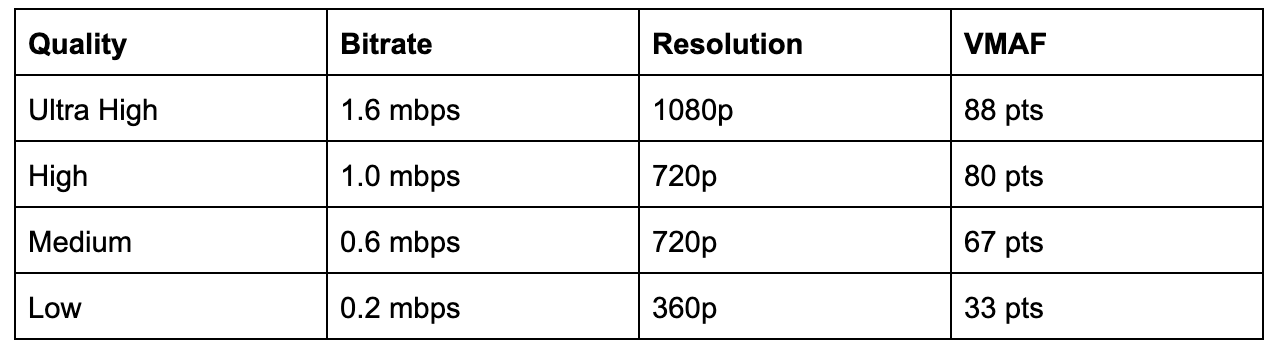
Below is a list of the appropriate resolutions and bit rates commonly used for Internet video distribution.
<< Estimated resolution and suitable bitrate >>
* Figures are based on 30 fps assumption and based on our opinions as of June 2021.
* The appropriate bit rate may vary slightly depending on the video content.
resolution Video with little movement Video with a lot of movement
SD (720 x 480 px) 500 kps-1 Mbps 1 Mbps-2 Mbps
HD (1280 x 720 px) 2.4 Mbps-4.5 Mbps 4.5 Mbps-9 Mbps
Full HD (1920 x 1080px) 4.5 Mbps-9 Mbps 9 Mbps-18 Mbps
4K (4096 x 2160 px) 25 Mbps-35 Mbps 35 Mbps ~ 70 Mbps
However, in the case of moving images, the image quality at the time of encoding will differ depending on whether the video material has a lot of movement or the video material has little movement, even if the bit rate is the same. Therefore, it is necessary to thoroughly judge and encode not only the bit rate, but also the frame rate and keyframe settings, which will be explained later, according to the video material. I hope you understand that “there is a relationship between resolution and proper bit rate” as a determining factor for high definition.
Point 2: Increase the frame rate if motion is important and lower the frame rate if image quality is important.
The frame rate (number of frames) is set at 29.97 fps for televisions and 24 fps for movies, while the frame rate is freely configurable for Internet video encoding. A video is a collection of continuous images (frames) like a flip book. The more frames per second, the smoother the movement.
In video encoding, the bit rate per second is fixed, so if you increase the frame rate, the number of images in the flip book will increase and the movement will be smoother, but the amount of data allocated per frame will decrease, so the image quality will be better to fall.
On the other hand, if you reduce the number of frames, the number of images in the flip book will decrease and the smoothness of the movement will be a little slower, but the image quality will improve because a large amount of data will be allocated to each frame.
If you want to emphasize the smoothness of motion in a video with a lot of motion, increase the frame rate (video demo 1). On the other hand, if the video has little movement, it is not necessary to increase the number of frames as much (depending on the degree), so it is effective to lower the frame rate and give priority to improving the image quality (Video Demo 2 ).
Point 3: insert “keyframes” at short intervals for moving images
A keyframe is a frame that exists as a single still image (an image that is not compressed between frames) and is the starting point for difference information. Depending on the encoder settings, the keyframes are inserted when there is a scene change and the difference information is inserted at regular intervals, such as XX frames and once every XX seconds.


