What is the difference between AAC and mp3? Introducing a music file format comparison!


Free Download Mp4Gain
picture

What is the difference between AAC and mp3? Introducing a music file format comparison!

AAC Vs. MP3

One of the music files is “AAC”, but do you know the difference between the two files, the AAC file and the popular mp3 file? This article provides a comparison of the formats and the differences between the two music files, AAC and mp3.

AAC or MP3

What is AAC?
What is the difference between AAC and mp3?

What is AAC?

There are various music file formats, but do you know what kind of file is “AAC”, what is one of the file formats? AAC is an abbreviation for “Advanced Audio Coding” and is one of the irreversible digital audio compression formats. The extensions are “.m4a” and “.m4p”.

This is a standardized file format for higher sound quality and higher compression than MPEG-1 Audio, including mp3. AAC is also used in MPEG-2 and MPEG-4 and is responsible for the audio part of video files in those formats. AAC can have 48 channels of full-bandwidth audio in one stream and can contain 16 channels of low-frequency sound effects, 16 interactive channels, and 16 data streams.

What is the difference between AAC and mp3?

You may be curious to know the difference between AAC files and mp3 files. As mentioned above, AAC files are a standard intended for higher sound quality and higher compression than mp3 files, which is why they are basically positioned as the successor format to mp3. AAC is the new generation and mp3 is the old generation.

Both are lossy compression, that is, data compression is done using a compression method that produces data that is truncated, even though the data compression rate is high. Therefore, if you rip from a music CD and create these files, the sound quality will inevitably deteriorate compared to the original music CD. (Since the audible range that humans cannot hear is cut off, it is difficult to notice if you are not very particular to

respect). The data compression rate for both AAC and mp3 is about 1/10 of the original data, and AAC is slightly better. It feels like the compression rate is high. AAC is the default file format used by Mac products, such as the iPhone, and mp3 is more common on Android smartphones. Also, there are many music players that support mp3 because it has a long history and AAC tends to be less than mp3.

Regarding sound quality, the maximum bit rate for both is “320 kbps”. Although 320 kbps is well below the 1142 kbps for music CDs, the sound quality is high enough considering the human audible range. And if both AAC and mp3 are encoded at 320 kbps, AAC is said to have better sound quality.


Free Download Mp4Gain
picture


Mp4Gain Main Window
picture


Mp4Gain Features
picture


Free Download Mp4Gain
picture

Difference between lossless compression and lossy compression.

Difference between lossless compression and lossy compression.

Lossless

Basically, the higher the kbps, the higher the sound quality in the sense that it is closer to the original sound.

lossless vs lossy

Therefore, it is easy to think that it is only necessary to collect sound sources with high kbps.

However, since the amount of data will be large, it must actually be compressed.

That’s where two compression technologies come in.

Lossless compression (lossless compression)
Rossy compression (lossy compression)
About the uncompressed sound source
Let’s explain each compression technology.

We will also look at uncompressed sound sources.

Lossless compression (lossless compression)
Lossless compression has the advantage of retaining a large amount of information by compressing the data without damaging it.

In other words, the tendency is for the kbps value to be higher.

Of course, because it is compressed, the file size can be reduced to about half.

However, the capacity is considerably higher than the Rossie compression.

Lossy compression (lossy compression)
Rossy compression is famous for formats like mp3 and AAC.

These audio files cut and compress sounds that are inaudible to the human ear, which can save a lot of space.

However, even in the sense of cutting off the sound, it deviates from the original sound.

However, it is quite difficult to distinguish it from those without loss in the ears of ordinary people and in an environment where you can prepare.

Therefore, it is still used in many software and services, taking advantage of the reduction in size.

About the uncompressed sound source
It is no exaggeration to say that the audio file is the closest to the original sound.

Windows .wav and Mac OS .aiff are famous as uncompressed sound sources.

Uncompressed sound sources are so flexible that they can store data at any sample rate and bit rate.

So it is the best file format to record first.

But it goes without saying that the file size is large because it is not compressed.

Therefore, lossless compression, which can reduce the size and preserve the original data, is now popular.Difference between lossless compression (lossless compression) and lossy compression (lossy compression)
Basically, the higher the kbps, the higher the sound quality in the sense that it is closer to the original sound.

Therefore, it is easy to think that it is only necessary to collect sound sources with high kbps.

However, since the amount of data will be large, it must actually be compressed.

That’s where two compression technologies come in.

Lossless compression (lossless compression)
Rossy compression (lossy compression)
About the uncompressed sound source
Let’s explain each compression technology.

We will also look at uncompressed sound sources.

Lossless compression (lossless compression)
Lossless compression has the advantage of retaining a large amount of information by compressing the data without damaging it.

In other words, the tendency is for the kbps value to be higher.

Of course, because it is compressed, the file size can be reduced to about half.

However, the capacity is considerably higher than the Rossie compression.

Lossy compression (lossy compression)
Rossy compression is famous for formats like mp3 and AAC.

These audio files cut and compress sounds that are inaudible to the human ear, which can save a lot of space.

However, even in the sense of cutting off the sound, it deviates from the original sound.

However, it is quite difficult to distinguish it from those without loss in the ears of ordinary people and in an environment where you can prepare.

Therefore, it is still used in many software and services, taking advantage of the reduction in size.

About the uncompressed sound source
It is no exaggeration to say that the audio file is the closest to the original sound.

Windows .wav and Mac OS .aiff are famous as uncompressed sound sources.

Uncompressed sound sources are so flexible that they can store data at any sample rate and bit rate.

So it is the best file format to record first.

But it goes without saying that the file size is large because it is not compressed.

Therefore, lossless compression, which can reduce the size and preserve the original data, is now popular.

High resolution compatible terminal

High resolution compatible terminal

High-Resolution Audio

In the case of the iPhone, it does not support the output of high-resolution sound sources.

Hi-Res Audio

Therefore, it is necessary to prepare a headphone amplifier equipped with a DAC that supports high resolution.

In the case of Android, there are terminals that support high resolution such as Xperia.

To enjoy high-resolution sound quality, you need to check whether the terminal that plays music is also compatible.

High resolution recommended elements
We will present specific recommended high resolution elements.

ACTIVE “CT10”
Let’s take a look at the appeal of the product.

ACTIVE “CT10”
ACTIVE CT10 [Cool White] High-resolution portable audio player with high sound quality

19,800 yen (as of 08/27 01:10)
Amazon
Rakuten

ACTIVE “CT10” is a digital audio player that allows you to easily enjoy high resolution.

ACTIVE “CT10” has the following characteristics.

Achieves smooth operation despite its compact size
Astell & Kern exclusive sound quality
Up to 400GB expansion with MicroSD card
groovers will end on June 30, 2019
Let’s take a look at each feature.

Achieves smooth operation despite its compact size
Many people support the compactness of the ACTIVE “CT10”.

It’s smaller than most smartphones and fits in the palm of your hand, making it easy to carry.

And despite its small size, it uses a “quad-core CPU” for exceptional stability.

The “Quad Core CPU” has high processing power and offers smooth operation.

The processing power is important because it is high resolution, which usually has a large capacity.

Astell & Kern exclusive sound quality
ACTIVE “CT10” is a collection of Astell & Kern technical capabilities.

Astell & Kern is the original brand of IRIVER Korea and has developed many audio players compatible with Hi-Fi / Hi-Res sound sources.

Due to its high sound quality, it is now one of the standard brands of high-resolution players.

ACTIVE “CT10” boasts of sound quality because it requested development support from the IRIVER group company.

Up to 400GB expansion with MicroSD card
Since the capacity is 16GB, it is a little small to put a high resolution sound source.

However, since it supports MicroSD cards up to 400GB, it can be expanded up to 416GB in total.

It is sold separately, but if you want to put a lot of music on it, buy a MicroSD card.

High resolution has a large capacity.

groovers will end on June 30, 2019
ACTIVE “CT10” was able to buy a high resolution sound source directly from the player body.

However, it cannot be used now because the distribution site “groovers” has ended.

However, ACTIVE “CT10” can easily transfer music from your computer.

Just because “groovers” have finished doesn’t mean you can’t listen in high resolution.

Difference between analog data and digital data
Analog is a line.

Digital is a point.

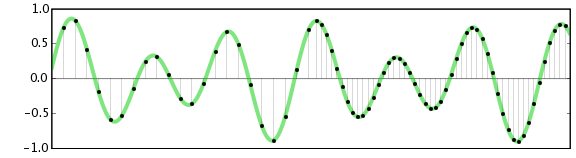
Digital data can be brought closer to analog (line) by arranging points in succession.

The record is analog because it records continuous sound waves in the groove as is.

A CD divides continuous sound waves at regular intervals (sampling) and applies numerical values ​​to each division (quantization).

Then the flow consists of converting the numerical value into digital data suitable for a computer (encoding).

In this way, digital data is only one point, so in theory it is further from the original sound than analog.

However, since it is indistinguishable to the human ear, it is possible to enjoy the sound digitally without any discomfort.

Over the limits of human hearing! High resolution doesn’t make sense?

Over the limits of human hearing! High resolution doesn’t make sense?

Hi-Res

What is the limit of the ability to discriminate human sounds?

Hi-Res Audio

Although there are individual differences, the human audible range is said to be 20 Hz to 20 kHz.

The sampling frequency of the CD is 44.1 kHz.

In theory, this value can be reproduced up to 22.05 kHz of the original sound, so it can sufficiently cover the human audible range.

In that case, the question arises that high-resolution sound quality, which has higher specs than CDs, may not be audible to the human ear.

Actually, there are many negative opinions from a scientific point of view, and it remains controversial.

<Reference: High Resolution Audio-Wikipedia>

However, the sound is highly dependent on experience, so if you are interested, you should give it a try.

Necessary environment to enjoy high resolution
Whether it makes sense or not, there are a few things you need to prepare for to enjoy high resolution.

The required environment is as follows.

High resolution sound source
High-resolution compatible headphones / earphones / speakers
High resolution compatible terminal
Let’s explain each environment.

High resolution sound source
There are various media for high resolution audio sources.

The easiest of these is probably the Hi-Res Audio source that is delivered online.

If you are a high resolution distribution site, you can get many sources of sound.

Note that listening with high-resolution headphones will not result in high-resolution audio.

High-resolution compatible headphones / earphones / speakers
In addition to high-resolution audio sources, prepare items such as compatible headphones and earphones.

It is quick to check if there is a high resolution mark on the product package to see if it is compatible.

Please note that most wireless headphones do not support high resolution playback because they compress data during transmission.

In the case of wireless technology, only aptX / aptX HD compatible items or SONY LDAC compatible devices support high resolution.

In any case, the high-resolution branding is a milestone.

High resolution doesn’t make sense?

High resolution doesn’t make sense?

Hi-Res

Sound quality comparison!

What is the difference between bit, khz and kbps? High resolution doesn’t make sense?
It is quick to judge whether the sound quality is good or bad from the data.

However, there are several factors that make up sound quality.

Therefore, in this article, I explained the sound quality in a rather broken way.

If you are a little interested in sound quality, check it out.

High-resolution sound quality and CD comparison
Over the limits of human hearing! High resolution doesn’t make sense?

Necessary environment to enjoy high resolution
High resolution sound source
High-resolution compatible headphones / earphones / speakers
High resolution compatible terminal
High resolution recommended elements
ACTIVE “CT10”
Difference between analog data and digital data
Difference between lossless compression (lossless compression) and lossy compression (lossy compression)
Lossless compression (lossless compression)
Lossy compression (lossy compression)
About the uncompressed sound source
Difference between bit, kHz (kilohertz) and kbps (Kirobuki PS)
The next three units are important for measuring sound quality.

little
kHz (kilohertz)
kbps (Kilobit per second)
Let’s briefly explain each unit.

What is a bit?
bit is the number of quantization bits.

Here, it is easy to understand if you think of it as “the resolution (fineness) of the sound itself”.

The higher the value of this bit, the smaller and finer the sound can be reproduced.

In other words, it is more faithful to the original sound.

However, there is a disadvantage that the amount of data increases when the bit is large.

What is kHz (kilohertz)?
kHz is the sampling frequency.

It’s easy to understand if you think of it as “the number of data used in the expression of sound per second”.

The higher this number, the greater the range that can be recorded.

Also, kHz is one of the numbers often used to express headphone specifications.

If you look at the specification table, you will often see numbers like “20Hz to 20kHz”.

This indicates the range of supported ranges.

The lower the number on the left, the better the bass can be heard, and the higher the number on the right, the greater the playback range.

What is kbps?
kbps is the so-called bit rate.

Also known as “bits per second” or “kilobits per second”.

Unit that expresses how many kilobits of data can be transmitted per second.

Kbps can be calculated using the following formula.

kbps = bit x kHz x number of channels

The number of channels is the number of speakers, for example, in stereo, it is “2”.

In theory, the higher the number of processed bits per second, the higher the sound quality.

High-resolution sound quality and CD comparison
Let’s compare CD and high resolution sound quality from a data point of view.

little kHz kbps
16 bit CD 44.1-48 kHz 1,411.2 kbps
High resolution Exceeds 44.1 kHz / 16 bit
Those that exceed CD specifications are defined as high resolution.

Specific examples are as follows.

44.1 kHz / 16-bit: CD specifications
48 kHz / 16-bit: CD specifications
44.1 kHz / 24-bit: high resolution (the number of quantization bits is greater than the CD specification)
48 kHz / 24 bit: high resolution (the number of quantization bits is greater than the CD specification)
96 kHz / 16 bit: high resolution (sampling frequency is higher than CD specification)
96 kHz / 24-bit: high resolution (both higher than CD specs)
96 kHz / 12 bit: not high resolution (low number of quantization bits)
32 kHz / 24 bit: not high resolution (sample rate is low)

What is a frame rate?

What is a frame rate?

Frame Rate

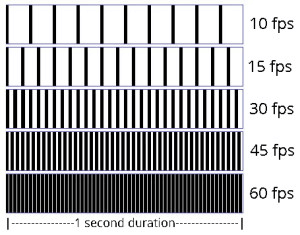
The frame rate is an index that indicates how many times the screen can be rewritten per second during video playback.

Frame Rate

It is expressed as a numerical value per second and the unit is fps (frames per second). For example, if the frame rate is 30 fps, the drawing will be done 30 times per second. The higher this number, the smoother the subject’s movement will be recorded. On the other hand, if this value is low, the subject’s movement will be choppy.

The human eye is said to think of it as a video when it exceeds 22fps, and it can be recognized that the frames drop at about 15fps, so it is said that it does not look like a smooth video.

This frame rate is very important when you want to stream and record smooth, beautiful images, but the higher this value, the larger the file size.

Generally, the standard is 24 fps for movies and 30 fps for TV and video.

In video encoding, the bit rate per second is fixed, so if you increase the frame rate, the number of images will increase and the movement will be smoother, but the amount of data allocated per frame will decrease, so image quality will deteriorate. …

On the other hand, if you reduce the number of frames, the number of images will decrease and the smoothness of the movement will slow down slightly, but you will be able to improve the image quality because a large amount of data will be allocated to each frame.

Frame rate

It supports up to 30 frames, and you can set and adjust the number of frames from the Preferences / Video tab for each client.

The number of frames that can be set is 7 patterns of “1, 5, 10, 15, 20, 25, 30 frames / sec.” The default value is set to “15 frames / sec”.

In a normal meeting, the video is often almost motionless, so even with a 15 frames / sec setting, you can use the video without any hassle.

The higher the number of frames, the smoother the video that can be used for web conferencing, but we recommend that you change it flexibly according to the number of docking stations, the specifications of your PC terminal and the status. of the Internet connection.

What is bit rate (bps)?

What is bit rate (bps)?

bit rate

Bit rate (bps) is an expression that indicates how many bits of data are processed or transmitted / received per unit of time.

Sample Rate

It is common to use “bits per second” (bps) as the unit, and the bit is the smallest unit represented by 0 and 1 in digital (binary).

Defined as the number of bits passed (that is, transferred) to a virtual or physical point on a data transfer path per second, commonly used in digital communication devices such as modems, routers, Serial ATA cables, and LANs.

It is also used to indicate how much information the compressed video and audio data is represented per second, and how much data the communication line can send and receive per second.

In general, increasing the bit rate improves picture and sound quality, but increases file size, and decreasing the bit rate decreases file size but reduces image and sound quality. Also, if you are using a CPU with a slow processing speed or a hard disk with a slow rotational speed, if you play a video created at a high bit rate, the processing may not be in time and the frames will be lose.

Bit rate type (bps)
There are two types of bit rates: constant bit rate (CBR) and variable bit rate (VBR).

All constant bit rates assign the same bit rate everywhere. Set a high bit rate when you want all image files to be high quality, and set a low bit rate when you want to reduce the file size.

It always assigns the same bitrate, so you can easily predict the size of the resulting file. Therefore, it is recommended to use it when there is an upper limit for the file size after encoding or when you want to keep the data transfer rate constant.

Variable bitrate, on the other hand, automatically assigns a high bitrate to fast-moving scenes and a low bitrate to scenes that move little. Since the bit rate is assigned according to the scene, the file size can be reduced while the image quality is relatively high, but the final file size is difficult to predict.

Constant bit rate and variable bit rate

VBR can be divided into two types: s encoding (fixed quality) and 2-step encoding (average bit rate).

1-pass MPEG-2 encoding can shorten processing time for export by analyzing video and encoding while maintaining specified constant quality. However, it is difficult to predict the size of the finished file.

In 2-pass encoding, after analyzing the information from all video data in the 1st pass, the bit rate is assigned and encoded in the 2nd pass based on that information. Although the processing time is long because the processing is performed twice, it is possible to efficiently assign the bit rate, making it possible to create high-quality video. By specifying the average bitrate, you can roughly predict the size of the file.

What is the sample rate / sample rate?

What is the sample rate / sample rate?

Sampling rate

Sampling rate

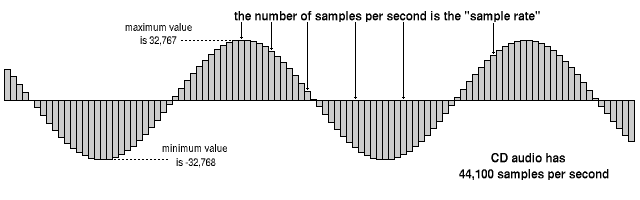
The sampling frequency is the number of sampling processes performed per second in an AD converter that converts an analog signal into a digital signal.

Sampling Rate

The unit is “Hz”, and the higher the value, the faster the analog input signal can be converted to a digital value, resulting in higher sound quality. However, the amount of data increases proportionally, so you must choose the correct frequency for media and devices with limited storage capacity.

It is said that to accurately record and reproduce a certain sound, it is necessary to sample at a frequency that is approximately twice the frequency of that sound. The sampling frequency used for music CDs is 44.1 kHz. In this case, the voice waveform is shredded 44,100 times per second and the voice information at each moment is converted into digital information.

Humans typically have 20Hz to individual differences, but they can perceive sounds between 15kHz and 20kHz as sound, and this frequency band is called the audible range.

Difference between sample rate and bit rate
Sample rate and bit rate are used to describe the sound quality before and after compression of the audio data.

The sampling rate is a value that represents “the number of sampling processes performed per second”.
For example, at the standard sample rate of 44.1 kHz, it means to sample 44100 times per second.
The higher this number, the softer the sound and the better the sound quality. In other words, the numerical value of the sample rate represents the quality of the sound.

On the other hand, the bit rate is a value that indicates “how many levels the volume is represented”.
For example, in the case of 16 bits, which is the standard bit rate, the amount of information is divided by 2 to the 16th power (= 65536 steps). If the number of bits is low, the sound quality will be grainy and, as with the sample rate, the higher the value of the bit rate, the more information that can be reproduced and the better the sound quality.

Sample rate bit rate
Divide the time axis to
44.1 kHz, divide 44100 per second Divide the amount of information vertically Into
In the 16-bit case, divide the amount of information by 2 to the 16th power

From the fundamentals of digital audio to its application

From the fundamentals of digital audio to its application

DIGITAL AUDIO

Introduction: There are specifications, characteristics and unique properties of digital technology.

digital audio

The name digital audio has quickly penetrated the market since the launch of CD players and audio CDs (hereinafter referred to as “CDDA” in this series) in 1982. Before that, audio sources (media recording) were LP records and magnetic tapes, and turntables and tape recorders were the core of audio playback equipment. After the advent of CDDA, MD (Mini Disc) and DAT (Digital Audio Tape) were developed as digital audio applications. In addition, SACD (Super Audio CD), DVD and Blu-ray have appeared, and recently, audio playback in file formats such as MP3, PC / USB audio, and Internet audio has become widespread.

The core technologies of digital audio are AD (analog to digital) conversion and DA (digital to analog) conversion. As long as it is audio, there is no doubt that the quality of the analog signal is important. However, digital audio has specifications, characteristics, and properties of digital audio that are different from conventional analog audio, and most of them are concentrated in the DA conversion system in the playback system.

Digital audio is a technology that has already been put into practice and is widely used in various devices. For this reason, some may point to “what happens now”. However, there are few cases where it is precisely and essentially explained. In this series titled “From the Basics to Digital Audio Applications,” we plan to explain the theory, core technology, applied technology, and unique mounting technology of digital audio in detail from this perspective. First, in Part 1 and Part 2, we will introduce the differences between analog audio and digital audio, and the points to keep in mind when understanding digital audio signals.

What is digital audio in the first place?
Similar to a general electrical signal, the characteristics of a conventional analog audio signal are defined by “signal level” and “signal frequency”. In the reproduction of an analog source, the signals that are handled with the exception of the control system are completely analog signals, and the main characteristics of the analog signals are applied as is. Figure 1 shows the general image of the analog audio reproduction system. Representatives of music sources are LP records and magnetic tapes (open reels, cassettes), and record players (including cartridges) and decks are used as electrical signal conversion and reproduction devices. The noise at each stage of signal processing determines the dynamic range as the ratio of signal to noise.

On the other hand, in digital audio, the source of the signal is a digital signal. The digital signal has digital information according to the signal level and the frequency of the original analog signal. At the same time, it has “digital signal characteristics”. The properties of a digital signal are the “quantization bit number” (quantization resolution, also expressed as “M bit”) that defines the information of the amplitude axis and the “sample rate” (sample rate, fs) which defines the frequency axis information. ) It is also expressed).

Relationship between audio and crystal clear sound quality and clock phase noise

Relationship between audio and crystal clear sound quality and clock phase noise

Hi-Res Audio

Analog → high resolution

High Res Audio

Sound is essentially an analog signal. When processing analog signals, there are “fading, noise, and degradation” drawbacks. Digitization solves that deficiency. The original analog signal is digitized by an analog-to-digital converter (ADC) and distributed as a digital sound source via CD or a network. This digital sound source is processed by the digital-to-analog converter (DAC) of the user’s digital audio equipment and is finally output in analog.

To digitize an analog signal, sampling (* 1) is performed at a constant frequency. To reproduce the sound as closely as possible to the original sound, it is necessary to increase the sampling frequency (* 2) and the bit rate (* 3). Compared to CD sound sources, today’s high-resolution sound sources have an improved sample rate / bit rate, allowing sounds closer to the original sound to be digitized.

[Sampling frequency and bit rate of digital sound source]
Digital sound source Sampling frequency bit rate
CD sound source 44.1 kHz 16 bit
High resolution 96 kHz 24 bit sound source
192 kHz 24 bits
384 kHz 24 bits
Noise components and fluctuations that cause sound deterioration
To accurately reproduce a high-resolution sound source, it is necessary to suppress the deterioration of the sound source in the digital audio device and accurately convert (DAC) from digital to analog and output it. The conversion accuracy of this DAC depends on the noise characteristics (extra frequency components other than the required frequency) of the clock frequency of the audio equipment.

If there is no noise in the circuit, the clock frequency will be a single line ((1) in the right figure), but actually, it is modulated by noise as shown in (2) in the right figure , and the spectrum has an extra frequency component in the vicinity, it will be a characteristic that you will have. This additional frequency component is called “phase noise”.

The phase noise of this clock frequency affects the conversion accuracy of the DAC, resulting in irregular time intervals.
This is called “jitter”. (See figure below)

Noise-free and accurate clock source requirements
In digital audio, clock frequency phase noise affects the DAC function as jitter and contributes to deterioration of the sound source, making it difficult to reproduce faithful sound. Therefore, to improve sound reproducibility, a master clock crystal oscillator with excellent phase noise (small jitter) characteristics is required.

Phase noise is expressed as the level of the frequency component measured at a distance from the original frequency of the crystal oscillator. The distance from the reference frequency is called the offset frequency and is mainly measured in the range of 1 Hz to 1 MHz.

Also, frequency stability is generally considered important for crystal oscillators, but frequency stability is a measure that does not fluctuate in frequency over a long period of time. Audio equipment is required to have less short-term fluctuation than long-term stability. Therefore, SPXO (* 4), which has a frequency stability of ± 30 ppm to ± 100 ppm, is often used as the master clock. Also, in high-end digital audio, OCXO (* 5), etc. can be used in search of higher quality sound.