How to Achieve High-Quality Videos with Low Bandwidth


Free Download Mp4Gain
picture

How to Achieve High-Quality Videos with Low Bandwidth

BITRATE


Megapixel surveillance cameras provide their users with more detailed images; however, these capabilities can affect the cost of the entire video surveillance project.

Bitrate

The amount of data that is transported and stored, in this case, increases significantly. Bandwidth requirements and increased capacity required significantly increase the total cost of an IP video surveillance system. The best way to reduce these costs is on the surveillance camera itself, and this can be achieved by reducing the bit rate.

The bit rate can be reduced, in particular, due to noise reduction. Noise is quite a damaging factor that leads to clogging of the encoding process. It leads directly to an increase in the bit rate.

Optimize bitrate to reduce streaming

Classic noise reduction systems are of two types. Spatial noise reduction techniques are applied within the frame to help reduce noise, while temporal noise reduction averages the pixels over multiple frames. These are very effective techniques for still images, but they can cause problems when there is movement. In the event that a temporary noise reduction is applied to a moving image, a ghost image may appear.

By combining spatial and temporal noise reduction with the ability to dynamically adjust them based on lighting levels and the detection of moving objects, we obtain images with low noise, maximum detail and low bit rate. The bit rate can be optimized by adjusting the amount of noise reduction based on the analysis of important moving objects in the surveillance camera’s field of view. When there is no movement, the bit rate is kept to a minimum. If an important object is detected, the bit rate increases, allowing you to capture as much detail as possible. The result is that the bandwidth requirements of the network remain low until something important happens in the frame.

Other ways to reduce the bit rate
For some megapixel surveillance cameras, the bit rate is limited by default. Constant bit rate is often used for this. The constant bit rate is kept at a fixed level. This can result in a constant high bit rate, and setting a low bit rate can result in poor image quality.


Free Download Mp4Gain
picture


Mp4Gain Main Window
picture


Mp4Gain Features
picture


Free Download Mp4Gain
picture

Bit rate in DVR. What is it and what does it affect?

Bit rate in DVR. What is it and what does it affect?

Bitrate

In a conversation about digital video recording, the term bit rate will surely ring a bell. This is an important parameter that affects image quality. Including filming on a video recorder.

BITRATE

If you are afraid of foreign words, then the bit rate can be called the recording speed or the compression ratio in another way. Because that’s exactly what happens: the compression of the video stream. How? Let’s take a look.

After the light hits the matrix and the subsequent digitization of the image, a very dense stream of digital video signal is obtained at the output. Also, the higher the video recording resolution and frame rate, the bulkier this stream will be. You cannot write it directly to a memory card; It will fill up very quickly with huge video files and you may just not be able to cope with such a flow of information. This is why the original video stream is compressed to an acceptable bit rate. This parameter is just the output data rate. Basically it reflects the speed at which the video is written to the memory card.

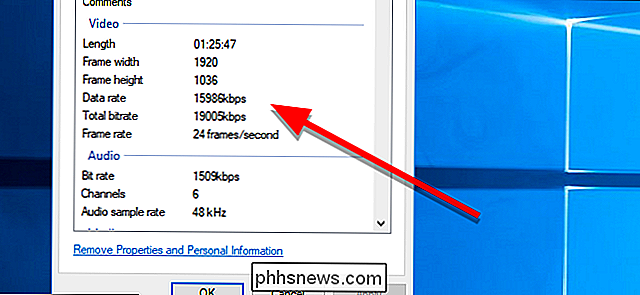
Bit rate can be calculated in bits, kilobits, and megabits per second – (bit / s, bps, b / s), (kbps, kbit / s, kbps) (Mbps, Mbit / s, Mbps). Most of the time, in megabits. The bit rate of the recorded video can be checked on a computer with a video editor or through the file properties menu. By dividing the figure by 8, you can determine it roughly in megabytes per second; it will be more convenient to compare it with the speed of your memory card.

The bit rate indicator is dependent, as you might guess, on the processor and intelligently optimized hardware and software to process the video stream. If all the conditions are met, the video stream will be compressed with high quality and with minimal loss. Otherwise, the video will contain noise, blurry images, artifacts, and other nasty distortions.

The bit rate also affects the size of the file. For example, at a relatively low bit rate (less than 10 megabits per second) more clips can fit on the memory card and cheap low speed cards can be used, but the video quality and details will be low. At a higher bit rate (10-20 begabits per second and more), the image will be of higher quality and more detailed. But the file size will also increase, so you need a memory card of the appropriate size and speed (16GB and above, class 10).

Manufacturers rarely indicate the bitrate on the box, therefore it is almost impossible to find out this indicator before buying. However, sometimes on the packaging you can see promises, for example, “8 hours of video in maximum quality at 32 GB”. And in this case, the bit rate can be roughly calculated. The formula is not complicated:
We took 32 gigabytes and, using the school’s computer skills, we converted them to megabits by multiplying them by eight and by 1024. Then we divided the resulting number by the number of seconds in eight hours.
– (32x8x1024) / (8×3600) – We get the result of 9.1 megabits per second.

Let’s clarify that the result will be conditional. First, because the actual volume of any card is always less than indicated. Second, the promises in the box can be just promises. Therefore, before buying, it is better to carefully study the selected model, having learned the speed of writing in the reviews.
So what bit rate should I be aiming for?

Given the adequate quality of the filling of the recorder (matrix + processor + lens + software), according to our practice, let’s say that this indicator is in the region of 15-45 megabits per second. This bit rate allows you to get a fairly adequate video quality during the day. Again, only during the day, because night photography, as we all know, is still a weak point of many recorders due to insufficient lens aperture and small matrix pixel size.

Note that DATAKAM has currently reached the maximum bit rate for recorders: 45 megabits per second, but only when working with a card with a capacity of 32 gigabytes or more. Some companies, notably Datakam and BlackVUE, are implementing bit rate selection options in settings. We find this option controversial. In our opinion, all drivers are initially interested in the highest quality videos, and it is easier to set the maximum bit rate for the recorder right away and simply choose the right memory card in terms of speed and volume.

And the last thing: they are unlikely to increase the bitrate incessantly on DVRs.

What is the best bit rate for video and sound and what is it?

What is the best bit rate for video and sound and what is it?

Audio bit depth - Wikipedia

Common characteristics of video and audio recordings include the so-called bit rate.

bit rate

Some users do not know how important this figure plays when playing files, along with their size and resolution. What is the bit rate? The bitrate is the number of bits that are used to process and transmit data during a certain period of time. This measurement is used to measure the effective transmission rate on a data stream channel.

In other words, this is the minimum value of the channel capable of passing the flow without delay. The measure of video bit rate is bits per second and its derivatives (kbps, Mbps, etc.). In audio and video transmissions that use degrading compression, this term refers to the degree of compression of the transmission.

Consequently, it indicates the size of the channel within which compression took place. Compression modes In practice, there are three modes of stream compression that cause quality loss: Constant Bit Rate (or CBR). In this encoding option, the initial bit rate is set by the user and then does not change for the entire duration of the audio or video. Its advantage is that it is quite easy to calculate the size of the final file. However, this encoding is not very suitable for audio files that have dynamically changing sound, as it does not provide a good size / quality ratio.

Variable bit rate (or VBR). The bitrate value is selected by the codec, depending on the parameters (the expected quality level). During the encoded fragment, the value of the bit rate may change. When audio is compressed, the required bit rate is set based on the psychoacoustic model. This encoding achieves the best sound quality ratio, but it is difficult to calculate the exact size of an audio or video recording. It can be very different. Average Bit Rate (or ABR).

This is a hybrid of the first two modes. The initial value of the bit rate is set by the user, but then independently changed by the program within certain limits. At the same time, the difference with VBR is that the codec uses the maximum and minimum values ​​within the limits set by the user, and does not exceed them. This encoding allows you to set the processing speed in the most flexible way and allows you to determine the file size with greater precision. Where are the Users and AppData folders and what is stored in them What and how is it measured? When quantifying high data rates, metric or decimal prefixes are used. It looks like this: Speed ​​1000 bps = 1 kbps (one kilobit or one thousand bits per second). Speed ​​1,000,000 bps = 1 Mbps (one megabit or one million bits per second). Speed ​​1,000,000,000 bps = 1 Gbps (one gigabit or one billion bits per second). What bit rate should I choose? When it comes to the common MP3 audio format, it is the audio compression that results in data loss. The higher the bit rate, the better the sound quality. Speaking of the choice of the bit rate for this format, we can say the following: 32 kbps: very low quality sound (valid only for voice recording); 96 – May be applicable for low quality audio transmission or voice recording; 128 and 160: allows you to encode music recordings at an entry level; 192 – music encoding in acceptable quality; 256: high quality music recording; 320 is the highest quality that can be achieved in MP3 format. In video formats, this value is calculated differently. For example, for videos on YouTube, a bit rate of 10-16 Mbps at 720p is sufficient. This will achieve a clear image and a small file size. If better image quality is required, this value can be increased to 18-25 Mbps. The highest image quality will be achieved at 50 Mbps and 1080i resolution. In general, the effect of bit rate on video quality is expressed as follows: Yandex.Direct18 + Start your journey from the station Start on your home planet, explore the universe and find intelligent life in the universe. MORE DETAILS XCRAFT.RU 18+ Read Glukhovsky’s new novel “Post” Exclusively on Booknet, a new post-apocalyptic novel by Dmitry Glukhovsky. MORE DETAILS LITNET.COM 400 kbps: low quality video at 240p; 750 kbps, 1 Mbps: can be used for some YouTube videos at 360p and 480p, respectively; up to 1.15 Mbps – compressed video in VCD format; 2.5 and 3.8 are compressed YouTube videos recorded at 720p; 4.5 and 6.8 are sharper, but still compressed YouTube videos using 1080p; 9.8 – DVD video recordings.

Data compression modes: CBR and VBR

Data compression modes: CBR and VBR

CBR and VBR

Often times an inexperienced (and even sophisticated) DVR owner has a question: “What’s behind the CBR and VBR abbreviations in the recording channel settings?”

CBR and VBR in mp4 H264 video files | Internet with a BrainCBR and VBR

In fact, if everything is clear with the video settings (720p, 1080N, 1080p are already established formats in the world of video surveillance), then with the audio settings not everything is so transparent.

The sound from the microphone connected to the recorder is encoded in MP3 format. Today, the MP3 format is the most popular audio file encoding format of all the existing ones. It is generally accepted that the quality of an audio track depends on its bit rate, therefore the most optimal bit rate for an audio track is 192 kbps. This statement, however, is one-sided, because in addition to the bit rate, the sound quality depends on the codec in which the audio was recorded.

There are three main types of MP3 file encoding: CBR, VBR, and ABR. The ABR type is intermediate between the other two and is not used in video surveillance. Therefore, in this article, we will only consider the CBR and VBR encoding types.

CBR (constant bit rate) stands for constant bit rate, which was set by the user during recording or encoding and does not change in the future. That is, regardless of the data type (even if you are recording silence), the number of bits specified by the user is constantly encoded in 1 second. The consequence of this type of encoding is the cumbersome amount of data received, which is a waste of disk space.

VBR (Variable Bit Rate) translates from English as a variable (variable) bit rate. By encoding in VBR, we get a file, the bit rate of which changes depending on the density of the data stream (that is, for example, the bit rate of silence will be less than the bit rate of any sound). This type of encoding continues to improve, reaching new indicators of the amplitude of changes in the bit rate of the data stream. The main disadvantage is that it is impossible to predict the future size of the encoded file. Despite this, this minus sign does not obscure the overall picture in any way – the file size turns out to be smaller than when encoded as CBR. This is due to the fact that the bit rate of silence (s) is lower. Obviously, this format is more acceptable for video surveillance tasks than CBR.

Estimated Compressed Video Quality Parameters

Estimated Compressed Video Quality Parameters

Bitrate

Estimated compressed video quality parameters.

Bitrate

If you have ever used video stream compression programs, you have probably come across parameters such as the size (size) of the output file or its bit rate among the characteristics of the output file, and wondered: how to choose the correct value?

Sound files
As a general rule, these problems do not arise with audio files, because the quality of the sound is determined almost unambiguously by its bit rate (that is, the reproduction rate of the transmission, usually expressed in kilobits per second). If we see that the bit rate of a compressed audio file (mp3) is 128 kpbs (kilobits per second), then we understand that the sound quality corresponds to a CD disc, if it is 64 or 96 kbps, then this already It is low. sound quality, if 256 kbps is High quality studio sound, etc.

Although within itself the sound quality is also characterized by parameters such as the sampling frequency, but as a general rule this parameter is already included in the bit rate and, therefore, the sound quality is usually determined by the Bit rate. Those. if we see an mp3 file with music with a description that is compressed with a quality of 128 kbps, then we already want to say that it is stereo sound with a sampling frequency of 44 or 48 khz.

Introductory
With video, things get a bit more complicated. The video has parameters such as size and frame rate. Therefore, knowing just one bit rate is not enough; you need to additionally know the frame size and the number of frames per second. Therefore, looking at the video parameters, for example, 640×480 (frame size), 25 fps (frames per second), 1300 kbps (bit rate), it is difficult for a beginner to say anything about its quality, even approximately. Similarly, setting the parameter 1300 kbps when compressing video, it is not clear what we get in the output. And this is essential, since the process of recompressing video movies takes several hours.

The quality of the video stream compression is most unequivocally determined by the “bits / pixel” ratio, which means the average number of bits spent in 1 pixel of the image. Also, I will denote this coefficient with the letter K (because I don’t know how it is normally denoted).
If we take a 24-bit color depth encoded in RGB format (that is, when the red, green and blue channels are encoded at 8 bits per channel), then the uncompressed video stream will have a value of K = 24. The Modern video codecs give a good quality picture at a fairly low K value. For XviD and DivX codecs, good image quality will be at a K-value in the range of 0.25-0.35, for H264 – in the range 0.15-0.2 (that is, the video stream is compressed by file size more than 100 times relative to uncompressed). I don’t know the values ​​of other codecs, but the worse (older) the codec is, the higher the value of K, in which there will be a good image quality.

The coefficient is calculated using the following formula:

The code:
K = (size * 8) / (width * height * fps * time)
Where:

size: size of the video stream in bytes
width, height – frame size (width and height) in pixels
fps: number of frames per second
time – video transmission time in seconds
At the same time, don’t forget that 1 kilobyte equals 1024 bytes (not 1000) and consequently 1 megabyte equals 1024 kilobytes = 1048576 bytes.

It should be understood that the above K values ​​for codecs are taken for “average” video. If the video is a hand-drawn cartoon or a flash cartoon, then the quality will be good even with lower values ​​of the coefficient. If the video contains a lot of movement and constant changes in color and brightness (for example, an anthill), then for good quality the video should be compressed with a higher value of the coefficient. If you do not need a clear image (for example, when you need to shoot some physical exercises, but at the same time the clear contours of the face and surrounding objects are not important to us), then the coefficient can be reduced. Etc.

Typically, compression programs ask you to specify the bit rate (usually in kilobits per second) or the size of the target file (usually in kilobytes). Starting from the fact that the bit rate is the file size in bits divided by the time in seconds, the corresponding parameters are calculated using the formulas

Does it make sense to convert the file to a higher audio bitrate?

Does it make sense to convert the file to a higher audio bitrate?

Bitrate

When a certain file (mp4, flv, etc.) has an audio bitrate of 95kbps, does it make sense to generate a higher bitrate when converting to mp3 or other format (lossy or not)?

Bitrate

Will this result in higher quality audio or just a larger file?

Edits after many answers + comments:

I am not saying that the output is of better quality than the input: obviously this is not possible. (Except to go from a lossless format to the original waveform). I’m talking about whether an output with a higher bit rate than an input will have better quality than otherwise.

Please note that I know that converting between lossy formats is not recommended. Only in some cases the original cd / wave may not be available. The question is just the usefulness of the optional increase in bitrate during conversion.

Perhaps a sub-question is useful: Does the answer depend on the output file type (lossless or lossy)?

the two most popular polls below (this one and this one) seem to speak differently, that is, the bitrates are later said to be not directly comparable, and if the original audio is in a more efficient format, then the audio Output (less efficient) should have a slightly higher bitrate (same idea here and here), but although mp3 is less efficient, I’m not sure which formats are more efficient. (Is it aac?) (- And, in general, the answers seem to fall into one of the two positions represented by the answers with the most votes).

The reality is that if you have a file with a bit rate, it will NOT improve if we increase the bit rate.
If the ORIGINAL encoding has a better bit rate, then it will sound better. But modifying it after encoding it has no effect.

MP3 bit rate – what does it mean?

MP3 bit rate – what does it mean?

bitrate

MP3 is a popular digital audio encoding format.

bit rate

When looking at the MP3 bit rate, generally the higher the bit rate, the better the sound quality. A lower bit rate is only useful when space is minimal.

What does bitrate mean
The bit rate of an MP3 file is a measure of the performance of the audio data over a specific period of time. In simple terms, it is the number of bits that are processed every second.

For example, audio data in an MP3 file that has been encoded at a constant bit rate (CBR) of 128 kilobits per second (kbps) is processed at a rate of 128,000 bits per second. For audio that has been encoded at variable bit rate (VBR), the displayed value is the average.

The higher the data rate, the better the sound quality when playing lossy melody formats. To put digital audio compression into perspective when it comes to bit rates, a standard audio CD containing uncompressed audio data has a bit rate of 1411 kbps. This is much higher than the best bit rate for MP3, which is 320 kbps.

Does the bit rate matter?
Unless you consider yourself an audiophile and don’t have top-notch headphones to use while listening to music, MP3 transfer rates may not matter much.

If you wear inexpensive headphones with your iPod, you won’t be able to hear the difference in music. Even with premium headphones, the difference between high and low bit rates is more noticeable in only a few areas:

Some little things may be missing from low bitrate MP3.
You may not be able to hear subtle backing tracks.
You may hear a little distortion.
Use the audio file converter to change the MP3 bit rate.

Here are some examples of how the sound quality differs as the bit rate increases:

32 kbps – Typically used for spoken audio only
96 kbps: low quality transmission or voice
128 or 160 kbps: medium quality data transfer
192 kbps: medium bit rate
256 kbps – Commonly used high quality bit rate
320 kbps – the highest bit rate that MP3 supports
Other audio file formats support much higher bit rates, such as up to 500 kbps for OGG files and 9.6 Mbps for DVD audio.

Digital video: What is bitrate?

Digital video: What is bitrate?

Bitrate

As we have been mentioning, the bitrate refers to the amount of information when reproducing a video file that our computer is able to read for every second.

Bit Rate

For this reason, in the same way that it happens with the image size, the greater the data flow, the higher the quality of the material.

what-is-the-bitrate-
The bitrate can even be more decisive than the size of the image to define its quality, since when viewing a video that has a large size but at the same time its data flow is scarce, we will be facing a material of very poor quality.

In this sense, we can cite as an example the DVD of 720 x 576 resolution and approximately 8 Mb / s, in comparison with a Bluray of 3840 × 2160 and 50 Mb / s, where without any doubt the second example will give us a much higher image quality, but with a greater effort on the part of the computer to reproduce it.

Let us bear in mind that in the case cited for comparison, although in one of them the screen size is larger, the truth is that its bandwidth is scarce, since this data stores the information regarding luminance and color of the video. Therefore, when the data flow is poor, the computer must group a large number of pixels that contain the same information, generating redundancy that directly affects the quality of the video.

what-is-the-bitrate-
As a side note, it is important to mention that we should not distinguish between KByte (KB) and Kbit (Kb), since every 8 bits we have one byte.

Conclution
As we could see in the article, the bitrate affects practically all the tasks that we undertake with our PC, tablet, smartphone or any other device, and we hope that it has been useful to understand a little better the wonderful world of the computing.

Bit rate on the Internet

Bit rate on the Internet

Bitrate

In the case of the bit rate applicable to the Internet, the higher the bit rate is the better, since the content we receive from the network arrives faster. In other words, the higher the bitrate we get from our ISP, the better the connection will be and we will be able to work much more comfortably.

Bitrate

Higher bitrate on an internet connection means streaming movies and video in high definition, playing online games with no lag, and downloading really large files smoothly and in seconds.

what-is-the-bitrate-
In the event that we want to know exactly what the bitrate of our connection is, we can do it easily and comfortably by accessing with our browser a site that is responsible for carrying out this test. One of the best on the market is speedtest.net.

Bit rate in audio and video
If we talk about audio and video, the meaning of the term bit rate differs a bit from what we use for the Internet. In this context, bit rate refers to the amount of data stored for every second of data that it reproduces. To take an example, an MP3 file of a song at 320 kbps offers a much higher quality than the same file encoded at 128 kbps, obviously as long as both files were created from the same source.

what-is-the-bitrate-
But we must always remember that if the source from which we obtained the files was of poor quality, then the copy will also be of poor quality, whether it has been encoded at 128 kbps or 320 kbps.

This is also the case with videos, a much higher bit rate will offer a much better display quality than video with the same resolution but at a lower bit rate.

The bit rate could be expected to increase each time the resolution increases as more data is being processed. This means that while high bitrate rates can deliver excellent display quality, they also require significantly more processing effort on the part of the hardware, forcing it, especially on modest and older hardware, to produce pauses and clipping.

what-is-the-bitrate-
Another aspect that we must also take into account since it is very important is that video file formats use different sets of compression algorithms, which could also be able to offer high quality with a more discreet bit rate. However, the extra processing load for these types of videos can also complicate the processor and systems involved in decoding.

Transfer bit rate on hard drives and SSD drives
Although most users do not pay attention to this parameter when talking about hard drives or SSDs, the truth is that it is one of the most important factors, more important even than its storage capacity or its rotation speed.

what-is-the-bitrate-
The bit rate in this context determines the reading and writing speed of these storage devices, the most delicate parameter to take into account, since this affects the performance that we will obtain from it. If we have a low transfer rate, it will slow down all the storage and reading processes, which will affect the times used to save large files and the overall performance of applications and games.

What is Bitrate? Bitrate of video, audio, internet and more …

What is Bitrate? Bitrate of video, audio, internet and more …

Bitrate

We have surely heard the word bitrate countless times when an expert user refers to some video or audio in digital format, and we have come to know that it is the element that defines the data flow. But what exactly is bitrate? The doubt arises because this parameter is not only used in these fields.

Bitrate

Like the resolution and the final format of the digital video or audio, another of the determining factors to obtain an excellent quality in an image or sound is, without a doubt, the bitrate, a parameter that perhaps is not always fully taken into account. And that not only applies to the field of audio or video. Therefore, in this article, we will find a lot of information to fully understand what bitrate is.

what-is-the-bitrate-

Bitrate: Why it is so important in our digital life
Electronic devices have reached operating speeds that were unthinkable just a few years ago, and that is why today we expect our device, be it a smartphone or tablet, a computer or a hard drive, to respond to us instantly and without hesitation. Many and varied factors have to do with it, but one of the most important is the bit rate at which it can exchange or process information.

The term bit rate, used in computing and telecommunications systems, basically refers to the amount of bits that can be transmitted in a given unit of time through a transmission system or between two digital devices. Depending on the context in which the term is used, the bitrate, or bitrate in English, is measured in Kbit / s or Mbps, kilobits per second or megabits per second, respectively.

what-is-the-bitrate-
Regardless of the unit of measurement used to define the bitrate, higher numbers always mean better and higher quality values, although we must not forget that low bitrate values ​​can also mean less signal processing by the hardware, very convenient in equipment such as smartphones, tablets or netbooks.