Detailed explanation of bit rates for video and music files


Free Download Mp4Gain
picture

Detailed explanation of bit rates for video and music files
CBR (Constant Bit Rate)

Bitrate is an unavoidable experience in video editing and music production.

VBR

The word bit rate sounds a bit complicated, but of course, video and audio files. It is also often found in various situations, such as mobile phones and internet lines.

What is the bit rate? It’s surprisingly useful to remember it sensually, so remember it.

I think the person who visited this page is a beginner asking “What is bitrate?” , So I would like to explain it in the easiest and simplest way possible.

Bit rate basics
To briefly explain the bit rate, it refers to the amount of data per second for communication, such as video files, music files, and the Internet.

The so-called reproduction and communication are data streams. This stream uses a unit called bps (bit per second) to indicate how many bits flow in one second (per second).

I think it is easy to understand if you can imagine the road that a car passes by. The car is the data and the data stream is the road.

Taking into account that a road with many cars carries many people and luggage, it can be said that a lot of data (information) flows. This is called high bit rate.

On the contrary, if there are few cars in motion, it can be said that little data (information) flows. This is called a low bit rate.

A state in which the amount of data is large and the bit rate of the stream is high

A state in which the amount of data is small and the bit rate is low

Should the bit rate be high?
A high bit rate means a large amount of information. If there is a lot of information, it sounds great, like high image quality for videos and high sound quality for music, but it has a big disadvantage.

The disadvantage of a high bit rate is that it increases the data capacity of a single file. If the data capacity is too large, it can take time to send data to someone or move data between hard drives, making it difficult to manage.

Therefore, the codec was developed to reduce data capacity while maintaining high image quality and high sound quality. I’ll talk about codecs another time, but you need to set the bitrate keeping in mind the balance between image quality, sound quality, and file capacity so that the data capacity is easy to handle.

How to check the bit rate
You can check the bit rate by looking at the detailed information of video files and music files on both Windows and Mac.

How to check bitrate in Windows 10
Click Properties in the context menu of the video or audio file for which you want to check the bit rate.


Free Download Mp4Gain
picture


Mp4Gain Main Window
picture


Mp4Gain Features
picture


Free Download Mp4Gain
picture

Variable bit rate

Variable bit rate

Variable Bit Rate

Variable bit rate

Variable Bit Rate

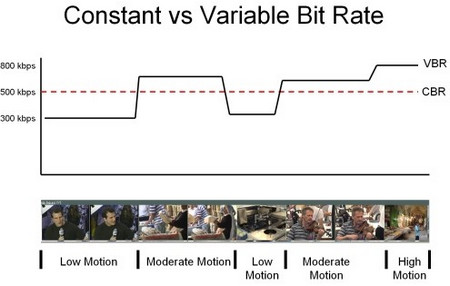
The bit rate fluctuates in a video or music data file. More efficient compression is achieved by increasing the bit rate (large amount of data) in the large change part (vigorous movement) and decreasing (decreasing the amount of data) in the small change part. You can expect the effect of reducing the amount of data while maintaining the quality or the effect of improving the quality while maintaining the amount of data, but it is generally used for the first purpose.

⇨  Bit rate
Source: Asahi Shimbun Publishing Co., Ltd. “Books to open when you have problems with your computer” Information on books to open when you have problems with your computer

Explanation of the ASCII digital glossary.jp “Variable bit rate”
Variable bit rate
Bit rate at which the amount of data changes per unit of time. With the variable bit rate, the bit rate per unit of time can be adjusted according to the state of use of the line and the amount of data to be transmitted, so that the data can be transferred efficiently. Also, when compressing video to mpeg, etc., a compression method by changing the bit rate value according to the video.

Digital Daijisen “Variable Bit Rate” explained
Kahen-Bitrate [Variable Bit Rate]

“Variable bit rate” used in a system, for example, when compressing audio and video data. By changing the bit rate, it corresponds to the amount of data in the scene. VBR. VBR control. → Constant bit rate

What is the difference between CBR / VBR / ABR in audio / video conversion? 

What is the difference between CBR / VBR / ABR in audio / video conversion? 

CBR vs VBR vs ABR

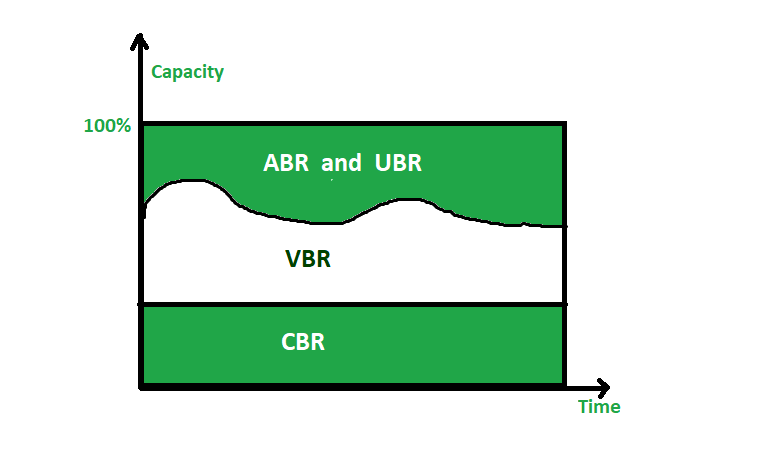
Bit rate is an index that determines the quality of compressed video and audio. Bit rate is the number of bits per second, and generally the higher the bit rate the higher the quality. However, the file size will increase accordingly.

ABR vs CBR vs VBR

The compression method is the behavior of the bit rate at the time of compression, which is the constant bit rate method (CBR), the variable bit rate method (VBR) or the average bit rate method (Averate Bit Rate, ABR). be classified

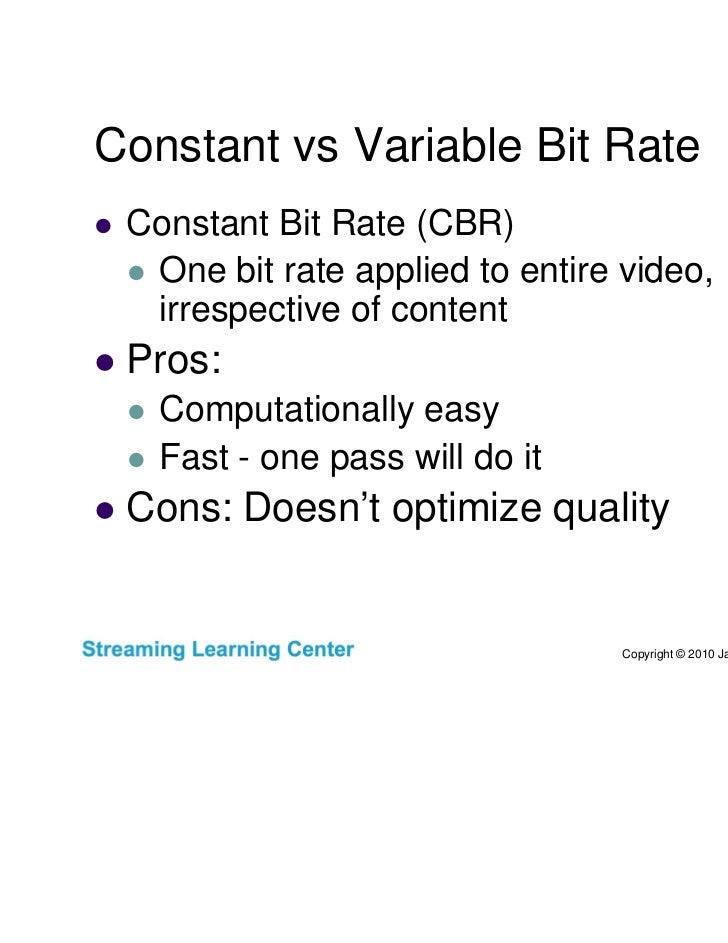
Constant Bit Rate (CBR) functions

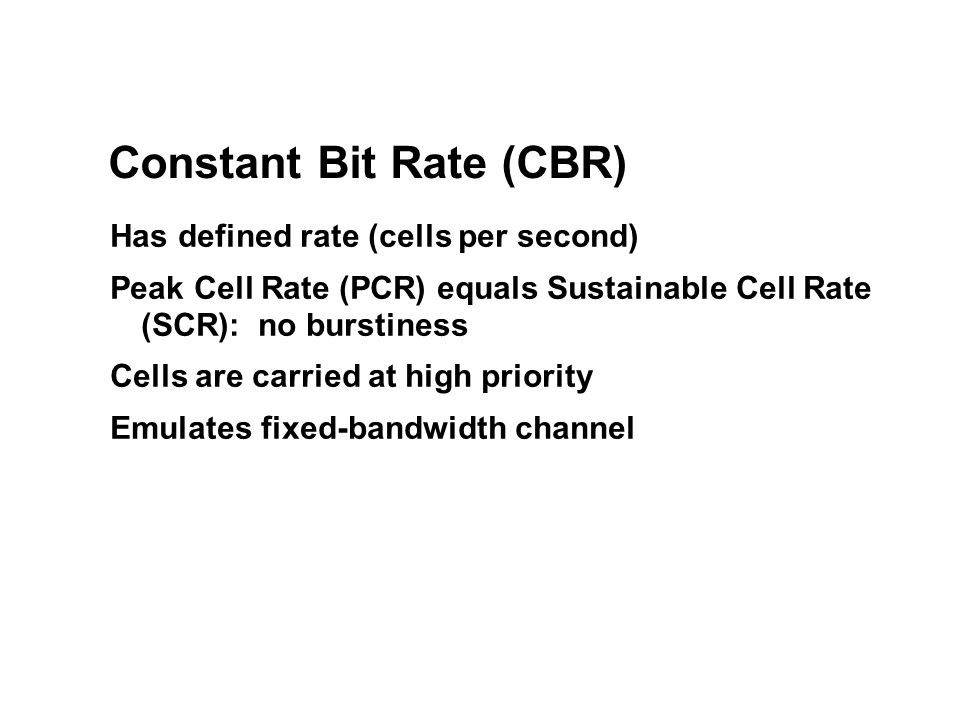
The compression method with a constant bit rate is called the constant bit rate (CBR) method. Since the bit rate is fixed, it is not only easy to predict the file size after compression, but it is also possible to search for the playback position at high speed. However, in the video there are scenes with little movement and scenes with a lot of movement. problems with such as quality change.

WAVE and uncompressed AIFF are also CBR.

advantage
It is possible to predict the size of the file after compression.
You can search the playback position at high speed.
Disadvantage
Quality tends to vary
Variable Bit Rate (VBR) Features
The compression method by changing the bit rate is called the variable bit rate (VBR) method. The VBR scheme places the jitter data with a high intense bit rate, the jitter is compressed by lowering the loose position, in its entirety the quality is kept constant can be compared with the CBR can be compressed with high quality if it is said. However, the size of the compressed file is unpredictable because the bit rate changes from moment to moment. Also, it takes longer to find the playback position than CBR.

advantage
Easy to control quality
High quality

Disadvantage
Difficult to predict compressed file size
It takes time to find the playback position.
Average Bit Rate (ABR) functions
Although the bit rate is variable, the compression method with a constant average bit rate is called the Average Bit Rate (ABR) method. Although the bit rate fluctuates with this method, the size of the final file can be predicted to some extent because it is compressed so that the average bit rate of all data is constant. This allows you to keep the quality as VBR and predict the file size as CBR. However, it takes longer than other methods because the data must be scanned at least once before compression.

advantage
It is possible to maintain quality to a certain extent.
File size can be predicted to some extent
Disadvantage
The compression process takes time

How to get the correct bitrate

How to get the correct bitrate
appropriate

bit rate

Here’s a simple way to get the correct value:

Bit Rate

Don’t increase the frame rate too much
Change the codec type
Check the resolution
If you’re taking up too much CPU on your computer with high-bit video, try the following.

Don’t increase the frame rate too much
Don’t lift too much

Since the frame rate is edited with basically the same settings as the frame rate when recording a movie, if you don’t increase the frame rate too much at the shooting stage, you can naturally keep the bit rate low and reduce the amount of data. may. Even if the resolution is a bit high, if the frame rate is low, like 24fps, there is no problem even if the value is low.

Change the codec type
Change type

By changing the type of program called a codec that compresses and converts audio and video data, it is possible to save high-quality videos even at low values. The codec type can be configured at encoding time, and the recommended codec is determined by the medium the video uses, so try switching to a better performing codec within the recommended encoding and range.

Check the resolution
check

Unless you have a specific purpose, the quickest way to lower the bitrate is not to edit with high image quality, such as 4K video. High-resolution videos have a large amount of information, so it is only natural that the bit rate is high.

So if lowering the resolution doesn’t reduce viewer comfort, try lowering the resolution a bit.

abstract
In this article, I explained the term bitrate, which is a must for anyone editing video. It seems a bit difficult compared to frame rate and resolution, and you should be able to set the proper bit rate by referring to this article.

By setting a suitable bitrate, you can create a video that is easy to handle with a small amount of data while maximizing the quality of the video.

The following article explains in detail how to edit videos.

[Video Editing Guide] Explains how to edit videos in 7 steps

Anyone can easily create video ads and video content. It acquired the number one share in the advertising and media industry for the second year in a row. (* 1) It has been introduced in more than 400 companies, mainly large companies, advertising agencies and production companies.

Estimated overall bit rate

Estimated overall bit rate

bit rate

approximate indication

Variable Bit Rate

Here are some general guidelines. The value that can be smoothly reproduced varies depending on the line speed and computer specifications, but keep the following as a guide.

Video: 850 kbps
Audio: 128 kbps
Video: 700-1500Kbps (video and total audio)
Recommended bit rate for uploading videos to YouTube
Upload the video

Here are the recommended bit rates for videos used on YouTube. Values ​​differ based on SDR video and HDR video, so check each one. We will present every resolution and frame rate you record, so set the video to upload to YouTube with the following values.

When loading an SDR video
Values ​​for uploading SDR videos are as follows.

writes
Video bit rate / standard frame rate (24/25/30)
Video Bit Rate / High Frame Rate (48/50/60)
4K
35-45 Mbps
53-68 Mbps
2K
16 Mbps
24 Mbps
1080p
8 Mbps
12 Mbps
720p
5 Mbps
7.5 Mbps
480p
2.5 Mbps
4 Mbps
360p
1 Mbps
1.5 Mbps
When loading HDR video
Values ​​for uploading HDR videos are as follows.

writes
Video bit rate / standard frame rate (24/25/30)
Video Bit Rate / High Frame Rate (48/50/60)
4K
44-56 Mbps
66-85 Mbps
2K
20 Mbps
30 Mbps
1080p
10 Mbps
15 Mbps
720p
6.5 Mbps
9.5 Mbps
480p
Not supported
Not supported
360p
Not supported
Not supported
Recommended audio bit rate for uploaded videos
The recommended audio settings are as follows.

writes
Audio bit rate
monaural
128 Kbps
stereo
384 Kbps
5.1
512 Kbps
How to make a video with the proper bit rate?
How to create?

I will explain how to create video with proper bitrate when editing video. Since various factors such as resolution, frame rate, computer specifications, and the media to be used determine the appropriate numerical value, it is problematic to think about every time you edit a video, and many people have so decidedly decided. appropriate.

If you refer to the bit rate guide presented above and the “How to set a suitable bit rate” explained below, it is not a difficult setting at all, so try them all.

Disadvantages of too high a bit rate
Demerit

Of course, if the value is set too high, the image quality will be high, but the amount of data will be huge, and the video may be difficult for the viewer to see. Problems such as stalling or getting stuck while playing a video will occur.

Not that there is a problem with the video, but the amount of data is too large, which puts too much pressure on the viewer side. Also, if you don’t have a high-spec PC, you won’t be satisfied with the edit in the first place, and there are downsides that it will take up a lot of storage.

What is the bit rate?

What is the bit rate?

bitrate

Bit rate represents the amount of data per second of video and is expressed as bps.

Bit Rate

Bps is an abbreviation for bits per second and 1 Mbps is 7.5 MB of data per minute. Since this value determines the amount of video data and the image quality of the video, those who edit the video should be aware of the appropriate setting method.

A video with a high bitrate value will have a lot of data and will be a heavy video that will take time to upload and download. High bit rate video has the characteristic of being able to express high quality and delicate images.

Those who edit videos need to acquire the minimum knowledge not only about the size of the video, such as the aspect ratio and resolution, but also about the bitrate that the amount of video data represents.

There are two types of bit rates
There are two kinds

There are two types of bit rates, which can be divided into audio and video. Generally, when editing a video, you should check the oval bitrate, which is the sum of these two types. The video is a complete work that combines audio and video, so there is no problem if you think about it in total.

Video cleanliness is determined by screen resolution x frame rate

The cleanliness of the edited video is determined by the resolution and the frame rate, and by setting the corresponding bit rate, the viewer can view the video in the highest quality. First, the resolution represents the number of pixels in the video and the upper limit of image quality is set at the recording stage.

Next, the frame rate shows how many images a video makes up per second, which is related to the smoothness of the video. By editing a high-image-quality video shot at the same frame rate as when it was shot, you can create smooth, high-quality video.

And the most important thing is the bitrate, and if this value is low, no matter how good the material is, it cannot be saved as a high-quality video. If you want to produce a beautiful video, you need to set it to a state where you can ensure the amount of data with a corresponding high bit.

What is the proper bit rate?
Suitable

The appropriate value depends on the quality of the video, but it is not always good to produce a video at a high bit rate so as not to reduce the quality. Since the value is the amount of data, the higher the value, the greater the amount of data, causing problems that cannot be processed by a low-spec personal computer.

There is a general recommended guideline based on resolution and frame rate, so it is recommended to configure it by referring to the following. Of course, if you are using a high-spec computer and want to produce a beautiful video with higher image quality, no problem, even if you produce a value slightly higher than recommended.

What is the bit rate in audio and video?

What is the bit rate in audio and video?

VBR vs CBR

Often times, you will want to adjust the bitrate when adjusting your video.

CBR & VBR

Many people find it difficult and annoying in technical terms, but if you don’t know it, you won’t be able to set it up correctly and the video quality will eventually deteriorate, so be careful. This article explains the meaning and function of bitrate in an easy-to-understand way, but if you want to understand it in detail, take a look.

Also, it is especially important that the standard bit rate is determined by the resolution and the frame rate, but it is better to change it at the same time as much as possible. This time, I will also introduce the operation procedure with the highly rated “iMyFone Filme” tool that you can set all three at once, but let’s download with the button below and try it together.

Part 1: What is the bit rate?
Bit rate indicates the amount of data that can be sent and received per second, and the unit is bps (bits per second). For example, if the video bit rate is 1 kbps, it means that 1000 bits of data can be transferred per second.

And if you break this down more concretely, there are the following three types.

“Video Bitrate

By analogy with the basic definition, video bit rate refers to the amount of video data per second. This value is calculated based on RGB data, frame rate, and resolution displayed by the color information contained in a pixel.

Bit rate of “speech”

Similarly, the audio bit rate refers to the amount of audio data per second, but the value is calculated using the sample rate (Hz) and the bit depth (bits). The first indicates how many times the sound is divided and recorded, while the second shows the amount of data per recording.

Bit rate “oval”

Speaking of the calculation formula, it is “oval bit rate = video bit rate + audio bit rate”. Also called total bitrate, this is also what commonly used video bitrates mean.

The Truth About High Bitrate Lossy Compression Part 3

The Truth About High Bitrate Lossy Compression Part 3

BITRATE

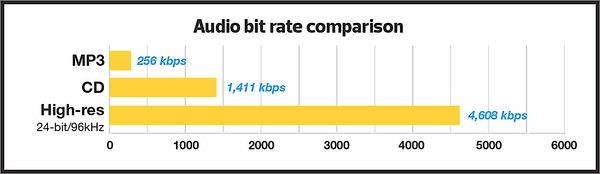
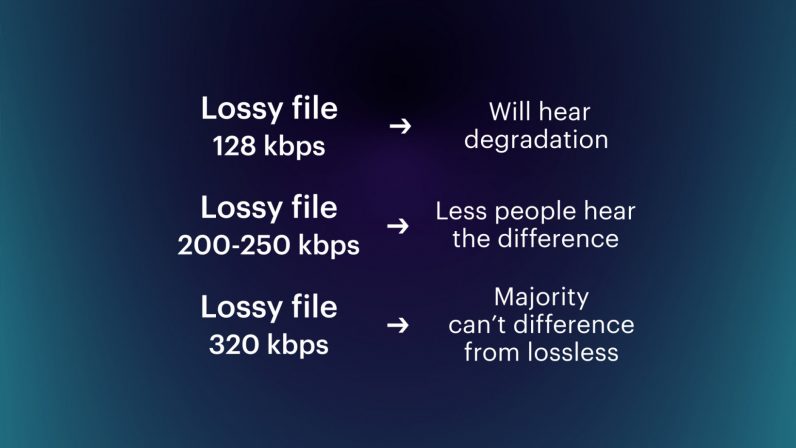
For most users of the MP3 format, the problem of high quality sound is usually phrased as follows: “256 or 320? Or maybe try VBR?”

Bitrate


And this question haunts them day after day. Not all recordings sound good at 256; there is a strong audible and visible (measured) loss in the high frequency range. When using VBR mode (the so-called variable bit rate stream), it often happens that music sounds better by ear than 256, but this should not be taken as a general rule of thumb. Encode low-value or poor-quality records – you can’t go wrong. I have selected the VBR parameters to get the highest quality for VBR.

For the commercial LQT format, there is only one encoder proprietary to the authors: Liquifier Pro. We push them. Note that the LQT format is originally based on VBR encoding, so there are simply multiple modes for it, such as “bad”, “good”, and “excellent”. Naturally, for our tests we took the “excellent” (audiophile) mode, which results in a stream of 192 to 256, most of the time 200-220 kbps. Let me remind you that the LQT format is based on the MPEG-2 AAC family of algorithms. Also, this is the highest quality AAC implementation to date (tested on analogs).

The OGG format is a relative of the MP3 format, but it contains a different psychoacoustic model and some technical innovations that MP3 does not have. For starters, OGG initially only supports VBR mode. The user sets the approximate bit rate and the encoder tries to compress as closely as possible. The range of variation is extremely wide: 8 to 512 kbps, and it is much more discreet than MP3. The top bar is up to 512 kbit / s, whereas nowadays MP3 encoders really only “pull” up to 320. You may ask “is it possible that even 320 is not enough?” Yes, it happens, but rarely.

Roxette samples
Well, we come to the most interesting part. Let’s start with my auditory sensations.

For MP3 in a 256 kbps stream, noise disturbances at high frequencies are clearly audible. Not only is a considerable part of them absent from the sound, but strong distortion, wheezing, clanging and other “charms” are also mixed in. This is a sign that 256 is clearly not enough, therefore you need to test higher. Let’s take a 320 compressed sample. The sound has changed significantly, this is a completely different matter: the upper part is in place, no differences by ear were found. For the purity of the experiment, let’s see what happens in floating flow mode. We obtain an average bit rate of 290 kbit / s, of which the conclusion suggests that 256 for the sample under study will not be enough. In fact, a sample encoded in VBR mode sounds a little better than 256, but it clearly falls short of 320. In the case of MP3, for high-quality compression, only encoding in 320 kbps mode is adequate, ie , to the maximum of opportunities.

Let’s take OGG as “modified MP3”. There are five approximate bit rates for the encoder: 128, 160, 192, 256 and 350. Well, let’s try 192 and 256. We will not take 350 bit rates, because we already know that MP3 at 320 kbps clearly transmits excellent quality, it seems that better not necessary. For 192 mode, we get an average stream of 226, and for 256 mode, up to 315 kbps. So far the precision. Such a large deviation from the reference point is a signal for sound material that is very difficult to encode; with a sample with a simpler density, the precision will be higher. To be honest, I tried to evaluate 320 MP3 and 315 OGG for a long time and came to the conclusion that they both sound almost identical to the original sound. But they are based on different psychoacoustic models and their sound coloration is different. Personally, I liked the MP3 a bit more. But, this is really a controversial issue; after all, the OGG encoder is just a beta version. When there is a release, I think it should surpass MP3 in quality. Comparing them separately to the original, I was inclined to believe that the OGG has an even closer sound to the original, but there is something wrong with the high frequencies of this encoder. Because of this, MP3 sounds a bit better. I don’t think it is necessary to say that in 350 mode (average bitrate was 365) OGG “perfectly” repeats the original.

Now we are talking about the little-known but widely advertised format as the “highest quality”: the LQT format. And most importantly, it sounds great overall, however after listening to it, I realized that I didn’t like its sound. It doesn’t distort high frequencies, like MP3 256 kbps, but it smears the sound and smears a lot. Loud sounds fade over time.

The Truth About High Bitrate Lossy Compression Part 2

The Truth About High Bitrate Lossy Compression Part 2

Bitrate

I decided to “drop” the three specified formats to get the highest quality sound with the minimum file size.

audio bitrate

For the test, we selected several samples (here a sample is a small fragment cut from a PCM file) from two types of compositions. The first is a very dense and loud sound with amplitude normalization (compacting the sound “vertically” to fit 16-bit from a 24-bit master) and compression of the dynamic range (so that the sound of all instruments is always strong). As the first type (as in my previous tests), the composition Crush On You from the album Have A Nice Day by Roxette was chosen, three samples of 15-20 seconds each of different parts of the composition were examined. The second sample is clean and transparent (acoustic or light orchestral arrangement).

Why these particular records? Roxette samples have very strong dynamic compression (the amplitude value is very often equal to the maximum (which is bad) and leads to overload of the playback equipment and strong distortions).

Roxette sample
In such samples, the encoders have to work in extreme mode, so any distortion becomes easily audible. encoding distortions add to the existing intrinsic distortions of the original. You ask “why then take a sample as a test?” It is necessary and how. The vast majority of albums released today are recorded this way. Therefore, the encoder must adequately accept clipping sound.

With Klaiderman’s samples, the situation is diametrically opposite. The original analog recording after a very high quality digital remastering was recorded to CD and without dynamic compression.

Clayderman sample
Great sound, very nice and smooth highs. We will pay special attention to them during the analysis, we will try to preserve them. But it is these frequencies that will be the most difficult for encoders to transmit.

the truth about high bitrate lossy compression

the truth about high bitrate lossy compression

bitrate lossy

Preface

bitrate lossy

In the understanding of most people, the word music lover is most often associated with a person who not only loves and collects music, but also appreciates high-quality music, and not only in artistic and aesthetic terms. but also the quality of the recording. of the phonogram itself. Think, a few years ago, an audio CD was considered the standard of music quality, but a computer, even in dreams, could not compete with the quality of a CD. However, time is a great joker and he often likes to turn things upside down. It would seem that quite a long time passed, one or two years and … that’s it, the CD on the PC went into the background. Don’t ask “why?”, You know the answer to this question yourself. Everything is to blame for the revolution in the world of sound on a computer: audio compression (hereinafter referred to as audiolo compression which means lossy compression to reduce the size of the audio file), which made it possible to store music on the hard drive, lots of music! In addition, it was possible to exchange it over the Internet. New sound cards have been released, capable of squeezing almost studio quality out of a piece of hardware that seems useless in terms of music. Today, even having a computer that is not very smart in performance, having bought a Creative SoundBlaster Live! And remembering that since the Soviet times there is a good amplifier and good acoustics, you will get nothing but a high-quality music center, the sound of which is inferior only to very expensive audio equipment (mid-range or even high-fidelity hi-fi). ). Add to this the general availability of music files and you know you have the power at your fingertips. And then there is a revolution, and you understand that a compact disc is no longer so convenient, you are fascinated by something completely different: the magic signs of the “MP3”. He cannot eat or sleep; faces the seemingly insoluble question of the “chicken and egg”: how to “squeeze” and, more importantly, how to “squeeze” …

This is where I will help you. This article is the beginning of my new series of informational materials on music on the computer. For over a year maintaining an extensive database of MP3 files, I have accumulated a great deal of research on audio compression. It is these studies that I will try to share with you. Several respected authors have written many articles on audio compression, so I will try not to write what I can easily find in other sources of information. I would like to express my position on the subject under discussion simply and clearly. We will not consider audio compression to be as compact a tool as possible put audio information on your hard drive (so that you can record so many hours of music there). Yes, compression allows you to record music more compactly, but my goal is to minimize quality loss by converting “pure” audio to compressed. That is why only high bitrates and encoders that compress qualitatively are considered in these modes. So it is much more convenient to work with compressed audio – instant access to any track from any album, convenient software for playback. And, of course, the financial issue has not been forgotten either.

Of the audio compression formats that exist today, three deserve attention, in my opinion: MP3 (or MPEG-1 Audio Layer III), LQT (as representative of the MPEG-2 AAC / MPEG-4 family) and the completely new OGG format (Ogg Vorbis) developed by a group of enthusiasts:

MP3 is by far the most widely used of these (mainly because it is free). Let me remind you that it was thanks to the MP3 format that the victorious procession of compressed audio took place. However, as is often the case with pioneers, little by little it is losing ground and giving way to new and better formats.
The second format, LQT, is a representative of a new direction of audio coding algorithms, a representative of the AAC family. This is a fairly high quality, but commercial and highly classified format.
OGG became widely known to the public this summer and is currently developing rapidly, soon (with the release of the Encoder and Decoder) it should beat MP3 with better sound quality with smaller file size.
I will not give a detailed description of technologies and formats here, you can easily find them yourself. There will only be facts, conclusions and recommendations. I plan to present my research separately for each format in separate articles.