What is the best way to use compressed sound sources like MP3, AAC and WMA correctly? Part 2


Free Download Mp4Gain
picture

What is the best way to use compressed sound sources like MP3, AAC and WMA correctly? Part 2
audio compression

User-friendly bit rate of sound quality and capacity is 128 kbps to 160 kbps
The problem is the compression rate (= bit rate) expressed in the unit of “kbps”. Difficult theory aside, it’s okay if you think the point is “bitrate = standard for numerically expressing sound quality”.

audio bit rate

“Reduce the amount of data by reducing the sounds that are not harmful to the human ear” In a compressed sound source, the lower the bit rate, the lower the capacity, but the higher frequencies are cut off. So if you lower the bitrate too much during encoding, you will get some moody sound quality somehow.

・ ~ 96 kbps …… Since the sound does not lengthen, it is suitable for talk-centric radio programs, etc.
・ 128 kbps …… No matter who listens to it, there is not much discomfort. Suitable for pop and rock with PC speakers and car audio
・ 160 kbps …… Sound quality that can be satisfied even with general audio. Suitable for loud jazz
・ 192 kbps …… There are few glitches even when listening with headphones. Even classical music with a wide range is fine.
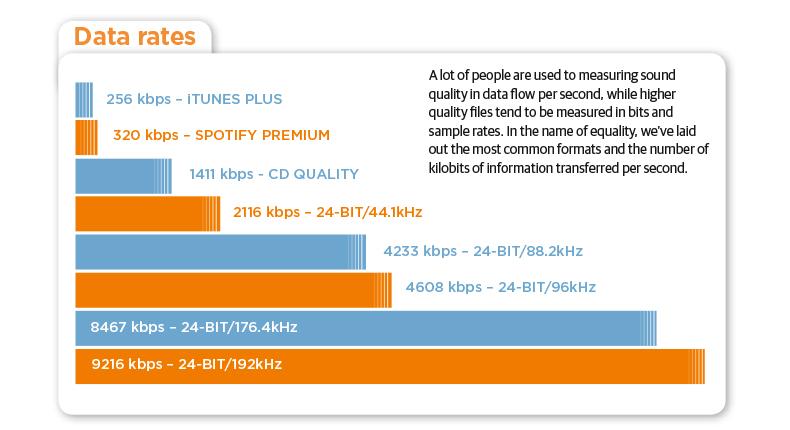
・ 256kbps / 320kbps …… High sound quality close to that of a CD (1411kbps equivalent)

Although there are individual differences, let’s think about it based on the above. The maximum difference in sound quality that a normal person can hear is 160 kbps. Beyond 192 kbps, you will not notice any difference unless you are a very “hearing” person.

Also, as the number of songs increases to 100 songs and 200 songs, the difference in capacity will be large, so choose a bit rate that is easy to use. If you convert a 4-5 minute song, often found in pop music, to MP3, the capacity will be roughly as follows.

·
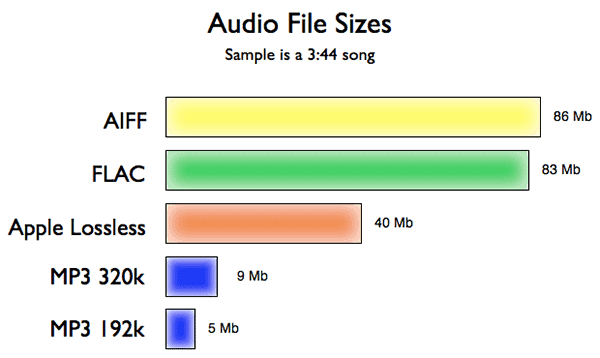
128 kbps: Approximately 4 MB · 160kbps: Approximately 5-6MB · 192kbps:
About 7 MB320 kbps
: Approximately 10 MB

AAC and WMA have a higher compression rate than MP3 and the capacity is lower even at the same bit rate. Since it is also resistant to low bit rates, AAC and WMA can sound better at 128 kbps or less.

On the contrary, when it exceeds 160 kbps, MP3 has a superior sound quality in theory. Keep in mind that the higher the bitrate, the better the MP3 will be in terms of sound quality, whether you can listen to it or not.


Free Download Mp4Gain
picture


Mp4Gain Main Window
picture


Mp4Gain Features
picture


Free Download Mp4Gain
picture

What is the best way to use compressed sound sources like MP3, AAC and WMA correctly?

What is the best way to use compressed sound sources like MP3, AAC and WMA correctly?

Audio Compression

When listening to music on a smartphone or iPod, what you seem to know but not understand is digitally compressed sound sources like MP3, AAC, and WMA. Let’s think again about “in what format” and “how much bit rate” is good.

audio compression mp3 acc wma

◆ World standard MP3, Apple standard AAC, Windows standard WMA
You all know that there are various formats of “digital sound sources”.

The best known is the WAV format, which is also used for CDs. Since it is an uncompressed format, there is no deterioration in sound quality and it is very versatile, but the capacity is not small, just over 50MB in 5 minutes.

Therefore, when used with a portable music player such as a smartphone, iPod, or Walkman, it is common to convert (= encode) from WAV to compressed sound sources such as MP3, AAC (M4A / M4P), and WMA.

By the way, compressed sound sources are used from the beginning for download distribution like iTunes. AAC for iTunes, MP3 for Amazon, and WMA for major national distribution sites are mainstream.

・ MP3 …… The oldest compression format established in 1995. There are many supported products, and it is the de facto standard that can be used in any case. “MP4” is a video standard, so don’t get it confused.

・ AAC (M4A / M4P) …… A standard established after MP3, which is a standard format for Apple products such as iPod and iPhone. M4P is a file protected by copyright. AAC is also used for audio on digital terrestrial broadcasts and digital BS on television.

・ WMA …… A format advocated by Microsoft. It has a strong affinity for Windows and many products are also used in voice recorders.

Sample rate and bit rate Part 2

Sample rate and bit rate Part 2

Sample Rate  Bit Rate

Listen and compare

sample rate and bit rate

Why don’t you really ask? In my memory, when I checked it in the past, I remember that it was difficult to distinguish it from the original sound (PCM) at 128 kbps of AAC under the conditions in the table above. I think this varies from person to person, and although I am involved with the audio and sound, I am aware that my ears are not a big problem, so even at a slightly higher rate, it is the same as the sound. original. I’m sure there are people who can tell the difference. At the low 32 kbps, you can clearly see the difference in sound quality. In terms of music, you can understand the metallic sound of the drum hi-hat.
Personally, I think that 44.1 Hz 16-bit (stereo) music CDs can be saved even at 128 kbps (1/10 compression or less) without losing sound quality. About 128 kbps is enough for my ears for both MP3 and AAC.

The bit rate is the compression rate
What happens if you set the encoding bit rate to 256 kbps for 16 kHz audio (monaural with 16 quantization bits)? .. .. Since the compression rate is 100%, it will be the same as the original sound. The sound quality should be the same as the original sound, but it may cause strange behavior depending on the encoders that are available for free (a configuration error may occur).

Sampling frequency Number of quantization bits Number of channels Original sound bit rate (PCM) Remarks
32 kHz 16 1 512 kbps Super Wide Band
24 kHz 16 1 384 kbps
16 kHz 16 1 256 kbps Broadband
8 kHz 16 1 128 kbps Narrowband
Regarding lossy compression of AAC and MP3, I think it is the result of research on how to encode at a low rate, so I personally think that setting a bitrate of 50% or more is not good. Lossless is recommended for compression ratios around 50% (lossless compression, MPEG-4 ALS, etc.). If you only think about saving, even if you compress it as is in PCM, it seems like it’s about half for audio with quiet sections. For lossy compression AAC, MP3, etc., if sound quality is important, about 15-20%, and if high compression is important, about 10% is sufficient sound quality.
Also, for audio purposes less than 10% and 5% is fine, but for audio it is recommended to lower the sample rate rather than suppress the bit rate to 48 kHz or 44.1 kHz (8 kHz or 16 kHz).

Stereo M / S (middle side)
The left and right signals are sum / difference signals. When encoding the sum signal (L + R) and the difference signal (LR) of both channels, the code is used when the correlation between channels is high, such as in stereo. The conversion efficiency is improved. For example, you can improve the coding efficiency of musical voices (L / R in phase, same amplitude).

Intensity stereo
When listening to high frequencies, the bit rate is reduced by combining the high frequency information (quantization coefficient) into one using the property that it is more susceptible to loudness than the L / R time difference.

In the end
Although bit rate may seem like a measure of sound quality, the digital audio field does not specify an encoded bit rate that exceeds the original sound bit rate. In short, I think it is important to use the proper bitrate for each encoder (encoder).

Sample rate and bit rate

Sample rate and bit rate

Sample Rates and Bit Depth

The compression ratio of audio encoding is determined by the bit rate at the time of encoding.

Sample Rate and Bit Depth

Last time I mainly wrote about the original sound bit rate (PCM), but this time I would like to write about the bit rate and compression rate of the encoding.

Specifically, setting a lower bitrate will increase the compression ratio and reduce the size of the file when it is saved. As I wrote last time, the bit rate of the sound source (PCM) before compression is as follows.

PCM bit rate = sample rate (Hz) x number of quantization bits x number of channels
For example, a music CD has the following 44.1 kHz stereo bit rate.

Music CD bit rate: 44100Hz x 16bit x 2ch (stereo) = 1411.2kbps
If it is encoded with MP3, AAC, etc., for example 256 kbps, the compression rate (assuming the original sound is 100%) is approximately 18% and the file size is 1/5 or less.

Encode Music CDs at 256 kbps: 256 kbps / 1,411.2 kbps = approximately 18%
If it’s 4 minutes of music, the file size is as follows.

Original sound: 1,411.2 kbps x 240 seconds = approximately 40.4 MB
Encode at 256 kbps: 256 kbps x 240 seconds = approximately 7.3 MB (+ header)
If a song is about 4 minutes long, 16 songs can be saved on CD650MB as original sound, but if it is encoded at 256 kbps as MP3 or AAC, 89 songs can be recorded.

Original sound: CD650MB / 40.4MB = about 16 songs
256 kbps encoded: CD650MB / 7.3MB = approximately 89 songs
If you check the web, you can compare the sound quality due to the difference in the bit rate. I think all the conditions are the same except the bit rate, but first of all there is a difference in the sound quality depending on the sample rate of the original sound source (PCM) and the number of quantization bits (the bit rate of the original sound changes). At the time of analog to digital conversion (ADC), the sound quality is determined by the conditions. No matter how high the bit rate is encoded for a sound source in poor condition, the sound quality is still poor. Even with the same bit rate, the compression rate changes depending on the number of channels (stereo or monaural). Therefore, strictly speaking, the evaluation of the sound quality cannot be judged only by the difference in the bit rate.
For example, when 48 kHz and 44.1 kHz 16-bit PCM is encoded at 32 kbps to 320 kbps, the compression ratio is as follows.

16-bit PCM compression ratio (when original sound is 100%)
Encoded bit rate 48 kHz stereo (1,536 kbps) 48 kHz monaural (768 kbps) 44.1 kHz stereo (1,411.2 kbps) 44.1 kHz monaural (705.6 kbps)
320 kbps 320/1536 = about 21% About 42% 320 / 1,411.2 = about 23% About 45%
256 kbps 256/1536 = about 17% About 33% 256 / 1,411.2 = about 18% About 36%
192 kbps 192/1536 = about 13% About 25% 192 / 1,411.2 = about 14% About 27%
160 kbps 160/1536 = about 10% About 21% 160 / 1,411.2 = about 11% About 23%
128 kbps 128/1536 = about 8% About 17% 128 / 1,411.2 = about 9% About 18%
64 kbps 64/1536 = about 4% About 8% 64 / 1,411.2 = about 5% About 9%
32 kbps 32/1536 = about 2% About 4% 32 / 1,411.2 = about 2% About 5%
Comparison with the original sound
It’s a bit of a twisted idea, but for example, which one is closer to the original sound, stereo or monaural in the above conditions?
Considering the compression ratio, it is the latter. Of course, stereo is superior to monaural in terms of expression, like expressing the depth of sound, so it makes sense to compare this and evaluate the sound quality, but in encoding, compression is done efficiently using stereo. Since there are algorithms (Stereo M / S and Stereo Intensity), the quality is not half that of monaural and the stereo is compressed efficiently.

What is the best way to use compressed sound sources like MP3, AAC and WMA correctly?

What is the best way to use compressed sound sources like MP3, AAC and WMA correctly?

Audio Compression

When listening to music on a smartphone or iPod, what you seem to know but not understand is digitally compressed sound sources like MP3, AAC, and WMA. Let’s think again about “in what format” and “how much bit rate” is good.

You all know that there are various formats of “digital sound sources”.

The best known is the WAV format, which is also used for CDs. Since it is an uncompressed format, there is no deterioration in sound quality and it is very versatile, but the capacity is not small, just over 50MB in 5 minutes.

Therefore, when used with a portable music player such as a smartphone, iPod, or Walkman, it is common to convert (= encode) from WAV to compressed sound sources such as MP3, AAC (M4A / M4P), and WMA.

By the way, compressed sound sources are used from the beginning for download distribution like iTunes. AAC for iTunes, MP3 for Amazon, and WMA for major national distribution sites are mainstream.

・ MP3 …… The oldest compression format established in 1995. There are many supported products, and it is the de facto standard that can be used in any case. “MP4” is a video standard, so don’t get it confused.

・ AAC (M4A / M4P) …… A standard established after MP3, which is a standard format for Apple products such as iPod and iPhone. M4P is a file protected by copyright. AAC is also used for audio on digital terrestrial broadcasts and digital BS on television.

・ WMA …… A format advocated by Microsoft. It has a strong affinity for Windows and many products are also used in voice recorders.

Based on these characteristics, let’s consider the compression format depending on the device used.

Methods of compression and compression of audio signals Part 3

Methods of compression and compression of audio signals Part 3

Audio Compression

The most popular compression format today is MP3.

The MP3 (MPEG Layer 3) format was developed, after several intermediate formats, by the Fraunhofer Institute in Germany. Actually, the .MP3 format relies on fooling the human ear. After some research, it turned out that human hearing tends to adapt to the appearance of new sounds, which is expressed in an increase in the hearing threshold. Therefore, some sounds are capable of masking (that is, making them subjectively inaudible) others. So in this format, some of the sounds that, according to the corresponding theory, are made inaudible, are simply removed from the general sound. The resulting “semi-finished product” is then encoded using the Hoffman method. Be sure to note that in the MP3 format, programs that compress the sound of the original are not standardized, that is, each competent programmer can implement their own compression scheme. And only the decoders obey the standards, which leads to the fact that the quality of MP3 playback does not always depend on the player that plays this file. Due to the different abilities and predilections of implementers of various encoders, some of them are better at handling symphonic music, some at rock and metal, some at rap and rave, etc.

JointStereo, which is one of the features of MP3, means that instead of encoding stereo as two independent channels, it encodes the call. center channel and the difference from the original stereo channels. Many stereo channel audio components are the same, and encoding them on the common channel allows you to free up additional bandwidth for more detailed encoding of the difference, leading to improved quality.

Be sure to mention the variable bit rate or VBR. This means that the encoder changes the compression ratio on the fly, depending on the nature of the sound. This approach results in a reduction in the final file size or, if quality requirements increase, the same file size produces better sound.

MP3 Pro – Introduced in 2001, the MP3 Pro codec was developed by Coding Technologies in association with Thomson Multimedia. It is MP3 based and as a result it turned out to be fully MP3 backward compatible and only partially forward compatible. It uses SBR (Spectral Band Replication) technology, so the codec provides good quality at low bit rates. However, the encoding quality at medium to high bit rates is inferior to almost all other codecs. As a result, MP3 Pro is used more for streaming on the Internet and demonstrating snippets of new musical compositions.

The MPEG-4 audio standard does not require a single or small set of highly efficient compression schemes, but rather a complex set to perform a wide range of operations, from low-quality speech coding to high-quality music and audio synthesis.

The MPEG-4 family of audio coding algorithms ranges from low quality voice (up to 2 kbps) to high quality audio (64 kbps per channel and higher).

RAW – Yes, it is not just the image format in which some digital cameras write photographs. In fact, RAW is the so-called. “Pure digitization”, which does not contain a title and contains only a sequence of samples of a sound wave. Typically, the scan is stored in 16-bit format.

Shorten is one of the first lossless codecs to appear. For a long time the project “slept sweetly.” However, in 2007, it began to develop again.

TTA (True Audio) – Finally about the most interesting. TTA is being developed by a team of our compatriots. And, I must say, the result of their work is impressive. All in order.

The codec is still quite young, but despite this it contains all the necessary features. We won’t list them again, we’ll just note that the format only lacks support for streaming audio over the network.

The format is open, as well as the source codes of the encoder program. There are compiled versions for Mac and Linux. There should be no compatibility issues during playback either, because there are already plugins for all popular players, as well as DirectShow filters for Windows Media Player. There is a plugin for Adobe Audition, which is important for musicians. For the past 4 years, hardware support has even appeared on players!

WAV – This is the primary audio format for many, many digital audio playback systems and is used as a standard audio file format on personal computers.

Compression and compression methods for audio signals Part 2

Compression and compression methods for audio signals Part 2

audio compression

FLAC is a member of the Xiph.Org codec family. By the way, it also includes the well-known ogg vorbis, one of the best lossy music compression algorithms. As a container for audio data, of course, OGG (files with the extension .ogg) and another open source container – Matroska (files with the extension .mka) are used.

It should be noted right away that both the FLAC format and algorithm are fully open. They are not patented, so they can be used completely free of charge in any program. This is the reason for the wide support for FLAC in players – any serious gamer has a plugin for FLAC. In addition, there are hardware mp3 players that support the FLAC codec.

The FLAC encoder is compiled for most platforms in use, so there should be no compatibility issues on alternative Windows operating systems.

FLAC supports tags in its own “FlacTags” format. There is the ability to encode multi-channel audio, a great advantage over Monkey’s Audio. The format supports any sample rate in the range of 1 Hz (!) To 65,535 Hz. Audio bit depth from 4 (!) To 32 bits.

FLAC is believed to be the most efficient use of system resources when decoding (playing) audio compared to other lossless codecs. Unfortunately, this is achieved at the expense of a significant increase in encoding (compression) time.

The FLAC website is regularly updated and new versions of the codec are released. Overall, FLAC is without a doubt the leader in terms of development activity. This may make it the main format in the future. Well, let’s see …

FLAC is the best option for storing high quality music.

MIDI (Musical Instrument Digital Interface) is a standard for hardware and software that allows you to play (and record) music by executing / recording special commands, as well as the format of the files that contain those commands. The playback device or program is called a MIDI synthesizer (sequencer) and is actually an automatic musical instrument.

Unlike other formats, it does not store the digitized sound, but sets of commands (played notes, links to played instruments, variable sound parameter values) that can be played differently depending on the playback device. The convenience of the MIDI format as a data representation format enables devices that produce automatic arrangements according to given chords, as well as 3D sound visualization applications. Additionally, these files tend to be orders of magnitude smaller than digitized audio of comparable quality.

Monkey’s Audio is a popular lossless digital audio encoding format. Distributed for free along with open source and a suite of encoding and playback software, as well as plugins for popular players. Monkey’s audio files use the following extensions: .ape to store audio and .apl to store metadata. Despite being open source, Monkey’s Audio is not free, as its license imposes significant restrictions on its use.

Audio files compressed with the Monkey audio codec have the extension ‘APE’; As you can see, the monkeys are present not only in the logo or the name (from English monkey: monkey, primate).

The average bit rate in an audio file is 600 to 700 kbps; compare with 128 kbps in MP3. Average compression is 40-50%, depending on the genre of music: if classical or jazz pieces are compressed in the best way, then compositions in the style of trash-metal or something similar “electronic noise” will show the worst result. . For codecs with acceptable quality loss, compression is approximately 80%.

There are four levels of compression. Maximum compression may seem like the only correct solution, although the compression time is quite long. However, you must also take into account the resource consumption of the system that plays the file; for the most compressed file, it is relatively high.

The .APE format provides tag support for searching for songs in your music collection. Another advantage is the verification of the integrity of the file during decoding. Recovery of original compressed .APE wav files is supported.

Monkey’s Audio has a graphical interface for Windows, in other words, a convenient window program to manage the encoding process. The rest of the codecs require the use of the command line or third-party interfaces.

Compression and compression methods of audio signals

Compression and compression methods of audio signals (types, differences, use)

Audio Compression

Basics of the analog-to-digital conversion principle, sound conversion and compression method, existing sound storage formats. Programs to convert and process sound and audio files. Application of these programs in linguistic research.

Bit rate is the amount of information per unit of time. In general, the bit rate is the number of bits that we spend encoding a sound with a duration of 1 second.

Analog-to-digital converter (ADC): A device that converts an input analog signal into a binary code (digital signal). The reverse conversion is done using a DAC (digital-to-analog converter, DAC). Typically, an ADC is an electronic device that converts voltage into a binary digital code. However, some non-electronic devices with digital output must also be classified as ADCs, such as some types of angle-to-code converters. The simplest one-bit binary ADC is a comparator.

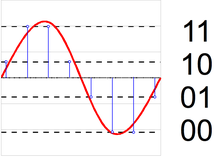
The circuit to convert an audio signal from analog to digital:

Sampling is the transformation of continuous images and sound into a set of discrete values ​​in the form of codes.

Quantization is the process of aligning a set of musical notes to a grid.

Compression (compression) of audio data is a process of lowering the bit rate by reducing the statistical and psychoacoustic redundancy of a digital audio signal.

The underlying idea behind all lossy audio compression techniques is to neglect the subtle details of the original sound that are beyond the reach of the human ear.

Codec (CoDec) is an abbreviation for compressor and decompressor. Basically, a codec is a collection of files, drivers, and libraries required to package a video or audio file into a compressed format and play the compressed file.

Formats:

AAC (Advanced Audio Coding) is an audio file format with less quality loss when encoding than MP3 of the same size. The format also allows you to compress without losing the quality of the source (ALAC AAC profile).

AAC (Advanced Audio Coding) was originally created as a successor to MP3 with improved encoding quality. The AAC format, officially known as ISO / IEC 13818-7, was released in 1997 as the new seventh part of the MPEG-2 family. There is also the AAC format known as MPEG-4

Apple AIFF: This file type is standard for Apple Macintosh systems and sound processing systems built on top of it. Apple AIFF stands for Audio Interchange File Format, an audio interchange file format, it is somewhat similar to WAV. Its peculiarity is that it allows you to place additional information along with the sound wave, in particular WaveTable samples (examples of the instrument sound together with synthesizer parameters), which improves the quality of the final result. Although today Apple computers are capable of playing files of almost any format, including MP3.

FLAC (Free Lossless Audio Codec) is a popular free codec for audio compression. Unlike lossy Ogg Vorbis, MP3 and AAC codecs, it does not remove any information from the audio stream and is suitable for both daily listening and archiving of audio collection. Today, the FLAC format is compatible with many audio applications.

Digital audio compression methods

Digital audio compression methods

audio compression

Lossless compression

AUDIO COMPRESSION

Generally speaking, the meaning of lossless compression is as follows: some pattern is found in the original data, and taking this pattern into account, a second stream is generated, uniquely describing the original. For example, to encode binary sequences in which there are many zeros and few ones, we can use the following replacement:

00> 0
01> 10
10> 110
11> 111

In this case, sixteen bits:
00 01 00 00 11 10 00 00

will be converted to thirteen bits:
0 10 0 0 111 110 0 0

If we write a compressed string without spaces, we can still add spaces in it, which means restoring the original sequence.

FLAC (Free Lossless Audio Codec)
Coding principle: the algorithm tries to describe the signal with this function so that the result obtained after subtracting it from the original (called difference, remainder, error) can be encoded with the minimum number of bits.

When the model is fitted, the algorithm subtracts the approximation from the original to obtain a residual signal (error), which is then losslessly encoded.

Lossy compression (MP3, AAC, WMA, OGG)
Using a lossy compression algorithm, the size of an MP3 file with an average bit rate of 128 kbps is approximately 1/11 of the original file of an Audio CD (uncompressed audio in CD-Audio format has a rate bit rate of 1411.2 kbps). MP3 files can be created at high or low bit rates, which affects the quality of the result.

The principle of compression is to reduce the precision of some parts of the sound flow, which is almost indistinguishable for most people. The audio signal is divided into segments of equal length, each of which, after processing, is packed into its own frame (frame). Spectral decomposition requires continuity of the input signal; therefore the table above and below are also used for calculations. The audio signal contains harmonics with a lower amplitude and harmonics that are close to the strongest; Such harmonics are cut off, as the average human ear will not always be able to determine the presence or absence of such harmonics. This characteristic of hearing is called the masking effect. It is also possible to replace two or more nearby peaks with an averaged one (which, as a rule, leads to sound distortion). The cutoff criterion is determined by the outflow requirement. Since the entire spectrum is relevant, the high-frequency harmonics are not cut off, but are only selectively removed to reduce information flow due to spectrum sparsity. After spectral removal, mathematical compression and frame packing methods are applied.

Masking effect
In certain cases, a sound can be hidden by another sound. For example, talking near the railroad tracks can be completely impossible if a train passes. This type of effect is called masking. A weak sound is said to be masked if it becomes indistinguishable in the presence of a louder sound.

Simultaneous masking
Any two sounds when heard simultaneously have an impact on the perception of the relative volume between them. A louder sound reduces the perception of a weaker one, until the disappearance of your hearing. The closer the frequency of the masked sound is to the frequency of the masker, the more it will be hidden. The masking effect is not the same when the masked sound is shifted down or up in frequency with respect to masking. Low-frequency sound masks high-frequency sound. However, it is important to note that high-frequency sounds cannot mask low-frequency sounds.

Time masking
This phenomenon is similar to frequency masking, but time masking occurs here. When the masking sound is stopped, the masking remains inaudible for some time. Under normal conditions, the temporary masking effect lasts significantly less. The masking time depends on the frequency and amplitude of the signal and can be up to 100 ms.
In the case where the masking tone appears at a time after masking, the effect is called post-masking. When the masking tone appears before the masking (this is also possible), the effect is called premasking.

Post-stimulus fatigue
Often after exposure to loud, high-intensity sounds, a person’s hearing sensitivity drops dramatically. Recovery to normal thresholds can take up to 16 hours. This process is called “temporary change in hearing sensitivity threshold” or “post-stimulus fatigue.”

Digital audio compression methods

Digital audio compression methods

Audio Compression

Lossless compression

Audio Compression

Generally speaking, the meaning of lossless compression is as follows: some pattern is found in the original data, and taking this pattern into account, a second stream is generated, uniquely describing the original. For example, to encode binary sequences with many zeros and few ones, we can use the following replacement:

00> 0
01> 10
10> 110
11> 111

In this case, sixteen bits:

00 01 00 00 11 10 00 00

will be converted to thirteen bits:

0 10 0 0 111 110 0 0

If we write a compressed string without spaces, we can still add spaces in it, which means restoring the original sequence.

FLAC (Free Lossless Audio Codec – Free Lossless Audio Codec)
Coding principle: the algorithm tries to describe the signal with this function so that the result obtained after subtracting it from the original (called difference, remainder, error) can be encoded with the minimum of bits.

When the model is fitted, the algorithm subtracts the approximation from the original to obtain a residual signal (error), which is then losslessly encoded.

Lossy compression (MP3, AAC, WMA, OGG)
Using a lossy compression algorithm, the size of an MP3 file with an average bit rate of 128 kbps is approximately 1/11 of the original file of an Audio CD (uncompressed audio in CD-Audio format has a rate 1411.2 kbps bit rate). MP3 files can be created at high or low bit rates, which affects the quality of the result.

The principle of compression is to reduce the precision of some parts of the sound flow, which is almost indistinguishable for most people. The audio signal is divided into segments of equal length, each of which, after processing, is packed into its own frame (frame). Spectral decomposition requires continuity of the input signal; therefore, the previous and next tables are also used for calculations. The audio signal contains harmonics with a lower amplitude and harmonics that are close to the strongest; Such harmonics are cut off, as the average human ear will not always be able to determine the presence or absence of such harmonics. This characteristic of hearing is called the masking effect. It is also possible to replace two or more close peaks with an averaged one (which, as a rule, leads to sound distortion). The cutoff criterion is determined by the outflow requirement. Since the entire spectrum is relevant, the high frequency harmonics are not cut off, but are only selectively removed to reduce information flow due to rarefaction of the spectrum. After spectral removal, mathematical compression and frame packing methods are applied.

Masking effect
In certain cases, a sound can be hidden by another sound. For example, talking next to a train track can be completely impossible if a train passes. This type of effect is called masking. A weak sound is said to be masked if it becomes indistinguishable in the presence of a louder sound.

Simultaneous masking
Any two sounds, when heard simultaneously, have an impact on the perception of the relative volume between them. A louder sound reduces the perception of a weaker one, until the disappearance of your hearing. The closer the frequency of the masked sound is to the frequency of the masker, the more it will be hidden. The masking effect is not the same when the masked sound is shifted down or up in frequency relative to masking. Low-frequency sound masks high-frequency sound. However, it is important to note that high-frequency sounds cannot mask low-frequency sounds.

Time masking
This phenomenon is similar to frequency masking, but time masking occurs here. When the masking sound is stopped, the masking remains inaudible for some time. Under normal conditions, the effect of temporary masking lasts much less. The masking time depends on the frequency and amplitude of the signal and can be up to 100 ms.
In the case where the masking tone appears later than the masking, the effect is called post-masking. When the masking tone appears before the masking (this is also possible), the effect is called premasking.

Post-stimulus fatigue
Often, after exposure to loud, high-intensity sounds, a person’s hearing sensitivity drops dramatically. Recovery of normal thresholds can take up to 16 hours. This process is called “temporary change in hearing threshold.”