Lossless Audio Compression Part 3


Free Download Mp4Gain
picture

Analyzing the main audio formats Part 2

Audio File Format

Compressed and uncompressed audio files

audio file format

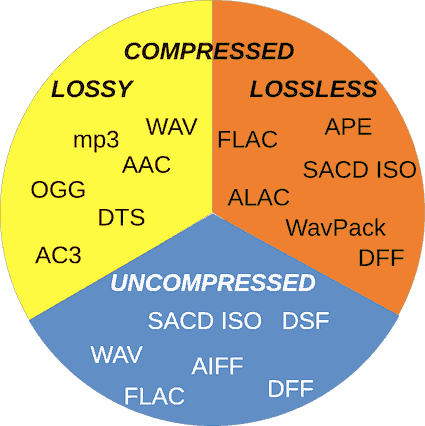
Let’s start by examining three categories into which all audio file formats can be grouped. They are determined by the degree of data compression and the associated loss of sound quality.

If a special algorithm (or codec) was not used to compress the audio in your file, this will lead to a double result: first, there will be no loss of sound quality, and second, you will soon run out of audio space. your hard drive.

In essence, the uncompressed recording is fully consistent with the original audio file, in which real sound signals are recorded in digital representation.

WAV, AIFF or FLAC: uncompressed formats
WAV and AIFF are the most popular uncompressed audio file formats. Both are based on PCM (Pulse Code Modulation), a well-known mechanism for directly converting audio to digital format. WAV and AIFF use similar technologies, but the storage methods are slightly different. CD-quality files and higher resolution files can be burned in these formats.

The WAV format was developed by Microsoft and IBM and is therefore used on Windows-based platforms; it is the standard CD recording format.

The AIFF format was created by Apple as an alternative to WAV; And while AIFF files are less common, they provide more comprehensive metadata support, allowing you to store album art, song titles, and the like.

The downside to these formats is that they require a large amount of memory. CD-quality files (16-bit, 44.1 kHz) occupy approximately 10 MB of disk space per minute of sound.

ALAC, FLAC, WMA Lossless: lossless audio formats
We all love FLAC. Lossless format, files in FLAC (Free Lossless Audio Codec, Free Lossless Audio Codec) are almost half the size of uncompressed WAV or AIFF files with equivalent sample rate, but in terms of sound, no loss of quality is noted. FLAC also supports higher resolution than CD quality, up to 32-bit and 192 kHz.

Besides FLAC, there are other lossless formats: ALAC (Apple Lossless) and WMA Lossless (Windows Media Audio). The former is a great alternative for iOS and iTunes, although the file size is slightly larger than FLAC. Not all smartphones and tablets support it.

AAC and MP3: lossy audio formats
Who has not heard of MP3? Everyone has heard of him. This most common audio format is convenient for storing music on iPods or tablets and is compatible with almost any device. However, this requires the sacrifice of a significant amount of information. To reduce file sizes by an order of magnitude compared to CD-quality recordings, a significant percentage of the original data needs to be discarded, leading to a loss in sound quality.

The bit rate at which the MP3 file is recorded also affects the sound quality. 128 kbps MP3s lose more information than 320 kbps files (this means “kilobits per second”, where each “bit” is essentially a small part of a song). Given the steep decline in memory costs, there is no reason these days to listen to files at 128 kbps; 320kbps MP3s make sense with limited storage space and are also still the standard format for downloading files from online stores.

Another lossy format, AAC (Advanced Audio Coding), also offers compression like MP3, but thanks to slightly more efficient algorithms, it provides better sound quality. AAC is used for iTunes downloads and Apple Music (256 kbps) streams and YouTube streams.

The Vorbis format, often referred to as Ogg Vorbis to emphasize the use of the Ogg container, is an open source, patent-free alternative to MP3 and AAC. This 320 kbps bit rate format is used in Spotify streams.

If you plan to use lossy formats, consider the following fact: increasing the number of “bits” generally leads to an increase in sound quality, but it is highly dependent on the efficiency of the codec with which the file is converted. If most of the music in your collection is encoded at 128 Kbps, you may have noticed that despite the fundamental similarity in sound, due to the low efficiency of the codec, MP3 files are likely to be somewhat audible. worse than AAC or Ogg. Vorbis.



Free Download Mp4Gain
picture


Mp4Gain Main Window
picture


Mp4Gain Features
picture


Free Download Mp4Gain
picture

Lossless Audio Compression Part 3

Analyzing the main audio formats

Audio File Formats

As you organize your digital music collection, you can dive into a variety of audio file formats. Almost everyone has heard of MP3, but what is OGG, AIFF, or MQA?

audio formats

If, after reading the list, you have the suspicion that all these formats for obtaining such chic abbreviations were studied in different universities, we will help to dispel it. This material will clarify the essence of some popular music formats, the difference between them and why it is important to know them.

Regardless of what you’re listening to – low-bit-rate MP3s, slightly better tracks in AAC, or high-resolution audio in FLAC or WAV – it’s time to find out exactly what you’re getting in each case and how to choose the optimal format.

Let’s take a look at the pros and cons of each.

A quick overview of file formats and codecs

In order not to beat around the bush, we’ll provide a quick guide to all file formats and the differences between them at first. If you want to know more, here is a more detailed description of the differences in size, sound quality and compatibility.

AAC (not a high resolution audio format). Apple’s popular alternative to MP3. Compressed and lossy, but with higher sound quality. Used to download from iTunes and stream from Apple Music.

AIFF (high resolution). Apple’s alternative to WAV with more complete metadata. It is not an uncompressed and lossy format very popular with large files.

DSD (high resolution). One-bit format used in Super Audio CD. Available in 2.8 MHz, 5.6 MHz and 11.2 MHz sample rates. Due to the use of a high quality codec, it is currently not used for transmission. Uncompressed format.

FLAC (high resolution). Lossless compression format supporting high-resolution supporting sample rates and metadata storage; the file size is half that of WAV. Due to the absence of royalties, it is considered the best format for downloading and storing albums in high resolution audio. Its main drawback is the lack of support for Apple devices (and therefore incompatibility with iTunes).

MP3 (not high resolution audio format). Popular compression and lossy format with small file size and far from the highest sound quality. Convenient for storing music on smartphones and iPods.

MQA (high resolution). Compressed format for storing high resolution files in an easier way to transmit. Used by the Tidal Masters service for high resolution audio streaming.

OGG (not high resolution audio format). He is sometimes referred to as his full name: Ogg Vorbis. An open source alternative to MP3 and AAC that is not covered by patents. This 320 kbps bit rate format is used in Spotify streams.

WAV (high resolution). The standard format in which all CDs are recorded. Great sound quality, but large files due to lack of compression. Weak support for metadata (versions, song titles and artists).

WMA Lossless (high resolution). An uncompressed version of Windows Media Audio, the compatibility of which is no longer often found on smartphones and tablets.

What is the highest quality music format right now? PART 2

What is the highest quality music format right now? PART 2

Audio Files Formats

CD discs

audio file formats

The audio CD format, or rather the .cda extension, appeared around the same time.

Unlike “wave” files saved on the hard disk, they cannot be edited. Today it can be opened in an audio processing program, reformatted by audio transcoding, and saved anywhere other than on a CD.

After specifying the output format and the device we will play them on, the conversion will begin. For all these tasks, we only need to drag and drop the elements that we are working with in its user interface. For example, if we are playing a file at twice the speed, an easy way to interpolate would be to play one sample out of two.

If you place the object at 50% pitch, you should double the number of samples, and an easy way to do this is to find the average of the two actual samples. Well, this signal needs to be decompressed, and this requires a proportionally higher CPU load that can “saturate”. And a less saturated processor means less risk of “hang.” We will analyze the most popular compression formats that will allow us to compress any file without losing information. What is fast? The most powerful?

MP3 codec
With the advent of the LAME MP3 Encoder codec, the music industry experienced a real shock, because those files “weighed” dozens of times less than the same WAV file. Even a five minute compose at full compression rarely exceeds the size of 5-7MB. Agree, a significant advance, not to mention the fact, allowed not only to adjust the above characteristics, but also some additional parameters in the form of ID3 tags, which contained information, for example, about the artist, album name and tracks. , the release date.

What is file compression? What does squeeze mean?
And the most used? Have you ever come across a file that was too busy and you didn’t know how to make it work less, like mail it to a friend? Compressing the file allows us to reduce the size of the file. It will take up less space on your hard drive and it will be easier to send. Depending on the type of file used and the type of compression, its size will be reduced more or less.

What compression formats are there and which are the most popular?
As we just said, there are several types of compression methods. For example, it is a compression method used to compress video, audio, or image files. The main characteristic of this compression method is that by compressing approximations, the media file is reduced in size. This method looks for repeating patterns in addition to other more advanced methods. This is achieved by reducing the file size without loss of information or quality, although obviously the file size is not reduced. Unlike the previous case, this information is not lost. … When it comes to compression formats and methods, we have a wide range.

This type has become the most popular. Look, almost the entire Internet is full of this universal format. In general, we can say that the MP3 audio format has become a true revolution in sound. It remains one of the most popular and in-demand so far, even though it is being replaced by other types of audio. But more on that later.

A Guide to Choosing Audio File Formats: The Present Century and a Bit of the Past
.
FLAC, APE, ALAC and all, or just lossless
Formats from another planet: WavPack, Opus, MPC and other scary lyrics
FLAC vs MP3
So what should I do?
Introduction
As always, I’ll start with the senile complaints. Twenty years ago … In fact, twenty years ago there was no particular option. Because there were CDs that were turned into WAV files that took up the space of an average “hard drive”, well, there was quite a bit of space left in the operating system. And on the BBS. And the games. And in the archive of files. And that’s it. Because the average size of a hard drive back then was a whopping 850 megabytes today. Yes, exactly that 850, and exactly one megabyte. The impetus for everything was given by the appearance of the MP3 format in 1997, and it was a very significant year!

What is the highest quality music format right now?

What is the highest quality music format right now?

audio format

The first audio format in computer games

Audio Format

The first mention of computer sound came from the creation of primitive games at the time, in which sound was played through the system’s speaker. But no matter how hard the developers of such software (software) have been, the required quality, compatible with tape or reel recordings or recorders, could not be achieved.

High definition digital music has been around for a long time. Why does it seem that it is now catching on? In addition to traction, they can have devices like one, the answer on the market. The author of this disappearance does not have to look very far. Except in special cases, most of the users are more than enough for their smartphone to listen to music. Even players that have settled down, you see, they reduce the ground they hit year after year.

That is why many manufacturers are looking for a solution on how to change the audio format so that the sound is natural. Frankly, this has led to more competition than we have now. This applies not only to the material being played, but also to studio sound, live performances, quality or basic parameter settings in terms of knowledge of physics, acoustics, etc.

We come to the millionth question. This requires a sensitive ear and some education. If you’re a high-profile foodie, you’ll probably know the difference first, but for ordinary mortals who only listen to music with a background meter, it’s probably too hard to pay the difference just to have that kind of quality.

It is not just a music player. Those that combine with this equipment are not cheap. To top it all, there is music that is sold in high definition formats, which is also a bit more expensive. Finally, this is the technical section. There is not even consensus among audio professionals themselves on whether these devices make such an important distinction. At least on paper, it seems that HD music sounds better, but there is a strong marketing component behind it. Are we willing to pay to see the audience as music lovers?

The appearance of the WAV format
It is believed that the first full quality of audio formats was associated with the appearance of the standard and the .wav file extension (this abbreviation was formed from the English word “wave” or wave). Anyway, he became the first-born that could be processed into computer programs on a professional level.

As is usual in most multimedia files with which we work almost daily, we link to video with photos or audio files, depending on the type of use that we are going to make of them, we must use them in a specific format, so It is also important to know the main differences between them.

But this is what we are going to talk about, these are some alternatives that we are going to present to you and that will be very helpful when it comes to testing and converting the different types of audio files that we usually find. If you want to know the main differences between the two, we recommend that you take a look at this post that we offer you.

Advanced Audio Formats Part 2

Advanced Audio Formats Part 2


DTSaudio formats

DTS – Digital Theater System, in fact, is Dolby Digital, or rather its competitor. DTS uses a lower compression rate than Dolby, so it actually sounds better, as evidenced by DVDs that have DTS or DD tracks. DTS in home theater systems uses a maximum bit rate of 1536 kbps (full bit rate), this sound is better than Dolby Digital’s AC-3 format. DTS – Uses 6 free audio tracks and supports 7.1 sound distribution system, with this DTS 4.0 bit rate – it will sound as immersive as Dolby 5.1.

AIFF VS FLAC

FLAC

FLAC – (Free Lossless Audio Codec). Unlike lossy codecs (MP3, Ogg, and AAC), it does not remove any information from the audio stream and is designed for listening to music on high-quality Hi-Fi and Hi-End equipment and for archiving a professional audio collection. Currently, the FLAC format is supported by many audio players and music applications. The basic decoder uses ID3v1 and ID3v2 tags to store basic types of metadata, so they can be freely added and edited.

SUNSARA
Varicose veins disappear without a trace in 10 days!
MORE INFORMATION →
MIDI

MIDI: (Musical Instrument Digital Interface), unlike other formats, MIDI does not store digital sound, but sets of commands: notes played, links to instruments, sound parameters. The convenience of the MIDI format is to use a device that is arranged according to the indicated chords. Midi files are typically several orders of magnitude smaller than digitized audio of the same quality. The MIDI format is versatile and designed so that any sequencer can read and write data without loss. At the same time, MIDI information that is incomprehensible to other software applications does not lead to misunderstandings, but is simply ignored. The mid-year backing track format allows you to save information about the instrument used, the tempo, the size designation, the information about the musical keys, the name of the track and the patterns and their number.

MP3

MP3: (MPEG Layer version 3) At the moment, MP3 is the most popular digital music encoding format. MP3 is a lossy compression format, that is, part of the audio information, according to the psychoacoustic model, the human ear can barely perceive is removed from the original file, irrevocably. The debate on MP3 quality still continues … First, the quality of the resulting MP3 depends not only on the bit rate of the compressed file, but also on the version of the encoding program used: the codec. Many music gourmets prefer to compress music with “maximum quality” – 320 kbps, or switch to other formats, for example FLAC, where the average bit rate is ~ 1000 kbps. At the moment, MP3 is the leader in universal recognition, but at the same time it is not a professional format in terms of technique. Professional musicians and DJs no longer use tracks with a bit rate lower than 320 kbps.

MODIFICATION

MOD is a format designed for the Amiga platform. Each MOD file contains digitized recordings of actual instrument sounds, called samples, somewhat similar to the structure of MIDI. Cj or a composer who writes in the MOD format uses a program called a tracker, in which he specifies what instrument, at what time, what note and octave should sound; This sequence of notes is written in a list; one track and several tracks. sounding in parallel forms a block called a pattern. The pattern collection forms a module: a file in MOD format, with the extension .mod. A track bar corresponds to an actual channel in which cj can play or edit numbered notes. Notes can be assigned various “patterns”, for example: tremolo, glissando, and so on.

OGG

OGG – Vorbis was developed in 2002 by the Xiphophorus team as an alternative to all paid licensed audio formats. Ogg Vorbis is compatible with all popular platforms. The format does not restrict the user to just two channels of audio (left and right), it supports up to 255 separate channels at a sample rate of up to 192 kHz and up to 32 bits, making Vorbis ideal for encoding DVD-Audio of 6 channels. home theater audio.

Advanced Audio Formats

Advanced Audio Formats

audio formats

Various physical methods have been developed to store audio data for these purposes, such as vinyl records, magnetic tape, CD, DAT, MD (minidisc), DVD, or converting music scores to music (MIDI), in the same way.

Audio File Formats

Many different computing methods have emerged. Audio data storage – digital: OGG, Mp3, Flac, Wav formats.
It is impossible to consider and discuss all audio formats, codecs, their advantages and disadvantages, so in our article we will try to talk about the most popular audio file extensions that you may have to work with.
Why can’t we use any universal audio file encoding format?

Because for the implementation of various functions, a different format is required. For example: to play CDs in a CD-ROM drive, to record music or sound effects in video games, to record a movie track or video clip, to play on mobile phones or transfer files over the Internet, in addition, there are a number of of operating systems that are the most used in the world. These include: Amiga, Macintosh, NEXT, and Windows personal computers. Also, the job of a dj, sound engineer, cj, video engineer, or a simple music lover is quite different in nature. This may require that your audio data be saved in your own way. For example, the audio on a CD must be saved using 16 bits and a sampling frequency of 44.1 kHz. However, to download sound over the Internet, it is better to use a different bit depth and sample rate, as each minute of 16-bit, 44-kilohertz audio takes about 10MB. those. an average 5 minute track will be 50 “meters” – this is too much information for the average user. This article presents brief information on the most popular music formats.

AA (audible audiobook file)

AA (Audible Audio Book File) is a proprietary format developed by Audible. It is used to record audiobooks that are sold through the Audible and iTunes services. It is possible to reduce or accelerate the speed of listening to files: digital tone, the ability to leave bookmarks when listening to audiobooks, file protection, when delivering sound recordings over the Internet.

AAC (advanced audio coding)

AAC (Advanced Audio Coding) is an audio file format with less loss of quality when encoding than MP3 in the same sizes. Lossless music encoding of original quality using the ALAC profile. AAC is a family of MPEG4 audio coding algorithms. Unlike the hybrid mp3 filter bank, AAC uses MDST (Modified Cosine Transform) technology, which means that the listener gets better sound quality than MP3 encoding with the same or lower bit rate. Possible AAC file extensions: .m4a. m4b .m4p.

AIFF

AIFF – This is the audio data format for the Apple Macintosh platform. The .aiff format supports 8- and 16-bit mono and stereo. If files in this format contain a Mac-Binary header (text, photos, copyright holder information, a single number, etc.), then the file will have the extension .snd. You can listen to an audio file with the extension .nd using Sound Forge. Forge will, of course, open such a file, but it will recognize it as a Macintosh resource format and it will not affect sound quality.

APE (mono audio)

APE – (Monkey’s Audio), developed by Matthew T. Ashland is a lossless digital audio format. Monkey’s audio codec is released for Microsoft Windows platform only, although there are several unofficial codecs for MacOS, Linux, BeOS Monkey’s audio files use the following extensions: .ape to store audio and .apl to store metadata This format is not free as its license severely restricts the distribution of .ape files.

Highest quality audio format. Part 3

Highest quality audio format. Part 3

Audio Formats

Music formats: which is better

audio file format

What devices support it?

There are several formats that support high definition music. The quality of each format may vary depending on how it was recorded and at what frequencies.

There are many other brands that are already flirting with portable devices that are supposedly capable of HD audio. It is good to note that it is not enough to play high resolution audio with the file. It requires adapted audio electronics and is compatible with these frequencies and bit rates. Of course, a high-end output device is also required.

The first audio format in computer games
The first mention of computer sound came from the creation of primitive games at the time, in which sound was played through the speaker of the system. But no matter how hard the developers of such software (software) have been, the required quality, compatible with tape or reel recordings or recorders, could not be achieved.

High definition digital music has been around for a long time. Why does it seem that it is now catching on? In addition to traction, they can have devices like one, the answer on the market. The author of this disappearance does not have to look very far. Except in special cases, most of the users are more than enough for their smartphone to listen to music. Even the players that have settled down, you see, they’re reducing the ground that they hit from year to year.

That is why many manufacturers have started looking for solutions on how to change the audio format so that the sound is natural. Frankly, this has led to more competition than we have now. This applies not only to the material being played, but also to studio sound, live performances, quality or basic parameter settings in terms of knowledge of physics, acoustics, etc.

We come to the millionth question. This requires a sensitive ear and some education. If you’re a high-profile foodie, you’ll probably know the difference first, but for ordinary mortals who only listen to music with a background meter, it’s probably too hard to pay the difference just to have that kind of quality.

It is not just a music player. Those that combine with this equipment are not cheap. To top it all, there is music that is sold in high definition formats, which is also a bit more expensive.

Finally, this is the technical section. There is not even consensus among audio professionals themselves on whether these devices make such an important distinction. At least on paper, it seems that HD music sounds better, but there is a strong marketing component behind it. Are we willing to pay to see the audience as music lovers?

Highest quality audio format. Part 2

Highest quality audio format. Part 2

audio file formats

Music formats: which is better

Audio File Format

For comparison, I will give information about the Wav format, which supports high-quality sound. With a sampling frequency of 44100 Hz, its bit rate is 1411 kb / s and 1 minute of a file recorded in this format occupies approximately 10 m of hard disk space.

So what are the most common audio formats today?

This group of formats records and compresses audio in a way that preserves its exact original quality when decoded. In lossy compression, the sound undergoes some modification. For example, compression cuts audio frequencies that are not audible to the human ear. When decoded, the file will differ from the original in terms of the information stored in it, but it sounds almost the same.

Learn more about the most common audio formats.
Some of the most common loss formats. However, this has been compromised by some independent tests. It generally provides better sound quality with the same file size. The sound sequence does not change and the sound encoded in this format is identical to the original. It is often used to reproduce sound in high-quality audio systems. Playback compatibility on devices and players is limited, so it is often converted to other formats if desired before playing on the player.

AAC (advanced audio coding) – other names – MPEG-2 AAC and MPEG-2 NBC. Evolution of MP3 files. With a lower bit rate, they are not inferior to MP3 quality.
AIFF is a file format for Mac OS, uncompressed data. High quality sound.
ASF (Advanced Streaming Format) is the standard format for Mac OS. Large file size with high sound quality comparable to AudioCD.
AudioCD (CDA): analog audio, high quality sound.
FLAC (Free Lossless Audio Codec) is a free audio codec that compresses audio by up to 50 percent without losing sound quality.
Liquid Audio (LQT, LA1) is a secure format for paid music downloads over the network.
MP2 (MPEG-1, Layer2) is a legacy audio format, predecessor of MP3.
MP3 (MPEG-1, Layer3) is an audio format that provides acceptable sound quality with a high compression ratio. One of the most popular formats in the world.
VQF is an audio format, an outdated analog of MP3.
WAV is a standard Windows file, high quality sound is supported. It takes up a lot of disk space.
WMA (Windows Media Audio) is an emerging format from Microsoft. With smaller file sizes and lower bit rates, it is not inferior to MP3 quality.

As a rule, today the term “audio” refers to everything that is connected with sound, whether it is playing, processing, mixing, mastering or listening to recordings. But few people know that audio formats since their inception have constantly undergone many significant changes, sometimes for the better and then for the worse. The problem is that, compared to the original formats, the creators of the new formats tried to improve the sound quality, and this invariably affected the size of the played file. Downsizing, on the contrary, led to a loss of quality. But it was not always like this.

Highest quality audio format

Highest quality audio format.

audio format

Music formats: which is better

audio format
In this article, I want to give an incomplete list of the most common music formats. With some we are more familiar, with others less, for example, those who use the Windows operating system on their computer are practically unfamiliar with the AIFF file format for Mac OS, an analog of the more famous WAV format. But that is not the point

Today there are “very many” music formats, they differ from each other by different sound compression algorithms, while the compression ratio itself is expressed by a concept such as the bit rate.

Uncompressed formats are not compressed. They simply unfold during opening. Although the size of these files is usually very large. The downside of lossy compression files is that it removes some data from the original file. But the advantage is that they are smaller, open faster and take up less space.

Lossy files can have a high or low resolution depending on the compression ratio. The higher the quality, the less information will be lost. The bit rate corresponds to the information processed per second. A higher bit rate means more information per second. And more information per second means better sound. Now you understand the basics of compression, file types, and bit rates, right?

The lower the bit rate, the poorer the sound quality of the compressed and recoded file. The audio bit rate is measured in kilobytes per second. To make it clearer what sound is, depending on its bitrate, the following table sheds light on this problem:

800 bps – 800 bps is the minimum quality for speech to be recognizable.
8 kbps – 8 kbps – the quality of telephone voice transmission.
32 kbps – 32 kbps – AM quality.
96 kbps – 96 kbps – FM quality.
128-160 kbps – 128-160 kbps – quality standard.
192 kbps to 192 kbps digital streaming with DAB quality (digital audio streaming). Becoming the new standard for MP3 music. At the same time, the bit rate, only professionals can tell the difference in sound.
224-320 kbps – 224-320 kbps – quality close to CD quality.
1411 kbps – 1411 kbps – PCM audio format, similar to CD “Compact Disc Digital Audio”.

Of course, it is necessary to remember and understand that the sound will depend on another characteristic of digital sound, such as the sampling frequency, which is responsible for representing the spectrum of the signal.

If we talked about each of the audio formats, we would be here all day. Of course, you have other responsibilities and a lot of music to produce. This is the best use for each of these formats. They take up a lot of hard drive space. For one simple reason: it has the best of both worlds.

They are compressed, which makes them easier to handle in terms of size. But they also offer a nice, rich sound. If you’re listening to streaming music, chances are you are. They are useful for transferring multiple files at the same time, browsing an entire directory, or quickly sharing and linking tracks.

8,000 Hz: telephone, enough to talk, Nellymoser codec;
1,025 Hz;
22,050 Hz – radio;
44 100 Hz – used in audio CDs;
48,000 Hz – DVD, DAT.
96,000 Hz – DVD-Audio (MLP 5.1)
192,000 Hz – DVD Audio (MLP 2.0)
2822 400 Hz – SACD Super audio CD 5.1
The most common format, especially on the Internet, is MP3. It uses a compression algorithm that minimizes the loss of sound quality and reduces the size of the data required to reproduce the recording and ensure the quality of the reproduction. The file size depends on the compression ratio, so when you create an MP3 at an average bit rate of 128 kbps, the result is a file that is approximately 1/10 the size of the original CD-Audio file.

By the way, don’t forget any format.
Try and judge for yourself. Choosing the correct format depends on each context. So think about what kind of sound you are sharing and where you are sharing it. Are you using the correct format? So make smart decisions and use the correct format. Digital audio can be saved in various formats. Each of them corresponds to a specific file extension that contains it.

It is not an audio format itself, so its functions are discussed separately. There are a large number of audio formats. Typically, the format type matches the file extension. Certain types of files are assigned a specific codec. In simple terms, the format can be compared to a container in which a video or sound signal can be stored using a given codec.

Choosing the best format to compress audio data: MP3, AAC or WavPack? Part 2

Choosing the best format to compress audio data: MP3, AAC or WavPack? Part 2

Audio File Formats

The square wave after conversion to AAC retains its shape, although base distortion and harmonics around the 1 kHz peak also occurred, albeit less noticeably than in MP3.

Music File Formats

At the same time, the AAC demonstrates a 1 dB higher measured noise level. What would that mean, an intermediate recording on a cassette, or what? No, the AAC algorithm sure uses something like noise shaping, a great invention that allows you to reduce quantization errors when mixing a pseudo-random noise signal. Again, this isn’t just about drowning out the distortion below the noise floor; more sophisticated math is applied here.

To illustrate, let’s look at the artifacts around the so-called 11.025 kHz jitter test. Why this particular frequency? Because the multiple harmonic of this peak falls exactly on the upper limit of the spectrum of the 44 kHz sampled digital stream, and all the rest will be outside of it. Small spurious peaks, especially those that are symmetrical with respect to pitch (modulation products, “sidebands”) – these are the grains of fluctuation.

Stability in AAC (top) and MP3 (bottom) jitter testing

As you can see, Fool-MP3 saved a low noise level, but generated more high frequency fluctuations (more perceptible to the ear), and AAC increased the noise a bit, but avoided clutter in the rest of the spectrum. But the WavPack encoder does even bigger tricks with noise shaping.

WavPack: keep frequency, change bit width
In general, if it is immediate and very short, then the WavPack encoder math today belongs to the most flexible and cool protocols for audio enthusiasts, no joke. Unlike FLAC, it can support 32-bit computation (I recommended it for creating lossless vinyl rips). Also, in WavPack you can even package a DSD file without converting it to PCM. In this case, the size of said file will be much smaller than the original dsf. But we will talk about lossless WavPack later, but for now we will consider the unique working principle of lossy WavPack codec.

In one of my reviews, I showed that in several cases, when compressing at a loss, it makes sense to reduce not the sample rate, but directly the bit depth of the signal (i.e. below 24 or 16 bits), carefully mixing the dither (that is, a special noise profile to reduce quantization errors). WavPack went in exactly this glorious way, without touching on discretion and frequency in general, but changing the bit depth, which is now a dynamic value, describing the loudness level of the signal. A bit like the DSD principle, right?

It is noteworthy that when converting to a lossy WavPack, you can also save a parallel “correction” file, with which you can fully restore the original, down to the last bit. However, in this case, you will not be able to save disk space, since the size of that pair will still correspond to the original without loss. However, the functionality of the protocol is still impressive.

The bitrate of our test file was set at 320kb / s to compare it to the maximum of our MP3 and AAC, but theoretically it can be set higher in WavPack. This is especially useful for highs, I’ll show you how later, and MQA is no longer needed!

Harmonic distortion comparison of original (green) and lossy WavPack encoded file (white). The noise level has increased slightly and there is almost no distortion.

In the graphics, the lossy WavPack demonstrates the commendable lack of a harmonic fence that the previous two encoders had run into due to the aggressive psychoacoustic model. There are no such nifty algorithms in WavPack, nor are there any frequency response filters; only dynamic signal level weighting works for a given bitrate, and that’s it. As a result, the 1 kHz test gives only a few odd-order harmonics: 3rd, 7th, 9th, and so on. The frequency range is preserved, also the square wave. In the 11 kHz jitter test, in the rest of the spectrum, except for the increase in noise, no parasitic activity was observed.

In jitter test with 11025 Hz tone, lossy WavPack is all clear

For the listening experience, I have selected a couple of fairly loud and well written phonograms, which you can also download and listen to in three lossy encoding variations with a 320 kb / s bit rate: MP3, AAC and WavPack. In the same place, in these two files, the standard CD FLAC originals with 16 bit / 44 kHz resolution will be attached.