Constant bit rate (CBR) vs variable bit rate (VBR), which one should you choose?


Free Download Mp4Gain
picture

Constant bit rate (CBR) vs variable bit rate (VBR), which one should you choose?
CBR vs VBR

How do you save memory when encoding in VBR?

CBR & VBR

What type of encoding to choose: variable or constant?
If you want to rip music from CDs or other media where it is stored uncompressed in lossy formats like MP3, WMA, AAC, and others, you have to choose what bit rate you will do it with. Constant (CBR) or variable (VBR).

Constant Bit Rate (CBR) encoding method

CBR (Constant Bit Rate) – When encoding in CBR throughout the music file, the bit rate will remain unchanged and equal to the value you selected.
The most common values ​​are: 128, 192, 256, 320 kbps.

The advantage of CBR encoding is that the file will be processed faster, both when encoding and decoding. Also, absolutely any program or hardware that is capable of playing music from MP3, WMA, AAC formats can do it if it is encoded in CBR, which cannot be said for the variable bit rate. Older hardware or software is not always compatible with CBR music playback.

However, it should be noted that CBR encoded music eventually takes up more memory than the same VBR encoded music.

Very often, CBR encoding is used for those cases where it will be transmitted over the network or when it is known in advance that it will be played on older equipment.

A constant bit rate is important for the music that will be streamed over the network, as the data flow will be stable and if it is within the bandwidth of the network channel, the playback will be smooth, without jerks or interruptions. . But if you stream music compressed with a variable bit rate, difficulties can arise when a part of a song that is encoded with the maximum bit rate does not pass the channel bandwidth, causing gags during playback.
Back to content

Variable Bit Rate (VBR) encoding
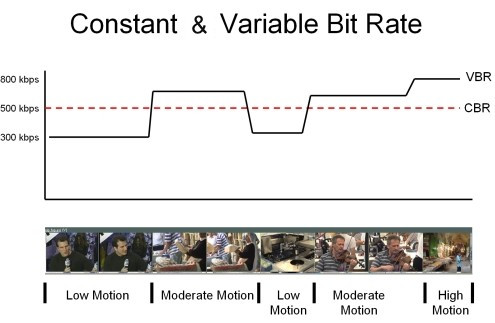
VBR (Variable Bit Rate) – When encoded in VBR, it is not constant but constantly changes as it is played.

This encoding method allows you to increase the bit rate in difficult musical sections and decrease it in simpler musical sections, allowing the quality to remain roughly the same level, but at the same time saving memory space.

VBR is used successfully and is compatible with most formats and software.

VBR Supported Formats: MP3, WMA, OGG, AAC and others.

The main advantage of variable over constant bitrate is to save memory space for storing music.

When encoding in VBR, more complex and resource-intensive algorithms are used, so playback requires more computing power from the device. For this reason, some older computers may not play music from VBR.
Back to content

How do you save memory when encoding in VBR?
Compression algorithms analyze not only the sound itself, but also its complexity, breaking it down into elementary components. Therefore, complex areas of music, where many instruments play at the same time, or the sound of an instrument often changes its pitch and volume, are encoded with the highest quality. But if simple seconds appear in the music, or if there is silence at all, these pieces are encoded at a much lower bitrate.

Due to this approach, memory savings are achieved.

But you should always remember that the main disadvantage of VBR is the inability to play music on old hardware or old software.
Back to content

What type of encoding to choose: variable or constant?
If you are absolutely sure that your encoded music will play on modern hardware, I recommend using a variable bit rate.

If your music will be played on a wide range of computers, it is best to play it safely and encode it at a constant bit rate.

All phones, players and computers that have been released in the last 10 years should support VBR playback without any problem, so in the vast majority of cases I recommend using VBR.

In this way, the music will take up less memory, but at the same time it will retain high quality.

It is especially important to use VBR if the music will be stored on portable devices such as mp3 players or phones. Although a large amount of memory has been incorporated lately, it is desirable to use it sparingly.



Free Download Mp4Gain
picture


Mp4Gain Main Window
picture


Mp4Gain Features
picture


Free Download Mp4Gain
picture

Difference between vbr and cbr

Difference between vbr and cbr

CBR and VBR

Bitrate (English): means the value (number) of bits that are used to record or transmit multimedia material that lasts one second. When multimedia content (audio and video) is fixed in MP3 format, it is compressed block by block using certain procedures (algorithms). And these algorithms are divided into types based on the bit rate (its value). Each of these blocks (frames) is assigned from thirty-two to three hundred and twenty bits.

VBR vs MBR vs CBR

Coding
The VBR, CBR and ABR algorithms used to encode in MP3 format do not provide complete quality preservation, it is lost. However, this can only be felt when viewing (playing) only on high-quality equipment.

For the non-professional look, material recorded with VBR, CBR, and ABR mechanisms will be of fairly high quality.

Let’s analyze the differences in the VBR, CBR and ABR algorithms to know which of them is correct to use for recording and later storage or transfer of files. Which is better for quality or for other tasks.

Constant bit rate
As the name implies (constant – constant, English), in this version of the algorithm, a constant number of bits per second of material is assigned. All blocks are equal to each other.

By using CBR it is possible to know in advance the size of the source file or the width of the sequence. This is important for transmitting information over channels with limited width.
Constant Bitrate Algorithm

Applying such encoding is not ideal:

When recording empty segments, the consumption of the selected bits remains the same;
when recording complex fragments, for which, in principle, it would be worth allocating more space, the bit rate, again, remains set.
The quality disadvantages of recording “difficult” sections are solved by increasing the bit rate, for example to a maximum of 320 kbps, but this increases the width of the transmission stream or the size of the file.

Variable bit rate
It is easy to guess that this type of method (VBR) is a variable (variable).

For such encoding, it is characteristic that the bit rate in this case changes during the encoding process by the codec program. And the bit rate in this case depends on the saturation of the audio or video material.

That is, when choosing VBR encoding, the program will select a lower bit rate to record an empty image and a higher bit rate to record saturated images or images that change quickly.
Variable bit rate algorithm

The negative aspect of this algorithm is the difficulty of anticipating the next changes. Increasing the recording bit rate will occur with a delay.

Furthermore, snippets that sound quiet are perceived during VBR encoding as unimportant snippets, and are assigned a minimum bit rate on this basis.

Therefore, CBR with a maximum of 320 kbps will provide better quality.

It is true that now VBR 2 Pass encoding has appeared.

Its essence is that the program first analyzes the multimedia stream (for the first time) and then makes a record, compressing it based on the data obtained during the primary scan. This results in the best quality and, in this sense, this encoding is better.

Average bit rate

Average is translated from English as average. This is a type of ABR, which is somehow a cross between VBR and CBR.

By choosing ABR mode, the user sets part of its value in kilobits per second. The codec can change it one way or the other, sticking to the set average value.

Average Bitrate Algorithm

The ABR method compares favorably with others in the allocated number of bits per second. You can choose absolutely any numeric parameter from 8 to 320. Whereas CBR encoding can only use sixteen times the value.

It follows from the above that if the size of the resulting file is important to the result, then for the highest quality it is better to take a close look at the ABR or CBR encoding.

What are CBR and VBR?

What are CBR and VBR?

CBR VBR

As you know, the result of encoding a signal using an algorithm such as MPEG-1 Layer III (MP3) (and many other algorithms) is a bit stream with a frame (block) structure. This is due to the fact that the source stream is not encoded in its entirety, but in parts. That is, in fact, the original stream is divided into blocks of some fixed length, then each block (frame) is encoded individually, and the result (encoded information block) is sent to the resulting stream (either a file or a stream of data).

CBR vs VBR

CBR (constant bit rate) is a way of encoding the original audio stream, in which all its blocks (frames) are encoded with the same parameters (with the same bit rate). In other words, the bitrate over the entire length (all frames) of the resulting stream is constant.

VBR (variable bit rate) is a method of encoding the original audio stream, in which each separate block (frame) is encoded with its own bit rate. The choice of the optimal bit rate to encode a given frame is made by the encoder itself by analyzing the “signal complexity” in each individual frame.

What are the differences between CBR, VBR and ABR for Lame Encoder?

Before starting the conversation, let’s clarify two details:

1. MP3 encoding happens block by block: the encoded file is divided into frames (frames) with the same interval, each frame is encoded and written to the output stream; therefore, the output stream also has a frame structure.

2. Frames cannot be encoded at any bit rate, but only at one of the standard MPEG1 Layer III bit rates listed in the table: 32, 40, 48, 56, 64, 80, 96, 112, 128, 160, 192, 224, 256, 320. The standard does not provide encoding at intermediate bit rates (“free format”).

Introduction

People using VBR in Lame often argue this with the phrase, “I want to get constant quality, not constant bitrate.” In fact, in music there are simple passages, for which 128 Kbps is sufficient (for example, pauses between songs), and there are also complex passages, in which a person with good hearing, a good audio card and other audio equipment. audio will hear compression defects even at 320 Kbps / sec. In fact, such an argument is not entirely valid.

CBR

Even in CBR mode, the mp3 encoder can reallocate bits over time, emphasizing more or fewer bits during complex or simple passages, thus improving the overall sound quality. This redistribution of bits is carried out at the expense of the so-called bit deposit: during the encoding of simple passages, the encoder spends not the entire user-specified bit rate on them, but only about 90%, about 10% is saved in the repository to encode complex locations (initially repository is empty). When encoding complex passages, the encoder will use 100% of the specified bit rate and add additional bits from the bucket (if any, that is, if the bucket is not empty). Unfortunately, according to the standard, the size of the tank is limited. This means that if a single signal lasts long enough, the tank builds its volume up to certain maximum allowed limits and then the encoding is already using 100% of the bit rate. And the opposite situation: if a complex signal lasts long enough, all the saved bits are taken from the repository (gradually) and then encoding is done using now 100% of the bit rate.

ABR: Explanation

You could say that the reservoir does a good job with its main function – accumulating “extra” bits during simple passages and issuing them as additional bits when encoding complex passages, if not for one “but”: it has a finite and additionally very limited size, which means that it can only be stored up to certain limits and consequently also until the tank is empty. It is in order to eliminate this major tank drawback that the ABR was developed.

The main difference between ABR and CBR is that in CBR all frames must be the same size (that is, the bitrate for all frames must be the same), but in ABR this restriction is removed, respectively, there is an opportunity to use an almost infinite tank instead of the standard, very limited in size. “virtual” reservoir. Does it look like this.

ABR: mechanism

Suppose user specified ABR mode and a certain bitrate B (user can specify absolutely any bitrate from 32 to 320, even not from standard bitrate grid, for example you can specify 129 as the rate Average Bit Rate). AND