
Audio compression formats
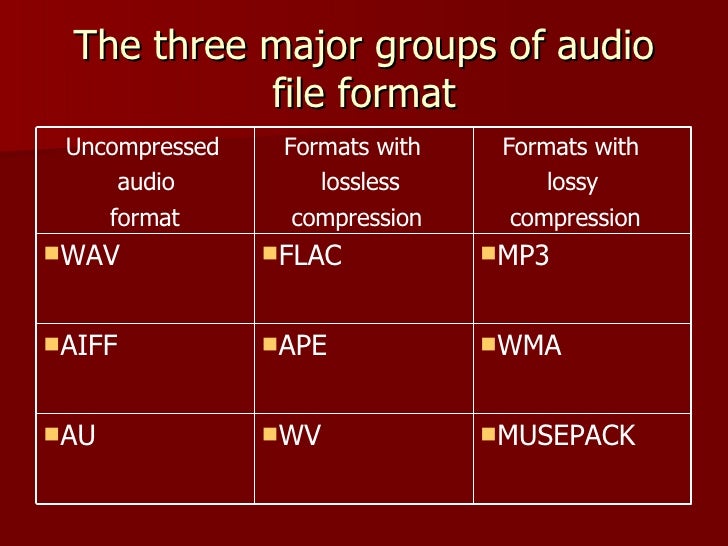
Now there are many audio compression formats that were originally developed for a computer, but later migrated to home appliances. Some of them are outdated and practically unused, some have appeared recently and have not had time to occupy their niche yet. Here I will focus only on the lossy compression formats that allow you to achieve the highest degree of compression of the audio data. What does “lossy compression” mean? Only after encoding from a .wav file to a compressed format, and then re-encoding from a compressed format to a .wav file, the original file and the final file will be different. Maybe not for the better.

The compressed audio format means that there is practically no change in sound quality, despite the decrease in file size by several times. How do you manage to achieve such a result? The science of psychoacoustics answers this. The human brain is designed in such a way that we do not notice the whisper of books in the background of a conversation, although on a computer, with close listening, we can track this sound. So it turns out that it looks like it is, but it looks like it isn’t …
The combination of conventional data compression methods and the knowledge of what information is perceived by our brain and what is not, allows you to achieve a music compression ratio of up to 10 times with an acceptable sound quality. Below I have provided a brief overview of the most common and well-known music file compression formats that could be used to create a home music collection.
MP3
MPEG 1 Layer III (less often MPEG 2 Layer III), also sometimes called by people as incompetent MPEG 3 (this format does not exist), has been for many years the only association with the phrase “computer music” for many users. Developed in the late 1980s, the format, which allowed music to be compressed up to 10 times without a catastrophic loss of quality, quickly took root in home computers.
The optimal compression bit rate is approximately 192 Kb / s. Although everyone’s ears are different: someone distinguishes distortions better, someone worse. A decent minimum is 128 Kb / s. It is possible to use a variable bit rate. That is, at the moment when the range of sound frequencies is small, the bit rate decreases, and when many things sound at the same time, then, on the contrary, it increases. A constant bit rate greater than 320 Kb / s is often excessive and causes a loss of space. Also, the MP3 file includes a specific area header Id3 tag. Contains basic information about the file. There are 2 different versions of this tag. The second, consequently, is more extensive, but nothing revolutionary has been added. The sound quality of an MP3 file can vary greatly depending on the selected encoder and player.
MPEGplus / Musepack (MP + / MPC / MPP)
This encoder is similar in principle to MPEG Layer II (MP2), but uses a more advanced algorithm. Unlike most modern codecs, the goal of the creators of Musepack was not at all to achieve the highest possible quality at low bit rates. The format is best displayed at medium and high bit rates (typical file bit rate is usually in the 160-180 Kb / s range). A superb psychoacoustic model that uses VBR encoding for excellent sound quality. As a result, the codec performs better than most of its competitors at similar bit rates. The quality of the files obtained when compressed in MPC significantly exceeds the quality of similar MP3 files. One of the serious shortcomings of the current version of Musepack is the limitation of the file format: 44 kHz, 16 bit, stereo, which makes it inapplicable, for example, to compress audio tracks for DVD movies. If MP3 compatibility is not too important to you and you want the highest quality from the final file, choosing Musepack may be the ideal solution. Using this format is a real alternative to using lossless compression to encode music from CDs for those who are already disappointed with the possibilities of the MP3 format. and it is desirable that the quality of the final file is as high as possible, choosing Musepack may be the ideal solution. Using this format is a real alternative to using lossless compression to encode music from CDs for those who are already disappointed with the possibilities of the MP3 format. and it is desirable that the quality of the final file is as high as possible, choosing Musepack may be the ideal solution.

