Everything you wanted to know about MPEG-4 / DivX, but were hesitant to ask Part 4


Free Download Mp4Gain
picture

Everything you wanted to know about MPEG-4 / DivX, but were hesitant to ask Part 4
DivX

DivX: 3.22

divx

In January 2000, the following version of DivX was created: 3.22 or 3.11 VKI (Variable Keyframe Interval). It has improved decoding algorithms and reliability. In May, DivX Networks was born, founded by Gej with former MP3.COM director Jordan Greenhall and Joe Bezdek. In July, DivX Networks launched the Majo project, which launched OpenDivX in January 2001. OpenDivX is incompatible with 3.11 and has nothing to do with it except name. In August 2001, DivX Networks released their own DivX 4.0 and they froze open source. Before version 4.12 of the codec, all previous versions were worse than DivX ;-).

In March 2002, the first commercial version of DivX 5.0x appeared. The free base option creates a video stream that conforms to the ISO certified version of the MPEG-4 format. While the commercial Pro version fully supports global motion compensation, B-Frames (encoded frames with two-frame support, B = bidirectional) and QPel (motion recovery method designation, Q = 1/4).

In the summer of 2003, DivX Networks announced the release of the 5.1 codec which, thanks to the technology implemented to evaluate visual frames, allows you to obtain better results with lower bit rates than with previous versions. This codec will improve the quality of movie playback on “weak” computers and consumer devices.

In 2004, the release of the DivX Q version is expected, which, according to the developers, should be twice as efficient as the current 5.1x.

In addition, DivX Networks plans to create a solution from a single source. It is planned to use our own development as a container for video and audio tracks (main reasons for incompatibility). According to DivX Networks, the AVI format provides the best storage option, but requires minor modifications. Licenses and audio format are being negotiated.

In parallel, an independent team based on OpenDivX created the less popular XviD format.

Audio formats in MPEG-4
The audio track in MPEG-4 can be mono, stereo, and even multi-channel AC3, which is used similarly on DVD. Supported sound formats: MP3, Ogg Vorbis, WMA, ACC, VGF, AC3 and others.

The most popular is MP3 (Very Evil Editor comment: it would be more correct to say MPEG-1 Layer3, but we must admit that the established name is still MP3). Currently, the pure MP3 is compatible with acoustic systems and all modern DVD players, the production of portable devices and car radio recorders that play MP3 has been launched. Thus, MP3 became the first massively recognized audio storage format after Audio-CD. Despite the fact that MP3 appeared a long time ago, the newer formats that claim their place have not yet been able to reach the same level of popularity. This also applies to the development of Microsoft’s WMA (Windows Media Audio) and VGF, a joint creation of Japanese firms NNT and Yamaha, and MPEG-2 AAC (Advanced Audio Coding – Advanced Audio Coding), one of the attempts to improve MP3.


Free Download Mp4Gain
picture


Mp4Gain Main Window
picture


Mp4Gain Features
picture


Free Download Mp4Gain
picture

Everything you wanted to know about MPEG-4 / DivX, but were hesitant to ask Part 3

Everything you wanted to know about MPEG-4 / DivX, but were hesitant to ask Part 3

MPEG VIDEO

Mpeg-4

mp4

Truly revolutionary is MPEG-4, which was officially completed in 1998. But since MPEG-4 is, in fact, a set of tools, they extend and complement each other. The last such additions to the standard were made in May of this year. It has become an extension of MPEG-1 and MPEG-2 and offers many innovative solutions, not all of which have found application in multimedia content and devices.

MPEG-4
The MPEG-4 standard was conceived as a way of transmitting transmission media, mainly video, over low-bandwidth channels. Unexpectedly, it gained popularity among users, thanks to the fact that it allowed to place feature films of one and a half hours to two in good quality on a single CD and to exchange video files on the Internet.

The MPEG-4 standard defines the principles for working with the digital representation of multimedia data in three areas: interactive multimedia itself (including products distributed on optical discs and on the Web), graphic applications (synthetic content) and digital television – DTV. . In fact, the format sets the rules for organizing the environment and the environment is object-oriented. It not only deals with streams and media matrices, but also with media objects.

With the same bit rate and certain encoding conditions, the image quality of a movie in MPEG-4 can be comparable or even better than when using MPEG-1 or MPEG-2. The video compression algorithm in MPEG-4 works in the same way as in previous formats. When encoding a source image, the codec saves keyframes and, instead of storing intermediate ones, predicts and stores only information about changes in the current frame relative to the previous one. The information obtained in this way is saved in a file. Sound compression is most often done in MP3, Ogg Vorbis, WMA formats. However, it is possible to use any codec, up to the six-channel AC-3 used on DVD.

The story behind DivX
The original DivX codec 😉 3.11 Alpha is a cracked version of MPEG-4 Version 3 (MP43c32.dll). The authors of the patch, known by the nicknames MaxMorice and Gej, published it in September 1999 on their website. It is no coincidence that the emoticon appeared in the title. At that time, the American company Circuit City was trying to commercialize the Digital Video Express (DIVX) Pay-per-View (Pay-per-View) video system. The business idea was to sell movies on CD, which would have been cheap but paid to see it again. Back then, hacking into the Digital Video Express security system was the target of many American hackers. Before this could be done, DivX disappeared from the market for financial reasons, and French programmers MaxMorice and Jerome “Gej” Rota immortalized it in the name of the new format.

Everything you wanted to know about MPEG-4 / DivX, but were hesitant to ask Part 2

Everything you wanted to know about MPEG-4 / DivX, but were hesitant to ask Part 2

DivX Video

Codecs

DivX and H.264

A codec (co dermatomyositis dec oder) is an encryption method and application for recording video data in a file, eg AVI, and decrypting the information, respectively, for playback of already recorded AVI files.

The most popular today is the commercial DivX codec. The non-commercial XviD competes with it (respectively, the name is the reverse spelling DivX).

Containers
During the widespread adoption of Windows 3.1x, Microsoft created an AVI container to store synchronous audio / video data. AVI stands for Audio Video Interleave. AVI is a container format that can contain compressed video / audio data using different codec combinations. So if MP3 and JPG files are obtained using only one type of data compression (MPEG Audio Layer 3 and JPEG), then the AVI file can contain several types of compressed data (for example DivX for video and MP3 for audio) . All AVI files look the same “on the outside” (they have the extension .AVI), but “on the inside” they can differ significantly.

A long time has passed since the creation of AVI, and today it is the most popular format for presenting videos. The rise in popularity was largely due to the advent of DivX.

MKV is less popular than the AVI container format. It got its name from the abbreviation of the Russian word “Matryoshka”, which symbolically reflects the principles of his work. The main advantage of MKV is its total openness. MKV has a number of advantages over AVI, however, according to the latest information, DivX Networks, which is a leader in the development and promotion of new formats, plans to use a new container, which will still be built on the basis of AVI.

History of MPEG
MPEG (Moving Pictures Experts Group) is the name of a group of ISO experts that develops standards for encoding and compressing audio and video data. Standards prepared by the committee receive the same name.

The first to appear on the market was the MPEG-1 standard. It was developed in 1992 to compress video to CD-ROM and formed the basis for Video-CD. The quality parameters of the video data processed by MPEG-1 are in many respects similar to ordinary VHS video, therefore this format is mainly used when it is inconvenient or impractical to use standard analog video media. The format has become widespread in Asia and has seriously replaced VHS devices.

In the MPEG-2 standard, compared to MPEG-1, multi-channel sound was added, image resolution was increased, and encoding quality was improved. As a result, MPEG-2 has become widespread in the DVD and satellite broadcasting industry.

MPEG-3 was supposed to be the new standard, but in the end it only slightly expanded the capabilities of MPEG-2.

Everything you wanted to know about MPEG-4 / DivX, but were hesitant to ask

Everything you wanted to know about MPEG-4 / DivX, but were hesitant to ask

Mpeg Video

Will MPEG-4 / DivX Hit the Consumer Fixed DVD Player Market?

Divx Mpeg4

For its fame and bad reputation, DivX should be grateful to hackers and the Internet. Thanks to this revolutionary format, movies can be distributed over the Web, and a good-quality two-hour video program can easily fit on a standard CD. So when it comes to DivX, publishing publishers are holding on to their hearts and asking journalists, “Just don’t write about how to beat DVDs in DivX, otherwise movie studios and media organizations. human rights start a heartburn attack. ” However, our article is about the fact that DivX is not only used by hackers.

Although the very origins of the format were the story of a hack, today DivX is rightly called “MP3 for video”. And just as MP3 found its place in the mobile entertainment and home electronics industry in its time, DivX is beginning to pave its equally successful path in this direction.

DivX is synonymous with the mobile and desktop digital video applications of the future. The format was recognized by renowned manufacturers, leaders in technology. Now it is being actively introduced into electronic devices, from stationary DVD players to mobile phones, from digital television devices to pocket PCs.

Major consumer electronics companies such as Sony, Philips and Matsushita are working to create a digital cinema standard based on MPEG-4. Several telecommunications operators use the MPEG-4 standard for video transmission over mobile networks. Devices based on specialized chipsets for DivX playback are now available on the market.

Misunderstandings with formats and codecs

As practice shows, there is always a lot of confusion around MPEG-4 and DivX. The most common mistake, Avi, DivX and MPEG-4, is the same. AVI and MKV are containers (file formats), that is, data storage and packaging. Whereas DivX or XviD are codecs, that is, encoding methods and implementation for recording video data to a file and decrypting information, respectively, for playing back already recorded files. MPEG, in turn, describes both the codecs and the storage methods.

Basic principles to reduce Redundant video data in the MPEG encoding process.

Basic principles to reduce
Redundant video data in the MPEG encoding process.

MPEG video

Evolution of digital video compression standards

Mpeg video format

The MPEG encoding process removes redundant video data in a series of adjacent frames.

Two adjacent frames often contain many of the same picture elements. The information in them differs in a small part from all the information contained in the frame. The video is compressed, in which not all the data from each video frame is used, but the frame dynamics changes, since in most consecutive frames of a video clip the background hardly changes, and clearly noticeable changes occur in the foreground. .

For example, there is a smooth movement of a small object against the background of an unchanging background. In this case, the complete information about the image is stored for the reference images only. For the rest of the frames, only the difference information is digitized: on the position of the object, the direction and magnitude of its displacement, on new background elements that open behind the object as it moves. In addition, this difference information is calculated not only in comparison with the previous images, but also with the later ones (since it is in them, as the object moves, that the previously hidden part of the background is revealed).

The data reduction process is as follows. First, a keyframe (I, Intra frame) is created.

The reference I-frames are used to restore the remaining frames and are placed sequentially every 10-15 frames. Only a few fragments of frames that are between I-frames have time to change, and it is these changes that are recorded during the compression process.

In addition to I-frames, two other types of frames are distinguished in MPEG:

predictable frames (P, Predicted) containing the difference between the current image and the previous I-frame or taking into account the displacements of individual fragments;
Bidirectional predictive frames (B, bidirectionally predictive), containing only references to before or after frames of type I or P, taking into account the offsets of the individual fragments.
I-frames form the basis of an MPEG stream and, through them, random access to a piece of video is performed. The I-frames are slightly compressed to ensure high visual quality.

The P-frames are encoded relative to the previous frames (I or P) and are used as a comparison pattern for an additional sequence of P-frames. In this case, a high level of compression is achieved.

B-frames are highly compressed. To link B-frames to a video sequence, it is necessary to use not only the previous image, but also the next one. B-frames are never used for comparison.

The I, P, B frames are combined into groups (GOP-Group Of Pictures), which represent the minimum repeated set of consecutive frames, for example:

(I0 B1 B2 P3 B4 B5 P6 B7 B8 P9 B10 B11) (I12 B13 B14 P15 B16 B17 P18 …)

Frames are made up of macroblocks, which are small fragments of an image 16 × 16 pixels in size. The MPEG encoder processor analyzes the frames and looks for identical or very close macroblocks by comparing the base and subsequent frames. As a result, only the difference data between frames, called vector motion code, is saved. Macroblocks that do not contain changes are ignored and therefore the amount of data to be transferred is significantly reduced. To reduce the impact of errors during data transmission, sequential macroblocks are combined into independent sections (slices). In turn, each macroblock consists of six blocks, four of which carry information on luminance (Y) and the remaining 2 blocks carry information on color difference signals (U / V). Blocks are basic units

Block diagrams are used 4: 2: 0 or for studio quality (broadcast) 4: 2: 2.

This is an important point that requires a more detailed explanation:

It is useful to know that RGB color data received from a video camera can be represented equivalently as the sum of the luminance signal (Y) and two color difference signals (U and V), called chromatic. The luminance signal Y determines the luminance of the point. The U and V color difference signals, together with the Y signal, can fully restore the original RGB data.

And it is calculated from RGB data using the formula: Y = 0.299R + 0.587G + 0.114B

The U and V signals are calculated as follows: U = R – Y and V = B – Y

Differences between audio formats

Differences between audio formats

Digital audio formats

Wav

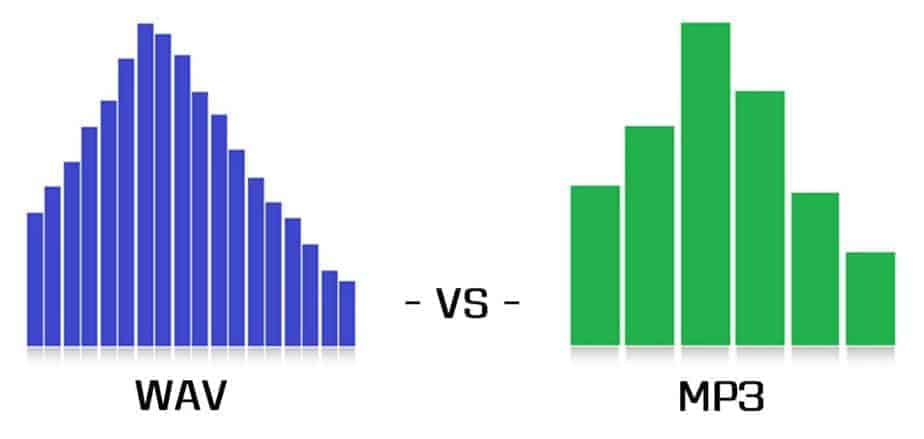
WAV or MP3

Wav
It is the primary audio format for many, many digital audio playback systems and is used as a standard audio file format on personal computers. In addition, it has a strong set of specifications, which has grown considerably in recent years. Its full name is Microsoft RIFF / WAVE – Resource Interchange File Format / Wave – Resource Interchange File Format / Waveform, and it was created by Microsoft and Intel engineers. In turn, WAV stands for Waveform Audio File Format.

WavPack (.WV extension)
WP
WavPack also includes a unique “hybrid” mode that provides all the benefits of lossless compression with the added benefit of creating a relatively small, high-quality, and lossy file (.wv) rather than creating a single file, which is you can reproduce by yourself. and a “fix” file (.wvc), which (in combination with the old .wv) allows you to fully restore the original. For some users, this means that they will never have to choose between lossy and lossy compression.

The format has very good compatibility with the player. Also, of course, the plugin for Winamp from the official codec site http://www.wavpack.com, you can download plugins for Adobe Audition (!) And Nero Burning Rom. There is a great plugin for XMMS: the Winamp analog for Linux. In addition, there is a project for the development of DirectShow filters for WavPack; this will allow the format to be used in any Windows program, including Windows Media Player. You can download the latest version from here. There is a third party interface for WavPack. Download it here.

From a technical point of view, there is nothing to complain about either. Multi-channel audio is supported, 32-bit audio stream resolution, sample rate: up to 192 kHz (!).

The format, like the source codes of the compression program, is open source. Unfortunately, the encoder is compiled only for the Windows platform, but there is always the possibility to independently recompile the source codes available for your operating system.

The site, like the codec itself, is regularly updated, which is good news.

DTS
DTS
DTS – Digital Theater System, in fact, is Dolby Digital, or rather its competitor. DTS uses a lower compression rate than Dolby, so it actually sounds better, as evidenced by DVDs that have DTS or DD tracks. DTS in home theater systems uses a maximum bit rate of 1536 kbps (full bit rate), this sound is better than Dolby Digital’s AC-3 format. DTS – Uses 6 free audio tracks and supports 7.1 sound distribution system, with this DTS 4.0 bit rate – it will sound as immersive as Dolby 5.1.

Windows Media Audio (WMA)
WMA
A licensed file format developed by Microsoft to store and transmit audio information.

Nominally, the WMA format is characterized by good compressibility, which allows it to “bypass” the MP3 format and compete on parameters with the Ogg Vorbis and AAC formats. But as the independent tests, as well as the subjective evaluation, showed, the quality of the formats is not yet unequivocally equivalent, and the advantage even over MP3 is unequivocal, as Microsoft claims.

Lossless WMA

The codec is part of the Windows Media Audio suite. It’s free, but the format, as well as the encoding program, are proprietary. Of course, the version only exists for the Windows platform.

Basically, WMA Lossless supports all the necessary functions: tags, high sample rates, multi-channel audio (including 7.1), streaming audio over a network, etc. Additionally, Windows Media Player’s built-in decoder support eliminates the need to download anything from the Internet to play a music file.

MP3
MP3
MP3 – (MPEG Audio Track Encoding Format) is a licensed file format for storing audio information.

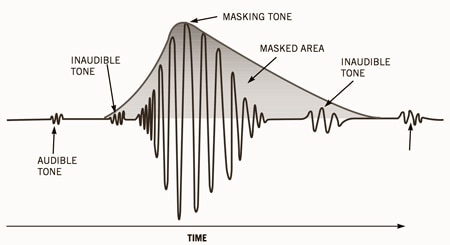
The most popular compression format today. The MP3 (MPEG Layer 3) format was developed, after several intermediate formats, by the Fraunhofer Institute in Germany. Actually, the .MP3 format relies on fooling the human ear. After some research, it turned out that human hearing tends to adapt to the appearance of new sounds, which is expressed in an increase in the hearing threshold. Therefore, some sounds are capable of masking (that is, making them subjectively inaudible) others. So in this format, some of the sounds that, according to the corresponding theory, are made inaudible, are simply removed from the general sound.

WAV AND MP3 COMPARISON | FEATURES AND WHICH IS BEST Part 2

WAV AND MP3 COMPARISON | FEATURES AND WHICH IS BEST Part 2

WAV vs. MP3

And now to the description of the formats. WAV music format The WAV music format was developed jointly by IBM and Microsoft engineers. The goal was to create a universal container format that would store uncompressed music and could be played on multiple devices.

WAV vs MP3


In fact, they succeeded. WAV is loved by both users (thanks in large part to native support for the Windows operating system) and music studios (minimal loss, fast encoding and decoding). It is true that WAV has not lost the main drawback of uncompressed formats: the huge file size. But the sound quality is as high as possible. In fact, it is a quasi-analog format in which the audio stream is recorded in waves. MP3 music format The MP3 music format was developed by the German company Fraunhofen IIS and was originally created to transfer audio into video files. Even its name stands for Moving Picture Expert Group Layer 3, that is, “the third layer in moving pictures”. But it turned out that the format is perfect for recording any sound and can be easily played without being packaged in an MPEG container. Since the task of the developers was to reduce the bit rate (“size”) of the audio track, otherwise it will weigh like a video track, they boldly mocked the audio stream. And, in addition to frame-splitting and spike-pasting compression, they also eliminated inaudible frequencies. That is, when encoding, everything below 20 Hz and above 15 kHz is removed from the audio stream. In theory, a person does not hear this, so he should not suffer. In practice, it turns out that frequencies below 20 Hz make the bass deeper, and above 15 kHz the voice is more detailed. But it doesn’t matter if headphones or speakers can’t reproduce frequencies below 20 Hz and above 15 kHz. And inexpensive audio equipment just can’t do that. But MP3 files are “heavy” a bit and provide enough quality for independent listening. And in the age of digital distribution, these two virtues have made MP3 very popular. Difference Between MP3 and WAV Actually, the main difference between WAV and MP3 is that the former is uncompressed and incredibly detailed, while the latter is compressed and not very verbose. But for the sake of music in the first format, you will have to buy an external hard drive, and in the second, a flash drive will suffice. The WAV format in 2019 is commonly used in the field of “professional audio”. Record musicians in studios. It’s where the songs mix. Only notorious audiophiles with excellent quality audio equipment listen to music on it. The MP3 format is now ubiquitous. It is suitable for listening at home, on the road (from a smartphone or player), in a car through a radio. A CD can fit about 50 songs in high quality or about 200 in low quality. The quality, of course, is not very high, but sufficient. And the “size” decides. In terms of numbers, the WAV bit rate is 1140 kbps, the MP3 bit rate is a maximum of 320 kbps. Which format is better, WAV or MP3? There is no definitive answer to this question. These formats are designed for different purposes. Comparison table, below: TECHNIQUE ON WHICH THEY WILL LISTEN TO MUSIC. PREFERRED FORMAT WHY HIGH DETAIL WAV HIGH-END EQUIPMENT, WITHOUT ELIMINATION OF INAUDIBLE FREQUENCIES ECONOMIC MP3 EQUIPMENT STILL CAN’T WAIT TO GET THE BEST SOUND QUALITY, CAN SAVE SPACE ON YOUR COMPUTER OR CUP PHONE PLAYER, MP3 PLAYER OF SPACE

WAV AND MP3 COMPARISON | FEATURES AND WHICH IS BEST

WAV AND MP3 COMPARISON | FEATURES AND WHICH IS BEST

WAV vs MP3

The development of digital audio distribution has led to the fact that there are now several dozen audio file formats on the market.

WAV vs. MP3

Each developer tried to come up with their own encoding method and encryption algorithms, and then make them popular. But now, in 2019, it has become clear that MP3 has won the battle of music formats.

And even if the developers no longer support it, that’s fine. Anyway, music in files of this type can be played on any phone, player, computer, radio, TV, and even some models of smart watches. However, when you buy high-quality audio equipment, such as headphones and a sound card for a total of 1.5 salaries, the disadvantages of MP3 start to show.

It seems that the technique is good, but still the music sounds somewhat “flat” and boring. This is because MP3 cuts parts of the audio stream. And then you want to choose a higher quality format. For example, a slightly less common WAV, which will help the technique to “open up”. But is this WAV really that good? Let’s compare two formats, WAV and MP3, and choose the one that suits you best! What is the difference between compressed and uncompressed music formats? Since WAV is a sample uncompressed music format and MP3 is a compressed format, it is worth understanding what compressed and uncompressed music formats are to understand the key difference between the two. We are not going to go deeper, we will also talk about sigma-delta modulation, just “let’s go over it.”

Uncompressed music formats were one of the first to emerge. They involve the sequential recording of every sound captured by the microphone in the studio, every note, every attempt by the vocalist to hit eight octaves in a single song. As a result, the file is incredibly detailed as all the sounds are listed. There are only a couple of problems. Due to the high level of detail of the audio file, it is huge. On average, a three-minute song in a WAV container “weighs” about 60 megabytes. As a result, it’s good for a gigabyte flash drive if it fits at least one artist’s album. And at a time when a 1GB hard drive was an unattainable luxury, it was at least unwise to waste precious hard drive space for songs.

The second problem is that to decode this type of music you need a powerful and agile processor. That is, the chip has to constantly take a digital signal and convert it to analog that goes to the speakers. At the same time, there are many digital signals – we remind you of every sound. Therefore, the performance of the chip must also be high. Thus, engineers and programmers were faced with the task of ensuring that a Robbie Williams fan could keep his entire discography (14 albums, 3 collections, countless singles, 8 DVDs) without having to buy a server. This is how compressed formats appeared, of which MP3 is an example. Compressed formats involve additional music transcoding. The audio stream is divided into separate frames, then they are pasted, the details are partially lost (for example, two loudness peaks are pasted into one), perhaps, as in MP3, some frequency ranges are cut off …

As a result, the file is much smaller. On average, a three minute song in a high bit rate (320 kbps) MP3 file “weighs” about 10 megabytes. In other words, a full EP (mini-album) in MP3 will “fit” in the volume of a song in WAV! And if you reduce the bitrate, removing even more frame-parts from the audio stream and significantly degrading the quality, then the entire discography of the long-suffering Robbie Williams may be “cluttered.” On the other hand, the loss of quality cannot be said to be too significant for the listener. MP3 320 kbps provides enough quality for listening to music, watching movies, etc. The listener ignores “missing details” or “ponders” them to create a complete acoustic picture. In addition, the quality of the equipment also affects the quality of playback. On computers with a weak built-in sound card and Chinese speakers that MP3 64 kbps, that MP3 320 kbps, that WAV will sound just as bad. But just get a multichannel audio system, an amplifier, a discrete sound card with a 192KHz DAC, and the sound in WAV flourishes. But MP3 will seem too flat and with little detail.

WAV vs Mp3, advantages of each

WAV vs Mp3, advantages of each

WAV vs. MP3

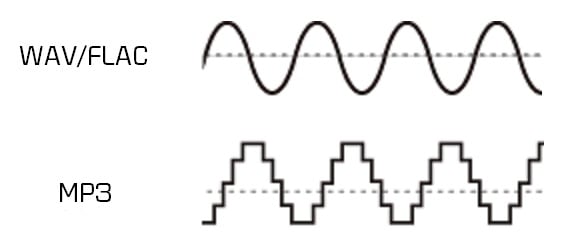
Wave is uncompressed or lossless format, while MP3 is compressed or lossy. Technically .wav is just a container format and can contain various types of compressed or uncompressed audio, but you will usually find that it contains uncompressed LPCM audio (the same as on audio CDs). With .wav files

WAV vs MP3

You essentially end up with a raw digital representation of the audio bitstream. Analog sound produced in the real world contains essentially an infinite amount of information because it is a constantly changing wave (see below). To digitize these sounds, you must sample the signal at different intervals to get an approximate sound. For .wav, the audio signal is typically sampled at 44,100 times per second or more, and each sampled value is recorded so that the audio wave can be played:

The analog sound wave is sampled at each T interval to obtain a digital approximation of the original signal. (For digital audio, T is usually 1 / 44,100 seconds or less)

MP3s are compressed to compress the same audio information into a smaller file size. The .wav format is great for representing an analog signal very accurately, but generally at the expense of large files, as you probably know. Compressed audio (and video similarly) is designed to reduce file size while maintaining an acceptable level of fidelity. In simple terms, compression tries to remove unnecessary data from the stream and reduce the signal to its most necessary components. In MP3, the encoding and compression algorithms use a model of how we listen to analyze the sound in the frequency domain and remove any unnecessary information. For example, due to hearing disguise, if there are two sounds at close frequencies, we will often only hear a loud sound if the difference in volume between them is significant. Therefore, for MP3, the lower volume sound can be reduced and the sound will sound essentially the same as it does to our ears. Find out more about the technical aspect of MP3 encoding here.

In practice, both .wav and MP3 have their uses. For production, .wav is the standard because it will almost always be a 100% accurate, bit-level reproduction of the source material. MP3s can be a decent alternative at high enough bit rates. Bitrate is a measure of how many bits per second the MP3 encoding will use. This means that the higher the bit rate, the closer the MP3 will be to the original uncompressed stream. Bit rate is generally measured in kilobits per second (kbps). I like high sound quality for my digital music collection, so when I get a chance, I usually encode MP3 at a constant 256 or 320 kbps. This is the upper limit of what MP3 can do, and sadly most digital music isn’t encoded that high there. When the bit rate drops, it is usually heard first in the high frequencies, like the cymbals of a drum set. 160 kbps is tolerable, but anything below and you’ll really start to notice. But again, with a fairly high bitrate, the differences between MP3 and .wav subtle, especially for an inexperienced listener (most listeners).

For .wav files, we mainly look at the bit depth and the frequency or sample rate. Bit depth is the number of bits used to encode each sample value. The sample rate indicates how many times per second the audio is sampled. CD (.wav) and MP3 are encoded at a sample rate of 44100 Hz (Hertz stands for “cycles per second”). Newer computers and audio hardware / software now support higher sample rates, including 48 kHz or 96 kHz. For .wav the bit depth is usually 16 or 24 bit on newer systems. For most purposes, 16-bit and 44.1 kHz is sufficient when using .wav, but if you have this capability, it’s generally worth moving up to 24-bit, 48 kHz.

Ogg Vorbis, ADVANTAGES Part 4

Ogg Vorbis, ADVANTAGES Part 4

OGG vorbis

Additional characteristics

OGG

The Ogg Vorbis format has several very interesting features, which we will now see.

ReplayGain technology
ReplayGain technology allows you to equalize the volume level of various songs and also helps eliminate distortion from songs at high volume. When using ReplayGain, the audio data in the file is not modified, it is only analyzed, and the information for sound correction is saved in the file’s metadata. When playing the processed file on a ReplayGain compatible player, the sound will be corrected automatically according to the correction data saved in the file.

There is a similar program for Ogg Vorbis – VorbisGain. As a more convenient option, you may suggest using the ReplayGain function built into the Foobar2000 player, which performs the same operation as VorbisGain.

Multiple songs in one file
As already mentioned, an Ogg Vorbis file can contain multiple tracks with their own tags. This function is very useful for continuous audio CD encoding. To create such a file, simply “paste” several Ogg Vorbis files in binary mode in the desired sequence into a common one. This can be done from the command line using the copy command.

copy / b test1.ogg + test2.ogg + test3.ogg out.ogg
This command will merge the files test1.ogg, test2.ogg, and test3.ogg into a common out.ogg. The resulting file will contain multiple songs at once. Each composition has its own labels. On players with 100% Ogg support, all songs in the playlist will be displayed as if they were opened from different files. On players with poor format support, the first track name will be displayed, but all songs will continue to play. You can edit tags within such files in foobar2000 itself; This player is fully compatible with the Ogg Vorbis format.

Edit without transcoding
The Ogg Vorbis format allows simple editing operations (cut start or end, replace frame, etc.) without re-encoding. To do this, you can use the standard utility vcut.exe from the Vorbis Tools standard package.

Reduce the bit rate without re-encoding
Lowering the bitrate without re-encoding is not a trivial task for any format. However, for Ogg Vorbis there is a utility for this task: Vorbis Bitrate Peeler.

WARNING
A complete algorithm has not yet been developed to reduce the bit rate without re-encoding. The proposed utility is purely experimental in nature. Maybe it is suitable only for small changes in bitrate, no more than ~ 10 kbps, for example, to adjust the file size to a certain size. Otherwise, the quality degrades a lot, because the program simply reduces the size of the frames in the file, removing the first available components without first analyzing their value.

Due to the lack of preliminary data analysis, the program works almost instantly. The bit rate change is set in the form of a coefficient that indicates how many times the frame size needs to be changed, that is, bit rate.

bpeel input.ogg output.ogg [factor]
As a side effect, it is possible to increase the bitrate without degrading the quality, although this is a rather useless function. Unless, perhaps, it helps in the event that a portable player requires a higher bit rate than the existing one. If it doesn’t help, we recommend using iRiver’s Ogg Bit Converter to convert Ogg Vorbis files to a different bit rate.

conclusion
As you can see, the Ogg Vorbis format is the most modern and optimal solution in the audio compression format market. If you follow the dynamics of the development of the format, you can easily see that it has a future. A large number of developers around the world are constantly developing the format, bringing it to perfection. It would seem that everything that could be done has already been done. However, it is not. The full potential of the format has not yet been revealed. There are still many problems that have not yet been fully affected. But we’re only going forward! We are the format, its developers and common users.