Sample rate (Hz and kHz), resolution (bits), and bit rate (kBit / s) for music and audio


Free Download Mp4Gain
picture

Because it always leads to misunderstandings, today there is a short explanation of the most important key figures for music and audio files. These basically apply to all uncompressed formats (WAV and AIFF). I’ll also go into the bitrate of compressed formats like MP3, WMV, and OGG below.

Sample Rates

Basic knowledge: An audio file stores a number at very short intervals that represents the level of the audio signal. During playback, the contour is calculated from this sequence of numbers.

Audio Sample Rate

An audio file can have multiple channels. Mono (one channel), stereo (2 channels), and 5.1 and 7.1 (Surround) are common. Each channel provides the information from one of the speakers and is a separate audio signal. That means we can split a stereo file and save it into two mono files.

The sample rate (Hertz) indicates how often the audio level is recorded and saved in one second. A specification of 44,100 Hz (44.1 kHz) means that 44,100 values ​​are stored for one second of music. Typical sample rates are 44.1 kHz (music CD), 48.0 kHz (film), and 96 kHz (recording studio).

The resolution (bit) indicates how much memory is used for that sample value. For example, 16 bits (2 to the power of 16) allow a scale of 65,536 values ​​for each individual sample value. If we have a lot of memory for a value, we can process the signal more precisely. Typical settings are 16-bit (music CD) or 24-bit or 32-bit in the studio.

Bit rate (kBit / s) is often confused with resolution. Represents the “bandwidth” of the audio file, that is, the amount of data that is processed in one second. For uncompressed formats like WAV and AIFF, you can easily calculate the bit rate by multiplying the above three values:

Bit rate = channels x sample rate x resolution

Example:

A WAV file in CD quality has the following bit rate:
2 channels x 16 bits x 44.1 kHz = 1411.2 kBit / s

The bit rate for compressed formats (MP3, OGG, WMV, AAC, etc.)
Unfortunately, this formula does not work with MP3 and other compressed formats because the signal is packaged to save space. The encoder reduces the bandwidth of the data to a desired bit rate and tries to obtain the best possible quality within this frame. The bit rate can be constant (CBR mode) or variable (VBR mode). A variable bit rate often makes sense if the audio signal is highly varied (for example, a movie or radio playback).


Free Download Mp4Gain
picture


Mp4Gain Main Window
picture


Mp4Gain Features
picture


Free Download Mp4Gain
picture

Sample rate, a clear explanation about what the sample rate is

Let’s proceed in order and start from the sampling frequency, defined as the number of times per second in which our AD converter will measure the electrical signal placed at its input: it is measured in Herz (Hz).

Obviously, the greater the number of “photographs” that we take of our electrical signal in one second, the greater its fidelity to the “original” sound wave. At the same time, obviously, our converter will be obliged to spend a greater amount of “energy” (faster information processing speed, greater storage space, etc.) which therefore translates into a different quality of components and obviously at a higher cost.

La tasa de muestreo

Sampling rate

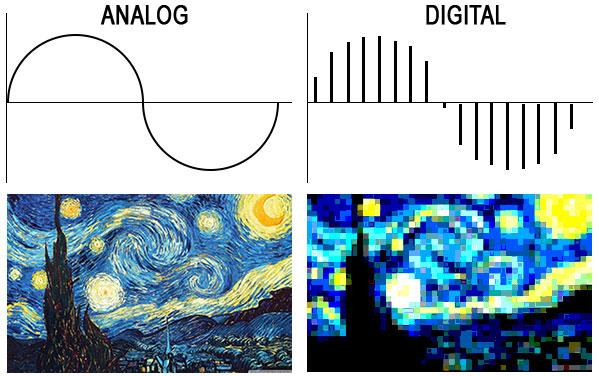
On the left an analog wave (a sine wave) in the time / amplitude domain and an image of Vincent Van Gogh’s “Starry Night” which, for our teaching purposes, we intend to be very high resolution. On the right, a quick reconstruction of the same sampled analog waveform and the same photograph reproduced with a much smaller number of pixels.

Well, if it were that simple, there wouldn’t be a bit of fun. Let’s go back to the diagram of the AD converter at the end of the previous article. Surely you have noticed that the first block through which our signal passes is the so-called “Anti-aliasing filter”, nothing less than a low pass filter.

Coooooooooooosaaaaaaaaaaaaaaaaaa !? Do we want to faithfully reproduce our signal in the digital domain and the first thing we do is pass it through a filter to change its frequency component (remove all components above a certain frequency)?

Yes my dear … you need to share a minimum (but I swear, a minimum) of signal theory to tell you a bit about the “Nyquist-Shannon Sampling Theorem” (for the “fetishists” – no offense, for course …. I am also part of it: of the mathematical treatment, take a look at the related Wikipedia page where you can find a good perspective), based on which, to sample an analog signal without loss of information (that is, to be able to re-enter it – then convert it DA – into the analog domain without “noticeable” differences compared to the original signal) it is necessary that the number of samples taken per second (the sampling frequency) is at least twice the maximum present frequency into the signal to be sampled, Therefore, it is worth introducing frequencies in the digital signal that do not exist in the original analog signal (the calls, and hence the filter name, alias frequencies).
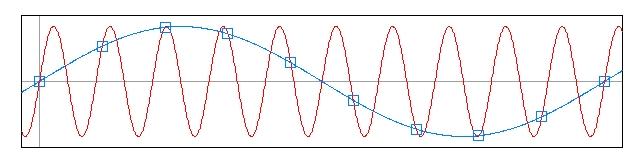
The aliasing phenomenon occurs because we do not have enough samples to describe the trend of the higher frequencies, which are therefore translated into the digital signal as lower frequencies, although nonexistent in the original signal. See this beautiful image always taken from the omniscient Wikipedia. In red the sinusoid sampled at intervals not sufficient to reconstruct it, and in blue the frequency alias (lower) that originates from the points we have taken.

La tasa de muestreo

Sampling rate

As we already know, the human ear is sensitive, at most (at an early age and in good hearing health), to frequencies around 20 KHz; In theory, our anti-aliasing filter should be set at 40,000 Hz and that should be our sample rate, but since it is practically impossible to build a filter with such a steep slope in analog, we opted for a filter with less steep slope and so both leaves the signal to sample frequencies slightly higher than 20,000 Hz (which we don’t hear, but there are), sampling at a slightly higher frequency. Therefore, the minimum sample rate used is equal to 44,100 samples per second.

Obviously, technological development and, nevertheless, the opinion and experience of many professionals (which I personally share very modestly) have in any case led to the awareness that, having set the minimum limit of 44,100 Hz (we will see later, it is the sampling frequency of the files that make up an audio CD), sampling at higher frequencies certainly leads to better results both from the point of view of signal manipulation (passing through a plug-in, the sum of two or more signals within a DAW, etc.) and from a listening point of view.

Later we will return to the topic, we will develop it further and we will begin to understand the logic with which the converter assigns a value in “machine language” to the different samples taken during the sampling phase.