Everything you need to know about video codecs and containers


Free Download Mp4Gain
picture

Everything you need to know about video codecs and containers
Video Formats, Codecs and Containers

Sometimes it is quite difficult to figure out which codec and container are the best to create your video masterpiece.
Video Container,  Video Codec

Today, everyone seems to be striving to become filmmakers. People use a wide variety of devices and devices for filming, including mobile phones, digital cameras, portable and professional video cameras. And the latest generation of digital SLR cameras can record high definition video.

Making a good video takes a bit of effort, but it becomes even more difficult when you want to show your masterpiece to other people in all its glory. Maybe you need to upload it to YouTube, maybe you are going to burn your own Blu-ray or DVD, maybe you want to download the video to your mobile phone or tablet.

Sometimes it is difficult to figure out which codec and container is best for creating your video masterpiece. The material below can help you solve this problem.

What is the difference between a codec and a container?

Novice users are often confused when trying to figure out the difference between codecs and containers. Now the word Codec has become commonplace, and initially the term was an abbreviation for the concept of KOMPRESSOR-DEKOMPRESSOR. What do codecs do?

They take data from digital media and compress it (for transmission and storage) or decompress it for viewing and transcoding. Each codec uses a specific method to encode and decode digital data.

Uncompressed video and audio (raw means unprocessed, or often “raw”) require a lot of storage space. Uncompressed 1080i HD video recorded at 50 frames per second consumes up to 410 gigabytes per hour. Audio on CDs, quite out of date by modern standards, plays for around 74 minutes with a 680 megabyte disk capacity. However, eight-channel audio encoded with a 24-bit resolution will require 16 megabits per second, or several gigabytes per hour. Even broadband internet connectivity is sometimes not enough to listen to music in full audio resolution. This is the reason why digital video and audio recordings must be compressed for transmission and storage.

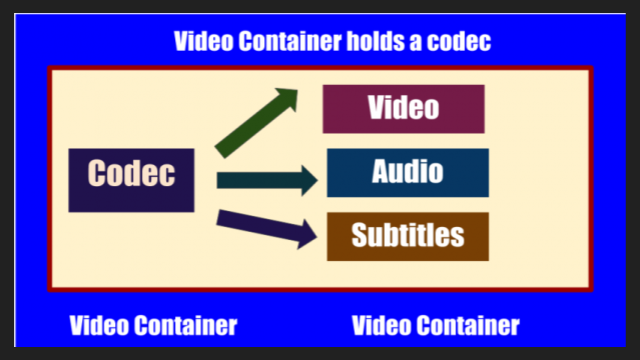
Once the media is compressed within reasonable limits, it must be packaged for shipping and later viewing. For this, container formats are used that act as a “black box” filled with various multimedia formats. Good container formats can accommodate files compressed with different codecs.

Let’s take a look at the types of codecs.

General concept of codecs

If you chat with people who are into video processing or visit the relevant web forums, one way or another, you will find yourself involved in the sometimes heated debate about which codec is better. In fact, the effectiveness of any codec is highly dependent on the compression mode used and the type of video material being processed. Therefore, it is worth considering various codecs and taking into account their specific use and the characteristics of the compressed material. Video codecs are mainly covered below, but the section on format containers also mentions the use of audio codecs.

Capture and archive videos

Most modern consumer electronic devices receive content in some kind of already compressed format. Usually only professional videographers work with uncompressed HD video. Of course, ideally, if possible, in the presence of a large-capacity storage system, the video files should be stored in the original recording format, because this ensures the highest quality. Transcoding a video from one type of compression to another can introduce subtle artifacts that can degrade image quality. (These errors are minimized with good software transcoding.) Many codecs with specific specializations are currently offered. The average user may never find most of them. The next section is dedicated to codecs as compression / decompression systems,

x.264 / MPEG-4 AVC (Advanced Video Coding). This most common codec is used in modern digital video and digital cameras, where shooting results are saved as files on built-in hard drives, memory cards, etc.

MJPEG (Motion JPEG). This is an older format used by some older generation digital cameras and video equipment. It was developed by the same specialists (Joint Picture Experts Group), who participated in the earlier development of the JPEG codec for compressing ordinary still images, hence the name of this codec.

DV and HDV. The DV standard was developed by a consortium of companies from


Free Download Mp4Gain
picture


Mp4Gain Main Window
picture


Mp4Gain Features
picture


Free Download Mp4Gain
picture

Digital audio formats

Digital audio formats

DIGITAL AUDIO FORMATS

Digital sound “format” means not only the format of the audio file (which can be determined by its extension), but also, for example, the data presentation format, which depends on the digitization method and parameters. In addition to the computer file formats of various operating systems, there are audio media formats, streaming audio formats, and multi-channel audio formats.

digital audio formats

Furthermore, the “sound” file can be not only an audio recording, but also a project file from an audio editor, DAW, or any other program for working with sound. The project file can contain embedded audio and only links to multimedia data.

A standard MIDI file does not contain any audio data, it is a set of commands that control synthesizers and other devices.

There are also several patch and sample formats that are used on synthesizers.

Presentation format
The format for representing audio data in digital form depends on how the analog-to-digital converter (ADC) quantizes. There are two types of quantization that are commonly used:

pulse code modulation
sigma delta modulation
Bit depth and sampling frequency (quantization) are also indicated for various audio recording and playback devices as the format for representing digital audio (24-bit / 192 kHz; 16-bit / 48 kHz).

Digital audio file formats
There are three groups of file formats:

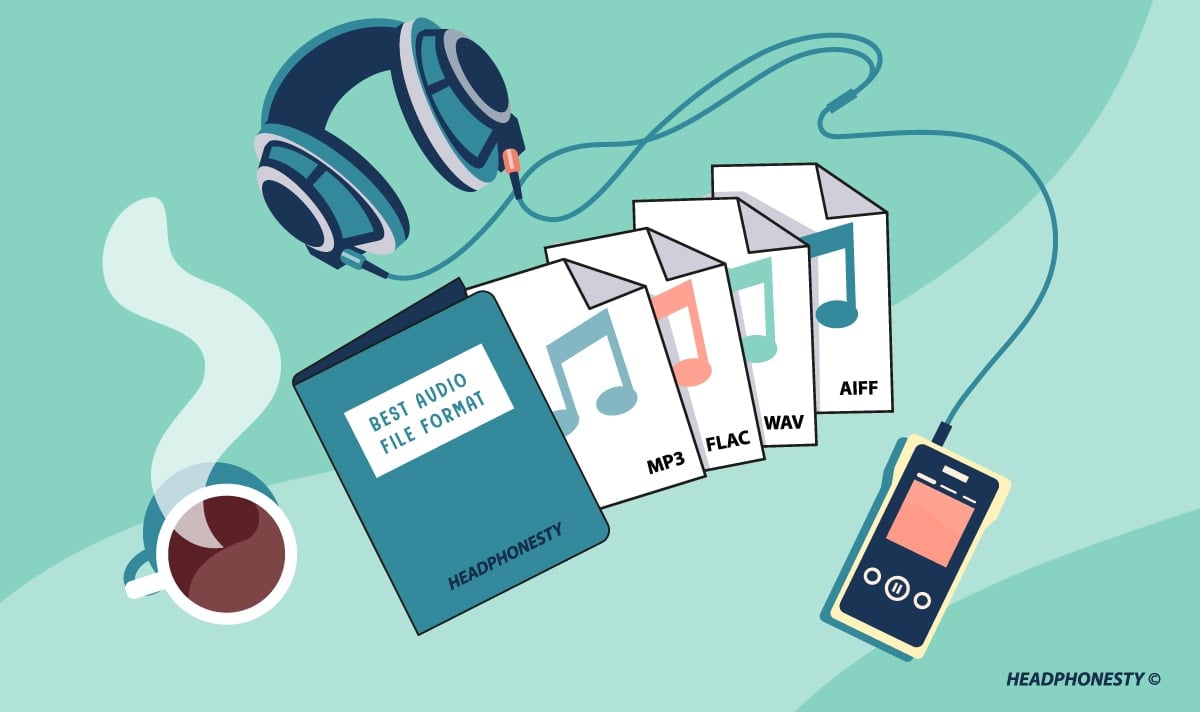
uncompressed audio formats like WAV, AIFF, RAW (raw (unprocessed) measurements without any header or sync)
lossless compressed audio formats (APE, FLAC)
lossy compressed audio formats (MP3, AAC, Ogg, WMA (lossless version available))
Comparison of digital audio formats

Lossless data compression is a data compression method by which encoded data can be recovered unambiguously with bit precision. This type of compression is fundamentally different from lossy data compression.

When lossy compression is used, the decompressed data differs from the original, but the degree of difference is not significant from the point of view of its perception or later use. The advantage of lossy compression is that it allows a higher compression ratio with acceptable distortion. When using lossy compression, be aware that recompression tends to degrade quality. However, if the recompression is done using the same algorithm and without changes to the compressed data, the quality does not change. But in general, when editing the decoded data, it is advisable to save the original uncompressed (or compress without data loss).

Audio formats for sound quality.

Audio formats for sound quality.

Audio Formats

The term “audio” today means everything that is somehow connected with sound. This is processing, playing, mixing and simply listening to audio recordings. Few people know that during their existence, all popular audio formats have undergone significant changes, sometimes for the better, and sometimes even for the worse.

audio formats

The problem is that when the creators tried to improve the recording quality by using the new format, the size of the result increased significantly. Reducing the size of the final file resulted in a significant loss of quality. But this was not always the case.
The first audio format used in computer games.

The first mention of computer sound is associated with the creation of several primitive video games. Then the sound was played back using the speaker of the system. As the software developers of that time did not try, it was impossible to achieve the level of quality that would be compatible with tape and reel recorders. This is what got many developers thinking about how to change the audio format to make the sound more natural and natural. It is this problem that has led to the current competition in the audio market. As a result, the formats used strongly affect the quality of the reproduced material and the configuration of the basic playback parameters.

WAV format

The first full quality of audio formats is associated with this particular format. The WAV extension designation was derived from the English word “wave”, which means wave in Russian. It was this format that became the first audio format to be processed with computer programs at a highly professional level. Files with a WAV extension had the following characteristics:

– depth of sound;
– sampling frequency;
– bit rate, etc.

This format was even compatible with the sound that could be obtained after processing an audio CD with an equalizer and other tools. However, the file size in this case was completely unwarranted. For example, the most common 3 minute long track could be up to 50 megabytes long.

CD

Audio CDs, or more exactly the .cda extension, appeared almost at the same time as the wav format. But unlike files with the wav extension, .cda cannot be edited. But it can be opened in any audio processing program, transcoded and formatted, and saved to your hard drive. Of course, you will not be able to save your changes to the CD.

MP3 codec

After the introduction of the LAME MP3 Encoder codec in the music industry, there was a real revolution in the audio world. Now the audio files are ten times smaller. At maximum compression, the size of a five minute composition rarely exceeds 7MB. This was a significant advance. Also, this extension finally implemented the ability to tweak some features and configure additional parameters, such as ID3 tags. They can contain information about the track title, artist, album, and release date.

Of course, this format immediately became widespread. Almost the entire Internet community uses this universal format. Therefore, we can say that the MP3 format has been a real revolution in the field of computer sound. Today it is one of the most demanded and popular audio formats. Although today it is already being replaced by other audio formats. But we will talk about this a bit later.

AIFF files

There are other types of audio files. This is the so-called aiff format. This format was originally created for use on Macintosh computers. A little later, a transformation occurred, as a result of which it was possible to achieve the compatibility of various audio formats and the possibility of their use on different platforms and operating systems.

OGG format

This audio format is also quite common. It was developed by the specialists of the Vorbis company. Please note that this format has several disadvantages. First of all, despite the small size of the files, using this format places a heavy load on the computer’s system resources.

Also, to work with this audio format, you must use your own decoders and codecs, which may not be installed automatically. For example, those who worked with the FL Studio Producer Edition program had to manually activate the installation file in .inf format to work with this format. Otherwise this app just won’t play OGG files. Despite all these shortcomings, OGG audio files are quite common nowadays and they sound good.