bit depth


Free Download Mp4Gain
picture

bit depth

Bit Depth

bit depth

BIT DEPTH

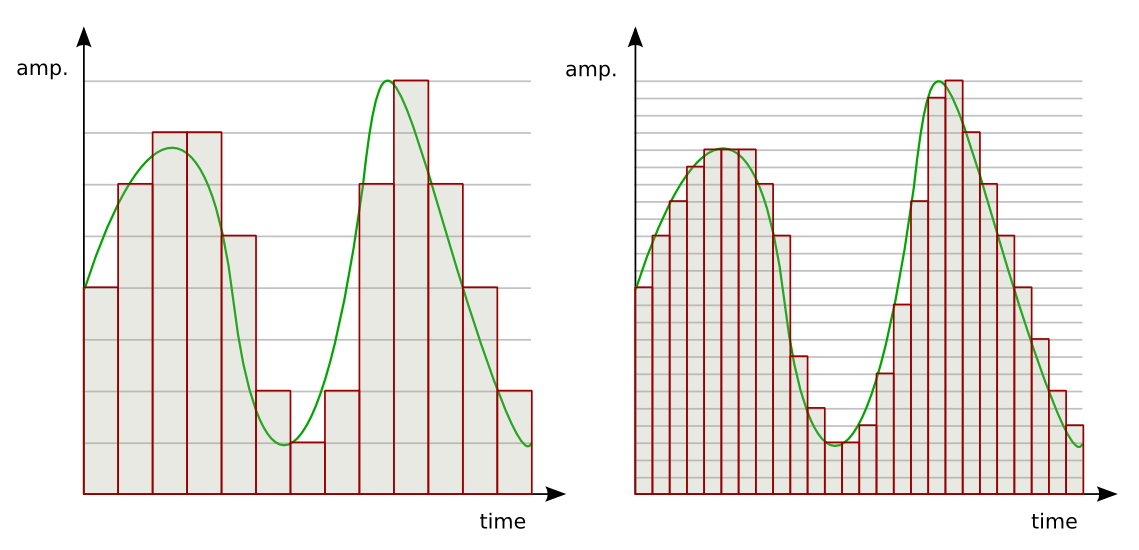
is the amount of information per discrete signal (sample) of a digital signal, that is, the number of quantization bits. Bit depth is only significant for PCM audio. There is no concept of bit depth in lossy compressed non-PCM audio such as MP3 and AAC. It is a term used in audio and graphics, and this section describes it in digital audio. == PCM Audio Bit Depth == There are several methods of recording digital audio, but most commonly used on CD-DA , DVD , computers , etc. is the pulse code modulation (PCM) method. In PCM, when the sound pressure bit depth is reduced at intervals of tens of thousands of times per second, the error between the original sound and the approximate recorded value becomes large, and it becomes difficult to faithfully reproduce the sound pressure waveform. original sound. The error is called the quantization error, and when the error tends to be large, such as 8 bits (256 steps), it can be heard by the human ear as noise. * CD-DA

(electrical voltage) at intervals of tens of thousands of times per second and records (displays) it discretely digitally, but the quantization accuracy is high and depends on the bit depth. Since digital numbers are recorded in binary and digits are bit deep, the number of recordable steps is calculated by multiplying by 2 bits deep.

It has a standard bit depth of 16 bits and a dynamic range of approximately 96 dB.
* DVD audio supports a bit depth of 24 bits per standard and has a dynamic range of approximately 144 dB.
In the field of acoustic engineering, when expressing the reproduction accuracy of sound amplitude, the ratio of the minimum and maximum values ​​that can be reproduced is expressed as a dynamic range in units of decibels (dB), which is a scale logarithmic . The dynamic range at a given bit depth can be calculated using the following formula ( audio compression and the case of uncompressed linear PCM which does not consider compression
DR_ = 20log_ (2^n), Or simply DR_ = 6.02n
The human ear is said to have a dynamic range of 120 dB and the ability to perceive frequencies from 20 to 20,000 hertz (Hz). Therefore, a bit depth of about 24 bits is said to be required to faithfully reproduce sound as long as it is not inferior to human hearing. For example, some music DVD standards are for 24-bit/96 kHz DTS tracks. In reality, however, no audio device has ever achieved a theoretical noise floor (-144.50 dB) at 24-bit depth. If you have a practical dynamic range (about 110 dB), you can handle noise other than 24-bit quantization noise.


Free Download Mp4Gain
picture


Mp4Gain Main Window
picture


Mp4Gain Features
picture


Free Download Mp4Gain
picture

Sample rate or bit rate

Sample rate or bit rate

Bit Depth

■ Sampling rate
(= sample rate)
If it is 44.1 kHz, the data is taken at 44100 times/sec
Wavewidth (fineness) = sound pitch Del

bit depth

sampling theorem (the original can be reproduced by sampling at twice the rate).
The calculation can be sampled up to the audio frequency of 22 kHz.
This is enough because normal CDs only record up to 20 kHz. By the way, I don’t quite understand the

sampling theorem, but is it true that sampling two points in a cycle and playing between them is an approximation with a sine wave? Addendum: Since the sampling theorem is a theorem about the result of the Fourier transform, the frequency mentioned there is naturally limited to sine waves. The sampling theorem is that “only sine waves less than half the sampling rate (fs) can be sampled”. That’s how it is. ■ Quantization bit (= bit depth) If 16 bits, divide waveform height by 2 ^ 16. Wave height = volume Bit rate is the transfer (processing) speed, in units of bps . It is completely different from the quantization bit. The bit rate will be described later. BTW, quantization is called quantize, but it seems it’s not called quantization bit.

Speaking of quantizing,
it’s like adjusting the timing of the sound in DTM and others.

Postscript:
It seems that the unit of the vertical axis is not dB. Sound pressure does not appear to be directly equal
because it becomes a wave when sound is converted to voltage. I don’t know anything because it’s about electricity. hard.

Bit depth and bit rate

From Wikipedia.
Bit rate = (bit depth) * (sample rate) * (number of channels)
For example, if the sample rate is 44.1 kHz, the bit depth is 16 bits, and 2 channels (stereo), the bit rate is as follows:
16 * 44100 * 2 = 1411200 bits/sec = 1411.2 kbps

bitrate means the amount of data processed per unit of time.

The example above is for a CD.
For mp3s, the player’s specifications are usually up to 320 kbps.
I think this number and 1411.2 kbps are quite different, but since
this bps is the data processing speed after compression
, comparing CD bitrate and mp3 bitrate has nothing to do with sound quality. There is a story that
even with 192kbps mp3, there seems to be no problem with sound quality, so even professionals can’t tell it apart from wav . I personally haven’t heard or compared so I don’t know. Maybe it’s the type that doesn’t bother me even though the recording quality is pretty bad.

known specifications


CD sample rate 44.1kHz
voice frequency band 20Hz ~ 20kHz
dynamic range 96dB (= 1bit 6dB * 16bit)


DVD Audio Sample Rate 48kHz, 96kHz,
192kHz voice frequency band ~ 88kHz (192kHz)
dynamic range of approximately 146dB (quantization bit 24bit ) )

Where is the 96db range centered?
That may be strange, but
0db is not quiet (my left ear hearing is -5db at 4kHz), so
could be extreme story -96db~0db right?
I wonder if it’s a mixer or a producer’s favourite.

Also, even if the range is 96 db,
it may not be possible to play all around the headphones.
I think I need a proper woofer.

from now on

After researching so far, I became interested in lossless!
I often watch it on FLAC or Apple Lossless.
It may be time to finally understand Huffman coding

What is bit depth?

What is bit depth?

Bit Depth

Definition and description of bit depth

Sampling

Digital audio requires certain values ​​to be set to describe the resolution of the sound data (sample) that is captured and stored in the audio file. This attribute is called bit depth.

Similarly, for image and video files, this measurement range is also used to determine the resolution of the image. The higher the bit depth (for example, 16-bit vs. 24-bit), the better the image.

This attribute is exactly the same as digital audio. Therefore, a higher audio bit depth provides a more detailed sound recording.

Bit depth is often confused with bit rate, but they are very different. Bitrate (measured in Kbps) is the data throughput per second when the sound is playing, not the resolution of the individual samples that make up the audio waveform. See Bit Depth and Bit Rate for more information.

Note: Bit depth is sometimes called sample format, audio resolution, or word length.

Bit depth details
The unit of measure for bit depth is a binary number (bit), and the precision doubles for each increase in bits. This bit range is an important integer that determines how good a recording (for example, part of the music) sounds.

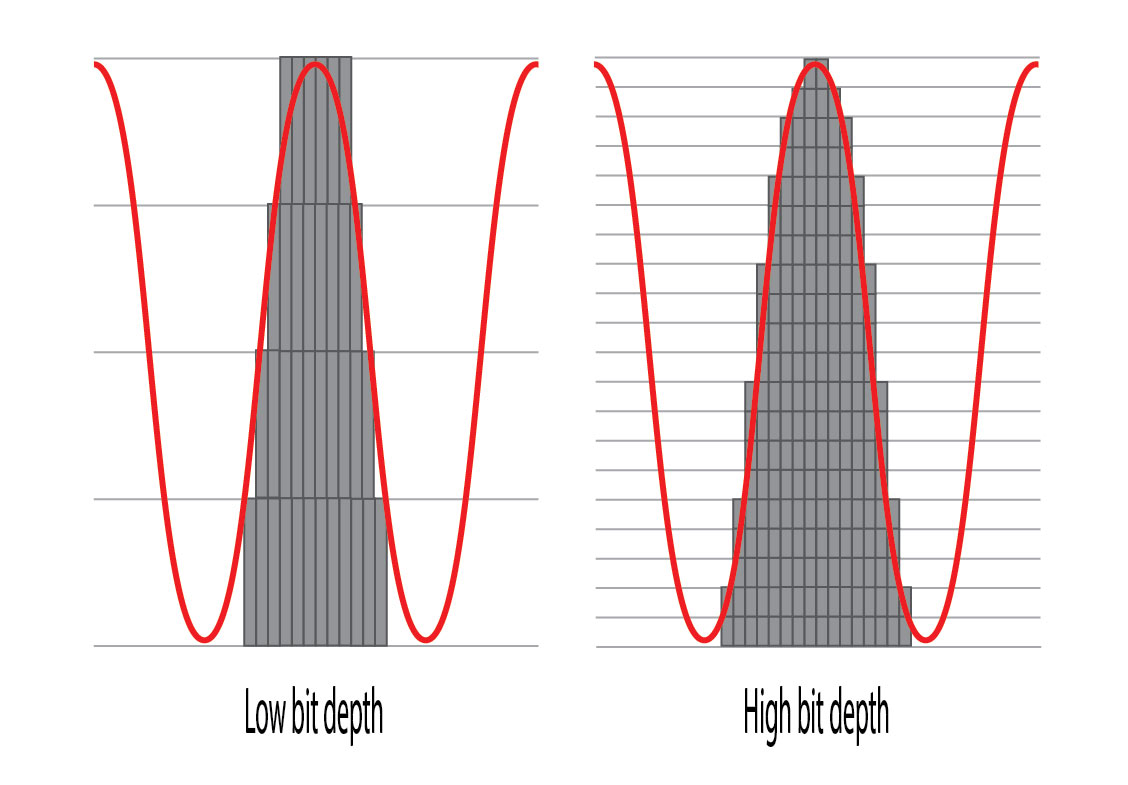
If the bit depth is too low, the recording will not be very accurate and you may lose a lot of quiet sound. For songs that make up a digital music library, MP3s encoded in a high-bit-depth PCM audio format (usually WAV ) have low bit depth compared to those encoded from the original PCM file.

Therefore, in theory it is much more precise when playing. As mentioned above, bit depth is especially important when dealing with the quiet harmonics of a song, as frequencies are lost if the bit depth is set too low.

Bit depth is relevant only within the range of the PCM signal. Therefore, there is no bit depth in the lossy compressed audio format.

Other methods Bit depth affects sound quality
While it is important to avoid clipping in your digital audio files, having the correct bit depth is also an important aspect to consider in reducing the amount of background noise.

All recordings have a degree of signal interference (called background noise) that can be minimized by using sufficient bit depth. This is because the dynamic range (the difference between the volume and the quietest sound) is much larger than the background noise, and the noise can be minimized.

The bit depth determines the volume of the recording. A dynamic range of approximately 6 dB is added for each bit increase. The most common media format in use today is the Audio CD format, which uses 16-bit depths, corresponding to a dynamic range of 96 bits. DVDs and Blu-rays have a bit depth of 24 and a dynamic range of 144 dB to improve sound quality.

What is bit depth? part 2

What is bit depth? part 2

BIT DEPTH

Frequently used bit depth in videos
The commonly used bit depth for video is “24 bit” .

Video Bit Depth

We usually look

digital terrestrial broadcasting
BS/CS Broadcasting
Youtube
Nico Nico Douga
· · Etc.
Etc are all 24 bit.

All the encoders that we use regularly are also 24-bit encoded. (Although not shown in settings)

I think it’s good to recognize that “all the videos I usually watch are 24-bit!”.

Difference in the number of colors.
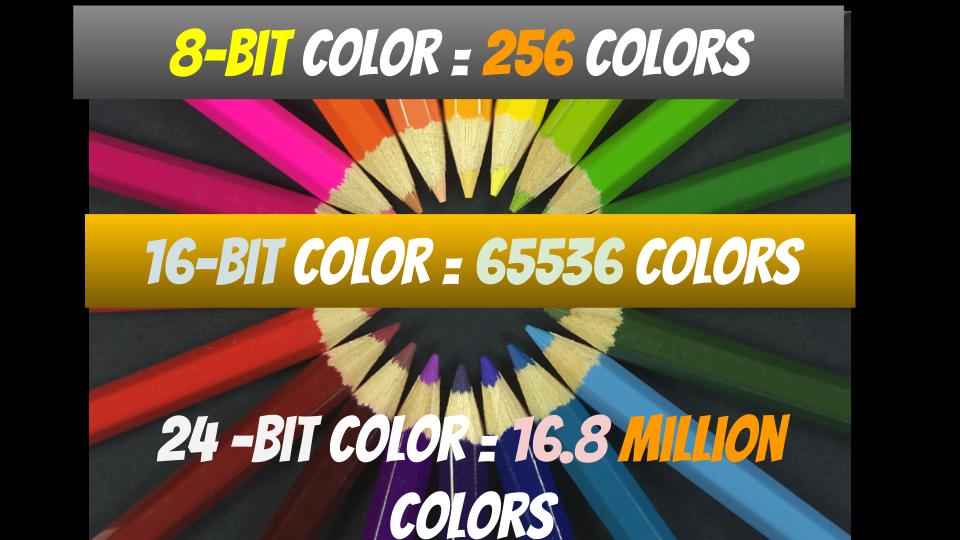
For example, in the case of 24bpp in RGB, 8 bits are assigned to R, G and B respectively.

A: 8 bit
G: 8 bit
B: 8 bit
8 bits is “256” in decimal.

In other words, you can see that “256 colors” can be expressed for each of R, G and B.

Also, there are as many color combinations as there are R, G, and B combinations, so

256 colors ✕ 256 colors ✕ 256 colors = 16777216 colors ≒ 16.77 million colors
Thus, you can see that a total of 16.77 million colors (in the 24-bit case) can be expressed.

By the way, most of the “maximum display colors” of general personal computer screens are 16.77 million colors.

screenshot_2971
▲ (Reference) Display I am using: DIOS-MF241XB specifications | Wide model | IODATA IO DATA DEVICE
As you can see from the specifications of the screen of the personal computer you are using, it probably has 16.77 million colors.

soon,

The number of colors in the videos we usually watch… “16.77 million colors”
Maximum number of colors for the screen we are using… “16.77 million colors”
That is, most of the images that we usually see are “16.77 million colors”, and the maximum number of colors on the screen that we usually use is also “16.77 million colors”.

Image quality comparison
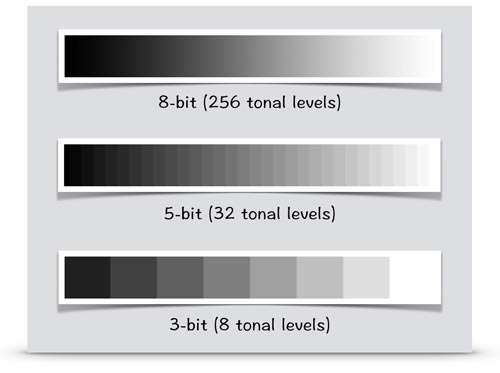
Up to about 24 bpp, the difference in image quality is relatively visible.

2_bit 4_bit 8 bits True Color
▲2bpp ▲4bpp ▲8bpp ▲24bpp
Quote: Color depth – Wikipedia

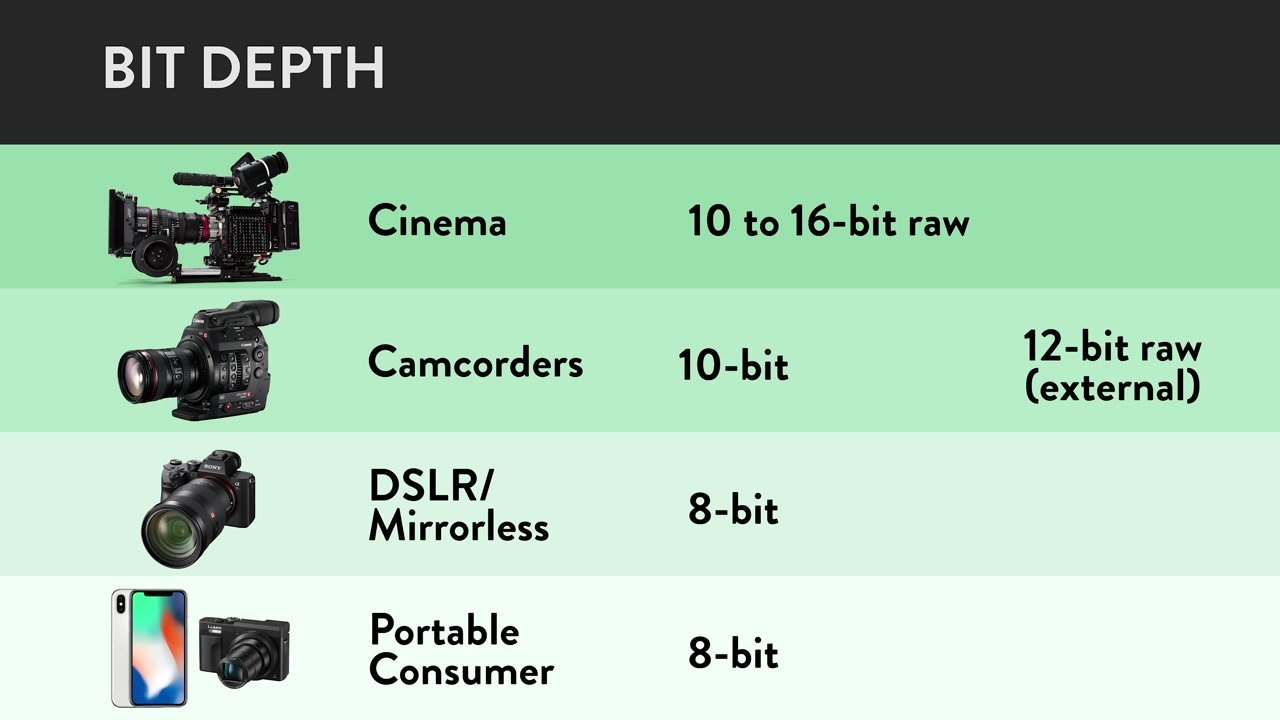
For example, with an x264 encoder, you can encode at 24 bpp or more with a “high bit depth” setting of 30 bpp (10 bits each), but you can barely tell the difference from 24 bits.

x264_high bit depth
▲ In case of x264guiEx from AviUtl

Also, (as mentioned above) most PC screens can only express up to “16.77 million colors (24-bit)” in the first place.

Therefore, in most personal computer environments, it is (physically) impossible to distinguish between 30-bit and 24-bit.

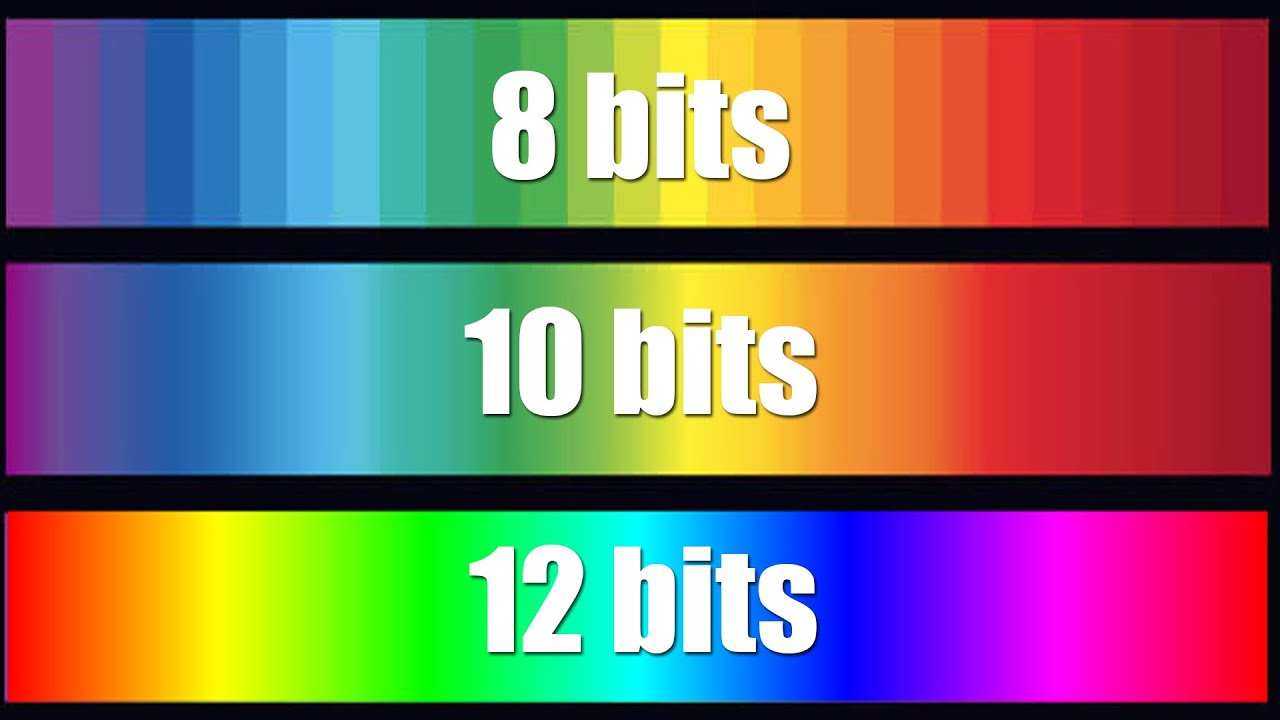
However, in the case of “video originally shot at 24 bits or more”, such as “animation” and “movie”, when encoding with 30 bits (10 bits each), the color-related filter effect will be applied without problems. As a result, banding (the noise that occurs in continuous parts of color) is reduced, and image quality tends to improve.

▼ An image of an animation encoded in 24-bit and 30-bit and the same part of the same frame cropped (the original frame is this )
8bit– 10bit–
▲ 24bit
(You can see that the banding is noticeable compared to 30 bits) ▲ 30 bits
So that doesn’t mean it doesn’t mean anything at all.

You can check it in the following blogs.

rigaya diary and notepad image quality comparison 2015.01
X264 10 bit depth is effective in anime: Cute Leaf
Name
Frequently used bit depths (color depths) are named.

16 bpp (65,536 colors): high color
24 bpi (16,777,216 colors): Full color
32 bpp (16,777,216 colors + α channel): true color
48 bpi (281,474,976,710,656 colors): Deep Color
Reference : What is color depth? | Color Depth – Meaning / Definition: IT Glossary

How to check the bit depth of a video
If you use video identification software like MediaInfo ,

You can easily check the bit depth of the video.

screenshot_298 screenshot_298
▲ In this case, 8 bits is the number of bits assigned to Y, U, and V.
So the bit depth is 24 bits (however the effective bit is YUV420 so it is 12 bits).
resume
-Bit depth: the amount of data per pixel

-The higher the bit depth, the more colors can be represented (= resulting in higher image quality).

・ The bit depth (color depth) of most videos is 24bpp.

What is bit depth?

What is bit depth?

Bit-depth

The “bit depth” in a video is “the amount of data allocated per pixel”.

BIT DEPTH

It has a different meaning than “bit depth” in audio.
“Bit depth” in audio…
→ The amount of data allocated per sample
“Bit depth” on video …
→ The amount of data allocated per pixel
Reference – meaning and relationship of sample rate, bit depth, and bit rate

further,

bit depth
color depth
pixel depth
They all have the same meaning.

For example, if the “bit depth” is “24 bits”, it means that 24 bits are assigned to a pixel.

Also, “bit depth” is expressed in the unit of bpp (bits per pixel).

Example: 24 bits per pixel = 24 bpp
File size calculation
30fps image

for example,

Bit depth: 24bpp
Resolution: 1920×1080
for videos

1920 pixels ✕ 1080 pixels ✕ 24 bits = 49766400 bits = 6220800 bytes ≒ 6.2 MB
You can see that it will be a whopping 6.2MB per frame.
(For a 1 minute video at 30 fps, 6.2 MB/frame ✕ 30 frames/s ✕ 60 s ≒ 11 GB)

By the way, this is the so-called “uncompressed video (RGB24)”.
Differences due to color space.
450px-YUV_UV_plane.svg
Quote: YUV – Wikipedia

Even if it says the same “24bpp”, the mapping method differs depending on the color space.

for example,

For “24bpp” in RGB:
→ Assign 8 bits to each of R, G, B
For YUV (YCbCr) of “24bpp”:
→ Assign 8 bits to Y, U, V respectively
It is so.

In the case of YUV, the number of bits allocated depends on the “sample ratio”.

The correct answer is to express YUV as YCbCr, but for some reason it’s commonly called YUV in the PC world, so I’ll call it YUV.
In the case of YUV, it becomes “effective bit”
In the case of YUV, the “sample ratio” differs depending on the format, so the method for taking the brightness and color difference will be different.

for example,

With “YUV444”, 8 bits each are taken from Y, U and V.
With “YUV420”, Y takes 8 bits each, but U and V share 8 bits.
It will be like this.

So in the case of “YUV420”, you can see that the actual number of bits times one is “12 bits”.

The “effective number of bits per pixel” at this time is called the “effective bit”. (“12bit” for “YUV420”)

From this, there is a double difference in file size between “YUV444” and “YUV420”. . (It’s actually compressed with a codec, so it doesn’t make much of a difference)

What is bit depth?

What is bit depth?

bit depth

Definition and description of bit depth

Sample Rate

Digital audio requires certain values ​​to be set to describe the resolution of the sound data (sample) that is captured and stored in the audio file. This attribute is called bit depth.

Similarly, for image and video files, this measurement range is also used to determine the resolution of the image. The higher the bit depth (for example, 16-bit vs. 24-bit), the better the image.

This attribute is exactly the same as digital audio. Therefore, a higher audio bit depth provides a more detailed sound recording.

Bit depth is often confused with bit rate, but they are very different. Bitrate (measured in Kbps) is the data throughput per second when the sound is playing, not the resolution of the individual samples that make up the audio waveform. See Bit Depth and Bit Rate for more information.

Note: Bit depth is sometimes called sample format, audio resolution, or word length.

Bit depth details
The unit of measure for bit depth is a binary number (bit), and the precision doubles for each increase in bits. This bit range is an important integer that determines how good a recording (for example, part of the music) sounds.

If the bit depth is too low, the recording will not be very accurate and you may lose a lot of quiet sound. For songs that make up a digital music library, MP3s encoded in a high-bit-depth PCM audio format (usually WAV ) have low bit depth compared to those encoded from the original PCM file.

Therefore, in theory it is much more accurate during playback. As mentioned above, bit depth is especially important when dealing with the quiet harmonics of a song, as frequencies are lost if the bit depth is set too low.

Bit depth is relevant only within the range of the PCM signal. Therefore, there is no bit depth in the lossy compressed audio format.

Other methods Bit depth affects sound quality
While it is important to avoid clipping in your digital audio files, having the correct bit depth is also an important aspect to consider in reducing the amount of background noise.

All recordings have a degree of signal interference (called background noise) that can be minimized by using sufficient bit depth. This is because the dynamic range (the difference between the volume and the quietest sound) is much larger than the background noise, and the noise can be minimized.

The bit depth determines the volume of the recording. About 6 dB of dynamic range is added for each bit increase. The most common media format in use today is the Audio CD format, which uses 16-bit depths, corresponding to a dynamic range of 96 bits. DVDs and Blu-rays have a bit depth of 24 and a dynamic range of 144 dB to improve sound quality.

What is the sampling rate? Part 2

What is the sampling rate? Part 2

Bit Depth

Sampling rate (Hz) x bit depth (bit) = bit rate (bps)
Will be.

Sample Rate

for example,

Sampling rate: 44100Hz
Bit depth: 16 bits
stereo
for music files

44100 (Hz) ✕ 16 (bit) ✕ 2 (stereo) = 1411200 (bps) ≒ 1411 (kbps)
Will be.

Uncompressed wav bitrate is about 1400kbps so it fits.

Since the audio bitrate of Youtube video is “192kbps” at most, you can see that the amount of information is almost 7 times different from uncompressed wav.

Reference : Upload/download high quality video to Youtube = impossible

By the way, “bps” can be converted to “B/s” by dividing by “8”.

So it can be “1411/8 = 176 KB/s”.

It means that the uncompressed wav contains 176 KB of data per second. (88,000 double-byte characters)

In other words, “increasing the bitrate” means

Increase the “sample rate” or “bit depth”

That’s what it points to.

resume
・ Sampling rate: “How many tens of thousands of sounds are collected per second?”

-Bit Depth: “How much capacity is given to each split data”

-Bit rate: Multiplying “sampling rate” and “bit depth”

What is the sampling rate?

What is the sampling rate?

Bit Depth

For example, let’s say you say “Ah” for 1 second.

Sample Rate

When recording this “Ah” sound on a personal computer, the “Ah” sound is divided into tens of thousands per second, and each is divided into tens of thousands.

“The tone of this section was about this.”
“The length of this section was about this.”
Register it as data like this.

The personal computer continuously reads each of this divided data and outputs it as a “voice” called “Ah”.

Right now, “how many tens of thousands of sounds are collected per second” is called the “sampling rate”. (Also called “sample rate”)

Sampling rate

The more splits you make, the smoother the sound will be, and as a result, you will feel that the sound quality has improved!

What is bit depth?
Sample rate is “how many tens of thousands of sounds are collected per second.”

“How much capacity is given to each divided data (sampling)” is called “bit depth”.

Also called “number of quantization bits”, “number of sample bits”, “bit offset”, etc.

For example, if the bit depth is “16 bits”, the amount of information is 2 to the 16th power (65536) for one sample.

The higher the bit depth, the greater the expressiveness of the sound, such as the fineness and loudness of the sound, and as a result, I feel that the sound quality has improved!

By the way, the bit depth of most sound sources in the world is 16 bits.

that’s why

“Import music from a CD!”
“Import music downloaded from the Internet!”
In such cases, 16 bits is enough.

On the other hand, if you say “Wav what you recorded in your DAW comes out!”, it is better to have 16 bits or more.

This is because, for example, when processing audio effects with audio editing software, the sound deterioration can be reduced to zero by assigning additional bit depth (for example, 32 bits). (Though 16 bits is fine for the final output)

What’s more,
Please note that “bit depth” on this page has a different meaning than “bit depth” in the video.

Reference : What is bit depth (color depth)? Differences like 10bit/24bit/30bit

What is a bit rate?
Bit rate is the “amount of data per second”.

Reference : What is a bitrate? Relationship between image quality, sound quality and codec [Video / Audio]

The “sample rate” and “bit depth” presented above are

Sampling rate – how many tens of thousands of sounds are collected per second
Bit depth – how much to give each split data
Therefore, the product of these two values ​​is the “bitrate”.

The higher the frequency and bitrate at the time of recording, the better the sound?

The higher the frequency and bitrate at the time of recording, the better the sound?

bitrate

Thanks for visiting our blog post! Would you like to freely connect with me on SNS? ?? Feel free to message us about inquiries prior to purchasing guitars and gear, concerns about making fans, etc. ^^

sample rate

Is PC recording okay?

You know that the audio interface used for PC recording (hereinafter referred to as audio IF) has a notation like “24bit-96kHz”. It is a notation that corresponds to the production of the so-called high-resolution sound source.

* ↑ It seems that 24bit-192kHz is mainstream these days.

This number is significant and can have an effect during recording. Isn’t it used like “Isn’t it better to have a bigger number?”

I will tell you the idea of ​​frequency and bit rate, and what kind of settings you should do if you want to make a sound source with high sound quality. Let’s optimize the recording settings for home recording!

Index Index [ Close ]

What are bit rates and frequencies in recording?
What is the effect of frequency and bit rate?
Optimal frequency and bit rate for singing and recording
High bit rate/high frequency recording is recommended even when making a CD
latest

What are bit rates and frequencies in recording?

Bit rate and frequency
24bit-192kHz

24 bits is called the “bit rate” and 192 kHz is called the “frequency”. Once this is determined, the bitrate of the final sound source will be determined. The bit rate is the amount of information. It’s easy to assume that the higher the number, the better the sound, but goodness of sound = high bitrate doesn’t always add up.

Most audio IFs are initially set to “16 bit, 44.1 kHz”. So unless you change the setting, it doesn’t record at high speed like “24bit-192kHz”. I think there are many cases where I don’t really care about this area.

“16 bit, 44.1 kHz” is the speed of the CD. If you don’t generate a wave file at this speed, you won’t be able to burn it to a CD. It is the most hassle-free fare to drive normally. I also record at CD rate for a simple recording.

So if you increase the overall bitrate, will the sound quality improve?

What is the effect of frequency and bit rate?

Manipulating the sound quality during recording will increase the amount of information. How does increasing the amount of information affect the sound by adjusting the frequency and bit rate? Let’s look at the effects of frequency and bitrate.

Frequency (sampling rate)
Increasing the frequency will make the sound softer. This is because there are more points to pick up the sound.

The upper limit of the frequency that can be recorded differs approximately twice between 44.1 kHz and 96 kHz. You will be able to record high-frequency sounds well. The sound isn’t twice as good, but when recording acoustic instruments, 96kHz is said to be able to record more treble.

Bit rate
Increasing the number of bits will make the volume of the sound clearer.

Expressing the relationship between frequency and number of bits as above, “So the higher the better, the better!”. However, not many people can distinguish between a sound source made with “24bit-192kHz” and a sound source made with “16bit-96kHz”. This is because it reproduces even the parts that are inaudible to the human ear. That’s why some people say that they can’t tell the difference even if they listen to music on a device that has high resolution. I’m not bad at listening.

Recommended DTM Books
There is a book that carefully explains bitrate/frequency and the points that beginners can easily trip over with DTM. I also try to open this book as soon as I have trouble recording. It’s a book by Ken Fujimoto, famous in the DTM world, so you can rest easy ^^

Frequency used for audio (sample rate, PCM, DSD, etc.)

Frequency used for audio (sample rate, PCM, DSD, etc.)

sample rate

On this occasion, I would like to explain the frequencies used in digital audio and their meanings.

Sample Rate

Recently, the number of Hi-Res Audio sources has increased and the frequency is written as 192 KHz or 11.2 MHz. What is this frequency?

I would like to explain the frequency used for such audio taking Combo384 installed on the USB-DAC used in LV2.0 as an example.

1. 1. What is the sample rate?

Music distribution is becoming more widespread these days, but audio was first digitized on CDs, which are still on the market.

You often hear that the sample rate of a CD is 44.1 KHz. Since digital signals are basically 0 or 1, reproducing down to the 20 KHz limit that the human ear can hear requires a resolution of twice that frequency. In addition, the frequency was decided to be 44.1 KHz considering the digital signal processing margin. Since a music signal is a set of sine waves, they are 44.1 KHz which can be shaken at a maximum frequency of 20 KHz.

2. What are 16-bit and 24-bit?

As you may often hear, CDs are sometimes described as 44.1KHz/16bit. This 16 bits is the volume of the sound. Since 16 bits can express the size of 2 to the 16th power, there are 65536 sizes.

Converting this to dB is 20LOG (65536), which is approximately 96 dB. The dynamic range of a CD (the difference between soft and loud sounds) is 96 dB.

For DVD and hi-res it can be 24-bit, but in this case it’s 16.77 million steps 144 dB.

3. 3. PCM format

So what is the actual signal? In the case of the PCM format, the standard called I2S is common, which can support up to 32 bits in sampling frequency. In the case of a CD, being stereo, the data has a frequency of 44.1KHz with 2 channels (L, R) alternately of 32 bits (although in reality 16 bits are used).

Therefore, to process this digitally, a processing capacity of 44.1KHz x 2CH x 32bit = 2.8224MHz is required.

In fact, let’s look at the output of COMBO384.

This is a signal called LRCLK (or FSCLK) where the yellow is changing 2CH (L/R), and a set of LRs are sent every 44.1 KHz.

The blue color below is divided into 32 bits by the DATA line, and the DATA L and R are output.