M4A Audio Format: Internal workings explained

Understanding M4A Audio Format
I remember the first time I came across an M4A file. I was confused about what it was and how it worked. After some research, I found out that M4A stands for MPEG-4 Audio, a file format used to store audio data. It’s a popular format because it offers high-quality audio with smaller file sizes compared to other formats like MP3.
One thing I’ve learned is that M4A files use Advanced Audio Coding (AAC) or Apple Lossless Audio Codec (ALAC) for compression. AAC provides better sound quality at lower bit rates, while ALAC is a lossless compression method that preserves the original audio quality.
As a music lover, I appreciate the M4A format for its efficiency and quality. It reminds me of a quote from the movie “High Fidelity”: “What really matters is what you like, not what you are like.” The same goes for audio formats – it’s all about personal preference.
M4A File Structure Explained
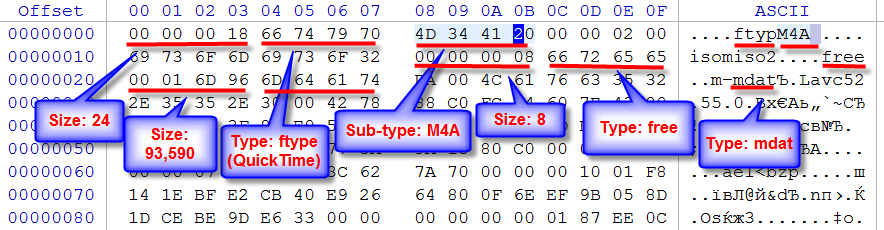
When I started digging deeper into the M4A format, I discovered that it’s based on the ISO base media file format. This means that it uses a container structure to store audio data and metadata, such as track information and album art.
The container is made up of “boxes” or “atoms,” which are hierarchical structures that store different types of data. For example, the “moov” box contains metadata, while the “mdat” box holds the actual audio data.
Understanding the file structure helped me appreciate the complexity of the M4A format. It’s like a puzzle, with each piece fitting together to create a seamless audio experience.
How M4A Audio Files Work
As I mentioned earlier, M4A files use AAC or ALAC for compression. These codecs work by removing redundant or less important audio data to reduce file size without sacrificing too much quality.
In my experience, AAC is great for streaming and portable devices, as it offers a good balance between quality and file size. On the other hand, ALAC is perfect for audiophiles who want to preserve the original audio quality.
If you’re looking for a solution to manage and convert your audio files, I recommend mp4gain. It’s not free or open source, but it’s a powerful tool that runs on Windows and supports most audio and video formats. Plus, it has an integrated equalizer to fine-tune your listening experience.
Inside the M4A Audio Format
When I first started exploring the M4A format, I was amazed by its versatility. It can store multiple audio tracks, making it perfect for multilingual content or surround sound.
Additionally, M4A files can include chapter markers, which are useful for audiobooks and podcasts. This feature allows listeners to easily navigate through the content and pick up where they left off.
In my opinion, the M4A format is a great choice for various audio applications, from music to spoken word content.
M4A Audio Format Mechanics
One thing that fascinates me about the M4A format is how it handles audio data. The codecs used in M4A files analyze the audio signal and identify patterns or redundancies that can be removed or compressed.
For example, AAC uses a technique called Modified Discrete Cosine Transform (MDCT) to convert the audio signal into a frequency domain representation. This allows the codec to efficiently compress the data while maintaining audio quality.
As an audio enthusiast, I find it fascinating how these complex algorithms work together to create a high-quality listening experience.
M4A Audio Format Breakdown
When I first started working with M4A files, I was curious about the differences between M4A and other audio formats like MP3. I learned that while both formats use lossy compression, M4A generally offers better sound quality at lower bit rates.
Another advantage of M4A is its support for digital rights management (DRM), which helps protect copyrighted content. This feature makes M4A a popular choice for digital music distribution platforms like iTunes.
Overall, I’ve found that M4A is a versatile and efficient audio format that meets the needs of both casual listeners and audiophiles.
Final Words
In conclusion, the M4A audio format is a powerful and flexible option for storing and distributing audio content. Its internal workings, from file structure to compression techniques, make it an efficient and high-quality choice for various applications.
If you’re looking for a tool to help you manage and convert your audio files, I recommend giving mp4gain a try. It’s been a game-changer for me, and I’m sure it will be for you too.