Variable Block Size Processing


Free Download Mp4Gain
picture

How to Implement Variable Block Size Processing in MP3 Encoding?

Variable Block Size Processing

Let’s Talk About Variable Block Size Processing

Variable Block Size Processing, often referred to as VBSP, is a crucial aspect of MP3 encoding that influences audio quality and compression efficiency. Imagine you’re a chef, and you have various sizes of food items to prepare for a feast. You need different tools and techniques for each ingredient, just as MP3 encoding requires variable block sizes to process audio data efficiently.

In this article, I’ll guide you through the world of VBSP, explain its significance, and provide insights into how to implement it effectively. As a specialist in audio encoding, I aim to offer you a comprehensive understanding of this complex yet fascinating subject.

The Basics of Variable Block Size Processing

VBSP is a technique used in MP3 encoding to improve audio quality and compression efficiency. It involves dividing an audio stream into blocks of different sizes, where each block size is selected based on the characteristics of the audio content. Think of it like a tailor who customizes clothing to fit each person perfectly; VBSP tailors the block size to the audio data.

The key principle of VBSP is to use smaller blocks for transient or complex audio segments and larger blocks for more steady and predictable segments. For example, a piece of classical music may have long, sustained notes where a larger block size is efficient, while a fast-paced rock song with rapid drum beats and guitar riffs benefits from smaller blocks.

Why VBSP Matters

Understanding the importance of VBSP requires a real-world analogy. Imagine you’re organizing a suitcase for a trip. You have various items, from small socks to larger clothing pieces. To make efficient use of space, you pack smaller items together and use a larger space for bigger items. In MP3 encoding, VBSP helps optimize compression and audio quality in a similar way.

VBSP ensures that each part of the audio signal is processed optimally. It reduces the potential for audio artifacts, which are unwanted distortions or quality losses, in your encoded audio. In essence, VBSP is the difference between a well-packed suitcase and one that’s disorganized and inefficient.

Implementing VBSP for Better MP3 Encoding

Now, let’s delve into how to implement VBSP effectively for MP3 encoding. Just like the tailor who customizes clothing, you need to tailor your encoding process to the audio content.

Step 1: Audio Analysis

  • Begin by analyzing the audio content you intend to encode. This step involves understanding the dynamics, frequency, and characteristics of the audio.

Step 2: Segment the Audio

  • Segment the audio into blocks of various sizes. The key is to identify transient sections that require smaller block sizes and steady sections that can use larger blocks.

Step 3: Apply Appropriate Encoding

  • Use the suitable encoding settings for each block size. Smaller blocks benefit from more frequent updates, while larger blocks can be processed less frequently.

Step 4: Monitor Quality

  • Constantly monitor the audio quality throughout the encoding process. Make adjustments as needed to maintain optimal quality while achieving compression efficiency.

Step 5: Test and Refine

  • Experiment with different block sizes and encoding settings. Testing and refining your VBSP techniques will lead to better results over time.

The Future of MP3 Encoding with VBSP

As technology advances, the implementation of VBSP in MP3 encoding continues to evolve. Just like a seasoned chef who experiments with new ingredients and techniques, the audio industry is constantly exploring ways to improve audio quality and compression efficiency.

New research and development efforts are focused on refining VBSP to handle various types of audio content, from music to speech, with greater accuracy. As technology progresses, MP3 encoding with VBSP is becoming more accessible, allowing content creators and enthusiasts to achieve better audio quality.

Latest Words on Variable Block Size Processing

In the world of audio encoding, the importance of VBSP cannot be overstated. It’s the tailor’s secret to making that perfect suit or the traveler’s art of efficient packing. By implementing VBSP effectively, you can enjoy audio files that sound amazing without sacrificing storage space.

And while we’re on the subject of audio quality, it’s worth mentioning that Mp4Gain, an audio enhancement solution, can further improve your audio quality. However, the primary focus of this article has been to help you grasp the concept of VBSP in MP3 encoding.

Comments:

This article is enlightening! I never knew encoding audio involved so much intricacy. Can you provide more examples of how VBSP impacts real audio files?

As a budding musician, I’m always looking for ways to optimize my music for online platforms. Understanding VBSP will undoubtedly be a game-changer. Thanks for the insights!

Great read! I’d love to learn more about how VBSP can benefit speech audio. Are there specific techniques for optimizing voice recordings?

This article explains VBSP beautifully. It’s like the Marie Kondo of audio encoding! I can see how efficiency and quality go hand in hand.

As a content creator, I’m always trying to strike a balance between audio quality and file size. VBSP seems like the answer. Looking forward to experimenting with it!

Can you recommend any software tools for implementing VBSP effectively? It’d be great to have some hands-on guidance in my audio projects.

This article is a gem! I’ve been encoding my music without understanding the importance of VBSP. Now, I can fine-tune my audio for better quality. Thank you!

How do I determine the optimal block sizes for encoding my audio? I want to make sure I’m doing it right and not compromising quality.

This article is a game-changer for my podcasting journey. The VBSP concept makes sense, and I’m eager to put it into practice for better audio episodes.

Wow, this was an eye-opener. I never thought about encoding audio like this. Now I understand why some of my audio files don’t sound as good as they could. Excited to try VBSP!


Free Download Mp4Gain
picture


Mp4Gain Main Window
picture


Mp4Gain Features
picture


Free Download Mp4Gain
picture

Handling Subband Filtering in the MP3 Audio Codec

Handling Subband Filtering in the MP3 Audio Codec

Subband Filtering
Subband Filtering

As a specialist with extensive experience in the world of audio technology, I’m excited to explore the intricate realm of subband filtering in the MP3 audio codec. In this article, I aim to provide you with a comprehensive understanding of this fascinating subject. Let’s embark on this journey to uncover the secrets behind the technology that powers your favorite music.

Let’s Talk About Subband Filtering

Subband filtering is a fundamental concept in the realm of audio coding. To put it simply, it’s a technique used to break down audio signals into smaller, more manageable parts. Think of it like a chef preparing ingredients before cooking a delicious meal. Each ingredient is a subband, and the chef’s task is to make sure they’re just right.

In the world of audio, subband filtering serves a crucial purpose. It helps us analyze and process audio data efficiently. When you listen to your favorite songs on your phone or computer, you may not realize that beneath the surface, subband filtering is at work, ensuring that the music reaches your ears in the best possible way.

Understanding the MP3 Audio Codec

Now, let’s talk about the MP3 audio codec. You might have heard of MP3 files – those are the ones you use to store and play your music. But what exactly is this codec thing? Well, it’s like the recipe for your favorite dish. It tells your device how to take the raw audio data and turn it into that familiar sound you love.

Why do we need codecs like MP3? Think of it this way: when you cook, you don’t want to carry around your entire kitchen to make a meal, right? You need a compact set of instructions (a recipe) to create a delicious dish. Similarly, the MP3 codec compresses audio data, making it smaller and easier to store and transmit, but without losing too much quality.

The Science Behind Subband Filtering

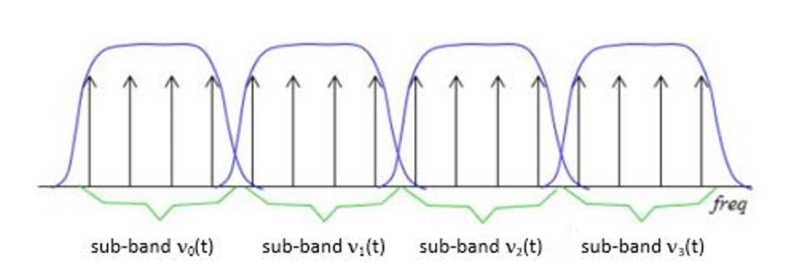
Now, let’s dive a bit deeper into the science of subband filtering. Imagine you’re trying to sort a big box of crayons. You decide to group them by color. Subband filtering does something similar – it groups different parts of the audio signal based on their frequencies.

It uses something called “filter banks” to do this. These are like magical sieves that separate the high-pitched sounds from the low-pitched ones. Just like your crayon groups, these “subbands” are easier to handle and process individually.

The Subband Filtering Process

So, how does subband filtering work in the MP3 codec? Let’s take a practical example: your favorite song. When you hit play, the audio signal is divided into many small chunks. Each of these chunks represents different parts of the music. The high notes might be in one chunk, and the low, thumping beats in another.

This division allows the MP3 codec to focus on the essential parts. It’s like when you’re reading a book – you don’t need to pay the same amount of attention to every word; you skim over the less important ones. Subband filtering helps the MP3 codec do something similar, paying more attention to the crucial parts and using less data for the less important bits.

The Role of Psychoacoustic Models

To make things even more efficient, the MP3 codec uses something called “psychoacoustic models.” These models are like having a good ear for music. Just like how you can tell which instruments are playing in a song, psychoacoustic models help the codec understand which parts of the music are more critical to our ears.

Imagine you’re listening to your favorite band live. Your brain naturally focuses on the lead singer’s voice and the melody. The background noise, like people chatting or the sound of cars passing by, is less important. Psychoacoustic models do something similar, helping the MP3 codec concentrate on the most important sounds while letting the less important ones fade into the background.

Efficiency and Data Reduction

Now, let’s talk about efficiency and data reduction. We all like fast and smooth experiences, right? The MP3 codec makes your music play quickly by reducing the amount of data it needs to process. It’s like having a super-organized backpack for a camping trip. You only carry what’s necessary, leaving the heavy and bulky stuff behind.

So, what does the codec do? It uses shorter codes for the most common sounds. In a song, the drumbeats or the lead singer’s voice are usually more frequent. They get shorter codes, making them quick to process. Less common sounds, like the subtle strumming of a guitar, get longer codes. This efficient system helps reduce the overall size of the audio file without sacrificing quality.

Quality vs. Compression

Of course, we all want our music to sound amazing. But there’s a balance to be struck – the quality of your music and the space it takes up. It’s like when you’re choosing video quality settings on a streaming platform. You want the best picture, but you also don’t want it to buffer forever.

The MP3 codec manages this balance. It compresses the audio data to save space while still delivering great sound. It’s like magic – it lets you store hundreds of songs on your phone without it getting too full, and they all still sound terrific.

Real-Life Applications

You might be wondering where subband filtering and the MP3 codec come into play in your daily life. Well, they’re everywhere! Think about streaming music on your phone, watching videos online, or even chatting on a video call. All of these rely on efficient audio coding techniques to make sure you hear what’s important while saving bandwidth.

Imagine you’re streaming your favorite cartoon online. Thanks to subband filtering and the MP3 codec, you get to enjoy clear dialogue and exciting music while the background noise from your neighbor’s lawnmower fades into the background.

Challenges and Future Developments

As technology keeps evolving, so does the world of audio coding. Challenges like making audio coding even more efficient and dealing with different devices are on the horizon. Just like how self-driving cars were a dream not too long ago, advancements in audio technology will continue to shape our lives.

In the coming years, we might see even better ways to balance quality and compression. It’s an exciting time for audio technology, and subband filtering will undoubtedly play a big role in making it even better.

Behind the Scenes: Creating an MP3

Have you ever wondered how an MP3 file is created? It’s a bit like following a recipe to cook a delicious meal. The audio data goes through a series of steps where subband filtering helps sort and organize it. Then, it’s compressed, much like simmering a sauce to concentrate the flavors.

Finally, the codec gives you a compact and tasty MP3 file that’s ready to be played. It’s a bit like cooking up your favorite dish – only in the world of sound.

In conclusion, subband filtering is like the chef’s secret technique for preparing an excellent meal. It’s the magic behind the MP3 codec, making your music sound fantastic while fitting in your device. So, next time you listen to your favorite song, remember the subbands and filters that make it

x264 Encoder in Mp4 Creation

Role of the x264 Encoder in MP4 Creation

x264
x264

As an expert in video encoding, I’ll delve into the significant role played by the x264 open-source encoder in the creation of MP4 files. This versatile tool has a profound impact on the quality, settings, and optimization of your MP4 videos. In this article, I’ll share insights and experiences to answer your search intention and help you understand the x264 encoder’s key role.

How Does x264 Affect Video Quality in MP4 Files?

The x264 encoder is renowned for its ability to enhance video quality in MP4 files. It achieves this by efficiently compressing video data while preserving visual fidelity. One of its notable features is its constant rate factor (CRF) mode, which allows you to balance file size and video quality. By adjusting the CRF value, you can control the compression level, ensuring that your MP4 videos maintain excellent quality. This balance is crucial, especially when dealing with high-definition content, as it ensures a visually pleasing viewing experience without excessive file sizes.

Key Settings for x264 in MP4 Encoding

To make the most of the x264 encoder in MP4 creation, it’s essential to understand key settings. The x264 encoder provides options for controlling parameters such as bitrate, preset, and profile. For instance, choosing the “slow” preset improves video quality but results in longer encoding times. On the other hand, the “fast” preset sacrifices some quality for faster encoding. These settings are valuable tools for customizing your MP4 files to meet your specific needs.

Benefits of Using the x264 Encoder in MP4 Creation

The x264 encoder offers several advantages when it comes to MP4 video creation. Firstly, it’s an open-source tool, which means it’s free and accessible for anyone. This allows for widespread adoption and community support. Additionally, it’s known for its high compression efficiency, resulting in smaller file sizes without compromising video quality. The x264 encoder’s flexibility and adaptability make it an ideal choice for various applications, from video streaming to archiving.

Optimizing x264 for MP4 Videos

Optimizing x264 for your MP4 videos involves fine-tuning the settings to suit your specific goals. You can experiment with different presets, CRF values, and profiles to find the right balance between quality and file size. It’s essential to consider the content you’re encoding and the target audience. For example, if you’re creating content for online streaming, you may prioritize faster encoding times. On the other hand, if quality is paramount, you can opt for slower presets and higher CRF values.

Last Words about the Role of the x264 Open-Source Encoder in MP4 Creation

In conclusion, the x264 open-source encoder plays a crucial role in MP4 video creation. It empowers users to achieve excellent video quality while providing flexibility and accessibility. By understanding its impact on video quality, key settings, benefits, and optimization techniques, you can harness the full potential of the x264 encoder for your MP4 files. Whether you’re a content creator or a video enthusiast, this tool is a valuable asset in the world of video encoding.