A brief explanation of loudness normalization


Free Download Mp4Gain
picture

A brief explanation of loudness normalization

Audio Normalization

Loudness Normalization

Audio Normalization

・ Is the volume of the sound source uploaded to the video site lower than that of the original sound source?
・ The sound source and volume of the CD are completely different from those of Youtube.
・ Sound pressure and volume increase with MIX, but it sounds small for some reason.
Have you ever felt like this when you were singing or posting on YouTube?
This is all because a feature called loudness normalization is working.

It has recently been introduced to Nico Nico Douga and applied to most music streaming services (subscriptions, etc.) in recent years.
Let’s briefly explain what happens to loudness normalization and what to do in the future.

1 What is loudness normalization?
2 It is important to have a mix with “margin”
3 How to know how much the volume has been lowered
3.1 For Youtube
3.2 Other services
4 Summary

What is loudness normalization?
In conclusion, loudness normalization is a
A specification that automatically reduces the sound when the volume exceeds a certain value.

It can be misinterpreted, but it is not a specification that reduces sound pressure.

Loud sounds are louder and cooler than listening to soft-sounding music!
I think there are a lot of people who say that.
However, if I personally think about why I voluntarily decided to lower the volume, I would like to increase the credit.

merit
・ Eliminate variation in the sound of each song ・
No need to adjust the volume every time you watch videos continuously
・ As a result, your ears do not get tired
The above can be mentioned.
All songs have a constant volume, so even
If you play music or videos continuously, you can avoid the problem of “the volume suddenly increased when the next song came!”.

You don’t need to turn down the volume, and it seems to be just a merit, but from a musical point of view, there are a few issues to consider.

A mix with “margin” is important
I’m sure there are people who say, “If you can turn it down without permission, no problem with high volume and sound pressure!”
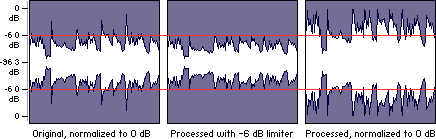
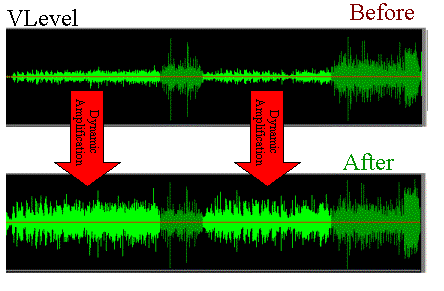
Anyway, it’s great! I have prepared a simple diagram of what happens to the sound source mixed with loudness normalization.

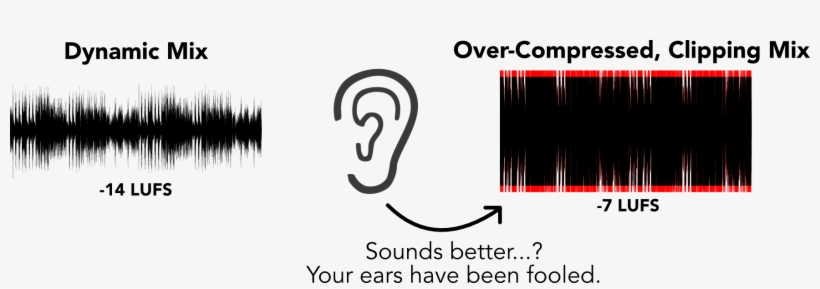
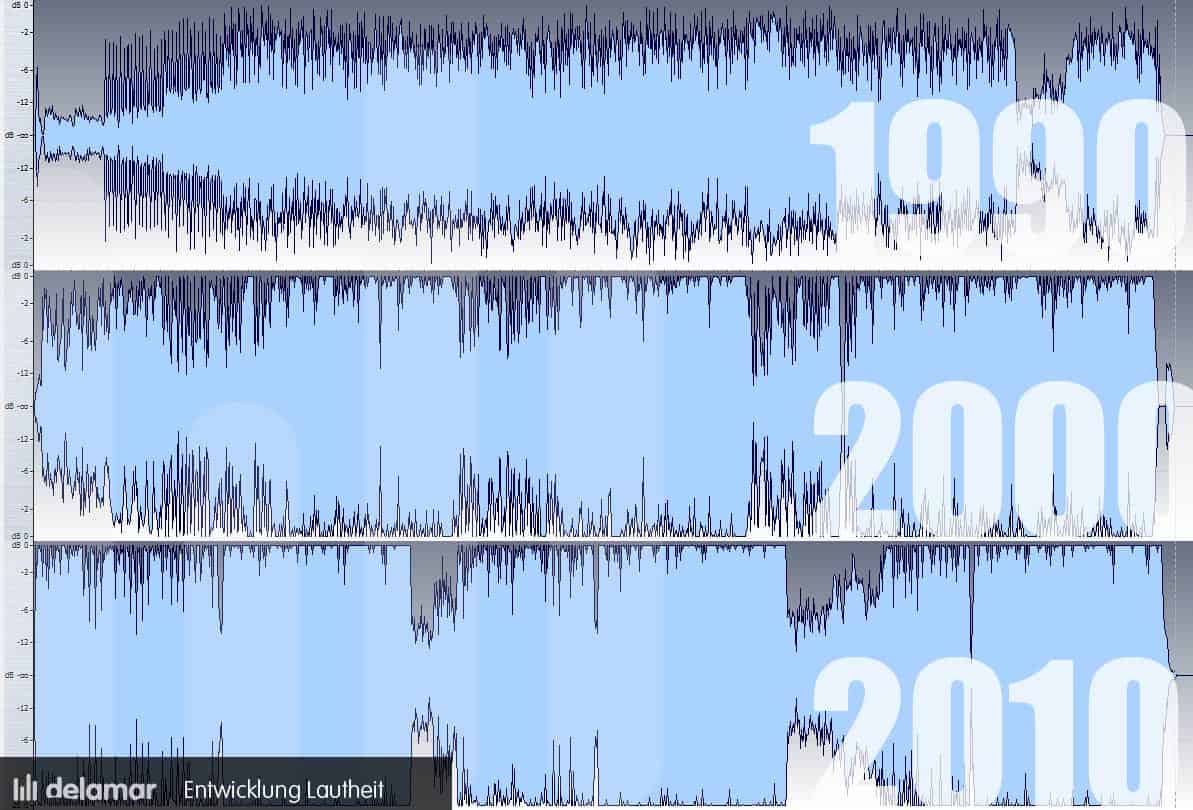
As you know, if you increase the sound pressure too much by mastering, the waveform will become a sound source that will fill with sound and get louder.

If the volume is forcibly reduced by normalizing the loudness in the state of a sound source with lost dynamics, the lack of power can be highlighted and heard.


Free Download Mp4Gain
picture


Mp4Gain Main Window
picture


Mp4Gain Features
picture


Free Download Mp4Gain
picture

Adjust volume using volume normalization or gain compensation

Adjust volume using volume normalization or gain compensation

Loudness

Gain compensation and automatic source normalization can be used to adjust the volume of individual audio sources. These volume controls, unlike other Wwise volume control functions, are transparent in terms of all logical operations related to volume. For example, it does not affect the decision to make a voice below the threshold (virtual voice) and is not considered in the evaluation of the HDR attenuation. It also does not appear in Voice Monitor.

Loudness

The sum of the gains for each source is displayed in the Wwise Profiler, Voices tab, in the Normalization / Compensation Gain column.

Font normalization
Loudness data collected during the analysis phase of your original file can be leveraged in Wwise to automatically normalize assets at runtime based on the expected loudness. Loudness value calculation is recommended by ITU-R BS.1770 for loudness measurement applying K-weighting filter, -70 dB absolute gate, -10 dB relative gate, 400 ms window and 75% overlap. Almost compatible.

The source normalization process is non-destructive and the loudness values ​​obtained from sound analysis are stored separately in Wwise and the appropriate normalization gain is applied at runtime. This gain is calculated based on the loudness value and is “gain = – loudness – 23 [dB]”. For example, if the loudness value of the sound analysis is -37dB, enabling source normalization will cause Wwise to apply a normalization gain of “+ 14dB (+ 37-23)” at runtime. Also, if the loudness value by sound analysis is -12dB, the normalization gain is “-11dB (+ 12-23)”. That is, small sounds are amplified and loud sounds are attenuated. If you are not satisfied with the normalization gain calculated based on the loudness value, you can make fine adjustments using the compensation gain.

Will you survive the loudness war?

Will you survive the loudness war?

Loudness War

Loud War Countermeasures in the Age of Music Broadcasting

Loudness War

Spotify and Apple Music can enable / disable volume normalization based on user settings
Let’s go back to streaming music. Since the music industry does not have volume regulation like the broadcast industry, when playing a playlist as described above, there is a possibility that a comfortable listening experience cannot be provided due to a difference in the feeling of volume of music.

Therefore, streaming service companies such as Spotify, Apple Music, and YouTube have established a mechanism to perform “volume normalization” (volume leveling) in order to unify the volume of content. It is a function that semi-forces the side of the platform to provide the same volume.

There is a reason for saying “semi-mandatory”. Spotify and Apple Music are application settings for playback that allow the user to decide whether or not to apply volume normalization.

For the Spotify iOS app, you can select Settings-> Play-> “Enable Audio Normalization”. Apple Music can be turned on and off by selecting “Music” -> “Adjust volume automatically” in the “Settings” application. YouTube, on the other hand, seems to be forced to apply volume normalization to all content.

Below are estimates of loudness normalization for the major platforms. Each company sends music according to this standard value. If the measured value is greater than this, the volume is suppressed and if it is less, it is amplified to this value. However, only Spotify officially publishes the loudness value in “Spotify for Artists”.

This default is not an officially announced value except in some cases. Also, it may change in the future. About AWA, the information I heard directly from “the person inside” before
Since J-POP generally has a higher sound pressure than this default, it means that the volume is lowered when shipped. It can be inferred that the high sound pressure regulation of AWA, a domestic platform, reflects such domestic circumstances.

As a music producer, I am concerned that if loudness normalization is applied to music with high SPL and the volume is forcibly lowered, the way the music is heard will be contrary to the artist’s intent. There is a possibility.

For music with volume normalization applied to music with high sound pressure, even when the volume of the playback device is turned up, the already small dynamic range becomes even smaller and the flat plate may feel thin.

The importance of loudness normalization Part 1

The importance of loudness normalization Part 1

Loudness Normalization

Regarding the importance of loudness normalization in streaming services, Shimamoto says: “The volume of musical works varies greatly depending on the era in which they were made and each album.

Matching Levels in Home Recordings for Even Playback | LedgerNote

When playing a single album on a CD, I just had to adjust the volume to the appropriate level first, but in music distribution, it varies. Music of different ages and genres will be mixed. At this time, if there is a volume difference for each song, the user will need to adjust the volume one by one. Therefore, to improve the user experience. A mechanism is now required. ” On

music streaming, volume normalization generally calculates the volume value that indicates the perceived volume for each album, and for songs that exceed the standard value, please lower the volume in the application to the standard value. It works in the way you play for it to become.

Currently, the services that have announced the installation of such loudness normalization are used in TIDAL, Amazon Music HD, Spotify and Nico Nico Douga. Although YouTube has not officially announced it, it has been confirmed that it has adopted a mechanism that conforms to the same international standard. On the other hand, some streaming services, such as mora qualitas and LINE MUSIC, do not have these standards (* as of October 2020).

The TIDAL application also has a “Loudness Normalization” item that can be turned on and off.
European broadcasters have adopted the standard of -23LUFS plus or minus 1. Streaming services do not necessarily publish this number, but for example TIDAL has advertised it as -14LUFS and Nico Nico Douga has advertised it as -15LUFS. Also, Spotify uses a different standard called Replay Gain, but it is supposed to be around -14 LUFS.

Nico Nico Douga has clearly established the “normalization of loudness” standard for January this year.
■ Impact of

Loudness normalization in audio listening I tested various music services to see how loudness normalization actually affects audio listening. The song uses “Pretender” by Official Hige Dandism.

Loudness normalization settings are built into PC and smartphone applications. It is often on by default, for example Amazon Music HD allows you to uncheck “Loudness Normalization” in “Settings”. With Spotify, you can turn it on and off with the item “Standard volume settings: play all songs at the same volume”.

First, play “Pretend” normally from the Spotify application on your PC. After that, when I turned off the “Standard volume settings / Play all songs at the same volume” item in the settings and played the song again, I felt the volume clearly increased even when listening with headphones. (Note: Loudness normalization in Spotify works when you pause one song and then play the next song again. Pause doesn’t work).

Playing music from the Spotify PC app (left) and the volume normalization setting screen (right)
Now let’s try it on Amazon Music HD. This is easy to understand because the volume changes clearly if you uncheck “Loudness Normalization” even during music playback. I couldn’t find a clear statement on what kind of Amazon Music HD standard sets, but since there is a notation that it is equivalent to -14LUFS as a guide when creating content for Alexa, a standard equivalent to this is set. a high possibility that it is.

Played from the Amazon Music HD PC app (left) and the volume normalization setup screen (right)
Let’s see it on YouTube this time. YouTube does not have a volume normalization on / off feature, but you can see how much the volume has dropped from the original source in the “stats”. If you right-click while playing “Pretend” and look at “Detailed Statistics”, “Volume / Normalized 100% / 41% (content volume 7.7dB)” is displayed. In other words, it plays with the volume reduced by about 7.7 dB.

When I measured the volume of “Pretender” using iZotope’s music editing software “iZotope RX 7 Audio Editor”, this song was displayed as “-6.3 LUFS”. Since the standard level of loudness normalization differs according to the distribution site, it cannot be said unconditionally, but considering this information, it is estimated that it is reproduced with the volume lowered between 7 and 8 dB. NS

The importance of loudness normalization

The importance of loudness normalization

Normalize Audio

With the rise of music streaming services, the term “volume normalization” is back in the spotlight. Music distribution platforms and streaming services that can be used in Japan have also announced the adoption of this “loudness normalization”, and discussions on this topic are becoming more active, especially among creators.

Volume normalization

We spoke to David Shimamoto, who is actively spreading the word about studio engineering, what loudness in the first place means, and what loudness normalization means to audiophiles.

David Shimamoto, representative of Vocal-EDIT.com

David Shimamoto Vocal Editing Service Representative
Vocal-EDIT.com. Graduated from the Department of Music Technology / California Institute of the Arts. After working in USEN Corporation’s in-house SSL studio, he moved into the international video streaming business. After a dozen years, he returned to the world of music. The book “Tokubakku-The Story of Digital Studio”, which focuses on the subject of loudness and deals with the Yomoyama story related to mixing and mastering from a unique perspective, is a self-funded book, but it is a lecture in many colleges music and vocational schools, has been adopted and introduced as reference material on Nico Nico Douga’s official blog. Twitter ID: @gyokimae

■ “Loudness” that quantifies how people hear it.

Loudness normalization is a mechanism that standardizes the volume of content playback that was originally introduced by broadcasting stations in Europe and the United States. Specifications established by an industry group called EBU (European Broadcasting Union) / ITU (International Telecommunication Union) are currently used throughout the world. LUFS (Loudness Units Full Scale) is primarily used as a unit to express loudness (sometimes the unit called LKFS is used, but the meaning is almost the same).

In TV broadcast, if the volume differs depending on the content, such as commercials, dramas and music shows, it will cause annoyance to the viewer. Therefore, a certain standard was set as a request from the broadcasting station.

The normalization of loudness was originally born from the request for television broadcasting and is a mechanism devised to keep the perceived volume of various content constant.
First of all, “loudness” is a different concept from the mere volume and level of electrical signals. Since the human ear does not sound the same at all frequencies, the concept of “volume” was born as a method to reduce it quantitatively based on “how loud it can be heard by the human ear.”

Even at the same signal level, the human ear has the characteristic that low-frequency sounds are more difficult to hear, sounds are more audible around 4kHz, and continuous sounds are more audible than instantaneous ones. Loudness is a quantification of how music is heard based on these characteristics.
There is also the word “sound pressure” as a word with similar nuances. The original meaning of the word “sound pressure” is to express how much is greater than the minimum level that the human ear can perceive, with one unit of pressure. However, today, as the word “sound pressure warfare” represents it, there is a slight deviation in its meaning.

Therefore, based on the intention of Mr. Shimamoto in this document, we do not dare to use the word “sound pressure”, but we use two things: “signal level”, which indicates the magnitude of the digital signal, and “loudness”, which quantifies the hearing of the human ear. I want to try to explain in words.

(Since the method of calculating the loudness value is complicated, I will skip it here. To understand this article, I would like you to keep in mind that the higher the number, the louder the sound.)

■ Broadcast service The role of loudness normalization in

Listeners in general are rarely aware of the existence of loudness normalization when used as a broadcast application. However, with the launch of music streaming services, it has also become of great importance to music listeners. Specifically, the user can now configure the on / off in the application.

How to normalize the loudness of a video

How to normalize the loudness of a video

Video Loudness

For decades it was achieved that MP3s could be normalized in their volume gain so that they all had the same loudness.

video loudness

Over time, the format of the files that people download has diversified.

If we talk about audio, we could say that people now download files in flac format, in Ogg format, wma, etc.

And with the great relevance that the world of videos has taken lately, many people download music videos and also find it necessary to normalize the volume level of these videos.

Mp4Gain is the best program AND perhaps the only one that can normalize the audio of the videos to make the loudness correct.

Avi, mpeg, mp4, flv, 3gp, etc. Some of the many video formats that Mp4Gain can normalize your volume level are.

The method of handling the program is really very simple because it is only necessary to load the file (s) and press a button to achieve normalization.
It can be batch or one by one.
The result of very high quality and absolutely corrects the problem and also offers the possibility of other capabilities How to equalize and improve the audio of the files also modify their tempo osu.ppy and a whole series of additional possibilities Which are very well received by users .

Normalizing the volume of a video is something that can be easily done today with this Mp4Gain program.

Which of course also allows the same loudness normalization in audio files.

It even also allows converting from one format to another without any problem, being able to even convert what was originally a video of a song into an audio file type MP3 or flac, etc.