
What is Audio Clipping?
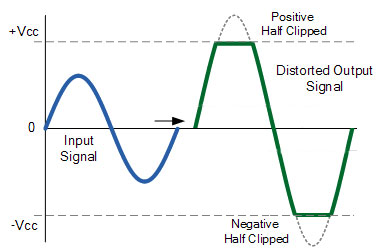
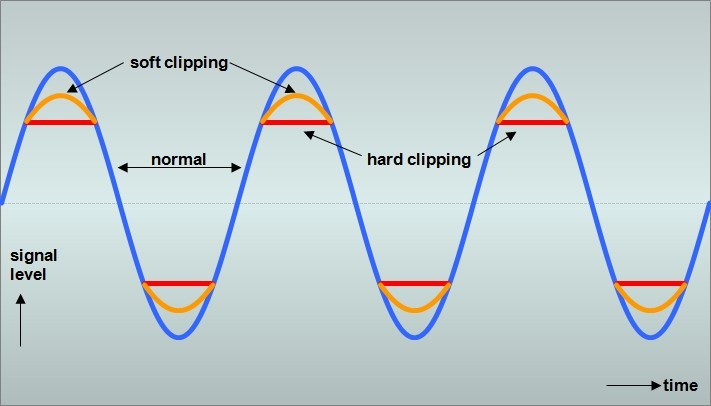
As an audio enthusiast, I always strive for the best possible sound quality. However, sometimes even the best recording can suffer from audio clipping. Audio clipping occurs when the audio signal exceeds the maximum amplitude that a system can handle, resulting in a distorted and unpleasant sound. In this article, I will discuss the causes of audio clipping, how to prevent it, and the solutions available to fix it.
Causes of Audio Clipping
One of the main causes of audio clipping is recording at too high of a volume. This can cause the audio signal to exceed the maximum amplitude, resulting in a distorted sound. Another cause of audio clipping is using audio equipment that cannot handle the volume levels being produced, such as low-quality microphones or speakers. Lastly, mixing and mastering can also cause audio clipping if the levels are not properly balanced.
To illustrate this point, let me share my experience. Once, I was recording a live concert, and I noticed that the audio was distorting. After some investigation, I realized that the recording was clipping due to the high volume levels. I had to adjust the microphone levels and the gain to prevent further audio clipping.
How to Prevent Audio Clipping
Preventing audio clipping starts with proper recording techniques. Make sure to record at an appropriate volume level and use high-quality equipment that can handle the volume levels. Proper mixing and mastering can also help prevent audio clipping. Additionally, using a limiter can help prevent clipping by limiting the maximum amplitude of the audio signal.
As a personal anecdote, I was once mixing a track and noticed that the levels were too high, resulting in audio clipping. I had to adjust the levels and use a limiter to prevent further clipping.
Audio Clipping Solutions
If you have already recorded audio that is suffering from clipping, there are solutions available to fix it. One solution is to use an audio editor to manually remove the clipped sections. Another solution is to use a normalizer or compressor to even out the volume levels and prevent further clipping.
Personally, I have found that using a normalizer, such as mp4gain, is an effective solution for fixing audio clipping. Mp4gain is a Windows-based software that can normalize and convert audio and video files while maintaining the highest sound quality. It also has an integrated equalizer that allows for further adjustments.
In conclusion, audio clipping is a common problem in the world of audio, but it is preventable and fixable. Proper recording techniques, mixing and mastering, and the use of a limiter can help prevent audio clipping. If you do run into audio clipping, solutions such as manually removing clipped sections, using a normalizer or compressor, or using software such as mp4gain can help fix the problem.
Final Words
In my experience, the best way to prevent audio clipping is to record at an appropriate volume level and use high-quality equipment. Mixing and mastering techniques can also help prevent clipping. However, if you do encounter audio clipping, there are solutions available to fix it. Whether it’s manually removing clipped sections, using a normalizer or compressor, or using software such as mp4gain, you can fix the problem and achieve the best possible sound quality.
audio clipping, how to prevent audio clipping, audio distortion, audio peak distortion, audio normalization, audio compression, limiter, mp4gain, audio editing, audio mixing, audio mastering, sound quality, recording techniques, high-quality equipment, volume levels, equalizer

