
The word “vlog” comes from the contraction of the Vidéo Blog. Vlogging is an increasingly popular video format, especially on YouTube. Some “youtubers” have made it their true brand and have millions of followers and billions of visits. The basic idea of this format is the regular production, with full autonomy, of a video showing its author on screen. When you create a vlog, you are basically a screenwriter, director, actor, and editor! It is important to plan your “setup” to get the best possible images quickly and easily.

Configure vlog.
# 1 ROOM
Implementing a vlog “setup” begins with choosing the camera. On paper, you can use any type of camera with a video mode to create a vlog: from a smartphone to a medium format. It all depends on the format you want to achieve and the type of image you want. For example, the use of a smartphone is ideal for having an ultra-mobile solution capable of live transmission. On the other hand, the use of a 24×36 mm hybrid allows for an image with a more cinematographic representation. Either way, it is better to choose a solution that has a good video mode (ideally 4K) and a very good auto focus. For the optical part, it is preferred to choose the wide angle, for example being able to film with extended arms. For added convenience, a camera with a tiltable screen in selfie mode provides video opp feedback and controls easier framing while recording. The camera must also be compatible with at least one external audio recording system and must therefore be equipped with a microphone jack. In all cases, camera selection affects the choice of accessories to use.
Compact Expert: These devices are interesting for creating nomadic vlogs. They are small, lightweight and offer advanced features in terms of recording and ergonomics. They also offer very good image quality.
# 2 SOUND
Audio is a basic element of all types of video, including vlogging. Although all cameras are equipped with small internal microphones (usually with stereo recording), it is preferable to choose an external microphone. It allows to improve the recording quality, focus the recording on the voice of “vlogger” and limit the presence of sound from the environment. External microphones are usually connected to the camera. These microphones are also suitable for mobile or studio setup.
# 3 THE LIGHT
Light is also an element that should not be overlooked when logging. Using one or more artificial light sources ensures consistency in the representation of the image in different shooting situations.
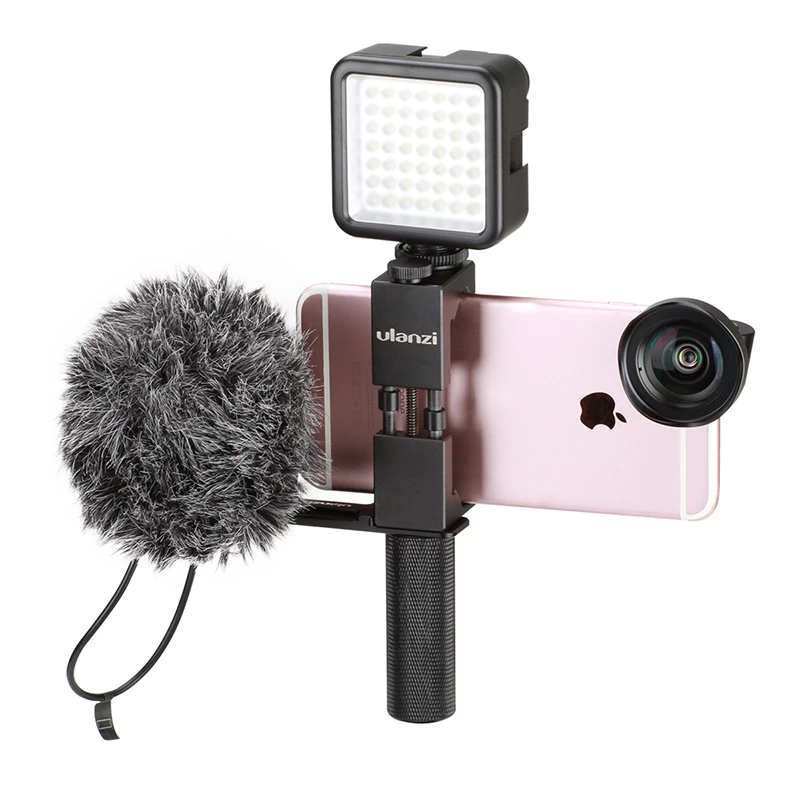
For nomad configurations, there are small adjustable LED panels in power and, for some, in color temperature, which can be attached to the camera.
Aputure Amaran AL-MX – Rotolight Neo II – Screwed P1
For studio setups it is possible to choose an LED torch system with light amplifiers installed on light racks.
# 4 Get started
Nomadic vlogging requires excellent camera grip. In fact, the device is often kept within reach for long periods of time. Therefore, it is important to choose a suitable handle. Compact and lightweight countertops are a good solution. Folded back, they turn into a really comfortable handle for freehand.


