
Today in this article we are going to investigate the best codec packs for Windows 10. Virtually everyone likes to watch movies and other multimedia content on our computer. It is possible that we have encountered problems when playing a video, either because it is of an unsupported format or because it is not seen correctly for some reason that we do not know. Very possibly the solution is precisely in the installation of new codecs to reproduce the multimedia content.
What is a codec pack?
A codec pack is a collection of libraries, filters, encoders and tools that are capable of encoding and, where appropriate, decoding existing audio and video formats. These toolsets are installed in operating systems so that they are capable of reproducing formats that are not natively readable by the system itself.
There are a large number of playback formats, just as .WMV is owned by Microsoft, we also find formats such as .MOV that belong to the Mac system. By using a codec pack we will be able to play this type of files without any problem.
Do I need codecs for Windows 10?
It is true that Windows 10 has a series of codec already installed natively to practically play any video. Although we can find the possibility that due to updates or errors that the system has suffered such as malware attacks, we encounter problems for reproduction.
It is also possible that our version of Windows 10 is of type N or KN. If you want to know what Windows 10 N is, visit our tutorial that explains this in detail. Well, in these versions of the system we do not have native multimedia support, so we will need to install both audio and video players independently and with it, codecs for Windows 10.
List of best free codec packs for Windows 10
We have already commented on the reasons why at any given time we may need these codec packs for Windows 10. So now we are going to comment on those that have more fame and impact on the web.
K-Lite Codec Pack

If we talk about codecs it is mandatory to do it from K-Lite Codec Pack. This is one of the packs with the longest travel, since Windows XP offers magnificent results and functionality. For this reason they have won first place for so many years.
Shark007

Another of the most valued, and best known codec pack for Windows 10 is Shark007, the famous shark with flow. This package, like the previous one, has a list of tools capable of reproducing any audio format that comes before it. It has perfect compatibility for all versions of Windows 10 and also for previous versions such as Vista or XP.
Combined Community Codec Pack (CCCP)
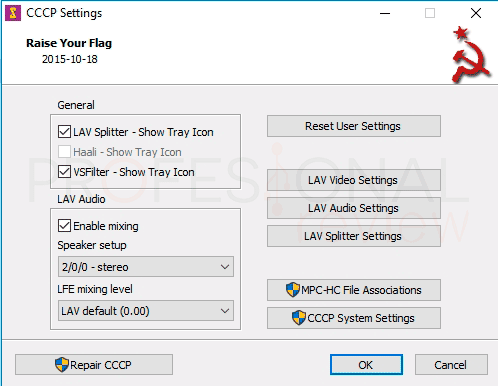
Our fourth option is a pack of codecs for Windows 10 of Russian origin, as you hear it. This pack at the time offered something that others could not give, and is the absence of errors in Windows 8 and 10 operating systems. It was one of the first to offer compatibility with these.
We can download it from its official website, which we can see that it does not download due to its graphic design or detailed information. Total, they are Russian, they are different. During the installation check what codecs we have already installed so as not to overwrite them again, unless we decide yes.
A negative aspect of this pack is that it has not been updated since the end of 2015, although you will not have any problem to play multimedia files.
X Codec Pack
Next on our list is X Code Pack. With a basic interface for the selection and association of file extensions we should not be fooled, they are also one of the best we can find. We can download them for free from its official website
The origin of its name goes back to Windows XP, previously called XP Codec Pack, maybe with this name it sounds like you. X Codec Pack discards for its simplicity and simple installation. In addition, it is lighter than K-Lite and also has everything you need.
One aspect that we must keep in mind is that it offers maximum compatibility with Windows 8 but not with Windows 10. So if you are a Windows 8 user, it may be your ideal pack at this time.


