Analyzing the main audio formats Part 3


Free Download Mp4Gain
picture

Analyzing the main audio formats Part 3
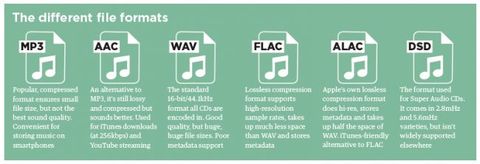
audio file formats

How about high definition music?

Audio Formats

Unlike HD video, there is still no universal standard for high definition audio.

Without going into detail, this term generally refers to recordings with a higher sample rate and / or bit depth than CD (i.e. 16 bit / 44.1 kHz). Examples of high-resolution audio are 16-bit / 96 kHz or 24-bit / 192 kHz files.

Due to the presence of additional audio information, high-resolution files sound much better than compressed files, which lose this information during the compression process. These formats require more disk space, but their quality is definitely worth the investment.

High-resolution audio includes uncompressed formats, such as AIFF and WAV, and lossless formats, such as FLAC and ALAC. DSD (partly a niche format used on Super Audio CDs) also falls under the Hi-Res Audio category, but it is compatible with a much smaller number of devices. When it comes to streaming, services like Tidal Masters use an MQA container to stream high definition files over networks using the lowest possible signal bandwidth.

When it comes to playing high-resolution audio formats, it is already supported by many devices today. The 24-bit files can be played with Denon HEOS wireless speakers, as well as premium portable music players like Cowon Plenue D2 and Astell & Kern A & norma SR15.

Also, most flagship Android smartphones support Hi-Res Audio, for example the highly rated Samsung Galaxy S10 +, but you won’t be able to immediately hear them on a new iPhone. We’ve found ways around this limitation, but keep in mind that Hi-Res Audio files are still not as compact as their lossy counterparts.

What is the best audio format for you?
The format you choose depends on whether you are more concerned about memory capacity or sound quality, and what type of device you intend to use it with.

The popularity of MP3s came at a time when the cost of disk space was very high. Today’s smartphones, music players, and laptops are equipped with an impressive amount of memory, so it makes sense to pay attention to higher-than-CD quality formats.

If you have decided to archive your audio files, FLAC or another lossless format might be a good option. They represent a good compromise between compression level and sound quality, allowing you to listen to high-quality digital music and save disk space. Just be sure to check the compatibility of the selected format and available devices.



Free Download Mp4Gain
picture


Mp4Gain Main Window
picture


Mp4Gain Features
picture


Free Download Mp4Gain
picture

Lossless Audio Compression Part 3

Analyzing the main audio formats Part 2

Audio File Format

Compressed and uncompressed audio files

audio file format

Let’s start by examining three categories into which all audio file formats can be grouped. They are determined by the degree of data compression and the associated loss of sound quality.

If a special algorithm (or codec) was not used to compress the audio in your file, this will lead to a double result: first, there will be no loss of sound quality, and second, you will soon run out of audio space. your hard drive.

In essence, the uncompressed recording is fully consistent with the original audio file, in which real sound signals are recorded in digital representation.

WAV, AIFF or FLAC: uncompressed formats
WAV and AIFF are the most popular uncompressed audio file formats. Both are based on PCM (Pulse Code Modulation), a well-known mechanism for directly converting audio to digital format. WAV and AIFF use similar technologies, but the storage methods are slightly different. CD-quality files and higher resolution files can be burned in these formats.

The WAV format was developed by Microsoft and IBM and is therefore used on Windows-based platforms; it is the standard CD recording format.

The AIFF format was created by Apple as an alternative to WAV; And while AIFF files are less common, they provide more comprehensive metadata support, allowing you to store album art, song titles, and the like.

The downside to these formats is that they require a large amount of memory. CD-quality files (16-bit, 44.1 kHz) occupy approximately 10 MB of disk space per minute of sound.

ALAC, FLAC, WMA Lossless: lossless audio formats
We all love FLAC. Lossless format, files in FLAC (Free Lossless Audio Codec, Free Lossless Audio Codec) are almost half the size of uncompressed WAV or AIFF files with equivalent sample rate, but in terms of sound, no loss of quality is noted. FLAC also supports higher resolution than CD quality, up to 32-bit and 192 kHz.

Besides FLAC, there are other lossless formats: ALAC (Apple Lossless) and WMA Lossless (Windows Media Audio). The former is a great alternative for iOS and iTunes, although the file size is slightly larger than FLAC. Not all smartphones and tablets support it.

AAC and MP3: lossy audio formats
Who has not heard of MP3? Everyone has heard of him. This most common audio format is convenient for storing music on iPods or tablets and is compatible with almost any device. However, this requires the sacrifice of a significant amount of information. To reduce file sizes by an order of magnitude compared to CD-quality recordings, a significant percentage of the original data needs to be discarded, leading to a loss in sound quality.

The bit rate at which the MP3 file is recorded also affects the sound quality. 128 kbps MP3s lose more information than 320 kbps files (this means “kilobits per second”, where each “bit” is essentially a small part of a song). Given the steep decline in memory costs, there is no reason these days to listen to files at 128 kbps; 320kbps MP3s make sense with limited storage space and are also still the standard format for downloading files from online stores.

Another lossy format, AAC (Advanced Audio Coding), also offers compression like MP3, but thanks to slightly more efficient algorithms, it provides better sound quality. AAC is used for iTunes downloads and Apple Music (256 kbps) streams and YouTube streams.

The Vorbis format, often referred to as Ogg Vorbis to emphasize the use of the Ogg container, is an open source, patent-free alternative to MP3 and AAC. This 320 kbps bit rate format is used in Spotify streams.

If you plan to use lossy formats, consider the following fact: increasing the number of “bits” generally leads to an increase in sound quality, but it is highly dependent on the efficiency of the codec with which the file is converted. If most of the music in your collection is encoded at 128 Kbps, you may have noticed that despite the fundamental similarity in sound, due to the low efficiency of the codec, MP3 files are likely to be somewhat audible. worse than AAC or Ogg. Vorbis.

Lossless Audio Compression Part 3

Analyzing the main audio formats

Audio File Formats

As you organize your digital music collection, you can dive into a variety of audio file formats. Almost everyone has heard of MP3, but what is OGG, AIFF, or MQA?

audio formats

If, after reading the list, you have the suspicion that all these formats for obtaining such chic abbreviations were studied in different universities, we will help to dispel it. This material will clarify the essence of some popular music formats, the difference between them and why it is important to know them.

Regardless of what you’re listening to – low-bit-rate MP3s, slightly better tracks in AAC, or high-resolution audio in FLAC or WAV – it’s time to find out exactly what you’re getting in each case and how to choose the optimal format.

Let’s take a look at the pros and cons of each.

A quick overview of file formats and codecs

In order not to beat around the bush, we’ll provide a quick guide to all file formats and the differences between them at first. If you want to know more, here is a more detailed description of the differences in size, sound quality and compatibility.

AAC (not a high resolution audio format). Apple’s popular alternative to MP3. Compressed and lossy, but with higher sound quality. Used to download from iTunes and stream from Apple Music.

AIFF (high resolution). Apple’s alternative to WAV with more complete metadata. It is not an uncompressed and lossy format very popular with large files.

DSD (high resolution). One-bit format used in Super Audio CD. Available in 2.8 MHz, 5.6 MHz and 11.2 MHz sample rates. Due to the use of a high quality codec, it is currently not used for transmission. Uncompressed format.

FLAC (high resolution). Lossless compression format supporting high-resolution supporting sample rates and metadata storage; the file size is half that of WAV. Due to the absence of royalties, it is considered the best format for downloading and storing albums in high resolution audio. Its main drawback is the lack of support for Apple devices (and therefore incompatibility with iTunes).

MP3 (not high resolution audio format). Popular compression and lossy format with small file size and far from the highest sound quality. Convenient for storing music on smartphones and iPods.

MQA (high resolution). Compressed format for storing high resolution files in an easier way to transmit. Used by the Tidal Masters service for high resolution audio streaming.

OGG (not high resolution audio format). He is sometimes referred to as his full name: Ogg Vorbis. An open source alternative to MP3 and AAC that is not covered by patents. This 320 kbps bit rate format is used in Spotify streams.

WAV (high resolution). The standard format in which all CDs are recorded. Great sound quality, but large files due to lack of compression. Weak support for metadata (versions, song titles and artists).

WMA Lossless (high resolution). An uncompressed version of Windows Media Audio, the compatibility of which is no longer often found on smartphones and tablets.

