High resolution CD and sound sound.


Free Download Mp4Gain
picture

High resolution CD and sound sound.
HiRes

Differences that can be heard and understood, differences that can not be understood.

What is Hi-Res Audio? HD music explained | Trusted Reviews

Recently, the same song will be launched in multiple media / formats as “CD”, “MP3 / AAC”, “44.1KHz / 16bit FLAC / WAV”, “high resolution compression format”, “FLAC / WAV high resolution” , and “DSD”. It is increasing, some of them are published on analog discs.

I am happy to have more options to enjoy music, but sometimes I see and listen to topics such as “the alleged superiority or inferiority of sound quality” and “high resolution sound is better”.
Well, manufacturers are also working hard to promote the “high resolution”, so I think that somehow is grown the image of “high resolution = good sound”.

By the way, do you feel the difference in the format of the same song, especially the difference in the sound between the CD version and the high resolution version, once you leave aside the good and the bad?

Even if it converts linear PCM music of 44.1 kHz / 16 bits, which is a CD format, a compression with loss that can not be played at 20 kHz, such as MP3 and AAC, even if you have a certain bit rate, You can change to AB. It is known that people can not distinguish between high resolution and CD, which has only the presence or absence of performance outside the limit of human perception in the first place is it easy to distinguish between high resolution and CD?
It is a simple and simple question.

Instead, in the songs that are effectively sold in normal version and in high resolution version, the sound difference is usually reviewed.
What’s wrong with this? ..

To unravel this, first we have to change our perspective.

For example, suppose you have a song whose MP3 / AAC version, CD version, high resolution version and disk version are on sale.
Is the same sound recorded in each file in the first place?

I am sure that some of you come with a pinch, but the keyword is to dominate.

Originally, it meant optimizing the original master of two tracks that was completed in the production process in the cutting process to make a disc. Specifically, keeping the signal within the physical limits of the disc, we will adjust
The level, the equalizer, the filter, etc. So that when the disc finally produced is reproduced, the sound is as similar as possible to the original master’s degree. . . In the digital age, compressed files, high resolution files and destination means have been added and changed, but the essence of mastering, which is the adjustment process to optimize destination, has not changed . It is not just about format conversion.


Free Download Mp4Gain
picture


Mp4Gain Main Window
picture


Mp4Gain Features
picture


Free Download Mp4Gain
picture

Review the basics of “high resolution.”

Review the basics of “high resolution.”

High-Resolution Audio

What is the difference between DSD, FLAC, MQA, etc?

HiRes Audio

There are various formats even if you say “high resolution”. If the format changes, the amount of sound information and thus the sound quality will change, the file size will also change and whether or not the playback device/software will support it will also change, so choosing a format is important. We will explain the main formats incorporating common technologies and unique pieces.

There are several high resolution formats, but…
What is the sampling rate?
Most digital sound sources are “linear PCM”. This is data obtained by digitizing (sampling) a sound waveform (analog signal) in a fixed cycle, and that cycle is called the “sampling rate”. If the sampling is done every 1/44100 of a second it will be “44.1kHz”, if it is 1/96000 of a second it will be “96kHz”, if it is 1/192000 of a second it will be “192kHz” It means the implementation cycle is shorter and the amount of information is greater. In other words, if you look at this number, you can see “how finely the sound was measured with respect to time”.

What is the number of quantization bits?
A value indicating the number of steps in which the amplitude of a signal is expressed when an analog signal is converted to a digital signal (AD conversion) for linear PCM generation. The larger the value, the finer the amplitude of the sound can be captured, and the waveform (analog signal) of the original sound can be approached, and accurate sound can be reproduced with higher resolution.

The large number of quantization bits is directly related to the resolution of the data. For example, when the number of quantization bits is 1 (1 bit), the width of the expression is 2 steps of “0 or 1”, but in 2 bits, there are 4 steps of “00” and “01”, “10” and “11”. It can be expressed. Similarly, there are 16 steps for 4 bits, 256 steps for 8 bits, 65,536 steps for 16 bits, and 16,777,216 steps for 24 bits, allowing for detailed expression.

The maximum/minimum sound ratio “dynamic range” that the sound waveform data can handle is determined by the number of quantization bits. The dynamic range of the human ear is about 120 dB, but when the number of quantization bits is 16 bits it reaches 96 dB, but when it is 24 bits it reaches 144 dB, and when it is 32 bits it reaches 192 dB . (increases 6 dB for each additional bit) If it’s a high resolution sound source, it can handle everything from tiny sounds to loud sounds with a margin.

Original waveform data. The vertical axis is the sampling frequency and the horizontal axis is the number of quantization bits.

The higher the sample rate (the finer the horizontal axis) and the greater the number of quantization bits (the finer the vertical axis), the richer the information-rich “high resolution” sound.
Definition of “high resolution”
Hi-Res quality audio sources (hereinafter referred to as Hi-Res sound sources), except DSD, are distinguished by the aforementioned sampling rate and the number of quantization bits. The expression “more than CD specifications” is often used, which means that it is based on the CD’s sampling frequency (44.1 kHz) and the number of quantization bits (16 bits).

According to the Japan Electronic and Information Technology Industries Association (JEITA) definition, high-resolution audio must “either the sampling rate or the number of quantization bits exceed the CD specifications” , and hi-res sound sources will follow this.

On the other hand, the Japan Audio Society also defines Hi-Res, and the Recommended Hi-Res logo is awarded to audio equipment that guarantees its playability. This standard is divided into analog and digital systems, and there is also a reference to the file format, such as setting the standard for high resolution sound sources to be “compatible with 96kHz/24bit FLAC and WAV”.

Disadvantages of “high resolution”

Disadvantages of “high resolution”

Hi-Res Audio

High sound quality has the downside of data.

Hi-Res Audio

Since this is digital data, the greater the amount of information, the greater the data capacity. Therefore, the amount of data from the high-resolution sound source is also quite large.

The capacity of each sound source per song for 5 minutes is as follows.

“Mp3 (normal sound quality)” =
“7.2MB” “CD” = “52.9MB”
“High resolution (such as 96 kHz/24 bit)” = “168.6 MB”

A 16 GB SD card only supports about 10 albums. It costs money

How to get and listen to Hi-Res sound source?
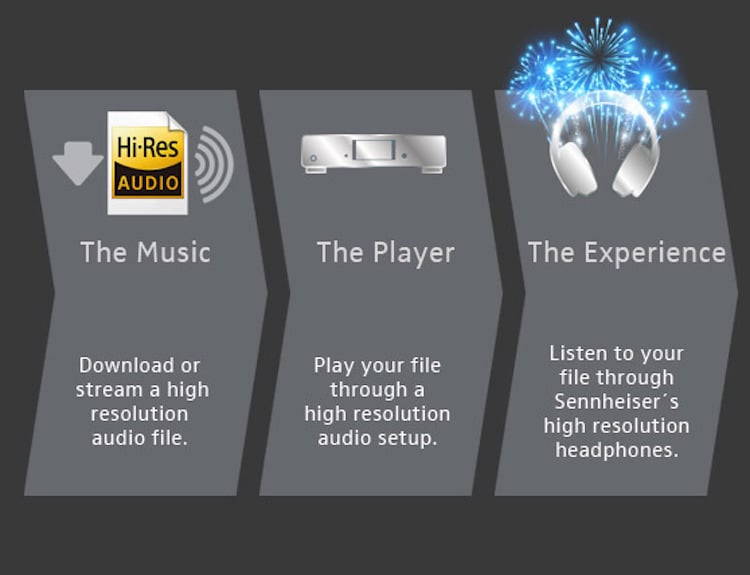
Due to the large capacity of Hi-Res Audio sources, they won’t fit on existing CDs, so you must purchase them through a music distribution site that handles Hi-Res music.
Currently, Hi-Res Audio sources can be purchased from music distribution sites such as “e-onkyo music”, “mora” and “HDtracks”.
If the demand for high resolution increases in the future, it can be handled by “iTunes”, etc.

Also, even if you get a sound source, you basically can’t enjoy high-quality sound unless you use a “high-resolution compatible” playback device, so be careful.

Although it is a “high resolution” that does not give the impression that the current situation is a bit high, it is an opportunity to listen to the songs of your favorite artist with better sound quality, and it will surely be a new musical experience. .

There are also electronics retail stores where you can hear them, so why not look for a viewer when you pass by?

What is the difference between “high resolution”?

What is the difference between “high resolution”?

Hi-Res

What are the advantages and disadvantages?

Hi-Res Audio

The keyword “high resolution” suddenly increasing its presence due to the proliferation of downloadable sound sources.
Even if you know that “high resolution” = “high sound quality”, there are not many people who really understand what is different from the conventional.

In this article, I will introduce how to listen to Hi-Res from the difference between “Hi-Res” and conventional sound.

What is high resolution?
High Resolution is an abbreviation for “High Resolution Audio” and means a high resolution sound source.
High resolution is used here to refer to “a digital sound source with an amount of information that exceeds the sound quality of a CD.”

So what does it mean to be a “digital sound source that exceeds the sound quality of a CD”?

High resolution sound source definition.
The sound quality of a digital sound source is determined by how accurately it is converted into a digital signal. The more information there is, the better the sound quality.

A sound source that can be called high resolution requires that the “sample rate” and “bit depth” exceed the level of the CD. I think it is an unknown word, so I will briefly explain this point.

The sound source on the CD has a “sampling rate of 44.1 kHz/s” and a “bit depth of 16 bits”.

“Sample rate” refers to “the amount of information divided per second,” and the higher the number, the smoother the sound.
On the other hand, “bit depth” refers to “data capacity per information divided”, and the larger the number, the greater the expressiveness of the sound.

Also, there is a unit called “bit rate (kbps)” when importing a CD or selecting sound quality with a streaming service.
This is the product of “sample rate”, “bit depth” and “number of channels (monaural = 1 / stereo = 2)”, and is a unit that expresses the goodness of the sound quality. Likewise, the higher the number, the higher the sound quality.

What is a high resolution sound source?

What is a high resolution sound source?

Hi-Res

High-Resolution Audio is audio that has a higher sound quality than CDs. High resolution is an abbreviation for high resolution. High resolution means high resolution.

High-Resolution Audio

The sound source of a music CD ( CD-DA ) is recorded at 16-bit/44.1 kHz, while the sound source of 24-bit/96 kHz or higher is often referred to as a high-resolution sound source.

high resolution format
write Sampling frequency Bit depth Amount of information per second Difference in data volume on the CD
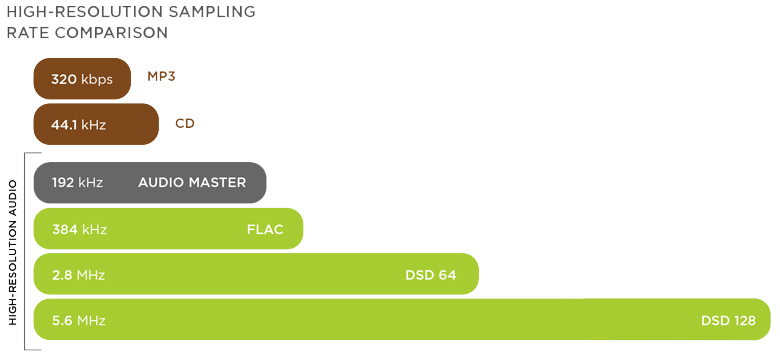
CD sound quality PCM 44.1KHz 16bit 705.6Kbps 1x
High resolution sound quality PCM 96KHz 24bit 2304Kbps 3.3 times
Hi-Res Sound Quality PCM 192KHz 24bit 4568Kbps 6.5 times
Sound quality DSC64 SACD 2.8224MHz 1 bit 2822.4Kbps 4.0 times
DSC128 5.6648MHz 1bit 5564.8Kbps 8.0 times
The sound gradation that can be expressed by the bit depth of PCM is as follows.

Sound gradation that can be expressed in 16 bits 2 16 gradation = 65,536 gradation
Sound gradation that can be expressed in 24 bits 2 24 gradation = 167,77,216 gradation
FLAC and ALAC lossless compression
ALAC of FLAC is a method of lossless compression. With the lossless compression method, the data before and after compression is exactly the same. Therefore, the sound quality does not deteriorate like MP3.

what is the difference between “high resolution”? Part 2

what is the difference between “high resolution”? Part 2

Hi-Res

How to get and listen to Hi-Res sound source?

{Hi-Res}

Due to the large capacity of Hi-Res Audio sources, they won’t fit on existing CDs, so you must purchase them through a music distribution site that handles Hi-Res music.
Currently, Hi-Res Audio sources can be purchased from music distribution sites such as “e-onkyo music”, “mora” and “HDtracks”.
If the demand for high resolution increases in the future, it can be handled by “iTunes” etc.

Also, even if you get a sound source, you basically can’t enjoy high-quality sound unless you use a “high-resolution compatible” playback device, so be careful.

Although it is a “high resolution” that does not give the impression that the current situation is a bit high, it is an opportunity to listen to the songs of your favorite artist with better sound quality, and it will surely be a new musical experience. .

There are also electronics retail stores where you can hear them, so why not look for a viewer when you pass by?

what is the difference between “high resolution”?

what is the difference between “high resolution”?

Hi-Res

What are the advantages and disadvantages?

Hi-Res

The keyword “high resolution” suddenly increasing its presence due to the proliferation of downloadable sound sources.
Even if you know that “high resolution” = “high sound quality”, there are not many people who really understand what is different from the conventional.

In this article, I will introduce how to listen to Hi-Res from the difference between “Hi-Res” and conventional sound.

What is high resolution?
High Resolution is an abbreviation for “High Resolution Audio” and means a high resolution sound source.
High resolution is used here to refer to “a digital sound source with an amount of information that exceeds the sound quality of a CD.”

So what does it mean to be a “digital sound source that exceeds the sound quality of a CD”?

High resolution sound source definition.
The sound quality of a digital sound source is determined by how accurately it is converted into a digital signal. The more information there is, the better the sound quality.

A sound source that can be called high resolution requires that the “sample rate” and “bit depth” exceed the level of the CD. I think it is an unknown word, so I will briefly explain this point.

The sound source on the CD has a “sampling rate of 44.1 kHz/s” and a “bit depth of 16 bits”.

“Sample rate” refers to “the amount of information divided per second,” and the higher the number, the smoother the sound.
On the other hand, “bit depth” refers to “data capacity per information divided”, and the larger the number, the greater the expressiveness of the sound.

Also, there is a unit called “bit rate (kbps)” when importing a CD or selecting sound quality with a streaming service.
This is the product of “sample rate”, “bit depth” and “number of channels (monaural = 1 / stereo = 2)”, and is a unit that expresses the goodness of the sound quality. Likewise, the higher the number, the higher the sound quality.

If the sound quality of the CD is the pixel art Mario from the Famicom, is it easy to imagine that the high resolution sound quality is as accurate as the pixel art Mario from the Super Nintendo?

The sound is good! That is why the disadvantages of “high resolution”
High sound quality has the downside of data.
Since this is digital data, the greater the amount of information, the greater the data capacity. Therefore, the amount of data from the high-resolution sound source is also quite large.

The capacity of each sound source per song for 5 minutes is as follows.

“Mp3 (normal sound quality)” =
“7.2MB” “CD” = “52.9MB”
“High resolution (such as 96 kHz/24 bit)” = “168.6 MB”

A 16 GB SD card only supports about 10 albums. It costs money

What is the difference between 16 bit and 24 bit? Part 2

What is the difference between 16 bit and 24 bit? Part 2

16 bits vs 24 bits

By the way, “32-bit” and “32-bit floating point” are completely different things, and you can think of 32-bit and 24-bit floating point as almost the same thing in terms of recording.

16 vs 24 bits

32-bit floating point audio interfaces are commonly sold.

What about 16 bit?
On the other hand, in the case of 16-bit recording, the dynamic range is originally smaller (96 dB) than that of 24-bit, so the noise ratio is relatively large. As a result, the effective range of dynamic range is typically around 80 dB, and the s/n ratio is considerably less than 120 dB in the 24-bit case. That is, although the noise is the same, it will be more noticeable when recording in 16bit than in 24bit.

Let’s aim to create sounds that are aware of the staging!
Paying attention to the input of these recordings is part of a basic and important task called “gaining stage direction.”

Gain, to put it bluntly, is volume. It is very important to manage gain in every music production process, from recording, to produce clear music with less sound pressure control, noise and distortion.

There are many ways to get a staging, but if you understand the concept correctly, it’s not particularly difficult or expensive.

Analog VU MeterOne of the most underrated gain staging tools, the “VU meter”. You can solve many problems by using it correctly with a digital meter, and it’s installed as standard in most DAWs.
The reason beginners are often confused by “clear sound quality” and “sound pressure” is that knowledge about this gain staging is not that widespread. There is an avalanche of information that prints “all you need is this gear and plug-ins”, “you need a professional studio”, and “everything is decided by professional mixing and mastering” without telling you the specific job. As long as you have the right knowledge and can figure it out, you don’t need any of these at all, and that’s why the standard Pro Tools features are more than enough.

An ally that stands strong against the shortcomings of the home recording environment! Use VU meters and RMS meters to help control sound pressure!

How to record in 24 bit
First of all, it’s an important premise that both your audio interface and DAW support 24-bit, but if you go for a normal lineup these days, there’s almost no case that it won’t, so rest assured. Let’s see what is needed for both configurations.

Audio Interface Configuration
If you’re using a recent audio interface, you don’t have to worry about that, as you can record at 24-bit or similar settings without any configuration, regardless of price. Make sure only the driver for the interface is installed correctly.

Especially for Windows users, if you use the Windows Default Driver (WDM) instead of the ASIO driver, unexpected problems such as not being able to fully utilize the capabilities of the audio interface and automatically handling it at 16-bit will occur. to verify that the correct driver is installed correctly.

What is the difference between 16 bit and 24 bit?

What is the difference between 16 bit and 24 bit?

16 bit vs. 24 bit Audio


Relationship between the number of recording bits and noise

Bit depth

Tips and production methods

I’m not sure if I should choose 16-bit or 24-bit when creating a new DAW session! What are the benefits and what are you looking for? Let’s take a look at how bit count is handled in recording in relation to the concept of “gain staging” which is indispensable to music production.

The larger the s/n, the clearer and more faithful the recording will be.
You may have often seen the expression “the s/n ratio is…” in computer reviews. s/n means “signal to noise ratio” and is read as “s/n ratio” in Japanese. Every time you record, you need to consider the effect of noise, but simply put, s/n is an index of how noise sounds, and the higher this number, the more noticeable the noise is to essential audio. that will disappear

In terms of sound quality, the first step in sound is recording. Therefore, if you want to achieve the clearest possible sound quality that is faithful to the original sound, it is desirable to achieve as high a s/n (discrete noise) ratio as possible from this stage. The question of “Which is better, 16bit or 24bit”, which is the topic of this time, is actually deeply related to this concept of y/n.

Relationship between dynamic range and background noise
The biggest difference in sound quality between 16-bit and 24-bit is the difference in dynamic range.

Dynamic range is an expression that expresses the difference between the smallest sound and the loudest sound, but when you think of dynamic range in terms of the number of overlay bits, you think of it as “audio resolution”, and in a great I feel that it is almost no problem.

The 16-bit dynamic range is 96 dB, while the 24-bit dynamic range is 144 dB, which is quite a difference. High-resolution audio is especially important in terms of “noise countermeasures” as well as being able to reproduce the fineness of sound more faithfully.

Relationship Between Dynamic Range and Background NoiseAn example showing the relationship between noise and dynamic range in a 24-bit recording. The red waveform represents noise and the green waveform represents audio. In general, the higher the dynamic range, the better the s/n ratio.
The “noise floor” in the figure above represents the range occupied by the background noise generated by the equipment. The wider the dynamic range, the lower the noise ratio (increases s/n). In the figure, the standard noise floor for 24-bit recording is set to -120 dB, but the actual effective dynamic range in this case is about 120 dB.

By the way, the human audible range is said to be only about 120 dB, and this is why it is generally said that “it is not necessary to record with a bit count of 24 bits or more”. part being used. Occasionally I see jokes that assume they don’t exist, saying “32 bit audio interface is for cats”, but that’s the reason behind it.

What is bit depth?

What is bit depth?

Definition and description of bit depth

Digital audio requires certain values ​​to be set to describe the resolution of the sound data (sample) that is captured and stored in the audio file. This attribute is called bit depth.

Similarly, for image and video files, this measurement range is also used to determine the resolution of the image. The higher the bit depth (for example, 16-bit vs. 24-bit), the better the image.

This attribute is exactly the same as digital audio. Therefore, a higher audio bit depth provides a more detailed sound recording.

Bit depth is often confused with bit rate, but they are very different. Bitrate (measured in Kbps) is the data throughput per second when the sound is playing, not the resolution of the individual samples that make up the audio waveform. See Bit Depth and Bit Rate for more information.

Note: Bit depth is sometimes called sample format, audio resolution, or word length.

Bit depth details
The unit of measure for bit depth is a binary number (bit), and the precision doubles for each increase in bits. This bit range is an important integer that determines how good a recording (for example, part of the music) sounds.

If the bit depth is too low, the recording will not be very accurate and you may lose a lot of quiet sound. For songs that make up a digital music library, MP3s encoded in a high-bit-depth PCM audio format (usually WAV ) have low bit depth compared to those encoded from the original PCM file.

Therefore, in theory it is much more accurate during playback. As mentioned above, bit depth is especially important when dealing with the quiet harmonics of a song, as frequencies are lost if the bit depth is set too low.

Bit depth is relevant only within the range of the PCM signal. Therefore, there is no bit depth in the lossy compressed audio format.