HIGH RESOLUTION AUDIO: HOW TO LISTEN TO MUSIC WITH THE HIGHEST QUALITY


Free Download Mp4Gain
picture

Many of our clients, simple music fans or professionals in the sector, constantly seek perfection. Some are willing to spend even thousands of euros to assemble a high-quality hi-fi system. Many come to us for advice, and we are happy to accommodate them. First, however, it is good to gain some (really few) insights into the world of music and the media through which we generally hear it.

Sony High-Resolution Audio

We will start from the beginning.

Digital music is distributed in many formats. Some are compressed, others are not compressed. However, all files are nothing more than a sequence of bits whose value can be 1 or 0. These bits are grouped into bytes, that is, words of 8 bits each. A series of bytes forms a file or an audio track that we can listen to.

High resolution audio: recording and playback

Once recorded, to be played by us, this digital music file is sent to an analog-to-digital converter (DAC), converted to an analog signal, and finally sent to an output circuit, either a preamplifier or analog output

The quality of the file to be reproduced is given by two factors: resolution and sampling frequency.
Resolution is expressed in bits, while the sampling value is expressed in kilohertz (kHz).

Word length (bit)
= resolution Dynamic range Reproducible tones
12 bit 72 dB 4,096
16 bit (CD) 96 dB 65,536
24-bit (DVD) 144 dB 16,777,216
32 bit 192 dB 4,294,967,296

In simple terms, all this means that the denser the digital information, the closer the “digital” version of the signal gets closer to the original analog signal.

“The highest possible quality is the closest to the original as it was produced.”

For example, if you have digital music on CD in 16 bit / 44.1 kHz, this corresponds to a dynamic range of 96 dB with 65,536 gradations. However, music is rarely written to CD under these conditions, because the recording was originally made in only 16 bits (other recording defects may further reduce the signal).

Today, however, recordings are made at 24-bit / 192 kHz (in part also at 32-bit / 384 kHz), which means that the length of the information is significantly longer (and therefore has a greater dynamic range) and a higher sampling rate thus increasing the bandwidth.

The higher the resolution of the audio file, the higher the sample rate and the better the final audio signal.

Please note that the increase in “information content” resulting from higher resolution / sampling is exponential: consequently, the qualitative difference between a 16-bit audio file and 24-bit recordings could be so subtle that only be perceived by a trained ear and obviously well equipped.

HIGH DEFINITION: COMPRESSED AUDIO FORMATS AND UNCOMPRESSED AUDIO FORMATS

Audio files can be compressed (with or without loss of quality) and uncompressed (without loss of quality).

Some examples:

Uncompressed audio formats

WAV – Waveform Audio File Format (.wav)
AIFF – Audio Interchange File Form (.aiff, .aif or .aifc)

Compressed audio formats (no quality loss)

ALAC: Apple Lossless Audio Codec (.mp4 or .m4a)
FLAC: Lossless Audio Codec (.flac)

Compressed audio formats (with loss of quality)

MP3: MPEG-1 or MPEG-2 Audio Layer III (.mp3)
AAC: Advanced Audio Coding (.aac, .mp4, or .m4a)

To make a “visual” example and clarify the concept, let’s take a photograph: on the left, the original version, in good resolution; On the right, the same photo, saved in compressed format, which reduces its quality:

high rsolution audio

music in high definition, example of maximum quality

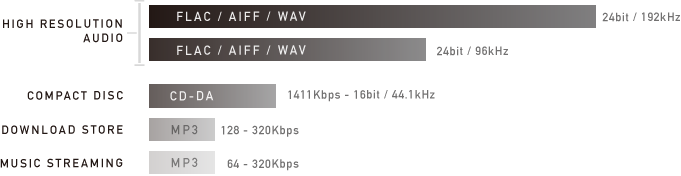
In summary: CDs (compact discs) offered good quality (not maximum) and a certain “portability”, but their capacity was limited.
Mp3 files certainly helped share music over the network, at the price of a substantial loss in terms of playback quality.

HIGH DEFINITION SOUND: A SMALL GLOSSARY TO BETTER UNDERSTAND

Bit rate

The bit rate is the amount of data per second required for a transfer from A to B. The bit rate is always expressed in kilobits (Kbps) or megabits (Mbps) per second. For example, an mp3 plays an audio track from 96 to 320 kbps; a FLAC file can exceed 5000 kbps.

Bit depth (resolution)

This value describes the number of bits recorded in a single audio sample. Therefore, it is equivalent to termination. An example: the quality of a CD (compact disc) supports up to 16 bits; An audio DVD supports up to 24 bits.


Free Download Mp4Gain
picture


Mp4Gain Main Window
picture


Mp4Gain Features
picture


Free Download Mp4Gain
picture

What is high-resolution audio?

High Red Audio

With more accurate analog sound sampling, this technology promises better digital sound than traditional audio CDs.
Marketing requires manufacturers not to miss the opportunity to put beautiful acronyms on their devices to indicate the presence of new “revolutionary” technologies. Therefore, in recent months, some headphones and speakers have blossomed, especially the labels “HD audio” or “high-resolution audio”. What does “high resolution audio” (or high definition) mean? In particular, it is a digital sound of at least 24 bits / 96 kHz, so it offers better quality than the 16 bits / 44.1 kHz of the audio CD. If we synthesize too much, we could say that it is a sampling gap similar to that which can separate Blu-ray from DVD.

How is it possible ? To fully understand it, it is important to go back to the beginnings of digital sound. Originally, the sound is analog data, such as the variation in air pressure or an electrical signal over time. To digitize the sound, samples are regularly taken and encoded in a series of bits. When creating the audio CD, manufacturers agreed on 16-bit encoding and sampling at 44.1 kHz, or 44,100 times per second. Therefore, one minute of mono sound requires about 5.3 MB of data and 10.6 MB of stereo per minute. When the first audio CDs were released in 1984/85, vinyl fans cried as a betrayal, accusing the digital sound of not reproducing the warmth of analog sound from the former 33rpm.

Is there really a difference?

We had the opportunity to test the entire high-resolution audio system multiple times: 192 Hz FLAC audio files, on a NWZ-A compatible high-resolution player and MDR-1A headphones, also Hi-Res. The reproduction is of course very good by ear and it seems that the songs on our test album (Play MemoriesDaft Punk) have been given precision. Even when the volume is pushed to the limit of the maximum threshold, the reproduction is still excellent and well detailed. But we also listened to the same MP3 album, in a (relatively) high 320 kbit / s sample, even with Sony’s portable music player and high-resolution headphones. And it is clear that the difference was frankly not clear. Our perception of representation was just as good. We continue the experience by listening to the MP3 version of the Daft Punk album, this time with less high-quality headphones than the Sony MDR-1A. And there the register was even worse: muted, less accurate in the treble and less powerful in the bass. Result: By ear sampling of the file had less influence on the reproduction because the quality of the products used to reproduce the sound, ie the player and the headphones. So a question about everything from a material order. For the right choice, go to our helmet department and our two specific comparisons:

– Comparison of headphones for less than 100 euros
– Comparison of headphones for more than 100 euros

What is high-definition audio?

Most digital audio systems encode analog sound, ie perceived sound, in digital form for archiving and transmission using a system called pulse code modulation. The quality of the digital recording is determined by two factors: Bit depth and sampling rate: The bit depth determines the number of “passes” available to describe the sound: the more bits used, the greater the dynamic range (the difference between the loudest and the lowest Sound) to be recorded.

high resolution audio

At the same time, the higher the sampling rate (ie how often a “snapshot” of the sound is recorded per second), the more precisely music can be analyzed and converted into digital data. The sampling rate refers to the frequency range of the audio from the lowest to the highest pitch that can be stored.

The higher the bit depth and the higher the sampling rate, the more information can be saved.

The CD uses 16-bit / 44.1 kHz encoding, which was best available at the time the CD was introduced in the early 1980s. However, progress has been made since then, and it is now possible to record and distribute music at bit depth and bit rates at higher sample rates. These formats have been used for recordings and recordings for several years, but are now also available to all households.

high resolution formats

High Resolution Audio (HRA) is any format that goes beyond the standard 16-bit / 44.1 kHz CD, and HRA recordings generally use 24-bit encoding, which enables a very dynamic range. wider than CD and sampling rates up to 192 kHz, which is the maximum level for commercial HRA recordings. All of this aims to achieve a sound that is as similar as possible to that of the recording studio.

High resolution audio formats

There is a wide range of HRA formats, so it is important that the HRA team supports them as fully as possible. Technics products are compatible with all common HRA formats (some are still in the introductory phase) and will ensure simple, practical and sustainable HRA reproduction in the future as the market develops.

CD quality music is also available in various formats. Below is a list of the most common formats used for CD quality music as well as music with loss of quality and for HRA playback.

FLAC: Studio Master sound quality (24 bit) and CD quality (16 bit)

Most music files available online (HRA and CD quality) are in FLAC (Free Lossless Audio Codec) format (the format is free, no music). 24-bit FLAC files are generally available in 96 kHz and 192 kHz, although some albums are in 24-bit / 44.1 kHz or 24-bit / 48 kHz format. These 24 bit / 192 kHz are usually the best files available and identical to the Studio Master version.
Unlike MP3, which reduces size at the expense of content, the FLAC format is lossless and works like a zip file on your computer. It is unpacked “on the fly” during playback and offers exactly the same data as in the file before compression.
Apple has its own format that means no loss: Apple Lossless (ALAC) works like FLAC, but is compatible with iTunes. Some companies that provide Studio Master downloads offer these in FLAC and ALAC formats.
An additional advantage of the FLAC and ALAC formats is that they store information about music in the form of metadata, including general parameters such as artist, album title, title / track number, music genre, composer, catalog number, etc.
This information is contained in Studio Master or HRA files that can be purchased online or added when creating a personal CD: the burning software uses a search in the Internet database to identify the hard drive to be archived and provides all the information. You can also edit this data or enter it manually.

WAV / AIFF: uncompressed file

You can also copy CDs as files without compression, e.g. B. as a direct copy of data to the hard drive. Windows computers save them as WAV files (Waveform Audio File Format), Macs as AIFF (Audio Interchange File Format), but the two formats are interchangeable and, of course, Technics systems are both reproduced.

High resolution audio: how to listen to music with the highest quality

High resolution audio: how to listen to music with the highest quality

Many of our clients, simple music fans or professionals in the sector, constantly seek perfection. Some are willing to spend thousands of euros to put together a high-quality hi-fi system. Many come to us for advice, and we are pleased to accommodate them. First, however, it is good to gain some (really few) insights into the world of music and the media through which we generally hear it.

high resolution quality

Let’s start from the beginning.

Digital music is distributed in many formats. Some are compressed, others are not compressed. However, all files are nothing more than a sequence of bits whose value can be 1 or 0. These bits are grouped into bytes, that is, words of 8 bits each. A series of bytes forms a file or an audio track that we can listen to.

High resolution audio: recording and playback

high resolution audio

Once recorded, to be played by us, this digital music file is sent to a digital-to-analog converter (DAC), converted to an analog signal, and finally sent to an output circuit, either a preamplifier or analog output

The quality of the file to be reproduced is given by two factors: resolution and sampling frequency.
Resolution is expressed in bits, while the sampling value is expressed in kilohertz (kHz).

Word length (bit)
= Resolution Dynamic range Playable tones
12 bit 72 dB 4,096
16 bit (CD) 96 dB 65,536
24-bit (DVD) 144 dB 16,777,216
32 bit 192 dB 4,294,967,296

In short, this all means that the denser the digital information, the closer the “digital” version of the signal gets closer to the original analog signal.

“The highest possible quality is the closest to the original, as produced.”

For example, if you have digital music on CD in 16 bit / 44.1 kHz, this corresponds to a dynamic range of 96 dB with 65,536 gradations. However, music is rarely written to CD under these conditions, because the recording was originally made in only 16 bits (other recording defects may further reduce the signal).

Today, however, recordings are made at 24-bit / 192 kHz (in part also at 32-bit / 384 kHz), which means that the length of the information is significantly longer (and therefore has a greater dynamic range), and the higher sampling frequency thus increasing the bandwidth.

The higher the resolution of the audio file, the higher the sample rate and the better the final audio signal.

Please note that the increase in “information content” resulting from the higher resolution / sampling is exponential: accordingly, the qualitative difference between a 16-bit audio file and 24-bit recordings could be so subtle as to be perceived only by a trained ear and obviously well equipped.

HIGH DEFINITION: COMPRESSED AUDIO FORMATS AND UNCOMPRESSED AUDIO FORMATS
Audio files can be compressed (with or without loss of quality) and uncompressed (without loss of quality).

Some examples:

Uncompressed audio formats

WAV – Waveform Audio File Format (.wav)
AIFF – Audio Interchange File Form (.aiff, .aif or .aifc)

Compressed audio formats (no quality loss)

ALAC: Apple Lossless Audio Codec (.mp4 or .m4a)
FLAC: Free Lossless Audio Codec (.flac)

Compressed audio formats (with loss of quality)

MP3: MPEG-1 or MPEG-2 Audio Layer III (.mp3)
AAC: Advanced Audio Coding (.aac, .mp4, or .m4a)

To make a “visual” example and clarify the concept, let’s take a photograph: on the left, the original version, in good resolution; On the right, the same photo, saved in compressed format, which reduces its quality:

music in high definition, example of maximum quality

In summary: CDs (compact discs) offered good quality (not maximum) and a certain “portability”, but their capacity was limited.
Mp3 files certainly helped share music online, at the price of a substantial loss in terms of playback quality.

HIGH DEFINITION SOUND: A SMALL GLOSSARY TO BETTER UNDERSTAND
Bit rate

Bit rate is the amount of data per second required for a transfer from A to B. Bit rate is always expressed in kilobits (Kbps) or megabits (Mbps) per second. For example, an mp3 plays an audio track from 96 to 320 kbps; a FLAC file can exceed 5000 kbps.

Bit depth (resolution)

This value describes the number of bits recorded in a single audio sample. Therefore, it is equivalent to termination. An example: the quality of a CD (compact disc) supports up to 16 bits; An audio DVD supports up to 24 bits.