Skip to content

mp4gain.com

Mp4 Gain Official Website

Tag: digital video compression peter sykes pdf

Digital Video Compression Part 6


Free Download Mp4Gain
picture

Digital Video Compression Part 6

DIGITAL VIDEO COMPRESSION

General description

Video Compression

DCT is a transformation widely used in image compression. The static JPEG compression standard, the H.263 video conferencing standard, and the MPEG digital video standards (MPEG-1, MPEG-2, and MPEG-4) use DCT. These standards use, in particular, two-dimensional DCT, applied sequentially to 8 x 8 pixel image blocks. DCT calculates 64 (8×8 = 64) coefficients, which are then quantized, thus providing true compression. In most images, most DCT coefficients, due to their smallness, are zeroed after quantization. This property of DCT is the basis for many compression algorithms that use DCT.

Furthermore, the human eye is known to be much less sensitive to high-frequency image components represented by large DCT coefficients. At these larger values ​​of the coefficients, a larger quantization factor can (and usually does) be applied. In particular, the matrix of 64 quantization factors for each of the 64 DCT coefficients used in the JPEG algorithm has large quantization factors for the higher frequency DCT coefficients, respectively. Once quantized, the coefficients are subjected to the RLE algorithm. In addition, for frequent combinations, short code words are used, for the rarer ones, relatively long. A probabilistic coding is carried out.

DCT, in turn, is best explained with the example of a one-dimensional DCT. Two-dimensional DCT is a one-dimensional DCT that is applied sequentially for each row (row) of a block of pixels and each column of a block of pixels obtained from a one-dimensional DCT of rows. One-dimensional DCT applied to N samples (pixels in an image or samples in an audio file). DCT is an NxN matrix whose rows are cosine functions:

DCT (m, n) = sqrt ((1 – delta (m, 1)) / N) * cos ((pi / N) * (n – 1/2) * (m-1))
where
DCT (m, n) is a one-dimensional DCT matrix
m, n = 1, …, N
pi = 3.14159267 …
N = number of samples per block
delta (m, 1) = 1 if m = 1 and 0 otherwise
cos (x) = cosine of x, measured in radians.
Naturally, using DCT in a block of N samples will require N * N multiplication and addition operations. However, due to the recursive structure of the DCT array, actually much fewer math operations are required, namely N log (N). This property makes DCT really applicable in modern personal computer math processors.

At the beginning At the beginning
Discrete Wavelet Transform (DWT)
Compressors using DWT (Discrete Wavelet Transform): Intel Indeo 5.x; Intel Indeo 4.x

Advantages and disadvantages

Most of the static and dynamic images compressed using the DWT algorithm do not have the characteristic block structure of the DCT algorithm.
The relative quality of DWT compressed images is superior to DCT compressed images with the same compression ratios.
DWT smudges a bit, rounds out the sharp outlines of the image. The so-called edge noise or Gibbs effect.
General description

The DWT algorithm is based on the transmission of a signal, such as an image, through a pair of filters: low pass and high pass. A low pass filter produces a coarse waveform of the original signal. A high pass filter produces a difference signal or additional detail.

In turn, the result at the output of the high-pass filter (additional detail signal) can be subjected to the same procedure, and so on.

A simple example of DWT is DWT Hara:

The input signal x [n] is a plurality of samples with index n. Haar’s low-pass filter is the arithmetic average of two successful samples:

g [n] = 1/2 * (x [n] + x [n + 1])

Haar’s high-pass filter is the average difference of two successful samples:

h [n] = 1/2 * (x [n + 1] – x [n])

Note that:

x [n] = g [n] – h [n] x [n + 1] = g [n] + h [n]

The output sequences g [n] and h [n] contain redundant information. Therefore, it is clear that to reproduce the original signal x [n], it is sufficient to take only odd or even samples. As a rule, even samples are taken. Therefore, the original signal x [n] is obtained only from: g [0], g [2], g [4], …. h [0], h [2], h [4], .. …

x [0] = g [0] – h [0]

x [1] = g [0] + h [0] x [2] = g [2] – h [2] x [3] = g [2] + h [2] and so on …

The low pass filter output, as noted, is a rough analogy to the original signal. If the original signal is an image, the low-pass filter output will produce a blurry, fuzzy, and low-resolution image. The high-frequency signal output adds detail to the image. In combination with the low-pass filter output, the original image can be reproduced in this way.


Free Download Mp4Gain
picture


Mp4Gain Main Window
picture


Mp4Gain Features
picture


Free Download Mp4Gain
picture

Author R. AriasPosted on June 19, 2021Categories Audio and videoTags audio and video compression in digital communication, basic principles of digital video compression techniques, digital video and audio compression, digital video and image compression, digital video and image compression in multimedia, digital video and image compression in multimedia ppt, digital video compression center, digital video compression center clg, digital video compression center clg wiki, digital video compression center logo, digital video compression in multimedia, digital video compression pdf, digital video compression peter sykes pdf, digital video compression ppt, digital video compression principles and techniques, digital video compression techniques, digital video concepts methods and metrics quality compression, digital video production (compression and decompression), digital video signal compression, dvcc digital video compression center, dvcc digital video compression center logo, explain about the digital video compression /and decompression, family of digital video compression standards and file formats, video compression standards in digital image processing, what is digital video compression

Digital Video Compression Part 5

Digital Video Compression Part 5

Digital Video Compression

General description

The basic idea behind vector quantization is to divide the image into blocks (4×4 pixels in the YUV color scheme for Indeo and Cinepak compressors). As a general rule, some blocks are similar to each other. In this case, the compressor identifies a class of similar blocks and replaces them with a common block. Furthermore, a binary table (map) of said common blocks is generated from the shorter code words. The VQ decoder then uses a table to assemble the image block by block from common blocks. It is clear that this encoding method is lossy, since, strictly speaking, the similarity of blocks is very relative. Here the approximation of blocks of real images to the common that joins them is allowed. The encoding process is long and laborious, since the encoder needs to identify the membership of each block of the image to some common block. However, the decoding task in this case is reduced to the task of constructing an image from a given map from common blocks and does not require much hardware and time resources. A table or map is also called a codebook, and the binary codes included in it are codewords, respectively. The highest compression using the VQ algorithm is achieved by reducing the number of common block classes, that is, by assuming the similarity of a relatively large number of image blocks and consequently reducing the codebook. As the size of the codebook decreases, the quality of the played video deteriorates. As a result, an artificial “lock” appears on the image. (Vector quantization and signal compression, A. Gersho and R. Gray, Boston, MA: Kluwer, 1992). A table or map is also called a codebook, and the binary codes included in it are codewords, respectively. The highest compression using the VQ algorithm is achieved by reducing the number of common block classes, that is, by assuming the similarity of a relatively large number of image blocks and consequently reducing the codebook. As the size of the codebook decreases, the quality of the played video deteriorates. As a result, an artificial “lock” appears on the image. (Vector quantization and signal compression, A. Gersho and R. Gray, Boston, MA: Kluwer, 1992). A table or map is also called a codebook, and the binary codes included in it are codewords, respectively. The highest compression using the VQ algorithm is achieved by reducing the number of common block classes, that is, by assuming the similarity of a relatively large number of image blocks and consequently reducing the codebook. As the size of the codebook decreases, the quality of the played video deteriorates. As a result, an artificial “lock” appears on the image. (Vector quantization and signal compression, A. Gersho and R. Gray, Boston, MA: Kluwer, 1992). that is, an assumption about the similarity of a relatively large number of image blocks and, as a consequence, a decrease in the codebook. As the size of the codebook decreases, the quality of the played video deteriorates. As a result, an artificial “lock” appears on the image. (Vector quantization and signal compression, A. Gersho and R. Gray, Boston, MA: Kluwer, 1992). that is, an assumption about the similarity of a relatively large number of image blocks and, as a consequence, a decrease in the codebook. As the size of the codebook decreases, the quality of the played video deteriorates. As a result, an artificial “block” appears in the image. (Vector quantization and signal compression, A. Gersho and R. Gray, Boston, MA: Kluwer, 1992).

A simple example: compare the following three 4 x 4 blocks.

(Block 1)
128 128 128 128

128 128 128 128

128 128 128 128

128 128 128 128

(Block 2)
128 127 128 128

128 128 128 128

128, 128, 127, 128

128 128 128 128

(Box 3)
128 127 126 128

128 128 128 128

127 128 128 128

128 128 128 128

These three blocks are indistinguishable to the human eye. Therefore, the second and third block can be safely replaced with the first. So the codebook will look like this:

Codebook [1] = 128128128128

128 128 128 128

128 128 128 128

128 128 128 128

In conclusion, we note that an important feature of VQ technology is that when compressing video, the same codebook can be used for multiple picture frames.

At the beginning At the beginning
Discrete Cosine Transform (DCT)
Compressors using DCT: Motion JPEG; Editable MPEG; MPEG-1; MPEG-2; MPEG-4.

Advantages and disadvantages

Author R. AriasPosted on June 19, 2021Categories Audio and videoTags audio and video compression in digital communication, basic principles of digital video compression techniques, digital video and audio compression, digital video and image compression, digital video and image compression in multimedia, digital video and image compression in multimedia ppt, digital video compression center, digital video compression center clg, digital video compression center clg wiki, digital video compression center logo, digital video compression in multimedia, digital video compression pdf, digital video compression peter sykes pdf, digital video compression ppt, digital video compression principles and techniques, digital video compression techniques, digital video concepts methods and metrics quality compression, digital video production (compression and decompression), digital video signal compression, dvcc digital video compression center, dvcc digital video compression center logo, explain about the digital video compression /and decompression, family of digital video compression standards and file formats, video compression standards in digital image processing, what is digital video compression

Digital Video Compression Part 4

Digital Video Compression Part 4

digital video compression

Lossy compression

(2) Compression can be lossy if information is lost during the compression process. However, from the point of view of human perception, lossy compression should be considered only that compression in which it is possible to distinguish with the naked eye the result of compression from the original.

Thus, despite the fact that the two images, the original and the result of compression with one or the other compressor, may not coincide little by little, however, the difference between them may be completely imperceptible. Examples include the JPEG algorithm for compressing static graphics and the M-JPEG algorithm for compressing video.

Compression without loss of perception
(3) Although technically lossy compression, a compression scheme can at the same time appear to be lossless in terms of human perception. Most lossy compression technologies have a so-called Compression Quality Factor (QF), which characterizes the perceived quality side and ranges from 0 to 100. With a compression quality factor of 100, the perceived quality characteristics of the compressed video are indistinguishable from the original. .

Lossy compression
(4) JPEG and MPEG and other lossy compression technologies are sometimes compressed, losslessly, exceeding the limits of compression in terms of perception of video information. However, compressed video and still images are quite acceptable for proper human perception. In other words, in this case the so-called natural degradation of the image is observed, in which some small details of the scene are lost. Something similar can happen in natural conditions, for example, rain or fog. The image in such conditions is usually distinguishable, but its detail is reduced.

Unnatural quality loss compression
(5) Poor compression quality, which greatly distorts the image and introduces artificial details (not present in the original) of the scene, is called unnatural lossy compression. An example of this is true “blocking” in highly compressed MPEG and other compressors using BDKP technology. Unnaturalness lies mainly in the violation of the most important features of the image from the point of view of human perception – the outlines. Experience shows that it is precisely the contours that allow a person’s perceptual apparatus to correctly identify a particular visual object.

In conclusion, we note that all widely used video compressors use lossy compression technologies. At high enough compression ratios, they will all compress with an unnatural loss of quality.

Thus, when choosing one or the other compressor to compress digital video, it is necessary to achieve compression, at least with a natural loss of quality.

Video compression algorithms and technologies overview
Run length encoding
The compressors that use RLE technology are:

Microsoft RLE (MRLE) RLE is also used to encode coefficients in the BDCP used in MPEG-1234, H.261, H.263, and JPEG.

Advantages and disadvantages

It works exclusively with 8-bit images.
Not suitable for full color video compression.
General description

RLE encodes a sequence of repeating picture elements or monochrome elements with one code word. For example, a sequence of pixels 77 77 77 77 77 77 77 can be encoded as 7 77 (for seven 77-rock). RLE is good for compressing images in which there is a repetition of the outlines or colors of individual elements. There is much less color repetition in full color images, so compressing full color video with RLE technology is pointless.

Vector quantization (VQ)
The compressors that use VQ technology are Indeo 3.2 and Cinepak. They both use the YUV (not RGB) color scheme.

Advantages and disadvantages

The encoding process is very time consuming and practically impossible without special additional equipment.
The decoding process is very fast.
Locks out distortion at high compression ratios.
With technologies that use BDKP algorithms, Fibreboard can achieve higher compression levels.

Author R. AriasPosted on June 19, 2021Categories Audio and videoTags audio and video compression in digital communication, basic principles of digital video compression techniques, digital video and audio compression, digital video and image compression, digital video and image compression in multimedia, digital video and image compression in multimedia ppt, digital video compression center, digital video compression center clg, digital video compression center clg wiki, digital video compression center logo, digital video compression in multimedia, digital video compression pdf, digital video compression peter sykes pdf, digital video compression ppt, digital video compression principles and techniques, digital video compression techniques, digital video concepts methods and metrics quality compression, digital video production (compression and decompression), digital video signal compression, dvcc digital video compression center, dvcc digital video compression center logo, explain about the digital video compression /and decompression, family of digital video compression standards and file formats, video compression standards in digital image processing, what is digital video compression

Digital Video Compression Part 3

Digital Video Compression Part 3

DIGITAL VIDEO COMPRESSION

VDOWave or VDOLive from VDONet (VDOM, VDOW)


Compression Video
VDONet releases a wavelet-based video compressor included with the 32-bit implementation of Video for Windows. Microsoft uses VDOWave as part of NetShow. There are currently two versions of the VDOWave compressor:

VDOWave 2.0 is a fixed rate video codec.

VDOWave 3.0 is a “scalable” video codec.

The NetShow 2.0 standard kit only installs the VDOWave decoder. The NetShow 2.0 development tool installs both the VDONet VDOWave encoder and decoder. According to some tests, VDOWave significantly outperforms MPEG-1 and other compressors based on the block discrete cosine transform algorithm in compression, but only at low kbps rates.

MPEG-4 (MPG4)
Microsoft’s NetShow 2.0 installs the MPEG-4 compressor, which is a new international standard that, however, has not yet been officially recognized.

AVI compressor performance
To test the performance of various compressors, a series of experiments was performed on a 10-second video clip recorded at 30 frames per second, 320 x 240, in a 24-bit-per-pixel color palette.

Furthermore, this video fragment was sequentially compressed by various video compressors using Microsoft Video for Windows 1.1. The results of the comparison are shown in the table. Except for the cases mentioned, the quality obtained did not differ significantly from the original.

Legend:

FCC, fluctuating in the range of 0 .. 100 and configurable compression quality factor.

TC: The technology used in compression.

CC X: keyframe every X.

Digital video compression technologies
There are many technologies for compressing digital video, but we will focus on those that formed the basis of the most popular video compressors. Some of the compressors considered use more than one compression technology, but some combination of them. For example, both Indeo 3.2 and Cinepak use vector quantization. The international standards MPEG-1, MPEG-2, MPEG-4, H.261 and H.263 use a combined BDKP technology and motion compensation. Some modern algorithms use Discrete Wavelet Transform (DWT) technology. Other technologies include fractal image compression.

First, let’s define the term “video compression quality”. Despite all the subjectivity of this concept, we will try to conditionally divide the compression quality into the following levels (compression ratios).

Lossless compression
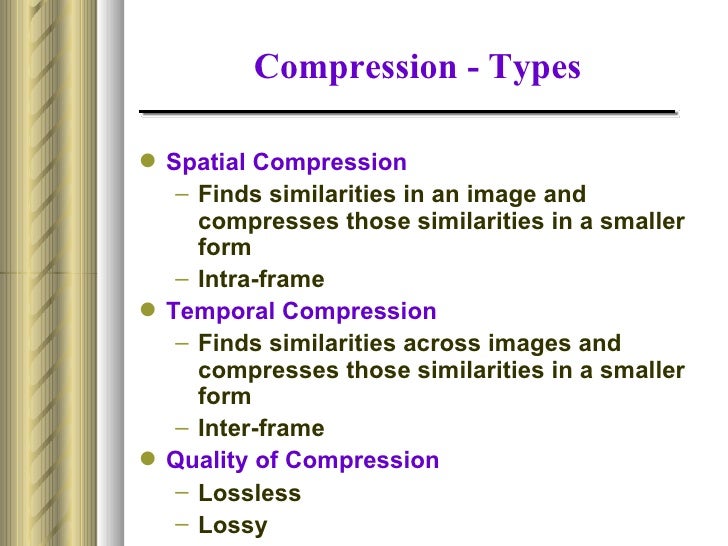
(1) Image compression can be performed without quality loss only if there was no data loss during the compression process. As a result, the image obtained after decompression will exactly match (bit by bit) the original. Examples of such compression are GIF for static graphics and GIF89a for video.

Author R. AriasPosted on June 18, 2021Categories Audio and videoTags audio and video compression in digital communication, basic principles of digital video compression techniques, digital video and audio compression, digital video and image compression, digital video and image compression in multimedia, digital video and image compression in multimedia ppt, digital video compression center, digital video compression center clg, digital video compression center clg wiki, digital video compression center logo, digital video compression in multimedia, digital video compression pdf, digital video compression peter sykes pdf, digital video compression ppt, digital video compression principles and techniques, digital video compression techniques, digital video concepts methods and metrics quality compression, digital video production (compression and decompression), digital video signal compression, dvcc digital video compression center, dvcc digital video compression center logo, explain about the digital video compression /and decompression, family of digital video compression standards and file formats, video compression standards in digital image processing, what is digital video compression

Digital Video Compression Part 2

Digital Video Compression Part 2

digital video compression

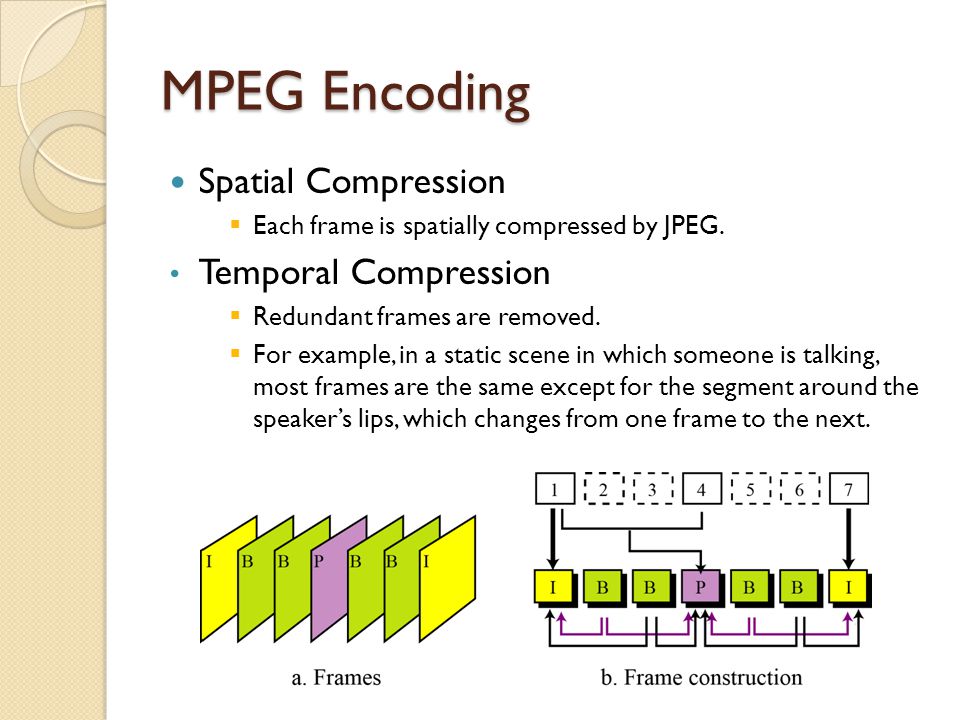
Individual images are made up of macroblocks. The macroblock is the main structural unit of image fragmentation.

compression techniques


Corresponds to an area of ​​the image with a size of 16 * 16 pixels. It is for them that the displacement vectors are determined relative to the I or P images. The total number of macroblocks in the image is 396. To increase the resistance of the image recovery process to possible data transmission errors, the Consecutive macroblocks are combined into independent sections (slices), with a maximum number of 396. In the limiting case of “clean transmission”, only one section of the image falls on the image. 396 macroblocks. In turn, each macroblock consists of six blocks, four of which contain information about the brightness Y, and one at a time determine the U and V components of color. Each block is an 8 * 8 matrix.

In conclusion, we would like to emphasize an important feature of MPEG streams: they do not allow frame-by-frame editing. In fact, due to the complex dependency on the images described above, making changes to one of them will inevitably lead to the need for complex calculation of many parameters across the entire group.

Motion JPEG or M-JPEG (MJPG)
Most desktop video capture and video editing systems use this method when recording video to AVI files. In Motion JPEG, each video frame in an image is compressed separately using the JPEG standard. In this case no other additional algorithms are used. The undoubted advantage of this method is the possibility of editing video without loss of quality, since the frames are independent. This, in fact, determines the use of this method precisely as a video storage mechanism that serves for editing, and not for distribution. Motion JPEG uses the Block Discrete Cosine Transform (DCT) algorithm to compress images.

Editable MPEG (XMPG. MPGI)
Editable MPEG, such as M-JPEG, used for digital video editing is an AVI file consisting only of MPEG type i frames. However, all other MPEG compression mechanisms are involved here. It is included in the standard delivery of Microsoft Video for Windows 1.1. and is used by desktop digital video editing systems like Adobe Premiere.

Although the above compressors are quite popular, they are far from all standards for compressing AVI files. In characterizing this group of compressors, it can be seen that they were designed and created primarily as a means of compressing video and audio data stored on hard drives and CDs, and this, in turn, indicates their low compression capacity and relatively high quality. high during playback. .

With the advent of the Internet, methods and tools for compressing video and audio data are becoming increasingly popular, allowing, using advanced technologies (sophisticated motion estimation and compensation, wavelets, fractals, and others) to achieve kilobits. / second smaller. ratios that allowed, for example, videoconference sessions over the Internet. It is clear that such compression methods provide significantly higher compression ratios with relatively low quality.

Compressor generation – H.XXX
More recently (5/18/97), a new series of digital video compressors was officially registered, defining trends in the development of video compression mechanisms. Some compressors in the H.XXX family, such as H.261, are quite popular, others are little known and use advanced and improved technologies such as wavelets.

A distinguishing feature of the H.XXX family compressors is their focus on reducing the flow of digital video over the Internet, which naturally leads to the quality factor fading into the background. Microsoft is improving some of the products in the H.XXX family, and some are already included in teleconferencing packages such as NetShow and NetMeeting.

Author R. AriasPosted on June 18, 2021Categories Audio and videoTags audio and video compression in digital communication, basic principles of digital video compression techniques, digital video and audio compression, digital video and image compression, digital video and image compression in multimedia, digital video and image compression in multimedia ppt, digital video compression center, digital video compression center clg, digital video compression center clg wiki, digital video compression center logo, digital video compression in multimedia, digital video compression pdf, digital video compression peter sykes pdf, digital video compression ppt, digital video compression principles and techniques, digital video compression techniques, digital video concepts methods and metrics quality compression, digital video production (compression and decompression), digital video signal compression, dvcc digital video compression center, dvcc digital video compression center logo, explain about the digital video compression /and decompression, family of digital video compression standards and file formats, video compression standards in digital image processing, what is digital video compression

Digital video compression

Digital video compression

Digital Video Compression

The number of different formats for presenting digital videos is huge.

Digital Video Compression

One of the most common problems faced by a stumped user is how do they differ and which one is the best? This article is an attempt to help a user lost in many standards. Furthermore, the subject of this article is a review and comparative analysis of various compressors for digital video compression, as well as an overview of the main ideas and algorithms used by these compressors. In addition, this article reveals the capabilities of the new compressors used to transmit video information over the Internet. The article is useful both for beginners who want to understand the variety of digital video presentation formats and understand how they differ, and for programmers looking for answers to specific questions.

AVI (Audio Video Interlive)
AVI files are a special case of RIFF files. (short for Resource Interchange File Format). This format, originally intended for the exchange of multimedia data, was Microsoft and IBM. This format is the most common form of video presentation on personal computers. AVI files come in different standards depending on the way the video data is presented.

AVI file standards
Video data in AVI can be formed and compressed in various ways. For example, Video for Windows 1.1 comes with a standard set of compressors. Namely:

Intel Indeo (version 3.2);
Microsoft Video 1;
Microsoft RLE (run-length encoding)
Cinepak;
….
Each standard has a so-called Four Character Code (FOURCC).

Full frames (uncompressed)
You can keep AVI files as uncompressed frames. You don’t need any compressor for this.

The 4 character code for this standard is ‘DIB’, (Microsoft Device Independent Bitmap).

However, there are at least three more FOURCCs for uncompressed AVI files:

‘RGB’; ‘RAW’; 0x00000000 (FOURCC, whose hexadecimal value is 0)

Variable Length Encoding (MRLE)
The peculiarity of this video image encoding scheme is that MRLE is capable of encoding video only in an 8-bit palette (256 colors). It does not support modes called “High Color” (2 ^ 16 colors) or “True Color” (2 ^ 24 or 2 ^ 32 colors).

Microsoft Video 1 (MSVC or CRAM)
Microsoft Video 1 only supports the 8-bit or 16-bit color gamut.

Intel Realtime Video 2.1 (Indeo 2.1) (RT21)
Included in the standard distribution of Microsoft Video for Windows 1.1.

Intel Indeo 3.1 / 3.2 (IV31 and IV32)
A feature of the method is the use of the vector image quantization algorithm (see below).

Intel® Indeo® Multimedia Kit 5.0

Cinepak (CVID)
One of the most popular and widely used video compressors for Windows. Provides the fastest video playback. Unlike the Indeo 32, which provides slightly better quality, but significantly overloads the processor during decompression, Cinepak offloads the processor resource as much as possible.

Today there are at least three standards for Cinepak.

Cinepak SuperMac (original 16-bit compressor)
Cinepak Radius (new and improved 16-bit compressor);
Cinepak Radius [32] (32-bit version of Radius Cinepak included with Windows 95).
A feature of the method is the use of the vector image quantization algorithm in conjunction with the frame difference algorithm (see below).

MPEG (Moving Image Expert Group)
One of the most popular digital video presentation formats. Currently, there are three of its specifications: MPEG-1, MPEG-2 and MPEG-4. Despite the great flexibility of the standard, which allows various applications to change the values ​​of most of its parameters (such as image resolution, aspect ratio, frame rate) within a wide range, its developers initially focused on it. use of compact discs. (CD-ROM) with a data transfer rate of 50Kbps. As a result, the basic algorithm (MPEG 1) limits the bit rate to the range of 150-225Kbps, the resolution of images (frames) as 352 * 288 (Pal) or 320 * 240 (NTSC), the frequency of its change is 25 (PAL) or 30 (NTSC)). Also, for simplicity, we just consider the Pal system.

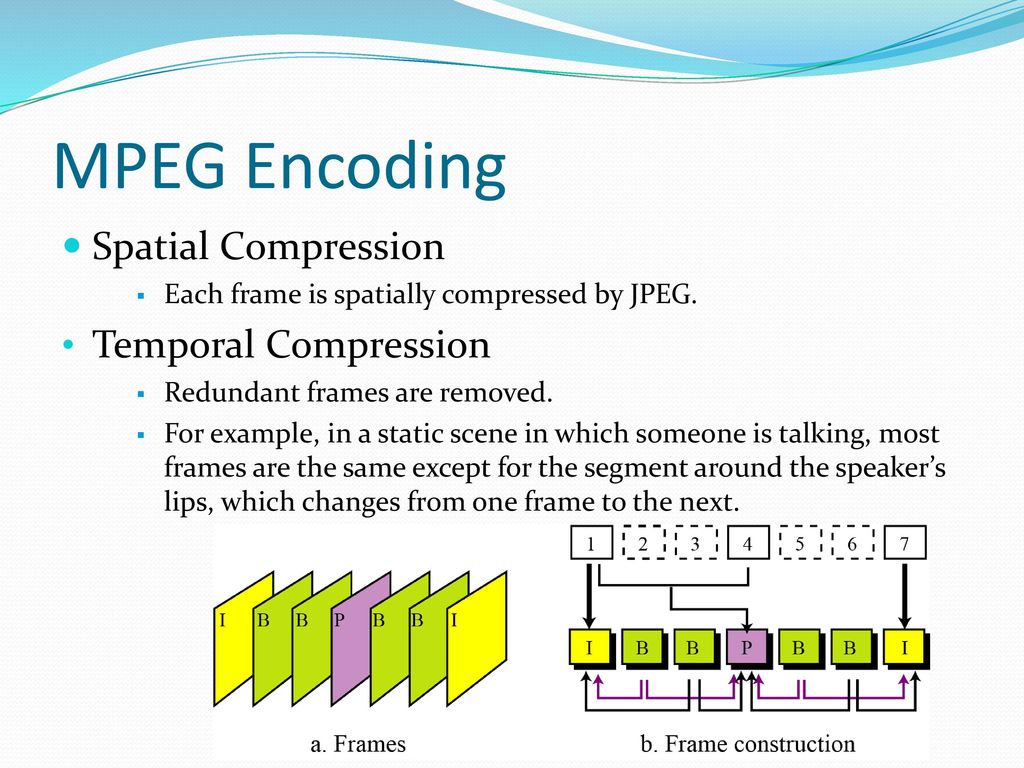
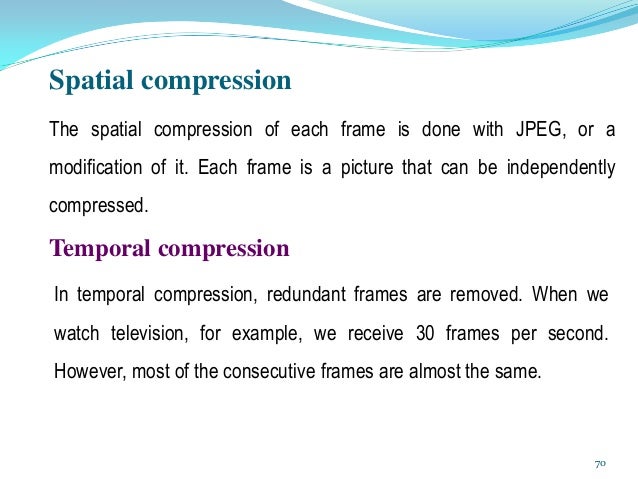
MPEG compression uses the following basic ideas:

Author R. AriasPosted on June 18, 2021Categories Audio and videoTags audio and video compression in digital communication, basic principles of digital video compression techniques, digital video and audio compression, digital video and image compression, digital video and image compression in multimedia, digital video and image compression in multimedia ppt, digital video compression center, digital video compression center clg, digital video compression center clg wiki, digital video compression center logo, digital video compression in multimedia, digital video compression pdf, digital video compression peter sykes pdf, digital video compression ppt, digital video compression principles and techniques, digital video compression techniques, digital video concepts methods and metrics quality compression, digital video production (compression and decompression), digital video signal compression, dvcc digital video compression center, dvcc digital video compression center logo, explain about the digital video compression /and decompression, family of digital video compression standards and file formats, video compression standards in digital image processing, what is digital video compression

ABOUT US


Volume Booster

Mp4

Mp4


Flac Nomalizer – Flac volume normalization

Ogg Normalizer

M4a Normalizer

Audio Normalization

Mp4Gain Crack

Posts

Mp3 Normalizer

audio blog in het nederlands

Mp3 to Wav Converter

Mp3 Converter

Mp3Gain

Amplificateur de volume Mp3

Make mp3 louder
volume booster and equalizer

volume equalizer

volume booster

volume equalization


normalize mp4, normalize flv, normalize avi, normalize mpeg, normalize mpg, normalize 3gp, normalize wmv, normalize mp3, normalize mp2, normalize flac, normalize ogg, normalize m4a, normalize aac, normalize wav, normalize ac3

mp3 louder
mp3 volume booster
youtube normalize audio
mp3 volume increaser
increase mp3 volume
volume enhancer
normalize video audio

La normalizzazione del livello audio

Youtube to mp4 converter download

Mp4 Gain Website

Dowload Mp4Gain

Mp3Gain alternative

Mp3Gain

Video Formats:
mp4, flv, avi
mpeg, mpg
3gp, wmv

Audio Formats:
mp3, mp2, flac
ogg, m4a, aac
wav, ac3

Flv Gain, Mp4 Gain, Avi Gain, Mpeg Gain, wmv Gain, Wav Gain, 3gp Gain, Flac Gain, Ogg Gain…


Video Volume Booster

Bass Booster

Mp3Gain Alternative

Mp3Gain Online

mp4 normalize, flv normalize, avi normalize, mpeg normalize, mpg normalize, 3gp normalize, wmv normalize, mp3 normalize, mp2 normalize, flac normalize, ogg normalize, m4a normalize, aac normalize, wav normalize, ac3 normalize.

Mp3Gain,mp3 louder,boost sound,increase mp3 volume,volume increaser,volume booster,normalize audio,mp3 volume increaser,mp3 volumne booster,volume equalizer,Volume Booster -Sound Booster,loudness equalizer,boost audio,make mp3 louder,boost mp3 volume,mp4 volume booster,mp3 audio booster,raise mp3 volume,loudness normalization,mp3 louder,mp3 volume booster,youtube normalize audio,mp3 volume increaser,increase mp3 volume,volume enhancer,normalize video audio,volume equalizer,mp3 louder,increase mp3 volume,video audio normalizer,

Categories

  • 3gp volume normalizer
  • AAC normalizer
  • are volume boosters safe
  • Audio and video
  • audio converter
  • Audio Converter Software
  • Audio Normalizer
  • AVI normalizer
  • Bit rate
  • Boost volume
  • codec
  • FLAC
  • Flac Normalizer
  • FLV volume normalizer
  • Increase mp3 volume
  • Lossless
  • loudness equalizer
  • loudness normalization
  • M4A
  • M4a (iTunes) Normalizer
  • M4a Normalizer
  • make mp3 louder
  • mp3 download
  • mp3 louder
  • Mp3 Normalizer
  • Mp3 to Wav
  • mp3 volume increaser
  • mp3 volumne booster
  • Mp3Gain
  • mp3gain online
  • Mp4
  • Mp4 Gain
  • Mp4 Normalizer
  • Mp4 volume booster
  • Mp4Gain
  • Mp4Gain Crack
  • Normalizing audio for the videos
  • Ogg Normalizer
  • Replay Gain
  • Samplerate
  • video
  • video audio normalizer
  • Video Converter
  • Video Gain
  • video to mp3 converter
  • VideoGain
  • Volume Booster
  • Volume Enhancer
  • volume equalizer
  • volume increaser
  • volume leveler
  • WAV
  • webm
  • WMV
  • youtube normalize audio
  • Youtube to mp3 downloader

Recent Posts

  • Video Louder
  • Video Volume Leveling
  • MP4 to MP3 Converter
  • Audio & Video Converter
  • Volume Changer for MP4 and MP3s Increase & Decrease
  • Increase Volume in MP4
  • adjust audio and video volume
  • Sound Leveling
  • Volume Booster
  • Importance of LUFS in Video or Audio Normalization
  • How to make MP4 audio volume consistent
  • Lossy compression in M4A
  • Advanced audio coding (AAC) in M4A
  • OGG vs. MP3 comparison
  • FLAC file size
  • Apple M4A Format: The Ultimate Guide
  • MP4 Compression Techniques
  • RMS Normalization
  • Loudness Normalization
  • MP4 Converter
  • MP4 File Extension
  • OGG Normalizer
  • Video & Audio Normalizer
  • FLAC Normalizer
  • MP4 Video Quality
  • MP4 File Format
  • m4a Normalizer
  • Mp4 Increase Volume
  • How MP4 Handles 4K and 8K Video Resolutions Efficiently
  • Low-Latency Encoding Strategies for WMV Live Streaming
  • Resampling Effects on M4A Audio Quality
  • How MP3 Bitrates Affect Audio Quality and File Size
  • MP4 Multi-Pass Encoding Benefits and Use Cases
  • How Variable Bitrate Encoding Affects MP4 Video Quality
  • How WMV Handles Aspect Ratio Correction in Different Players
  • How WMA Adapts to Dynamic Range in Music Encoding
  • Comparing WMV to MPEG-2 for Legacy Video Storage
  • WMA Standard, WMA Pro, and WMA Lossless: Key Differences
  • Understanding the MP4 moov Atom and Its Role in Video Playback
  • Comparing WMA to Ogg Vorbis for Open-Source Audio Compression
  • WMV Container Efficiency in Video Streaming Applications
  • Hardware Acceleration for M4A Encoding and Decoding
  • How M4A Compares to MP3 in Real-World Listening Tests
  • The Role of Perceptual Coding in WMA Compression
  • Temporal Noise Filtering Techniques in WMV Compression
  • H.264 and H.265 Codecs
  • Advanced Audio Compression Techniques in M4A Format
  • Comparing GPU vs. CPU Encoding Efficiency for WMV Files
  • Advanced Error Correction in M4A and AAC Encoding
  • The Effect of Multi-Channel Encoding on WMA Audio Files
mp4gain.com Proudly powered by WordPress