Understanding Sample Rate Part 2


Free Download Mp4Gain
picture

Understanding Sample Rate Part 2

sample rate

When the number of samples is reduced in this way, the original smooth curve disappears and a choppy waveform is created.

Sample Rate

Well, when it’s actually played back, it’s not the reason the signal is so choppy, it’s that in post-processing by the computer, “From the position of this point, the original waveform would have looked like this.” it is possible to reproduce a certain curve, but…

However, it is easy to imagine that the smaller this point is, the more difficult it will be to reproduce the original correct waveform, right?

In other words, you can understand that the higher the sample rate, the higher the reproducibility of the original sound.

Let’s hear the difference in sound quality depending on the sample rate

Let’s see in this video how the sound quality actually changes when the sample rate is different.

In this video you can check the sound quality of each of the four stages, “8kHz, 16kHz, 32kHz, 48kHz”.

There is a clear difference, right?

At 8kHz, the treble is cut off so much that it doesn’t seem to be the same song, and the overall muffled sound makes it impossible to hear the drum hi-hat.

The higher the sample rate, the better?
As you can see in the video above, sample rate is an important part of sound quality.

At this point, it’s easy to think, “If you set the sample rate to 96kHz or 192kHz, you should get really good sound!”, but actually the change in sound is quite hard to understand after 44, 1kHz

So why is it difficult to understand the change in sound after 44.1 kHz?

The reason why the change in sound quality is difficult to understand above 44.1 kHz
First, the frequency band that humans can hear is determined to be “20 Hz to 20 kHz”.

And as the basis of audio, there is a rule that the sample rate “needs twice the frequency of the frequency band you want to reproduce”. (For more information, see “Nyquist Frequency”)

Simply put, if you want to play down to 20kHz, which is the human audible range, you need a sample rate of at least 40kHz.

Since the sound quality of the CD is 44.1 kHz, the CD can completely cover the limit of human hearing, 20 kHz.

In the video above, the sound source with a sampling rate of 8 kHz is actually 4 kHz or later, and the sound source with a sampling rate of 16 kHz is actually 8 kHz or later, and the high-pitched sound disappears.

daughter
That’s why I couldn’t hear the high-frequency hi-hat sound at first.

At this level, the difference is easy to understand because it is within the human audible range, but since the CD sound quality has already been reproduced beyond the human audible range of 20 kHz, the playable frequency becomes 48 kHz or 96kHz So in most cases, the general public either don’t have enough speakers or headphones to reproduce it, or they can’t hear frequencies above 20kHz in the first place.

However, there are some interesting research results that humans hear components above 20kHz, so you can’t say there’s no point in playing after 20kHz, but unless you’re listening in a very good environment. There’s no doubt that most people can’t tell the difference.

Reference: Effect of components above 20kHz on the perception of instrument sounds

Three reasons why a 44.1 kHz sample rate is enough

So far, you know that as the sample rate increases, the difference in sound quality becomes negligible.

So what value should be set for the project sampling rate?

It’s “44.1kHz”!

Let’s look at why 44.1 kHz is the recommended sample rate, along with three reasons why.

The higher the sample rate, the higher the CPU load.
This is the biggest disadvantage of increasing the sampling rate.

If you increase the sample rate of the project, the load on the CPU will increase and the computer will not work properly.

Therefore, the higher the sampling rate, the greater the amount of information, but it is not a good option to demand too much sound quality with the specifications of a general personal computer.

After all, the standard sample rate in the music industry is 44.1 kHz.
Although high-resolution audio sources are gradually appearing recently, the music industry standard is 44.1 kHz of CD sound quality.

Furthermore, although subscription models are becoming more and more common in the music industry today, the sample rates of Spotify, Amazon M


Free Download Mp4Gain
picture


Mp4Gain Main Window
picture


Mp4Gain Features
picture


Free Download Mp4Gain
picture

Understand sample rate

Understand sample rate

Sample Rate

This “sample rate” is always involved when creating a new project or when exporting audio.

sample rate

The sampling rate seems to be difficult… Which one should I choose after all?

Of the various options, which sampling rate should be selected as the “correct answer”?

If you make a mistake when choosing the sample rate first, the song you made may be ruined, so today I will learn the basics about this sample rate and use it for everyday music production.

After reading this article, you will find that:

Knowledge of sampling rate required for DTM
Which sample rate to choose
Differences in sound quality depending on the sample rate and advantages/disadvantages
How to check the sample rate
Aside from difficult stories like “aliasing” and “Nyquist frequency”, I have summarized only the knowledge that is absolutely necessary to do DTM, so even those who say “It’s a pain to talk about numbers…” should definitely use this . knowledge Let’s remember!

Now, let’s start with the basics of sample rate.

Table of Contents
What is the sampling rate?
Let’s hear the difference in sound quality depending on the sample rate
The higher the sample rate, the better?
The reason why the change in sound quality is difficult to understand above 44.1 kHz
Three reasons why a 44.1 kHz sample rate is enough
The higher the sample rate, the higher the CPU load.
After all, the standard sample rate in the music industry is 44.1 kHz.
You can also request mastering if you have a minimum of 44.1kHz.
Two ways to check the sample rate
For audio files, right click to check
How to check from your DAW preferences
resume
What is the sampling rate?

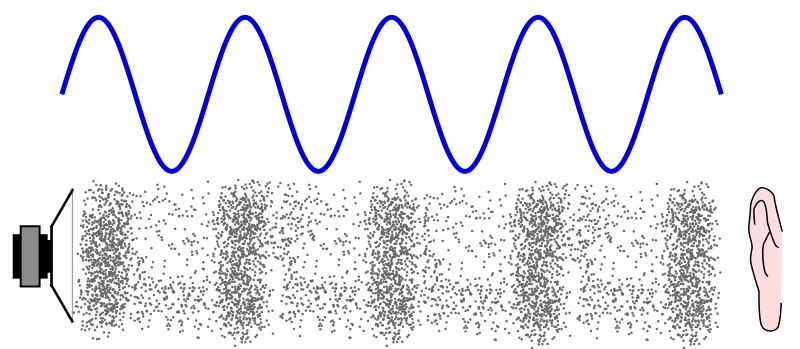
Sound is represented by such a waveform.

You can see a similar waveform even if you zoom in on the audio file in your DAW, but first let’s make this the waveform of the sound in the real world (analog world).

We take this to a computer and listen to it on a speaker and edit it, so we have to bring the sound as data into the digital world. (Convert DA)

At that point, a process called “sampling” is required, but this is not a particularly difficult story, and it is necessary to cut a cross section of sound tens of thousands of times per second and digitize analog data. .

And this “how many times per second do you sample?” it is expressed by the number “sampling rate”.

Old man
If the sample rate is 1 Hz, it means sample once per second.

So at 44.1kHz (44,100hz) CD sound quality, you’re sampling 44,100 times per second.

Next, let’s take a look at the waveform of sound reproduced in the digital world.

This part is the sampled part, and the more points there are, the more accurately the original sound can be reproduced.

In the figure above, the points are connected by a straight line, but a relatively smooth curve is still maintained at this point.

So what happens to the waveform if this point (sample rate) is low?

What is sample rate/sample frequency?

What is sample rate/sample frequency?

sample rate

Sampling rate Sampling rate is the number of sampling processes performed per second in an AD converter that converts an analog signal to a digital signal.

SAMPLERATE

The unit is “Hz”, and the higher the value, the faster the analog input signal can be converted to a digital value, resulting in higher sound quality. However, the amount of data grows proportionally, so choose the right frequency for media and devices with limited storage capacity.

It is said that in order to accurately record and reproduce a certain sound, it is necessary to sample at a frequency that is approximately twice the frequency of that sound. The sample rate used on music CDs is 44.1 kHz. In this case, the voice waveform is shredded 44,100 times per second, and the voice information at each time is converted into digital information.

Human beings generally have 20 Hz for individual differences, but they can perceive sounds from around 15 kHz to 20 kHz as sound, and this frequency band is called the audible range.

Difference Between Sample Rate and Bit Rate
Sample rate and bit rate are used to describe the sound quality before and after the compression of the audio data.

The sampling rate is a value that represents “the number of sampling processes performed per second”.
For example, at the standard sample rate of 44.1 kHz, that means sampling 44,100 times per second.
The higher this number, the smoother the sound and the better the sound quality. In other words, the numerical value of the sample rate represents the quality of the sound.

On the other hand, the bitrate is a value that indicates “at how many levels the volume is rendered”.
For example, in the case of 16 bits, which is the standard bit rate, the amount of information is divided by 2 to the 16th power (= 65536 steps). If the number of bits is low, the sound quality will be uneven, and as with the sample rate, the higher the bit rate value, the more information can be reproduced and the sound quality will be better.